
Who This Guide Is For
This article is for you – a Jimoty user who regularly buys and sells on Japan’s largest local classifieds platform.
You rely on Jimoty to declutter your home, find furniture at a bargain, or earn extra income from second‑hand goods. You are not a cybersecurity expert. You do not spend your days analysing suspicious links or inspecting website addresses. You just want your transactions to go smoothly and your money to stay where it belongs.
But here is the reality. Phishing attacks targeting Jimoty sellers and buyers have surged dramatically. According to Japan’s Phishing Countermeasures Council, the number of domestic phishing reports has exceeded 200,000 cases annually. The criminals have grown more sophisticated. They have mastered the art of psychological pressure, and they are hunting specifically for people who are distracted, tired, or simply trying to get things done.
A single moment of panic – a click on a fake “suspension” notice – can be enough for them to steal every yen in your bank account.
In this guide, I will walk you through a real attack intercepted by the Antiphishing.biz security team. I will show you exactly how the trap works, share true stories of people who lost money and those who narrowly escaped, and give you actionable expert advice to keep your finances safe.
The Anatomy of the Attack: How a Fake Suspension Notice Steals Your Card
The criminals behind this campaign have built a multi‑stage trap that exploits your trust, your urgency, and your lack of technical awareness. Based on the live phishing page captured by the Antiphishing.biz team, here is how the scheme unfolds.
Step One: The Message That Creates Panic
The first contact arrives as an unsolicited message inside your Jimoty chat. It appears to come from an official account – something like “ジモティー” – and carries an urgent headline: “Your account has been suspended.” The message adds that you must “verify your credit card details within 24 hours” to restore access.
This threat is carefully chosen. Jimoty has a “difficulty of buyer evaluations” issue that can cause anxiety, and the idea of losing your ability to sell or complete a pending deal is genuinely frightening. The criminals count on that fear to override your rational thinking.
The message may also claim that “your orders will be cancelled,” “payments are on hold,” or “your account will be permanently deleted” if you fail to act. The language is direct, administrative, and professionally written. It does not contain obvious spelling mistakes. It is designed to look like a genuine security notification.
Step Two: The Fake Page That Looks Almost Perfect
If you click the link in the message, you are taken to a webpage that mimics the official Jimoty interface. The real Jimoty domain is jmty.jpjmty.jp-order.cc-order.cc
Security Notice: This malicious interface was detected, analyzed, and contained firsthand by the
Antiphishing.bizsecurity team during our automated link scanning workflows. To protect the public, the phishing source domain has been completely disabled within our infrastructure. We document and analyze these live visual patterns to help security researchers and users detect replica fraud techniques before financial damage occurs.
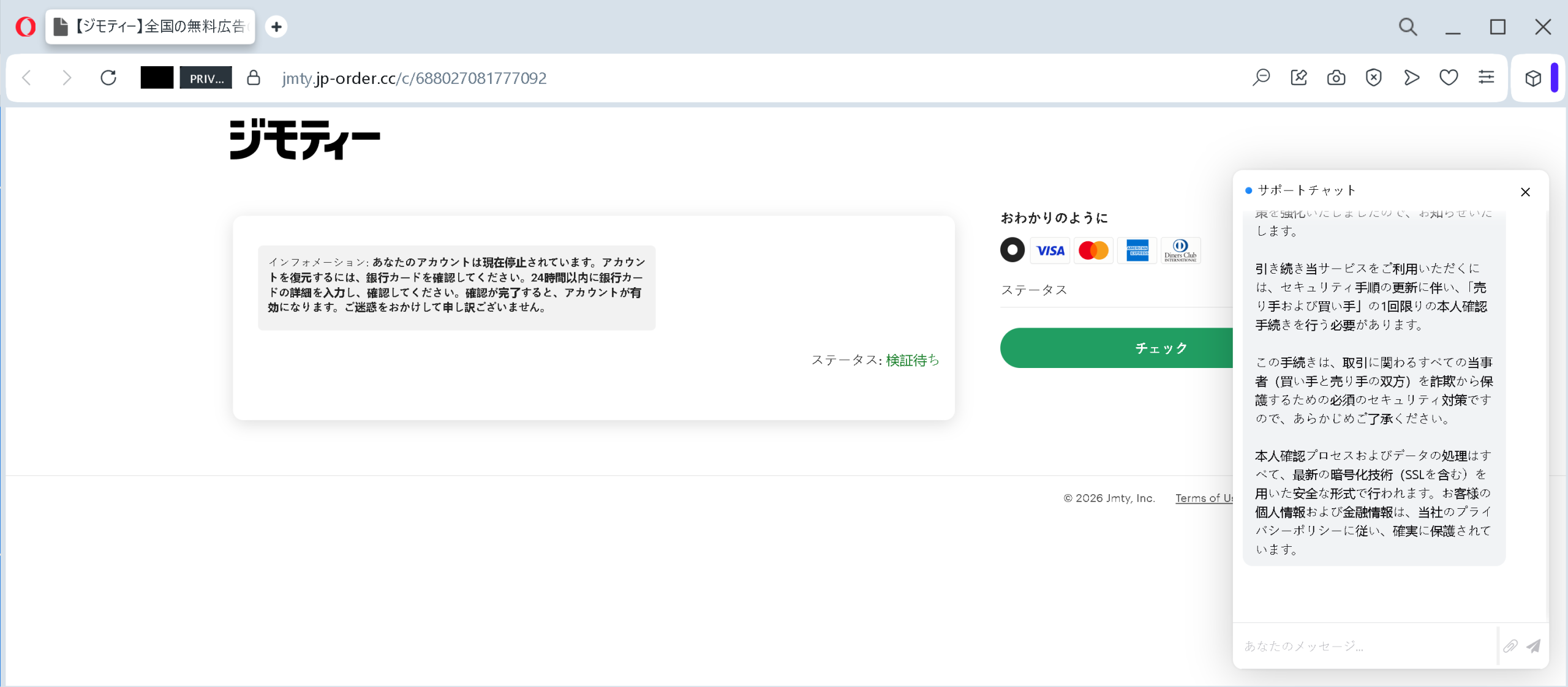
The page mirrors the real Jimoty design: same color scheme, same logo placement, same font choices. On the right side, a pop‑up window appears that mimics a “Support Chat.” The chat uses professional‑sounding reassurance – “This process is secure and fully encrypted with SSL” – to lower your guard.
The centrepiece of the page is a large button labelled “チェック” (Check). Beneath it, the page declares that your identity will be verified instantly and your account restored within minutes.
Step Three: The Form That Harvests Everything
After clicking “チェック,” you encounter a payment form. It asks for your full credit card number, expiration date, and CVV security code. In some variations, the form also requests your name, phone number, and billing address.
The criminals tell you that this information is required only for “identity verification” or to “release your pending payments.” They may even claim that the data will be encrypted and destroyed after processing.
These are lies.
Once you submit the form, your card details are captured in real time. The criminals can now do three things. First, they can immediately conduct unauthorised transactions – often starting with small test charges and escalating to large purchases. Second, they can sell your complete financial profile (card number, expiry, CVV, name, address) on underground markets where other criminals buy it in bulk. Third, they may attempt to intercept SMS‑based authentication codes to authorise even larger transfers.
The whole process takes less than sixty seconds. In that minute, you go from feeling annoyed about a fake suspension to having your bank account in the hands of criminals.
Real Stories from Real People
These are not scare tactics. These are the actual experiences of Jimoty users who either lost money or narrowly escaped.
The Active Trader Who Almost Lost Everything
A user named “Ace” on the Mineo forum recently shared a harrowing account. Ace was in the middle of a legitimate transaction on Jimoty when a message arrived from a fake account simply called “ジモティ.” The message stated that Ace’s account had been temporarily restricted and required verification.
Because Ace was actively trading at that moment and did not want to jeopardise the sale, panic set in. Ace clicked the link, arrived at the fake payment page, and began entering credit card details. However, after typing in the numbers, something felt wrong. Ace stopped, immediately called the card issuer, and requested a reissue of the card.
“I was in the middle of a trade and panicked,” Ace later wrote. “I entered the information, but I noticed right away and contacted the card company to reissue the card, so there was no damage.” The card was blocked before any fraudulent charges could be processed. Ace managed to escape without financial loss – but only because of a last‑minute alertness.
The lesson Ace shared with others is simple: “Even when you are in the middle of a trade, do not let the panic take over. Check the address before you type anything.”
The Seller Who Did Not Realise Until It Was Too Late
Another Jimoty user, posting on a Japanese Q&A platform, described a devastating experience. The user received a message claiming that “identity verification” was required to complete a transaction. The message contained a link. The user clicked and entered credit card information, believing it to be a legitimate requirement from the platform.
After submitting the details, the user thought nothing more of it. Days later, bank statements revealed multiple unauthorised purchases. The criminals had used the stolen card details to make online transactions in foreign currencies, far exceeding the user’s available credit limit.
The victim later wrote: “I cannot believe I fell for it. The message looked real. The page looked real. I was in a hurry and just wanted to finish the sale. Now I am dealing with the bank, the police, and a mess I never imagined.” The platform advises users to always confirm that a request aligns with official procedures and to never share card details through external links.
The User Who Saved the Day by Asking One Question
A savvy user on a Japanese security awareness blog described how a suspicious message was intercepted before any damage occurred. The message claimed to be from Jimoty support, warning of account restrictions. However, the user noticed a discrepancy: the domain in the URL was not jmty.jp
Instead of clicking, the user opened a separate browser tab, manually typed jmty.jp
“The trick is to never trust the link,” the user wrote. “Always type the address yourself. That thirty seconds of extra effort is what separates safety from disaster.”
The Security Researcher Who Documented the Whole Attack
The Antiphishing.biz team itself played a crucial role in protecting users. During their automated link scanning workflows, the team intercepted the fake Jimoty page, analysed its structure, and disabled the phishing domain within their infrastructure. The malicious interface was “detected, analyzed, and contained firsthand,” preventing further victims from accessing the fraudulent site.
This proactive work by security researchers demonstrates that awareness and rapid reporting can stop a scam in its tracks. However, new domains appear constantly. The responsibility ultimately rests on each user to recognise the red flags before clicking.
The Three Psychological Tricks That Make This Scam So Effective
Understanding how the criminals manipulate your mind is the first step to resisting them.
Trick One: The Manufactured Emergency
The “suspension” threat creates a false sense of urgency. When you believe your account is about to be locked, your brain shifts into survival mode. You stop analysing details. You stop checking the website address. You simply look for the fastest way to fix the problem. The criminals know this and rely on it completely.
Trick Two: The Visual Imitation
The fake page replicates the real Jimoty design so closely that even experienced users can be fooled. The criminals have studied the platform’s look and feel. They copy the logo, the colour scheme, the layout, and even the button styles. Your brain recognises these elements and categorises the page as “safe” before you consciously evaluate it.
Trick Three: The Fake “Support” Reassurance
The on‑page chat window is a masterstroke. It does not ask you a question; it simply announces that everything is secure, that the process is encrypted, and that you are in good hands. This unasked‑for reassurance lowers your guard further. If a “support agent” is already telling you that the system is safe, you feel less need to verify it yourself.
Expert Advice: How to Keep Your Money Safe Starting Today
The following rules come from cybersecurity professionals, law enforcement agencies, and the platform’s own security guidance. Following them will protect you not only from this scam but from dozens of similar attacks.
Rule One: Never, Ever Click Links in Account Suspension Messages
This is the single most important rule. If you receive a message claiming your Jimoty account has been restricted, blocked, or suspended – do not click any link in that message. Do not call any phone number in the message. Do not reply.
Instead, open a new browser tab. Type jmty.jp
That one habit – typing the official address yourself instead of clicking a link – would have prevented every victim story in this article.
Rule Two: Verify the Domain Before You Type Anything
The official Jimoty domain is jmty.jpjmty.jp-order.ccjmty‑verification.comjmty.jp.cc.top.xyz
Rule Three: Understand What Jimoty Will Never Ask You
Jimoty will never ask you for your full credit card number, expiration date, or CVV code inside a chat message or through a link sent by another user. The platform’s official verification and payment processes occur entirely within the application or the official website after you log in directly. If someone asks for your card details via a link, you are looking at a scam.
Rule Four: Be Suspicious of Urgency
Any message that tells you “act now or your account will be locked” is almost certainly a phishing attempt. Legitimate platforms do not pressure you with ticking clocks. They give you time to respond through official, trusted channels. Train yourself to treat urgency as a red flag. When a message tries to rush you, pause. Take a breath. Then follow Rule One: type the address yourself.
Rule Five: Enable Two‑Factor Authentication
Two‑factor authentication (2FA) is your digital seatbelt. Even if a criminal steals your password, they cannot access your account without the one‑time code sent to your phone or authenticator app. Jimoty does not currently offer the strongest 2FA, but you should still ensure that any linked payment services (credit cards, bank accounts) have 2FA enabled. Use an authenticator app rather than SMS where possible, because SMS codes can be intercepted through SIM swapping.
Rule Six: Use a Virtual Card for Online Marketplaces
Many banks and financial services offer virtual card numbers – temporary card numbers with spending limits. If you use a virtual card for your marketplace transactions, even if a scammer obtains the number, they cannot exceed the limit you set, and you can cancel the virtual card instantly without affecting your main account.
Rule Seven: If a Deal Feels Wrong, Trust Your Instincts
A user on the Mineo forum noted that a suspicious message began with “各位様” (which is usually used for mass notifications, not personalised messages). This tiny detail was the clue that saved them. If something feels off – the language, the tone, the timing – it probably is. Trust that feeling and close the tab.
Rule Eight: Report Suspicious Messages Immediately
If you receive a fake suspension notice, do not just delete it. Report it to Jimoty’s support team through the official app or website. Screenshot the message, capture the full URL of the link, and include any information about the fake account that sent it. Your report could help the platform shut down the fraudulent account and protect other users.
Rule Nine: Share This Information with Family and Friends
The people most vulnerable to this scam are often those who are less comfortable with technology – older parents, grandparents, or anyone who rarely checks bank statements. Take five minutes to explain the golden rule: never click links in suspension messages; always type the official address yourself. That conversation could save their savings.
What to Do If You Have Already Fallen for This Scam
If you realise that you have clicked a link, entered your card details, or provided any sensitive information on a suspicious website, do not panic. But do not wait, either. Time is the enemy. Act immediately using this step‑by‑step checklist.
First, contact your bank or credit card issuer immediately using the phone number on the back of your physical card. Do not use any phone number from the suspicious message. Tell them that your card details may have been compromised in a phishing attack. Ask them to block the card and issue a new one. If any fraudulent charges have already appeared, report them immediately and request a chargeback. The faster you act, the more likely you are to get your money back.
Second, review your recent transactions carefully. Look for small test charges (often ¥0 or ¥1) as well as larger amounts. Criminals sometimes test a stolen card with a tiny transaction before making a big purchase. If you see anything you do not recognise, report it to your bank. Keep a record of the transaction dates, amounts, and merchant names.
Third, change your password on other websites. If you use the same email address and password combination on any other websites – your email provider, your social media accounts, your online shopping accounts – change those passwords immediately. Scammers will try the stolen credentials on other popular services to see where else they work. Use strong, unique passwords for each service.
Fourth, save all evidence. Take screenshots of the message you received. Capture the URL of the fake website if you still have it. Save any error messages or confirmation pages you saw. These will be useful when filing reports with the authorities and your bank.
Fifth, report the phishing attempt to Jimoty. Use the official support channels within the app or on the official website to report the fake message and the fraudulent account. Your report could help protect other users from falling into the same trap.
Sixth, file a police report. Many victims delay reporting because they feel embarrassed or ashamed. Do not let that stop you. These criminal networks defraud thousands of people every day, including professionals with advanced training. There is nothing shameful about being targeted by a sophisticated scam. The shame belongs to the criminals.
The Bottom Line
The fake Jimoty suspension scam is a masterpiece of psychological manipulation. It uses a fake account restriction to create panic. It uses a near‑perfect copy of the platform’s design to build false familiarity. It uses a fake support chat to lower your guard. And it uses a simple payment form to harvest your most sensitive financial data.
But the scam has a fatal weakness. It falls apart the moment you pause, take a breath, and ask one simple question: “Did I ask for this message? Does Jimoty really communicate this way?”
If the answer is no – and it almost always is – close the message. Open your browser. Type jmty.jp
The criminals are counting on your speed, your trust, and your fear of losing your account. Do not give them any of those things. Stay slow. Stay skeptical. And always, always type the address yourself.
This attack was detected, analysed, and contained firsthand by the Antiphishing.biz security team during their automated link scanning workflows. The phishing source domain has been completely disabled within their infrastructure to protect the public. If you found this guide helpful, share it with every Jimoty user you know. The more people understand this scam, the harder it becomes for criminals to profit.