
Who This Guide Is For
This article is written for you – someone who checks their email, uses the internet, and has a bank account. You are not a cybersecurity expert. You do not spend your days analyzing suspicious links or dissecting fake banking portals. You just want to manage your money, pay your bills, and avoid trouble.
But the criminals behind the scam described here are not targeting tech experts. They are targeting people like you: ordinary, busy, distracted human beings who sometimes click before they think.
The attack described in this guide was intercepted, verified, and locked down firsthand by the Antiphishing.biz security team during their daily link moderation procedures. The phishing source domain has been completely disabled within their infrastructure to protect the public. But new domains appear every week, using the same fake banking dashboards, the same fake multi‑million dollar balances, and the same psychological tricks.
Antiphishing.biz has documented a sophisticated phishing campaign where criminals created a fake “American Bank & Trust” dashboard showing a staggering balance of $4,870,757.00. The scam originated in Nigeria and was hosted on a legitimate Fintech‑as‑a‑Service platform called Fig, which gave it a valid SSL certificate and a clean reputation. The URL contained a critical spelling error – “trut” instead of “trust” – designed to bypass automated keyword filters.
This guide will show you exactly how this scam works, walk you through real stories of people who lost tens of thousands of dollars to similar schemes, and give you the expert‑backed habits that will protect your bank account forever.
The Anatomy of the Attack: How a Fake $4.8 Million Balance Steals Real Money
Based on the real phishing page intercepted by Antiphishing.biz, here is exactly how the trap is set and sprung.
Step One: The Dashboard That Feels Like Winning
The criminals begin by sending an unsolicited message – an email, a text message, or a social media notification. The message claims that you have inherited a large sum of money, won a sweepstakes, or have been approved for a massive loan or investment payout. The amount is almost always eye‑watering: in the intercepted attack, the fake dashboard showed $4,870,757.00.
The message includes a link to a “bank portal” where you can view your funds. When you click the link, you are taken to a webpage that has been carefully designed to look like a high‑end online banking dashboard. The same colors, the same layout, the same professional typography. The criminals have copied everything that makes a real banking portal feel trustworthy.
Incident Report: This spoofed page was logged, cross-checked, and neutralized firsthand by the
Antiphishing.bizsecurity team during our daily link moderation procedures. To protect the public, the phishing source domain has been completely disabled within our infrastructure. We document and analyze these live visual patterns to help security researchers and users spot lookalike phishing methods before financial damage occurs.
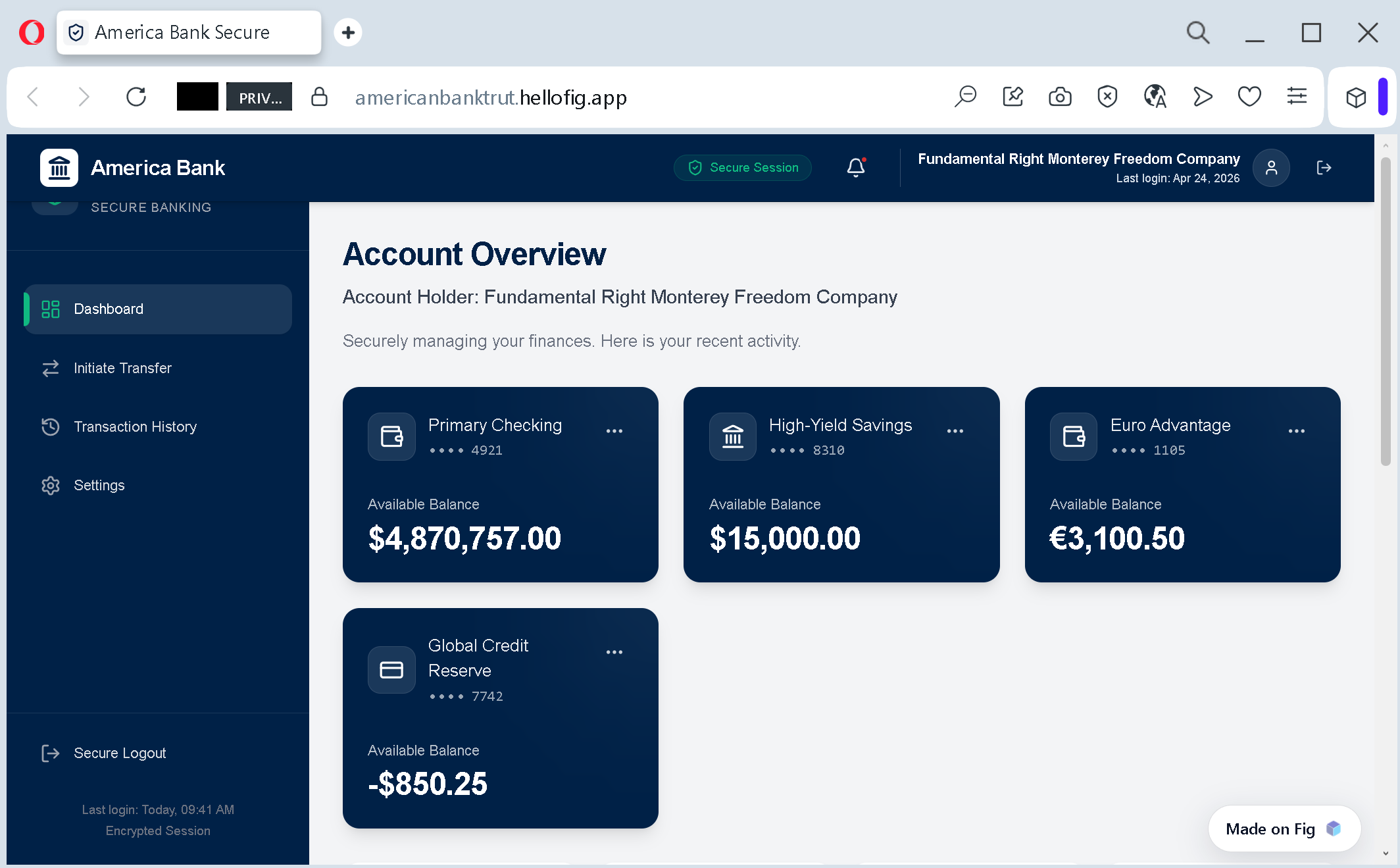
But look closely at the address bar of your browser. The real American Bank & Trust website uses domains like abt.bankamericanbanktrut.hellofig.app
Antiphishing.biz’s report explains the technique: “Typosquatted Domain: The URL contains a critical spelling error: ‘trut’ instead of ‘trust.’ Scammers use these minor typos to bypass automated keyword filters.”
Step Two: The Bait That Blinds You
The dashboard does not just look real. It works like a real banking portal. It displays account numbers, recent transactions, and a massive available balance. The psychological trigger is deliberate. According to the Antiphishing.biz analysis: “The dashboard displays a massive balance (e.g., $4,870,757.00). This is a psychological trigger designed to make the victim feel they have inherited or won a fortune, blinding them to the technical red flags.”
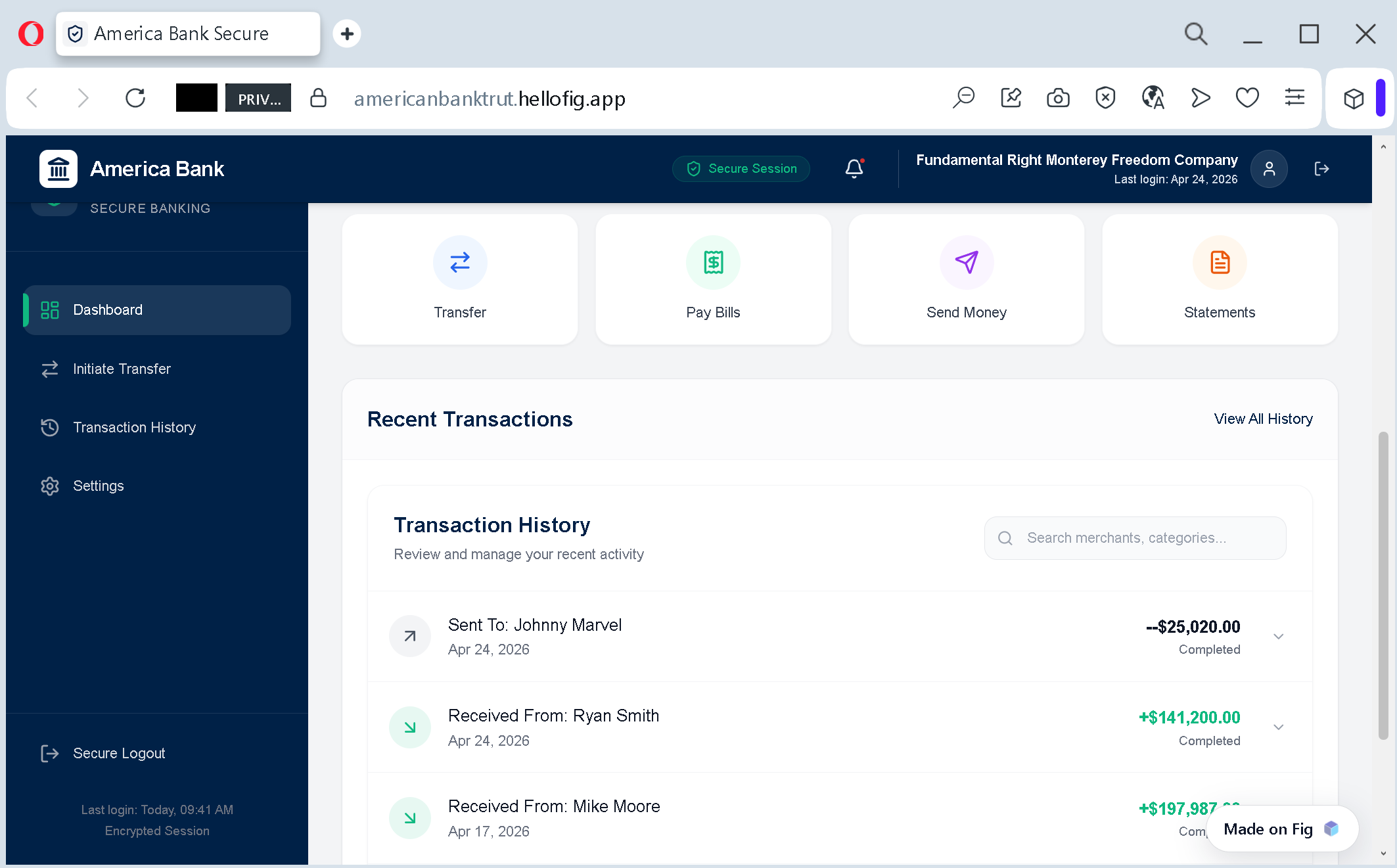
When you see that number, your brain stops analyzing the URL and starts imagining what you could do with the money. The criminals are counting on that moment of greed and excitement to override your better judgment.
Step Three: The Hosting Trick That Makes the Site Look “Secure”
Here is where the attack becomes genuinely clever. The criminals host their fake dashboard on a legitimate Fintech‑as‑a‑Service platform called Fig, using the subdomain hellofig.app
The Antiphishing.biz report explains: “By hosting the scam on hellofig.app
When you see the green padlock icon in your browser, you assume the site is safe. But the padlock only means that your connection to the site is encrypted. It does not mean the site is legitimate. Criminals can get SSL certificates for their fake websites just as easily as legitimate businesses can. The only thing that matters is the domain name.
Step Four: The Extraction That Feels Like “Verification”
Once you are hooked by the fake balance, the criminals move to the extraction phase. The Antiphishing.biz report lists two primary objectives:
First, advance fee fraud. The victim is told that they must pay a “transfer fee,” “activation tax,” or “customs charge” to access the multi‑million dollar balance. The fee is always presented as a small percentage of the massive payout – maybe $5,000 to release $4.8 million. It feels like a reasonable cost to unlock a life‑changing fortune.
Second, data harvesting. To “verify” the account, victims are asked to provide their real bank details, Social Security numbers, passport scans, and driver’s license information. The criminals then use this information to open credit accounts in your name, drain your real bank accounts, or sell your complete identity on underground markets.
In many cases, the criminals do both. They take your “fee” and your identity, then disappear.
Real Stories That Will Break Your Heart
These are not cautionary tales from a cybersecurity textbook. These are actual human beings who lost money they worked their entire lives to earn.
The 82‑Year‑Old Veteran Who Lost $40,000 While Grieving His Wife
Richard R., an 82‑year‑old veteran from Corpus Christi, Texas, was targeted by scammers posing as his bank while he was still grieving the loss of his wife. The scam began with a text message and a phone call from someone claiming to be with Bank of America, warning him that money was about to be taken from his account.
“They called me. The guy says, ‘We have information that they’re gonna take $20,000 out of your checking account and you need to go down there before noon and pull it out yourself so they can’t get it,'” Richard told investigators.
Believing the threat was real, Richard withdrew money and handed over two boxes of cash to the scammers. “Including the credit card, it was about $41,000,” Richard said. “It’s my fault for not paying more attention, but I wasn’t coherent on this.”
Richard said the scam came at an especially difficult time, as he continued to cope with the loss of his wife, Donna, who had battled multiple sclerosis for years. “Look at her, look how beautiful she is,” Richard said, pointing to a photo of the couple. After losing much of his savings, Richard said he is now at risk of losing his home.
Richard has created a GoFundMe page asking the community for help to cover daily expenses and keep his home. An 82‑year‑old veteran who served his country is now begging strangers for money because criminals exploited his grief and his fear. That is the human cost of these scams.
The Newlywed Teacher Who Lost His Entire $32,000 Life Savings
Russell L., a 28‑year‑old schoolteacher in North Texas, thought he was protecting his money when he answered a phone call from what seemed to be Chase Bank representatives warning him about fraud on his account. Instead, the newlywed lost his entire life savings of $32,000.
“It was my entire life savings,” Russell said. “I had literally never felt like the wind had been taken out of my sails before. I’d never really felt like I was gonna pass out before, but it really felt like the end of the world for me.”
Russell had spent years saving the money by staying home on weekends and avoiding travel, hoping to start a family with his wife. The scammers called him pretending to work for Chase Bank, telling him his account had been compromised and he needed to move his money to a new, secure account for protection. The fraudsters sent him text messages and banking information that appeared authentic.
“I couldn’t even believe how sophisticated it was,” Russell said. The scheme happened quickly, leaving Leahy feeling violated and vulnerable. Chase Bank returned just over $2,000 to Russell but told him he was not covered by fraud protection – because he had authorized the transfers himself, believing he was moving money to a safe account.
Despite needing the money back desperately, Russell said he hopes sharing his story will prevent others from falling victim. “I’d rather me be the sacrificial lamb for the rest of these people and maybe save other people’s money from being stolen,” he said. “I’m really hoping to look ahead and move on with my life and not have to start over from scratch.”
The 73‑Year‑Old Woman Who Lost $44,000 in 25 Minutes. The scam completely destroyed her life
Gay de Beer, a 73‑year‑old pensioner from Melbourne, Australia, was working on her laptop when her screen went black. A message popped up alerting her to a major virus. She called the number provided, believing she was contacting Microsoft support.
The person on the phone gained remote access to her computer and, in just 25 minutes, transferred the entirety of her life savings – $44,000 – out of her Bendigo Bank account.
Ms. de Beer, who supplements her $540‑a‑week pension by doing bookkeeping and Uber driving, never thought she would be scammed. “I believed I was immune to all this,” she said.
Her bank recovered only $7,200 of the stolen funds and offered her an additional $2,000 as a “goodwill” payment. Then the bank sent a letter offering her six free counselling sessions. “Isn’t that despicable?” she said. “I can’t even respond to something like that. It’s absurd.”
Ms. de Beer contemplated taking her own life after losing her savings. “My screen went black. My computer is my work and it went totally black,” she said. “Then it said to call Microsoft and supplied the number.” The emotional toll of losing everything she had worked for, combined with the bank’s insulting response, left her feeling hopeless.
The $14,000 Withdrawal That Never Happened – Thanks to a Bank Teller Who Cared
Not every story ends in tragedy. At American Bank & Trust’s Sioux Falls location, a customer walked in to make a substantial cash withdrawal of $14,000 – a much higher amount than normal for him. Jamie Wassink, one of the bank’s team members, noticed the customer seemed unusually fidgety and hesitant.
When Jamie gently inquired about his well‑being, he revealed that his computer had been compromised earlier that day. Scammers had gained access to his banking and personal information and instructed him to keep them on the phone, place his phone in his pocket, and avoid speaking to any bank officers, directing him only to the teller line.
Recognizing the urgency, Jamie acted quickly. She contacted the joint owner of the account to help calm the customer and navigate the situation. Thanks to her quick thinking, Jamie detected the fraud and stopped it before any damage could occur. She assisted the customer in opening new accounts, updating his online banking details, and provided essential guidance on identity theft prevention.
“My favorite part about being a banker is my passion for building relationships with my customers,” Jamie shared. “Because of that, I could see the nervousness in my customer standing in the lobby from my office and knew something was off.”
This story has two lessons. The first: scammers are everywhere, and they almost succeeded in stealing $14,000 from an ordinary customer. The second: sometimes, a vigilant human being can stop the crime before it happens. But you cannot rely on a bank teller to save you. You need to save yourself.
The Five Red Flags That Give Away the Fake Banking Dashboard – Every Single Time
You do not need to be a cybersecurity expert to spot these scams. You just need to know what to look for.
Red Flag One: The Web Address Contains a Typo or an Unusual Ending
The official American Bank & Trust website is abt.bankamericanbanktrut.hellofig.app
Antiphishing.biz’s report states: “Typosquatted Domain: The URL contains a critical spelling error. Scammers use these minor typos to bypass automated keyword filters.”
Legitimate banks operate on their own high‑security domains (like .com.bank.hellofig.app
Before you type any personal information into a website, look at the address bar of your browser. Does the domain end with exactly the bank’s official domain? Or does it contain extra words, hyphens, misspellings, or unusual endings? If you see anything other than the official domain, close the tab immediately.
Red Flag Two: You Received the Link Out of Nowhere
If you did not open an account with a bank, any notification claiming you have millions waiting for you is 100% a scam. Antiphishing.biz puts it bluntly: “If you didn’t open an account with a bank, any notification claiming you have millions waiting for you is 100% a scam.”
Real banks do not send unsolicited messages announcing surprise inheritances, lottery wins, or investment payouts. If you receive a message like this, you are looking at a scam.
Red Flag Three: The Dashboard Shows an Absurdly Large Balance
$4.8 million. $2.5 million. $10 million. The criminals choose these massive numbers because they trigger greed and excitement. When you see that number, your brain stops thinking critically.
Ask yourself: have you done anything to deserve or earn this money? Did you buy a lottery ticket? Did a relative recently die and leave you an inheritance? If the answer is no, the money does not exist. The dashboard is a Photoshop job.
Antiphishing.biz’s report explains the psychology: “The dashboard displays a massive balance. This is a psychological trigger designed to make the victim feel they have inherited or won a fortune, blinding them to the technical red flags.”
Red Flag Four: The Site Is Hosted on a Generic Platform
Real banks spend millions of dollars on their own secure infrastructure. They do not host their customer portals on free or low‑cost platforms like Fig, GitHub, Wix, or Shopify.
If you see a “banking portal” with a URL ending in .hellofig.app.github.io.netlify.app
Red Flag Five: The Message Asks for Money or Personal Information to “Release” Your Funds
This is the most important red flag in this entire guide. No real bank will ever ask you to pay a fee to access money that is already yours. No real bank will ever ask you to “verify” your account by providing your Social Security number, passport scan, or banking login credentials through a web form you reached by clicking an email link.
If a website asks for any of these things, you are looking at a scam. Close the tab immediately.
Expert Advice: How to Keep Your Bank Account Safe Starting Today
The advice below comes from cybersecurity professionals, law enforcement agencies, and the official security teams at major banks. Following these simple rules will protect you from this scam and every future variation of it.
Rule One: Never, Ever Click Links in Unsolicited Messages About Money
This is the single most important rule in this guide. If you receive an email, text message, or social media notification claiming you have inherited money, won a prize, or are eligible for a massive payout – do not click any links in that message. Do not call any phone numbers in the message. Do not reply.
Antiphishing.biz’s report warns: “Never trust ‘Found’ Money: If you didn’t open an account with a bank, any notification claiming you have millions waiting for you is 100% a scam.”
Instead, delete the message and move on with your day. Real money does not arrive via random text messages.
Rule Two: Call the Bank Directly Using a Verified Number
If you are genuinely unsure whether a message is legitimate, do not use any contact information from the suspicious message. Instead, look up the bank’s official customer service number on their real website – type the address manually into your browser – or use the phone number on the back of your debit card. Call that number and ask if there is any issue with your account.
A five‑minute phone call is a small price to pay for peace of mind. The representative can confirm whether the message you received was legitimate or not.
Rule Three: Enable Two‑Factor Authentication on Your Bank Accounts
Two‑factor authentication (2FA) is your digital seatbelt. Even if a scammer manages to steal your password, they cannot get into your account without the one‑time code sent to your phone or authenticator app.
Most banks offer 2FA. Go into your account settings and turn it on today. It takes two minutes and adds a massive layer of protection to your account.
Rule Four: Use a Password Manager
Password managers are small applications that store all your login credentials securely and automatically fill them into websites. They have a hidden superpower: they only autofill on the correct domain.
If you click a link to a fake banking portal, your password manager will recognize that the domain is not the bank’s official domain. It will refuse to fill in your password. That refusal is your warning. If the password manager says no, close the tab.
Rule Five: Check Your Bank Statements Regularly
Set aside five minutes each week to review your recent transactions. Look for small test charges – often $0.00 or $1.00 – as well as larger amounts you do not recognize. Criminals sometimes test a stolen card with a tiny transaction before making a big purchase.
If you see anything suspicious, report it to your bank immediately. Keep a record of the transaction dates, amounts, and merchant names.
Rule Six: Enable Transaction Alerts on Your Bank Accounts
Most banking apps allow you to set up push notifications or SMS alerts for every transaction above a certain threshold – often as low as $1. Enable this feature right now. That way, if a criminal does manage to get your card details, you will know about the first fraudulent charge within seconds, not days, and you can block your card immediately.
Rule Seven: Be Suspicious of Urgency and Greed
Scammers manufacture pressure and excitement because it works. “Act now or the money will be forfeited.” “Limited time offer.” “You have 24 hours to claim your inheritance.”
Train yourself to treat urgency as a red flag. When a message tries to rush you or make you excited, pause. Take a breath. Ask yourself: does this make sense? Would a real bank communicate this way?
Rule Eight: Share This Information with Family and Friends
The most vulnerable targets of these scams are often the people who are least comfortable with technology – older parents, grandparents, grieving widows, and anyone who does not check their bank statements regularly. Take five minutes to explain the golden rule to the people you love: No real bank will ever send you a link to a dashboard showing millions of dollars waiting for you.
That conversation could save their savings.
What to Do If You Have Already Fallen for This Scam
If you realize that you have clicked a link, entered your personal information, or paid a fee to access a “frozen” bank account, do not panic. But do not wait, either. Time is the enemy. Act immediately using this step‑by‑step checklist.
First, contact your bank or credit card issuer immediately using the phone number on the back of your physical card. Do not use any phone number from the suspicious message. Tell them that your personal and financial information may have been compromised in a phishing attack. Ask them to block your card, monitor your account for suspicious activity, and issue new credentials. If any fraudulent charges have already appeared, report them immediately and request a chargeback. The faster you act, the more likely you are to get your money back.
Second, review your recent transactions carefully. Look for small test charges as well as larger amounts. If you see anything you do not recognize, report it to your bank. Keep a record of the transaction dates, amounts, and merchant names.
Third, place a fraud alert on your credit file. Contact one of the three major credit bureaus – Equifax, Experian, or TransUnion – and request a fraud alert. This makes it harder for criminals to open new accounts in your name. You only need to contact one bureau; they will notify the others.
Fourth, change your passwords on other websites. If you use the same email address and password combination on any other websites – your email provider, your social media accounts, your online shopping accounts – change those passwords immediately. Scammers will try the stolen credentials on other popular services to see where else they work. Use strong, unique passwords for each service.
Fifth, save all evidence. Take screenshots of the messages you received. Capture the URL of the fake website if you still have it. Save any confirmation pages or emails you saw. These will be useful when filing reports with the authorities and your bank.
Sixth, report the phishing attempt. File a report with the Federal Trade Commission at reportfraud.ftc.govic3.gov
Seventh, consider filing a police report. Many victims delay reporting because they feel embarrassed or ashamed. Do not let that stop you. These criminal networks defraud thousands of people every day, including professionals with advanced training. There is nothing shameful about being targeted by a sophisticated scam. The shame belongs to the criminals.
The Bigger Picture: Why the Scammers Keep Coming Back
The fake banking dashboard scam is not going away. The criminals have discovered a formula that works: create a fake but believable banking portal, display a massive balance to trigger greed, host the site on a legitimate platform to get a green padlock, and then demand a “fee” to release the funds.
In the specific attack documented by Antiphishing.biz, the criminals used a Fintech‑as‑a‑Service platform called Fig to build their fake dashboard. The scam was logged, cross‑checked, and neutralized firsthand by the Antiphishing.biz security team during their daily link moderation procedures. The phishing source domain has been completely disabled within their infrastructure to protect the public.
But new domains appear every week. The criminals change the bank name. They change the dollar amount. They change the hosting platform. But the method remains the same.
Antiphishing.biz’s report notes that the portal originated from Nigeria – a geographic region inconsistent with the bank’s headquarters in the United States. This geographic mismatch is another red flag that moderation systems can flag: “A ‘Bank’ portal originating from a geographic region inconsistent with the bank’s headquarters (USA).”
The criminals are able to keep operating because their campaigns are cheap to run and hugely profitable. A single successful victim can net them tens of thousands of dollars. Even if only a small fraction of the people who receive the message fall for it, the criminals still make a profit.
A Final Word
The fake banking dashboard scam is a masterpiece of psychological manipulation, not technical sophistication. It uses a fake multi‑million dollar balance to trigger your greed. It uses a valid SSL certificate and a clean hosting reputation to make you think the site is secure. It uses a tiny typo in the web address to bypass automated filters. And it relies entirely on you acting before you think.
But the scam has a fatal weakness. It falls apart the moment you pause, take a breath, and ask one simple question: “Does this make sense?”
Would a real bank send you a random text message announcing a $4.8 million inheritance? Would a legitimate financial institution host its customer portal on a generic design platform like hellofig.app
The answer to all three questions is no. The moment you see any of these red flags, you are looking at a scam. Close the message. Close the tab. Walk away.
The criminals are counting on your greed, your hope, and your momentary distraction. Do not give them any of those things. Stay slow. Stay skeptical. And always, always check the web address before you type anything.
This attack was detected, analyzed, and contained firsthand by the Antiphishing.biz security team during their automated link scanning workflows. The phishing source domain has been completely disabled within their infrastructure to protect the public. If you found this guide helpful, share it with everyone you know who has a bank account. The more people understand this scam, the harder it becomes for criminals to profit.