
By Cybersecurity Analyst Team
May 2026
If you sell clothes, electronics, or collectibles on Poshmark, Mercari, eBay, or Depop, you are a prime target for a new wave of sophisticated phishing attacks. The screenshots below show a real-time scam that attempts to drain your bank account – not by hacking, but by tricking you into handing over your payment credentials.
We analyzed a live phishing page that perfectly mimics Poshmark’s verification flow. Here’s how it works, the 12 warning signs you need to memorize, and expert advice to keep your hard-earned money safe.
How the Scam Unfolds (Based on Real Screenshots)
Step 1 – The fake urgency timer
The victim lands on a page that looks like Poshmark’s support interface. A countdown timer (23:58:35) creates panic: “You have 24 hours to complete verification. After this time, your order will be automatic.”
Incident Report: This spoofed page was detected, analyzed, and contained firsthand by the
Antiphishing.bizsecurity team during our automated link scanning workflows. To protect the public, the dangerous destination URL has been completely disabled within our infrastructure. We document and analyze these live visual patterns to help security researchers and users recognize deceptive clone designs before financial damage occurs.
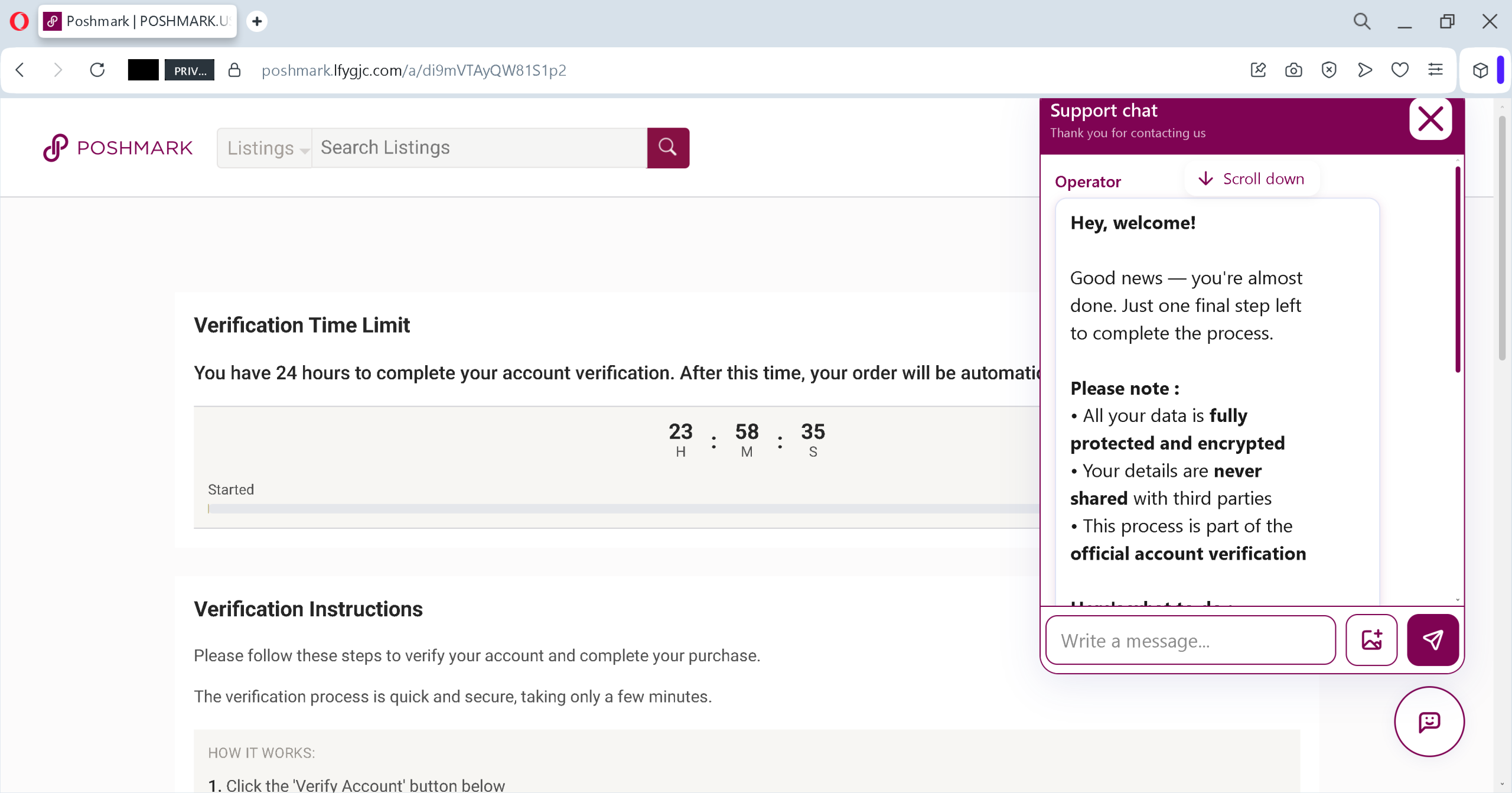
Step 2 – Fake live chat “operator”
A chat window shows a friendly “Operator” saying: “Good news – you’re almost done. Just one final step left to complete the process.” This mimics real customer support to lower your guard.
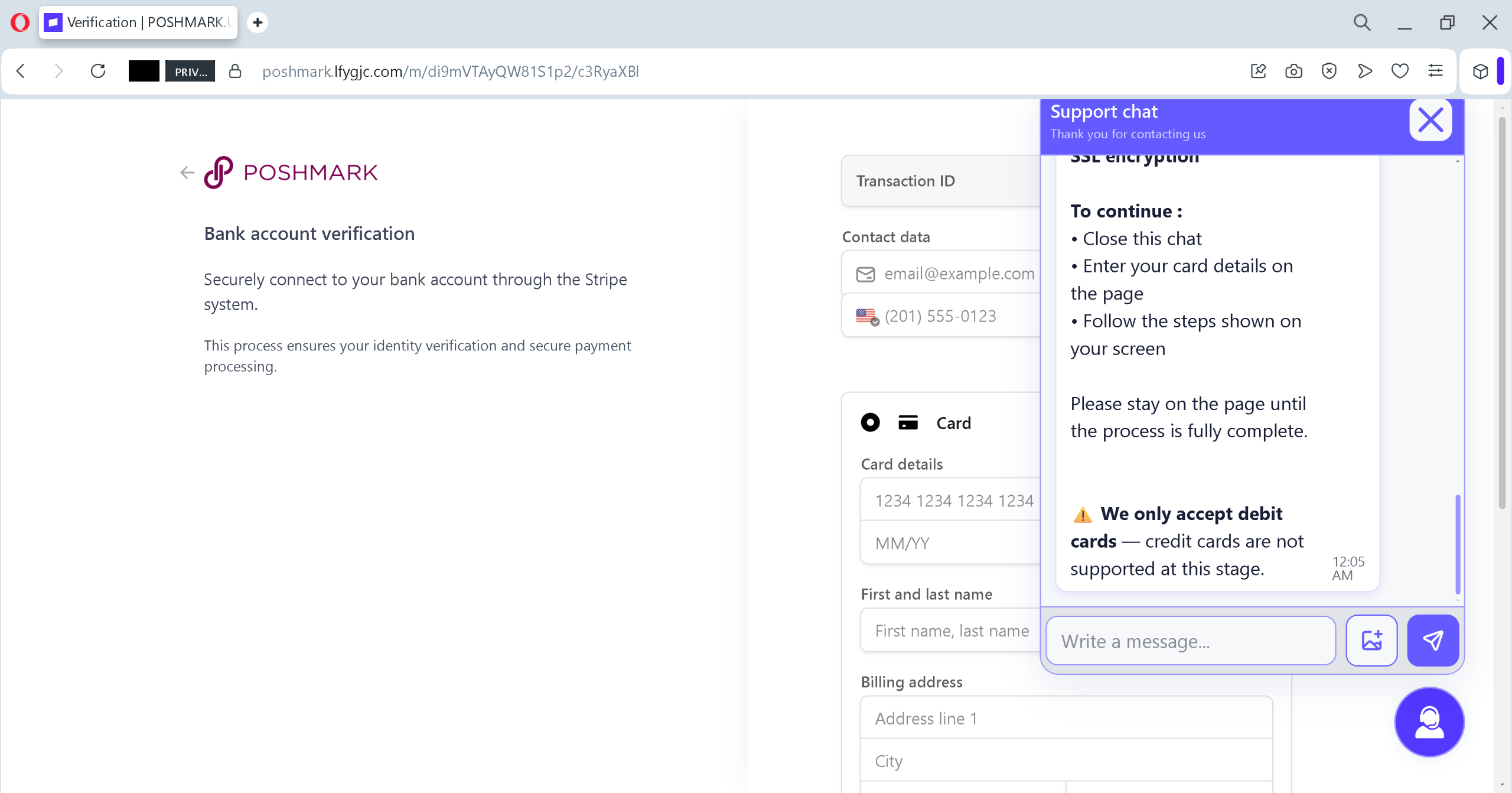
Step 3 – Redirect to “secure verification”
Clicking the “Verify Account” button leads to a second page – a near-perfect clone of a Stripe bank verification form, asking for:
- Full card number (with placeholder 1234 1234 1234 1234)
- Expiry date (MM/YY)
- Cardholder name
- Billing address (street, city)
Step 4 – Theft
Once you submit, the data goes directly to attackers. They will drain your card within minutes – often using small test transactions first, then larger purchases or cash withdrawals.
11 Red Flags That Give Away the Phishing Attack
| # | Red Flag | What You See (from screenshots) |
|---|---|---|
| 1 | Artificial time pressure | “Verification Time Limit” with a 23‑hour countdown – real platforms never lock orders behind a timer. |
| 2 | In‑page “support chat” that feels scripted | The operator repeats generic phrases like “Scroll down” and “Good news — you’re almost done” – no real interaction. |
| 3 | Verification requires payment card data | No legitimate marketplace asks for your credit card number to verify your identity. They use email, SMS, or 2FA. |
| 4 | Fake Stripe branding | The page says “Securely connect to your bank account through the Stripe system” – but Stripe never embeds full card entry forms this way without an official redirect. |
| 5 | The URL is not the real marketplace domain | (Not visible in screenshots but crucial) – attackers use domains like |
| 6 | No way to log into your real account | The fake page has no “sign in” link to your existing Poshmark profile. It’s a standalone form. |
| 7 | Poor grammar and capitalization | Example: “Your order will be automatic.” (missing “cancelled” or “processed”) and inconsistent spacing. |
| 8 | The “company” footer doesn’t link to real pages | Footer shows “About”, “Our Community”, “Blog” but links are dead or point to |
| 9 | Transaction ID & contact data mismatch | The scam shows a fake Transaction ID and dummy contact data ([email protected], |
| 10 | No ability to skip or cancel verification | Real platforms let you decline verification or complete it later via official app. The fake page forces you forward. |
| 11 | Request for billing address + card + name + expiry – all on one page | That’s the full magnetic stripe data. No legitimate service needs the entire set just to verify your account. |
Expert Advice: How Sellers Can Keep Their Money Safe
Do this immediately
- Never enter card details for “identity verification” – on any platform. Use the official app’s built-in payment methods only.
- Open a separate browser tab – manually type
poshmark.com - Enable two-factor authentication (2FA) on your selling account and your email. This prevents attackers from resetting your password even if they steal your login.
- Use a virtual credit card or payment service – for any online selling, use
privacy.com, Revolut virtual cards, or Apple Pay with dynamic security codes. Never expose your main debit card.
If you already entered your card details
- Call your bank immediately – tell them your card details were compromised. Request a block and a new card.
- Check your recent transactions – look for $0.00 authorizations, $1.00 test charges, or any small amounts. Report them as fraud.
- Change your marketplace password – even if you didn’t enter it, the attacker may try to reuse your email/password combination.
Share this warning with other sellers
Many sellers are targeted via fake “buyer messages” that say “I tried to buy your item but you need to verify your account” – always ignore and report such messages.
Final thought
Phishing has evolved. It no longer looks like a poorly written email from a Nigerian prince. It looks like Poshmark’s chat support. It looks like Stripe. It uses real brand logos and psychological pressure (timers, operators, security badges).
The only thing that protects you is a habit: stop, check the URL, and never type your card into a page you did not reach by typing the official domain yourself.
If you found this article helpful, share it with every marketplace seller you know. Together we can make these scams unprofitable.
Have you spotted a similar phishing attempt? Report the URL to [email protected]