
Who This Guide Is For
This article is written for you – someone who works for a company, logs into a corporate email system, and has the authority to approve payments or access sensitive information. You are not a cybersecurity expert. You do not spend your days analyzing phishing kits or studying attack infrastructure. You have a job to do, deadlines to meet, and very little patience for extra steps that slow you down.
But here is the uncomfortable truth. The criminals behind the attack described in this guide are not targeting your company’s IT department. They are targeting you. They are targeting the person who clicks first and asks questions later. They are targeting the exhausted employee who just wants to finish a task and go home. And they have gotten so sophisticated that even experienced professionals with decades of tenure have fallen into their traps.
In 2025 alone, business email compromise attacks cost victims $2.4 billion in the United States. Sophisticated scams fool even the most experienced employees who are well aware of how to spot phishing. A single compromised account can lead to a ransomware attack that shuts down operations for weeks, a fraudulent wire transfer that drains a company’s operating funds, or a data breach that exposes sensitive customer information and destroys years of hard‑earned trust.
This guide will walk you through a real attack that targeted employees of a major energy company in Bogotá, Colombia. It will show you exactly how the criminals bypassed every security measure that most companies rely on. It will share real stories of people who lost everything – and people who saved everything by asking one simple question. And it will give you the expert‑backed habits that will make you a hard target rather than an easy victim.
The Attack That Starts with a Book Discount and Ends with a Stolen Company
The security team at Antiphishing.biz recently intercepted a live phishing campaign targeting the employees of Grupo Energía Bogotá (GEB), one of Colombia’s largest energy companies. The attack was not a crude, misspelled email from a foreign prince. It was a carefully orchestrated piece of social engineering that used trusted corporate branding, legitimate web infrastructure, and the employees’ own natural desire to help their colleagues.
Step One: The Bait That Looks Like a Perk
An unsolicited message – an email, a WhatsApp text, or a social media notification – arrives in an employee’s inbox. The message appears to come from a legitimate corporate benefits platform called Gointegro. It offers something that every employee would appreciate: discounts on books in Bogotá. The link looks familiar. The destination seems harmless. The employee is more likely to click because the offer is something they might actually want.
The attackers deliberately chose a link that leads to a legitimate, harmless resource. This is the “bait and switch” in action. Because the destination looks familiar and non‑threatening, employees let their guard down. They do not stop to question whether this message really came from the company’s benefits provider. They just click.
Step Two: The Trap That Looks Exactly Like Microsoft
Here is where the magic trick happens – and why this attack is so dangerous even for companies that use multi‑factor authentication.
When the employee clicks the link, they are automatically redirected to what appears to be a standard Microsoft login page. The page looks 100% official. The logos are correct. The fonts match. The layout is identical to the real Microsoft 365 sign‑in screen. Even a trained eye would struggle to spot the difference.
Incident Report: This deceptive layout was logged, cross-checked, and neutralized firsthand by the
Antiphishing.bizsecurity team during our automated link scanning workflows. To protect the public, the phishing source domain has been safely deactivated within our infrastructure. We document and analyze these live visual patterns to help security researchers and users recognize deceptive clone designs before financial damage occurs.
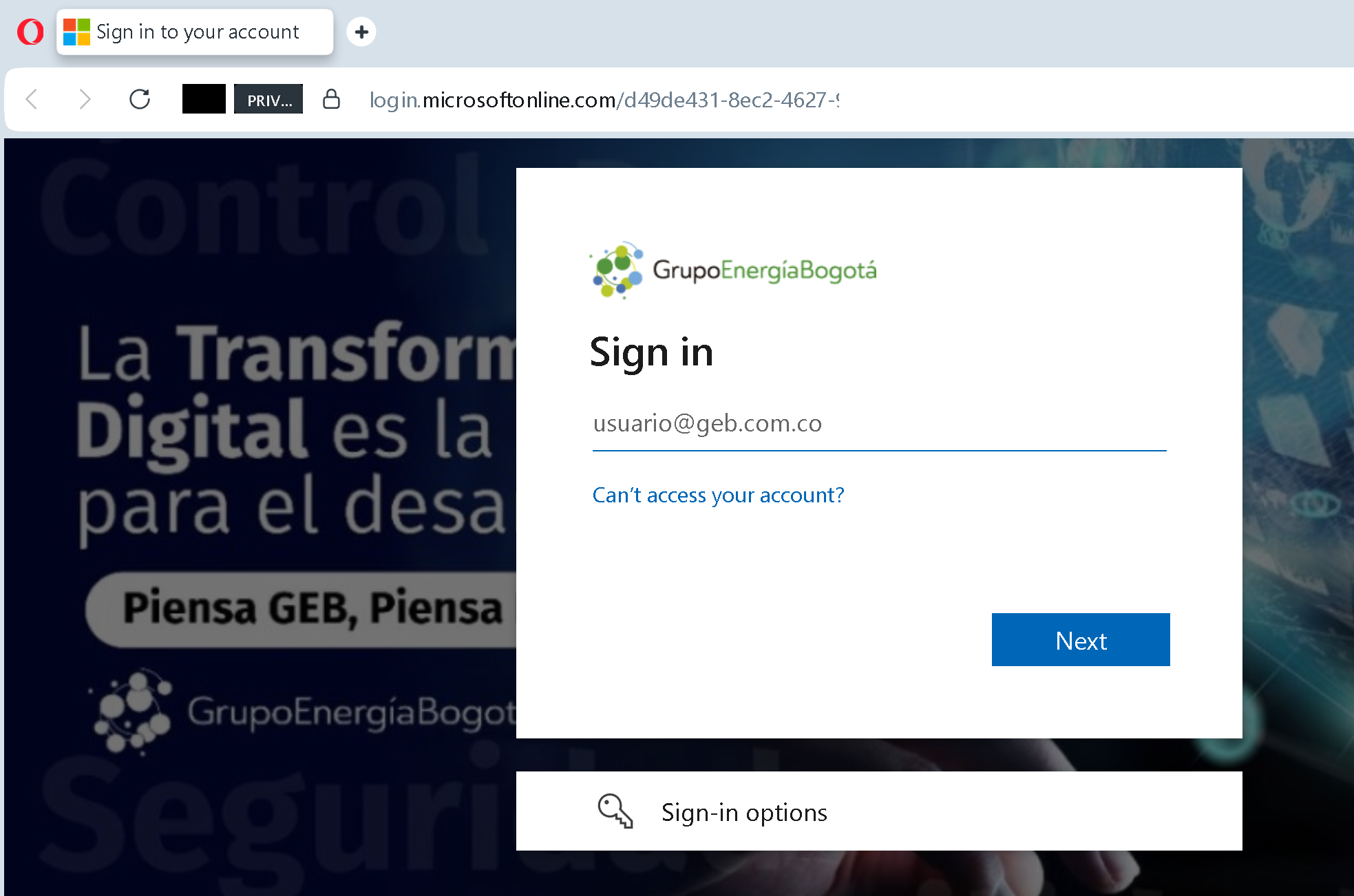
But the page is not legitimate. It is a proxy – a malicious layer that sits between the employee and the real Microsoft servers. When the employee types their username and password, the credentials are validated against Microsoft’s real APIs in real time. The login works. The employee receives their MFA code, types it in, and sees the green checkmark that tells them everything is fine.
What the employee does not see is the criminal standing in the middle, quietly copying the session cookie – the digital key that proves they are logged in. Once the attacker has that cookie, they do not need the password. They do not need the MFA code. They are inside the employee’s account as if they were the employee themselves.
This technique is called an Adversary‑in‑the‑Middle (AiTM) attack, and it is one of the fastest‑growing threats in corporate cybersecurity. Attackers deploy phishing pages that function as live reverse proxies between the victim and legitimate Microsoft 365 authentication services. When a user authenticates through the proxy, their credentials and MFA challenge are validated in real time against Microsoft APIs, making the login appear completely legitimate.
Step Three: The Theft That Leaves No Trace
Once the attacker has the session cookie, they can enter the victim’s account at will. They do not need to trigger any additional security checks. From Microsoft’s perspective, the login is already authenticated. The session is already active. The criminal walks right through the front door.
What happens next depends on the attacker’s goals. In some cases, they will simply read through emails, looking for payment invoices, project correspondence, and bank statements. They will create hidden inbox rules to move incoming security alerts out of the victim’s visible inbox – suppressing any chance of early discovery from within. They may spend days or weeks inside the account, learning how the company operates, who approves which transactions, and where the money flows.
Then they strike. They may send a fake invoice from a compromised vendor account, changing the bank details to an account they control. They may intercept a legitimate payment request and replace the wiring instructions with their own. They may impersonate the CEO in an email to the finance department, demanding an urgent wire transfer to a “new” account.
In the case study documented by Antiphishing.biz, the attackers’ ultimate goal was corporate espionage and ransomware. By capturing corporate credentials, threat actors can gain access to the company’s internal network and sensitive data. They can perform AiTM attacks to intercept MFA tokens. And they can spread ransomware or conduct financial fraud within the organization.
The attack is particularly dangerous because it originates from the same geographic location as the victim company. In this case, the phishing infrastructure was hosted in Bogotá, the same city where GEB is headquartered. This made the attack appear “local” and less suspicious to both employees and automated security systems.
Real Stories That Will Make You Rethink Every Login
These are not cautionary tales from a cybersecurity textbook. These are actual human beings who lost money they worked their entire lives to earn – and other human beings who saved their companies by asking one simple question.
The Vice President with 28 Years of Experience Who Almost Lost Everything
A vice president of business development at a US warehouse company had 28 years of experience. He had seen every scam, every trick, every con. He was the person other employees came to when they were unsure about a suspicious email.
Then he received a message that seemed to come from a vendor he had worked with for months. The company was in the process of purchasing a new facility, and the vendor had been hired to remove materials from the building. The job was almost done. The employee had communicated with the vendor’s representative constantly over email and phone calls. They had a relationship. They had trust.
The representative went away on holiday. Suddenly, the tone of the emails shifted. The representative – or someone pretending to be him – asked if the payment could be wired instead of hand‑delivered. The request did not seem out of line. The employee knew the person was traveling. The request came from a long email thread showing their complete communication history. The tone was impatient, but so was the real person.
The employee forwarded the email to the CFO, asking him to close the deal by completing the transaction. The CFO did as told. Nothing seemed out of the ordinary until the bank called about the transaction. The receiver of the funds was trying to convert them into cryptocurrency, and the bank had flagged the transaction as suspicious.
“I panicked,” the employee later told investigators. “What the heck did I do wrong? I called the guy up and said, ‘Hey, what’s going on?’ And he said, ‘Are you gonna hand‑deliver that check?’ I said, ‘Oh no, what are you talking about? You’ve sent me an email that you wanted this done with a wire transfer.'”
The conversation continued for a while. The employee felt yanked around. Then he felt the hair stand up on the back of his neck. “I put a lot of folks at risk in our organization because I streamlined a process. I had to explain to senior leadership at our organization what had happened, which was rather embarrassing.”
The company did not disclose the exact amount lost. But the employee’s message was clear: even 28 years of experience does not make you immune. The attackers mimicked the tone, the voice, and even the impatience of the real person. Nothing seemed out of the ordinary, because that person was regularly like that.
The Manufacturing Firm That Lost $560,000 Because One Employee Clicked
Experi‑Metal Inc., a Michigan‑based manufacturing firm, lost $560,000 after an employee supplied the company’s online banking credentials in response to a phishing email that purported to come from the bank. The credentials were then used to initiate wire transfers totaling $560,000 to accounts in Russia, Estonia, Scotland, Finland, China, and the United States.
What made this case particularly tragic was the bank’s own practices. The phishing scam worked only because of Comerica Bank’s routine practice of sending emails to customers asking them to click on a link to update their security information. Over a three‑hour period, 47 wire transfers and 12 transfer‑of‑fund requests were initiated from the company’s account. The bank did not check with the company about the unusual activity for several hours, and even after it was asked not to honor any transfers, the bank did not take action until another 38 wire transfers had taken place.
The bank’s response was brutal. “Valid credentials assigned to an EMI employee were used to authenticate a logon for purposes of online banking transactions. If some unknown criminals used those credentials, rather than the EMI employee to whom they had been entrusted, this was caused solely by the actions of that EMI employee.”
One employee, one click, $560,000 gone. And the bank blamed the victim.
The Construction Firm That Lost £93,425 Because No One Asked
A construction firm in the UK lost £93,425 after an employee’s email was compromised. The fraudster manipulated email communications, intercepted a subcontractor’s invoice, and issued a fake version with altered bank details. Without verification, the finance department transferred the money to the fraudulent account.
The company had not enabled multi‑factor authentication on the compromised account, allowing the hacker unrestricted access. The hacker set up forwarding rules to hide genuine subcontractor emails and created a nearly identical fake email address. Despite having procedures for verifying bank detail changes, staff failed to follow them. Weeks later, the genuine subcontractor followed up on the payment, exposing the fraud.
Fortunately, the loss was recovered through the company’s cyber insurance policy. But the lessons were clear: enable MFA, conduct phishing awareness training, implement strict financial verification protocols, and monitor for unusual account activity.
The Singapore Construction Firm Where Eight Clicks Opened the Door for a Week
A Singapore construction firm learned the hard way how dangerous AiTM attacks can be. The phishing emails that reached the organization were not obviously suspicious. Formatted as standard Microsoft SharePoint document‑sharing notifications – the kind of email any employee in a project‑driven business receives routinely – they arrived from real accounts at known business contacts. In the first wave, a company with an existing working relationship with the firm. In the second, a trade association of which the organization was a registered contractor member. Both sender accounts had been compromised beforehand. Both emails passed every standard authentication check.
Eight employees clicked. The links routed through legitimate SharePoint sites before redirecting to attacker‑controlled pages that mimicked Microsoft’s sign‑in screen. Employees entered their credentials and completed multi‑factor authentication – and the attackers bypassed it entirely.
By the time the organization’s IT team identified the intrusion and reset passwords, the most heavily compromised account had been accessible for approximately seven days. During that window, the threat actor read through almost 2000 emails, collected attachments from payment invoices and project correspondence, and created a hidden inbox rule to move incoming alerts out of the account holder’s visible inbox – suppressing any chance of early discovery from within.
The People Who Saved Everything by Asking One Question
Not every story ends in disaster. Some of the most powerful lessons come from people who recognized the trap before it snapped shut.
The Payroll Team That Sent a Second Email
Mount Royal University’s payroll department was hit repeatedly with requests to change bank account information. The requests looked legitimate. They came from a Mount Royal employee, and the email address displayed was correct. The sender’s name was someone they knew. The request seemed routine.
But the payroll team had been trained. They knew that the sender’s email address was just a text field – an attacker could easily enter anything they like into that field. They also knew to verify that the request was actually made by the displayed sender.
So instead of acting on the original email, they created a new, second email with a screenshot of the one they had received. They sent that new email to the person who supposedly made the request and asked: did you actually send this?
The answer was no.
The payroll team’s quick thinking saved themselves and their colleagues days of heartache and a whole lot of money. They did not use advanced technology. They did not have special training. They simply took a few extra minutes to send a new message, text, or call. That simple act averted disaster.
The Employee Who Noticed the Missing Padlock
In the GEB attack documented by Antiphishing.biz, some employees did not click. They saw a link promising book discounts, and then they saw something that did not belong. A URL shortener. An unexpected redirect. A login page that appeared when they were not expecting to log in.
One employee later told the company’s IT security team: “I clicked the link, and when it asked for my Microsoft password, I closed the tab immediately. A link about book discounts should never ask for my corporate password. That is the only thing you need to remember.”
That employee was right. According to the Antiphishing.biz analysis, a link for “book discounts” should never suddenly ask for your Microsoft password. This is a primary sign of a credential phishing attack. The employee who noticed this mismatch and acted on it saved their company from a potential breach.
The WaterAid Employee Who Reported the Fake CEO Email
When a business email compromise attack slipped past email filters and landed in 39 employee inboxes at WaterAid, it could have been a disaster. The malicious email was automatically removed from all 39 inboxes within 60 seconds – before anyone else could even open it. How? Because a single employee recognized the email as suspicious, reported it through the company’s Phish Alert Button, and the security team took immediate action.
The company had previously experienced employees falling victim to basic phishing attacks, including one from an account impersonating their CEO. By training employees to report suspicious emails quickly and providing an easy tool to do so, WaterAid turned its workforce into a human firewall.
The Accountant Who Asked for a Second Signature
In a manufacturing company, an accountant received an urgent request from what appeared to be the CEO’s email account. The request demanded an immediate wire transfer to a new vendor account to close a critical deal. The amount was significant – more than $200,000.
The accountant had been trained to never act on urgent financial requests received solely by email. Instead of initiating the transfer, he walked to the CEO’s office and asked: did you send this email?
The CEO had not. The email was a forgery. The accountant’s refusal to bypass the company’s dual‑approval process saved the organization from a devastating loss.
These stories share a common thread. In every case where the employee saved the day, they did something that required no technical expertise, no expensive software, and no special permissions. They paused. They asked a question. They verified through a separate channel before taking action.
Expert Advice: How to Keep Your Company Safe Starting Today
The advice below comes from cybersecurity professionals, law enforcement agencies, and the official security teams at major technology companies. Following these simple rules will protect you from this attack and every future variation of it.
Rule One: Never Trust a Login Prompt That You Did Not Initiate Yourself
This is the single most important rule in this guide. If you click a link – no matter how legitimate the source – and you are suddenly asked to log into your Microsoft account, your email, or any corporate system, stop immediately. Close the tab. Do not enter your credentials.
A link that promises book discounts, a shared document, or a benefits update should never require you to re‑authenticate. If it does, something is wrong. The Antiphishing.biz report states this clearly: “A link for ‘book discounts’ should never suddenly ask for your Microsoft password. This is a primary sign of a Credential Phishing attack.”
Rule Two: Verify Financial Requests Through a Separate Channel
If you receive an email requesting a wire transfer, a change to payment instructions, or any other financial transaction, do not reply to the email. Do not call any phone number listed in the email. Instead, verify the request using a different communication method: a phone call to a number you know is legitimate, a face‑to‑face conversation, or a new email sent to an address you have used before.
The NJCCIC’s guidance is clear: “Confirm the source and instructions of any monetary transaction received via email through a separate means of communication, such as a phone call. Email replies are not an effective verification method, as they could be sent to the threat actors.”
The Mount Royal University payroll team saved their organization by sending a new email – not replying to the suspicious one – and asking a simple yes‑or‑no question.
Rule Three: Enable the Strongest Form of Multi‑Factor Authentication Available
SMS‑based one‑time passwords are better than nothing, but they are not secure enough for corporate accounts. Criminals can intercept SMS codes through SIM swapping attacks or trick you into providing them through fake support pages. Authenticator apps – Google Authenticator, Microsoft Authenticator – are more secure. Hardware security keys like YubiKey are the gold standard.
But remember: even the strongest MFA can be bypassed by an AiTM attack if you enter your credentials into a proxy page. MFA is a critical defense, but it is not a magic shield. It must be combined with the other rules on this list.
Rule Four: Be Suspicious of Any Link That Uses a URL Shortener
Attackers use URL shorteners to hide the final destination and to bypass corporate email filters that would otherwise block direct links to phishing sites. If you receive a link that is shortened – bit.lytinyurl.com
Rule Five: Check for Unexpected Redirects
In the GEB attack, the link led to a legitimate Gointegro page, and then automatically redirected to a fake Microsoft login page. This should have been a red flag. Anytime a link takes you somewhere you did not expect – especially if it redirects multiple times – close the tab and report the incident to your IT security team.
Rule Six: Never Share Your Session or Your Cookies
No legitimate IT support person will ever ask you for your browser cookies or your session token. These are the digital keys to your account. Keep them private.
Rule Seven: Report Suspicious Messages Immediately
If you receive a suspicious email or link, do not just delete it. Report it to your company’s IT security team. Many organizations have a “Phish Alert Button” that allows you to report suspicious messages with one click. Your report could help protect other employees from falling into the same trap.
In the WaterAid case, a single employee’s report triggered an automated response that removed the malicious email from 39 inboxes within 60 seconds – before anyone else could open it.
Rule Eight: Enable Hidden Inbox Rule Monitoring
One of the most dangerous techniques used by attackers is the creation of hidden inbox rules that move security alerts and other important messages out of the victim’s visible inbox. IT security teams should implement monitoring for the creation of such rules, especially rules that delete, forward, or hide messages containing keywords like “security,” “alert,” “compromised,” or “fraud.”
What to Do If You Suspect You Have Been Targeted
If you realize that you have clicked a suspicious link, entered your credentials into an unexpected login page, or approved an MFA request that you did not initiate, do not panic. But do not wait, either. Time is the enemy. Act immediately using this step‑by‑step checklist.
First, disconnect the affected device from the network immediately. If possible, turn off Wi‑Fi and unplug any network cables. This prevents the attacker from using your active session to move laterally through the corporate network.
Second, change your password immediately. Use a strong, unique password that you have never used anywhere else. Do this from a device that you know is clean – preferably not the device where you clicked the link.
Third, revoke all active sessions. Most corporate email systems have a “sign out everywhere” or “revoke all sessions” feature. Use it. This will kick any criminal out of your account if they are currently logged in.
Fourth, report the incident to your IT security team immediately. Provide them with the link you clicked, the time of the click, and any screenshots you may have taken. The faster they know, the faster they can investigate and contain the breach.
Fifth, check for hidden inbox rules. Review your email settings for any rules that automatically delete, forward, or move messages. Pay special attention to rules that target messages containing words like “security,” “alert,” “compromised,” or “unusual activity.”
Sixth, review your recent account activity. Most corporate email systems provide a sign‑in log that shows the locations and devices used to access your account. Look for any sign‑ins that you do not recognize – especially those from unusual geographic locations or at odd hours.
Seventh, if you have the authority to approve financial transactions, notify your finance department immediately. Ask them to place a hold on any pending payments and to verify any recent changes to vendor bank accounts through a separate communication channel.
The Bottom Line
The GEB phishing attack described in this guide is a masterpiece of social engineering, not technical sophistication. It uses a legitimate corporate benefits platform to lower your guard. It uses a real Microsoft login page – viewed through a malicious proxy – to capture your credentials and session cookie. It uses your own fatigue and your desire to get things done quickly to bypass every security measure your company has put in place.
But the attack has a fatal weakness. It falls apart the moment you pause, take a breath, and ask one simple question: “Did I ask for this?”
Did you ask for a link about book discounts? Did you ask to log into your Microsoft account in the middle of your workday? Did you ask for an urgent wire transfer request from your CEO?
If the answer is no, you are looking at a potential attack. Do not click. Do not log in. Do not approve. Close the tab. Report the message. Verify through a separate channel.
That extra sixty seconds could save your company from a ransomware attack that shuts down operations for weeks. It could prevent a fraudulent wire transfer that drains your operating funds. It could protect your customers’ sensitive information from being exposed in a data breach.
The criminals are counting on your speed, your trust, and your exhaustion. Do not give them any of those things. Stay slow. Stay skeptical. And always, always verify before you act.
This attack was detected, analyzed, and contained firsthand by the Antiphishing.biz security team during their automated link scanning workflows. The phishing source domain has been completely disabled within their infrastructure to protect the public. If you found this guide helpful, share it with every employee in your organization. The more people understand this attack, the harder it becomes for criminals to profit.