
A new phishing campaign is specifically targeting sellers on Discogs, the popular music marketplace and database. Attackers have constructed a multi‑page deception that begins with a fake human verification check and ends with a cloned Stripe payment form. The screenshots provided document this attack in detail. Understanding each step of the scam is the only way to avoid becoming a victim.
The Three‑Stage Deception
The scam uses a carefully choreographed sequence of web pages, each designed to lower suspicion and increase urgency.
Stage 1 – The Fake CAPTCHA
Threat Intel: This malicious interface was detected, analyzed, and contained firsthand by the
Antiphishing.bizsecurity team during our automated link scanning workflows. To protect the public, the dangerous destination URL has been fully defanged within our infrastructure. We document and analyze these live visual patterns to help security researchers and users recognize deceptive clone designs before financial damage occurs.
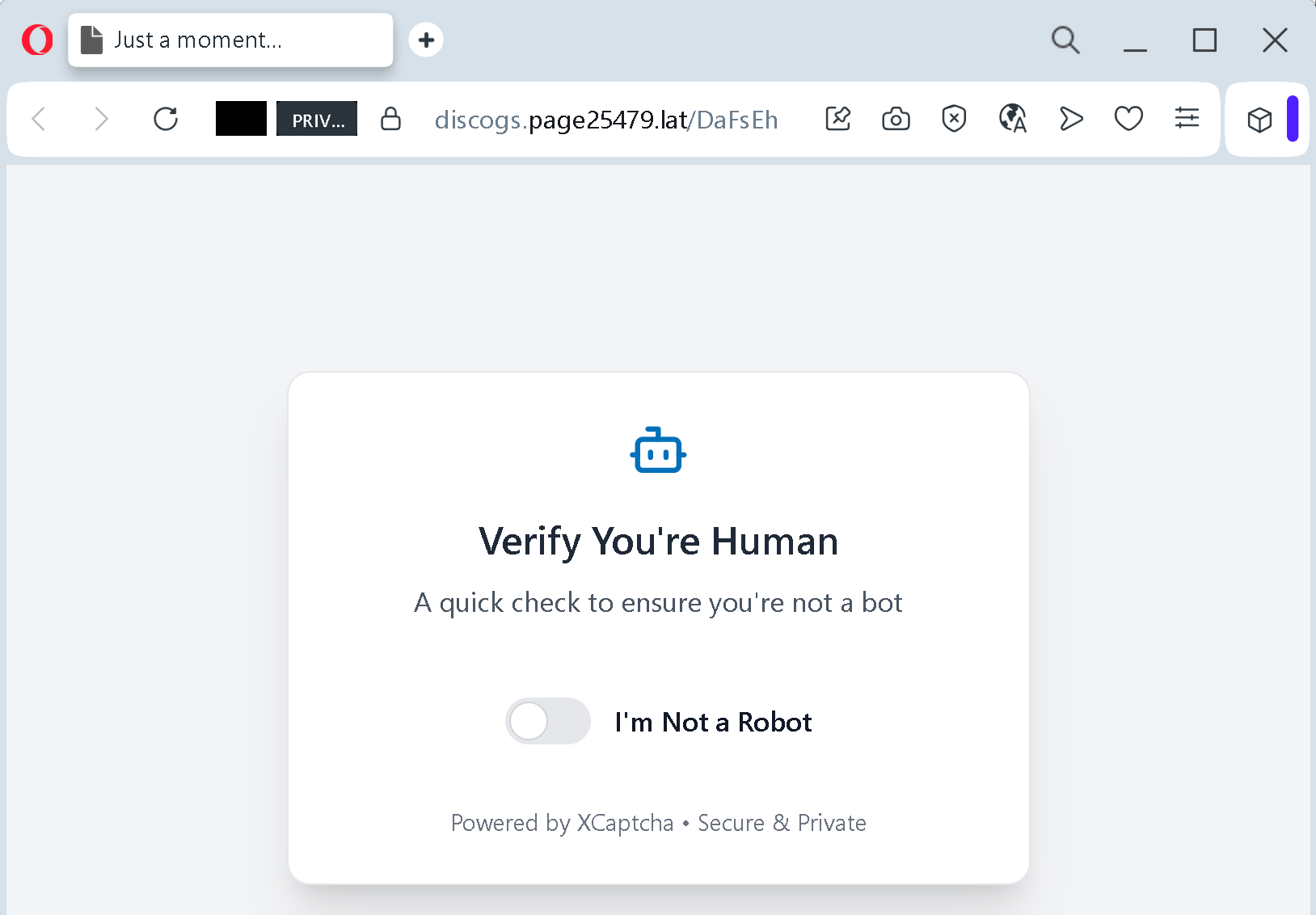
The victim lands on a page that displays “Just a moment…” and a small widget that says “Verify You’re Human” with a checkbox labelled “I’m Not a Robot”. The page is branded with “Powered by XCaptcha · Secure & Private”. In reality, XCaptcha is not a legitimate CAPTCHA provider. This is a classic trick: the attacker creates a fake bot check to make the user believe the site is security‑conscious. Clicking the checkbox does not perform any real verification. Instead, it either triggers the next page or simply records that the user is willing to interact with the fraudulent interface.
Stage 2 – The Discogs‑Branded Notice
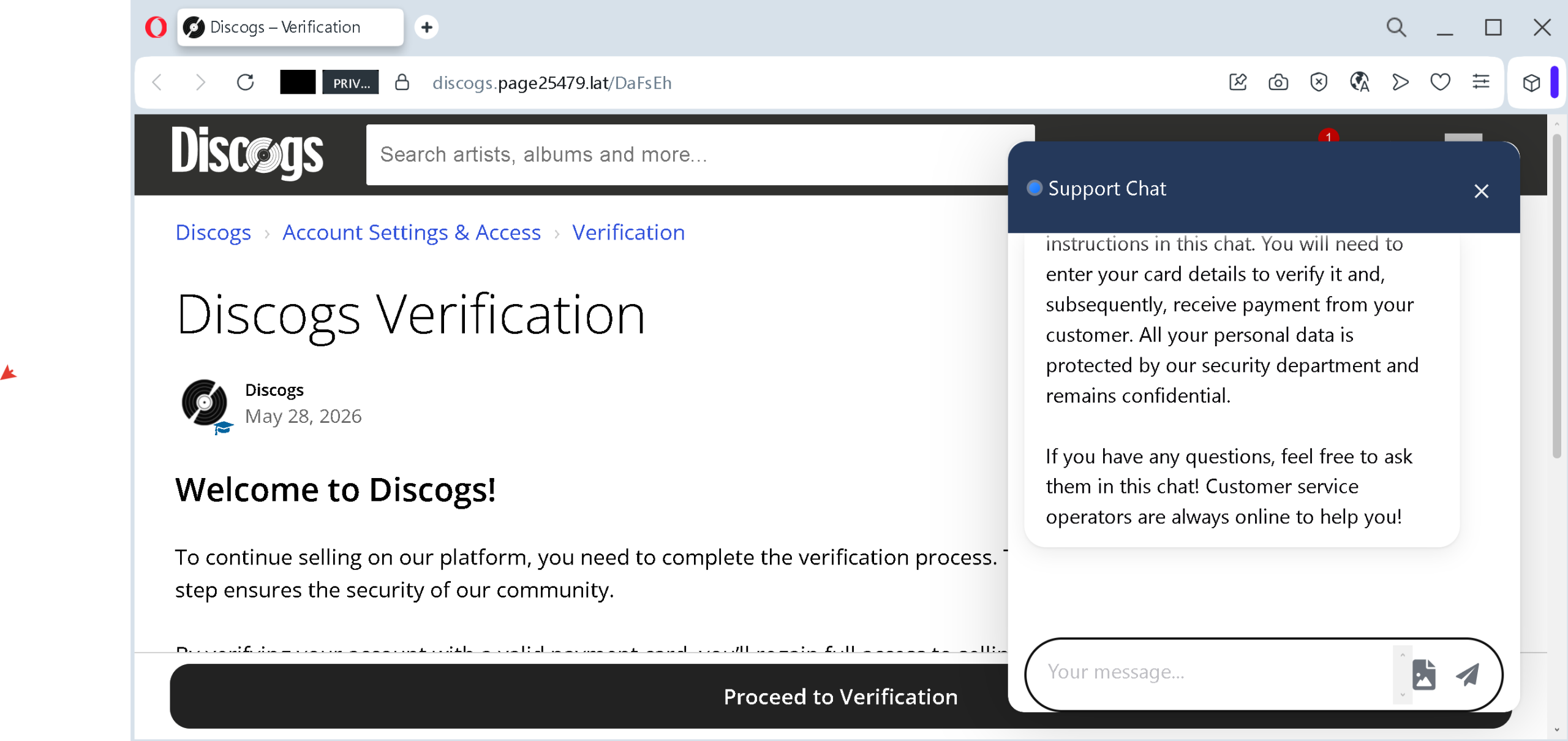
After passing the fake CAPTCHA, the user sees a page styled to resemble an official Discogs notification. The header reads “Discogs > Account Settings & Access > Verification”. The message states: “Welcome to Discogs! To continue selling on our platform, you need to complete the verification process. This step ensures the security of our community.”
A fake support chat window is embedded on the same page. The chat text explains: “You will need to enter your card details to verify it and, subsequently, receive payment from your customer.” It reassures the user that “all your personal data is protected by our security department and remains confidential” and that “customer service operators are always online to help you.”
A large button labelled “Proceed to Verification” leads to the final stage.
Stage 3 – The Cloned Stripe Payment Form
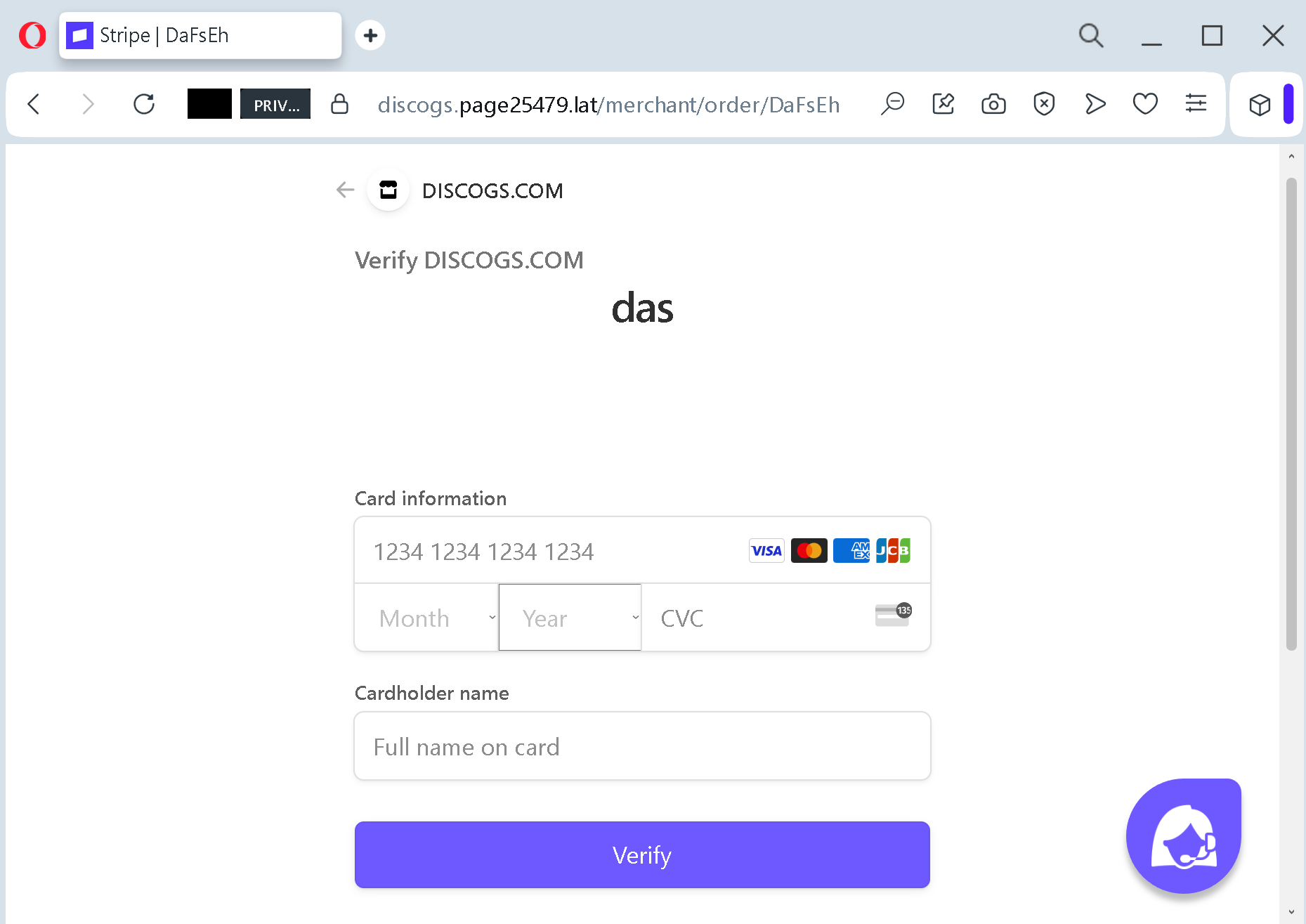
The third page is a near‑perfect imitation of a Stripe payment interface. The domain shown in the URL bar is discogs.page25479.lat/merchant/order/DaFsEh
- Card number (with a placeholder 1234 1234 1234 1234)
- Month and year of expiry
- CVV code (labelled “CV” on the screenshot)
- Cardholder name (“Full name on card”)
A “Verify” button completes the action.
Why This Scam Is Particularly Dangerous for Discogs Sellers
Discogs is a platform where independent sellers list vinyl records, CDs, and music memorabilia. Many sellers are private individuals who do not have formal business training in cybersecurity. They are often motivated by the desire to sell a few items from their personal collection. This profile makes them ideal targets: they expect to provide payment information to receive money from buyers, and they may not immediately recognise that a request for card details is the opposite of what a legitimate selling platform would require.
The scam exploits a fundamental confusion between “verifying identity” and “providing payment credentials”. No legitimate marketplace asks a seller to enter their own credit card number as a way to verify their seller account or to receive payments. Payments from buyers are deposited into a seller’s linked bank account or PayPal account – not drawn from the seller’s card.
The presence of the fake support chat adds a dangerous layer of psychological manipulation. The chat creates an illusion of live, human assistance. A worried seller might be tempted to ask questions, and the automated responses (or a real criminal on the other end) would reinforce the legitimacy of the request. The phrase “customer service operators are always online to help you” is designed to prevent the victim from seeking help elsewhere.
Expert Analysis: Technical and Behavioural Red Flags
Cybersecurity professionals who have examined similar phishing kits identify several consistent patterns. This campaign exhibits all of them.
The URL is the most immediate red flag. The page is hosted on discogs.page25479.latpage25479.latdiscogs.com.lat.top.xyz
The CAPTCHA page serves no technical purpose. Real CAPTCHAs (such as Google’s reCAPTCHA) are used to block automated bots from accessing forms or content. They are never used as a gateway to a subsequent page that then asks for payment card information. If a site shows you a “Verify You’re Human” widget and then immediately presents a financial form, you are looking at a phishing page.
The fake support chat is a behavioural exploit. Research into online fraud shows that users are more likely to comply with a request when they believe they have a safety net – someone to ask for help. The chat window creates that false safety net. In reality, the “operator” is either a script or a criminal whose only goal is to keep you on the page until you submit your data.
The Stripe form is a direct copy of a legitimate payment interface, but with a critical omission: there is no transaction context. A real Stripe payment form appears when you are actively purchasing something, and it shows the merchant name and the amount to be charged. This form shows neither. It asks for your card “to verify it and, subsequently, receive payment” – a nonsensical statement. Receiving money requires you to provide bank account or PayPal details, not your credit card number.
The Financial Impact: What Happens After You Submit
If a seller enters their card information into this form, the data is sent directly to the attacker. Within minutes, the attacker will test the card with a small authorisation (often $0.00 or $1.00) to confirm it is active. Then they will either:
- Make high‑value purchases of digital goods that can be resold quickly.
- Withdraw cash from ATMs if the card is a debit card and the attacker has cloned it.
- Sell the full card details (number, expiry, CVV, cardholder name) on underground markets for others to abuse.
The seller may not notice the fraudulent transactions until days later, by which time the money is gone and the card is compromised.
How to Protect Yourself: Expert Recommendations for Discogs Users
The following advice is based on standard security practices and the specific tactics revealed in this phishing campaign.
Never initiate account actions from links in unsolicited messages. If you receive an email, direct message, or any notification that claims you need to verify your account, do not click embedded links. Open a new browser tab, type discogs.com
Understand how Discogs actually handles seller payments. Discogs itself does not process payments directly. Sellers on Discogs typically use PayPal or Stripe as separate payment gateways. To receive money from a buyer, you provide the buyer with your PayPal email address or a Stripe payment link. You are never asked to enter your credit card number into a Discogs page for the purpose of receiving funds. If a page asks for your card to “verify” your seller status, it is a scam.
Look at the browser’s address bar before entering any information. Legitimate Discogs pages always have a URL starting with https://www.discogs.com/https://discogs.com/discogs.something.latdiscogs-verify.xyz
Do not trust on‑page chat windows that appear in unsolicited verification flows. Real customer support chats are accessible only after you log into your account and navigate to the help section. A chat that appears unbidden on a verification page is a manipulation tool.
Enable two‑factor authentication on your Discogs account. This will not prevent a phishing page from stealing your card, but it will prevent an attacker from taking over your Discogs account even if they later obtain your password through another method. Use an authenticator app (Google Authenticator, Authy) rather than SMS when possible.
Use virtual or single‑use card numbers for online transactions. Many banks and services (such as Privacy.com, Revolut, or Citi’s Virtual Account Numbers) allow you to generate a temporary card number linked to a spending limit. If you ever encounter a suspicious verification request, using a virtual card with a $1 limit would reveal the scam immediately: the charge would be rejected or you would see an unauthorised attempt.
Monitor your card transactions daily. Set up SMS or push notifications for every transaction. The sooner you spot a fraudulent charge, the faster you can report it to your bank and limit your liability.
What to Do If You Have Already Entered Your Card Details
If you recognise that you have submitted your payment information to a page similar to the one described, act immediately.
Contact your bank or card issuer using the phone number on the back of your card. Do not use any contact information found on the suspicious page. Request that the card be blocked and replaced. Ask the bank to review recent transactions for unauthorised activity.
File a report with your local police. In many jurisdictions, online fraud is a criminal offence. A police report may help you dispute fraudulent charges with your bank.
Change your Discogs password. Even if the phishing page did not explicitly ask for your password, the attacker may have captured it if you used the same device or if the page was part of a wider compromise. Use a strong, unique password.
Report the phishing URL to Discogs. Send an email to their support team with the full URL and screenshots. This helps the platform take down the fraudulent site and warn other users.
Final Words
Phishing attacks that target platform sellers are becoming more sophisticated. They no longer rely on obvious spelling mistakes or generic greetings. They clone the look and feel of legitimate services, add fake CAPTCHAs to create an illusion of security, and embed simulated support chats to disarm critical thinking.
The single most effective defence is a simple rule: never enter your credit card details on a page that claims to be verifying your identity or unlocking your seller status. Real verification uses passwords, two‑factor codes, or identity documents – not payment instruments.
Share this analysis with anyone who sells on Discogs. The more sellers understand these tactics, the harder it becomes for attackers to profit.