
Who This Guide Is For
This article is written for you – a business owner, a supplier manager, a procurement officer, or a finance professional who works with Woolworths or other major retailers across Australia.
You are not a cybersecurity expert. You have invoices to process, deadlines to meet, and relationships to maintain with your biggest clients. When an email arrives announcing the “Woolworths Vendor Summit 2026” and inviting you to register your company for a major opportunity, your instinct is to act quickly. You want to secure your spot. You want to maintain that crucial business relationship.
That instinct is exactly what the criminals are counting on.
Woolworths is Australia’s largest retailer by revenue, with a vast network of thousands of suppliers, vendors, and business partners. The company processes millions of transactions annually and handles sensitive corporate data from businesses across the country. Where that much money flows, sophisticated criminals follow.
This guide will walk you through a real phishing attack that impersonated Woolworths to harvest supplier data. It will share true stories of Australian businesses that lost hundreds of thousands of dollars to similar schemes – and the ones that escaped by making one simple decision. Most importantly, it will give you the expert-backed habits that will protect your company’s finances and your professional reputation.
The Anatomy of the Attack: How a Fake “Vendor Summit” Harvests Your Company’s Secrets
The security team at Antiphishing.biz recently intercepted a live phishing campaign that perfectly illustrates how criminals target Australian suppliers. This attack was logged, cross-checked, and neutralized firsthand during their automated link scanning workflows. But the pattern it reveals is now being replicated across multiple industries.
Step One: The Bait That Looks Like an Opportunity
The scam begins with an unsolicited email or message that appears to come from Woolworths. It announces the “Woolworths Vendor Summit 2026” – a seemingly legitimate industry event that any supplier would want to attend. The invitation plays on your professional ambition. You do not want to miss out on networking opportunities, contract renewals, or new business leads. So you click.
The message looks professional. It uses Woolworths branding, the familiar logo, and official-sounding language. The criminals have copied everything that makes the company feel trustworthy.
Step Two: The Trap That Asks for Too Much
The registration page that opens asks for detailed corporate information: your “Company Name,” “Agent Name,” and “Designation.” It also requests that you “Upload Image” – ostensibly for your event profile.
Incident Report: This deceptive layout was logged, cross-checked, and neutralized firsthand by the
Antiphishing.bizsecurity team during our automated link scanning workflows. To protect the public, the hostile origin link has been fully defanged within our infrastructure. We document and analyze these live visual patterns to help security researchers and users detect replica fraud techniques before financial damage occurs.
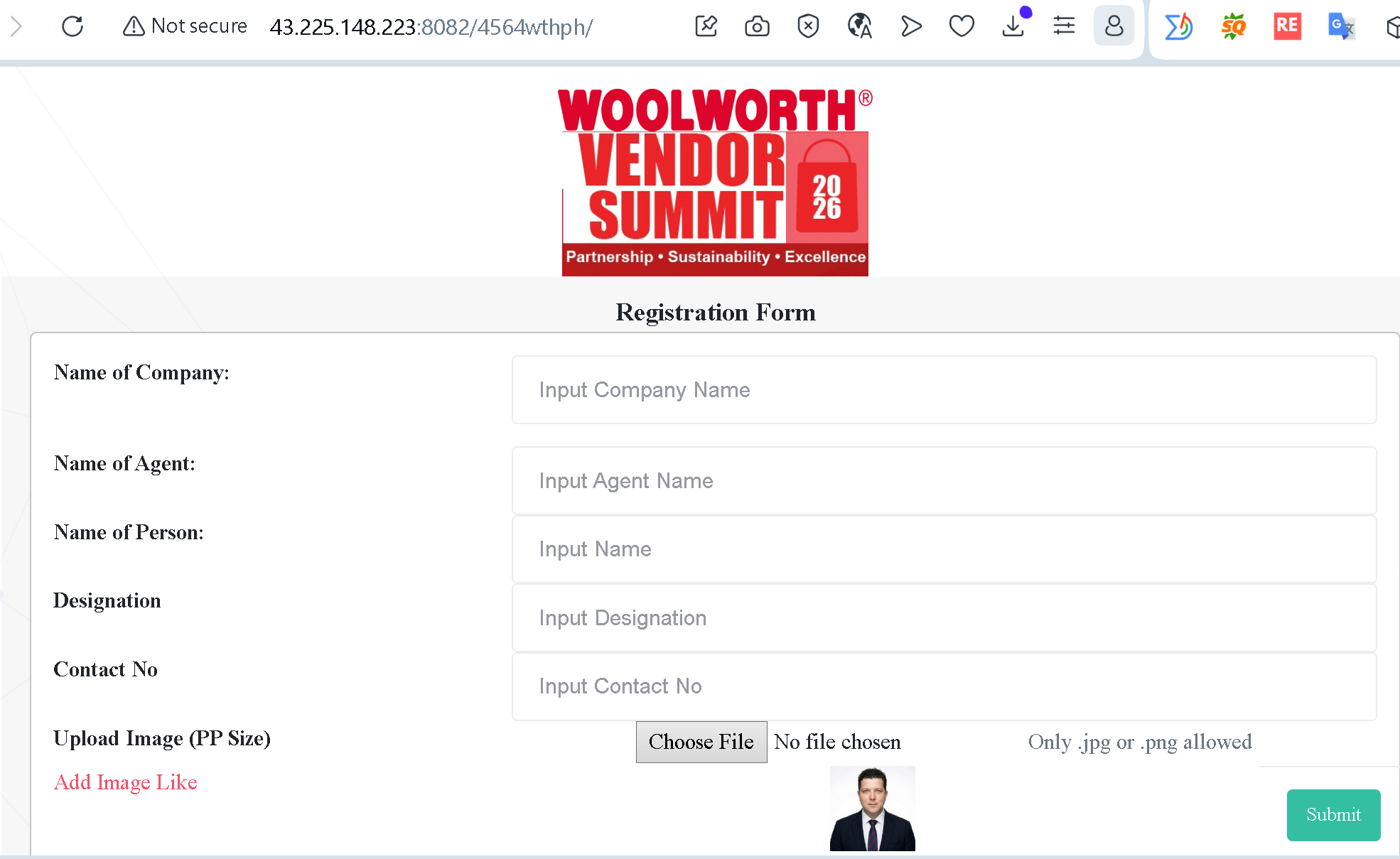
This is not a harmless registration form. It is corporate reconnaissance.
The request for an image upload is particularly dangerous. Criminals can use it to harvest biometric data, or – more directly – trick you into uploading sensitive corporate ID documents. A company logo might be harmless, but if you accidentally upload a staff identification card, a business license, or any other official document, you have handed the attackers a master key to your corporate identity.
Here is what the criminals are actually collecting:
- Company Name: Helps them understand your place in Woolworths’ supply chain.
- Agent Name and Designation: Gives them the exact names and job titles of your employees who have authority to approve payments or change supplier information.
- Uploaded Files: Can include everything from personal identification to internal documents that the criminals will later use to impersonate your company to Woolworths – or to impersonate Woolworths to you.
The Antiphishing.biz report puts it bluntly: “Scammers use this data to perform more convincing Business Email Compromise (BEC) attacks later.”
Step Three: The Technical Red Flags That Give It Away
The fake page in this attack displayed three clear warning signs that any user could spot – if they knew what to look for.
- “Not Secure” Warning: The browser explicitly marked the site as “Not secure.” Legitimate corporate portals always use encrypted HTTPS connections. The absence of a secure connection means your data is being sent across the internet in plain text – readable by anyone.
- Numerical URL: The website used a raw IP address
(43.225.148.223)woolworths.com.au@woolworths.com.auaddresses and point to official domains. - Non-Standard Port: The use of port
:8082
The Real Stories That Will Make You Rethink Every Supplier Email
These are not hypothetical scenarios. These are actual Australian businesses that lost hundreds of thousands of dollars – and the ones that saved themselves by making one simple decision.
The Builder Who Lost $70,000 Because Two Clients Trusted the Wrong Email
A Master Builders Queensland member – a construction company owner – thought he was protecting his business. Instead, he watched $70,000 disappear into cryptocurrency, never to be recovered.
The story began when a longtime client, Lisa, received an email that appeared to come from the construction company. The email claimed the business had changed its bank account. The instructions seemed routine. The email was basic – no logos, no fancy formatting – but it arrived during a busy project deadline when no one had time to double-check.
Lisa followed the instructions and sent $70,000 to the “new” account. Another client, David, received a similar email and sent $15,000.
When the company’s bookkeeper checked the accounts, both payments were missing. Police traced David’s $15,000 to an inactive account in Central Queensland and recovered the funds. But Lisa’s $70,000 was transferred via Sydney into cryptocurrency, making it impossible to retrieve. The builder was left out of pocket, while Lisa insisted her payment obligation had been met.
The lesson is brutal and simple: never rely on email alone to confirm changes to bank details. Always double-check by phone or in person before making or accepting large payments.
The Government Agency That Transferred $3.5 Million to a Fake Vendor
In one of Australia’s most striking business email compromise cases, a Northern Territory government agency transferred more than $3.5 million to a fraudulent bank account.
According to the Australian Federal Police, threat actors registered a business with a name closely resembling that of a legitimate government vendor. They opened a lookalike bank account and used a deceptive corporate email to trick the agency into making the payment. The scam was uncovered as part of an AFP investigation that led to the arrest of a 38-year-old man in Sydney, who was charged with dealing in the proceeds of crime.
Thanks to fast intervention by the receiving bank, $3.57 million of the funds were recovered, reducing the net loss to under $12,000. But even a near-miss can have lasting effects on internal workflows, due diligence processes, and trust in finance operations.
The lesson for every business is clear: verify vendor details and communication sources before releasing funds. A single phone call to a known contact number could have prevented this entire incident.
The Business That Lost $190,000 When a Supplier’s Email Was Hacked
A real Australian business submitted a story to Scamwatch that should terrify every finance professional. The scammers hacked a legitimate supplier’s email and advised the business of a change in bank details.
Everything was a perfect copy. The scammers sent invoices with amended bank details, and they included the prior email trail to and from the supplier. They were inside the supplier’s IT system. The business even checked that the email address of the sender matched the supplier’s email address. It did.
Thinking it was real, the business sent $190,000 to the new account. The real supplier never received it. The business only found out when the supplier called by phone to say the payment was missing.
The story includes this haunting line: “The email address was also correct for the supplier, but they told us that they did not receive our responses. The scammers seem to have some way of hiding our responses from the supplier.”
The single sign that this was a scam was the change in bank details. That was the only clue. And by the time anyone noticed, $190,000 was gone.
The Construction Company That Stopped the Fraud Before It Started
Not every story ends in disaster. A large Australian construction company – one of the country’s largest developers – demonstrated how proactive protection works.
The company’s chartered accountant received a supplier email requesting a change in banking details. It was a normal-looking message from a supplier who was already familiar to the accountant. What the accountant did not know was that the supplier’s email had been infiltrated and weaponized in a business email compromise attack.
But the construction company had already implemented a payment protection solution. When the accountant triggered the verification process, the fraudster completed the request form by email – but left a note stating they did not have their phone with them and could not verify their identity through the usual SMS code.
The verification specialists flagged the request as fraudulent. The accountant and the system saved the construction company tens of thousands in fraudulent payments, protecting both the business’s financial assets and its relationship with a critical supplier.
The lesson is clear. Strong financial controls and multi-person verification processes can stop the fraud that email alone cannot detect.
The Finance Team That Asked One Simple Question
In another Australian case, a business received an urgent email requesting that a supplier’s bank details be changed. The email looked legitimate. The sender name matched a known contact. The language was professional. Everything seemed in order.
But the finance team had been trained. Instead of acting on the email, they picked up the phone. They called the supplier’s known contact number – not the number in the email, but the number they had on file from previous interactions.
The supplier had no idea what they were talking about. The email was a forgery. The finance team’s refusal to trust the message and their willingness to verify through a separate channel saved the company from a significant financial loss.
The Four Red Flags That Give Away the Fake Supplier Portal – Every Time
You do not need to be a cybersecurity expert to spot these attacks. You just need to know what to look for.
Red Flag One: The “Not Secure” Warning
If your browser displays a “Not secure” message in the address bar, stop immediately. Legitimate companies always use HTTPS to encrypt your data. The absence of a secure connection means any information you type – company names, employee details, uploaded files – is being sent across the internet in plain text, readable by anyone.
Red Flag Two: Numbers Instead of a Name
Official portals use clear domains like woolworths.com.au43.225.148.223
Red Flag Three: Unusual Data Requests
Be wary of forms asking for “Agent Names,” “Designations,” or especially those requiring you to upload images or files on an unverified site. A registration for a vendor summit should not ask for sensitive corporate documents.
Red Flag Four: Poor Visual Quality
Look for “copy-paste” logos, inconsistent fonts, or strange phrasing like “Add Image Like.” Real corporate sites go through strict quality control. If the page looks slightly off, it probably is.
Expert Advice: How to Keep Your Supplier Data Safe Starting Today
The following rules come from cybersecurity professionals, law enforcement agencies, and Woolworths’ own security guidance. Following them will protect your business from this attack and every future variation.
Rule One: Never Click Links in Unsolicited Supplier Messages
This is the single most important rule. If you receive an email about a vendor summit, a supplier portal update, or a change in banking details – do not click any links. Do not reply. Do not call any phone numbers in the message.
Instead, open a new browser tab. Type the official Woolworths website address manually. Navigate to their supplier portal from there. Or, if the message claims to be from a known supplier, call them using a phone number you have on file – not the one in the message.
The Antiphishing.biz report states clearly: “Official Woolworths communications will only come from verified @woolworths.com.au email addresses and point to official domains.”
Rule Two: Verify Financial Requests Through a Separate Channel
If you receive an email requesting a change in bank details for a supplier – no matter how legitimate it looks – do not reply to the email. Do not call any phone number in the email. Instead, verify the request using a different communication method: a phone call to a number you know is legitimate, a face-to-face conversation, or a new email sent to an address you have used before.
The Australian Cyber Security Centre advises businesses to “contact the supplier directly using a second, reliable mode of communication such as a known phone number to verify any request to change bank details.”
Rule Three: Require Multi-Person Approval for Supplier Changes
Set up your financial systems to require two people to approve any change to supplier bank details. This is your emergency brake. If a criminal compromises one set of credentials, they cannot move money without a second approval.
The NT government agency case demonstrated that strong verification controls can stop fraud even after a payment has been initiated. The bank recovered $3.57 million of the $3.5 million because the fraud was detected quickly.
Rule Four: Enable Multi-Factor Authentication on All Corporate Accounts
Multi-factor authentication (MFA) is your digital seatbelt. Even if a criminal steals your password, they cannot access your account without the one-time code sent to your phone or authenticator app.
In the vendor risk management case study, the investigation revealed that the absence of MFA and secure change management protocols created an environment in which the fraud could succeed.
Rule Five: Report Suspicious Messages Immediately
If you receive a suspicious email claiming to be from Woolworths, do not just delete it. Forward it to [email protected] for further investigation by their Cyber Security team.
Woolworths has a dedicated scam alert page that explains how to spot a scam, current scam examples, and what to do if you suspect you may have encountered a scam. Use it.
Rule Six: Audit Your Supplier Master Data
Regularly review the vendor details stored in your financial systems. Look for any changes to bank accounts, contact information, or payment instructions that you did not authorize.
The Australian Banking Association advises businesses to “only use the payment details stored in your records or system that you have confirmed in the past.”
Rule Seven: Train Your Entire Finance Team
One trained employee can save a company millions. The construction company that stopped the fraud before it started succeeded because they had a payment protection solution in place. The finance team that asked one simple question succeeded because they had been trained to verify through a separate channel.
Run regular phishing simulations. Test your team with fake “supplier portal update” emails and see who clicks. Train them until the habit of verifying first becomes automatic.
Rule Eight: Remember the Rule of Thumb
The Antiphishing.biz report summarizes the most important guidance in a single sentence: “If a registration link doesn’t end in the official company domain, do not click, do not type, and do not upload.”
What to Do If You Have Already Fallen for This Scam
If you realize that you have clicked a link, entered corporate information, or uploaded files on a suspicious website, do not panic. But do not wait, either. Time is the enemy. Act immediately.
First, contact your IT security team immediately. Provide them with the link you clicked, the time of the click, and any screenshots you may have taken. The faster they know, the faster they can investigate and contain the breach.
Second, if you provided any financial information or banking details, contact your bank using the official number on your statements. Tell them that your corporate information may have been compromised and ask them to monitor your accounts for suspicious activity.
Third, review your recent supplier payments and banking transactions. Look for small test transfers as well as large amounts. Criminals often test a compromised account with a tiny transfer before moving larger sums.
Fourth, change your passwords on any corporate accounts that might be affected. Use strong, unique passwords that you have never used anywhere else.
Fifth, report the phishing attempt to Woolworths by forwarding the message to [email protected]. Also report it to the Australian Cyber Security Centre’s ReportCyber service.
Sixth, if your company suffered a financial loss, file a police report. Many victims delay reporting because they feel embarrassed or ashamed. Do not let that stop you. These criminal networks defraud thousands of businesses every year. The shame belongs to the criminals.
The Bigger Picture: Why Supplier Phishing Is Exploding in Australia
Australian organisations reported losses to scammers from business email compromise of more than $152.6 million last year, an annual increase of 66%. This risk is accelerating as cybercriminals target vendor relationships at scale.
According to a recent investigation into a business email compromise, the fraudster infiltrated the vendor data team by impersonating the accounts contact of a major supplier. The deception unfolded in stages. First, the attacker requested updates to the supplier’s contact details including the contact email address. Once the new fraudulent contact was in place, the attacker asked for copies of recent invoices – building credibility and context. Finally, the attacker submitted a request to update the supplier’s bank account details. When the next invoice was paid, the funds were transferred directly to the fraudster’s account.
This methodical approach bypassed traditional verification processes. The vendor data team relied on publicly available contact information and website details to validate the change, unaware that these sources had also been compromised. The absence of MFA and secure change management protocols created an environment in which the fraud could succeed.
With nearly 70% of organisations failing to conduct due diligence on key suppliers, the market is exposed to unprecedented levels of cyber-enabled fraud. As directors, the greatest vulnerability may not lie within your own systems but in the unseen weaknesses of your vendor network.
A Final Word
The fake Woolworths Vendor Summit phishing attack is a sophisticated piece of social engineering designed to harvest corporate intelligence from Australian suppliers. It uses your professional ambition, your desire to maintain client relationships, and your trust in a trusted brand. It asks for information that seems harmless – company names, job titles, and a simple image upload – but that information becomes ammunition for the next attack.
The criminals are counting on your speed, your trust, and your desire to seize an opportunity. Do not give them any of those things.
Build a new habit today. When an email arrives announcing a supplier event, a vendor portal update, or a change in banking details – do not click. Do not type. Do not upload. Open your browser. Type the official domain manually. Verify through a separate channel. Make that phone call. Send that second email.
That extra five minutes could save your business from a $190,000 loss, protect your supplier relationships, and preserve the trust you have built with your clients.
Share this guide with every supplier manager, procurement officer, and finance professional you know. The more Australian businesses understand this attack, the harder it becomes for criminals to profit.
This attack was detected, analyzed, and contained firsthand by the Antiphishing.biz security team during their automated link scanning workflows. The phishing source domain has been fully defanged within their infrastructure to protect the public. If you found this guide helpful, share it widely.