
Who This Guide Is For
This article is written for you – a Bazaraki seller.
Whether you are clearing out your closet, flipping furniture, or running a small business, you rely on Bazaraki to connect with buyers across Cyprus. Every day, thousands of people list cars, apartments, jobs, and household goods on Cyprus’s biggest classifieds platform.
You are not a cybersecurity expert. You are not expected to be one. You just want to sell your item, get paid, and move on with your day. But exactly that desire – to receive money quickly and without complications – is what the criminals behind this scam are counting on.
The attack described in this guide was intercepted, verified, and locked down firsthand by the Antiphishing.biz security team during their automated link scanning workflows. The phishing domain has been safely deactivated to protect the public. But new domains appear every week, using the same fake logos, the same urgent language, and the same fake live chat window that pretends to be helping you.
One professional criminal defense lawyer in Cyprus described the method in stark terms. “What the victim does not realize is that they are not verifying anything. They are handing over the keys to their bank account. With the card data and the verification code, criminals can operate in minutes. By the time the bank alerts you, it is already too late.”
The Worst Part? The Attack Doesn’t Even Ask for Your Password
Think about that for a moment. Most people believe that if they never type their password into a strange website, they are safe.
The Bazaraki phishing scam bypasses that entirely. It doesn’t need to trick you into giving away your login credentials. Instead, it convinces you that your account has been “restricted” and that you must “verify” your identity – by entering your credit card details, your CVV, and the one‑time SMS code that your bank sends to your phone – all in the name of “receiving your money.”
Once you type those numbers in, the criminals have what they need. The password on your Bazaraki account becomes irrelevant because they are no longer interested in selling your old sofa. They are interested in draining your bank account directly.
How the Scam Actually Works: A Step‑by‑Step Breakdown
Based on the real phishing page intercepted by Antiphishing.biz, here is exactly how the trap is set and sprung.
Step One: The Fake Account Restriction Message
It starts with an unsolicited message – an email, an SMS, or a pop‑up notification that appears while you are browsing. The message claims that your Bazaraki account has been “restricted” or “temporarily blocked.” It states that you have a strict deadline, usually 24 hours, to verify your identity. If you do not act immediately, you will lose access to your account, miss out on pending orders, or fail to receive money from a buyer.
This is the hook. The criminals know that the worst thing that can happen to a seller is not being able to access their account. The thought of a sale slipping away or a payment being stuck creates instant anxiety. When people panic, they stop double‑checking the website address. They stop questioning the request for their bank card. They just want to solve the problem as fast as possible.
Step Two: The Landing Page That Looks Exactly Like Bazaraki
If you click the link, you are taken to a webpage that has been carefully designed to mimic the official Bazaraki website. The same colors. The same layout. The same fonts. The criminals have copied everything that makes the real site feel familiar and trustworthy.
Analysis Memo: This spoofed page was intercepted, verified, and locked down firsthand by the
Antiphishing.bizsecurity team during our automated link scanning workflows. To protect the public, the phishing source domain has been safely deactivated within our infrastructure. We document and analyze these live visual patterns to help security researchers and users spot lookalike phishing methods before financial damage occurs.
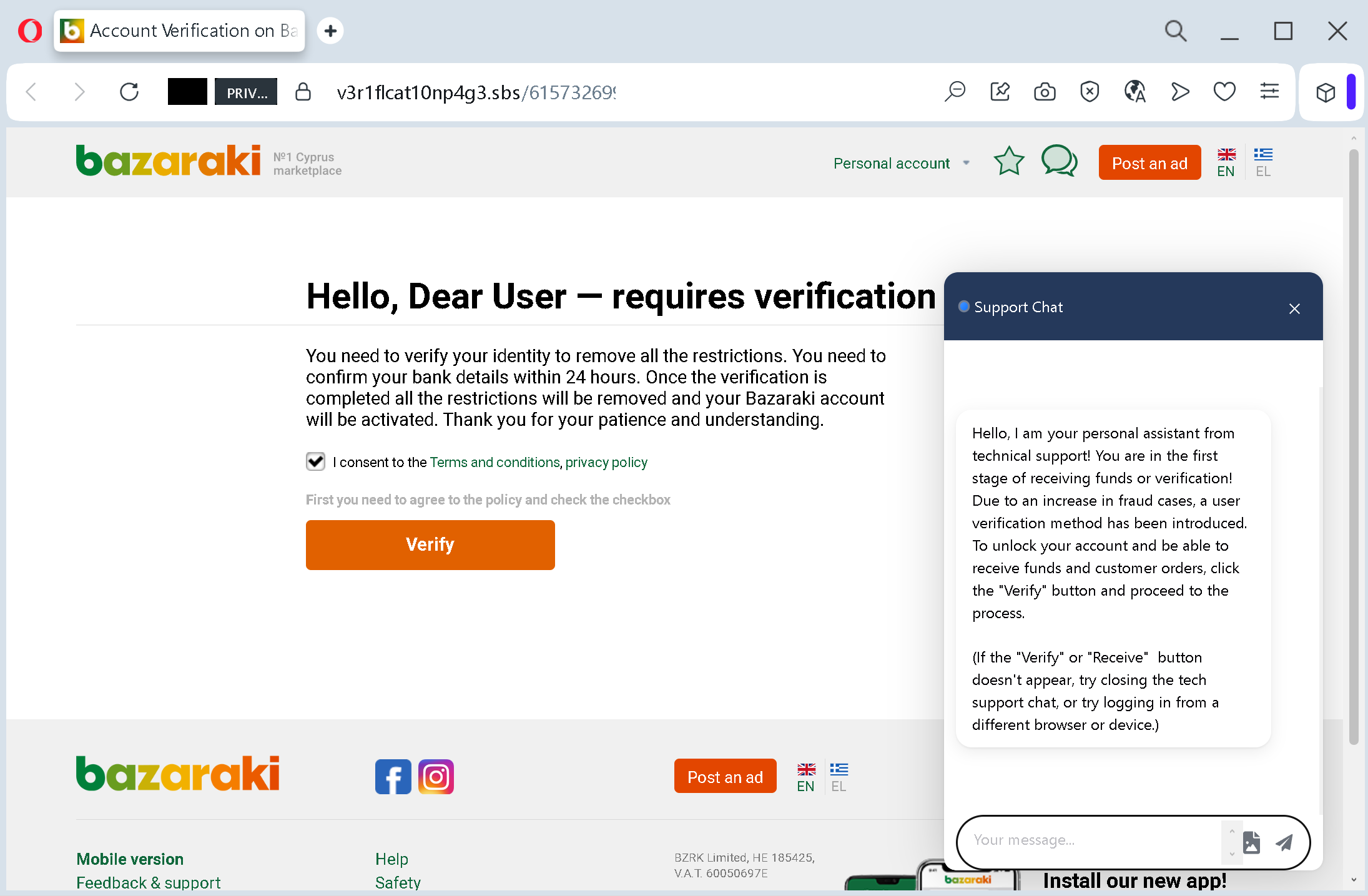
But look closely at the address bar of your browser. The official Bazaraki website is bazaraki.com. The fake page is hosted on a completely different domain – often something that contains the word “bazaraki” but adds extra words, hyphens, or unusual endings like .top.xyz.digital
Step Three: The Fake Live Chat Window That Pretends to Be Your Friend
Here is where the attack becomes truly dangerous – and genuinely frightening.
A chat window opens automatically on the page. It is not a real help desk. It is a scripted message, carefully written to sound helpful and reassuring. The “support assistant” explains that you must verify your account to “receive funds” or “customer orders.” The tone is warm, professional, and completely fake.
The chat window is the criminals’ psychological masterstroke. A sudden pop‑up chat from a “support assistant” feels legitimate. Your brain registers it as a safety net – someone is there to help you, so you are not alone. But the person on the other end is either a script or a criminal whose only goal is to keep you on the page until you submit your credit card information.
In the real attack documented by Antiphishing.biz, the fake chat was programmed to start talking before the victim had even clicked anything. It did not ask if you needed help. It simply announced that you were in the right place and that everything was secure. That is not how legitimate support works. Real support chats wait for you to ask a question.
Step Four: The “Verify” Button That Leads to the Extraction Page
At the bottom of the fake landing page, a large, inviting “Verify” button waits for you. You may also be asked to check a box agreeing to terms and conditions. Neither of these actions does anything to help you. They are just there to make you feel like you are participating in an official process.
When you click “Verify,” you are taken to a second page – the real harvesting page. On this page, the criminals will ask for the following information:
- Your full name and contact details
- Your credit or debit card number
- The card’s expiration date
- The CVV code (the three‑digit security code on the back of your card)
- Your online banking credentials
- The one‑time SMS verification code that your bank sends to your phone
This is everything a criminal needs to drain your account.
The attackers will then use your information to authorize large transactions, transfer money to accounts they control, or sell your complete financial profile on underground markets where other criminals buy it in bulk.
A Real‑Life Story That Should Terrify Every Seller
This is not a theoretical threat. This is happening to real people right now.
In a case investigated by Cyprus authorities, a Bazaraki seller received a text message claiming his account had been temporarily restricted and that he needed to verify his identity within 24 hours to “release a pending payment” from a buyer. The message included a link that led to a nearly perfect copy of the Bazaraki login page, complete with a live‑chat window that opened automatically with a “support assistant” already typing reassuring messages.
The seller, who ran a small business selling furniture through the platform, entered his personal information and his bank card details, believing he was simply confirming his identity to receive a legitimate payment. Within an hour, €3,500 had been drained from his business account through a series of online purchases and wire transfers. The criminals even used the information to open a credit account in his name, leaving him with debt he had never authorized.
When the victim contacted his bank, he was told the transactions had been authorized using the one‑time SMS codes that had been sent to his phone – the same codes he had typed into the fake verification page thinking he was confirming his identity. “I thought I was receiving money,” he later told investigators. “I was actually paying them to steal from me.”
In another case, a contractor advertising services on Bazaraki received a message from what appeared to be the platform’s security team. The message claimed his account was suspended because of “unusual activity” and that he needed to click a link to verify his bank details. The contractor, who depended on Bazaraki for most of his business leads, acted immediately. He entered his business debit card information into the fake form. Days later, he discovered that nearly €2,000 had been withdrawn from his account through a series of small, untraceable online payments.
The financial loss was devastating. The emotional toll was worse. “Not only are you out the money, but there is a lot of emotional damage as well,” his business partner later said. “You feel stupid. You feel like everyone is looking at you and wondering how you could have fallen for something so obvious. But it was not obvious. It was very, very convincing.”
The scammers are sophisticated. They know exactly which buttons to push. And they are getting better at it every single day.
The Six Red Flags That Give Away the Fake Message – Every Single Time
You do not need to be a cybersecurity expert to spot these scams. You just need to know what to look for.
Red Flag One: The Message Creates Panic with a Deadline
“Your account will be suspended in 24 hours.” “Immediate action required.” “Your orders will be canceled if you do not verify now.”
These phrases are the scammers’ most powerful weapon. They are designed to make you panic. When you panic, you do not check the web address. You do not question the request for your bank card. You just want to fix the problem as fast as possible.
Real security notifications from Bazaraki do not work this way. Legitimate alerts give you information. They do not demand immediate action through a link. If a message tries to rush you, that is your signal to stop entirely.
Red Flag Two: The Message Is Unsolicited
Bazaraki never sends links requiring users to verify their identity via external pages. All account‑related actions – password changes, verification, security updates – are done within the official website after you log in normally. If you receive a message that claims your account has a problem and asks you to click a link to fix it, you are looking at a phishing attempt.
Red Flag Three: The Web Address Is Not Exactly “bazaraki.com”
The official Bazaraki website is bazaraki.combazaraki‑secure.combazaraki-verification.netbazaraki.compr-verify.digitalbazaraki.com
Before you type any personal information into a website, look at the address bar of your browser. If you see anything other than the official domain – any extra words, any hyphens, any unusual endings like .top.xyz.info
Red Flag Four: A Live Chat Window Opens Automatically
This is one of the most important red flags in the entire attack. Real support chats do not initiate contact with a pre‑written explanation before you have even asked a question.
If a chat window pops up on a page you reached by clicking a link in a message, and that chat window starts telling you that you need to “verify your account to receive funds,” you are looking at a scam. Legitimate help desks wait for you to click a button or type a message. They do not launch unsolicited conversations designed to guide you toward a financial transaction.
Red Flag Five: The Page Asks for Your CVV or SMS Code
This is the most important rule in this guide. No legitimate website will ever ask you to provide your CVV code or the one‑time SMS verification code from your bank for the purpose of “verifying your account.”
Your CVV code and your SMS verification codes are the keys to your bank account. They exist to prove that you are the legitimate cardholder. If a website asks for these numbers, you are looking at a scam.
Red Flag Six: The Page Does Not Know Your Name
Official Bazaraki communications are personalized. They address you by the name associated with your account. The fake page documented by Antiphishing.biz used generic greetings and placeholders. It did not know who you were. That is because the criminals are sending the same message to thousands of people, hoping that a few will click and fill out the form.
A Horrifying Real‑Life Story: The €300,000 Ghost Buyer Scam
The fake “account verification” page is not the only way criminals use Bazaraki to steal money. In a separate but equally devastating fraud scheme documented by Cyprus authorities, criminals pose as legitimate buyers, contact sellers, and then claim to have “deposited” an amount greater than the price of the item. They then request a refund of the difference back to their account.
The sellers, believing they have received a legitimate overpayment, refund the difference. But the original “deposit” was never real. The criminals used forged payment confirmations or spoofed emails to create the illusion of a transfer. By the time the seller realizes the original payment never arrived, the money they refunded is gone.
This scam has cost victims in Cyprus hundreds of thousands of euros. In some cases, the criminals have even sent “couriers” to collect the goods directly, leaving sellers with no item and no payment.
One victim, a small business owner in Limassol, lost more than €300,000 after being tricked by a sophisticated network of ghost buyers. The criminals used fake invoices, spoofed bank emails, and even impersonated delivery drivers to make the transaction feel real. When the victim finally contacted his bank, he was told the original deposit had never existed. The money he had refunded was gone.
A forum user on Eastern Cyprus described the nightmare in stark terms: “Just be careful with Bazaraki. Whilst it can be really useful for selling and buying, it is getting a bad reputation for scams. I nearly fell for one but smelt a rat towards the end. Others have lost a good deal of money in the hustle.”
Expert Advice: How to Keep Your Bank Account Safe Starting Today
The advice below comes from cybersecurity professionals, law enforcement agencies, and the official Bazaraki security team. Following these simple rules will protect you from this scam and every future variation of it.
Rule One: Never, Ever Click Links in Unsolicited Messages
This is the single most important rule in this guide. If you receive an email, text message, or pop‑up notification claiming that your Bazaraki account has been restricted or needs verification – do not click any links. Do not call any phone numbers in the message. Do not reply.
Instead, open a new browser tab. Type bazaraki.com
That one habit – typing the official address yourself instead of clicking a link – would have prevented every single victim story in this article.
Rule Two: The Official Bazaraki Safety Page Is Your Best Friend
Bazaraki has an official safety page available at safety.bazaraki.com. Before you do anything else, bookmark this page. It contains clear, up‑to‑date warnings about the latest scams targeting the platform, including fake verification pages, ghost buyers, and phishing attempts.
The safety page states clearly: “Employees of Bazaraki will never ask the code, only scammers.” It also warns: “Fraud buyers try to trick you by presenting their messages as messages from the service, whereas Bazaraki never sends messages about interest in your product.”
Rule Three: Enable Two‑Factor Authentication on Your Bazaraki Account
Two‑factor authentication (2FA) is your digital seatbelt. Even if a scammer manages to steal your password, they cannot get into your account without the one‑time code sent to your phone or email.
Bazaraki supports 2FA. Go into your account settings and turn it on today. It takes two minutes and adds a massive layer of protection to your account.
Rule Four: Never Share Your SMS Verification Code with Anyone
This rule is absolute. Your bank sends you a one‑time SMS code to verify that you are the legitimate account holder. That code is for you and you alone. No legitimate customer service representative from any company will ever ask you to read that code back over the phone or type it into a web page that you reached by clicking a text message link.
If a page asks for your SMS verification code, you are looking at a scam. Close the tab immediately. Call your bank using the official number on the back of your card to report the incident.
Rule Five: Be Suspicious of Any Chat That Opens Itself
Real support chats wait for you to ask a question. If a chat window opens automatically and starts giving you instructions about “verifying your account” or “receiving funds,” you are talking to a script – not a human being. Close the tab and navigate to the official website manually.
Rule Six: Check Your Bank Account Regularly
Set aside five minutes each week to review your recent transactions. Look for small test charges – often €0.00 or €1.00 – as well as larger purchases you do not recognize. Criminals sometimes test a stolen card with a tiny transaction before making a big purchase. If you see anything suspicious, report it to your bank immediately.
Rule Seven: Enable Transaction Alerts on Your Bank Cards
Most banking apps allow you to set up push notifications or SMS alerts for every transaction above a certain threshold – often as low as €1. Enable this feature. That way, if a criminal does manage to get your card details, you will know about the first fraudulent charge within seconds, not days, and you can block your card immediately.
Rule Eight: Use a Credit Card Instead of a Debit Card for Online Transactions
Credit cards offer significantly better fraud protection than debit cards. If a fraudulent charge appears on your credit card, you can dispute it, and the card issuer will typically remove the charge while they investigate. With a debit card, the money leaves your bank account immediately, and recovering it can be a much longer, more difficult process.
For any transaction that might be risky – including “verification” pages – a credit card is safer.
Rule Nine: Keep All Communication Inside Bazaraki
Bazaraki’s official safety page warns: “Scammers want to translate communication with Bazaraki into private messages via WhatsApp, SMS or emails.” If a buyer or seller tries to move the conversation off the platform, treat that as a red flag. Legitimate transactions can be completed entirely within Bazaraki’s messaging system. The criminals move you off the platform because that is where they can lie without being detected.
Rule Ten: Share This Information with Other Sellers
The more people understand this scam, the harder it becomes for criminals to profit. Take five minutes to explain the golden rule to a friend or family member who sells on Bazaraki: Bazaraki will never send you a link asking for your credit card details or SMS verification code. That conversation could save their savings.
What to Do If You Have Already Fallen for This Scam
If you realize that you have clicked a link, entered your card details, or provided your SMS verification code on a suspicious website, do not panic. But do not wait, either. Time is the enemy. Act immediately using this step‑by‑step checklist.
First, contact your bank or credit card issuer immediately using the phone number on the back of your physical card. Do not use any phone number from the suspicious message. Tell them that your card details may have been compromised in a phishing attack. Ask them to block the card and issue a new one. If any fraudulent charges have already appeared, report them immediately and request a chargeback. The faster you act, the more likely you are to get your money back.
Second, review your recent transactions carefully. Look for small test charges as well as larger amounts. If you see anything you do not recognize, report it to your bank. Keep a record of the transaction dates, amounts, and merchant names.
Third, change your Bazaraki password immediately. Even if the fake page did not ask for your password explicitly, it is better to be safe. Log into the real Bazaraki website – by typing bazaraki.com
Fourth, enable two‑factor authentication on your Bazaraki account if you have not already. This will prevent anyone from taking over your account even if they manage to steal your login credentials later.
Fifth, change your passwords on other websites. If you use the same email address and password combination on any other websites – your bank login, your email provider, your social media accounts – change those passwords immediately. Scammers will try the stolen credentials on other popular services to see where else they work. Use strong, unique passwords for each service.
Sixth, save all evidence. Take screenshots of the SMS or email you received. Capture the URL of the fake website if you still have it. Save any error messages or confirmation pages you saw. These will be useful when filing reports with the authorities and your bank.
Seventh, report the phishing attempt. Forward the fake message to Bazaraki’s security team. Send the URL and screenshots to [email protected]. Your report could help protect other sellers from falling into the same trap. Also file a report with the Cyprus Police Cybercrime Unit and with your local consumer protection agency.
Eighth, consider filing a police report. Many victims delay reporting because they feel embarrassed or ashamed. Do not let that stop you. These criminal networks defraud thousands of people every day, including professionals with advanced training. There is nothing shameful about being targeted by a sophisticated scam. The shame belongs to the criminals.
The Bottom Line
The fake Bazaraki verification page scam is a masterpiece of psychological manipulation, not technical sophistication. It uses a fake account restriction notice to create panic. It uses a scripted live chat window to build false trust. It uses a second “verification” page to harvest your credit card details and SMS codes.
The criminals are counting on one thing: that you will act before you think. They want you to panic. They want you to click. They want you to hand over your bank details without looking at the web address.
Do not give them that satisfaction.
Build a new habit today. When a message lands on your phone claiming your Bazaraki account has been restricted, do not click. Do not panic. Do not trust the fake chat window. Open your browser. Type bazaraki.com
That extra thirty seconds will protect your account, your savings, and your peace of mind.
Bazaraki has invested in security tools, awareness campaigns, and fraud detection. But none of it works if you click a link in a text message without checking the address first. The scammers are counting on your speed, your trust, and your hope that your sale will go through. Do not give them any of those things.
Stay slow. Stay skeptical. And always, always type the address yourself.
This attack was detected, analyzed, and contained firsthand by the Antiphishing.biz security team during their automated link scanning workflows. The phishing source domain has been completely disabled within their infrastructure to protect the public. If you found this guide helpful, share it with every Bazaraki seller you know. The more people understand this scam, the harder it becomes for criminals to profit.