
Who This Guide Is For
This article is written for you – anyone who has ever received a confusing charge notification from an airline, a travel agency, or a tech subscription service and wondered, “Did I actually buy this?”
You check your email and see a receipt for a $1,278 charge from an airline. You have never flown that airline. You do not recognize the seat booking or the reference number. Your heart rate spikes. Your first instinct? Find the customer support number and get this fixed immediately.
Threat Intel: This malicious interface was detected, analyzed, and contained firsthand by the
Antiphishing.bizsecurity team during our automated link scanning workflows. To protect the public, the phishing source domain has been completely disabled within our infrastructure. We document and analyze these live visual patterns to help security researchers and users detect replica fraud techniques before financial damage occurs.
That instinct is exactly what the scammers are counting on.
This attack targets frequent flyers, business travelers, vacation planners, and anyone with a credit card linked to online services. It does not matter whether you are tech-savvy or barely comfortable booking flights online. The scam is built to bypass your rational brain and speak directly to your fear of losing money.
Over the past two years, fake airline customer support scams have caused victims to lose thousands of dollars. One Canadian woman lost $6,000 after scammers impersonated airline support accounts while her family was urgently trying to deal with a cancelled flight. Another airline customer lost over $17,000 during a single phone call with a fraudster who used internal systems to legitimize the transaction.
This guide walks through the exact mechanics of a real, intercepted attack. It explains why the trap works, how to recognize it before you lose a single penny, and what to do if you have already fallen into it.
How The Trap Gets Sprung: The Four-Step Extraction Machine
The attack documented by the Antiphishing.biz security team reveals a highly organized, multi-layered fraud operation. It is not a random phishing email. It is a coordinated sequence designed to move you from confusion to panic to action – and from action to financial loss.
Step One: The Fake Invoice That Creates Panic
It begins with an urgent message. An email or SMS arrives in your inbox. It looks like an automated receipt from a well-known airline, travel agency, or tech company. The message states that a large charge – in this specific attack, $1,278 – has already been authorized on your account for something you never purchased. The receipt mentions seats that you never booked.
The message does something clever, however. It does not include a direct refund link. Most people have learned not to click suspicious links in emails. The scammers know this. So instead of a link, the message provides a toll-free customer assistance number. In the intercepted attack, that number was 1-860-616-0240.
Why is this effective? Because a phone number feels safe. You are not clicking a mysterious link. You are calling a person. Your brain registers this as the responsible, cautious choice. You are taking action the old-fashioned way.
What you do not realize is that the phone number is the trap door.
Step Two: The Fake Call Center That Sounds Real
When you dial that number, you are not connected to an airline’s automated enterprise system. You are connected directly to a fraudulent call center. The person who answers introduces themselves as a support agent. They sound professional. They sound calm. They sound like they have done this a thousand times.
The operative asks for your fake invoice number – which is conveniently displayed in the original email – and verifies it. They confirm that a pending transaction exists on your account. They express concern. They assure you that they can reverse the charge immediately. All you need to do is follow a simple process.
This is the psychological pivot point. You came in feeling anxious and confused. Now you are speaking to a helpful person who understands the problem and promises to fix it. The relief you feel lowers your guard completely.
Step Three: The Single-Use Link That Leads Nowhere Good
To “process the cancellation,” the operative generates a single-use, highly customized short link via an API. They send it to you by SMS or chat. The link is unique to you. It contains information that only you and the scammer share. This personalization makes it feel legitimate and secure.
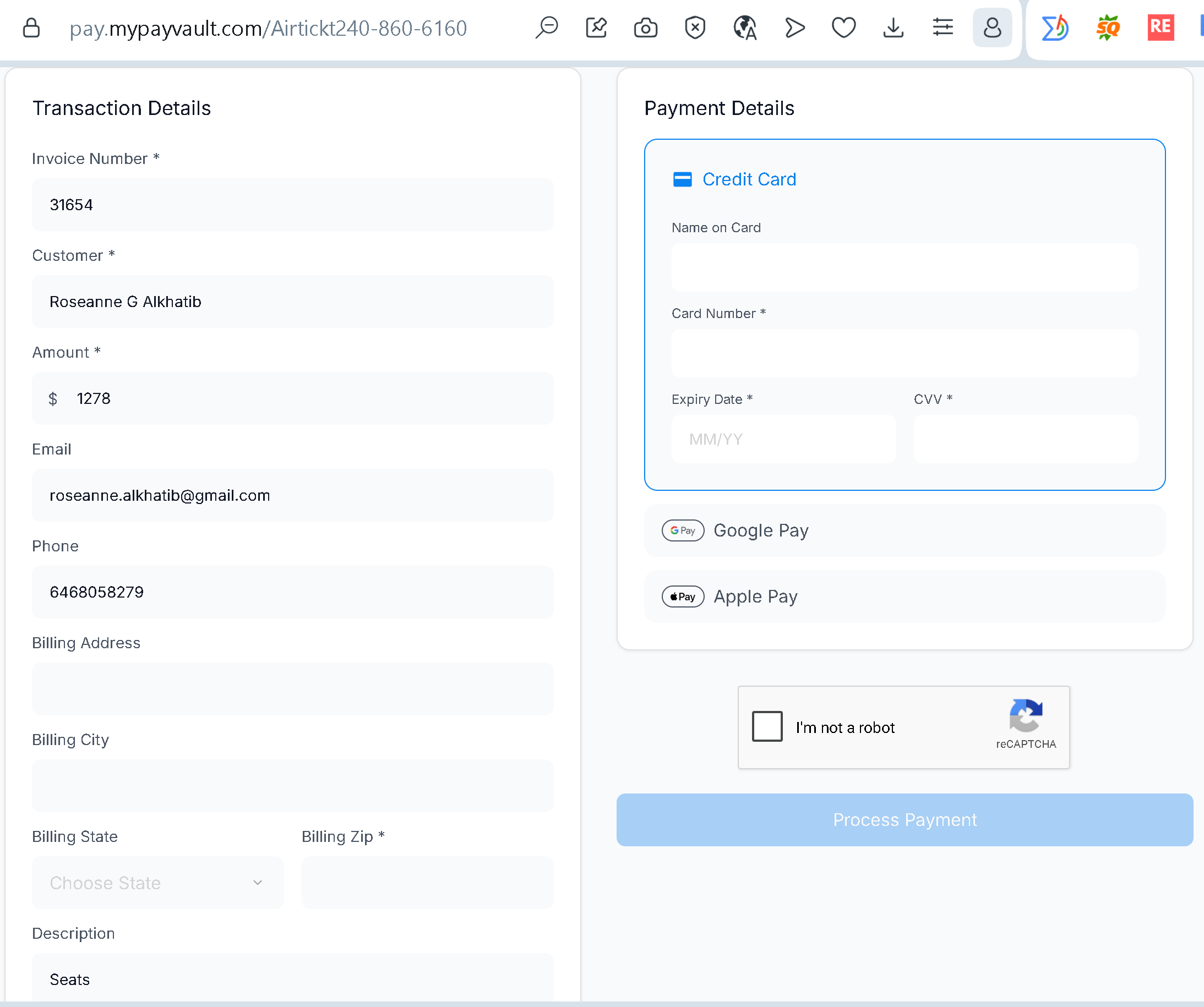
When you click the link, you are taken to a payment page. It looks professional. It includes familiar elements like Google Pay and Apple Pay integration, plus a standard reCAPTCHA widget. The presence of these recognizable global tech components lowers your suspicion. Your brain sees these trusted logos and relaxes, assuming you are interacting with a heavily audited payment architecture.
Step Four: The Inversion That Steals Your Money
Here is where the magic trick happens – and why this scam is so dangerous.
The operative on the phone tells you that you are entering your payment details into a secure cancellation portal to verify your identity and receive a reverse credit. They explain that the system needs to confirm you are the legitimate cardholder before processing the refund. This sounds plausible. Many legitimate services ask for payment confirmation.
But the truth is the exact opposite of what you have been told.
The page you are looking at is not a cancellation portal. It is a standard merchant billing portal. Every field you fill out – your full credit card number, expiration date, CVV, and billing address – is being collected to execute a live charge. When you click the blue button that says “Process Payment” or “Verify,” you are not canceling anything. You are authorizing the scammers to pull $1,278 directly out of your bank account.
Let me repeat that because it is the most important sentence in this guide:
The scammers trick you into paying them to cancel a charge that never existed in the first place.
You receive a fake invoice for $1,278. You call a fake support number. A fake agent tells you to enter your card details into a fake cancellation portal. And then the fake portal charges you the real $1,278.
The invoice was fiction. The charge becomes fact.
The Three Psychological Levers The Scammers Pull
Understanding why this scam works is the first step to making sure it never works on you.
Lever One: The Appearance of Knowledge
Look closely at the payment page in the intercepted attack. Under “Transaction Details,” every field – the victim’s full legal name, private email address, phone number, and the exact target amount – is permanently hardcoded and locked. You cannot edit these fields. They are frozen in place.
This is not a technical limitation. It is a deliberate design choice.
When you see a page that already knows your name, your email, and the amount you supposedly owe, your brain concludes that this must be legitimate. The system already knows who you are. It already has your information. You are not providing anything new. You are just confirming what is already there.
This creates an illusion of a secure, formal system. The locked fields reinforce the false legitimacy of the support agent who guided you there. The page feels official because it appears to have been waiting for you.
Lever Two: The Misdirection of Trusted Logos
The page embeds official merchant integration styles for Google Pay and Apple Pay alongside a standard reCAPTCHA widget. These are real, legitimate components used by thousands of trusted websites.
Scammers do not create fake versions of these logos. They embed the actual code that displays the real logos. When you see a Google Pay button, your brain registers that Google is involved. When you see a reCAPTCHA checkbox, your brain registers that security verification is happening.
But these components prove nothing about who is running the page. A scammer can embed a real reCAPTCHA just as easily as a legitimate merchant can. The presence of these logos does not mean the page is safe. It only means the scammer knows how to copy and paste code.
Lever Three: The Refund Request That Should Never Exist
This is the single most reliable red flag in the entire attack. No legitimate company – airline, bank, subscription service, or any other business – requires a customer to input a full credit card number, expiration date, and CVV code on a web form to receive a refund or cancellation.
Think about this logically. If a company needs to refund you money, they already have your payment information on file. They do not need you to re-enter it. They do not need you to “verify” your card to process a credit. The only reason a page would ask for your full card details is to charge you.
Repeat this to yourself until it becomes automatic: Refunds do not require your credit card number. Purchases do.
The Real Stories Behind The Statistics
This is not abstract theory. Real people are losing real money to these exact tactics.
A woman from North Vancouver lost $6,000 after scammers impersonated airline customer support accounts on social media. Her family was urgently trying to deal with a cancelled flight when the fraudsters struck. They used fake social media replies, WhatsApp calls, refund promises, and money transfers through payment platforms to extract thousands of dollars from a panicked traveler.
In another documented case, a United Airlines customer lost over $17,000 during a three-hour phone call with a fraudster. The scammer allegedly used United’s internal systems to legitimize the transaction, leaving the victim with a valid flight booking and a massive fraudulent charge. The victim thought they were dealing with official support. They were dealing with a criminal who knew exactly how to sound authentic.
Fake airline customer support numbers are now showing up as top search results through paid advertisements. Attackers are increasingly using hijacked ad accounts – not just fake ones – to push their fraudulent phone numbers to the top of Google and Bing search results. Instead of sending victims to a fake website, scammers bring them straight into a live conversation, where they can manipulate them in real time.
This attack vector has become so widespread that security researchers have documented campaigns impacting users across at least 48 organizations in the United States, affecting industries such as healthcare, manufacturing, and technology. Activity was first observed in early 2026 and escalated rapidly due to the attackers’ ability to blend malicious content into legitimate-looking search results.
Expert Advice: How To Spot This Scam Before It Costs You
You do not need to be a cybersecurity professional to protect yourself. You just need to change a few habits and remember a handful of simple rules.
Rule One: Never Call The Number In An Unexpected Invoice Email
If you receive an email or text message claiming a charge has been made to your account – especially if it is for an amount you do not recognize – do not call the number provided in that message. The number is almost certainly fraudulent.
Instead, open a new browser tab. Go directly to the official website of the airline, bank, or service mentioned in the message. Find their customer support contact information on their official site. Call that number. Ask them to verify whether the charge is legitimate.
This takes an extra three minutes. Those three minutes could save you thousands of dollars.
Rule Two: Understand That Refunds Never Require Your Card Details
Commit this to memory: A legitimate refund does not require you to enter your full credit card number, expiration date, CVV, or billing address. The company already has that information if they need to credit your account. If a refund requires a card, it is not a refund. It is a charge.
If you are on a call with someone who claims to be processing a refund and they send you a link to a page that asks for your card details, hang up immediately. You are talking to a scammer.
Rule Three: Be Suspicious of Pre-Filled Information
A page that already contains your name, email, and invoice amount does not prove legitimacy. Scammers can obtain this information from previous data breaches, from public records, or from the initial message you received. The locked fields are a psychological trick, not a security feature.
The only thing that proves a page is legitimate is the web address in your browser’s address bar. Check it carefully. Is the domain exactly the official domain of the company you think you are dealing with? Are there any misspellings, extra words, or unusual endings like .net.top.xyz
Rule Four: Be Wary Of Payment Pages With Google Pay And Apple Pay But No Company Affiliation
Familiar payment logos create a false sense of security. A page can embed a real Google Pay button and still be entirely fraudulent. The presence of these logos means nothing. Focus on the domain name and the context. Does the page display a clear company name and logo that matches the airline or service you originally contacted? If not, you are in the wrong place.
Rule Five: If A Support Agent Sends You A Link, Treat It As Hostile
Legitimate customer support agents rarely send links to payment pages during a phone call. When they do – for example, to process a payment for a new booking – the link will be clearly associated with the company’s official domain. A link that contains random words, numbers, or unfamiliar endings like the one documented in this attack (/Airtickt240-860-6160
Rule Six: Use A Credit Card Instead Of A Debit Card For Travel Bookings
Credit cards offer significantly better fraud protection than debit cards. If a fraudulent charge appears on your credit card, you can dispute it and the card issuer will typically remove the charge while they investigate. With a debit card, the money leaves your bank account immediately, and recovering it can be a much longer, more difficult process.
Rule Seven: Enable Transaction Alerts On All Your Cards
Set up text or email alerts for every transaction above a certain threshold – say, $1 or $10. This way, if a fraudulent charge occurs, you will know about it within seconds. The faster you detect fraud, the faster you can report it and limit your losses.
What To Do If You Think You Have Been Targeted
If you have already entered your card details into a suspicious page, time is critical. Take these steps immediately.
First, call your bank or credit card issuer right now. Use the phone number on the back of your physical card – not any number from the suspicious message or page. Tell them that your card details may have been compromised in a phishing attack. Ask them to block the card and issue a new one. If any fraudulent charges have already appeared, report them immediately and request a chargeback.
Second, review your recent transactions. Look for small test charges (often $0.00 or $1.00) as well as larger amounts. Criminals sometimes test a card with a tiny transaction before making a big purchase. Report anything you do not recognize to your bank.
Third, change your passwords. If you use the same email address and password combination on other websites, scammers may attempt to reuse those credentials. Change your passwords for your email account, your bank login, and any travel or airline accounts you hold. Use strong, unique passwords for each service.
Fourth, file a report. Report the incident to your local police. File a complaint with the Federal Trade Commission (if you are in the US) or your country’s equivalent consumer protection agency. If the scam involved a specific airline or travel company, report it to their security team as well.
Fifth, warn others. Share what happened with friends and family. The more people understand how this scam works, the fewer victims the criminals will find.
One More Thing: The New Frontier Of Travel Scams
This particular attack uses a phone number and a fake payment page. But scammers are constantly evolving their tactics.
Fake airline customer support numbers are now appearing at the top of search results through paid advertisements. When you search “Delta customer service” or “United Airlines refund,” you may see sponsored results that look official but actually lead to fraudulent call centers. Search engine companies are fighting this, but new ads appear constantly.
Social media is another battleground. Scammers create fake support accounts on X (formerly Twitter), Facebook, and Instagram that mimic official airline profiles. When you tweet at an airline about a problem, a scam account may reply with a phone number or link before the real airline responds.
Fake flight cancellation texts are also widespread. These messages appear to come from your airline, include your name and flight number, and tell you to call a number to rebook. When you call, you reach a scammer who offers to book you a new ticket – for a price – even though your original flight was never canceled.
The common thread across all these scams is the phone number. The scammers want you to call. Once you are on the phone, they have your attention, your trust, and your willingness to follow instructions. Do not give them that opportunity.
The Bottom Line
The tech support and flight booking scam is a masterpiece of psychological manipulation. It uses your own fear of losing money to trick you into handing over your card details. The fake invoice creates panic. The fake call center provides comfort. The fake cancellation portal completes the theft.
But the scam has a fatal weakness. It relies entirely on you taking action without verifying the source. Every single step of the attack falls apart if you pause, take a breath, and ask one simple question: “Does this make sense?”
Why would an airline charge me for seats I never booked?
Why would they need my card details to cancel a charge that was supposedly already authorized?
Why is the support number in this email different from the number on the airline’s official website?
The answers to these questions will always lead you to the same conclusion: close the message, close the tab, hang up the phone, and go directly to the official source.
The scammers are counting on your panic. Do not give it to them. Stay calm. Stay skeptical. And remember – no legitimate refund has ever required you to type in your credit card number to receive it.
This attack was detected, analyzed, and contained firsthand by the Antiphishing.biz security team during automated link scanning workflows. The phishing source domain has been completely disabled within their infrastructure to protect the public.