
Who This Guide Is For
This article is written for you – a client of Banesco, one of the largest and most trusted banks in Venezuela, Panama, and across Latin America. You check your balance on BanescOnline. You send money to family with BanescoMóvil. You trust your bank to keep your money safe.
But trusting your bank is not enough. Because the criminals attacking Banesco are not breaking into the bank’s vaults. They are breaking into your habits, your inbox, and your split‑second decisions.
Banesco is a massive target. The bank serves more than 2.4 million monthly active users across its mobile and web platforms, processing peer-to-peer payments and high-value transfers every single day. Where that much money moves, criminals follow.
Across Latin America, scam attempts against bank customers jumped 155% in 2025. Malware attacks rose 225%. Account takeover attempts nearly tripled between late 2024 and early 2026. And one of the most popular tools in the criminal toolkit is painfully simple: a fake login page that looks exactly like yours.
This guide walks you through a real Banesco phishing attack intercepted by security researchers. You will see exactly how the trap works, why it fools smart people every single day, and – most importantly – the simple habits that will keep your account safe forever.
The Phishing Page That Pretends To Be Your Bank
Let me show you exactly what happens when you become the target of this attack. The criminals have built a page that copies Banesco’s login screen so well that most people never suspect a thing.
Step One: The Hook That Gets Your Attention
It starts with a message. An email. A text message. A WhatsApp notification. The message claims to come directly from Banesco. It might warn about “unusual activity” on your account. It might say your security settings need to be updated. It might announce a new “Contigo” feature that requires you to log in.
The message carries urgency. It might say your account will be locked if you do not act. It might warn of an unauthorized login attempt from a device you do not recognize. It might simply ask you to “verify your information” before something bad happens.
Whatever the story, the message contains a link. And that link leads to a trap.
Step Two: The Page That Looks Like Home
You click the link. A page opens. It displays the Banesco logo. It uses the bank’s signature colors and design language. It asks for your usuario (username) and contraseña (password).
The page even includes options that make it feel real. There is a “Recordarme” checkbox to remember your login on that device. There are links for forgotten credentials – just in case you need them. Every visual detail has been copied from the genuine Banesco login interface.
Threat Intel: This spoofed page was detected, analyzed, and contained firsthand by the
Antiphishing.bizsecurity team during our standard URL vetting operations. To protect the public, the dangerous destination URL has been safely deactivated within our infrastructure. We document and analyze these live visual patterns to help security researchers and users detect replica fraud techniques before financial damage occurs.
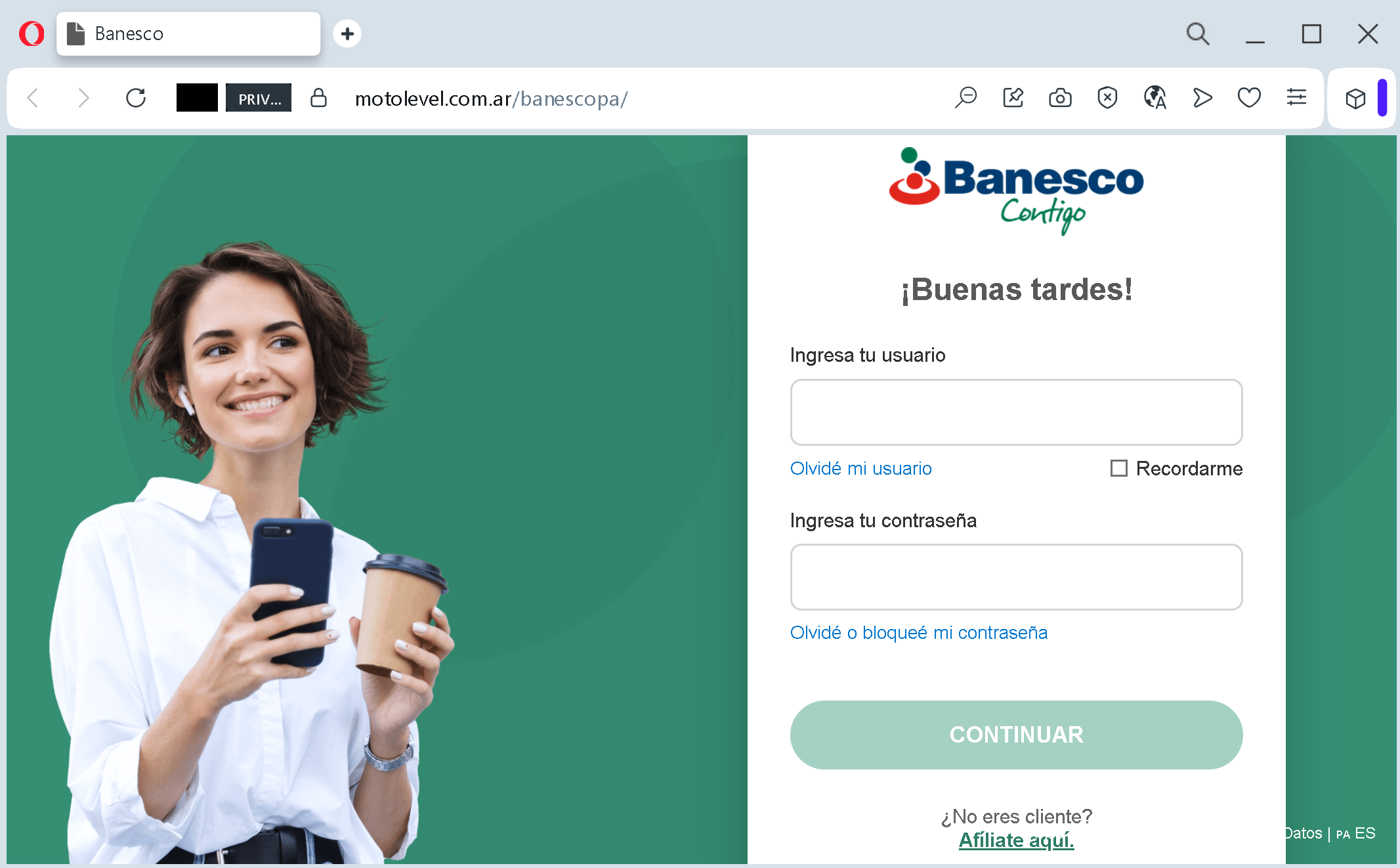
If you are a regular Banesco customer, this page looks exactly like the one you use every week. Your brain relaxes. You start typing.
Step Three: The Theft That Happens Invisibly
You enter your username. You enter your password. You click the “CONTINUAR” button.
In that instant, your credentials are captured and sent directly to the attackers. The criminals now have the keys to your account. They can log in as you. They can view your balances. They can transfer your funds. They can add themselves as authorized payees. They can drain your entire account before you even realize something went wrong.
And here is the cruelest part: after stealing your credentials, the fake page often redirects you to the real Banesco website. You log in successfully. You see your balance. You think everything is fine. But the damage has already been done. Your stolen username and password are now in the hands of criminals who may strike days or weeks later.
The Four Red Flags That Give Away The Fake Page
The fake page documented by security researchers at Antiphishing.biz revealed a clear set of differences between the real Banesco login screen and the criminal copy. Here is what you need to look for every single time you log in.
Red Flag One: The Web Address Is Wrong
A legitimate Banesco login page lives on a domain that ends with banesco.combanesco.com.pa
Before you type a single character, look at your browser’s address bar. Does the web address begin with banesco.com.top.xyz
Red Flag Two: The Page Does Not Know You
When you log into the real Banesco website, something special happens. After you enter your username, the bank’s system recognizes you. It might display a personal security image – a picture you selected when you set up your account. It might show a partial view of your account information. It might ask for an additional authentication step, such as a one‑time code sent to your phone.
The fake page does none of this. It is a static form. It treats every visitor the same way. It lacks the personalization and the multi‑step authentication that genuine Banesco login uses. If you enter your username and the page immediately asks for your password without any personalization, you may already be on a fake page.
Red Flag Three: The Page Asks For Login Out Of Nowhere
Banesco does not send links. The bank’s official security policy is clear: they will never send you an email or text message with a link that asks you to log in to resolve an account issue.
Think about that for a moment. If Banesco needs you to take action on your account, they will notify you through their official app or through secure messages inside your online banking dashboard. They will not send you a random link and ask you to click it. Any message that does this – no matter how official it looks – is a phishing attempt.
Red Flag Four: The Page Lacks Security Notices
Real Banesco login pages include security notices, legal disclaimers, and references to the bank’s fraud protection policies. The fake page documented by Antiphishing.biz used the bank’s logo and color scheme but omitted the additional security text that appears on the real page. The criminals copied the look but not the full content. Compare the page you are on with what you remember from previous logins. If something is missing, that is a warning.
The Bigger Picture: Why Banesco Customers Are Being Targeted
Banesco is not a small, obscure bank. It is the leading private bank in Venezuela, with more than 2.4 million monthly active users. It operates across multiple countries in Latin America. It processes millions of digital transactions.
This scale makes Banesco an irresistible target for organized cybercriminal groups. They do not need to break into the bank’s systems. They just need to trick a small percentage of customers into handing over their credentials on fake login pages. Across 2.4 million users, even a tiny success rate yields thousands of compromised accounts.
Across Latin America, the numbers are staggering. Scam attempts against bank customers rose 155% in 2025. Malware attacks increased 225%. Account takeover attempts nearly tripled. Mexican banks saw account takeover attempts increase by more than 324%. The criminals are not slowing down. They are getting more aggressive, more organized, and more convincing.
Security researchers tracking these attacks note that criminals often start with basic phishing and credential theft. But when banks improve their authentication processes, the criminals shift toward real‑time social engineering and remote access to victims’ devices. Today’s fake login page is just the beginning. Tomorrow, the criminals may call you pretending to be Banesco support, asking for the one‑time code sent to your phone.
Banesco itself has recognized this threat and taken significant steps to protect customers. The bank has implemented Clave Dinámica – a numeric code generated in the BanescoMóvil app that changes every 30 seconds for transactions. It has introduced Llave Banesco, a next‑generation system that validates user identity through fingerprint, facial recognition, or PIN when making transfers, specifically designed to combat phishing.
More recently, Banesco rolled out passkeys for 2.2 million users, moving away from SMS one‑time passwords that criminals could easily intercept through phishing or vishing calls. Passkeys use cryptography that never leaves your device, eliminating the risk of man‑in‑the‑middle attacks that traditional codes cannot prevent.
But here is the hard truth: none of these protections matter if you type your username and password into a fake page. The criminals do not need to break the bank’s security. They just need you to give them access.
Expert Advice: How To Keep Your Banesco Account Safe
You do not need to be a cybersecurity expert to protect yourself. You just need to change a few simple habits and remember a handful of rules.
Rule One: Never, Ever Click Links In Unsolicited Messages
This is the single most important rule in this entire guide. If you receive an email, text message, or WhatsApp message claiming to be from Banesco – especially one that asks you to click a link to verify your account, update your security settings, or check for suspicious activity – do not click the link.
Instead, open a new browser tab. Type banesco.com
Banesco USA explicitly states this in their fraud warnings: the bank will never ask for your password, PIN, Social Security number, or full account numbers by email or text. They will also never request a secure access code over the phone.
Rule Two: Bookmark The Official Login Page
Take sixty seconds right now. Open your browser. Navigate to the official Banesco login page for your country. Bookmark it. Name it “Banesco – Official”. From now on, use that bookmark every time you need to log in.
Bookmarking protects you from typos (you cannot accidentally type banesc0.com
Rule Three: Use A Password Manager
Password managers are small applications that store all your login credentials securely and automatically fill them into websites. They have a hidden superpower: they only autofill on the correct domain.
If you click a link to a fake Banesco page, your password manager will recognize that the domain is not banesco.com
Rule Four: Enable Every Security Feature Banesco Offers
Banesco provides multiple layers of security that criminals cannot easily bypass – but only if you turn them on.
Activate Clave Dinámica for transactions. This is the numeric code generated in the BanescoMóvil app that changes every 30 seconds. It adds a time‑sensitive barrier that criminals cannot predict or reuse.
Enable Llave Banesco for biometric verification. This system uses your fingerprint, facial recognition, or PIN to validate your identity before processing transfers. It is specifically designed to resist phishing and impersonation attacks.
If you use Banesco USA, enable two‑factor authentication wherever the bank offers it. Use strong, unique passwords for your banking account – never reuse a password from another website. Set up transaction alerts so you are notified immediately of any activity on your account.
Rule Five: Be Suspicious Of Urgency
Phishing messages almost always create a false sense of urgency. “Your account will be locked in 24 hours.” “Unauthorized login detected – act now.” “Immediate verification required.”
This urgency is the criminal’s most powerful weapon. When you panic, you stop thinking clearly. You stop checking addresses. You just want to fix the problem.
Train yourself to treat urgency as a red flag. When a message tries to rush you, pause. Take a breath. Open your bookmark and log in the normal way. The real Banesco will wait for you. The criminal cannot afford to wait.
Rule Six: Know What Banesco Will Never Ask You
Banesco will never send you a link to log in and resolve an account issue. Banesco will never call you and ask for your password or a secure access code. Banesco will never request your full debit card number, expiration date, or CVV by email, text, or phone.
If someone asks for any of these things, you are not talking to Banesco. You are talking to a criminal. Hang up. Delete the message. Do not engage.
What To Do If You Have Already Entered Your Credentials
If you realize that you have typed your Banesco username and password into a suspicious page, do not panic. But do not wait, either. Time is critical.
First, go directly to the official Banesco website by typing banesco.com
Second, check your account for unauthorized activity. Look for transfers you did not make. Look for new payees added to your account. Look for changes to your contact information or security settings. If you see anything suspicious, contact Banesco’s fraud department immediately.
Third, call Banesco directly. Use the official customer service number from the bank’s website or from the back of your debit card. Do not call any number provided in the suspicious message. Tell them your credentials may have been compromised and ask them to review your account for fraud.
Fourth, enable or review your security features. Make sure Clave Dinámica and Llave Banesco are active on your account. If you have not yet set up two‑factor authentication, do it now.
Fifth, report the phishing page. Send the URL to Banesco’s fraud department. Your report could help protect other customers from falling into the same trap.
The Bottom Line
The fake Banesco login page scam is not a sophisticated hack. It does not rely on breaking through the bank’s defenses. It relies on something much simpler: your momentary distraction, your trust in familiar logos, and your natural reaction to urgency.
The criminals build a page that looks like home. They send a message that sounds like a warning. And they wait for you to do what millions of people do every day – type your username and password without looking at the address bar.
But the scam has a fatal weakness. It falls apart the moment you pause, take a breath, and ask one simple question: “Did I get here by clicking a link in a message?”
If the answer is yes, you are in the wrong place. Close the page. Open your bookmark. Log in through the real Banesco website. That extra thirty seconds will protect your account, your savings, and your peace of mind.
Banesco has invested millions in security technology – passkeys, dynamic codes, biometric verification, fraud monitoring. But none of it works if you hand your credentials to a criminal on a fake page.
The scammers are counting on your speed. They are counting on your trust. Do not give them either. Stay slow. Stay skeptical. And always, always type the address yourself.
This attack was detected, analyzed, and contained firsthand by the Antiphishing.biz security team during standard URL vetting operations. The dangerous destination URL has been completely disabled within their infrastructure to protect the public.