
Who This Guide Is For
This guide is written for you – someone who has a PayPal account and uses it to send money, receive payments, or shop online.
You are not a cybersecurity professional. You probably think that as long as you are careful and do not click suspicious links, you will be fine. And you are mostly right. But what if the scam emails look perfectly normal? What if the alert you receive seems to come from a trusted source? What if it happens to you when you are tired, distracted, or worried about your money?
That is exactly when the criminals strike. And they are very, very good at what they do.
PayPal has around 400 million active accounts worldwide, and phishing scammers target every single one of them relentlessly. In 2024, the FBI saw $16.6 billion stolen through cybercrime, with phishing among the top three attack types. People over 60 lost nearly $5 billion of that – but younger people are getting hit too.
This guide will show you exactly how a new, highly effective PayPal scam works. We will walk through the two-step trap, read the stories of real people who lost everything, and learn the simple habits that will keep your money safe.
The Two-Step Trap That Steals Your Account Without You Even Noticing
The Antiphishing.biz security team recently intercepted a live phishing attack that uses a simple but devastating psychological trick. It relies not on breaking through PayPal’s defenses, but on making you hand over your own keys.
Step One: The Fake “New Device Detected” Alert
It starts with an unsolicited email, SMS, or web pop‑up. The message claims that a new device has just logged into your PayPal account. It even includes fabricated details to make the alert feel real – a location like Madrid, Spain, a browser type like Android Chrome, and a recent date.
Analysis Memo: This spoofed page was detected, analyzed, and contained firsthand by the
Antiphishing.bizsecurity team during our automated link scanning workflows. To protect the public, the dangerous destination URL has been completely disabled within our infrastructure. We document and analyze these live visual patterns to help security researchers and users recognize deceptive clone designs before financial damage occurs.
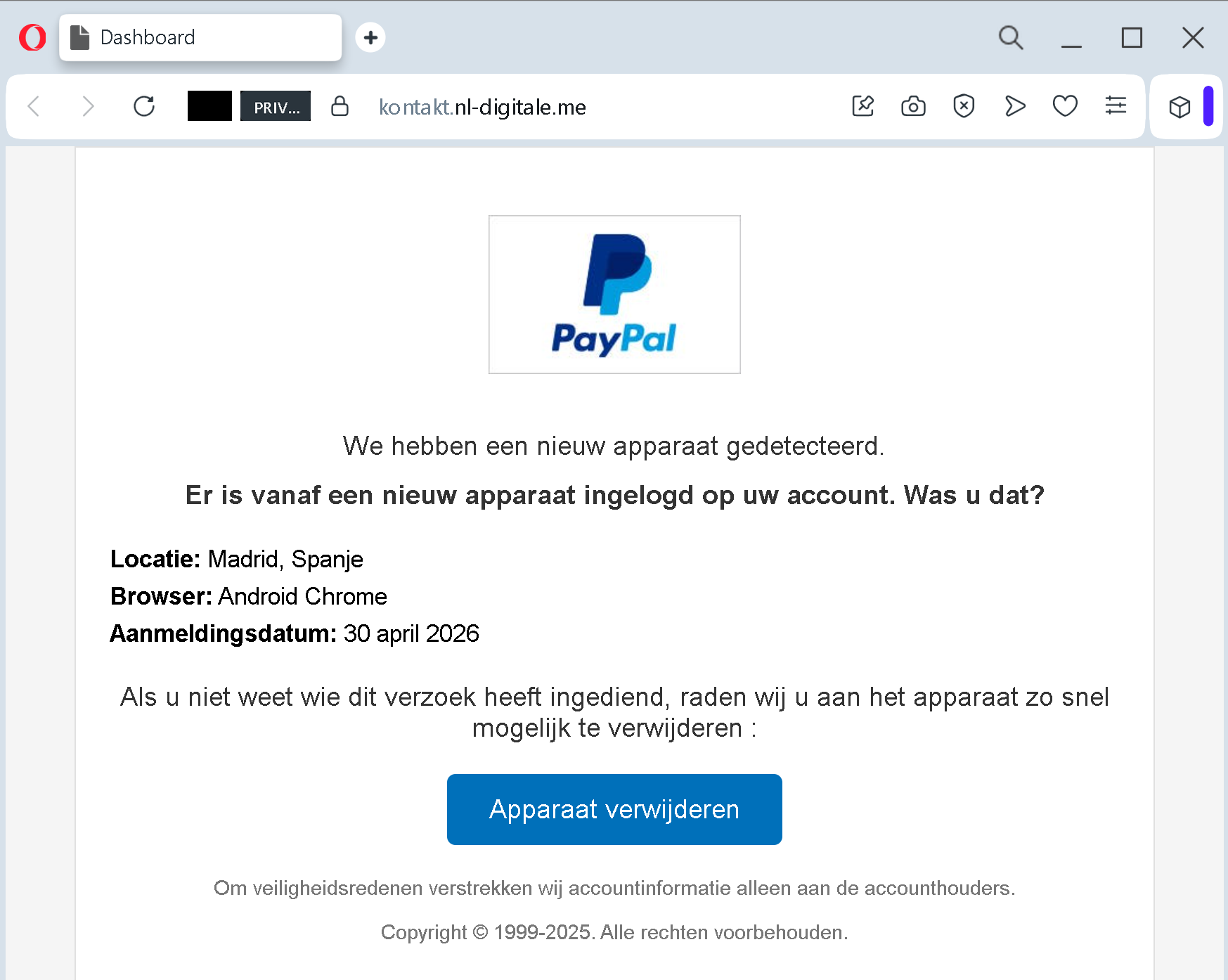
The message urges you to click a button labeled something like “Remove the device” or “Apparaat verwijderen” as a security measure. The criminals create fear: someone else is in your account, and you need to act now to stop them.
This is the hook. The fear of losing your money triggers an urgent fight‑or‑flight response. Your brain stops analyzing the URL and starts looking for the fastest way to fix the problem. The “Remove device” button offers a quick solution. That is the trap.
In the real attack documented by Antiphishing.biz, the alert shared the same suspicious domain pattern as the login page that followed. The criminals did not even bother to hide it very well. But when you are panicking, you do not look at the address bar.
Step Two: The Fake PayPal Login Page
Clicking that button leads to a page that mimics the official PayPal login screen perfectly. The same logos. The same layout. The same fonts. It asks for your email address and password.
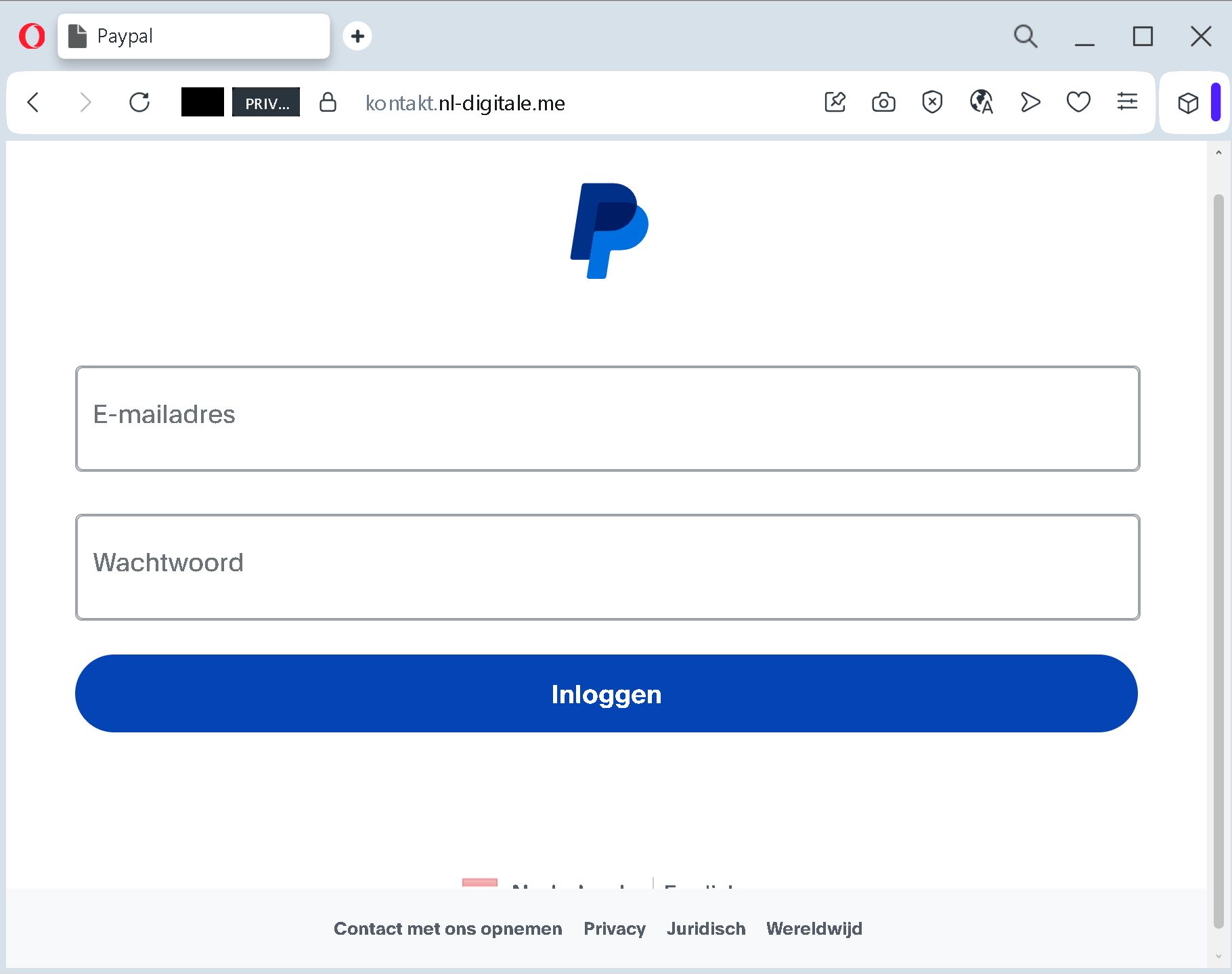
Once you type them in and click “Log In,” your credentials are sent directly to the attacker. They now have the keys to your account. They can view your balance, transfer your funds, make purchases, and – worst of all – try the same email and password combination on other websites like your bank or social media accounts.
In many cases, the fake page also captures any two‑factor authentication codes you receive. The criminals have gotten so sophisticated that they can intercept those codes in real time and use them to log in before the code expires.
The whole process takes less than a minute. In that minute, you go from feeling safe to having your entire account in the hands of criminals.
Real Stories That Will Break Your Heart
Let me share a few stories of real people who fell for similar scams. These are not cautionary tales from a cybersecurity textbook. These are actual human beings who lost money they worked their entire lives to earn.
An 85-Year-Old Retiree Lost $200,000 and Nearly Half of His Retirement Savings
Brian Oliver is 85 years old, retired, sharp, and financially savvy enough to have a stock‑and‑bond portfolio worth hundreds of thousands of dollars. He is not the type of person you picture getting scammed. That is exactly why scammers picked him.
It started with a routine‑looking email that said PayPal owed him money. It was not a wild claim. He had dealt with PayPal before and figured, “Maybe they found some money for me.” So he responded. The email included a phone number, and that number connected him to a man who called himself Andrew Johnson.
“Yeah, we have $450 for you. Type in the number 100 on your computer and we’ll get it started.” Brian typed 100. Andrew immediately said he had made a mistake: “Oh no, you put in 10,000.” Brian pushed back. He said he did not type 10,000. Andrew told him to check his Bank of America account.
Brian opened it, and there it was: $10,000 sitting in his checking account. Except it was not real. The scammers had mirrored his bank’s website. What Brian saw looked exactly like his actual Bank of America page, complete with a new balance and a phone number embedded in the “Contact Us” section. That number was fake, too.
Brian called it. A man named Josh answered, identifying himself as a Bank of America representative. He told Brian that the only way to return the money without triggering a $3,500 tax penalty was to withdraw $10,000 in cash and feed it into a crypto ATM. Brian had never heard of a crypto ATM before that day. Josh helpfully told him exactly where to find one. It was in a sketchy part of town. Brian walked in carrying $10,000 in his pocket.
“I’m on my knees, on a cement floor, and I’m 85,” Brian later said. He fed one hundred $100 bills into the machine, bill by bill, watching over his shoulder the entire time. Some bills got kicked back out. He fed them in again. When the machine finally accepted all of them, he photographed the receipt and sent it to Andrew Johnson, just as he had been instructed.
Then Brian went home and told Andrew it was done. Andrew told him they still had to take care of his refund. He told Brian to type in the number 200. Brian typed it. Andrew’s response came fast: “Oh my God, my boss is going to kill me. It’s $200,000 we’ve transferred to your account.”
Brian opened his bank account again. The fake mirrored site showed $200,000 sitting there. Josh Wilson was back on the phone with a new plan. This time, the crypto ATM would not work because the amount was too large. Brian needed to liquidate $200,000 from his stock and bond portfolio, convert it to cash and use it to buy gold coins.
Brian protested. He told them to just reverse the transfer. They said it was impossible. “This is my retirement money. 50% of my retirement money,” he said.
The scammers told him not to breathe a word to anyone. Josh specifically warned him that telling his broker the truth could trigger tax problems. So Brian called his broker and said he had his eye on a piece of real estate he wanted to flip. The broker processed the sale without question.
Brian went to a gold coin store, wrote a check for $198,560 and waited two to three days for it to clear. Andrew Johnson stayed in regular contact the entire time. When the gold was ready, Johnson gave Brian one final instruction. A courier would come to his door to pick up the box. Before handing it over, Brian should ask the courier for a password. The password was “blue.”
The courier arrived. He was driving a black Mustang. He said the word blue. Brian handed over the box. “He told me the password,” Brian said. “I handed the box, and off went my $200,000.”
The day after the courier left, Andrew Johnson called back with urgency. He told Brian another $200,000 had landed in his account, and they needed to do the whole thing over again. That was the moment it broke. “That’s when I came out from under the ether of this scam,” Brian said. “And I said, this cannot be right.”
He immediately called the police. The case went to trial. A courier named Seth Wayne received an 18‑year prison sentence. Another courier was convicted as well. But that did not give Brian his $200,000 back. Ten other victims testified at that trial. Some had lost far more. One victim lost $1.8 million. Another lost $4.9 million.
An 85-Year-Old Woman Lost Thousands After Scammers Used Her Actual Purchase History Against Her
Jean, an 85‑year‑old woman from Arizona, received an email that appeared to be from PayPal, asking her to verify a transaction. “It said that an amount of 669.90 was going to be charged from my PayPal account, and if that wasn’t me to call this number,” Jean explained.
When she called, the scammer introduced himself as a representative from PayPal and immediately demonstrated knowledge of her recent purchases. “The gentleman introduced himself as Henry from PayPal, and he knew my last two PayPal purchases. He had the amount and who it went to. So, I assumed that I was talking to PayPal,” Jean said.
The scammer told Jean that $400 had been taken from her account and offered to help recover the money. He instructed her to type her name and “$400” on her computer screen. “He told me to put my full name on the screen, and then to put $ sign and 400. So, I did that. And then he said, ‘Did you put an extra zero in?’ And I said, ‘No.’ He said, ‘Well, it says 4,000.’”
Henry told Jean she needed to return the “extra” money to PayPal and claimed she could only do that by purchasing gift cards. “He said, ‘What I want you to do is to go to the store and get either Nike or Apple gift cards in the amount of the $4,000,’ and I said, ‘Well, how do I know I’m talking to PayPal?’ I asked again. He said, ‘Well, how would I know what you bought the last two purchases if I wasn’t with PayPal?’”
Jean eventually realized she had been scammed. But the emotional toll was almost worse than the financial loss. “Not only are you out the financial amount, but there’s a lot of emotional toll to it as well,” her daughter Beth said. “It’s been a nightmare for my mom. She’s just exhausted and, of course, overwhelmed with the whole process. And then, you know, down on herself.”
A Grand Forks Man Lost $12,500 in a Bitcoin Machine
Adam Kuhn, owner of AK Tile LLC in Grand Forks, North Dakota, received a text message from what he thought was his bank about possible fraud. A few days later, he received an email from someone claiming to be from the PayPal fraud department. They indicated a fraud alert with a large charge.
“I thought it was weird because I haven’t used PayPal in forever… but I called the 805 area code number because I wanted my money back and it was as real as PayPal could be. It was all voice activated and it sounded so real,” he said.
Adam provided them everything they asked for. Soon, they had full control of his personal computer. The man on the phone told him that to get the reported money back, he had to go to a local Bitcoin machine. “The guy said all you have to do is put the cash in. I put in $12,500 dollars of my own cash in this machine,” Adam says.
The machine provided a QR code receipt, which later showed his money was sent to Vietnam. Contact with the man claiming to be with PayPal soon became slim, and he realized he was scammed.
“I’ve been really hard on myself. I’ve been thinking, why are you so stupid? Why would I do something like that and think it’s right? I’m just so mad at myself,” he said. “I’m basically starting over now… this will affect my business and my family.”
Adam’s warning to others is simple: “If you get a text that has anything to do with money, I would question it, 100%. Scammers are out here. They will take everything you have, and they don’t care.”
A Florida Couple Lost More Than $80,000 in a Text Message Scam
An older couple in Ormond Beach, Florida, received a text about an “unauthorized $599 charge” on their PayPal account. They called the phone number listed in the message to address the problem and received a form from scammers posing as Norton Security representatives to catalog how much money they lost.
When they saw $50,000 deposited back into their account, they thought they had mistakenly added a few zeros on the form and wired the extra money they thought they received – some $49,000 – to an account in Utah. But the scammers claimed the money was never sent because of a problem with the IRS and requested the money in cash.
The couple handed over $33,000 in cash to a courier who visited their home. In total, they lost close to $83,000.
The Four Red Flags That Give Away The Fake Message
You do not need to be a cybersecurity expert to spot these scams. You just need to know what to look for.
Red Flag One: The Message Creates Panic With A Deadline
“Your account has been restricted.” “Someone has logged in from a new device.” “You have 24 hours to verify your information.”
These phrases are the scammers’ most powerful weapon. They are designed to make you panic. When you panic, you do not check the web address. You do not question the request for your password. You just want to fix the problem as fast as possible.
Real security notifications from PayPal do not work this way. Legitimate alerts give you information. They do not demand immediate action through a link. If a message tries to rush you, that is your signal to stop entirely.
Red Flag Two: The Message Was Unsolicited
PayPal will never send you a link to log in and resolve an account issue via email or text. Real security notifications appear inside your PayPal account when you log in normally, or they come from official email addresses ending in @paypal.com. They never ask you to click a button to “remove” a device.
If you receive a message that claims your account has a problem and asks you to click a link to fix it, you are looking at a phishing attempt.
Red Flag Three: The Web Address Is Not Exactly paypal.com
paypal.comBefore you type your password into any website, look at the browser’s address bar. The real PayPal login page lives at paypal.compaypal.com/nlluna.mindnation.comgithub.io
Scammers use these look‑alike domains because they know most people glance at the first part of the address (“paypal”) and assume the rest is fine. It is not fine. The difference is the difference between safety and theft.
Red Flag Four: The Message Lacks Account‑Specific Details
A real security alert from PayPal would include partial information about the actual device or location from your login history. It might say “a login attempt was made from an iPhone in Chicago.” The fake messages use generic placeholders that could apply to anyone.
The copyright notice is another clue. One fake alert documented by security researchers showed a copyright notice for “1999‑2025” even though the screenshot was taken earlier in 2026 – a clear sign of a templated phishing page that had not been updated.
What PayPal Will Never Do
PayPal has a clear, official policy about how they communicate with customers. Memorizing this short list could save your account.
PayPal will never ask you to click a link in an email or text message to “verify” your account or “remove” a device.
PayPal will never ask you to provide your password, credit card number, or bank account details in an email or text message.
PayPal will never ask you to purchase gift cards or use cryptocurrency to resolve an account issue.
PayPal will never ask you to download software to your computer to “fix” a problem.
PayPal will never call you and ask for your two‑factor authentication code.
If someone asks you to do any of these things, you are not talking to PayPal. You are talking to a criminal. Hang up. Delete the message. Do not engage.
Expert Advice: How To Keep Your PayPal Account Safe
You do not need to be a cybersecurity professional to protect yourself. You just need to change a few simple habits and remember a handful of rules.
Rule One: Never Click Links In Unsolicited Messages
This is the single most important rule. If you receive an email or text message claiming that someone has logged into your account, that a payment has been made, or that your account has been restricted – do not click any links in that message. Do not call any phone number in the message.
Open a new browser tab. Type paypal.com
That one habit – typing the official address yourself instead of clicking a link – would have prevented every single victim story in this article.
Rule Two: Enable Two‑Factor Authentication Using An Authenticator App
Two‑factor authentication (2FA) is your digital seatbelt. It means that even if a scammer steals your password, they cannot get into your account without the one‑time code.
But here is the catch: using SMS (text message) for 2FA is no longer safe enough. Scammers have learned how to convince phone carriers to transfer your phone number to a SIM card they control. They can also intercept SMS codes through the fake login pages described earlier.
Instead, use an authenticator app like Google Authenticator, Microsoft Authenticator, or Authy. These generate codes directly on your phone without sending anything over the network. Or better yet, use a hardware security key like a YubiKey. These are the strongest forms of 2FA available.
Rule Three: Use A Password Manager
Password managers are small applications that store all your login credentials securely and automatically fill them into websites. They have a hidden superpower: they only autofill on the correct domain.
If you click a link to a fake PayPal login page, your password manager will recognize that the domain is not paypal.com
Rule Four: Check Your Recent Account Activity Regularly
Log into your PayPal account once a week and review your recent transactions. Look for small test charges as well as larger ones. Criminals sometimes test a stolen card with a tiny transaction – $0.00 or $1.00 – before making a big purchase.
If you see anything you do not recognize, report it to PayPal immediately. You can also set up transaction alerts in your PayPal settings to receive a text or email every time money moves out of your account.
Rule Five: Be Suspicious Of Urgency
Scammers manufacture pressure because it works. If someone on the phone is telling you that you must act right now, that is not a real emergency. That is a tactic.
Train yourself to treat urgency as a red flag. When a message tries to rush you, pause. Take a breath. Open your browser and type paypal.com
Rule Six: Never Give Out Your Two‑Factor Authentication Code
No one from PayPal will ever call you and ask for your 2FA code. No one from your bank will ever call you and ask for your 2FA code. No legitimate customer service representative from any company will ever call you and ask for your 2FA code.
These codes are for you and you alone. The moment someone asks you to read one back over the phone, you are talking to a criminal. Hang up immediately.
Rule Seven: If You Are Unsure, Call PayPal Directly Using A Verified Number
PayPal has a customer service number for exactly this situation. Do not call any number provided in a suspicious message. Instead, go to the official PayPal website, scroll to the bottom, and find the “Contact Us” link. Use the phone number listed there.
A five‑minute phone call is a small price to pay for peace of mind. The representative can confirm whether the message you received was legitimate or not.
What To Do If You Have Already Fallen For This Scam
If you realize that you have clicked a link, entered your password, or provided any sensitive information on a suspicious website, do not panic. But do not wait, either. Act immediately.
First, go directly to the official PayPal website by typing paypal.com
Second, review your recent transactions. Look for any payments you did not authorize. If you see anything suspicious, report it to PayPal’s fraud department immediately.
Third, enable two‑factor authentication if you have not already. This will prevent the scammer from getting back into your account even if they still have your old password.
Fourth, if you provided your credit card or bank account details, call your bank or credit card issuer using the phone number on the back of your card. Tell them your details may have been compromised and ask them to block the card or monitor your account for fraudulent activity.
Fifth, if you use the same email address and password combination on any other websites – and you probably do – change those passwords immediately. Scammers will try the stolen credentials on other popular services like Amazon, eBay, Gmail, and social media platforms.
Sixth, report the phishing attempt to PayPal by forwarding the email to [email protected]. Then delete the message. Your report could help protect other customers from falling into the same trap.
Seventh, file a report with the Federal Trade Commission at reportfraud.ftc.govic3.gov
A Final Word From The Security Team
The phishing attack described in this guide was intercepted, analyzed, and contained firsthand by the security team at Antiphishing.biz during their automated link scanning workflows. The dangerous destination URL has been completely disabled within their infrastructure to protect the public.
But new domains appear every day. The criminals change their tactics. They refine their fake pages. They find new ways to bypass security measures. But one thing never changes: they need you to take an action they have scripted for you.
Your best defense is not a piece of software or a security product. Your best defense is awareness. Every time you are about to click a link in a message about your PayPal account, pause. Ask yourself whether the request makes sense. Ask yourself whether PayPal would ever ask you to do what you are about to do.
If something feels wrong, trust that feeling. Close the message. Type paypal.com
The scammers are counting on your speed, your trust, and your fear of losing money. Do not give them any of those things. Stay slow. Stay skeptical. And always, always type the address yourself.
If you found this guide helpful, share it with everyone you know who has a PayPal account. The more people understand this scam, the harder it becomes for criminals to profit.