
Who This Guide Is For
This article is written specifically for you – a Depop seller who uses the platform to make a living, earn extra cash, or simply clear out your closet. You are not a cybersecurity expert. You do not have time to analyse every link that lands in your inbox. You just want to sell your items without drama.
And that is exactly why scammers have you in their crosshairs. Depop has grown into a massive global marketplace, and where money flows, criminals follow. According to a recent survey, 57% of Depop buyers reported being targeted by some kind of scam, the highest rate among all second‑hand platforms. Sellers are being hit just as hard – especially with the kind of phishing attack we are about to unpack.
This guide will show you exactly how the scam works, why it feels so real, and – most importantly – how to spot it before you lose a single penny.
The Scam That Pretends To Be Your Friend
Let me walk you through what happened to a real seller who almost fell for this trap. You will recognise the sequence immediately.
Step 1: The Panic Inducer
It starts with a message that looks like it came directly from Depop. The headline screams: “Orders Suspended”. The message tells you that your store operations have been temporarily halted because of a problem with your payment details. You need to “verify” your information immediately, or you will not be able to complete your pending sales.
A large, friendly “Verify” button waits for you at the bottom.
Security Notice: This scam layout was intercepted, verified, and locked down firsthand by the
Antiphishing.bizsecurity team during our daily link moderation procedures. To protect the public, the phishing source domain has been completely disabled within our infrastructure. We document and analyze these live visual patterns to help security researchers and users spot lookalike phishing methods before financial damage occurs.
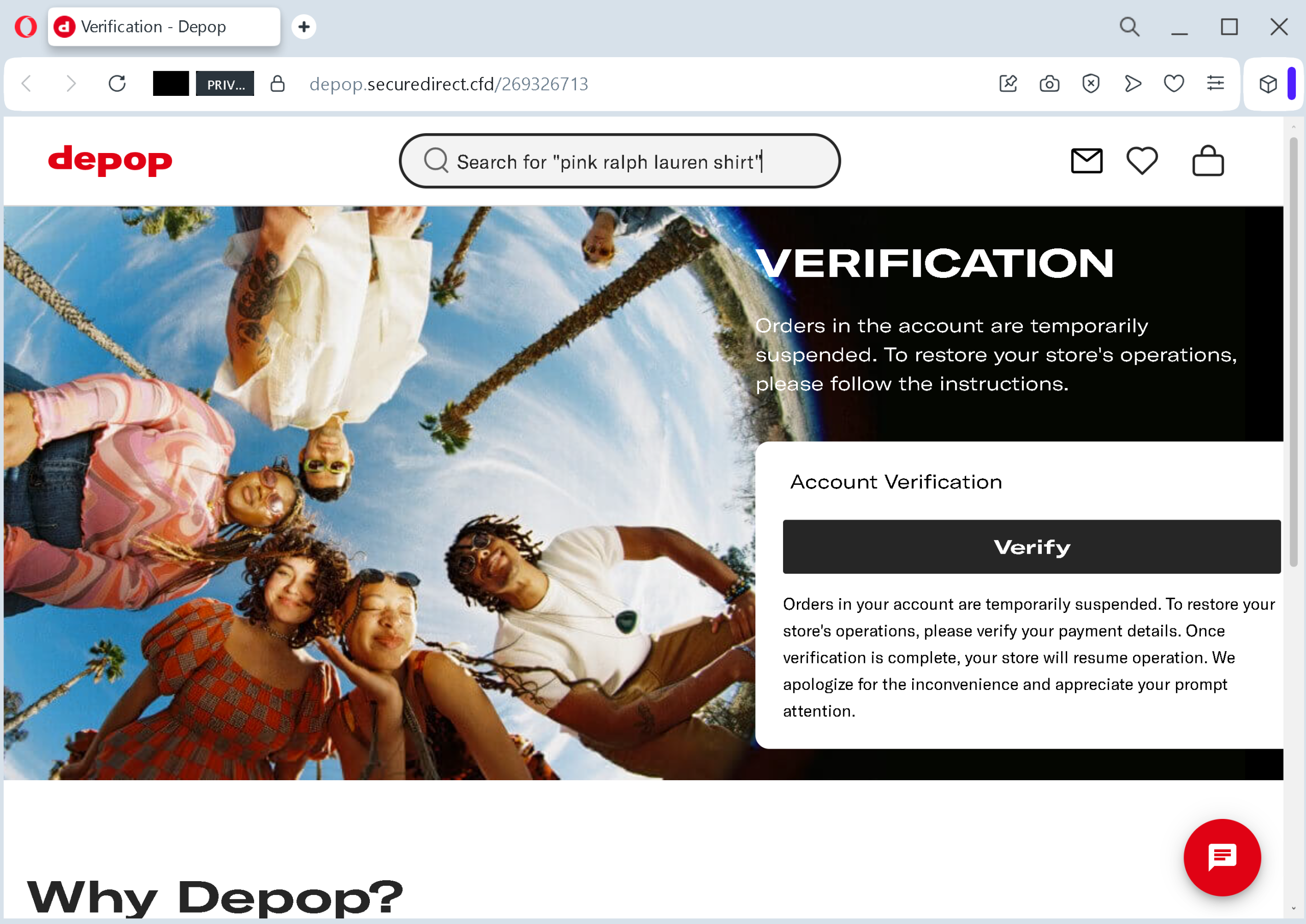
This is the hook. The scammer knows that the worst thing that can happen to a seller is lost orders. The thought of a sale slipping away creates instant anxiety. And when people panic, they stop double‑checking things. They click.
Step 2: The “Friendly” Operator
After you click, a chat window pops up. A support agent named “Amelia” welcomes you.
Her message is carefully written to sound warm and reassuring: “The process is secure and only done once” – and then she adds the killer line: “Amelia is a real person, not a robot.”
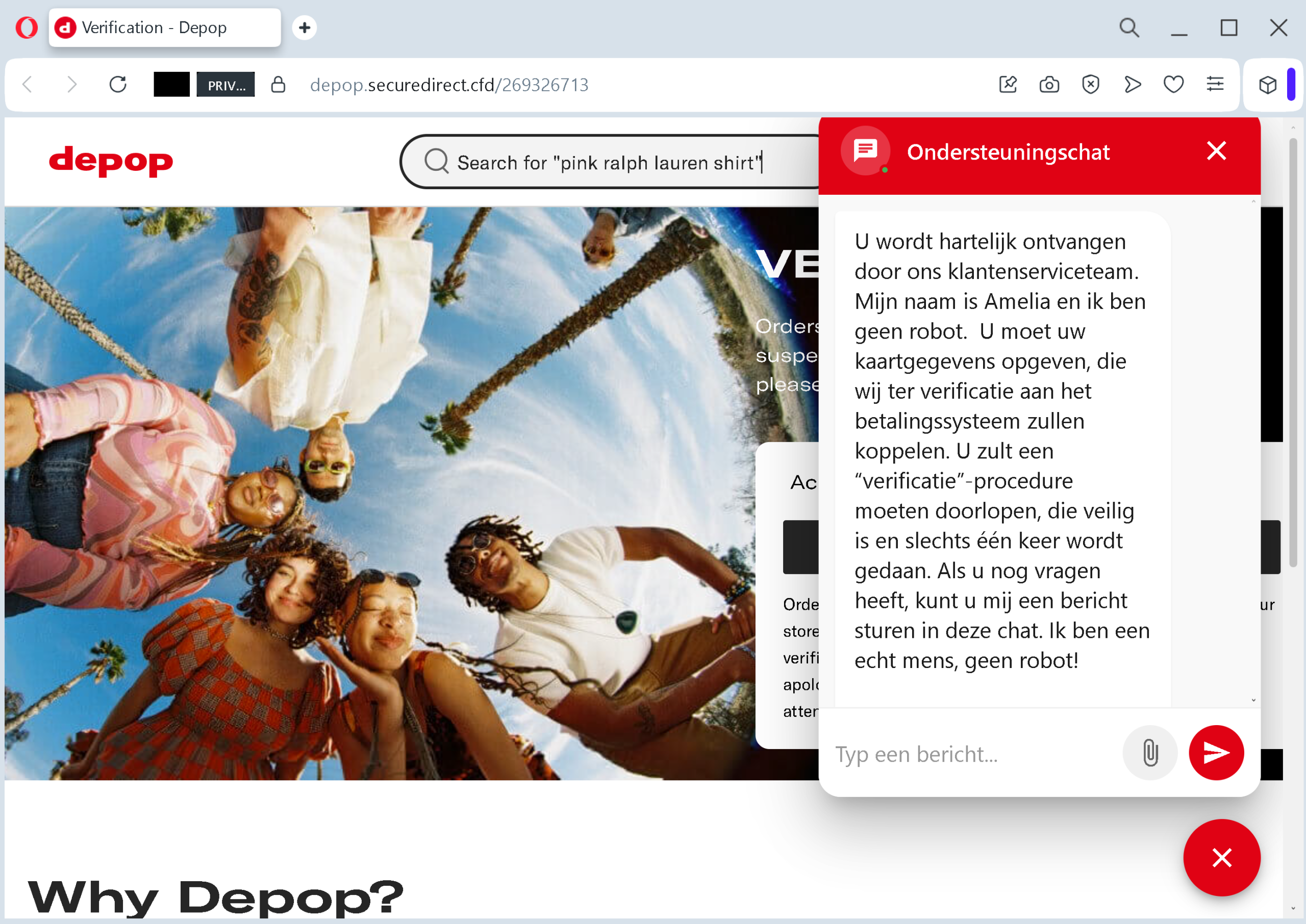
This is pure psychological manipulation. By claiming to be a human being, the scammer tries to build instant trust. They want you to feel like you are talking to a helpful customer service representative who has your back. In reality, “Amelia” is either a script or a criminal sitting in a different time zone, waiting for you to hand over your card details.
Step 3: The Card Harvesting Form
The final page looks almost official. It displays logos of Visa, American Express, and Discover. It even claims: “All transactions comply with PCI DSS” – a fake security badge designed to make you think your data is safe.
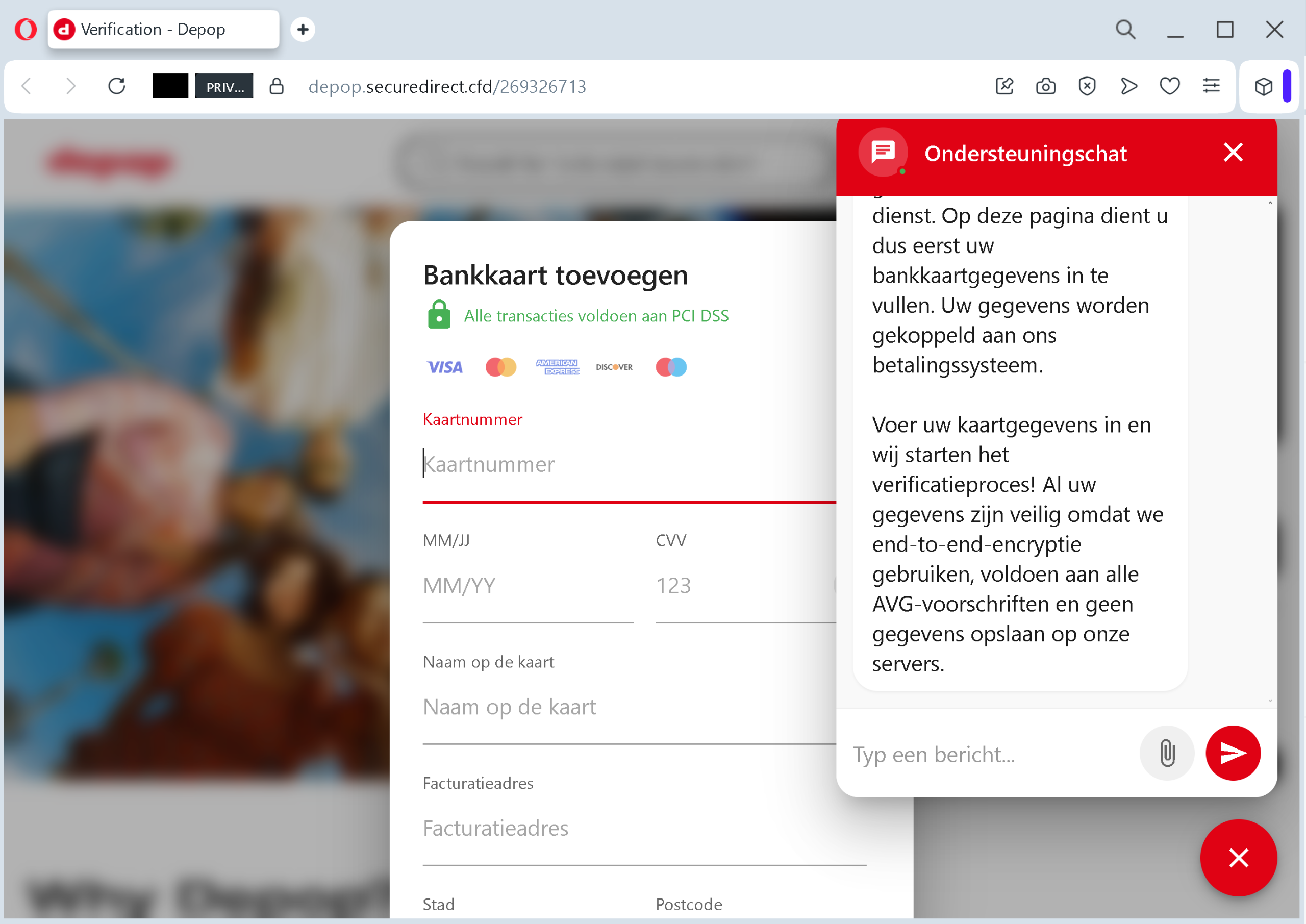
But look closely at what this page asks for:
- Full card number
- Expiration date
- CVV (the three‑digit security code)
- Name on the card
- Billing address (street, city, postal code)
This is everything a thief needs to clone your card and empty your account. With these five pieces of information, a criminal can make fraudulent online purchases, sell your card details on underground markets, or even attempt identity theft.
And here is the part that should stop you cold: No legitimate platform, including Depop, will ever ask for your CVV to “verify” your account or restore your selling privileges. Period. End of story.
Why This Feels So Real (And Why You Almost Believed It)
If you are thinking “I would never fall for something this obvious” – stop right there. This scam works on smart, careful people every single day. Here is why.
They use your own fear against you. The threat of lost orders triggers a fight‑or‑flight response. Your brain stops analysing the URL and starts looking for the fastest way to fix the problem. The “Verify” button offers a quick solution. That is the trap.
They fake the feeling of human support. The chat window is not a random pop‑up. It is designed to mimic the live chat tools that legitimate companies use. The name “Amelia” sounds friendly. The claim that she is a real person lowers your guard. You start to think, “If there is a human on the other end, this must be legit.”
They steal credibility from trusted brands. The Visa, American Express, and PCI DSS logos do not belong to the scammer. They are copied from real websites and pasted onto the fake page. Your brain sees those symbols and relaxes, because you have seen them a thousand times on legitimate checkout pages.
The domain name looks almost right. The fake page in this attack was hosted at likedepop.securedirect.cfddepop.com.cfd
The One Rule That Will Protect You From Every Phishing Attack
If you remember only one thing from this guide, make it this:
Never, ever click a link from an unsolicited message that claims your account has a problem.
Instead, do this:
Open a new browser tab. Type depop.com
That one habit – typing the official URL yourself instead of clicking a link – will neutralise 99% of phishing attacks, including this one.
Expert Tips: How To Stay One Step Ahead
Here is the advice that security professionals give to their own families. Follow these rules, and you will make yourself a very hard target for scammers.
Turn on two‑factor authentication (2FA) right now. This is the single most effective security measure you can take. Depop supports 2FA. Go to My Depop > My account > Two‑factor authentication and toggle it on. This means that even if a scammer steals your password, they cannot access your account without the one‑time code sent to your phone. It adds an extra lock to your front door.
Never trust a chat window that asks for card details. Legitimate customer support will never – ever – ask you to type your credit card number, expiration date, or CVV into a chat box. If a pop‑up chat starts asking for this information, you are looking at a phishing page. Close it immediately.
Check the URL like a detective. Before you enter any sensitive information, look at the address bar. Is the domain exactly depop.com.cfd.top.xyz.lat
Be suspicious of urgency. Any message that says “act now or your account will be suspended” or “you have 24 hours to verify” is almost certainly a scam. Real companies do not pressure you with ticking clocks. They give you time to respond through official channels.
Use a virtual card for online selling. Many banks and services (such as Revolut, Privacy.com, or Citibank) offer virtual card numbers – temporary cards with spending limits. If you use a virtual card for your marketplace transactions, even if a scammer steals the number, they cannot exceed the limit you set. And you can cancel the virtual card instantly without affecting your main bank account.
What To Do If You Already Entered Your Card Details
Do not panic. But do not wait, either. Take these steps immediately.
Call your bank right now. Use the phone number on the back of your credit or debit card. Tell them that your card details may have been compromised in a phishing attack. Ask them to block the card and issue a new one. If any fraudulent charges have already appeared, report them immediately. The faster you act, the more likely you are to get your money back.
Review your recent transactions. Look for small test charges (often $0.00 or $1.00) as well as larger amounts. Criminals sometimes test a card with a tiny transaction before making a big purchase. Report anything you do not recognise.
Change your Depop password. Even if the phishing page did not ask for your password, it is better to be safe. Choose a strong, unique password that you do not use on any other website.
Enable 2FA if you have not already. This will prevent anyone from taking over your Depop account, even if they manage to steal your login credentials later.
Report the phishing page. Send the URL and screenshots to Depop’s security team. Your report could help protect other sellers from falling into the same trap.
A Final Word From The Security Team
The phishing attack described in this guide was intercepted, verified, and disabled by the Antiphishing.biz security team during their daily link moderation work. The dangerous domain no longer works. But new ones appear every week, using the same tactics, the same fake chat windows, and the same urgent messages.
The criminals behind these attacks are counting on one thing: that you will act before you think. They want you to click first and ask questions later. Do not give them that satisfaction.
Build a new habit today. When a message lands in your inbox claiming your account is in trouble, do not click. Do not panic. Do not chat with “Amelia”. Open a fresh browser tab. Type depop.com
That extra thirty seconds will save you from a world of financial pain. Stay safe out there.
If you found this guide helpful, share it with every seller you know. The more people understand this scam, the harder it becomes for criminals to profit.