
A growing number of cybercriminals are creating fake account verification pages designed to steal financial data from users of shared accommodation platforms such as Flatmates.com.au, flatmate.com, and similar services. The scam begins with an urgent message claiming a user’s account has been restricted and requires identity verification within a strict time limit. The message is designed to create panic. The victim is then directed to a fraudulent web page that mimics a legitimate verification portal.
The attacker’s goal is simple: trick users into entering credit card details, bank account information, or other sensitive data. Once the information is submitted, criminals can drain bank accounts or use the stolen data to commit identity fraud.
Understanding how this scam operates and knowing exactly what to look for is the difference between keeping your money and losing it.
The Anatomy of the Attack: What the Screenshots Reveal
The phishing kit used in this campaign consists of several distinct but interconnected pages, each designed to lower the victim’s defences step by step.
Phase 1: The Urgent Account Restriction Notice
The first screen presents itself as an official notification from the platform. It reads: “Your account is temporarily restricted. You need to verify your identity to remove all the restrictions. You need to confirm your bank details within 24 hours.” The message includes a “Status: Verification required” field and a prominent “Verify” button.
Security Notice: This spoofed page was logged, cross-checked, and neutralized firsthand by the
Antiphishing.bizsecurity team during our automated link scanning workflows. To protect the public, the phishing source domain has been completely disabled within our infrastructure. We document and analyze these live visual patterns to help security researchers and users recognize deceptive clone designs before financial damage occurs.
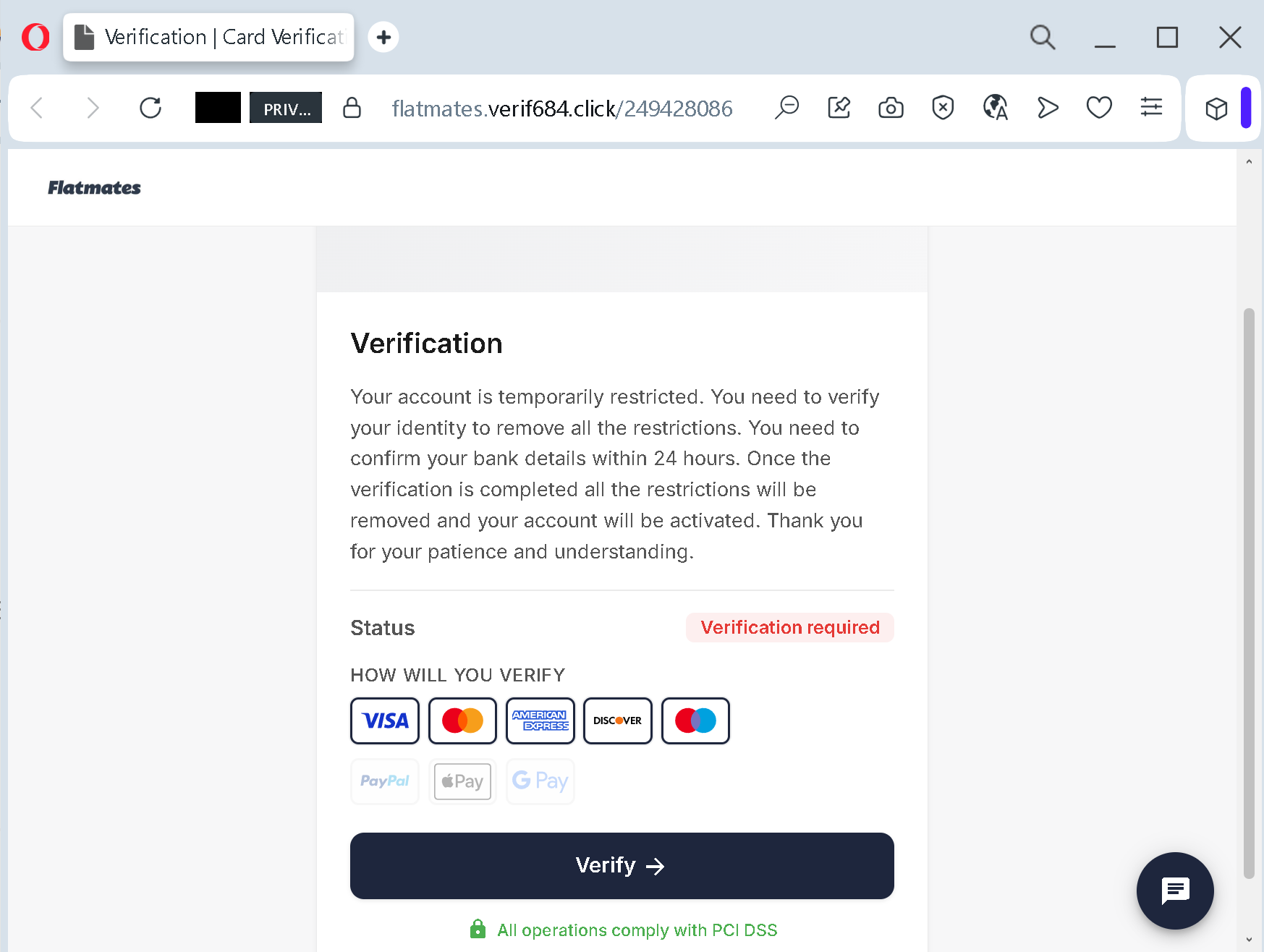
This approach directly mimics the urgent account verification scams that cybersecurity researchers have documented across multiple industries. As noted in analyses of such attacks, these fake messages claim an account needs checking due to strange activity or security measures and warn that if verification is not completed, the service might stop working. The entire structure is designed to create panic and bypass rational thought.
Phase 2: The Fake Payment Information Form
After clicking the verification link, the victim is directed to a second page that appears to be a bank card addition form. The page displays logos for VISA, American Express, Discover, PayPal, Apple Pay, and Google Pay in an attempt to appear trustworthy and legitimate.
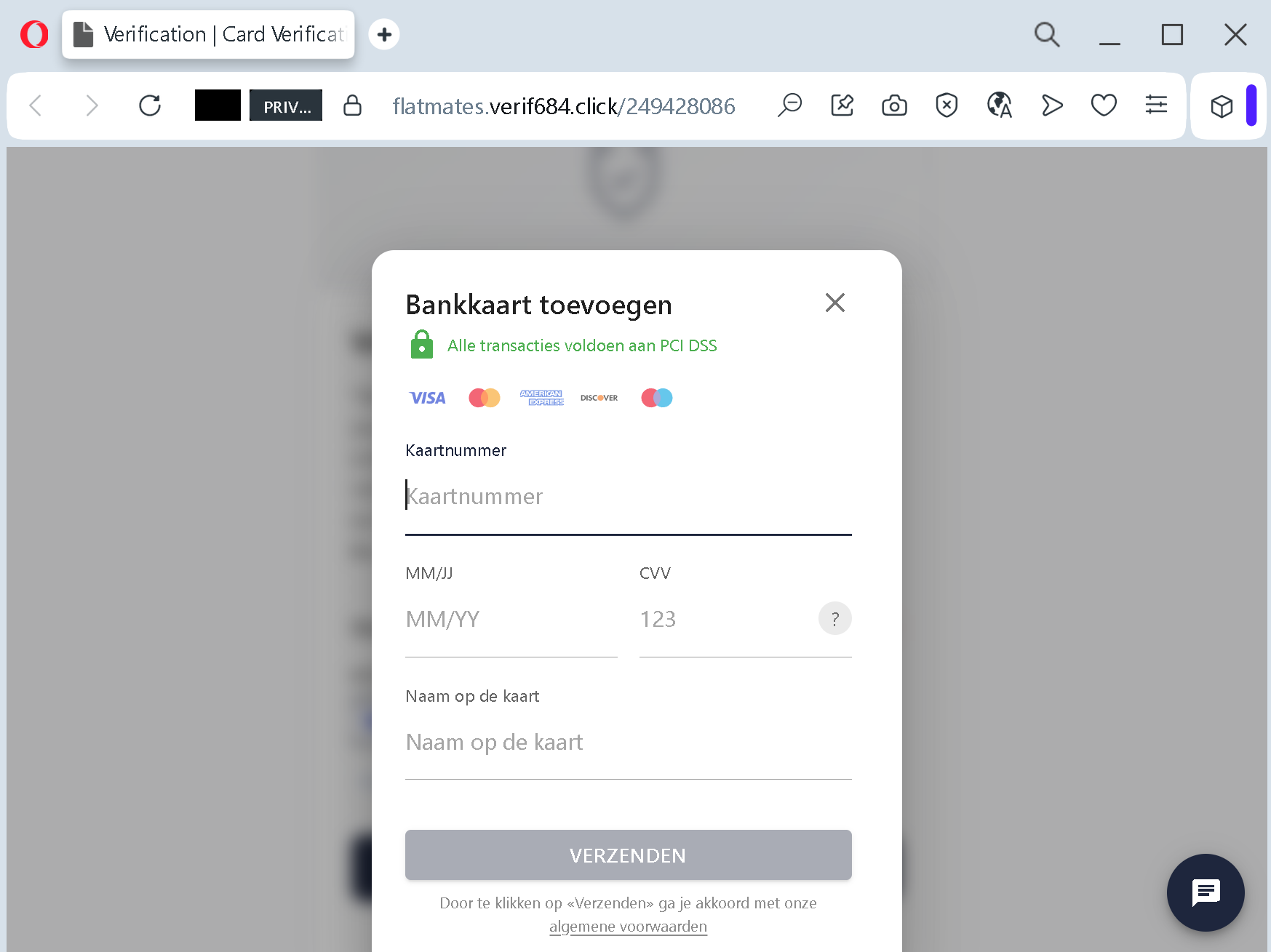
The form itself explicitly requests the following data:
- Full card number (with a placeholder reading “Kaartnummer” meaning “Card number”)
- Expiry date (MM/JJ representing month/year)
- CVV code (placed directly next to the expiry field with the label “123”)
- Cardholder name (“Naam op de kaart”)
The page concludes with a “VERZENDEN” (Send/Submit) button and claims that all operations comply with PCI DSS (Payment Card Industry Data Security Standard). The PCI DSS logo is a fraudulent addition included solely to give the page an air of legitimacy. No legitimate service would request a full card number, expiry date, CVV, and cardholder name together in a single unsecured form. Genuine platforms use tokenised payment systems where this sensitive data never touches their own servers.
The Expert Analysis: Why This Scam Is Particularly Dangerous
From a technical and psychological perspective, this phishing operation demonstrates a high level of sophistication in its design and execution. Several factors make it especially threatening to users who may not be technically sophisticated.
The use of an artificial 24-hour deadline is a classic social engineering tactic. When a user believes an account is at risk of being permanently restricted or losing access to funds, the urgency overrides critical thinking. Criminals exploit this vulnerability systematically.
Including payment method logos on the page builds false credibility. The presence of well-known brand marks such as VISA, PayPal, and Google Pay subconsciously signals to the user that the page is secure and authenticated. In reality, these logos can be copied by anyone from publicly available sources.
The explicit request for a CVV code alongside the card number is a critical red flag. CVV codes are explicitly designed to verify that the cardholder is physically in possession of the card during a transaction. While some legitimate recurring payment setups may request a CVV for initial authorisation, they do so in an isolated, one-time context and never as part of a standalone identity verification form. Any service that requests CVV together with the full card number and expiry date in a single form intended for “verification” is almost certainly fraudulent.
Key Red Flags: A Checklist for Users
To help users identify this and similar scams in the future, security experts have compiled a set of actionable indicators. Any page exhibiting the following characteristics should be treated as an immediate threat:
Urgency language and time limits: If a page threatens account restriction or service termination unless verification is completed within a specified time window, it is almost certainly a phishing attempt. Authentic platforms rarely use such tactics and would instead direct users to complete verification through their official app or website.
Requests for payment card information as identity verification: No legitimate accommodation or service platform uses a payment card as a means of identity verification. Identity verification involves government-issued identification, two-factor authentication codes sent to registered email or phone numbers, or biometric authentication. Entering card details into a page that claims to verify identity is equivalent to handing a stranger the keys to your bank account.
Poor grammar, inconsistent language, or mixed languages on the same page: The screenshot shows a mix of English (“Verification”) and Dutch (“Bankkaart toevoegen,” “Kaartnummer,” “Verzenden”). While some legitimate services operate in multiple languages, phishing pages frequently mix languages because they are copied from translated templates that were never properly localised.
Absence of specific platform branding or logos: The screenshots reference the platform name only in the URL and the initial restriction message. The verification pages themselves omit the platform’s official logo, colour scheme, or footer information. Legitimate verification processes are fully integrated into the platform’s branded interface.
PCI DSS compliance claim without visible SSL certificate or security verification: Displaying a logo that claims PCI DSS compliance does not make a page secure. True compliance involves a range of backend security measures. Without an active, verified SSL certificate and transparent data protection policies, the claim is meaningless.
Request for CVV in a standalone verification form: As noted previously, this is the most specific and damning indicator of a phishing page.
Expert Advice: What to Do If You Encounter This Scam
Security professionals and accommodation platforms have issued consistent guidance for handling such threats.
Never click verification links in unsolicited messages. If you receive an email, text message, or social media direct message claiming your account is restricted and requiring immediate action, do not click any links contained within the message.
Navigate directly to the platform. Instead of clicking any link, open a new browser tab and manually type the official domain of the accommodation platform you use. If you are a user of Flatmates.com.au, type “flatmates.com.au” directly into the address bar. Navigate to your account dashboard. Any legitimate verification requirement will be displayed there. If no such notice appears, the original message was a fraud.
Contact support through official channels. If you are unsure whether a message is legitimate, contact the platform’s support team directly using the contact information listed on the official website. Do not use the contact details provided in the suspicious message itself.
Enable two-factor authentication (2FA) on all accounts. Two-factor authentication adds a critical layer of security by requiring a code from your phone or an authenticator app in addition to your password. This prevents attackers from accessing your account even if they steal your login credentials.
Monitor your financial accounts. If you have already entered card details into a suspicious page, contact your bank or card issuer immediately. Request a new card number and review recent transactions for unauthorised charges.
The Broader Implications: Why Accommodation Platforms Are Targeted
The increasing targeting of shared accommodation platforms by cybercriminals reflects a broader trend in how phishing attacks are distributed. As noted in fraud prevention literature, flatmate scams operate by creating fake profiles to gather personal information such as email addresses, phone numbers, and even financial details. The shift toward standalone phishing pages that appear to originate directly from the platform itself represents an escalation of the threat.
Unlike rental listing scams that rely on fake properties or overpayment schemes, this approach directly requests the financial data that enables large-scale account theft. By compromising a single user’s payment card, attackers can not only drain that user’s account but also use the stolen credentials to register on other services, conduct fraudulent transactions, or sell the information on dark web marketplaces.
The platforms themselves have taken steps to combat this threat. Official guidance from Flatmates.com.au advises users to be wary of potential phishing sites by checking the URL prior to logging in or providing information. The platform states, “We only use the domain flatmates.com.au” and directs users to safety resources for step-by-step instructions on how to protect themselves. However, platform security measures are only effective when users actively recognise and avoid fraudulent pages.
Final Recommendations
Every user of shared accommodation platforms should adopt the following practices as a matter of routine:
Maintain a single consistent process for all account-related actions. When any notification claims action is required, pause. Open the official application or website manually. Do not trust links in messages. Do not trust QR codes. Do not trust phone numbers provided in the body of emails.
Regularly review your account activity. Check for unfamiliar login locations, unrecognised linked payment methods, or changes to your profile details. Report any suspicious activity to the platform immediately.
Stay informed about current phishing techniques. Scammers adapt their tactics rapidly. Following cybersecurity resources and platform-specific safety guides helps maintain awareness of evolving threats.
Remember that account verification and identity confirmation on legitimate platforms happens through the platform’s own secure interface, typically within the application or website you originally signed up for. No legitimate service will ask for your full payment card details through a standalone web page reached by clicking an external link.
If you believe you have already provided payment information to a fraudulent page, contact your financial institution without delay. Time is critical. The longer stolen card data remains active, the greater the potential for financial loss.