
Who This Guide Is For
This article is written for you – anyone who pays an Xfinity bill, logs into an Xfinity account, or relies on Comcast for internet, TV, or home phone service. You are not a cybersecurity expert. You do not spend your days analyzing email headers or inspecting SSL certificates. You just want your services to work and your personal information to stay private.
But that is exactly why scammers have you in their crosshairs. Xfinity has millions of customers across the United States, and where there are accounts, there are criminals trying to break into them.
In early 2026, authorities in New Jersey issued urgent scam warnings targeting Verizon and Xfinity customers. Scammers have been sending waves of fake emails and texts, trying to trick customers into giving up their login credentials. The Antiphishing.biz security team recently intercepted, verified, and locked down one of these campaigns in real time. The attack used a simple but devastating two-page trick designed to steal usernames and passwords from unsuspecting Xfinity account holders.
This guide will walk you through exactly how that attack worked, why it nearly fooled the people who saw it, and – most importantly – the simple habits that will keep your account safe forever.
The Two-Page Trap That Steals Your Xfinity Login
Let me show you exactly what happens when you become the target of this phishing campaign. The attack is designed to feel harmless at first. That is what makes it so dangerous.
Page One: The Innocent “Thanks For Choosing” Screen
The first page you see looks like a simple welcome message. It displays the Xfinity logo, a friendly “Thanks for choosing xfinity” greeting, and a single button that says “click here to continue”.
Incident Report: This scam layout was intercepted, verified, and locked down firsthand by the
Antiphishing.bizsecurity team during our automated link scanning workflows. To protect the public, the hostile origin link has been completely disabled within our infrastructure. We document and analyze these live visual patterns to help security researchers and users recognize deceptive clone designs before financial damage occurs.
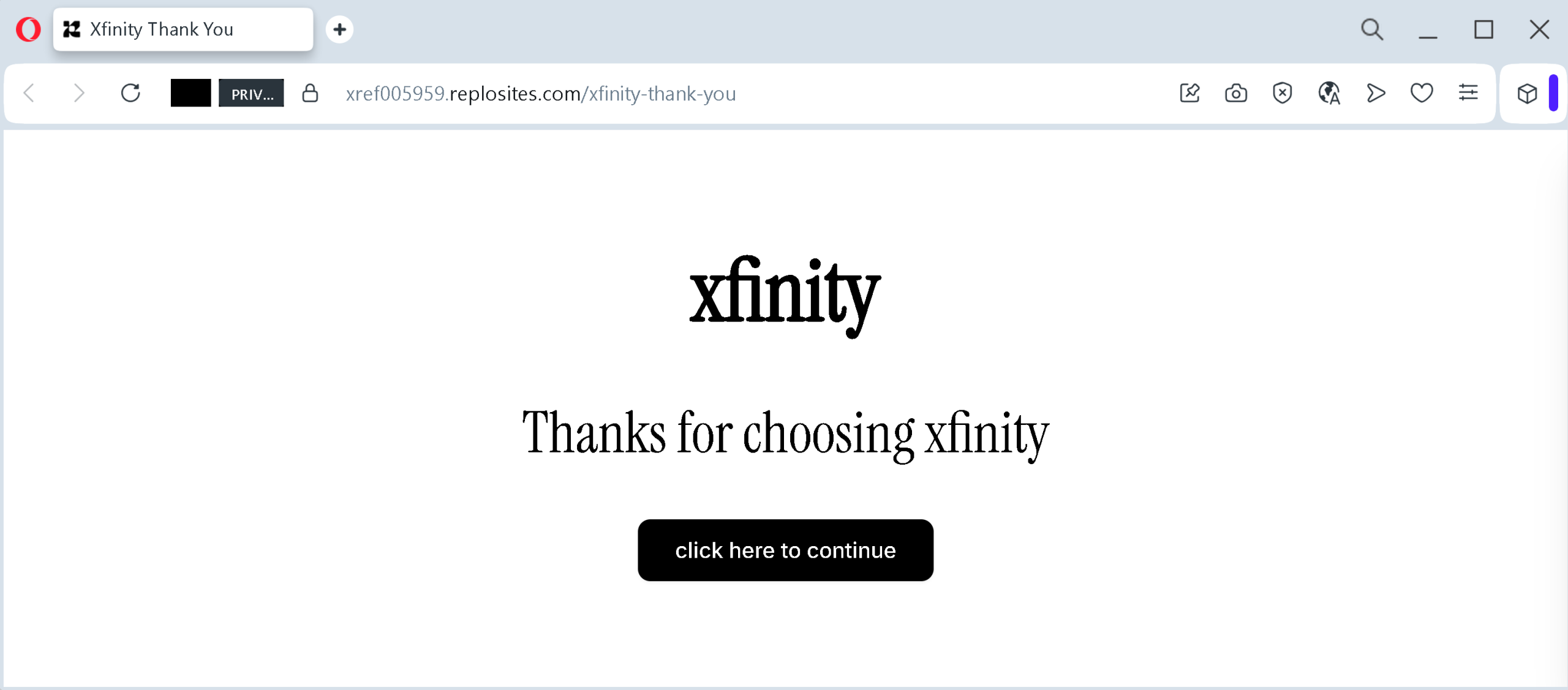
That is it. No request for personal information. No urgent warning about your account being locked. Just a polite thank-you and a button.
This page has no real function. It exists for one reason only: to make you click that button and move to the next screen.
Why would scammers add an extra step? Because it lowers your guard. By the time you reach the second page, you have already taken an action. You have already committed to the process. Your brain is no longer in alert mode. You are just following the flow.
Page Two: The Fake Sign-In Form
After you click, you are taken to a second page that mimics Xfinity’s real login screen as closely as possible. It asks for your email, mobile number, or username, followed by your password. A “Let’s go” button waits at the bottom.
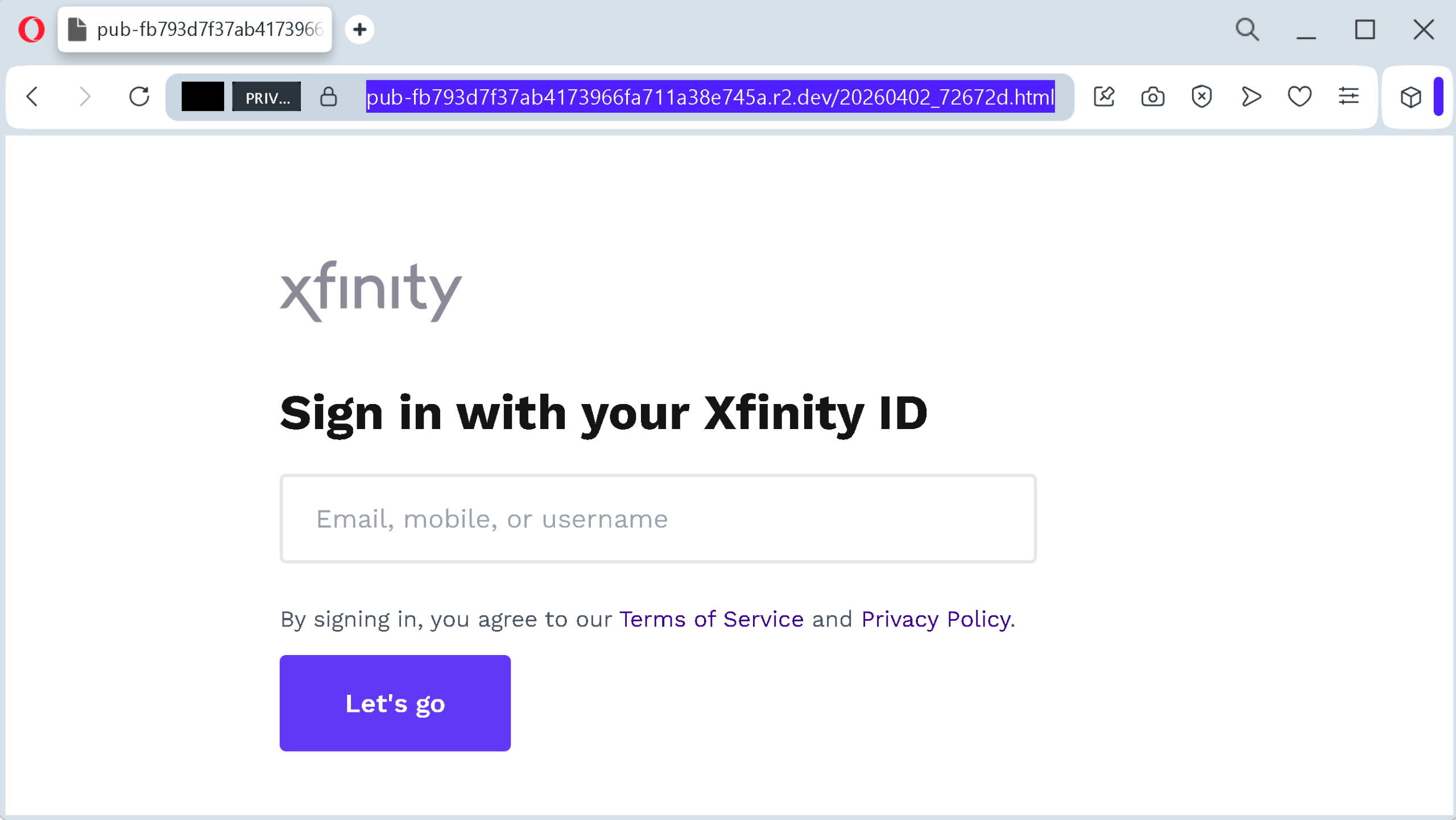
The page includes fake legal text: “By signing in, you agree to our Terms of Service and Privacy Policy.” This is designed to make the page feel legitimate and official.
Once you enter your Xfinity ID and password and click that button, your information is sent directly to the attackers. They now have full access to your account. They can view your billing information, change your service plan, order new equipment in your name, and – worst of all – try the same email and password combination on other websites like your bank, your social media accounts, or your email provider.
The Real Stories Behind The Warning
This is not a theoretical threat. Scammers have been actively targeting Xfinity customers using multiple different stories, all designed to create the same sense of urgency.
One widely reported scam sends emails claiming that Xfinity’s Terms of Service and Privacy Policy have changed. The email threatens that customers will lose access to their emails if they do not click a link immediately. Another scam claims that a user changed their Wi-Fi network name or password and encourages the customer to click a link to reconnect. Both use the same technique: a phony link that leads to a fake login page designed to steal passwords and personal information.
The Middlesex County Prosecutor’s Office in New Jersey issued an alert in early 2026 warning residents about these exact scams. The alert noted that senior citizens are especially vulnerable to these tactics and urged customers to never click unsolicited links or provide login information.
One customer shared their experience on a neighborhood forum: they received an email claiming their Xfinity account had been accessed from Pakistan. Shortly after, they noticed unauthorized changes to their account settings. Another customer reported that after clicking a link in a fake Xfinity email and paying what they thought was a small bill, the scammers continued to harass them with calls and messages. The link was the entry point, and the damage did not stop there.
Even the official Xfinity Community Forums are filled with reports from users who suspect they have encountered phishing attempts. One forum participant offered a crucial piece of advice: any official email from Comcast or Xfinity viewed on the website will have a verified logo displayed before it. If you do not see that logo, you can be certain the email is not from Xfinity. That simple visual check can save you from a world of trouble.
The Four Red Flags That Give Away The Fake Page
The Antiphishing.biz team documented a clear set of differences between a real Xfinity login page and the fake version. Here is what you need to look for.
Red Flag One: The Web Address
A real Xfinity login page starts with https://login.xfinity.com/customer.xfinity.comgithub.ioxfinity-login.xyzxfinity.comcustomer.xfinity.com
Red Flag Two: The Missing Security Features
Real Xfinity pages show a green lock icon and a valid security certificate issued to Comcast. Fake pages often lack visible security indicators altogether, or they use certificates issued to unknown entities. While a padlock icon alone does not guarantee a page is safe – scammers can get SSL certificates too – the absence of one or a certificate issued to a strange company name is a clear warning.
Red Flag Three: The Missing Account Options
Real Xfinity login pages include standard account recovery options like “Forgot password?” or “Create an account” links. The fake page documented by Antiphishing.biz had no such options. It was stripped down to just the logo and the form. If a login page feels incomplete or bare-bones, treat it with suspicion.
Red Flag Four: The Unnecessary Extra Click
Real Xfinity takes you directly to the login form. The fake page uses an intermediate “click here to continue” step. This extra click serves no legitimate purpose. It is a psychological trick designed to lower your guard before you reach the credential-harvesting form. Any login flow that makes you click an unnecessary button before asking for your password should raise an alarm.
Expert Advice: How To Keep Your Xfinity Account Safe
You do not need to be a cybersecurity professional to protect yourself. You just need to change a few simple habits and remember a handful of rules.
Rule One: Never, Ever Click Links In Unexpected Messages
If you receive an email or text message claiming to be from Xfinity – especially one that warns you about policy changes, Wi-Fi issues, or account problems – do not click any links inside that message. Scammers are counting on you to click. Take that option away from them.
The Middlesex County Prosecutor’s Office put it bluntly: do not click unsolicited links. Do not provide your login information. The only safe way to access your account is to open a new browser tab, type xfinity.comcustomer.xfinity.com
Rule Two: If You Are Unsure, Call Xfinity Directly
Xfinity has a customer service number for exactly this situation: 1-800-934-6489 (1-800-Xfinity). If you receive a suspicious message and you are not sure whether it is legitimate, call that number. Do not call any number provided in the suspicious message itself. Use the official number, and ask them to verify whether the message came from them.
Authorities have emphasized this repeatedly: call your service provider directly if you receive a suspicious message. A quick phone call takes five minutes and could save you from losing access to your entire account.
Rule Three: Enable Two-Factor Authentication On Your Xfinity Account
Two-factor authentication (2FA) is your digital seatbelt. Even if a scammer steals your password, they cannot get into your account without the one-time code sent to your phone or email. It blocks attackers even when they have your credentials.
Law enforcement agencies recommend enabling two-step verification whenever it is available. Xfinity supports this feature. Go into your account settings and turn it on today. It takes two minutes and adds a massive layer of protection.
Rule Four: Look For The Verified Logo In Official Xfinity Emails
If you read your email on Xfinity’s website, any legitimate message from Comcast or Xfinity will display a verified logo before you even open it. If you do not see that logo, the email is not from Xfinity. This is a quick, reliable visual check that can stop you from clicking a dangerous link.
Rule Five: Never Share Personal Information With Anyone Who Contacts You Unexpectedly
The Middlesex County Prosecutor’s Office warns that customers should never share personal information such as date of birth, Social Security number, account login information, or bank account details with anyone who contacts them unexpectedly. Xfinity already has this information on file. They will not call or email you asking for it.
Rule Six: Block Suspicious Phone Numbers
If you receive a scam text or call from a suspicious number, block it immediately. Report it as spam or junk through your phone’s built-in tools. This reduces the chance that you will be targeted again from the same number.
Rule Seven: Report Scams When You See Them
If you receive a phishing attempt, report it. You can report scams to the Federal Trade Commission at reportfraud.ftc.govic3.gov
Xfinity also has its own reporting process. To report a scam email sent to or from a Comcast.net email account, follow the instructions under the “How do I report phishing email” heading on Xfinity’s support pages.
What To Do If You Have Already Entered Your Credentials
If you realize that you have entered your Xfinity username and password into a suspicious page, do not panic. But do not wait, either. Take these steps immediately.
First, go directly to the official Xfinity website by typing xfinity.com
Second, check your account for unauthorized changes. Look for new equipment orders, plan changes, or unfamiliar email addresses added to your account. If you see anything you did not authorize, contact Xfinity customer service at 1-800-934-6489 to report it.
Third, if you use the same email address and password combination on any other websites – your bank, your email provider, your social media accounts – change those passwords immediately. Scammers will try the stolen credentials on other popular services to see where else they work.
Fourth, enable two-factor authentication if you have not already. This will prevent the scammer from getting back into your account even if they still have your old password.
Fifth, report the phishing attempt to the FTC and to Xfinity. Your report could help protect other customers from falling into the same trap.
The Bottom Line
The fake Xfinity login page scam is a masterpiece of psychological manipulation, not technical sophistication. It uses an unnecessary extra click to lower your guard. It copies Xfinity’s branding to create false familiarity. It relies entirely on you taking action without checking where you really are.
But the scam has a fatal weakness. It falls apart the moment you pause, take a breath, and ask one simple question: “Did I get here by clicking a link in an email or text message?”
If the answer is yes, close the page. Open a new tab. Type xfinity.com
The scammers are counting on your speed, your trust, and your fear of losing service. Do not give them any of those things. Stay calm. Stay skeptical. And always type the address yourself.
This attack was detected, analyzed, and contained firsthand by the Antiphishing.biz security team during automated link scanning workflows. The phishing source domain has been completely disabled within their infrastructure to protect the public.
.