Threat Analysis: AOL Phishing – Fake Login Page Stealing Email Credentials
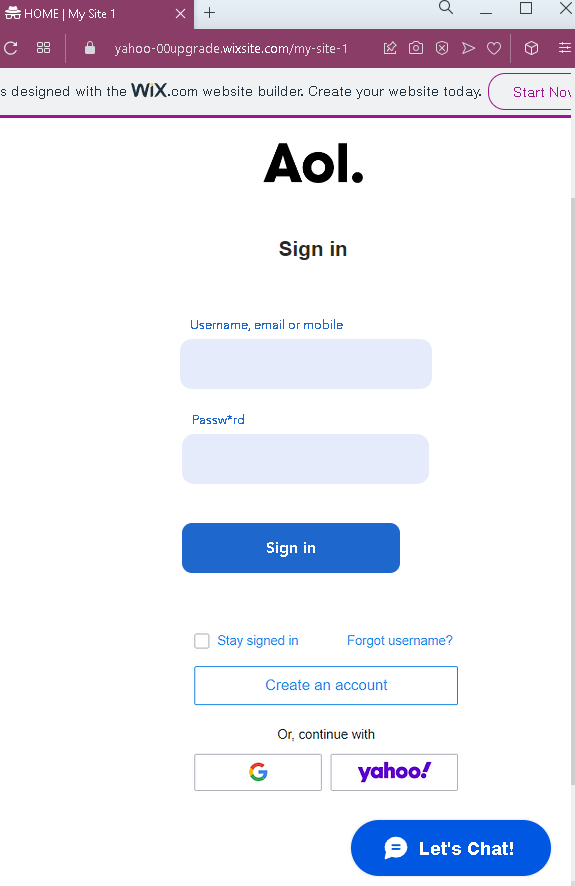
This phishing campaign impersonates AOL (America Online) , an email and online service provider. The page is designed to steal victims’ username, email address, or mobile number and password used to access AOL accounts.
How it works:
The victim receives a phishing email, SMS, or other message claiming a security alert, account issue, or the need to verify their information. The message includes a link to this fake AOL login page. When the victim enters their username/email/mobile and password and clicks “Sign in,” the credentials are captured and sent to the attacker.
The goal:
The attacker aims to steal AOL account credentials. With these, they can:
- Access the victim’s email account
- Search for sensitive information (banking, personal documents, password reset emails)
- Use the compromised email to reset passwords for other accounts (social media, banking, etc.)
- Send further phishing messages to the victim’s contacts
Red flags to watch for:
- Suspicious URL: The page is hosted on a domain that is not
aol.comor any official AOL domain. The presence of “WIX.com” website builder branding at the top indicates this is a quickly created phishing page, not a legitimate AOL site. - Unsolicited login request: AOL does not send emails or messages with links requiring users to log in to resolve account issues. Users should always access AOL by typing the official URL directly.
- Generic design: While the page uses the AOL logo, it lacks the full navigation, security notices, and personalized elements present on the legitimate AOL login page.
- “Let’s Chat” button: The presence of a “Let’s Chat” button is unusual for the AOL login page and suggests the page was assembled from a template.
- Missing security features: Legitimate AOL login pages include SSL certificates and proper domain verification. This page lacks those indicators.
- WIX.com branding: The “designed with WIX.com” notice is a strong indicator that this page is not an official AOL page. Official AOL is not built on a free website builder.
What to do if you encounter this:
- Do not enter your username, email, mobile number, or password on this page.
- If you are an AOL user, always access your account by typing
aol.comdirectly into your browser or by using the official AOL mobile app. - If you have already entered your credentials, change your AOL password immediately. If you use the same password for other accounts, change those as well.
- Enable two-factor authentication (2FA) on your AOL account if available.
- Report the phishing page to AOL’s abuse team.
Why this scam is effective:
AOL still has millions of users, particularly among those who have used the service for many years. The simple, clean design of the page resembles AOL’s actual login interface. The “Stay signed in” and “Forgot username?” options are familiar elements that add to the illusion of legitimacy. The inclusion of social login options (“G” for Google, “yahoo?”) is unusual for AOL but may confuse some users into thinking the page is legitimate.
Protective measures:
- Bookmark the official AOL login page and use that bookmark to access your account—never click links in emails or messages.
- Use a password manager: It will autofill only on legitimate
aol.comdomains, not on phishing sites. - Enable two-factor authentication (2FA) on your email account to add an extra layer of protection.
- Be suspicious of any unsolicited message that creates urgency and asks you to log in to your email or other account.
- Check the URL carefully: Legitimate AOL domains end with
aol.com. Look for misspellings, extra words, or unusual top-level domains. Also be wary of pages hosted on free website builders like WIX, Weebly, or similar platforms. - If in doubt, contact AOL support directly through the official website—never use contact information provided in a suspicious message.