
Threat Intel: This malicious interface was intercepted, verified, and locked down firsthand by the
Antiphishing.bizsecurity team during our daily link moderation procedures. To protect the public, the phishing source domain has been safely deactivated within our infrastructure. We document and analyze these live visual patterns to help security researchers and users detect replica fraud techniques before financial damage occurs.
Threat Analysis: Massachusetts Unemployment Insurance Phishing – SSN & Account Takeover Scam
This phishing campaign impersonates the Massachusetts Unemployment Insurance (UI) Online Application portal, used by the state’s Department of Unemployment Assistance (DUA). The scam targets unemployment claimants, aiming to steal their Social Security Number (SSN), password, and email verification code—the credentials needed to access benefit accounts and redirect payments.
How it works:
The victim receives a phishing email, SMS, or other message claiming an issue with their unemployment claim, an overpayment waiver, or the need to verify their account. The message includes a link to the first phishing page.
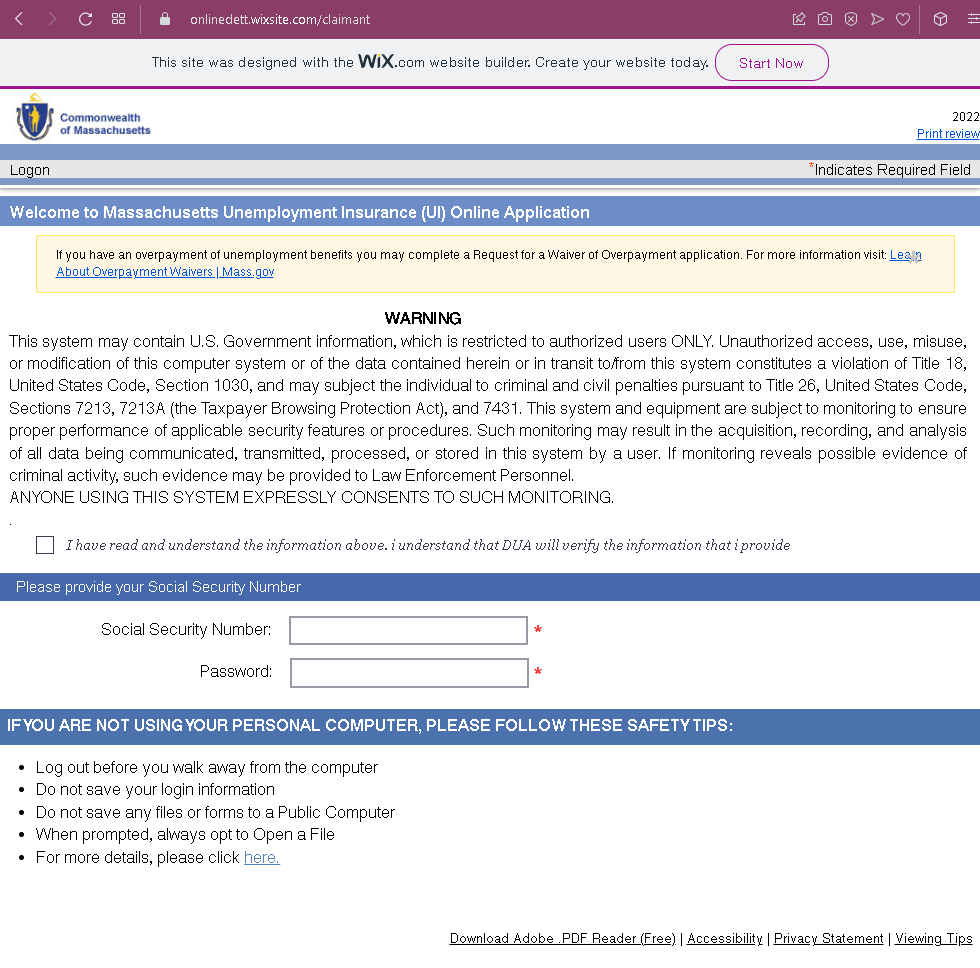
Step 1 – Fake Login / SSN Entry Page (First Screenshot)
This page mimics the Massachusetts UI Online Application interface. It asks for:
- Social Security Number (SSN)
- Password
The page includes a lengthy “WARNING” notice copied from official government websites, stating that unauthorized access is monitored and may be subject to criminal penalties. This warning is intended to make the page appear legitimate. A checkbox is used to acknowledge the terms.
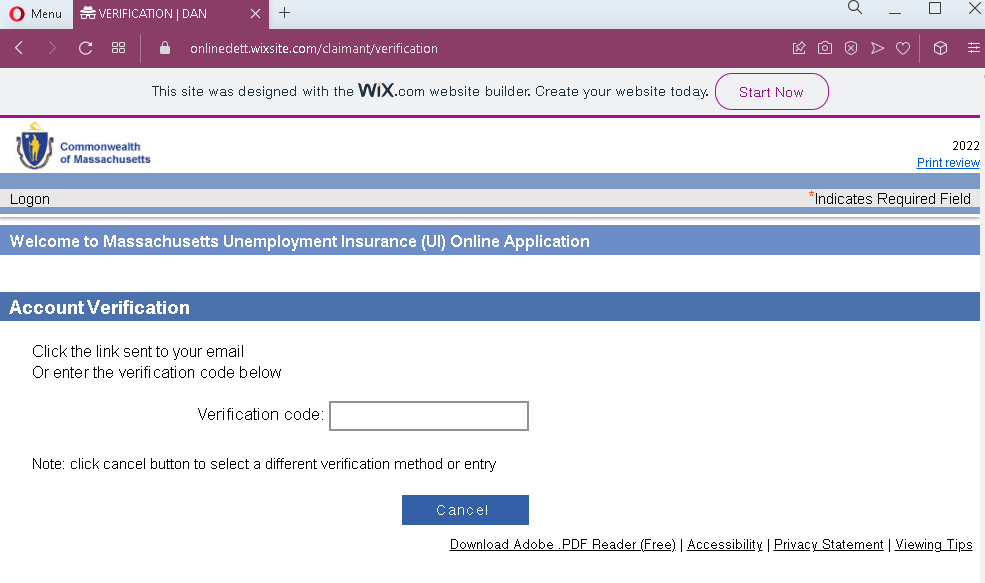
Step 2 – Fake Account Verification Page (Second Screenshot)
After submitting the SSN and password, the victim is taken to a second page that claims a verification code has been sent to their email. The victim is asked to either click a link in the email or enter the verification code directly on the page.
The goal:
The attacker aims to:
- Steal the victim’s SSN and the password they use for the unemployment portal
- Capture the email verification code (2FA) to complete the login on the real DUA site
- Gain full access to the victim’s unemployment benefits account to redirect payments, change banking information, or commit identity theft
Red flags to watch for:
- Suspicious URL: The pages are hosted on a domain that is not
mass.govWIX.com” website builder branding at the top is a strong indicator that this is not an official government site. - SSN and password on the same page: Legitimate Massachusetts UI login uses a different flow (often a username or email with password, not SSN directly on the login page). Asking for SSN and password together in this manner is unusual and a red flag.
- Copied government warnings: The warning notice about unauthorized access is copied from real government websites, but it is being used out of context on a fake page. The inclusion of such text does not make the page legitimate.
- Unsolicited verification request: The state DUA does not send emails or messages with links requiring claimants to log in and then verify via a code entered on a third‑party site.
WIX.combranding: Official government websites are not built on free website builders like WIX. The visible “designed withWIX.com” text is a clear sign of a fraudulent page.- Generic design: The pages lack the full branding, security seals, and personalized account details that would appear on a legitimate state UI portal after login.
What to do if you encounter this:
- Do not enter your SSN, password, or any verification code on these pages.
- If you are a Massachusetts unemployment claimant, always access the UI Online system by typing
mass.gov - If you have already entered your SSN and password, contact the Massachusetts DUA immediately to secure your account, change your password, and report the incident. Also monitor your credit and consider placing a fraud alert on your SSN.
- Report the phishing page to the Massachusetts DUA and to the appropriate authorities (such as the FBI’s IC3).
Why this scam is particularly dangerous:
Unemployment benefit accounts are high‑value targets for fraudsters. By stealing SSNs and passwords, attackers can redirect benefit payments to their own bank accounts or use the stolen identities to file fraudulent claims. The addition of a “verification code” step is designed to bypass any two‑factor authentication (2FA) that the real system may use, giving the attacker full control.
Protective measures:
- Always access government benefits portals by typing the official URL directly (e.g.,
mass.gov - Use a password manager: It will autofill only on legitimate domains, not on phishing sites.
- Never enter your SSN and password on a page that appears to be a login form unless you are 100% sure of the URL. Legitimate state portals often use separate steps for identity verification.
- Enable two‑factor authentication (2FA) on your unemployment account if available.
- Be suspicious of any unsolicited message that creates urgency and asks you to log in to your benefits account, especially if it involves SSN or verification codes.
- Check the URL carefully: Official Massachusetts government domains end with
mass.govwixsite.comweebly.com - If in doubt, contact the Massachusetts DUA directly using a phone number from the official website—never use contact information provided in a suspicious message.