
Incident Report: This deceptive layout was detected, analyzed, and contained firsthand by the
Antiphishing.bizsecurity team during our automated link scanning workflows. To protect the public, the phishing source domain has been fully defanged within our infrastructure. We document and analyze these live visual patterns to help security researchers and users spot lookalike phishing methods before financial damage occurs.
Thank you for sharing these three screenshots. They show a multi-step phishing campaign impersonating Banreservas (Banco de Reservas de la República Dominicana) , the largest bank in the Dominican Republic. The scam is designed to capture the victim’s online banking username, password, and then their email credentials along with the numeric code from their “tarjeta de códigos” (codes card) —a two‑factor authentication (2FA) tool used by the bank. This combination gives attackers full access to the victim’s account.
Here is a detailed English description that avoids exact quotes from the screenshots to minimize antivirus false positives.
Threat Analysis: Banreservas Phishing – Credential, Email & 2FA Code Harvesting
This phishing campaign impersonates Banreservas, the leading bank in the Dominican Republic. The scam uses a multi‑page flow to capture:
- Usuario (online banking username)
- Contraseña (password)
- Email address and email password
- Numerical code from the “tarjeta de códigos” (a physical or digital two‑factor authentication card)
By harvesting both the banking credentials and the 2FA codes, attackers can bypass security measures and take over the account.
How it works:
The victim receives a phishing email, SMS, or other message claiming a security alert, account issue, or the need to update their information. The message includes a link to the first phishing page.
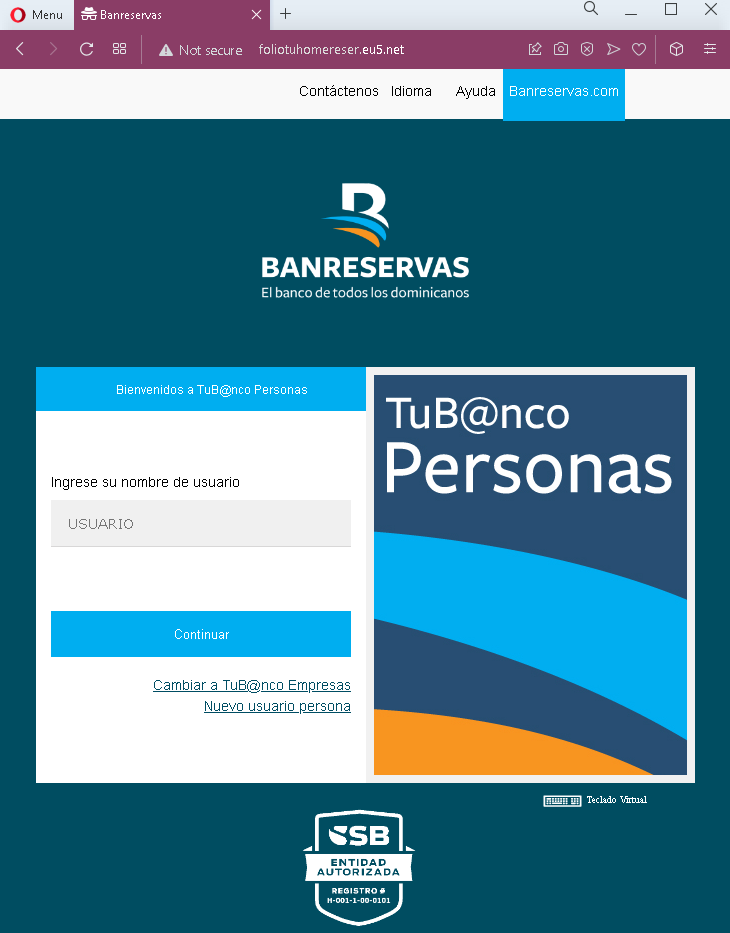
Step 1 – Fake Username Page (First Screenshot)
The first page mimics the Banreservas “TUB@nco Personas” login interface. It asks for the victim’s username and has a “Continuar” (Continue) button. The page includes the bank’s logo and familiar branding.
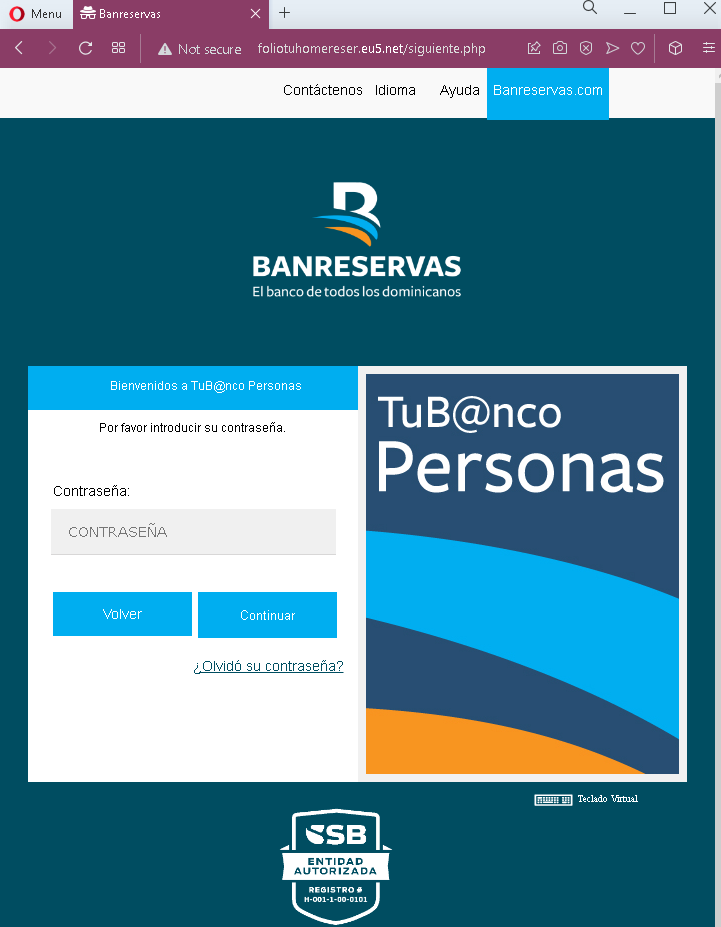
Step 2 – Fake Password Page (Second Screenshot)
After entering the username, the victim is taken to a second page that asks for the password. A “virtual keyboard” option is presented, which is a real security feature of the bank, making the page appear legitimate.
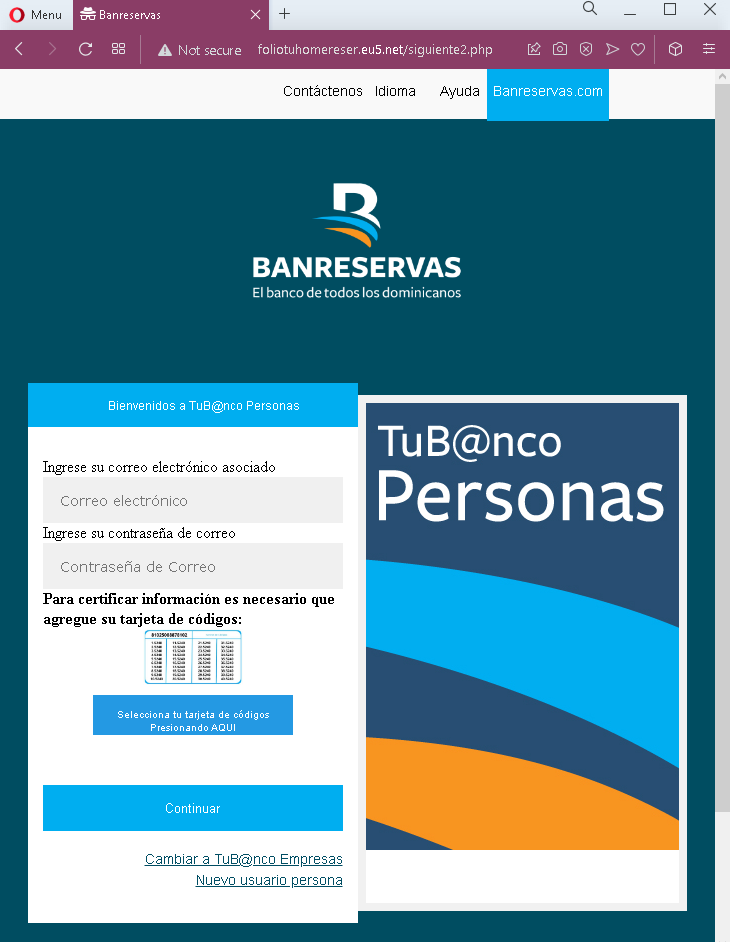
Step 3 – Fake Email & “Tarjeta de Códigos” Page (Third Screenshot)
The third page asks for:
- Correo electrónico (email address)
- Contraseña de Correo (email password)
- A selection of a “tarjeta de códigos” (codes card) – a numbered card used to generate one‑time codes for two‑factor authentication.
The victim is prompted to enter the code from the card after selecting the appropriate card. This step captures both the email credentials and the 2FA codes needed to authorize transactions.
The goal:
The attacker aims to:
- Steal the victim’s Banreservas online banking username and password
- Capture the victim’s email address and password to intercept communications, reset passwords, and maintain persistent access
- Obtain the “tarjeta de códigos” 2FA codes, which are required to perform transactions or log in
With all this information, the attacker can log into the victim’s bank account, transfer funds, and also take over the associated email account.
Red flags to watch for:
- Suspicious URL: The pages are hosted on domains that are not
banreservas.com - Request for email password: A legitimate bank never asks for your email account password. This is a clear sign of a phishing attack designed to compromise your email.
- Request for “tarjeta de códigos” codes without context: The bank’s 2FA card is used to verify specific transactions or logins. Asking for it in a generic “update” flow is suspicious and indicates credential theft.
- Unsolicited login request: Banreservas does not send emails or messages with links requiring customers to log in and then provide email passwords and 2FA codes.
- Multi‑step design with unrelated requests: The flow moves from banking username/password to email credentials to 2FA codes. No legitimate banking process combines these in a single session.
- Copied legitimate content: The pages use the bank’s logo, color scheme, and terminology (“TUB@nco Personas”, “tarjeta de códigos”) to appear authentic, but they are hosted on fraudulent domains.
What to do if you encounter this:
- Do not enter your banking username, password, email credentials, or 2FA codes on these pages.
- If you are a Banreservas customer, always access online banking by typing
banreservas.com - If you have already entered your banking credentials but not the email or 2FA codes, contact Banreservas immediately to change your password and secure your account.
- If you have entered your email password, change that password immediately, enable two‑factor authentication on your email account, and check for unauthorized forwarding rules.
- If you have entered 2FA codes from your “tarjeta de códigos”, the attacker may have already used them. Contact Banreservas’ fraud department immediately.
- Report the phishing pages to Banreservas’ security team.
Why this scam is particularly dangerous:
This is a complete account takeover phishing kit targeting both the bank account and the associated email. By capturing the “tarjeta de códigos” 2FA codes, the attacker can authorize transactions without needing additional verification. The email credentials allow them to intercept alerts, delete evidence, and reset passwords for other services. This level of compromise can lead to significant financial loss and identity theft.
Protective measures:
- Bookmark the official Banreservas login page and use that bookmark to access online banking—never click links in emails or messages.
- Use a password manager: It will autofill only on legitimate
banreservas.com - Never provide your email password or 2FA card codes on a page you reached via a link. The bank already has this information and will not ask for it in an unsolicited login flow.
- Enable two‑factor authentication on your email account using an authenticator app (not SMS) to reduce the risk of account takeover.
- Be suspicious of any unsolicited message that creates urgency and asks you to log in to your bank account.
- Check the URL carefully: Legitimate Banreservas domains end with
banreservas.com - If in doubt, contact Banreservas directly using a phone number from your bank statement or the official website—never use contact information provided in a suspicious message.