
Security Notice: This deceptive layout was detected, analyzed, and contained firsthand by the
Antiphishing.bizsecurity team during our automated link scanning workflows. To protect the public, the hostile origin link has been completely disabled within our infrastructure. We document and analyze these live visual patterns to help security researchers and users spot lookalike phishing methods before financial damage occurs.
Threat Analysis: Generic Banking Phishing – Credential & SMS Code Harvesting
This phishing campaign impersonates a financial institution (likely a bank or digital wallet in Latin America, based on the Spanish language and the “reactivar” – reactivate – pretext). The scam uses a multi-page flow to capture the victim’s username, password, and SMS verification code (two-factor authentication), enabling full account takeover.
How it works:
The victim receives a phishing email, SMS, or other message claiming that their account has been deactivated or requires verification to “reactivate” it. The message includes a link to the first phishing page.
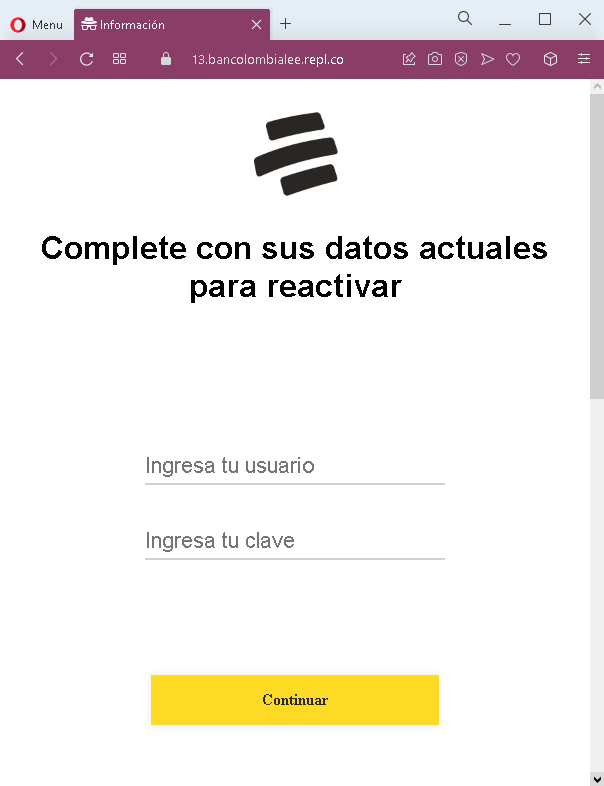
Step 1 – Fake Credentials Page (First Screenshot)
The first page asks for:
- Usuario (username)
- Clave (password)
This page captures the victim’s primary account credentials. The pretext of “reactivating” the account creates urgency.
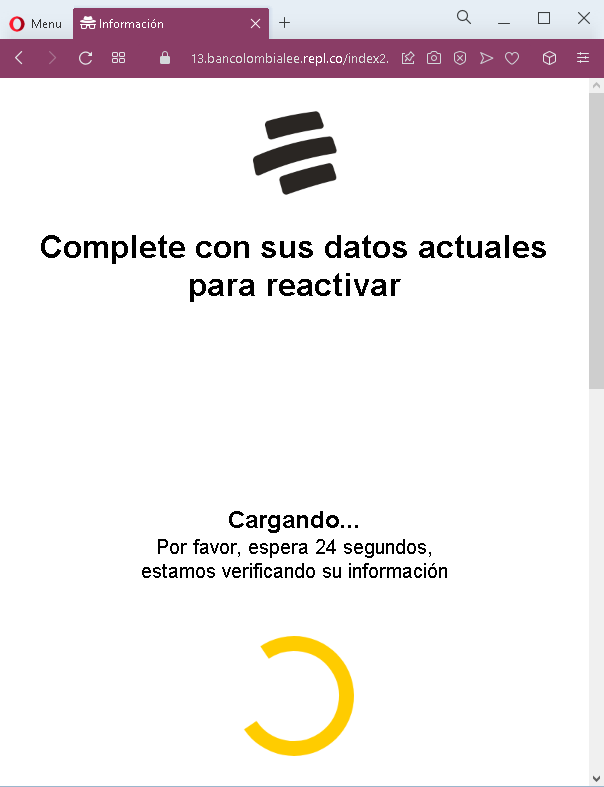
Step 2 – Fake Waiting/Loading Page (Second Screenshot)
The second page displays a fake loading message with a countdown timer (24 seconds), claiming that the victim’s information is being verified. This page serves two purposes:
- It creates a sense of legitimate processing
- It buys time for the attacker to use the stolen credentials to log into the real bank/platform and trigger an SMS code to the victim’s phone
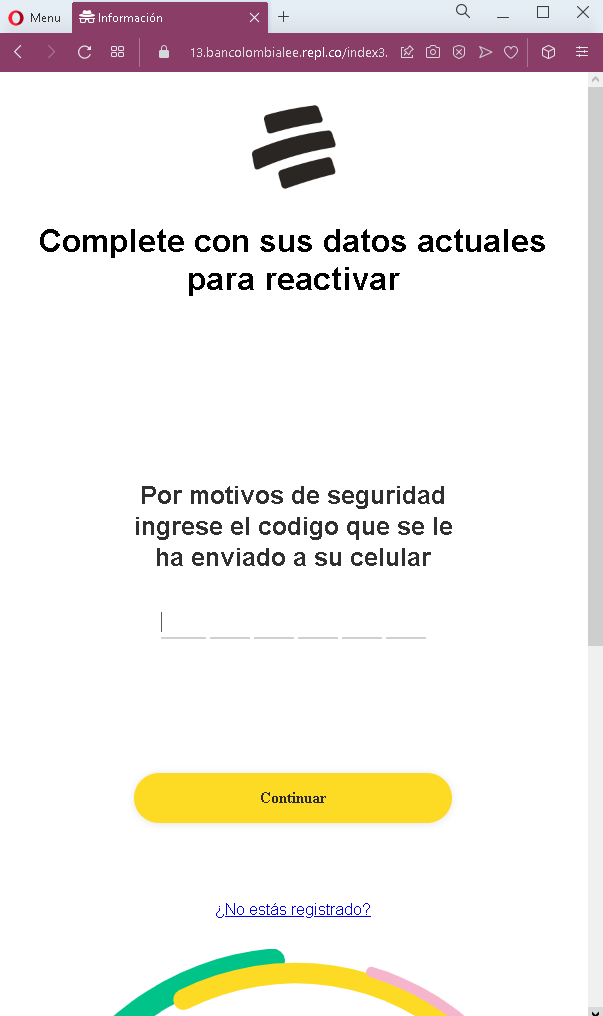
Step 3 – Fake SMS Code Page (Third Screenshot)
The third page asks for the SMS verification code sent to the victim’s mobile phone. When the victim enters this code, the attacker captures it and uses it to complete the login on the real platform.
The goal:
The attacker aims to:
- Steal the victim’s account credentials (username and password)
- Capture the SMS verification code (2FA) in real time
- Gain full access to the victim’s account to transfer funds, make payments, or commit fraud
Red flags to watch for:
- Suspicious URL: The pages are hosted on domains that are not the official domain of the legitimate financial institution. Always check the address bar before entering credentials.
- Unsolicited “reactivation” request: Legitimate banks do not send emails or messages with links requiring customers to log in to “reactivate” accounts.
- Fake loading page with countdown: Legitimate banking sites do not display artificial countdown timers during login. This is a classic phishing tactic to buy time for the attacker.
- Multi-step design with SMS code request: After entering credentials, the victim is asked for an SMS code. While this mirrors the real 2FA flow, the pages themselves are fake.
- Generic branding: The pages lack the specific logos, security notices, and personalized elements that would appear on a legitimate bank’s login interface.
- “Reactivate” pretext: The claim that the account needs to be reactivated is a common fear-based tactic to pressure victims into acting without thinking.
What to do if you encounter this:
- Do not enter your username, password, or SMS verification code on these pages.
- If you are a customer of any financial institution, always access your account by typing the official website URL directly into your browser or by using the official mobile app.
- If you have already entered your credentials but not the SMS code, contact your bank immediately to change your password and secure your account.
- If you have entered the SMS code as well, the attacker may have already accessed your account. Contact your bank’s fraud department immediately.
- Report the phishing pages to the legitimate institution being impersonated.
Why this scam is particularly dangerous:
This is a real-time account takeover phishing kit. The attacker uses the stolen username and password immediately to log into the real platform and trigger an SMS code. The fake loading page buys time for this process. When the victim enters the SMS code on the phishing page, the attacker uses it to complete the login—often within seconds. The “reactivation” pretext is effective because it creates urgency and implies that the account is at risk if no action is taken.
Protective measures:
- Never click links in unsolicited messages claiming your account needs to be reactivated or verified. Instead, type the official website URL directly into your browser.
- Use a password manager: It will autofill only on legitimate domains, not on phishing sites.
- Never enter your SMS verification code on a page you reached via a link. Legitimate banks only ask for 2FA codes after you have initiated a login on their official site.
- Be suspicious of any unsolicited message that creates urgency and asks you to log in to your account.
- Check the URL carefully: Look for misspellings, extra words, or unusual top-level domains.
- If in doubt, contact your bank directly using a phone number from your bank statement or the official website—never use contact information provided in a suspicious message.