Royal Mail phishing page revealed


Gumtree Classifieds Phishing – Fake “Payment Received” Scam (UK Variant)

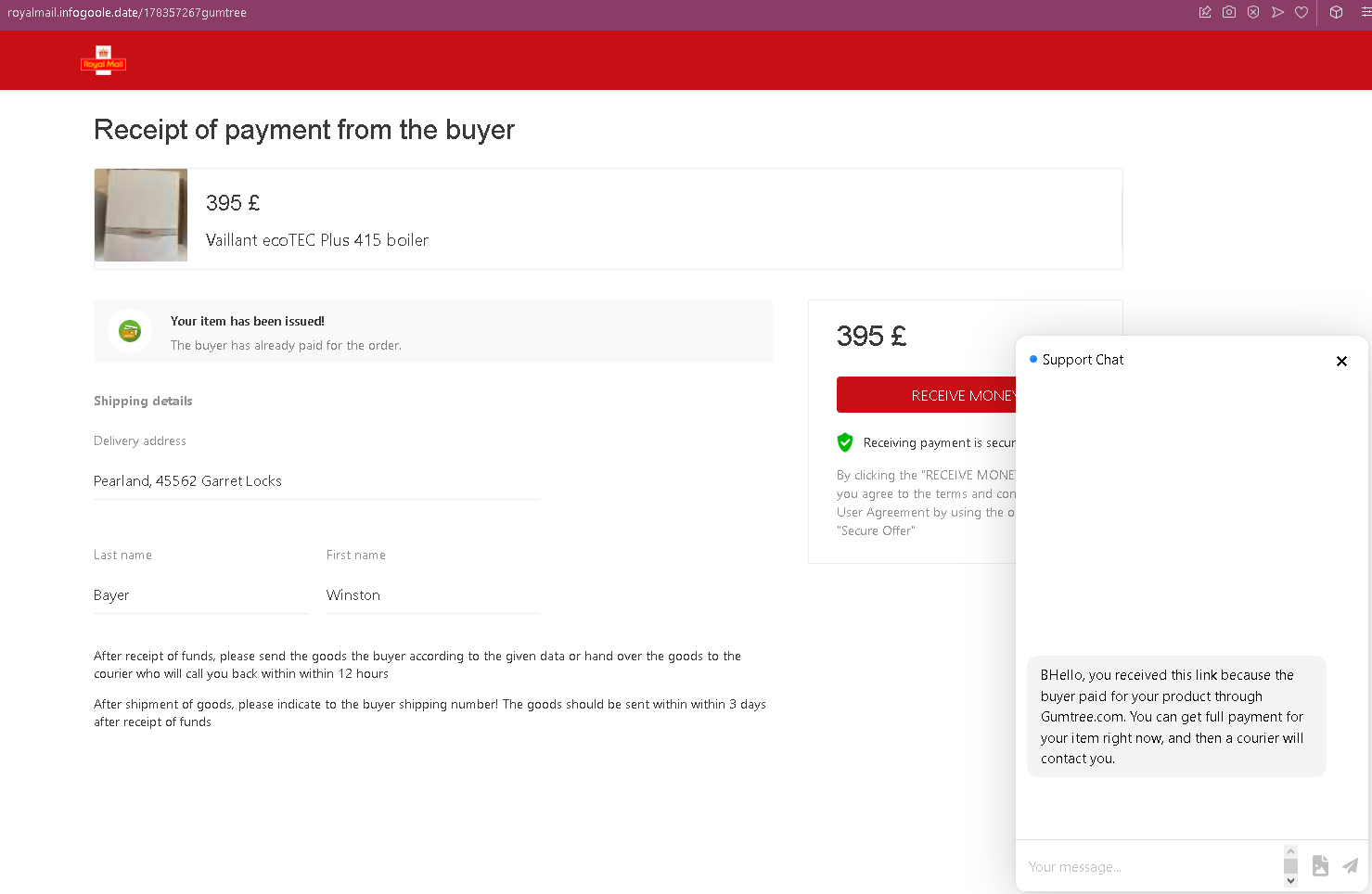
This phishing campaign impersonates Gumtree, a widely used classified advertisements platform in the United Kingdom. The scam targets sellers by creating a fake “payment received” page that claims a buyer has already paid for an item. The page includes a fake chat support window to add credibility and pressure the seller into entering credit card details on a following page.

How it works:
A seller receives a message—likely via Gumtree’s messaging system, SMS, email, or another chat app—from a supposed buyer claiming to have paid for the item. The message includes a link to this phishing page.

The Fake Payment Confirmation Page
This single page displays:

  • A prominent payment receipt heading
  • An item description (in this case, a boiler model) with a price in GBP (£395)
  • Fabricated buyer details, including a name and a shipping address
  • A message stating that the buyer has already paid and that the seller should ship the item or await a courier after “receiving funds”
  • Instructions implying that the seller must take action to claim the payment
  • A prominent button designed to initiate the “receipt” of funds
  • A fake chat support window that appears to show a pre-written message claiming to be from Gumtree support, explaining that the buyer paid through Gumtree and that the seller can get full payment immediately

The goal:
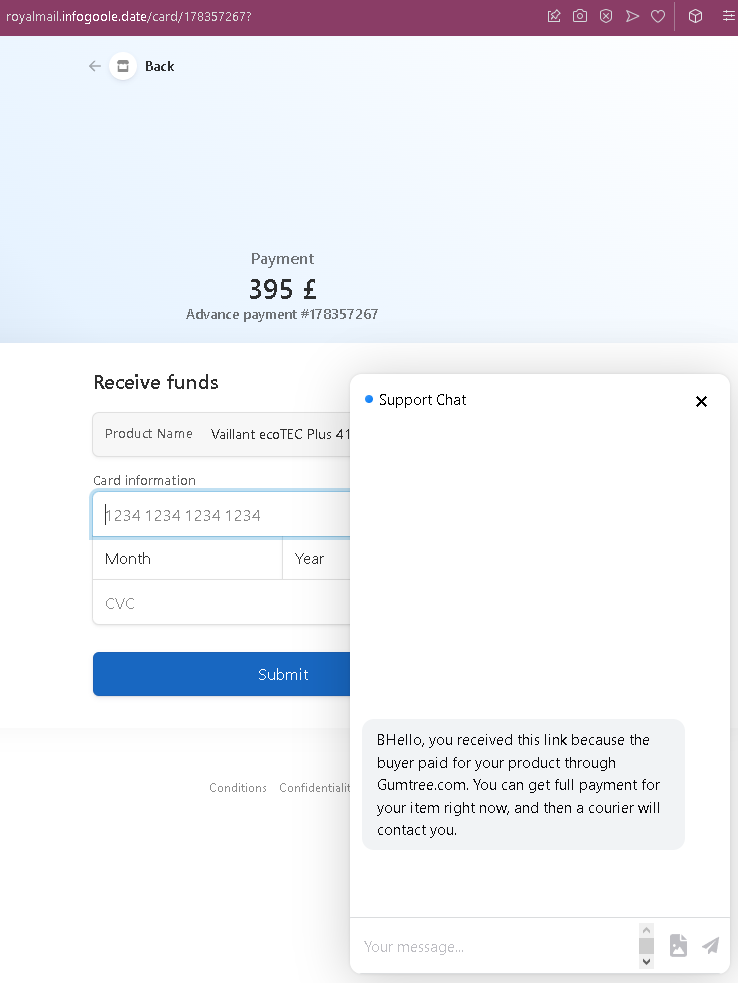
The attacker intends to steal the seller’s credit card details. While this screenshot does not show the card entry form, the pattern from similar scams indicates that clicking the “receive” button leads to a second page requesting full credit card number, expiry date, and CVC. There is no actual payment—the buyer, the order, and the support chat are all fabricated.

Red flags to watch for (without quoting specific text):

  • Illogical request flow: The page asks the seller to “receive” money but does so by directing them to a button that leads to a card entry form. In legitimate transactions, sellers receive money directly to their bank account or PayPal—they never need to enter card details to claim payment.
  • Fake chat support: The embedded chat window is not a live support feature but a scripted message designed to reassure the victim. Legitimate Gumtree transactions do not include a live chat pop-up that explains payment processes on third-party pages.
  • Suspicious URL: The page is hosted on a domain that is not gumtree.com. Always check the address bar before entering any information.
  • Vague buyer address: The shipping address appears nonsensical (“Pearland_45562 Garret Locks”)—a tactic to make the listing seem specific without using real identifiable information.
  • No account login required: A legitimate sale on Gumtree would appear in the seller’s account dashboard after logging in. This page bypasses account authentication entirely and asks for sensitive information directly.
  • Pressure to ship: The page instructs the seller to ship the item after “receiving funds” and within a specific timeframe, creating urgency to bypass critical thinking.
  • Mixed branding: While the page references Gumtree in the fake chat, the overall design lacks official Gumtree branding consistency and security indicators.

What to do if you encounter this:

  • Do not click the button to “receive” funds or proceed to any next step.
  • Do not enter any credit card details, even if a subsequent page asks for them.
  • If you are selling on Gumtree, always log into your account directly (by typing gumtree.com into your browser) to check for real sales and messages. Legitimate transactions appear in your account inbox and dashboard.
  • Never trust links sent by buyers claiming they have paid—especially if they direct you to an external page.
  • If you have already entered your credit card details, contact your bank immediately to block the card and dispute any unauthorized charges.
  • Report the phishing page to Gumtree’s support team.

Why this scam is effective:
Gumtree is one of the UK’s most popular platforms for selling second-hand goods, especially household items like appliances. Sellers are often eager to complete a sale and may click a link in a message without suspicion. The fake chat support window is a particularly convincing touch—it mimics the “live chat” features common on e-commerce sites and provides a seemingly helpful explanation for why the seller needs to “claim” the payment. The £395 price point is realistic for a boiler, making the scam plausible.

Protective measures:

  • Always verify any sale by logging directly into your Gumtree account—never through a link sent in a message.
  • Never enter credit card details to receive payment. Sellers provide payout details (bank account) during account setup; payments are processed automatically.
  • Be suspicious of any page that includes a pop-up chat window claiming to explain a payment process—legitimate platforms do not use such tactics on external pages.
  • If a buyer sends you a link to “claim” payment, treat it as a red flag and verify directly through the platform’s official app or website.
  • Enable two-factor authentication (2FA) on your email and any linked payment accounts.
Subito phishing page detected


Subito.it Classifieds Phishing – Fake “Secure Funds Receipt” Scam (Italian Variant)

This phishing campaign impersonates Subito.it, the most widely used classified advertisements platform in Italy. The scam targets sellers by creating a fake “order” page that claims a buyer has initiated a purchase, then directs the seller to a card harvesting page under the pretext of “receiving funds securely.”

How it works:
A seller receives a message—likely via Subito’s messaging system, SMS, or other chat app—from a supposed buyer claiming to have paid for the item. The message includes a link to the first phishing page.

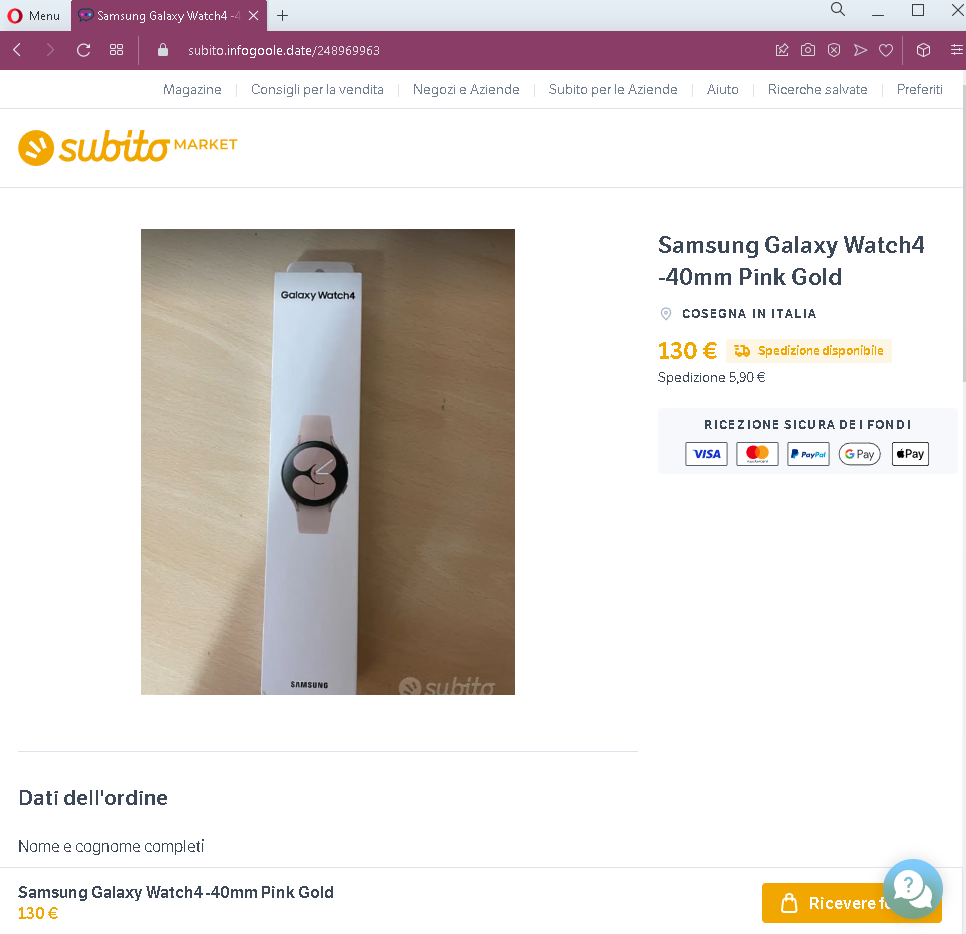
Step 1 – Fake Order Confirmation Page
The first page displays:

  • Subito branding and a product listing (in this case, a Samsung Galaxy Watch)
  • A price in euros (€130) plus shipping
  • Payment method logos (Visa, PayPal, etc.) to appear legitimate
  • Order details including the buyer’s name and the item
  • A prominent button implying the seller can securely receive funds

The page mimics Subito’s official interface, giving the impression that the transaction is already in progress.

Step 2 – Credit Card Harvesting Page with Fake Chat Support
After clicking the button, the seller is taken to a second page that:

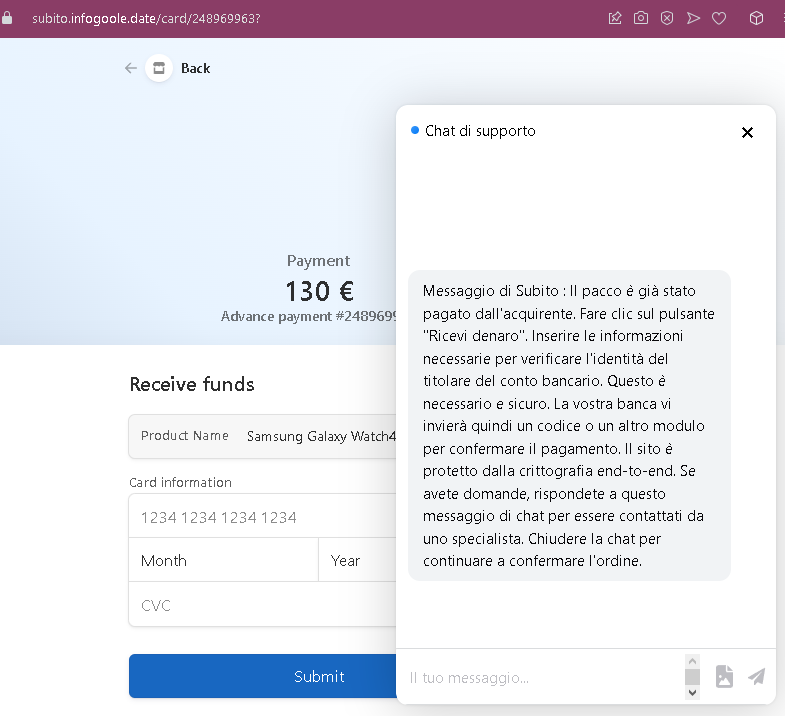
  • Requests full credit card number, expiration date, and CVC
  • Displays the same transaction amount and a reference number
  • Includes a fake chat support window with a pre-written message
  • The chat message claims to be from Subito, explaining that the package has been paid for and that the seller must enter card details to verify their identity and confirm the payment. It falsely states the site is protected by end-to-end encryption.

The goal:
The attacker steals the seller’s credit card details. There is no actual buyer or payment—the entire transaction is fabricated. The fake chat window is designed to answer objections and pressure the seller into completing the card form.

Red flags to watch for:

  • Illogical request for card details: A seller receiving money should never be asked to enter their credit card number, expiry date, and CVC. Receiving funds requires bank account details (IBAN) or a linked payout method—not card credentials.
  • Fake chat support: The embedded chat window is not a live support feature but a scripted message. Legitimate Subito transactions do not include a pop-up chat that explains payment procedures on a third-party page.
  • Suspicious URL: The pages are hosted on a domain that is not subito.it. Always check the address bar before entering any information.
  • No login required: A legitimate sale on Subito would appear in the seller’s account dashboard after logging in. This scam bypasses account authentication entirely.
  • Generic payment form: The second page lacks integration with Subito’s actual payment system (Tantum) and does not display the expected security indicators of a legitimate checkout page.
  • Pressure to act: The combination of a realistic product price (€130) and the fake chat’s reassuring tone is designed to lower the seller’s guard and encourage quick action.

What to do if you encounter this:

  • Do not click any buttons promising to “receive” funds.
  • Do not enter your credit card details, expiry date, or CVC on such pages.
  • If you are selling on Subito, always log into your account directly (by typing subito.it into your browser) to check for real sales and messages.
  • Never trust links sent by buyers claiming they have paid—especially those directing you to external pages.
  • If you have already entered your credit card details, contact your bank immediately to block the card and dispute any unauthorized charges.
  • Report the phishing page to Subito’s support team.

Why this scam is effective:
Subito.it is Italy’s dominant classified platform, with millions of users. Sellers are accustomed to receiving messages about their listings and may not suspect a link that appears to show a legitimate order confirmation. The fake chat support window adds a layer of “customer service” that can convince hesitant victims. The €130 price point for a Samsung Galaxy Watch is realistic, making the scam plausible.

Protective measures:

  • Always verify any sale by logging directly into your Subito account—never through a link sent in a message.
  • Never enter credit card details to receive payment. Sellers provide payout details (bank account) during account setup; payments are processed automatically.
  • Be suspicious of any page that includes a pop-up chat window claiming to explain a payment process—legitimate platforms do not use such tactics on external pages.
  • If a buyer sends you a link to “claim” payment, treat it as a red flag and verify directly through the platform’s official app or website.
  • Enable two-factor authentication (2FA) on your email and any linked payment accounts.
DPD phishing page in Slovak detected


DPD & Posta.sk Phishing – Fake “Funds Receipt” Scam with PS5 Lure (Slovak Variant)

This phishing campaign impersonates DPD and Slovenská pošta (Posta.sk) to target sellers on Slovak classified platforms (such as Bazar.sk). The scam uses a PlayStation 5 (PS5) as the fake item—a high-value, frequently sought-after product—to make the transaction seem plausible and urgent. The scam includes a fake chat support window to pressure the seller into entering credit card details.

How it works:
A seller receives a message—likely via Bazar.sk’s messaging system, SMS, or other chat app—from a supposed buyer claiming to have paid for the item. The message includes a link to the first phishing page.

Step 1 – Fake DPD & Posta.sk “Funds Received” Page
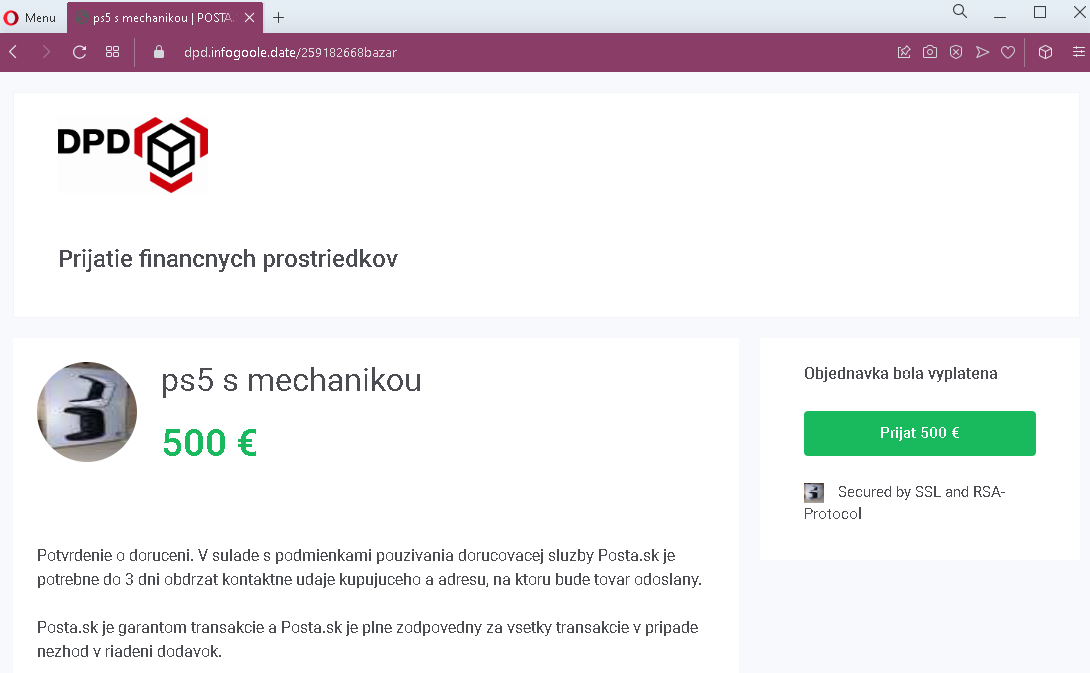
The first page displays:

  • DPD logo
  • A heading suggesting receipt of funds
  • A high-value item: PlayStation 5 (PS5) with a price in euros (€500)
  • Text referencing Posta.sk as a transaction guarantor
  • A button implying the funds have been received or can be claimed
  • A generic security badge (SSL/RSA)

Step 2 – Credit Card Harvesting Page with Fake Chat Support
After clicking the button, the seller is taken to a second page that:

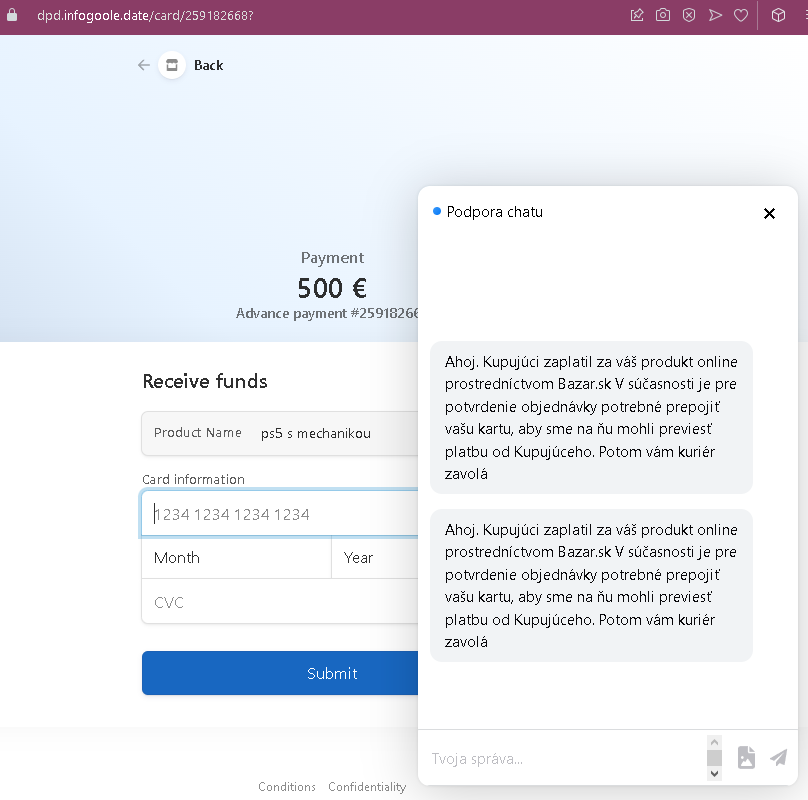
  • Requests full credit card number, expiration date, and CVC
  • Displays the same transaction amount (€500) and a reference number
  • Includes a fake chat support window with pre-written messages
  • The chat messages claim to be from support, explaining that the buyer paid through Bazar.sk and that the seller must “link” their card to receive the payment

The goal:
The attacker steals the seller’s credit card details. There is no actual buyer or payment—the entire transaction is fabricated. The fake chat window is designed to answer objections and pressure the seller into completing the card form.

Red flags to watch for:

  • Illogical request for card details: A seller receiving money should never be asked to enter their credit card number, expiry date, and CVC. Receiving funds requires bank account details (IBAN) or a linked payout method—not card credentials.
  • Mixed branding: The page uses both DPD and Posta.sk branding, which is unusual—these are separate companies. A legitimate transaction would not involve both.
  • Fake chat support: The embedded chat window is not a live support feature but a scripted message. Legitimate shipping companies and classified platforms do not use pop-up chats on external pages to guide users through payment receipt.
  • Suspicious URL: The pages are hosted on a domain that is not dpd.sk, posta.sk, or bazar.sk. Always check the address bar.
  • High-value lure: The PS5 is a popular, often hard-to-find item. Scammers use such products to attract sellers and create urgency.
  • No account login required: A legitimate sale would appear in the seller’s Bazar.sk account dashboard after logging in. This scam bypasses account authentication entirely.

What to do if you encounter this:

  • Do not click any buttons claiming funds are ready.
  • Do not enter your credit card details, expiry date, or CVC on such pages.
  • If you are selling on Bazar.sk or similar platforms, always log into your account directly (by typing the official URL) to check for real sales and messages.
  • Never trust links sent by buyers claiming they have paid—especially those directing you to external pages.
  • If you have already entered your credit card details, contact your bank immediately to block the card and dispute any unauthorized charges.
  • Report the phishing page to Bazar.sk, DPD, and Slovenská pošta.

Why this scam is effective:
This scam combines multiple trusted brands (DPD, Posta.sk, Bazar.sk) to create a false sense of legitimacy. The PS5 is a highly desirable item with a realistic second-hand price (€500), making the transaction plausible. The fake chat support window adds a layer of “customer service” that can convince hesitant victims. The pressure to “link” a card to receive payment is presented as a simple technical step, lowering suspicion.

Protective measures:

  • Always verify any sale by logging directly into your Bazar.sk or other platform account—never through a link sent in a message.
  • Never enter credit card details to receive payment. Sellers provide payout details (bank account) during account setup; payments are processed automatically.
  • Be suspicious of any page that includes a pop-up chat window claiming to explain a payment process—legitimate platforms do not use such tactics on external pages.
  • If a buyer sends you a link to “claim” payment, treat it as a red flag and verify directly through the platform’s official app or website.
  • Enable two-factor authentication (2FA) on your email and any linked payment accounts.
Shpock phishing page detected


Shpock Classifieds Phishing – Fake “Product Already Paid For” Scam (UK Variant)

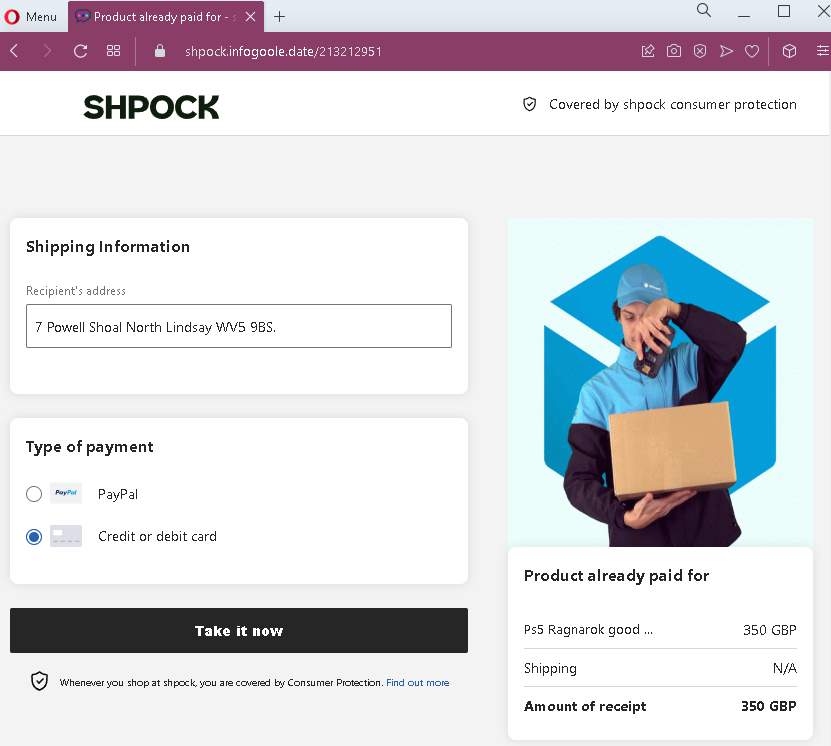
This phishing campaign impersonates Shpock, a widely used classified marketplace app and website in the UK and other European countries. The scam targets sellers by creating a fake order page that claims a buyer has already paid for an item, then directs the seller to a card harvesting page.

How it works:
A seller receives a message—likely via Shpock’s messaging system, SMS, or other chat app—from a supposed buyer claiming to have paid for the item. The message includes a link to the first phishing page.

Step 1 – Fake Order Confirmation Page
The first page displays:

  • Shpock branding
  • A shipping address (fabricated)
  • Payment method options (PayPal and credit/debit card), with one pre-selected
  • A prominent button implying the seller can “take” or claim the payment
  • A false statement that the product has already been paid for
  • A high-value item: PlayStation 5 Ragnarok bundle, priced at £350 GBP

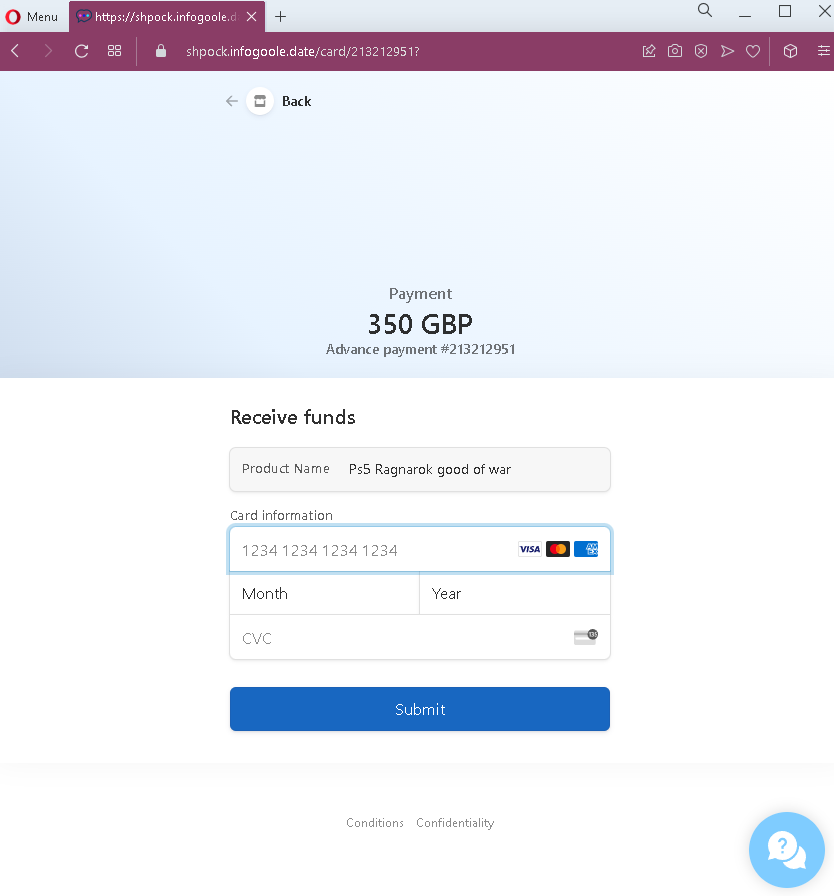
Step 2 – Credit Card Harvesting Page
After clicking the button, the seller is taken to a second page that:

  • Requests full credit card number, expiration date, and CVC
  • Displays the same transaction amount (£350) and a reference number
  • Includes a “Submit” button

The goal:
The attacker steals the seller’s credit card details. There is no actual buyer or payment—the entire transaction is fabricated. The reference to “Advance payment” and the fake transaction number are designed to make the card entry seem like a necessary step to complete the legitimate sale.

Red flags to watch for:

  • Illogical request for card details: A seller receiving money should never be asked to enter their credit card number, expiry date, and CVC. Receiving funds requires bank account details or a linked payout method (such as PayPal, which is set up once in account settings)—not re-entering card credentials per transaction.
  • Mismatched payment flow: The first page offers both PayPal and card options, but the second page only presents a card form—even if the seller expected to use PayPal.
  • Suspicious URL: The pages are hosted on a domain that is not shpock.com. Always check the address bar before entering any information.
  • No account login required: A legitimate sale on Shpock would appear in the seller’s account dashboard after logging into the app or website. This scam bypasses account authentication entirely.
  • Fake buyer address: The shipping address appears nonsensical (“7 Powell Shoal North Lindsay WVS 9BS”), a common tactic to make the listing seem specific without using real identifiable information.
  • High-value lure: The PS5 Ragnarok bundle is a highly desirable, often expensive item. Scammers use such products to attract sellers and create urgency.

What to do if you encounter this:

  • Do not click the button to “take” or claim payment.
  • Do not enter your credit card details, expiry date, or CVC on such pages.
  • If you are selling on Shpock, always open the official Shpock app or type shpock.com directly into your browser to check for real sales and messages.
  • Never trust links sent by buyers claiming they have paid—especially those directing you to external pages.
  • If you have already entered your credit card details, contact your bank immediately to block the card and dispute any unauthorized charges.
  • Report the phishing page to Shpock’s support team.

Why this scam is effective:
Shpock is popular for selling second-hand electronics, and the PS5 is one of the most sought-after items. Sellers are often eager to close a sale quickly. The page mimics Shpock’s simple, mobile-friendly design, and the fake “Consumer Protection” mention adds a false sense of security. The £350 price is realistic for a used PS5 bundle, making the transaction believable.

Protective measures:

  • Always verify any sale by logging directly into your Shpock account (via the app or official website)—never through a link sent in a message.
  • Never enter credit card details to receive payment. Sellers provide payout details (bank account or PayPal) during account setup; payments are processed automatically.
  • Be suspicious of any message that creates urgency or claims payment is already “waiting” but requires you to click an external link.
  • If a buyer sends you a link to “claim” payment, treat it as a red flag and verify directly through the platform’s official app or website.
  • Enable two-factor authentication (2FA) on your email and any linked payment accounts.
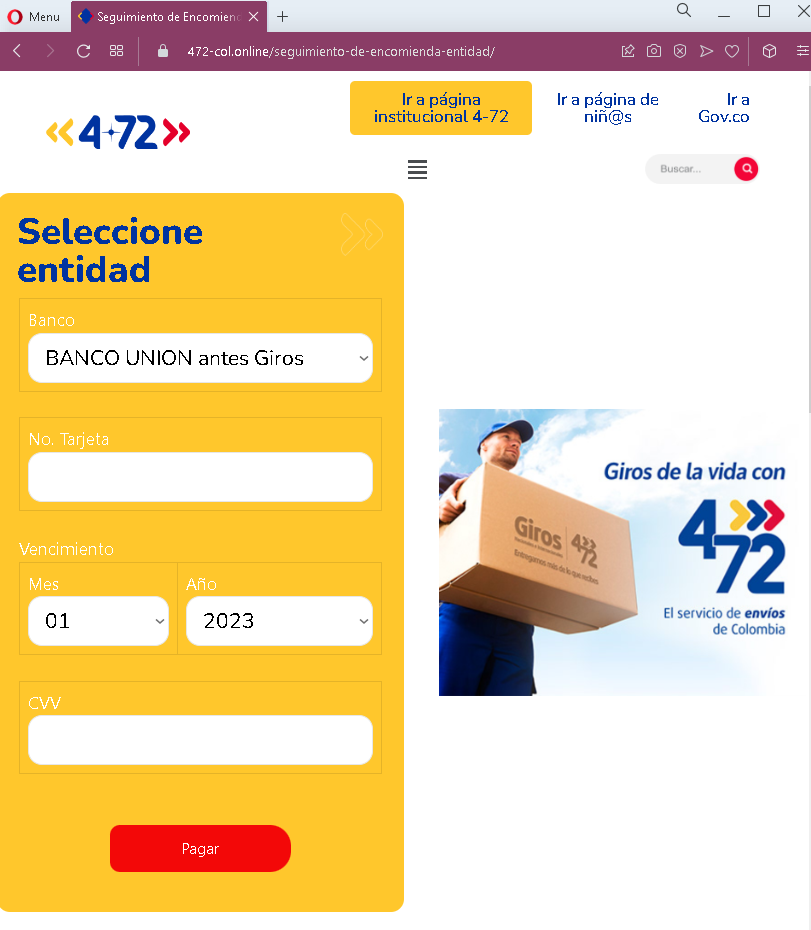
4-72 Servicios Postales Nacionales (Colombia) phishing page detected


4-72 Colombian Postal Service Phishing – Fake Shipping & Payment Scam

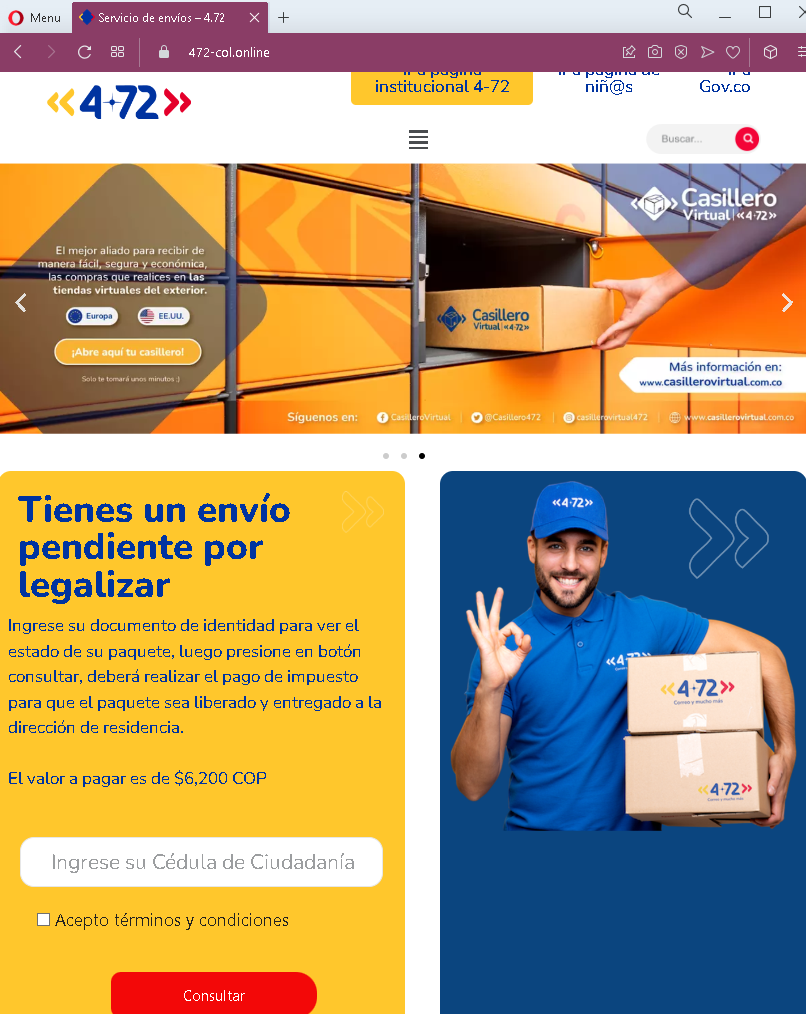
This phishing campaign impersonates 4-72 La Red Postal de Colombia (the official national postal service of Colombia) and likely references Gov.co (the Colombian government portal) to appear legitimate. The scam combines a fake shipping information form with a payment page designed to steal credit card details.

How it works:
The victim receives a phishing message—likely via SMS, email, or WhatsApp—claiming a package cannot be delivered due to missing information, customs fees, or a small payment required for release. The link leads to the first phishing page.

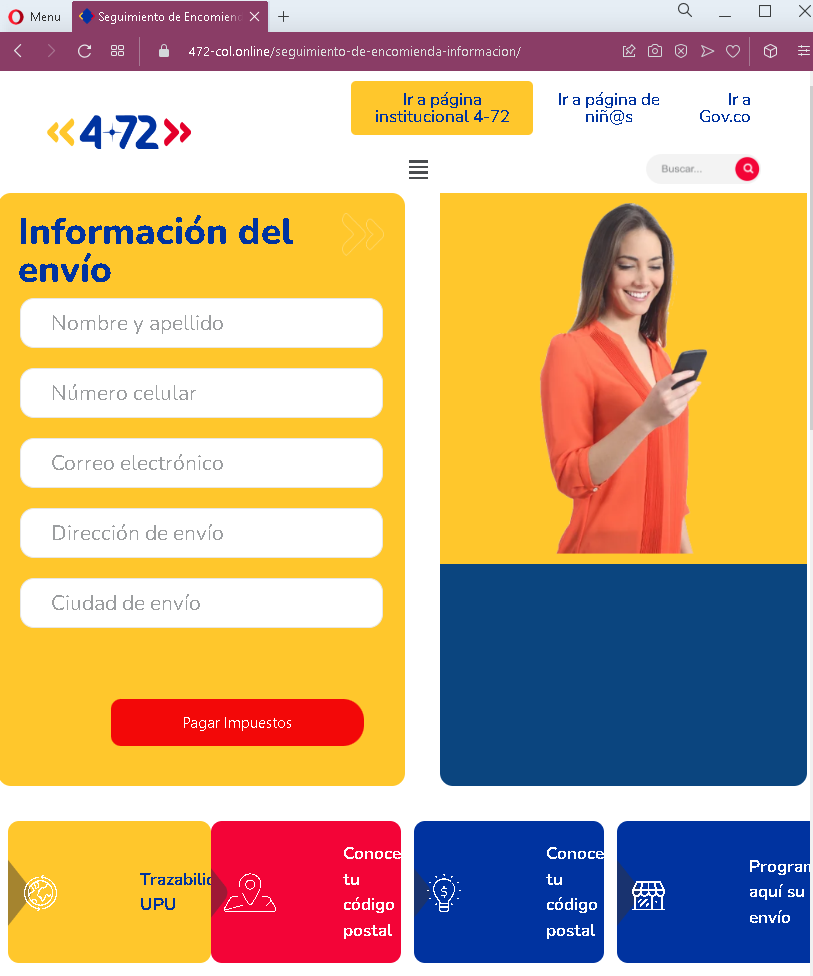
Step 1 – Fake Shipping Information Form
The first page (second screenshot) presents a form requesting:

  • Full name
  • Phone number
  • Email address
  • Shipping address (street and city)

This page uses official-looking Colombian postal branding and includes links to legitimate government sites (such as Gov.co and 4-72’s institutional page) to appear authentic. The purpose of this step is to collect personal information and convince the victim they are interacting with the official postal service.

Step 2 – Fake Payment Page
The second page (third screenshot) presents a payment interface that:

  • Asks the victim to select a bank or payment entity
  • Requests payment card details, including card number, expiration date, and CVV
  • Displays a “Pagar” (Pay) button

The amount to be paid is not shown prominently in these screenshots, but in similar scams it is typically a small fee (e.g., for redelivery or customs processing). The page references “Giros” (a Colombian money transfer service) to add familiarity.

The goal:
The attacker steals the victim’s credit card details along with their personal information (name, address, phone, email). This combination enables fraudulent transactions and can be used for identity theft. There is no actual package or delivery issue—the entire shipping notification is fabricated.

Red flags to watch for:

  • Unsolicited link: The victim receives an unexpected message claiming a package issue, with a link to enter personal and payment information. Legitimate postal services do not request payment or personal details via unsolicited links.
  • Request for full card details: Legitimate Colombian postal services (4-72) do not collect credit card information through such forms. Customs or redelivery fees are typically paid in person, at official offices, or through integrated payment gateways after logging into a verified account.
  • Mixed branding: The page includes links to 4-72 and Gov.co, but these are likely just copied text—the actual phishing page is hosted on a different domain.
  • No tracking number context: A legitimate delivery issue would reference a specific tracking number. These pages ask for personal information without linking to any verifiable shipment.
  • Suspicious URL: The pages are hosted on a domain that is not 4-72.gov.co or any official Colombian government domain. Always check the address bar.

What to do if you encounter this:

  • Do not enter any personal information (name, address, phone, email) on such pages.
  • Do not enter credit card details, expiration date, or CVV.
  • If you are expecting a package from 4-72, go directly to the official website (4-72.gov.co) and use your tracking number to check its status.
  • Report the phishing page to 4-72 and to the Colombian authorities (such as the national police’s cybercrime unit).

Why this scam is effective:
4-72 is the official postal service of Colombia, and many citizens use it to send and receive packages. The inclusion of links to legitimate government sites (Gov.co, 4-72’s institutional page) in the footer adds a false sense of authenticity. The two-step process (first collecting personal information, then payment details) mimics the flow of a legitimate shipping update, lowering the victim’s guard.

Protective measures:

  • Always verify package status by typing the official postal service URL directly into your browser—never click links in unsolicited messages.
  • Legitimate postal services will not ask for your credit card details via a form linked in an SMS or email.
  • Be suspicious of messages that create urgency (e.g., “your package cannot be delivered without payment”) and direct you to an external page.
  • If a message claims to be from 4-72, check for a valid tracking number and verify it on the official site.

Orange phishing page revealed


Orange Voicemail Phishing – Fake “New Messages” Notification

This phishing campaign impersonates Orange, a major telecommunications provider in France and other countries. The scam uses a fake voicemail notification to create urgency and trick victims into entering their Orange account credentials on a fraudulent login page.

How it works:
The victim receives a phishing email or SMS claiming to be from Orange, stating that new voicemail messages are waiting. The message includes a link to the first phishing page.

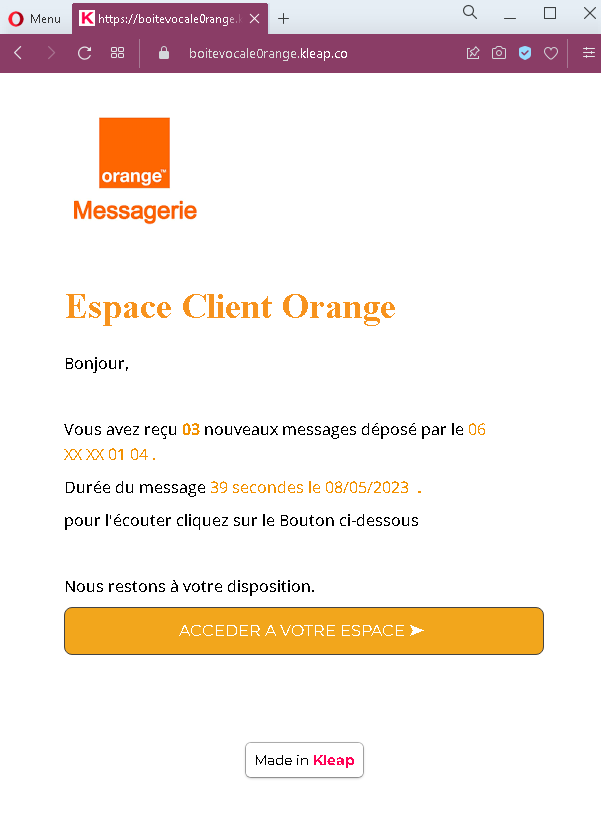
Step 1 – Fake Voicemail Notification Page
The first page displays:

  • Orange branding
  • A claim that the recipient has received new messages from a specific phone number
  • A fabricated message duration and date
  • A prominent button inviting the victim to access their account to listen to the messages

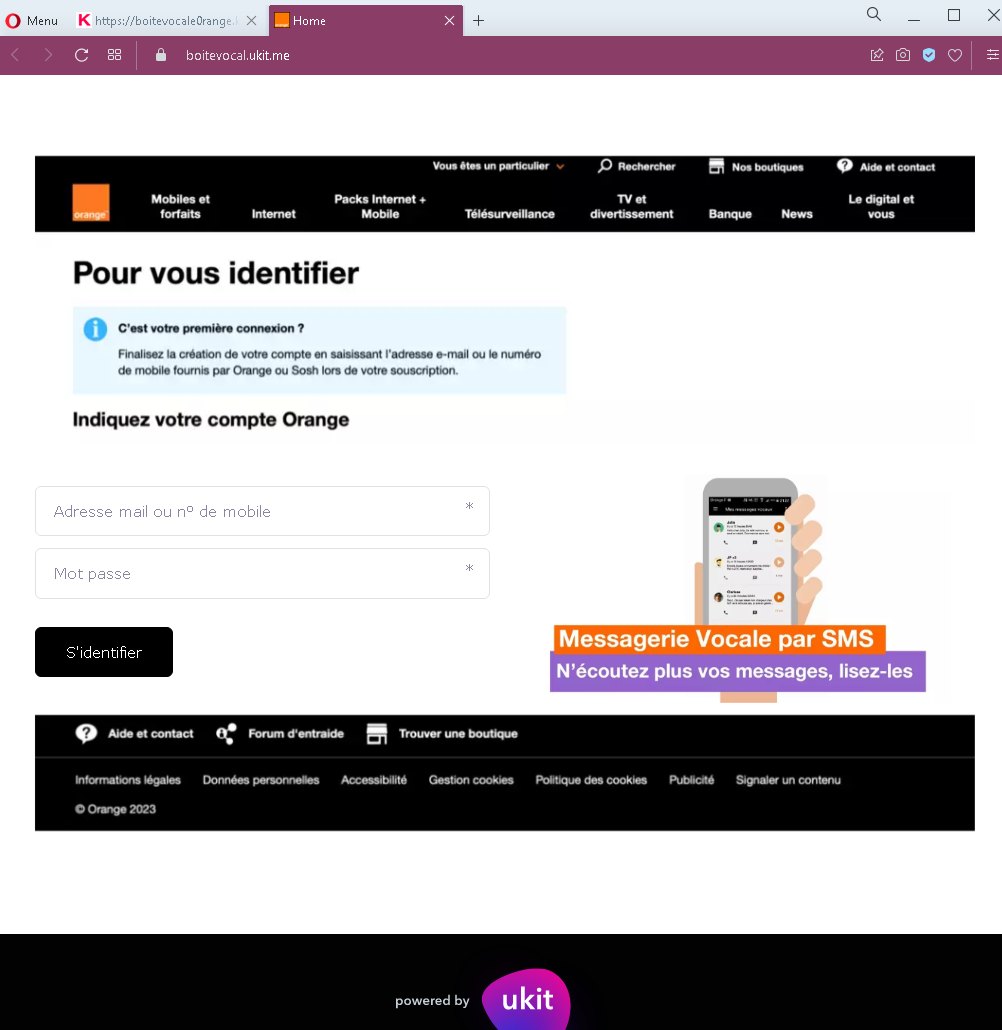
Step 2 – Fake Orange Login Page
After clicking the button, the victim is taken to a page that mimics Orange’s official login interface. This page:

  • Asks for the victim’s Orange account identifier (email or mobile number) and password
  • Includes a “Sign in” button
  • Features footer links commonly found on legitimate Orange pages (help, legal information, cookie policy) to appear authentic

The goal:
The attacker steals the victim’s Orange account credentials (username/email and password). With these, they can:

  • Access the victim’s personal information stored in the Orange account
  • Potentially port the victim’s phone number (SIM swapping) to gain control over SMS-based two-factor authentication for banking and other services
  • Use the compromised account to send further phishing messages to the victim’s contacts
  • Gain access to any services linked to the Orange account

Red flags to watch for:

  • Unsolicited notification: A legitimate voicemail notification from Orange typically appears as a direct alert within the phone’s voicemail system or via a short SMS without a link. Orange does not send emails with buttons to “access your space” for voicemail playback.
  • Suspicious URL: Both pages are hosted on a domain that is not orange.fr or any official Orange domain. Always check the address bar before entering credentials.
  • Generic design elements: The first page includes a “Made in Kleap” watermark (a website builder), which is not present on official Orange communications.
  • No personalization: The notification does not address the recipient by name or reference a specific account number.
  • Login page mismatch: The login page asks for credentials to listen to voicemail, but legitimate voicemail access is typically handled through the phone’s native voicemail system or a dedicated app—not through a web login form.

What to do if you encounter this:

  • Do not click the button to “access your space.”
  • Do not enter your Orange account credentials on such pages.
  • If you have an Orange voicemail, access it directly through your phone’s voicemail feature or the official Orange app.
  • If you are an Orange customer, always type the official Orange website URL (orange.fr or your local Orange domain) directly into your browser to log in.
  • If you have already entered your credentials, change your Orange account password immediately and enable two-factor authentication (2FA) if available. Also check for any unauthorized changes to your account (such as SIM swap requests).
  • Report the phishing page to Orange’s fraud department.

Why this scam is effective:
Voicemail notifications are routine for mobile phone users, and the promise of “new messages” creates immediate curiosity. The use of Orange branding and a plausible message format (including a date, duration, and partial phone number) makes the notification seem credible. The second page closely mimics Orange’s actual login interface, complete with familiar footer links.

Protective measures:

  • Never click links in unsolicited emails or SMS claiming to be from your telecom provider. Access your account by typing the official URL directly or using the provider’s official app.
  • Be suspicious of any message that creates urgency and asks you to log in via a link.
  • For voicemail, rely on your phone’s built-in visual voicemail or the carrier’s official voicemail number, not web links.
  • Enable two-factor authentication (2FA) on your telecom account if offered, to prevent unauthorized access and SIM swapping.
  • If you receive a suspicious message claiming to be from Orange, forward it to the company’s official phishing reporting address (e.g., spam.orange.fr).

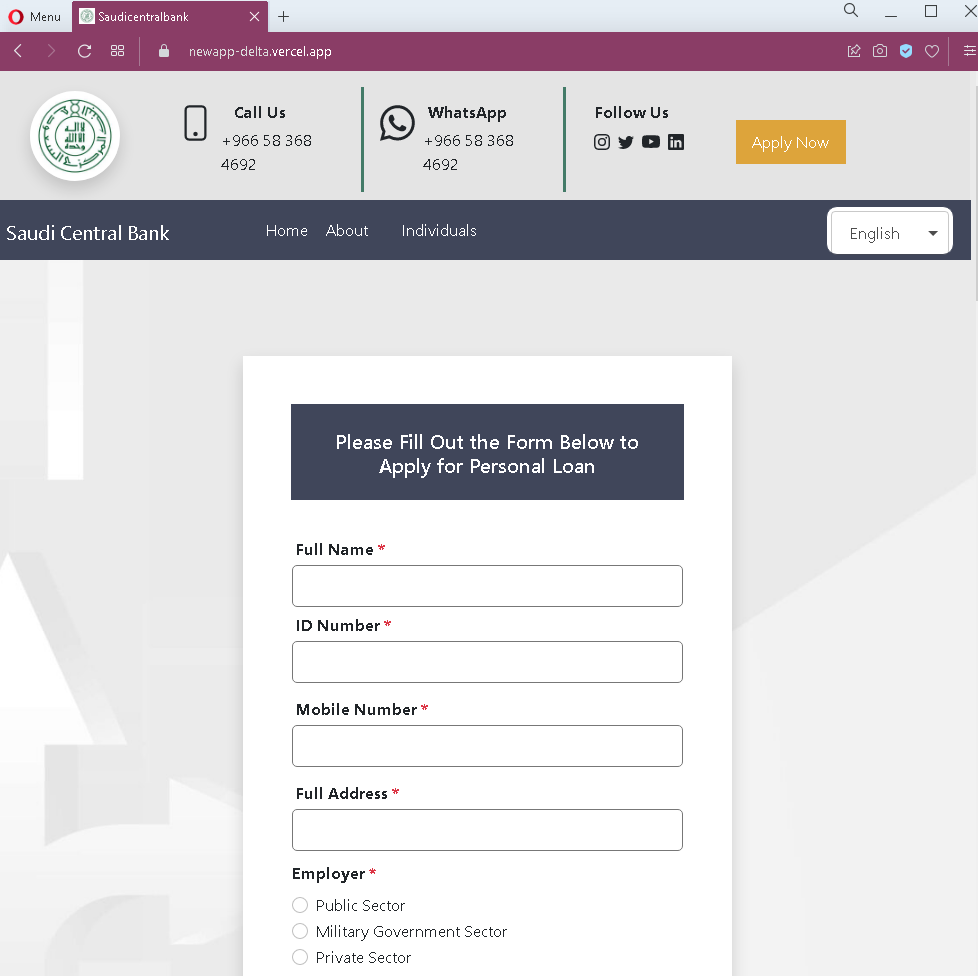
Saudi Central Bank phishing page detected


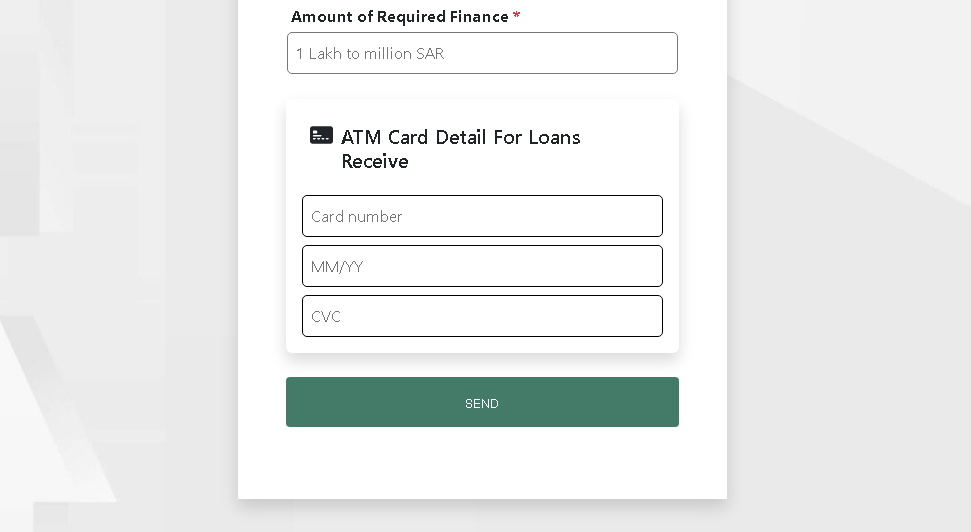
Saudi Arabia Fake Loan Scam – “Instant Loan Without Salary Transfer” Phishing

This phishing campaign impersonates legitimate financial companies licensed by the Saudi Central Bank (SAMA) . The scam promotes instant loans without salary transfer requirements—a highly attractive offer—to lure victims into providing personal information and eventually banking credentials.

How it works:
The victim encounters the scam via social media ads, SMS, email, or messaging apps promoting quick, easy loans. The campaign consists of multiple pages designed to build credibility and collect sensitive information.

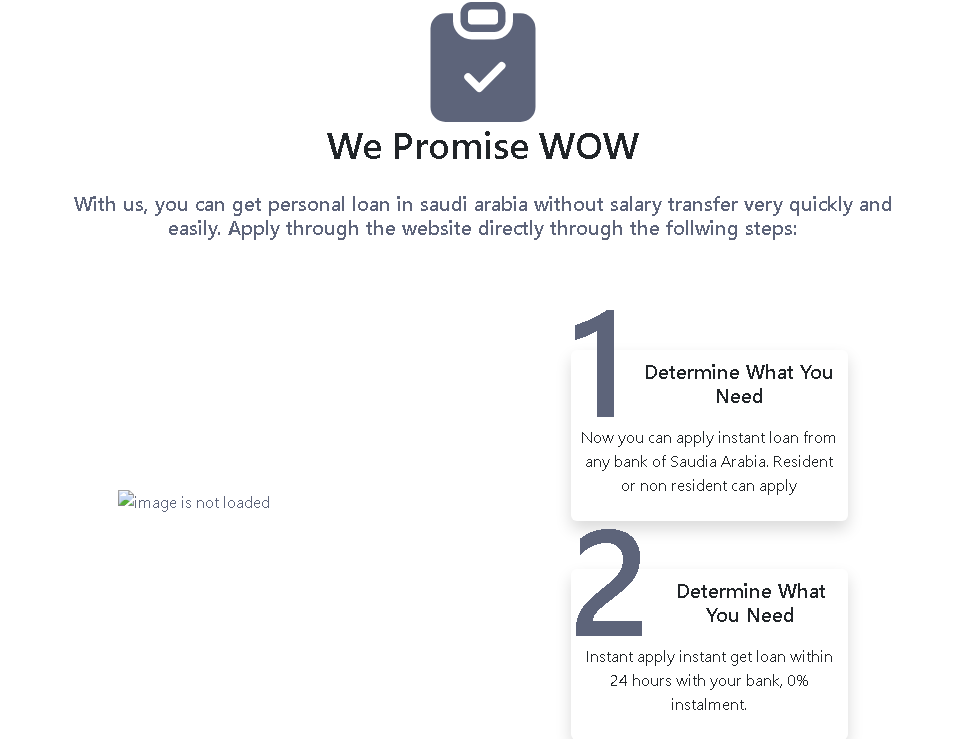
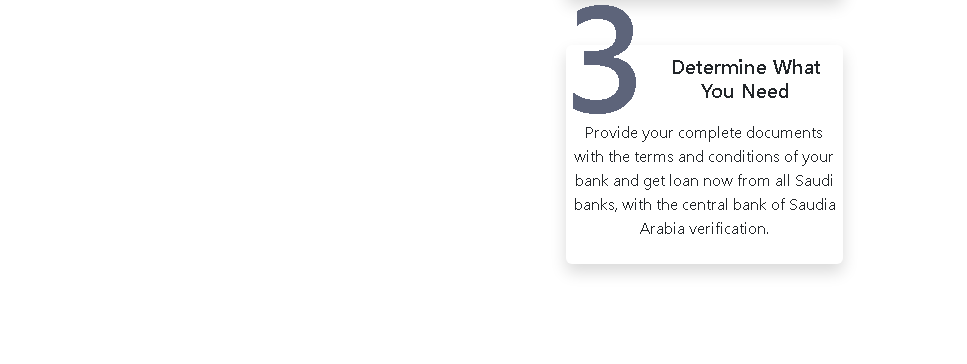
Step 1 – Loan Promotion Page
The first page displays:

  • Promises of instant personal loans in Saudi Arabia without the need for salary transfer
  • Claims of quick approval (within 24 hours) and 0% installments
  • Instructions to “apply through the website directly”
  • A numbered list of simple steps to create a sense of simplicity and speed

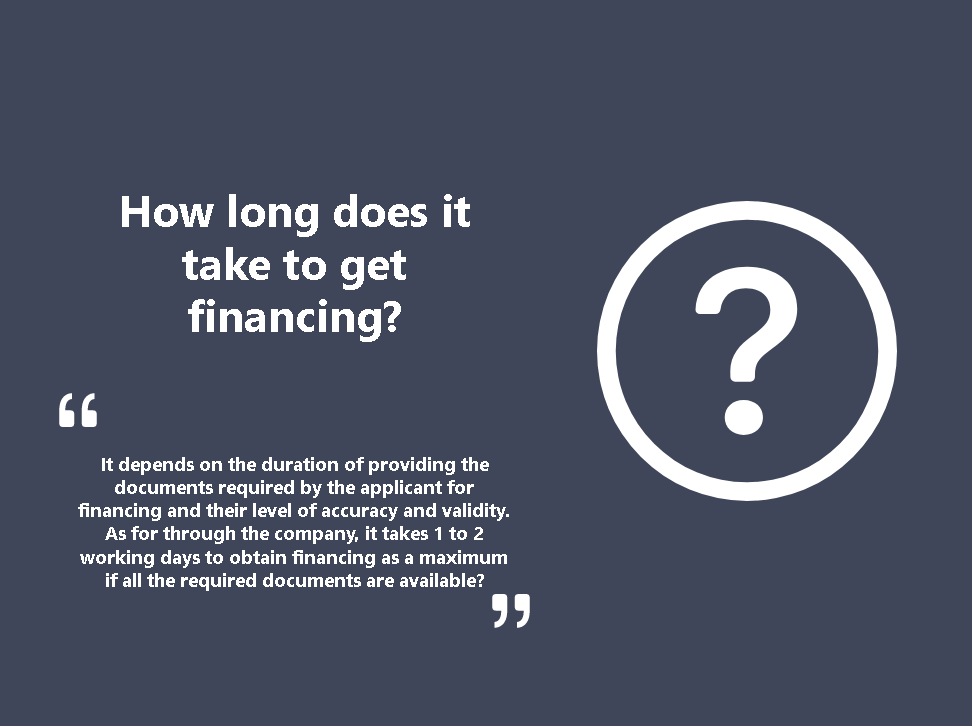
Step 2 – Information Page
The second page provides vague answers about financing timelines, claiming approval takes 1–2 working days. This page is designed to make the offer appear legitimate by addressing “frequently asked questions.”

Step 3 – Fake Financial Institution Page
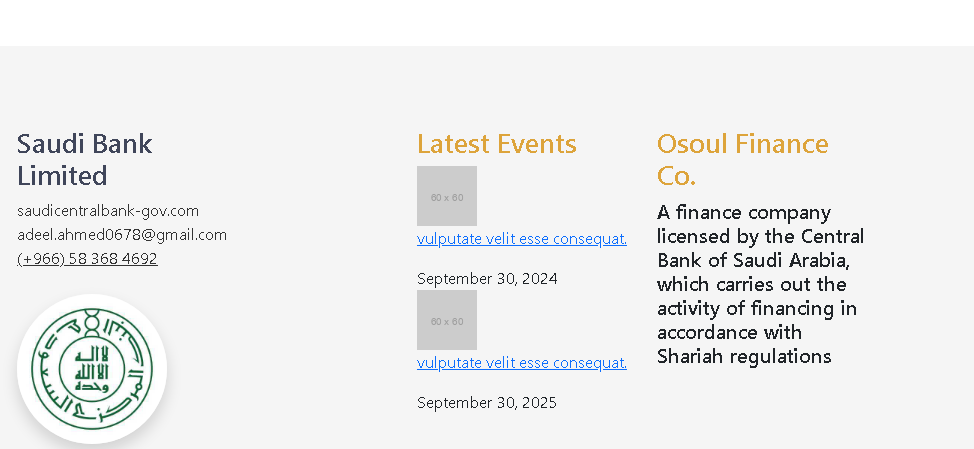
The third page (fourth screenshot) is the most critical. It displays:

  • A domain designed to look like an official Saudi Central Bank or financial authority URL
  • A company name described as a finance company licensed by the Saudi Central Bank, operating in accordance with Shariah regulations
  • Contact information (email and phone number)
  • Fake event listings (“Lottery,” “Settlement”) with future dates to appear active and credible

The goal:
The attacker aims to collect:

  • Personal information (name, ID number, income details, etc.) through an application form likely presented after these pages
  • Bank account or credit card details under the guise of “processing” or “verifying” the loan
  • Potentially advance fees from victims desperate for a loan

There is no legitimate loan—the entire offer is fabricated. Victims who provide their banking details risk having their accounts drained or their information sold.

Red flags to watch for:

  • Too good to be true offer: Promises of instant loans without salary transfer, with 0% installments, approved within 24 hours, are classic signs of predatory lending scams. Legitimate financial institutions require thorough verification.
  • Suspicious domain: The URL shown in the fourth screenshot is designed to mimic the Saudi Central Bank but uses a .com domain with extra words. The official Saudi Central Bank domain is sama.gov.sa.
  • Unprofessional design: The pages contain generic placeholder content (“Lorem ipsum”-like text) and repetitive, low-quality graphics that legitimate financial institutions would not use.
  • Mismatched branding: The page claims to be a licensed finance company but uses a domain impersonating the central bank—a contradiction.
  • Fake events: The “Lottery” and “Settlement” listings with future dates are irrelevant to a loan company and are likely copied from a template to make the page appear more active.
  • Generic contact: The email address ([email protected]) is a free consumer email service, not an official corporate domain. Legitimate licensed financial institutions use their own domains for official communication.

What to do if you encounter this:

  • Do not provide any personal information (national ID, income details, etc.).
  • Do not enter any bank account or credit card details on such pages.
  • Do not pay any “processing fees” or “advance payments” for a promised loan.
  • If you are seeking a loan in Saudi Arabia, work only with officially licensed financial institutions verified through the Saudi Central Bank’s official website (sama.gov.sa).
  • If you have already provided sensitive information, contact your bank immediately to secure your accounts, and report the incident to the Saudi Central Bank’s fraud department.

Why this scam is effective:
In Saudi Arabia, many individuals seek personal financing without the requirement of salary transfer (a common condition for traditional bank loans). The promise of quick approval, 0% installments, and a “licensed by the central bank” claim directly targets this demand. The use of Shariah compliance language adds legitimacy for the local audience. The fake domain mimicking the central bank’s name preys on users who do not carefully verify URLs.

Protective measures:

  • Always verify financial institutions through the official Saudi Central Bank website (sama.gov.sa) before applying for loans.
  • Legitimate licensed finance companies in Saudi Arabia have official domains ending in .sa or clearly registered corporate domains—they do not use free email services like Gmail for official business.
  • Be suspicious of any loan offer that promises approval without thorough verification or asks for upfront fees.
  • Never enter banking credentials or transfer money to unknown entities for “loan processing.”
  • Report suspicious financial promotions to the Saudi Central Bank’s anti-fraud channels.

Ebay fake page in German detected


eBay / Kleinanzeigen Phishing – Fake “Ticket Sold” & Card Harvesting Scam (German Variant)

This phishing campaign impersonates eBay (or the German eBay Kleinanzeigen platform) to target sellers. The scam creates a fake “item paid” page for a high-demand concert ticket, then directs the seller to a credit card harvesting form under the guise of “receiving” payment.

How it works:
A seller receives a message—likely via the platform’s messaging system—from a supposed buyer claiming to have paid for a listed item. The message includes a link to the first phishing page.

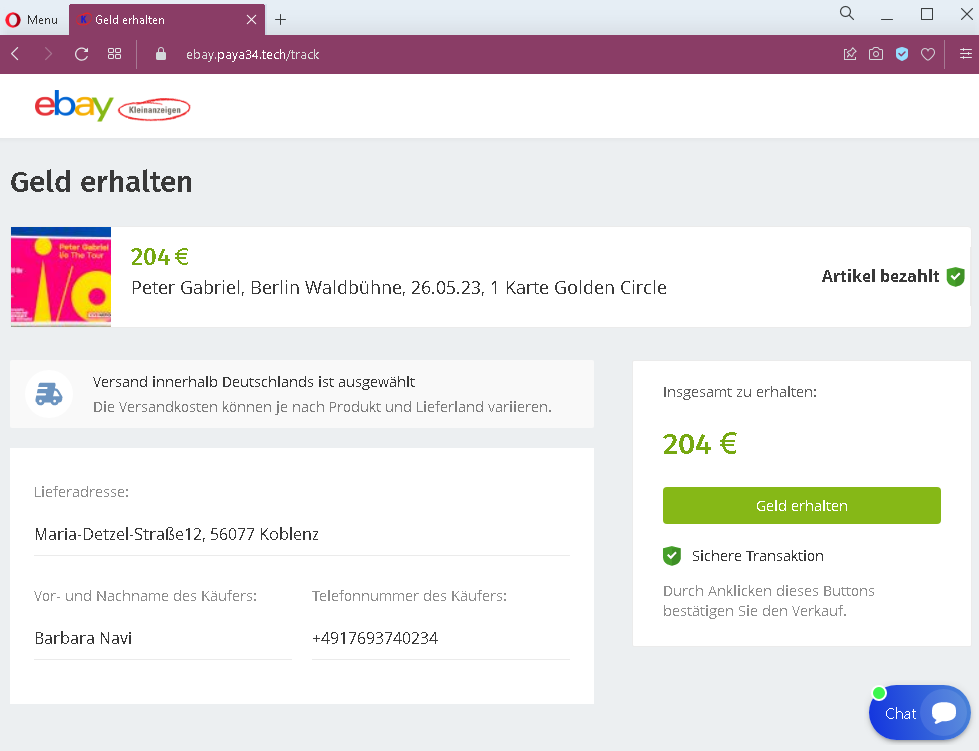
Step 1 – Fake “Item Paid” Confirmation Page
The first page displays:

  • A heading suggesting funds are ready to be received
  • A specific event: a concert ticket (Peter Gabriel in Berlin) with a price in euros (€204)
  • A statement that the item has been paid
  • Fabricated buyer details, including a name, phone number, and shipping address in Germany
  • A prominent button implying the seller can claim or receive the money

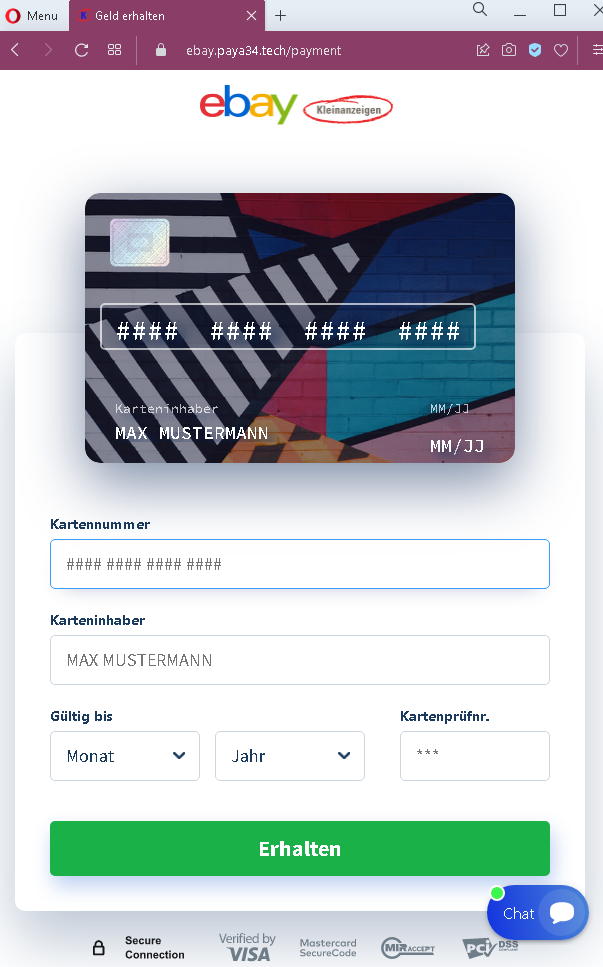
Step 2 – Credit Card Harvesting Page
After clicking the button, the seller is taken to a second page that:

  • Uses eBay branding
  • Requests full credit card details: cardholder name, card number, expiration date, and (implied) security code
  • Includes payment brand logos (Visa, Mastercard) and a “Secure Connection” badge to appear trustworthy

The goal:
The attacker steals the seller’s credit card details. There is no actual buyer or payment—the entire transaction is fabricated. The concert ticket and the €204 price are realistic, making the scam plausible.

Red flags to watch for:

  • Illogical request for card details: A seller receiving money should never be asked to enter their credit card number, expiration date, and security code. Receiving funds requires bank account details (IBAN) or a linked payout method—not card credentials.
  • No eBay Kleinanzeigen branding on first page: The first page lacks clear eBay Kleinanzeigen branding, despite referencing a sale. The second page uses generic eBay branding, but the flow is inconsistent with how the platform actually processes payments.
  • Suspicious URL: The pages are hosted on a domain that is not ebay.de, ebay-kleinanzeigen.de, or any official eBay domain. Always check the address bar.
  • Fake buyer details: The provided buyer address and phone number are likely fabricated. In legitimate transactions on eBay Kleinanzeigen, payment is typically handled in person or via direct bank transfer—not through a third-party payment page.
  • No account login required: A legitimate sale would appear in the seller’s account dashboard after logging in. This scam bypasses account authentication entirely.
  • Generic card form: The second page lacks integration with eBay’s actual payment systems (such as the platform’s integrated checkout) and uses a generic form design.

What to do if you encounter this:

  • Do not click the button to “receive” money.
  • Do not enter your credit card details, cardholder name, expiration date, or security code on such pages.
  • If you are selling on eBay Kleinanzeigen or similar platforms, always log into your account directly (by typing the official URL) to check for real sales and messages.
  • Never trust links sent by buyers claiming they have paid—especially those directing you to external pages.
  • If you have already entered your credit card details, contact your bank immediately to block the card and dispute any unauthorized charges.
  • Report the phishing page to the platform’s support team.

Why this scam is effective:
The German classifieds market is active, and concert tickets for popular artists like Peter Gabriel are frequently sold second-hand. The €204 price is realistic for a “Golden Circle” ticket. Sellers are often eager to complete a sale quickly. The use of the eBay brand on the second page (even if generic) adds a layer of false familiarity for German users.

Protective measures:

  • Always verify any sale by logging directly into your account (e.g., eBay Kleinanzeigen)—never through a link sent in a message.
  • Never enter credit card details to receive payment. Sellers provide payout details (bank account) during account setup; payments are processed automatically or arranged in person.
  • Be suspicious of any message that creates urgency or claims payment is already “waiting” but requires you to click an external link.
  • If a buyer sends you a link to “claim” payment, treat it as a red flag and verify directly through the platform’s official app or website.
  • On eBay Kleinanzeigen, prefer local, cash-on-pickup transactions for high-value items. If shipping, use the platform’s integrated payment system (if available) or a traceable bank transfer—never a link-based “card” form.

Booking.com phishing site detected


Booking.com Partner Phishing – Full Credential & 2FA Code Theft

This phishing campaign impersonates Booking.com’s partner portal (the extranet used by property owners and managers). The scam uses a multi-page flow designed to capture the victim’s username, password, and two-factor authentication (2FA) codes in real time, allowing attackers to bypass security measures and take over the account.

How it works:
The victim (a Booking.com partner) receives a phishing email, SMS, or message claiming an issue with their property listing, a payment problem, or a need to verify their account. The link leads to the first phishing page.

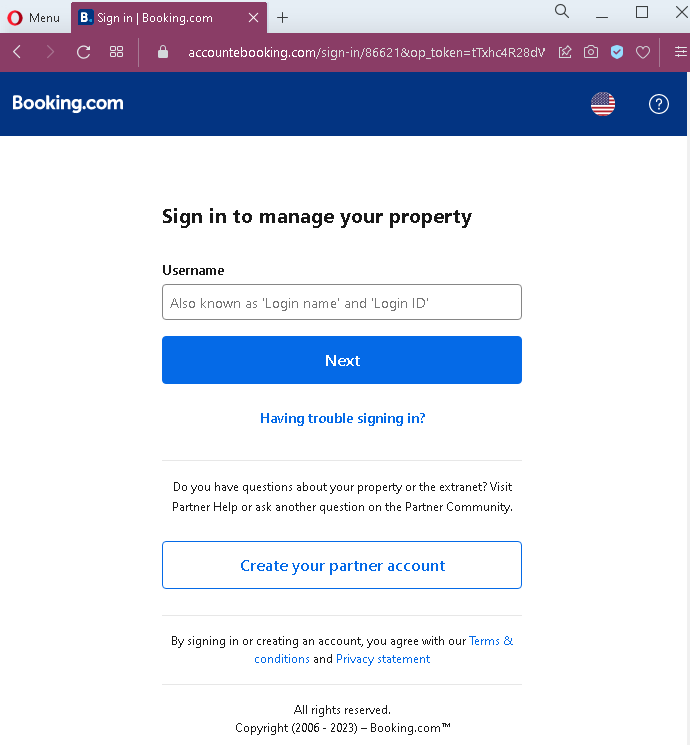
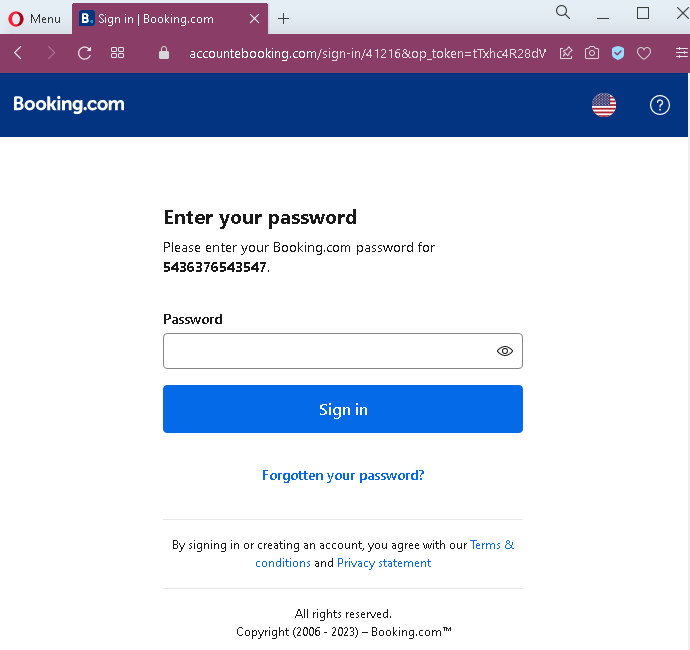
Step 1 – Fake Username Login Page
The first page mimics Booking.com’s partner login interface. It asks for the victim’s username (or login ID) associated with their property account.

Step 2 – Fake Password Page
After entering a username, the victim is taken to a second page that asks for the account password. This two-step approach is identical to Booking.com’s legitimate login flow, making it more convincing.

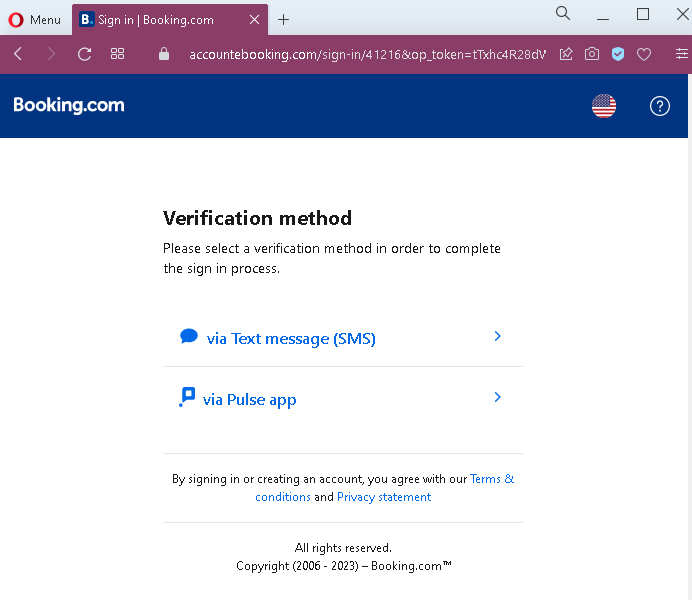
Step 3 – Fake 2FA Method Selection Page
Once the attacker has captured both username and password, the victim is presented with a page asking them to select a verification method (SMS or app). This mimics Booking.com’s actual two-factor authentication step.

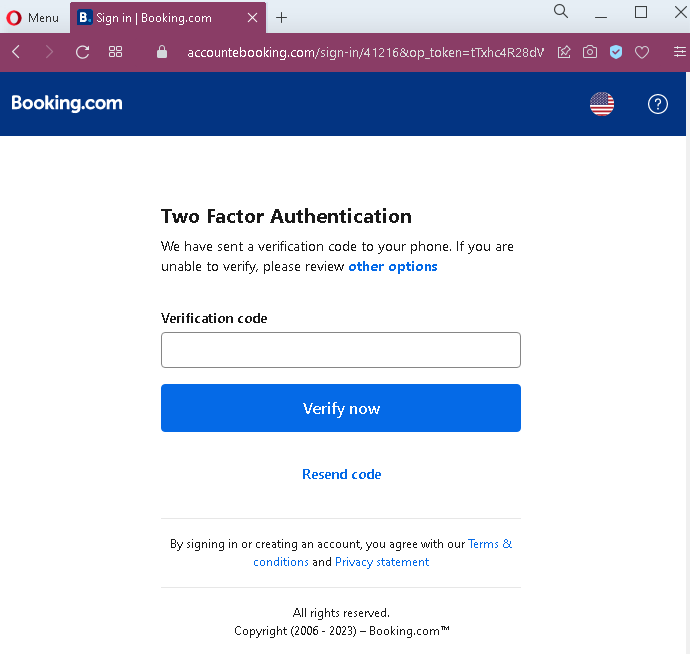
Step 4 – Fake 2FA Code Entry Page
After selecting a method, the victim is shown a page requesting the verification code sent to their phone or authenticator app. When the victim enters the code, the attacker captures it and uses it to complete the login on the real Booking.com site—often within seconds.

The goal:
The attacker gains full access to the victim’s Booking.com partner account. With this access, they can:

  • View and modify property listings
  • Access guest payment information
  • Change bank account details for payouts, redirecting future earnings
  • Defraud guests by sending fake messages requesting additional payments
  • Use the compromised account to target other partners or guests

Red flags to watch for:

  • Suspicious URL: The pages are hosted on a domain that is not booking.com or booking.com/extranet. Always check the address bar before entering credentials.
  • Unsolicited login request: Booking.com does not send emails or messages with links requiring partners to log in to resolve account issues. Partners should always access the extranet by typing the URL directly.
  • Generic numbering: The second page shows a placeholder account number (“5436376543547”) that is not personalized to the actual victim—a common flaw in phishing kits.
  • Inconsistent flow: While the pages mimic Booking.com’s design, subtle differences in layout, fonts, or footer formatting may be present when compared to the real site.
  • No browser security indicators: Legitimate Booking.com login pages use HTTPS with valid certificates and often show a padlock icon in the address bar. Phishing pages may use HTTP or self-signed certificates.

What to do if you encounter this:

  • Do not enter your username, password, or any two-factor authentication codes on these pages.
  • If you are a Booking.com partner, always access the extranet by typing admin.booking.com directly into your browser or by using the official Pulse app.
  • Enable two-factor authentication on your Booking.com account if not already active, and use a physical security key or authenticator app rather than SMS where possible.
  • If you have already entered your credentials and 2FA code, contact Booking.com’s partner support immediately to secure your account and check for unauthorized changes (especially payout details).
  • Report the phishing page to Booking.com’s security team.

Why this scam is particularly dangerous:
This is a real-time credential and session hijacking attack. The attacker does not just collect credentials—they use the stolen 2FA code immediately to log into the real Booking.com account. By the time the victim realizes the mistake, the attacker may have already changed payout bank details and initiated fraudulent transfers. Booking.com partners (hotels, vacation rentals) manage significant financial transactions, making these accounts high-value targets.

Protective measures:

  • Bookmark the official extranet URL and use that bookmark to log in—never click links in emails or messages.
  • Use a password manager: It will autofill only on legitimate Booking.com domains, not on phishing sites.
  • Verify any unexpected login request: If you receive an email about an account issue, open a new browser window and go to the official site directly instead of clicking links.
  • Use hardware-based 2FA (such as a YubiKey) or an authenticator app rather than SMS when available, as these are more resistant to phishing.
  • Regularly review payout details in your Booking.com account to ensure no unauthorized changes have been made.

Deutsche Post phishing page detected


Deutsche Post Phishing – Fake Shipment Tracking & Card Harvesting Scam (German Variant)

This phishing campaign impersonates Deutsche Post, the national postal service of Germany. The scam creates a fake shipment tracking page for a second-hand item (a children’s bicycle) to convince a seller that a buyer has paid and the item is ready to be shipped. The victim is then directed to a credit card harvesting page to “receive” payment.

How it works:
A seller receives a message—likely via a classified platform (e.g., eBay Kleinanzeigen) or messaging app—from a supposed buyer claiming to have paid for an item. The buyer sends a link to the first phishing page.

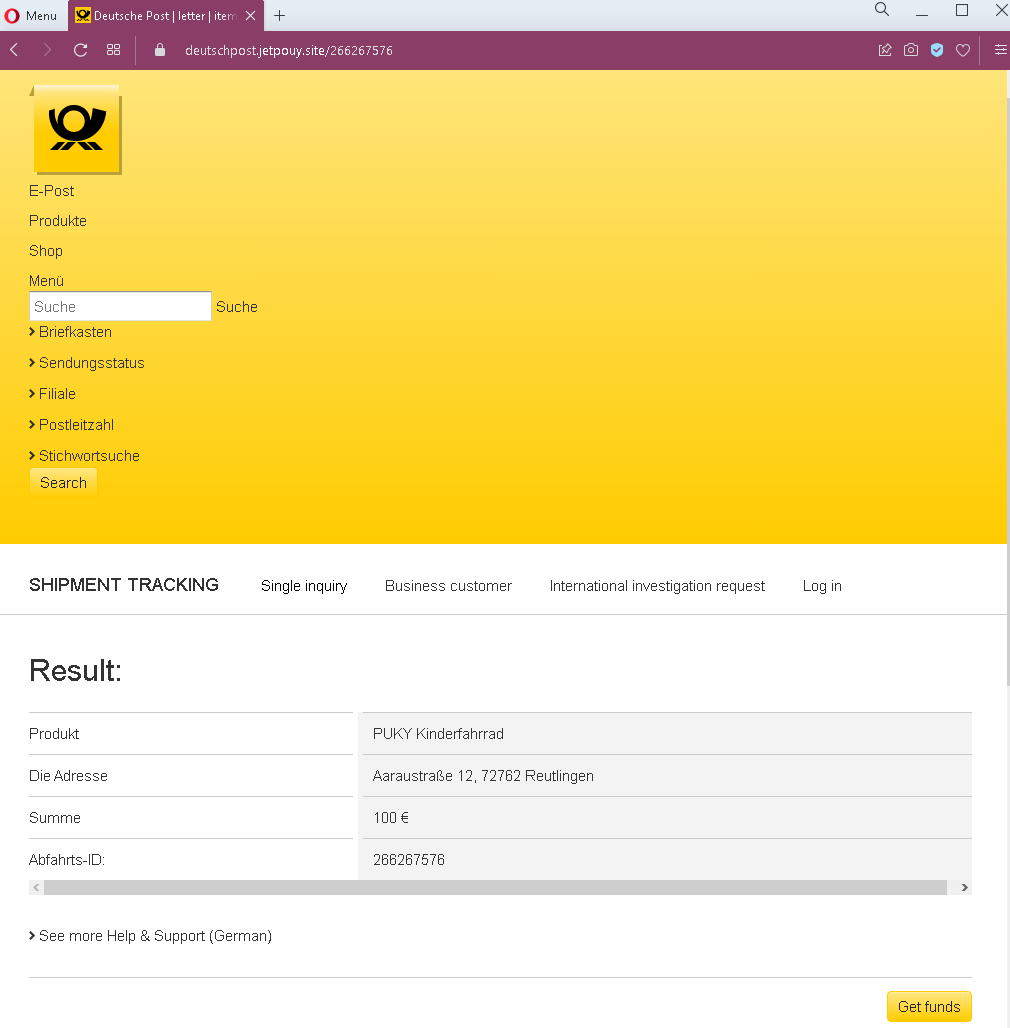
Step 1 – Fake Deutsche Post Shipment Tracking Page
The first page displays:

  • Deutsche Post branding and navigation elements copied from the legitimate website
  • A shipment tracking result showing:
  • A product: a children’s bicycle (PUKY brand)
  • A delivery address in Germany
  • An amount in euros (€100)
  • A fake tracking/reference ID
  • The layout mimics Deutsche Post’s official tracking interface

Step 2 – Customer Service Information Page
The second page displays:

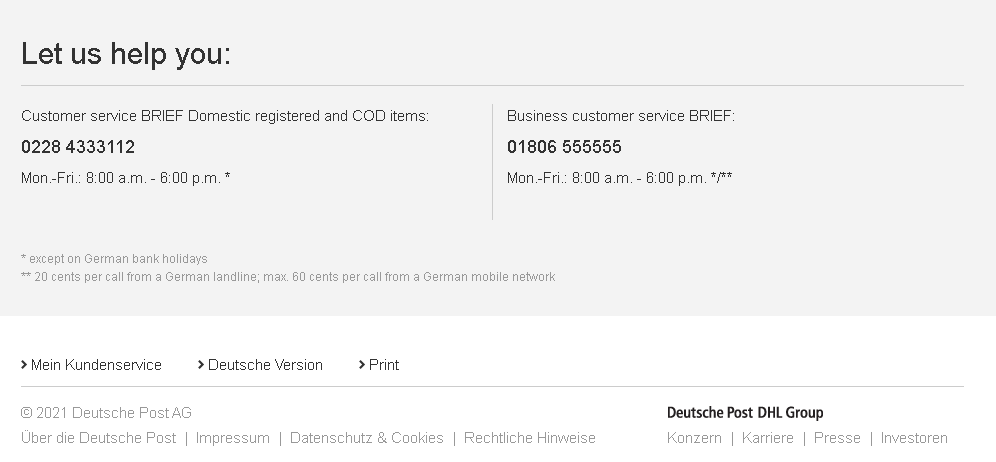
  • Legitimate-looking Deutsche Post customer service phone numbers and hours
  • Footer links including imprint, privacy, and legal notices copied from the real Deutsche Post website
  • This page is designed to add credibility, making the overall scam appear more legitimate

Step 3 – Credit Card Harvesting Page
The third page is a payment form that:

  • Uses Deutsche Post branding (with a typo in the domain name and page title)
  • Displays the same amount (€100) and reference number
  • Requests:
  • Full credit card number
  • Expiration date (MM/YY)
  • Phone number
  • Includes a “Send” button and claims of secure encryption

The goal:
The attacker steals the victim’s credit card details along with their phone number. There is no actual buyer or payment—the entire transaction and tracking information are fabricated.

Red flags to watch for:

  • Illogical request for card details: A seller receiving money should never be asked to enter their credit card number, expiration date, or phone number. Receiving funds requires bank account details (IBAN) or a linked payout method—not card credentials.
  • Domain mismatch: The third page shows a URL that is not deutschepost.de. The legitimate Deutsche Post domain is deutschepost.de—any variation (misspellings, extra words, different TLDs) is a red flag.
  • Typo in branding: The third page contains a typo (“dentschpost” instead of “Deutsche Post”), a clear indicator of a fake page.
  • Mixed purpose: The first page presents shipment tracking information, but the final page asks for card details to “receive funds.” These functions are unrelated in legitimate postal services.
  • No login required: A legitimate shipment tracking or payment process would not ask for credit card details without first logging into a verified account.
  • Copied content: The second page contains real Deutsche Post customer service numbers and legal text, but it is hosted on the phishing domain—attackers often copy such content to appear authentic.

What to do if you encounter this:

  • Do not enter any credit card details, expiration date, or phone number on such pages.
  • Do not click any buttons claiming to “receive” funds or complete a transaction.
  • If you are expecting a payment for an item sold online, never use a link sent by the buyer. Instead, arrange payment via bank transfer (IBAN), PayPal (by logging into your account directly), or cash on pickup.
  • If you have already entered your credit card details, contact your bank immediately to block the card and dispute any unauthorized charges.
  • Report the phishing page to Deutsche Post’s security team.

Why this scam is effective:
Deutsche Post is a trusted institution in Germany, and its tracking service is frequently used for shipments from classified platforms. The scam combines multiple familiar elements: a realistic product (children’s bicycle), a plausible price (€100), and a fake tracking page that mimics the official Deutsche Post interface. The inclusion of real customer service numbers and legal footers adds to the illusion. Sellers who are eager to complete a sale may not question why they are being asked for card details to receive money.

Protective measures:

  • Always verify tracking information by typing deutschepost.de directly into your browser and entering the tracking number manually—never through a link.
  • Never enter credit card details to receive payment. Sellers should provide their IBAN or PayPal email address directly to the buyer, and payments should appear in the seller’s account without further action.
  • Be suspicious of any message that creates urgency and directs you to an external page to “claim” payment or “complete” a shipment.
  • If a buyer sends you a link to a Deutsche Post tracking page, independently verify the tracking number on the official website.
  • For classified transactions in Germany, prefer local, cash-on-pickup transactions, or use the integrated payment system of the platform (e.g., eBay Kleinanzeigen’s “Sicher Bezahlen”).