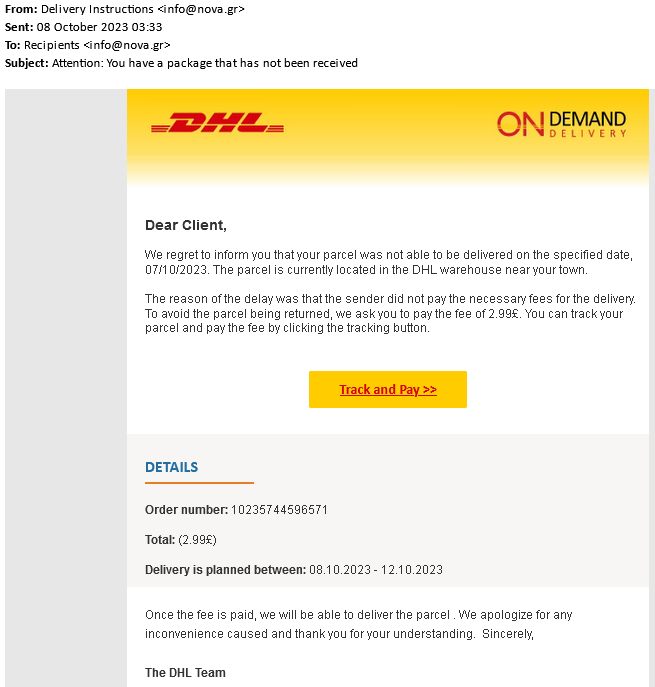
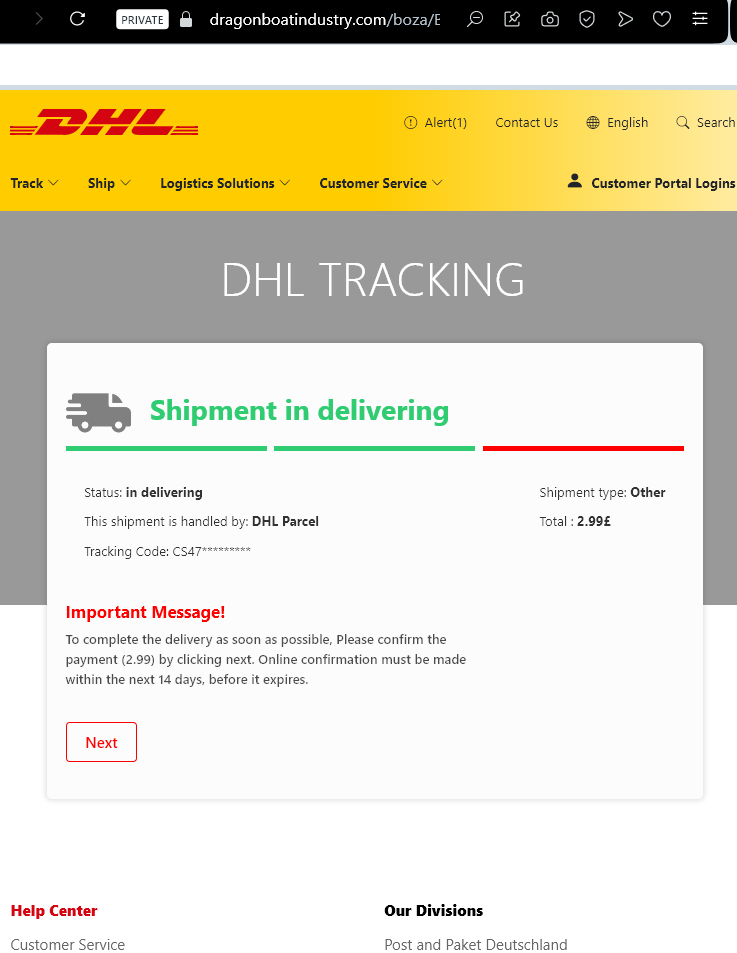
This phishing campaign impersonates the international shipping company DHL. The email informs the recipient that a package cannot be delivered due to a problem with the address or a failed delivery attempt, creating a sense of urgency.
How it works: The email contains a link that leads to a fake DHL tracking page (as shown in your screenshot). If the victim clicks the link, they are taken to a fraudulent website designed to collect personal and financial information. The final step of the scam typically asks for credit or debit card details under the guise of a small “redelivery fee” or “customs processing fee.” Once entered, the card information is stolen and can be used for fraudulent transactions.
Red Flags to Watch For:
Sender’s email address: The email often comes from a generic or misspelled domain, not an official @dhl.com address.
Generic greeting: Legitimate DHL communications usually include your name or a reference number; phishing emails often start with “Dear Customer” or “Dear User.”
Spelling and grammar: Look for awkward phrasing or minor errors in the subject line and body.
The link: Hover over the link without clicking—if the URL does not match dhl.com or contains unusual characters, it is a phishing site.
Request for payment: DHL does not ask for payment via a link in an email for redelivery. Always log in to the official DHL website or app directly to verify any outstanding charges.
What to Do if You Receive This Email:
Do not click any links or download any attachments.
Do not enter any personal or banking information.
If you are expecting a package, go directly to the official DHL website (dhl.com) and use your tracking number to verify its status.
Report the phishing attempt to DHL and forward the email to your local anti-phishing authorities (e.g., in the US: [email protected]).
By understanding these tactics, you can avoid falling victim to this type of scam and protect your financial information.
Etsy Seller Payment Scam (Fake Order Notification)
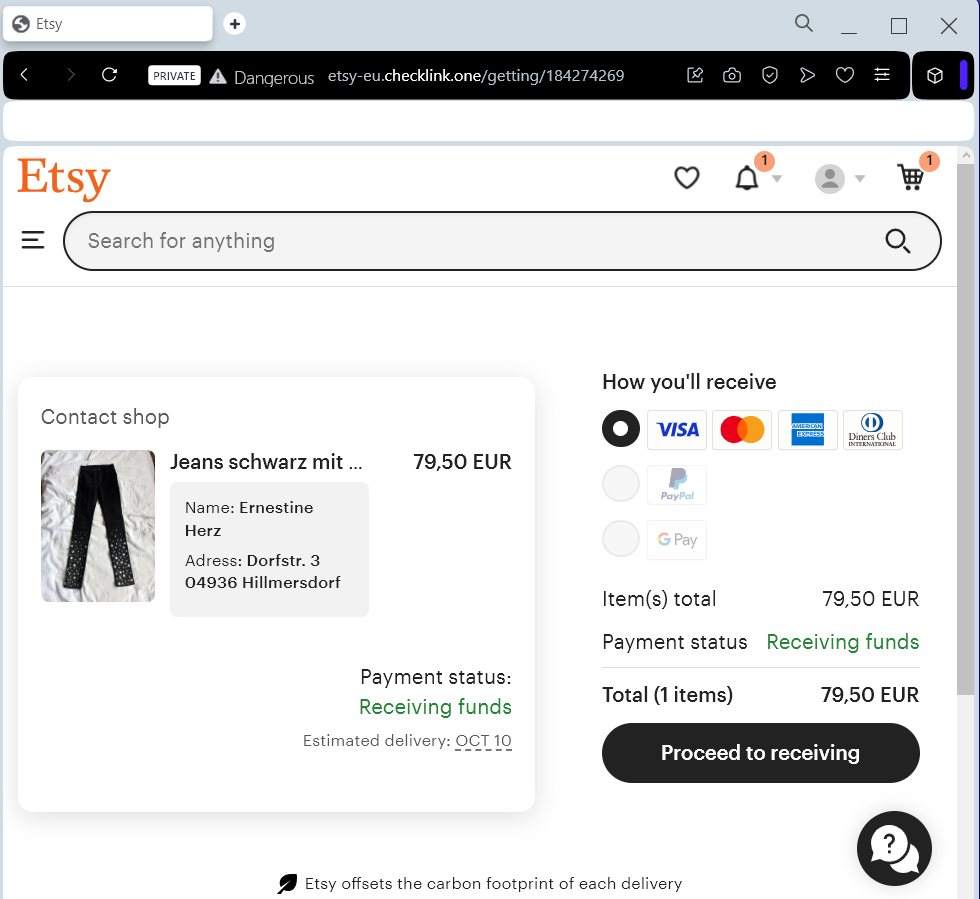
This phishing page is designed to target Etsy sellers by impersonating a legitimate order notification. The page mimics Etsy’s interface and claims that a buyer has purchased an item—in this case, “Jeans schwarz mit …” for €79.50—and that the payment is awaiting release.
How it works: The victim (an Etsy seller) receives an email or a direct message with a link to this page, claiming a buyer has placed an order. The page shows fake buyer details (name, address), a fabricated order summary, and a “Payment status: Receiving funds” message. To “proceed to receiving” the funds, the seller is prompted to enter sensitive financial information—most likely credit card details, bank account information, or login credentials on the next screen.
The goal: Instead of receiving a legitimate order, the seller unknowingly hands over their payment credentials or login details to the attacker. Because the page looks like a genuine Etsy order confirmation, sellers who frequently manage orders may click through without suspicion.
Red flags to watch for:
Unsolicited link: The page is accessed via a link from an email or message, not through the official Etsy dashboard or app.
Fake payment status: Etsy does not display “Receiving funds” in this manner; legitimate payment processing occurs within your seller dashboard, not on a standalone page accessed via an external link.
Buyer details: The name and address shown (e.g., “Ernestine Herz”) are often fabricated or generic.
“Proceed to receiving” button: This is a fake call-to-action designed to lead to the credential-harvesting form. On the real Etsy site, sellers do not need to click an external button to “receive” funds—payments are automatically processed.
URL mismatch: The page is hosted on antiphishing.biz (your own site), but in a real attack, it would be on a fraudulent domain. Sellers should always check that the URL matches etsy.com before entering any information.
What to do if you encounter this:
Do not click “Proceed to receiving” or enter any personal, banking, or login information.
If you are an Etsy seller, always log in to Etsy directly by typing etsy.com into your browser and checking your Shop Manager → Finances → Payment account for real orders.
Report the phishing attempt to Etsy’s trust and safety team by forwarding the original email or link to [email protected].
This scam exploits the trust sellers place in order notifications. Staying vigilant about checking URLs and verifying orders directly through the official platform can prevent account takeover and financial loss.
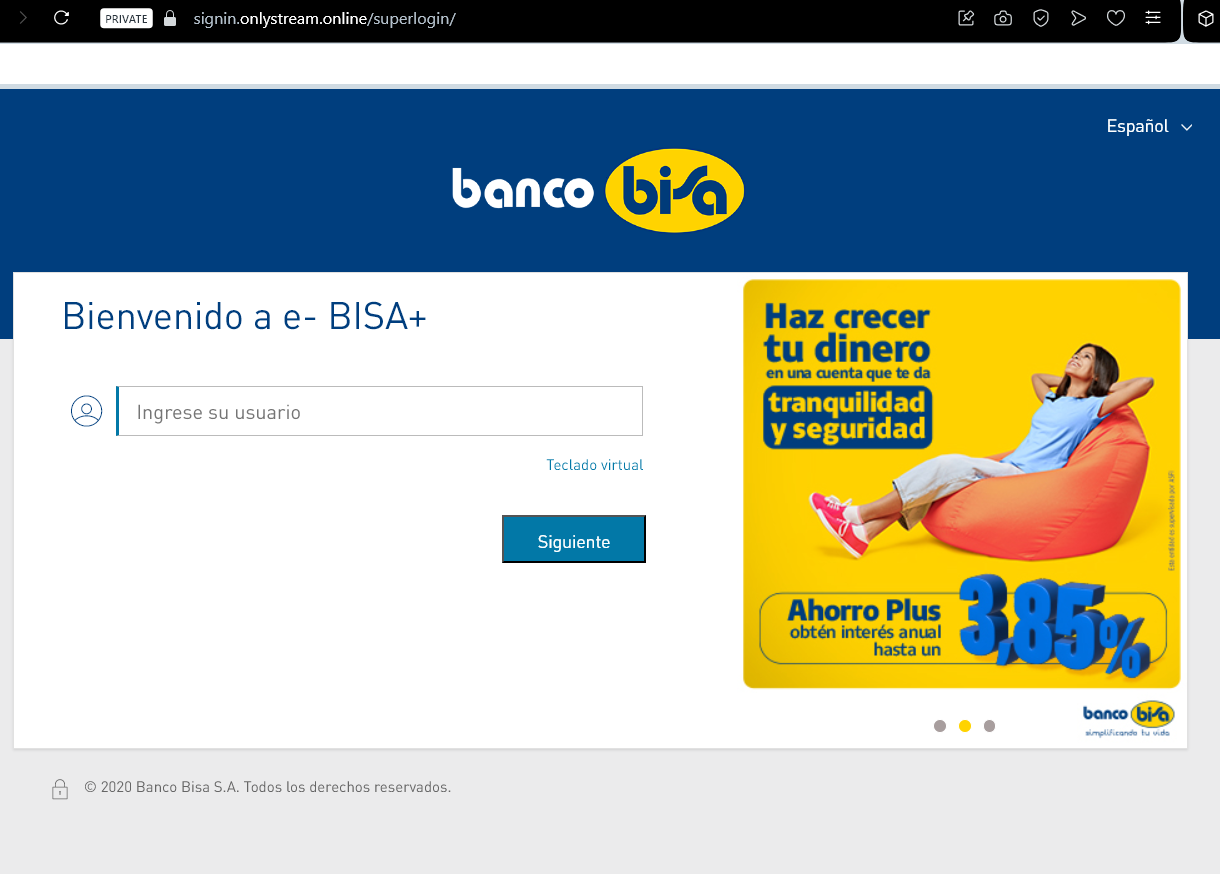
This phishing page impersonates the online banking portal of Banco BISA (a Bolivian bank). The page is designed to steal customers’ login credentials by mimicking the bank’s legitimate authentication interface.
How it works: The victim receives a phishing email, SMS, or other fraudulent message claiming there is an issue with their account, a security alert, or a promotion. The link leads to this fake login page. The page requests the user’s “usuario” (username) and features a “Teclado virtual” (virtual keyboard) button—a common security feature used by Latin American banks to protect against keyloggers.
The twist: Cybercriminals replicate the virtual keyboard to trick users into thinking the page is legitimate. When the victim clicks the virtual keyboard button and enters their credentials, the information is captured and sent directly to the attacker. The fake “Siguiente” (Next) button then leads to a second page that likely requests additional sensitive data, such as a password, security token, or one-time code.
Red flags to watch for:
URL mismatch: The page is not hosted on the official bank domain. Banco BISA’s legitimate online banking URL would be something like www.bisa.com or a secure subdomain—not a random or unrelated address.
Generic promotion: The footer text about “Ahorro Plus” (earning 3.85% interest) is copied from the real bank’s marketing, but phishing pages often use outdated or slightly mismatched promotional content.
Virtual keyboard context: While many banks do use virtual keyboards, phishing pages replicate them. Always verify you are on the official site before interacting with any login form.
Lack of personalization: Legitimate banking portals often display a partial account number, security image, or personal greeting after entering the username—this fake page does not.
What to do if you encounter this:
Do not enter your username, click the virtual keyboard, or press “Siguiente.”
If you are a Banco BISA customer, always type the official bank URL directly into your browser or use the official mobile banking app.
Report the phishing page to Banco BISA’s fraud department so they can work to have it taken down.
Why this scam is dangerous: Once the attacker obtains the username and password, they can attempt to log in to the victim’s real bank account. If the bank uses two-factor authentication (2FA), the phishing site may also ask for the 2FA code on a subsequent page, allowing real-time account takeover.
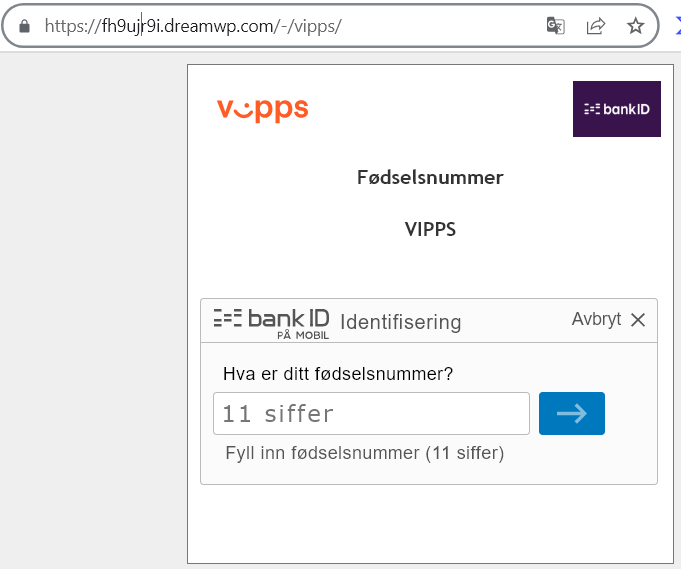
This phishing page impersonates Vipps, a widely used mobile payment app in Norway. The page is designed to steal victims’ fødselsnummer (Norwegian national ID number) and subsequently their BankID credentials, which would allow attackers to take over bank accounts and authorize fraudulent transactions.
How it works: The victim receives a phishing email, SMS, or social media message claiming a payment issue, a refund, or a request to verify their Vipps account. The link leads to this fake page hosted on a suspicious domain (dreamwp.com). The page asks for the victim’s 11-digit fødselsnummer (birth number) and then prompts them to authenticate with “BankID Identifiering PÅ MOBIL” (BankID identification on mobile)—a common authentication method in Norway.
The goal: If the victim enters their fødselsnummer and proceeds, they are likely taken to a subsequent fake BankID page that captures their BankID password or confirms a fraudulent transaction. With these credentials, the attacker can log in to the victim’s online banking, transfer money, or authorize payments in real time.
Red flags to watch for:
Suspicious URL: The page is hosted on fh9ujj9i.dreamwp.com, which is clearly not the official Vipps domain (vipps.no). Attackers often use compromised WordPress sites (like dreamwp.com) to host phishing pages.
Poor design and formatting: The page shows a distorted Vipps logo (“V:pps”) with inconsistent spacing and visual errors. Legitimate Vipps pages are professionally designed.
Immediate request for fødselsnummer: Vipps does not randomly ask for your full national ID number via a link sent in a message. Official authentication happens within the Vipps app or via BankID on a trusted, verified page.
Generic content: The page lacks personalization (no name, no partial account reference) that a legitimate payment service would display.
What to do if you encounter this:
Do not enter your fødselsnummer or any other personal information.
Do not click the “BankID Identifiering” button or attempt to authenticate.
If you are a Vipps user, always open the Vipps app directly to check for notifications or pending actions. Never click links in unsolicited messages claiming to be from Vipps.
Report the phishing page to Vipps’ security team at [email protected] (or via their official support channels).
Why this scam is particularly dangerous: In Norway, the combination of fødselsnummer + BankID provides near-complete access to a person’s banking, tax, and healthcare records. Once compromised, victims may face significant financial loss and identity theft. These phishing pages often mimic BankID’s interface seamlessly, making them difficult to distinguish from the real thing.
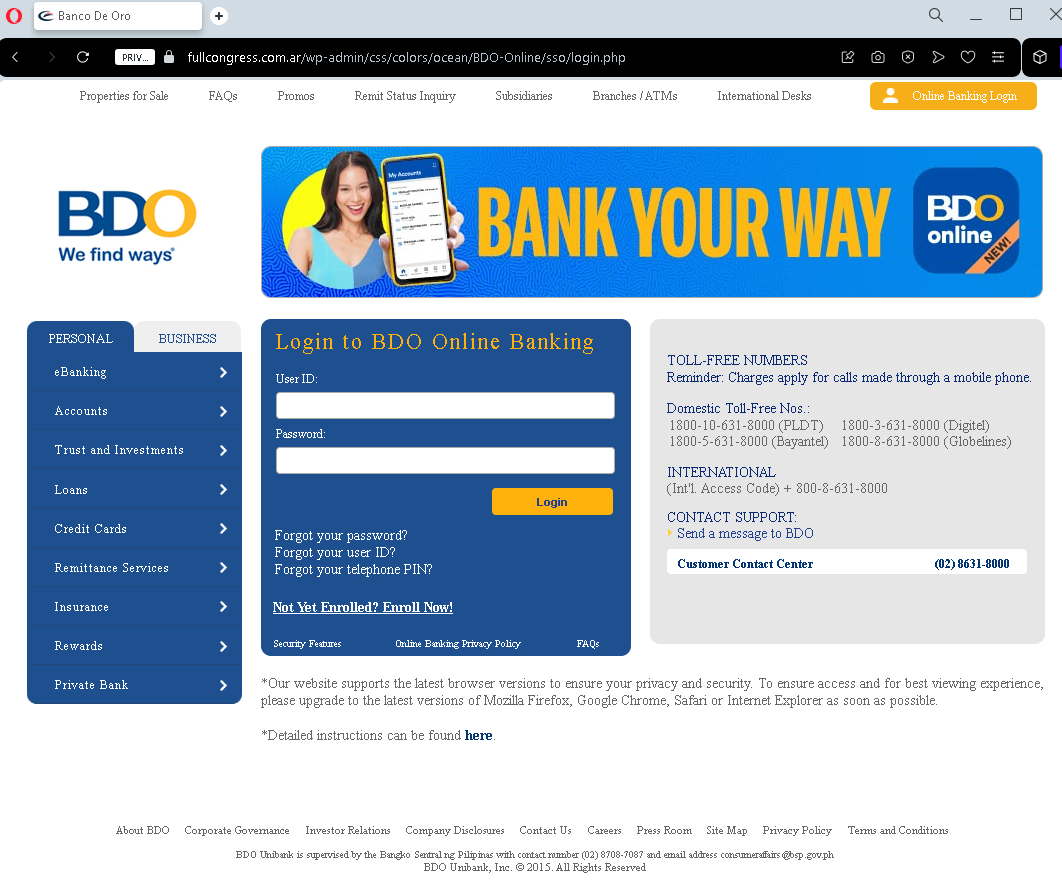
This phishing page impersonates the login portal of BDO (Banco de Oro Unibank) , one of the largest banks in the Philippines. The page is designed to steal customers’ User ID and Password, giving attackers direct access to their bank accounts.
How it works: The victim receives a phishing email, SMS, or social media message claiming a security alert, account suspension, or a “problem with your account.” The link leads to this fake BDO login page. The page closely mimics the real BDO Online Banking interface, including legitimate-looking footer links (Privacy Policy, Terms and Conditions, Toll-Free numbers) to appear authentic. When the victim enters their User ID and Password and clicks “Login,” the credentials are captured and sent to the attacker.
The goal: With stolen User ID and Password, the attacker can log in to the victim’s real BDO account, transfer funds, pay bills, or even enroll in additional services to further compromise the account. Because BDO uses two-factor authentication (2FA) for some transactions, the attacker may attempt to use the credentials immediately or combine them with social engineering to obtain the 2FA code.
Red flags to watch for:
Suspicious URL: The page is hosted on a domain that is not bdo.com.ph. Attackers often use domains that look similar but contain misspellings, extra words, or unrelated extensions.
“Legin” typo: The page header says “Legin to BDO Online Banking” instead of “Log in to BDO Online Banking.” This typo is a clear indicator of a fake page.
Generic login form: Legitimate BDO Online Banking often displays a security image or personalized greeting after entering the User ID—this page does not.
Fake footer: While the footer contains real BDO information (toll-free numbers, etc.), phishing pages copy this text to appear credible. Always check the URL first, not the content.
What to do if you encounter this:
Do not enter your User ID, Password, or any other personal information.
Do not click any links on the page, including the “Forgot your password?” links—they may lead to additional phishing pages.
If you are a BDO customer, always type www.bdo.com.ph directly into your browser or use the official BDO mobile app to access your account.
Report the phishing page to BDO’s fraud department at [email protected] or through their official customer service hotline.
Why this scam is effective: BDO has millions of online banking users in the Philippines, and phishing pages like this are often distributed via SMS (“smishing”) claiming “Your BDO account has been temporarily locked.” Because the page includes authentic-looking footer content (toll-free numbers, privacy policy links), many users mistakenly trust it. The typo “Legin” is one of the few visual red flags—underscoring how carefully users must scrutinize every detail.
Česká Pošta Package Delivery Scam – Fake Redelivery Fee
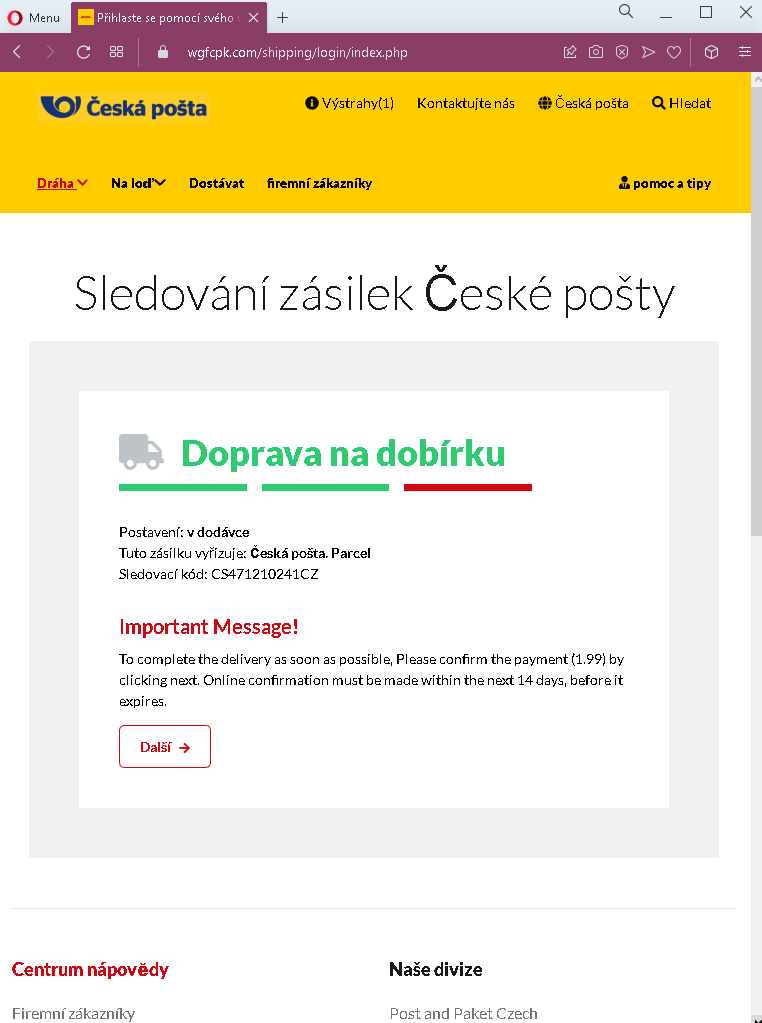
This phishing page impersonates Česká pošta (Czech Post) , the national postal service of the Czech Republic. The page is designed to trick victims into paying a small “confirmation fee” (1.99, presumably in euros or Czech koruna) under the guise of completing a package delivery.
How it works: The victim receives a phishing email, SMS, or messaging app notification claiming that a package is awaiting delivery or that a delivery attempt failed. The message includes a link to this fake Česká pošta tracking page. The page displays:
A fake tracking number (CS471210241CZ)
A status: “v dodávce” (in delivery)
A message claiming the package is being sent cash on delivery (dobírka) and that a payment of 1.99 must be confirmed online within 14 days
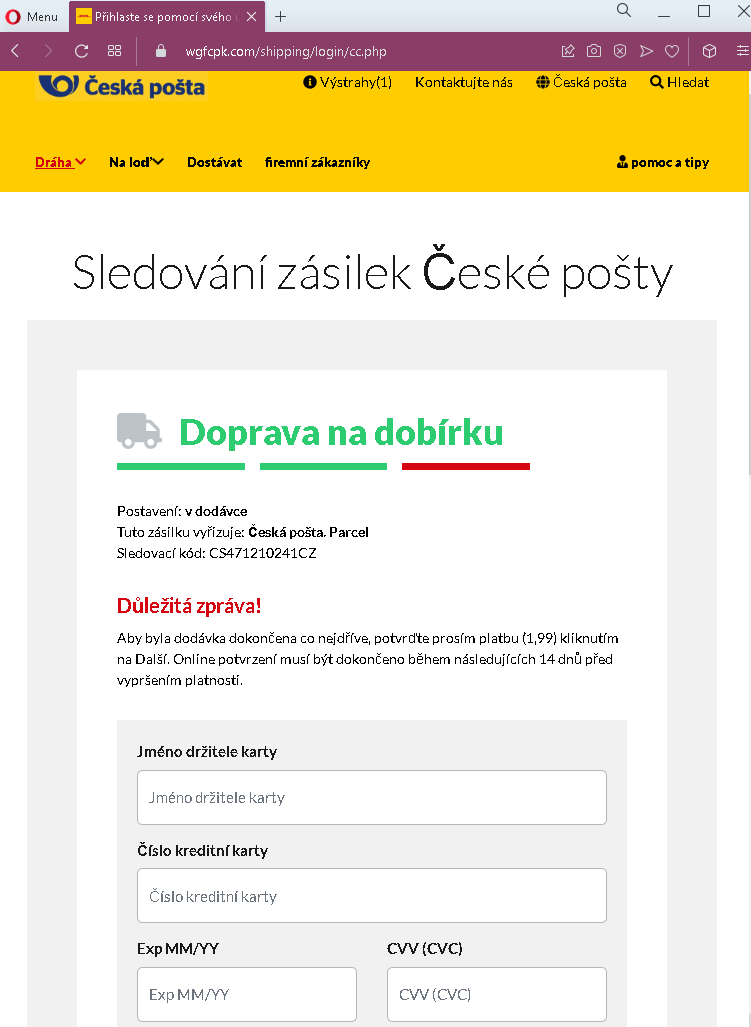
When the victim clicks “Další” (Next), they are taken to a payment page designed to steal credit card or bank account details.
The goal: The attacker aims to collect credit card information, including card number, expiration date, and CVV. Because the requested amount is small (€1.99 or roughly 50 CZK), victims may not hesitate to “pay” it, assuming it is a legitimate redelivery or handling fee. Once the card details are entered, the attacker can make unauthorized charges or sell the information.
Red flags to watch for:
Suspicious URL: The page is hosted on a domain that is not ceskaposta.cz. Always check the address bar.
Mixed language: The page mixes Czech (“Sledování zásilek,” “Doprava na dobírku”) with English (“Important Message!”), which is unusual for an official postal service page.
Request for payment via link: Česká pošta does not request payment for redelivery or “confirmation” through a link in an unsolicited email or SMS. Legitimate customs or handling fees are paid in person upon delivery, at the post office, or through the official app after logging in.
Vague wording: The message says “Please confirm the payment (1.99)” without specifying the currency or exactly what the fee is for. Official communications are precise.
Fake tracking number: The tracking number format may appear plausible, but it is fabricated. You can verify any real tracking number directly on the official Česká pošta website.
What to do if you encounter this:
Do not click “Další” or enter any payment information.
If you are expecting a package, go directly to the official Česká pošta website (www.ceskaposta.cz) and enter your real tracking number.
Report the phishing attempt to Česká pošta’s security team or forward the original message to your local anti-phishing authorities.
Why this scam is effective: Package delivery scams are among the most common phishing tactics worldwide because people frequently order online and expect delivery notifications. The small “fee” lowers suspicion, and the fake tracking number gives the page an air of authenticity. Victims may only realize they have been scammed when they see unauthorized charges on their card days or weeks later.
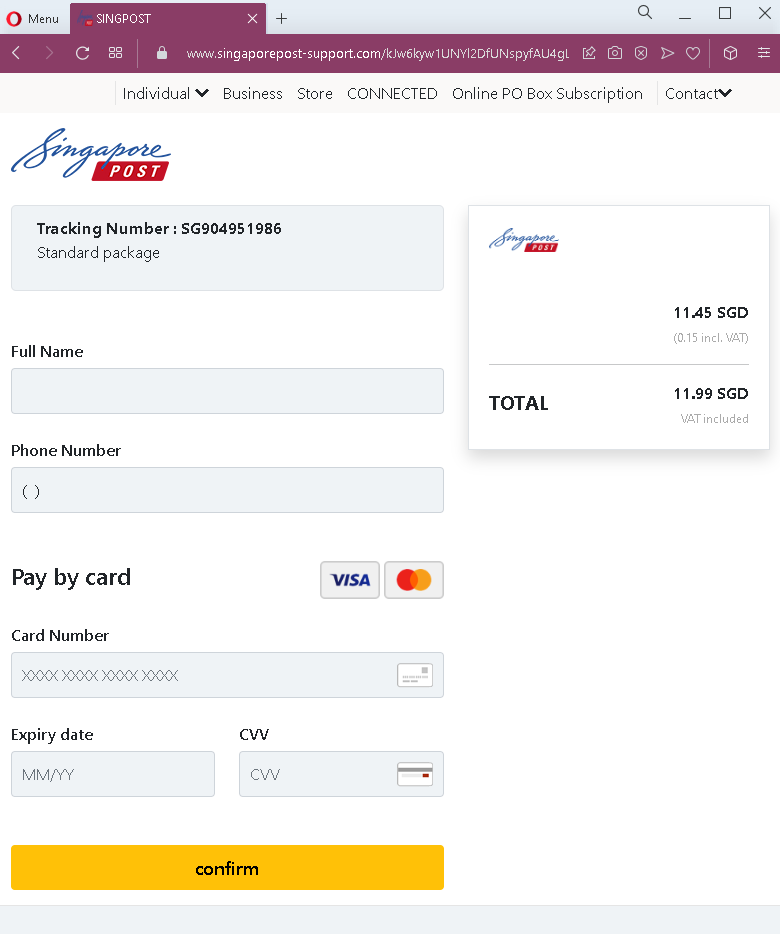
This phishing page impersonates a postal or courier service, likely targeting an international audience. The page claims to provide tracking information for a package (Tracking Number: SG904951986) while simultaneously requesting sensitive financial details under the guise of “pay by card.”
How it works: The victim receives a phishing email or SMS claiming a package is awaiting delivery, that a customs fee is due, or that a redelivery fee must be paid. The link leads to this page, which displays:
A fake tracking number (SG904951986)
A description: “Standard package”
Fields for Full Name, Phone Number, and a complete credit card form (Card Number, Expiry Date, CVV)
When the victim fills out the form and clicks “Confirm,” all personal and financial information is sent directly to the attacker.
The goal: This is a direct financial phishing attack. Unlike more sophisticated multi-step phishing pages that first collect login credentials and then payment details, this page combines both. The attacker obtains:
The victim’s full name and phone number (useful for identity theft or follow-up scams)
Complete credit card details (card number, expiration, CVV), which can be used for fraudulent online purchases, cloned cards, or sold on criminal marketplaces
Red flags to watch for:
No carrier branding: The page lacks any official logo or name of a legitimate carrier (e.g., USPS, FedEx, DHL, Royal Mail, etc.). Legitimate tracking pages always clearly display the carrier’s branding.
Vague tracking number: The tracking number “SG904951986” does not follow the standard format of any major carrier. Real tracking numbers are carrier-specific and can be verified on the official website.
Request for payment without context: The page demands credit card details but provides no explanation of what the payment is for (customs, redelivery, insurance, etc.). Legitimate carriers clearly state the reason for any fee.
Poor design and generic fields: The form is minimal, lacks security icons, and does not use HTTPS padlock indicators that legitimate payment pages display.
No delivery details: There is no recipient address, sender information, or estimated delivery date—all of which are standard on legitimate tracking pages.
What to do if you encounter this:
Do not enter your name, phone number, or any credit card details.
Do not click “Confirm” or any other buttons on the page.
If you are expecting a package, go directly to the official website of the carrier you believe is handling the shipment and enter your real tracking number.
Report the phishing page to the legitimate carrier being impersonated (if identifiable) and to anti-phishing organizations.
Why this scam is dangerous: This type of phishing page is often distributed via SMS (“smishing”) with messages like “Your package could not be delivered. Please update payment information.” Because the requested amount is never specified, victims may assume it is a small fee. Once credit card details are submitted, attackers can drain accounts or make high-value purchases before the victim realizes what happened. The combination of personal information (name, phone) and financial data also enables identity theft.
Western Union Phishing – Fake “Receive Money” Scam
This phishing campaign impersonates Western Union, a legitimate money transfer service. The scam is presented in two steps:
A fake “tracking” page claiming money is ready to be received
A payment page designed to harvest credit card details
How it works: The victim likely receives an email, SMS, or social media message claiming someone has sent them money via Western Union. The message includes a link to the first phishing page.
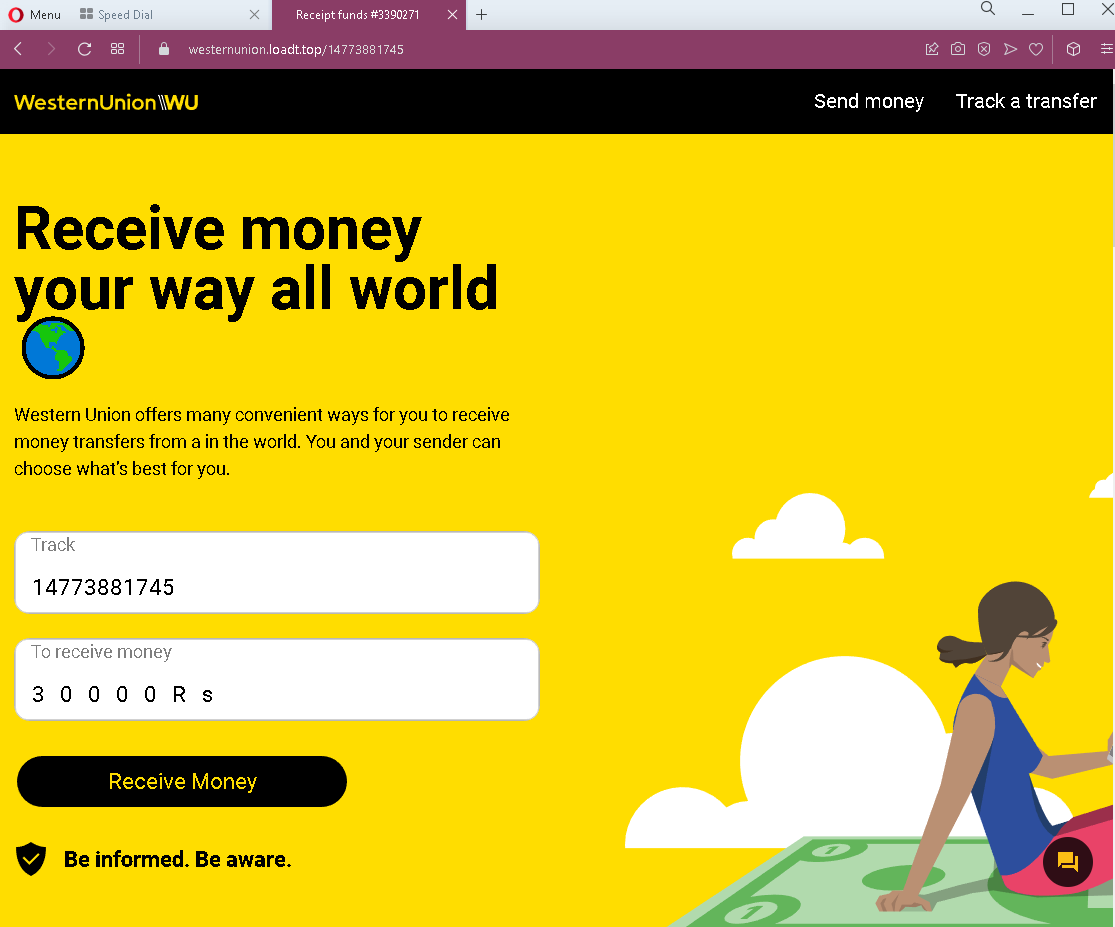
Step 1 – The Fake Tracking Page (First Screenshot) This page displays:
A tracking number: 14773881745
An amount: 30000 Rs (30,000 rupees, approximately $360 USD)
A “Receive Money” button
The page mimics Western Union’s branding and claims the victim can “receive money your way all world.” To claim the funds, the victim is instructed to click “Receive Money.”
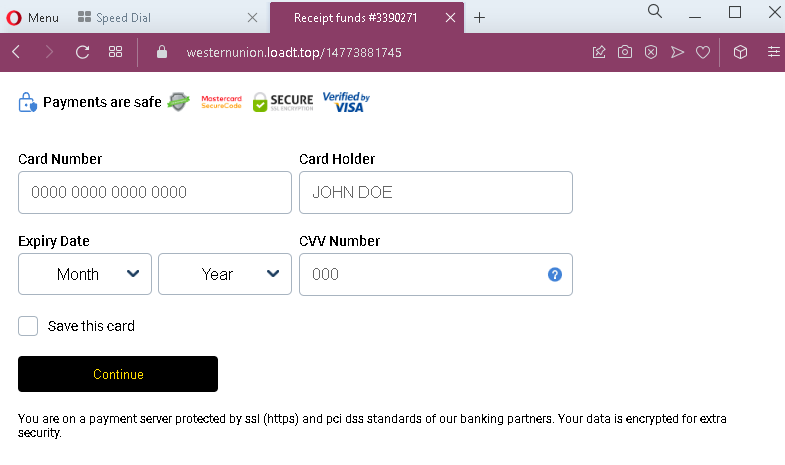
Step 2 – The Credit Card Harvesting Page (Second Screenshot) After clicking “Receive Money,” the victim is taken to this page, which asks for:
Card Number
Card Holder name
Expiry Date
Option to “Save this card”
The page falsely claims to be secure (“protected by ssl (https) and pci das standards”) to lower suspicion.
The goal: The attacker aims to steal full credit card details. There is no money waiting to be received—the entire “tracking” page is fabricated. If the victim enters their card information, the attacker can make unauthorized purchases, withdraw funds, or sell the card details.
Red flags to watch for:
No login required: Legitimate Western Union money transfers require the recipient to provide tracking information (MTCN) and identification—not credit card details—to receive money. You never need to enter a credit card to receive funds.
Fake tracking number: The tracking number format does not match Western Union’s standard MTCN (Money Transfer Control Number) format.
Currency mismatch: The page mixes English with “Rs” (rupees), which may indicate targeting of specific regions but lacks professional localization.
Unnecessary card request: Receiving money through Western Union never requires the recipient’s credit card information. This is the clearest red flag.
Generic security claims: The second page claims PCI compliance but provides no verifiable security details (e.g., no padlock icon, no recognizable payment processor branding like Stripe or Braintree).
Suspicious URL: Both pages are hosted on domains that are not westernunion.com.
What to do if you encounter this:
Do not click “Receive Money” or enter any credit card details.
If someone has actually sent you money via Western Union, go directly to westernunion.com or use the official app. You will need the MTCN (tracking number) and valid identification—never a credit card.
Report the phishing page to Western Union’s fraud team at [email protected].
Why this scam is effective: The promise of receiving a large sum of money (30,000 Rs) creates excitement and urgency, overriding critical thinking. Victims may believe they need to “verify” their identity or “activate” the transfer with a credit card. Scammers often pose as a “buyer” on classified ad sites (e.g., Facebook Marketplace, OLX) claiming they’ve sent payment via Western Union and need the victim to “click the link to receive it.” In reality, the link steals card details.
Protective measures:
Never enter credit card information to receive money through any service
Always type the official URL of financial services directly into your browser
Be wary of unsolicited messages claiming unexpected money transfers
Kapital Bank Phishing – Fake Transfer Confirmation & Card Harvesting
This phishing campaign impersonates Kapital Bank, one of the largest banks in Azerbaijan. The scam is presented in two steps:
A fake transfer confirmation page claiming money is ready to be received
A payment/card details harvesting page
How it works: The victim likely receives a phishing email, SMS, or social media message claiming someone has sent them money or that they have a pending transfer. The link leads to the first phishing page.
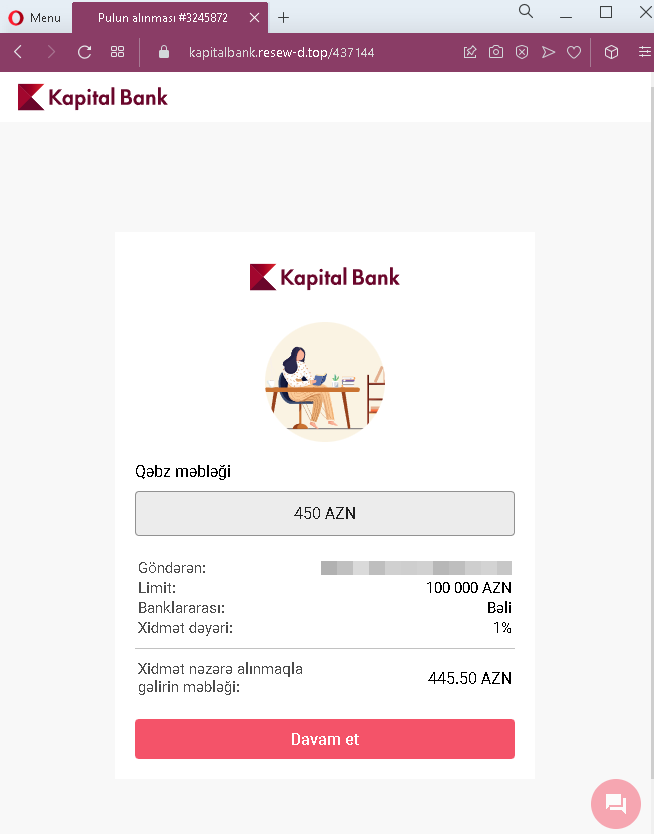
Step 1 – The Fake Transfer Page (First Screenshot) This page displays:
A claimed transfer amount: 450 AZN (Azerbaijani manat)
Sender information: “Göndaran” (Sender) field is blank
Limit: 100,000 AZN
Fee details: 1% service fee, net amount 445.50 AZN
A “Davam et” (Continue) button
The page mimics Kapital Bank’s interface to appear legitimate. The victim is told they are receiving money and must continue to claim it.
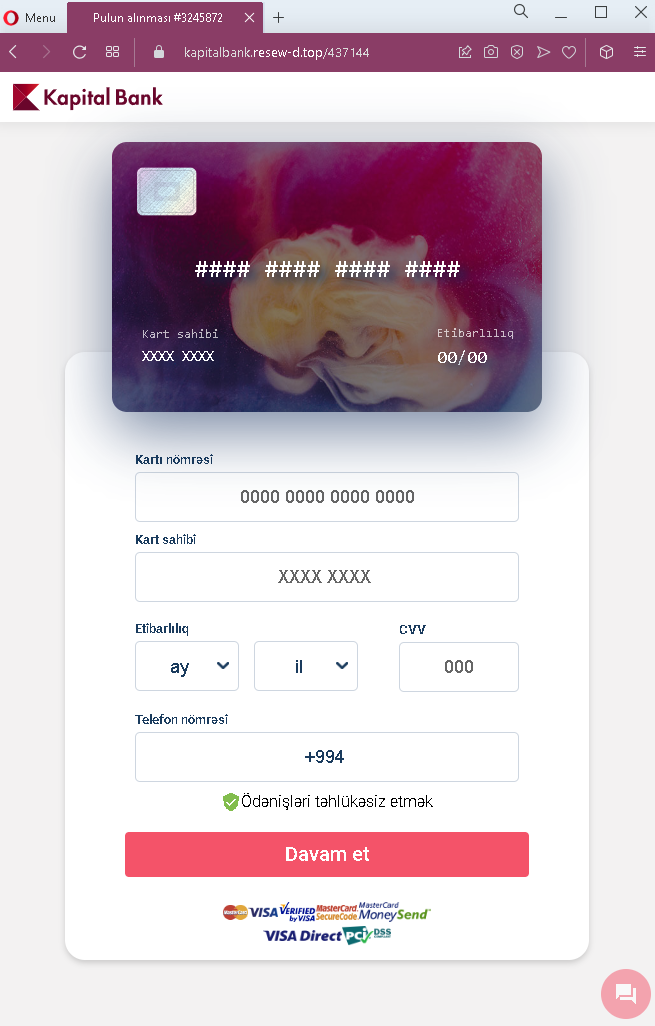
Step 2 – The Card Details Harvesting Page (Second Screenshot) After clicking “Continue,” the victim is taken to this page, which requests:
Card number (placeholder shows 0000 0000 0000 0000)
Cardholder name (placeholder shows XXXX XXXX)
Expiry date (month/year)
CVV (three-digit code)
Phone number (with +994 country code for Azerbaijan)
The page also includes Visa branding and a checkbox with text in Azerbaijani (“Odənişləri təhlükəsiz et” – “Make payments secure”) to create a false sense of security.
The goal: The attacker aims to steal complete credit or debit card details along with the victim’s phone number. With this information, they can make unauthorized transactions, link the card to digital wallets, or sell the data. There is no actual transfer of 450 AZN—the entire offer is fabricated.
Red flags to watch for:
No login required: Legitimate banking transfers do not require entering card details to receive money. Receiving funds never requires the recipient to input their card information.
Suspicious URL: Both pages are hosted on domains that are not kapitalbank.az (Kapital Bank’s official domain).
Missing sender information: The “Göndaran” (Sender) field is empty, yet a transfer is allegedly pending—this is unrealistic for a legitimate banking notification.
Typo in second page header: The second page says “Kapitel Bank” instead of “Kapital Bank,” a misspelling that is a clear indicator of a fake page.
Unnecessary card request: To claim a transfer, a legitimate bank would either deposit funds automatically or require login credentials—never a full card number, CVV, and phone number.
Generic placeholders: The form uses “XXXX XXXX” and “000” as placeholders, which is not standard for a legitimate banking portal.
Vague fee explanation: The fee is stated but the overall context (why a fee applies to receiving money) is suspicious.
What to do if you encounter this:
Do not click “Davam et” (Continue) or enter any card or personal information.
If you are a Kapital Bank customer, always type the official bank URL (kapitalbank.az) directly into your browser or use the official mobile app.
Never provide your card details, CVV, or phone number in response to a link claiming you are receiving money.
Report the phishing page to Kapital Bank’s fraud department and to local authorities.
Why this scam is effective: The promise of receiving money (450 AZN) creates a sense of opportunity. Victims may believe they need to “verify” their card or “activate” the transfer by entering their details. Scammers often distribute these links via SMS or messaging apps, claiming a friend or family member sent money. Because the page mimics Kapital Bank’s branding and includes Azerbaijani language, local users may lower their guard.
Protective measures:
Never enter card details to receive money through any bank or payment service
Always access banking services by typing the official URL or using the official app
Be suspicious of unsolicited messages about unexpected money transfers
Check the URL carefully—phishing domains often differ by one letter or use unusual extensions
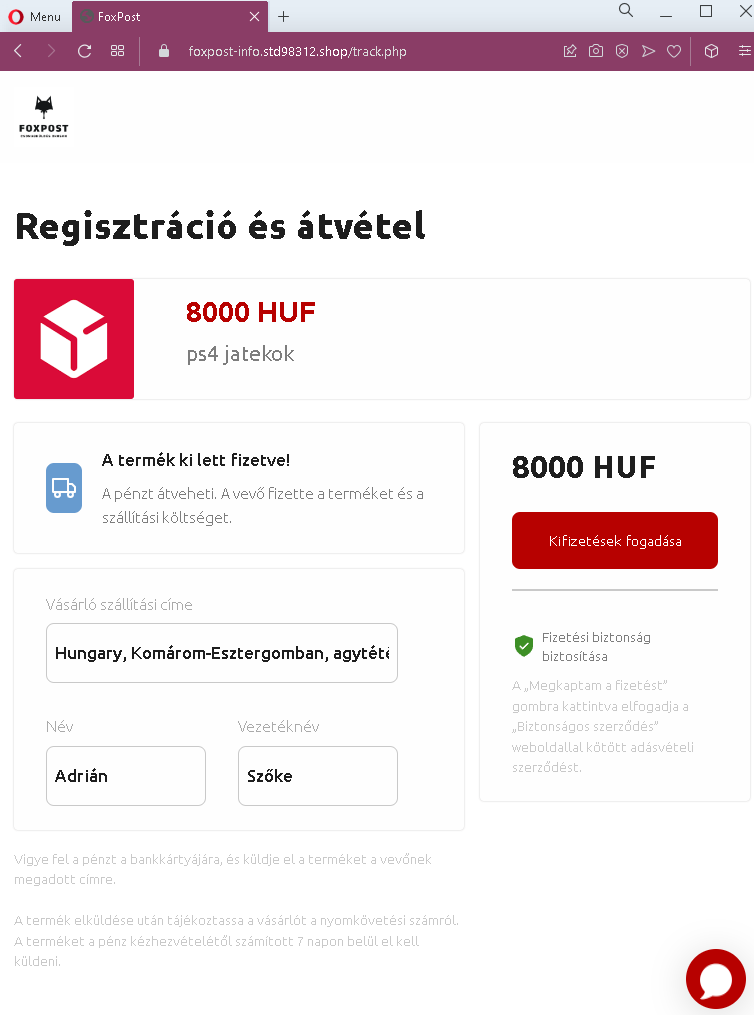
This phishing campaign is designed to steal online banking credentials from sellers on classified ad platforms (such as Facebook Marketplace, Jófogás, or Vatera) in Hungary. The scam is presented in three steps, creating an illusion of a legitimate payment holding service.
How it works: The victim (a seller) receives a message from a potential buyer claiming they have paid for the item. The buyer sends a link to a fake “payment confirmation” page that mimics a trusted escrow or payment protection service.
Step 1 – The Fake Payment Confirmation Page (First Screenshot) This page claims:
An item (PS4 games) has been paid: 8000 HUF (Hungarian forints)
The buyer’s shipping address (partial, with errors: “agytéti” likely a misspelling of Ágostyán or similar)
The buyer’s name: Adrián Szőke
Instructions: “Vigye fel a pénzt a bankkártyájára” – “Transfer the money to your bank card and send the item”
The page uses Hungarian language and presents itself as a secure intermediary. The seller is told they must click “Megkaptam a fizetést” (I received the payment) to proceed.
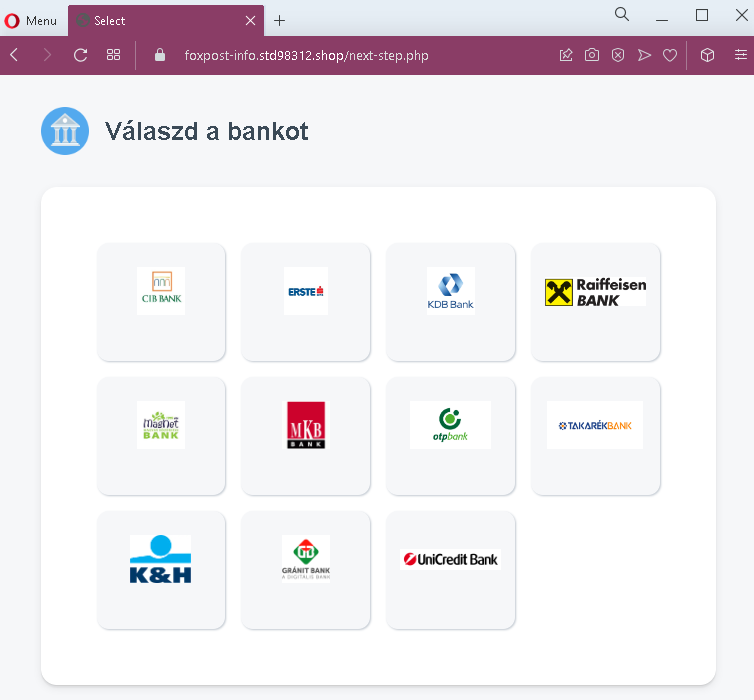
Step 2 – Bank Selection Page (Second Screenshot) After clicking, the victim is taken to a page asking them to select their bank from a list of major Hungarian banks:
CIB BANK
K&H Bank (misspelled as “BESTEÉ” in the screenshot, likely an error or placeholder)
Raiffeisen BANK
Takarékbank (misspelled as “TAKABÉKBANK”)
Gránit Bank (misspelled as “GJÁNIT BANK”)
UniCredit Bank
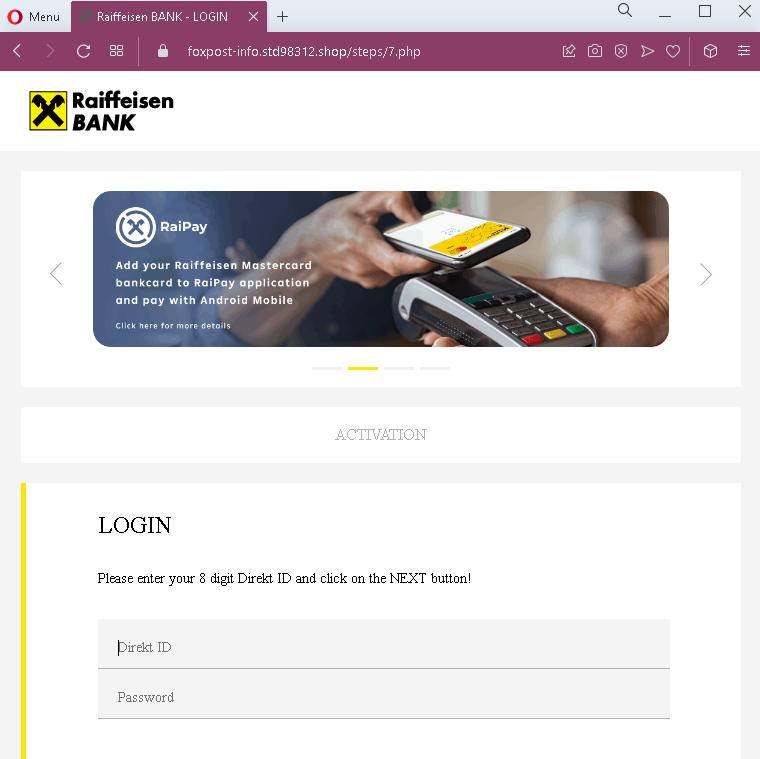
Step 3 – Fake Bank Login Page (Third Screenshot) Once a bank is selected (in this case, Raiffeisen), the victim is taken to a fake Raiffeisen login page. This page asks for:
Direkt ID (8-digit online banking identifier)
Password
The page mimics Raiffeisen’s branding and includes references to “RaIPay” (a real Raiffeisen payment service) to appear authentic.
The goal: The attacker steals the victim’s online banking credentials (Direkt ID and password). With these, they can log in to the victim’s real bank account, transfer funds, or authorize fraudulent payments. There is no actual buyer, no payment of 8000 HUF, and no legitimate escrow service—the entire transaction is fabricated to trick sellers into “claiming” money that doesn’t exist.
Red flags to watch for:
Fake payment intermediary: Legitimate classified ad platforms (like Facebook Marketplace) do not use third-party pages to “hold” payments. Buyers either pay in person or through official platform payment systems.
Grammatical errors and misspellings: The first page contains a misspelled location (“agytéti”), and the second page has multiple bank name misspellings (“BESTEÉ,” “TAKABÉKBANK,” “GJÁNIT BANK”). Official financial pages do not have such errors.
Suspicious URL: All pages are hosted on domains that are not official bank domains nor legitimate classified platform domains.
Request for banking credentials: No legitimate payment process requires a seller to log into their bank account through a link provided by the buyer to receive funds.
Pressure to ship: The first page instructs the seller to ship the item after “receiving” the payment—sellers who fall for this may ship the item before realizing no payment was ever made.
No actual funds transfer: The process involves no real money movement; it’s purely a credential harvesting scheme.
What to do if you encounter this:
Do not click “Megkaptam a fizetést” or any buttons on these pages.
Do not select your bank or enter any login credentials.
If you are selling items online, never click links sent by buyers claiming payment is waiting. Instead, check the official platform (Facebook Marketplace, etc.) for payment confirmation.
If a buyer insists you click a link to “receive payment,” it is a scam. Legitimate buyers pay through official platform mechanisms or in cash upon pickup.
Report the phishing pages to the banks being impersonated and to the classified platform where the scam originated.
Why this scam is effective: Sellers are eager to complete sales and may not be familiar with how online payment intermediaries work. The promise of already-received funds (8000 HUF) creates a sense of urgency to “claim” the money and ship the item. By using localized Hungarian language and mimicking familiar bank interfaces, the scam successfully lowers suspicion.
Protective measures:
Always complete transactions in person with cash, or use official platform payment systems
Never click links from buyers claiming payment is pending—log in to the platform directly
Never enter bank login credentials on a page you reached via an unsolicited link
Verify the URL carefully: official Hungarian banking domains end in .hu and use proper spelling (e.g., raiffeisen.hu, cib.hu, kh.hu)
Manage Cookie Consent
We use cookies to optimize our website and our service.
Functional
Always active
The technical storage or access is strictly necessary for the legitimate purpose of enabling the use of a specific service explicitly requested by the subscriber or user, or for the sole purpose of carrying out the transmission of a communication over an electronic communications network.
Preferences
The technical storage or access is necessary for the legitimate purpose of storing preferences that are not requested by the subscriber or user.
Statistics
The technical storage or access that is used exclusively for statistical purposes.The technical storage or access that is used exclusively for anonymous statistical purposes. Without a subpoena, voluntary compliance on the part of your Internet Service Provider, or additional records from a third party, information stored or retrieved for this purpose alone cannot usually be used to identify you.
Marketing
The technical storage or access is required to create user profiles to send advertising, or to track the user on a website or across several websites for similar marketing purposes.