
Security Notice: This malicious interface was logged, cross-checked, and neutralized firsthand by the
Antiphishing.bizsecurity team during our automated link scanning workflows. To protect the public, the dangerous destination URL has been safely deactivated within our infrastructure. We document and analyze these live visual patterns to help security researchers and users recognize deceptive clone designs before financial damage occurs.
Booking.com Partner Phishing – Full Credential & 2FA Code Theft
This phishing campaign impersonates Booking.com’s partner portal (the extranet used by property owners and managers). The scam uses a multi-page flow designed to capture the victim’s username, password, and two-factor authentication (2FA) codes in real time, allowing attackers to bypass security measures and take over the account.
How it works:
The victim (a Booking.com partner) receives a phishing email, SMS, or message claiming an issue with their property listing, a payment problem, or a need to verify their account. The link leads to the first phishing page.
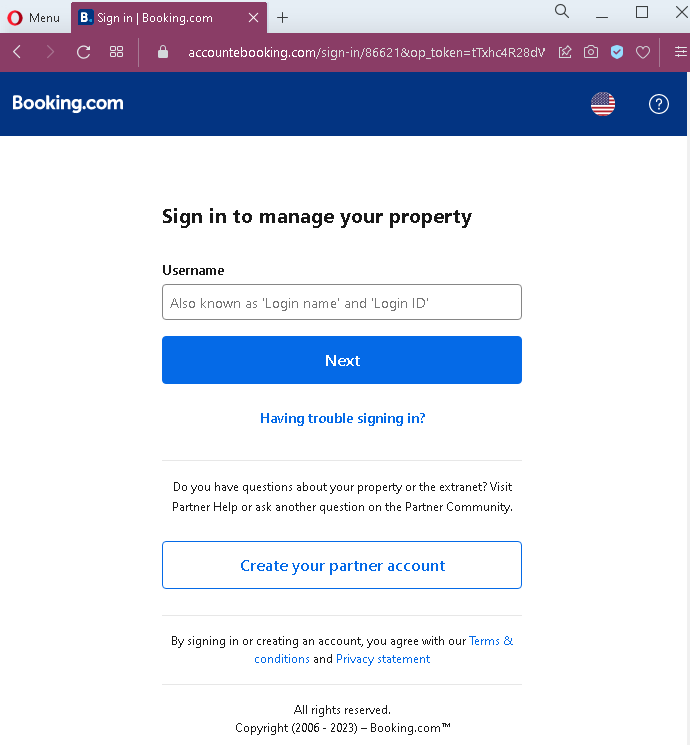
Step 1 – Fake Username Login Page
The first page mimics Booking.com’s partner login interface. It asks for the victim’s username (or login ID) associated with their property account.
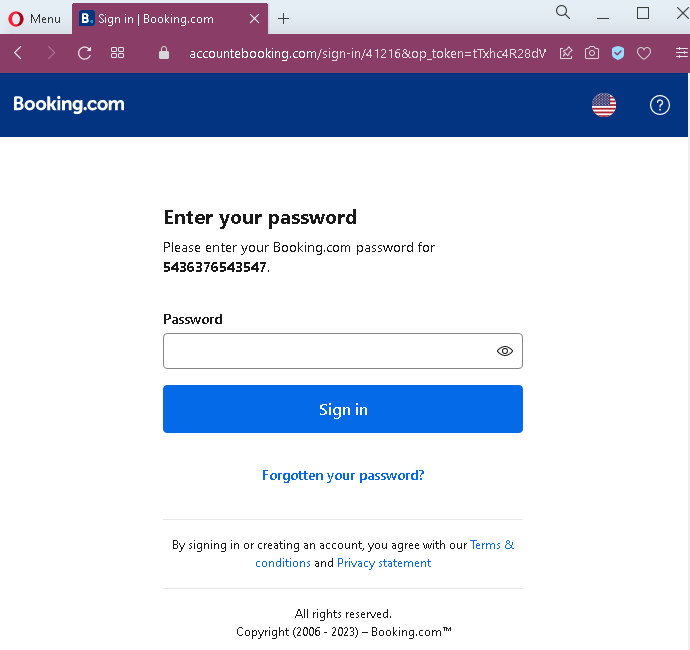
Step 2 – Fake Password Page
After entering a username, the victim is taken to a second page that asks for the account password. This two-step approach is identical to Booking.com’s legitimate login flow, making it more convincing.
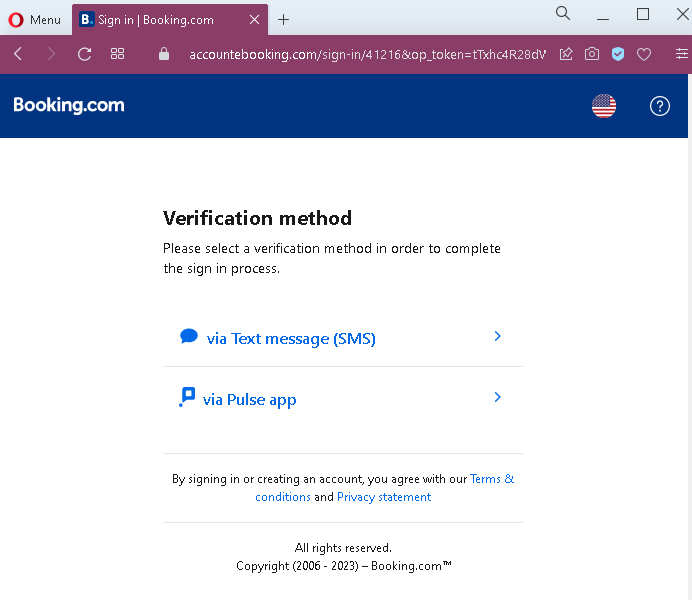
Step 3 – Fake 2FA Method Selection Page
Once the attacker has captured both username and password, the victim is presented with a page asking them to select a verification method (SMS or app). This mimics Booking.com’s actual two-factor authentication step.
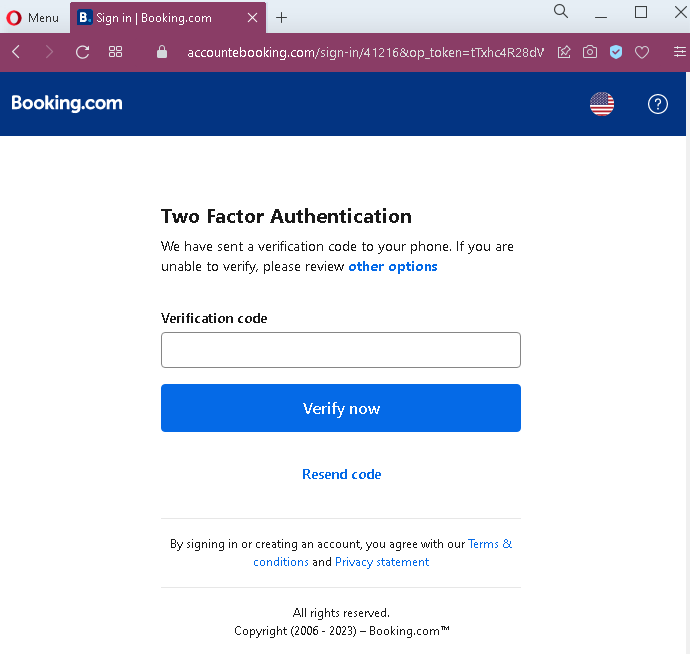
Step 4 – Fake 2FA Code Entry Page
After selecting a method, the victim is shown a page requesting the verification code sent to their phone or authenticator app. When the victim enters the code, the attacker captures it and uses it to complete the login on the real Booking.com site—often within seconds.
The goal:
The attacker gains full access to the victim’s Booking.com partner account. With this access, they can:
- View and modify property listings
- Access guest payment information
- Change bank account details for payouts, redirecting future earnings
- Defraud guests by sending fake messages requesting additional payments
- Use the compromised account to target other partners or guests
Red flags to watch for:
- Suspicious URL: The pages are hosted on a domain that is not
booking.combooking.com/extranet - Unsolicited login request:
Booking.comdoes not send emails or messages with links requiring partners to log in to resolve account issues. Partners should always access the extranet by typing the URL directly. - Generic numbering: The second page shows a placeholder account number (“5436376543547”) that is not personalized to the actual victim—a common flaw in phishing kits.
- Inconsistent flow: While the pages mimic
Booking.com’s design, subtle differences in layout, fonts, or footer formatting may be present when compared to the real site. - No browser security indicators: Legitimate
Booking.comlogin pages use HTTPS with valid certificates and often show a padlock icon in the address bar. Phishing pages may use HTTP or self-signed certificates.
What to do if you encounter this:
- Do not enter your username, password, or any two-factor authentication codes on these pages.
- If you are a
Booking.compartner, always access the extranet by typingadmin.booking.com - Enable two-factor authentication on your
Booking.comaccount if not already active, and use a physical security key or authenticator app rather than SMS where possible. - If you have already entered your credentials and 2FA code, contact
Booking.com’s partner support immediately to secure your account and check for unauthorized changes (especially payout details). - Report the phishing page to
Booking.com’s security team.
Why this scam is particularly dangerous:
This is a real-time credential and session hijacking attack. The attacker does not just collect credentials—they use the stolen 2FA code immediately to log into the real Booking.com account. By the time the victim realizes the mistake, the attacker may have already changed payout bank details and initiated fraudulent transfers. Booking.com partners (hotels, vacation rentals) manage significant financial transactions, making these accounts high-value targets.
Protective measures:
- Bookmark the official extranet URL and use that bookmark to log in—never click links in emails or messages.
- Use a password manager: It will autofill only on legitimate
Booking.comdomains, not on phishing sites. - Verify any unexpected login request: If you receive an email about an account issue, open a new browser window and go to the official site directly instead of clicking links.
- Use hardware-based 2FA (such as a YubiKey) or an authenticator app rather than SMS when available, as these are more resistant to phishing.
- Regularly review payout details in your
Booking.comaccount to ensure no unauthorized changes have been made.