Vipps phishing page in Norwegian detected

Vipps Payment Phishing – BankID Credential Theft

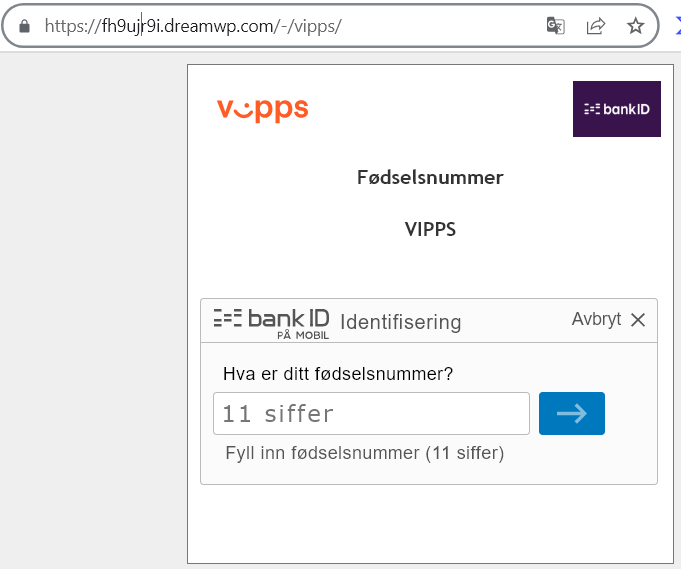
This phishing page impersonates Vipps, a widely used mobile payment app in Norway. The page is designed to steal victims’ fødselsnummer (Norwegian national ID number) and subsequently their BankID credentials, which would allow attackers to take over bank accounts and authorize fraudulent transactions.

How it works:
The victim receives a phishing email, SMS, or social media message claiming a payment issue, a refund, or a request to verify their Vipps account. The link leads to this fake page hosted on a suspicious domain (dreamwp.com). The page asks for the victim’s 11-digit fødselsnummer (birth number) and then prompts them to authenticate with “BankID Identifiering PÅ MOBIL” (BankID identification on mobile)—a common authentication method in Norway.

The goal:
If the victim enters their fødselsnummer and proceeds, they are likely taken to a subsequent fake BankID page that captures their BankID password or confirms a fraudulent transaction. With these credentials, the attacker can log in to the victim’s online banking, transfer money, or authorize payments in real time.

Red flags to watch for:

Suspicious URL: The page is hosted on fh9ujj9i.dreamwp.com, which is clearly not the official Vipps domain (vipps.no). Attackers often use compromised WordPress sites (like dreamwp.com) to host phishing pages.

Poor design and formatting: The page shows a distorted Vipps logo (“V:pps”) with inconsistent spacing and visual errors. Legitimate Vipps pages are professionally designed.

Immediate request for fødselsnummer: Vipps does not randomly ask for your full national ID number via a link sent in a message. Official authentication happens within the Vipps app or via BankID on a trusted, verified page.

Generic content: The page lacks personalization (no name, no partial account reference) that a legitimate payment service would display.

What to do if you encounter this:

Do not enter your fødselsnummer or any other personal information.

Do not click the “BankID Identifiering” button or attempt to authenticate.

If you are a Vipps user, always open the Vipps app directly to check for notifications or pending actions. Never click links in unsolicited messages claiming to be from Vipps.

Report the phishing page to Vipps’ security team at [email protected] (or via their official support channels).

Why this scam is particularly dangerous:
In Norway, the combination of fødselsnummer + BankID provides near-complete access to a person’s banking, tax, and healthcare records. Once compromised, victims may face significant financial loss and identity theft. These phishing pages often mimic BankID’s interface seamlessly, making them difficult to distinguish from the real thing.
Banco De Oro phishing page detected

BDO Online Banking Phishing – Credential Harvesting

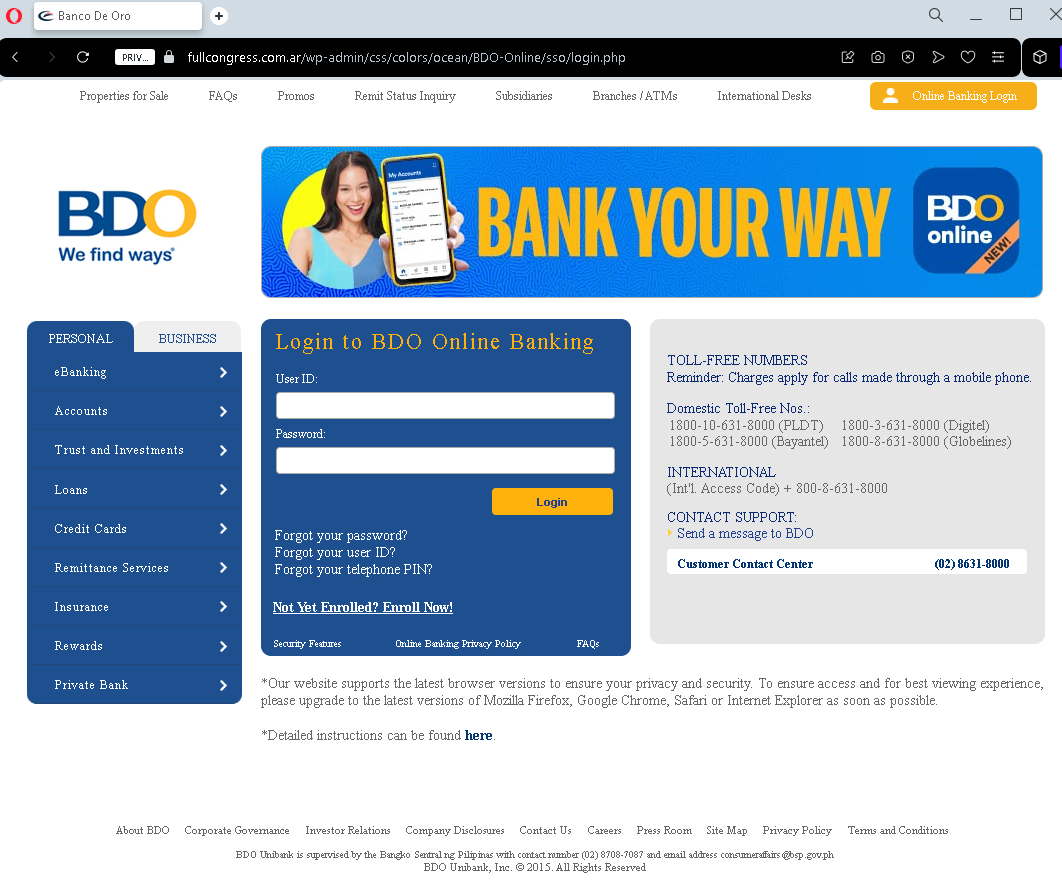
This phishing page impersonates the login portal of BDO (Banco de Oro Unibank) , one of the largest banks in the Philippines. The page is designed to steal customers’ User ID and Password, giving attackers direct access to their bank accounts.

How it works:
The victim receives a phishing email, SMS, or social media message claiming a security alert, account suspension, or a “problem with your account.” The link leads to this fake BDO login page. The page closely mimics the real BDO Online Banking interface, including legitimate-looking footer links (Privacy Policy, Terms and Conditions, Toll-Free numbers) to appear authentic. When the victim enters their User ID and Password and clicks “Login,” the credentials are captured and sent to the attacker.

The goal:
With stolen User ID and Password, the attacker can log in to the victim’s real BDO account, transfer funds, pay bills, or even enroll in additional services to further compromise the account. Because BDO uses two-factor authentication (2FA) for some transactions, the attacker may attempt to use the credentials immediately or combine them with social engineering to obtain the 2FA code.

Red flags to watch for:

Suspicious URL: The page is hosted on a domain that is not bdo.com.ph. Attackers often use domains that look similar but contain misspellings, extra words, or unrelated extensions.

“Legin” typo: The page header says “Legin to BDO Online Banking” instead of “Log in to BDO Online Banking.” This typo is a clear indicator of a fake page.

Generic login form: Legitimate BDO Online Banking often displays a security image or personalized greeting after entering the User ID—this page does not.

Fake footer: While the footer contains real BDO information (toll-free numbers, etc.), phishing pages copy this text to appear credible. Always check the URL first, not the content.

What to do if you encounter this:

Do not enter your User ID, Password, or any other personal information.

Do not click any links on the page, including the “Forgot your password?” links—they may lead to additional phishing pages.

If you are a BDO customer, always type www.bdo.com.ph directly into your browser or use the official BDO mobile app to access your account.

Report the phishing page to BDO’s fraud department at [email protected] or through their official customer service hotline.

Why this scam is effective:
BDO has millions of online banking users in the Philippines, and phishing pages like this are often distributed via SMS (“smishing”) claiming “Your BDO account has been temporarily locked.” Because the page includes authentic-looking footer content (toll-free numbers, privacy policy links), many users mistakenly trust it. The typo “Legin” is one of the few visual red flags—underscoring how carefully users must scrutinize every detail.

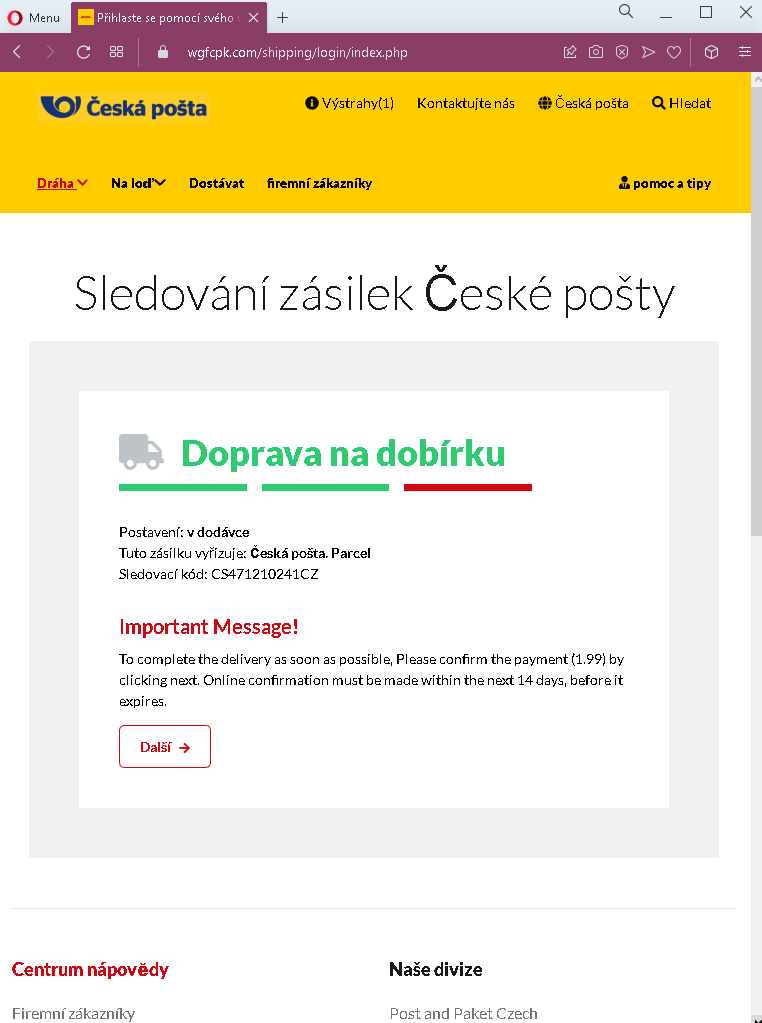
Česká pošta fake page detected

Česká Pošta Package Delivery Scam – Fake Redelivery Fee

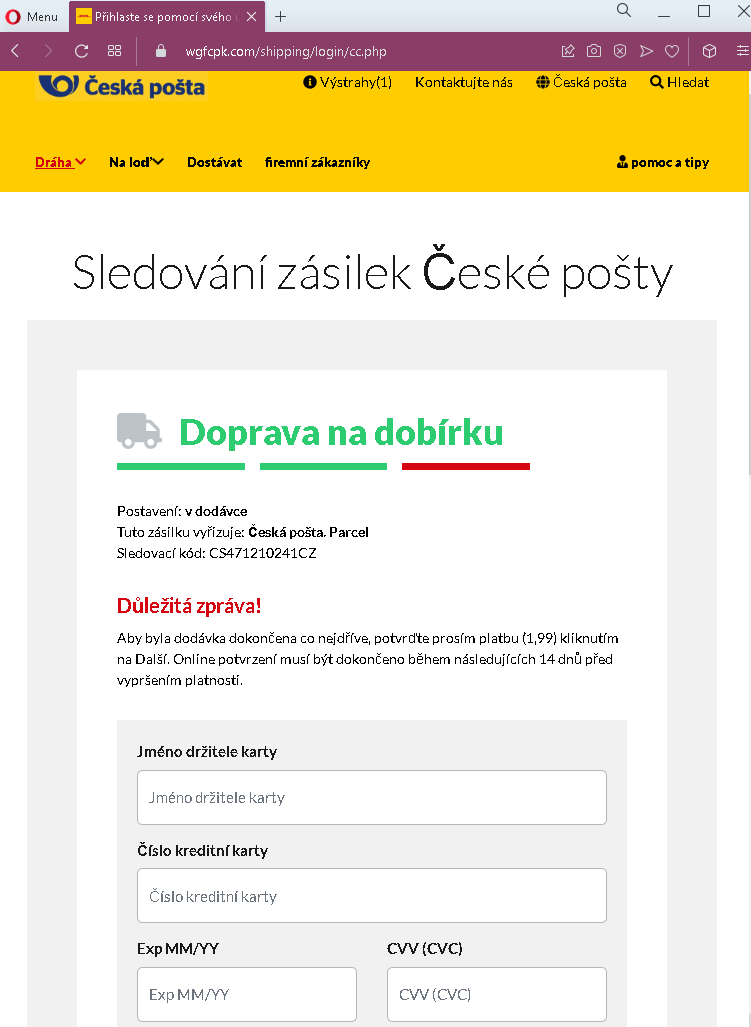
This phishing page impersonates Česká pošta (Czech Post) , the national postal service of the Czech Republic. The page is designed to trick victims into paying a small “confirmation fee” (1.99, presumably in euros or Czech koruna) under the guise of completing a package delivery.

How it works:
The victim receives a phishing email, SMS, or messaging app notification claiming that a package is awaiting delivery or that a delivery attempt failed. The message includes a link to this fake Česká pošta tracking page. The page displays:

A fake tracking number (CS471210241CZ)

A status: “v dodávce” (in delivery)

A message claiming the package is being sent cash on delivery (dobírka) and that a payment of 1.99 must be confirmed online within 14 days

When the victim clicks “Další” (Next), they are taken to a payment page designed to steal credit card or bank account details.

The goal:
The attacker aims to collect credit card information, including card number, expiration date, and CVV. Because the requested amount is small (€1.99 or roughly 50 CZK), victims may not hesitate to “pay” it, assuming it is a legitimate redelivery or handling fee. Once the card details are entered, the attacker can make unauthorized charges or sell the information.

Red flags to watch for:

Suspicious URL: The page is hosted on a domain that is not ceskaposta.cz. Always check the address bar.

Mixed language: The page mixes Czech (“Sledování zásilek,” “Doprava na dobírku”) with English (“Important Message!”), which is unusual for an official postal service page.

Request for payment via link: Česká pošta does not request payment for redelivery or “confirmation” through a link in an unsolicited email or SMS. Legitimate customs or handling fees are paid in person upon delivery, at the post office, or through the official app after logging in.

Vague wording: The message says “Please confirm the payment (1.99)” without specifying the currency or exactly what the fee is for. Official communications are precise.

Fake tracking number: The tracking number format may appear plausible, but it is fabricated. You can verify any real tracking number directly on the official Česká pošta website.

What to do if you encounter this:

Do not click “Další” or enter any payment information.

If you are expecting a package, go directly to the official Česká pošta website (www.ceskaposta.cz) and enter your real tracking number.

Report the phishing attempt to Česká pošta’s security team or forward the original message to your local anti-phishing authorities.

Why this scam is effective:
Package delivery scams are among the most common phishing tactics worldwide because people frequently order online and expect delivery notifications. The small “fee” lowers suspicion, and the fake tracking number gives the page an air of authenticity. Victims may only realize they have been scammed when they see unauthorized charges on their card days or weeks later.

Singapore Post fake page detected

Package Tracking Phishing – Credit Card Harvesting

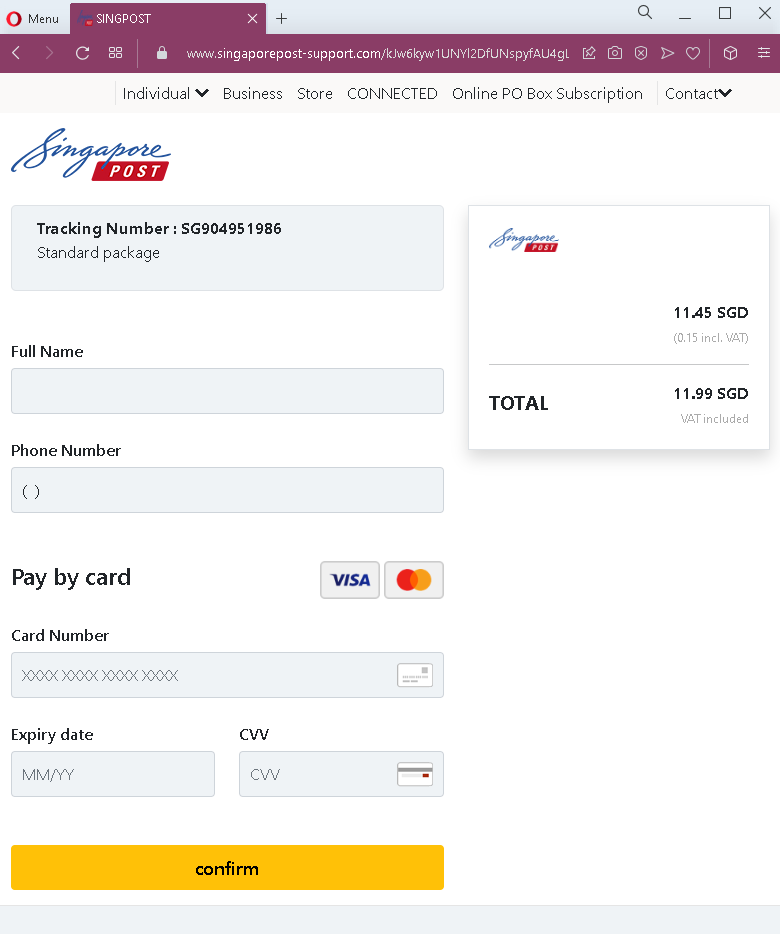
This phishing page impersonates a postal or courier service, likely targeting an international audience. The page claims to provide tracking information for a package (Tracking Number: SG904951986) while simultaneously requesting sensitive financial details under the guise of “pay by card.”

How it works:
The victim receives a phishing email or SMS claiming a package is awaiting delivery, that a customs fee is due, or that a redelivery fee must be paid. The link leads to this page, which displays:

A fake tracking number (SG904951986)

A description: “Standard package”

Fields for Full Name, Phone Number, and a complete credit card form (Card Number, Expiry Date, CVV)

When the victim fills out the form and clicks “Confirm,” all personal and financial information is sent directly to the attacker.

The goal:
This is a direct financial phishing attack. Unlike more sophisticated multi-step phishing pages that first collect login credentials and then payment details, this page combines both. The attacker obtains:

The victim’s full name and phone number (useful for identity theft or follow-up scams)

Complete credit card details (card number, expiration, CVV), which can be used for fraudulent online purchases, cloned cards, or sold on criminal marketplaces

Red flags to watch for:

No carrier branding: The page lacks any official logo or name of a legitimate carrier (e.g., USPS, FedEx, DHL, Royal Mail, etc.). Legitimate tracking pages always clearly display the carrier’s branding.

Vague tracking number: The tracking number “SG904951986” does not follow the standard format of any major carrier. Real tracking numbers are carrier-specific and can be verified on the official website.

Request for payment without context: The page demands credit card details but provides no explanation of what the payment is for (customs, redelivery, insurance, etc.). Legitimate carriers clearly state the reason for any fee.

Poor design and generic fields: The form is minimal, lacks security icons, and does not use HTTPS padlock indicators that legitimate payment pages display.

No delivery details: There is no recipient address, sender information, or estimated delivery date—all of which are standard on legitimate tracking pages.

What to do if you encounter this:

Do not enter your name, phone number, or any credit card details.

Do not click “Confirm” or any other buttons on the page.

If you are expecting a package, go directly to the official website of the carrier you believe is handling the shipment and enter your real tracking number.

Report the phishing page to the legitimate carrier being impersonated (if identifiable) and to anti-phishing organizations.

Why this scam is dangerous:
This type of phishing page is often distributed via SMS (“smishing”) with messages like “Your package could not be delivered. Please update payment information.” Because the requested amount is never specified, victims may assume it is a small fee. Once credit card details are submitted, attackers can drain accounts or make high-value purchases before the victim realizes what happened. The combination of personal information (name, phone) and financial data also enables identity theft.

Western Union fake page detected

Western Union Phishing – Fake “Receive Money” Scam

This phishing campaign impersonates Western Union, a legitimate money transfer service. The scam is presented in two steps:

A fake “tracking” page claiming money is ready to be received

A payment page designed to harvest credit card details

How it works:
The victim likely receives an email, SMS, or social media message claiming someone has sent them money via Western Union. The message includes a link to the first phishing page.

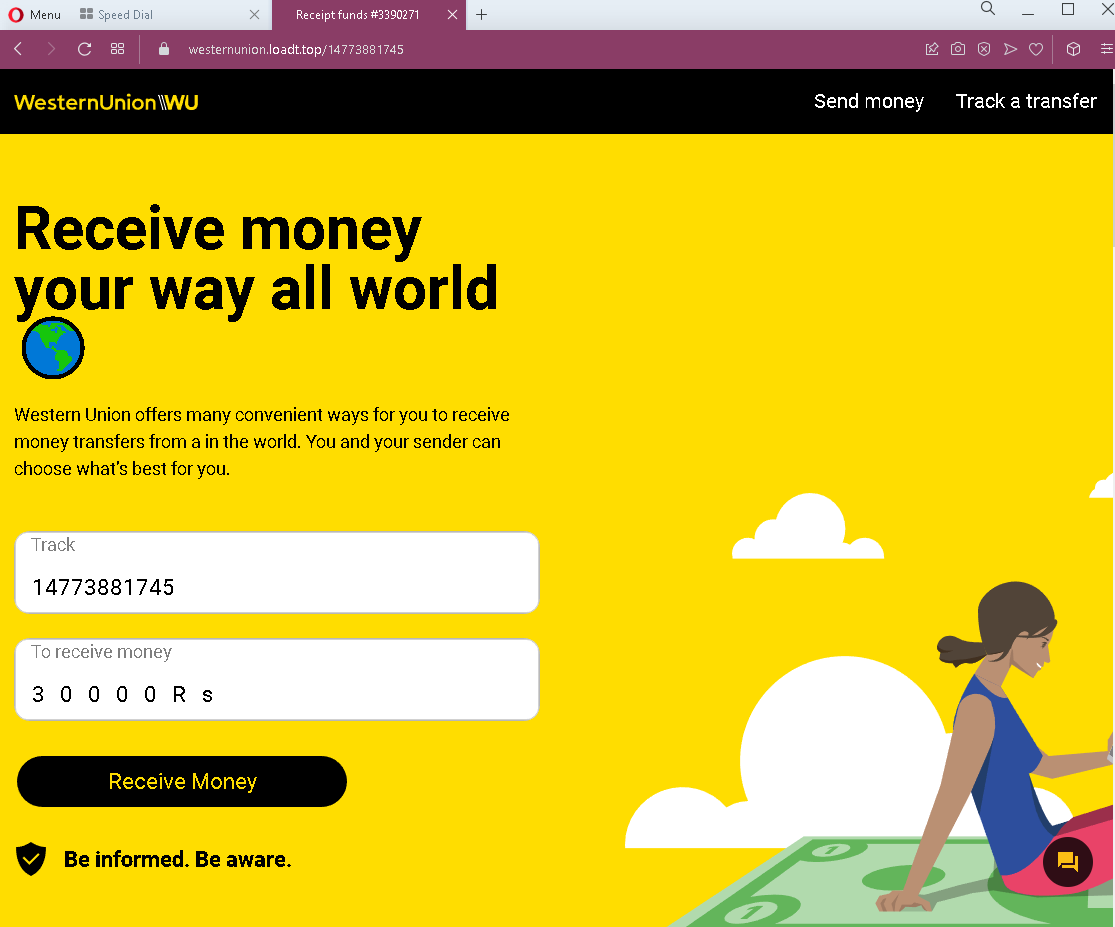
Step 1 – The Fake Tracking Page (First Screenshot)
This page displays:

A tracking number: 14773881745

An amount: 30000 Rs (30,000 rupees, approximately $360 USD)

A “Receive Money” button

The page mimics Western Union’s branding and claims the victim can “receive money your way all world.” To claim the funds, the victim is instructed to click “Receive Money.”

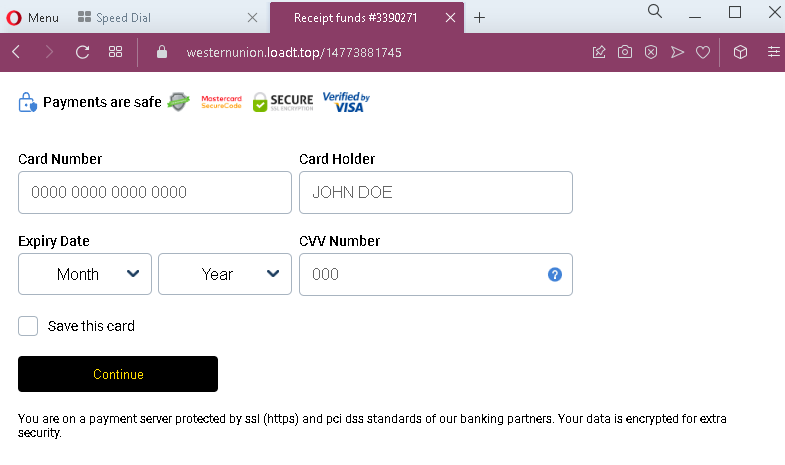
Step 2 – The Credit Card Harvesting Page (Second Screenshot)
After clicking “Receive Money,” the victim is taken to this page, which asks for:

Card Number

Card Holder name

Expiry Date

Option to “Save this card”

The page falsely claims to be secure (“protected by ssl (https) and pci das standards”) to lower suspicion.

The goal:
The attacker aims to steal full credit card details. There is no money waiting to be received—the entire “tracking” page is fabricated. If the victim enters their card information, the attacker can make unauthorized purchases, withdraw funds, or sell the card details.

Red flags to watch for:

No login required: Legitimate Western Union money transfers require the recipient to provide tracking information (MTCN) and identification—not credit card details—to receive money. You never need to enter a credit card to receive funds.

Fake tracking number: The tracking number format does not match Western Union’s standard MTCN (Money Transfer Control Number) format.

Currency mismatch: The page mixes English with “Rs” (rupees), which may indicate targeting of specific regions but lacks professional localization.

Unnecessary card request: Receiving money through Western Union never requires the recipient’s credit card information. This is the clearest red flag.

Generic security claims: The second page claims PCI compliance but provides no verifiable security details (e.g., no padlock icon, no recognizable payment processor branding like Stripe or Braintree).

Suspicious URL: Both pages are hosted on domains that are not westernunion.com.

What to do if you encounter this:

Do not click “Receive Money” or enter any credit card details.

If someone has actually sent you money via Western Union, go directly to westernunion.com or use the official app. You will need the MTCN (tracking number) and valid identification—never a credit card.

Report the phishing page to Western Union’s fraud team at [email protected].

Why this scam is effective:
The promise of receiving a large sum of money (30,000 Rs) creates excitement and urgency, overriding critical thinking. Victims may believe they need to “verify” their identity or “activate” the transfer with a credit card. Scammers often pose as a “buyer” on classified ad sites (e.g., Facebook Marketplace, OLX) claiming they’ve sent payment via Western Union and need the victim to “click the link to receive it.” In reality, the link steals card details.

Protective measures:

Never enter credit card information to receive money through any service

Always type the official URL of financial services directly into your browser

Be wary of unsolicited messages claiming unexpected money transfers

Kapital bank phishing page detected

Kapital Bank Phishing – Fake Transfer Confirmation & Card Harvesting

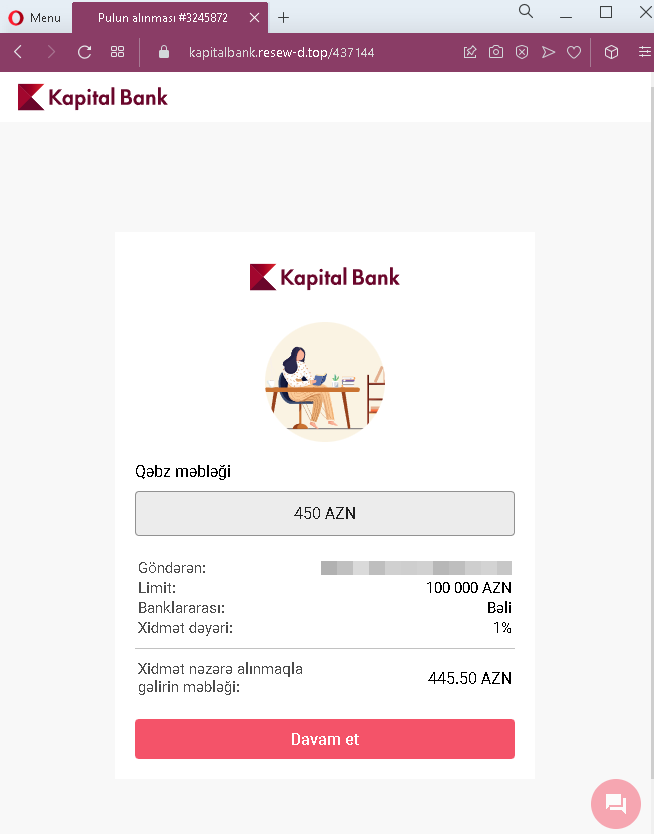
This phishing campaign impersonates Kapital Bank, one of the largest banks in Azerbaijan. The scam is presented in two steps:

A fake transfer confirmation page claiming money is ready to be received

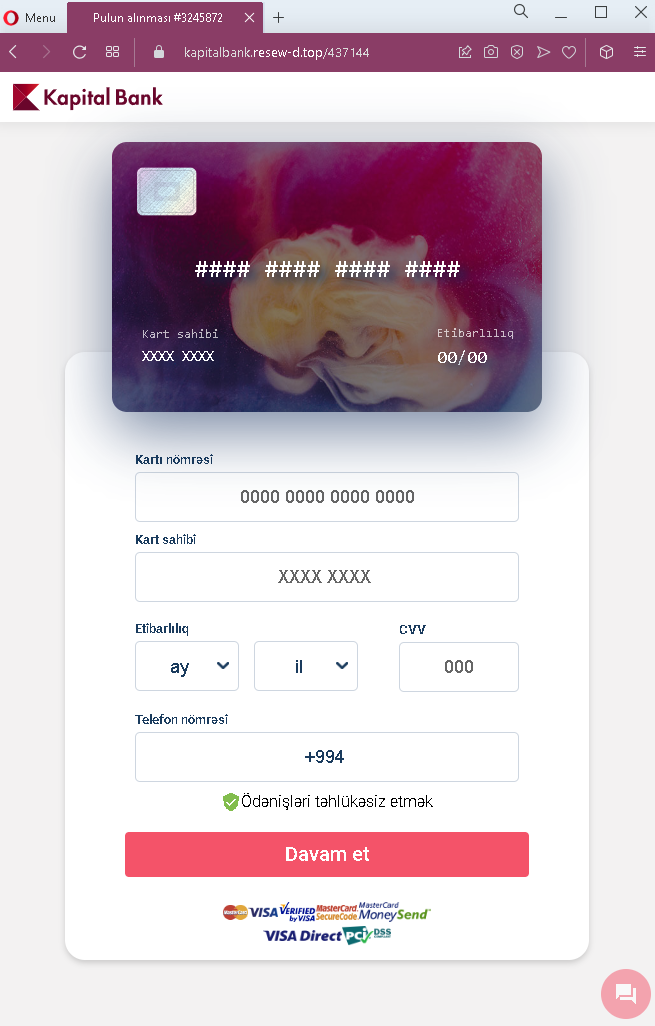
A payment/card details harvesting page

How it works:
The victim likely receives a phishing email, SMS, or social media message claiming someone has sent them money or that they have a pending transfer. The link leads to the first phishing page.

Step 1 – The Fake Transfer Page (First Screenshot)
This page displays:

A claimed transfer amount: 450 AZN (Azerbaijani manat)

Sender information: “Göndaran” (Sender) field is blank

Limit: 100,000 AZN

Fee details: 1% service fee, net amount 445.50 AZN

A “Davam et” (Continue) button

The page mimics Kapital Bank’s interface to appear legitimate. The victim is told they are receiving money and must continue to claim it.

Step 2 – The Card Details Harvesting Page (Second Screenshot)
After clicking “Continue,” the victim is taken to this page, which requests:

Card number (placeholder shows 0000 0000 0000 0000)

Cardholder name (placeholder shows XXXX XXXX)

Expiry date (month/year)

CVV (three-digit code)

Phone number (with +994 country code for Azerbaijan)

The page also includes Visa branding and a checkbox with text in Azerbaijani (“Odənişləri təhlükəsiz et” – “Make payments secure”) to create a false sense of security.

The goal:
The attacker aims to steal complete credit or debit card details along with the victim’s phone number. With this information, they can make unauthorized transactions, link the card to digital wallets, or sell the data. There is no actual transfer of 450 AZN—the entire offer is fabricated.

Red flags to watch for:

No login required: Legitimate banking transfers do not require entering card details to receive money. Receiving funds never requires the recipient to input their card information.

Suspicious URL: Both pages are hosted on domains that are not kapitalbank.az (Kapital Bank’s official domain).

Missing sender information: The “Göndaran” (Sender) field is empty, yet a transfer is allegedly pending—this is unrealistic for a legitimate banking notification.

Typo in second page header: The second page says “Kapitel Bank” instead of “Kapital Bank,” a misspelling that is a clear indicator of a fake page.

Unnecessary card request: To claim a transfer, a legitimate bank would either deposit funds automatically or require login credentials—never a full card number, CVV, and phone number.

Generic placeholders: The form uses “XXXX XXXX” and “000” as placeholders, which is not standard for a legitimate banking portal.

Vague fee explanation: The fee is stated but the overall context (why a fee applies to receiving money) is suspicious.

What to do if you encounter this:

Do not click “Davam et” (Continue) or enter any card or personal information.

If you are a Kapital Bank customer, always type the official bank URL (kapitalbank.az) directly into your browser or use the official mobile app.

Never provide your card details, CVV, or phone number in response to a link claiming you are receiving money.

Report the phishing page to Kapital Bank’s fraud department and to local authorities.

Why this scam is effective:
The promise of receiving money (450 AZN) creates a sense of opportunity. Victims may believe they need to “verify” their card or “activate” the transfer by entering their details. Scammers often distribute these links via SMS or messaging apps, claiming a friend or family member sent money. Because the page mimics Kapital Bank’s branding and includes Azerbaijani language, local users may lower their guard.

Protective measures:

Never enter card details to receive money through any bank or payment service

Always access banking services by typing the official URL or using the official app

Be suspicious of unsolicited messages about unexpected money transfers

Check the URL carefully—phishing domains often differ by one letter or use unusual extensions

Foxpost phishing page detected


Classified Ads Phishing – Fake “Payment Received” & Bank Credential Harvesting

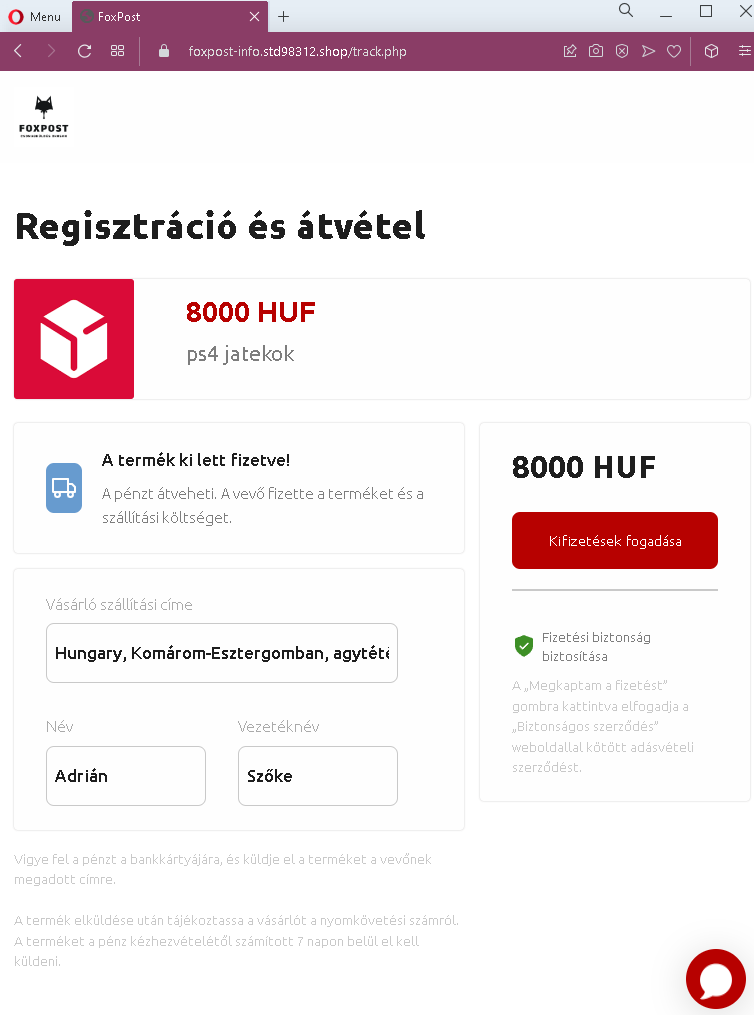
This phishing campaign is designed to steal online banking credentials from sellers on classified ad platforms (such as Facebook Marketplace, Jófogás, or Vatera) in Hungary. The scam is presented in three steps, creating an illusion of a legitimate payment holding service.

How it works:
The victim (a seller) receives a message from a potential buyer claiming they have paid for the item. The buyer sends a link to a fake “payment confirmation” page that mimics a trusted escrow or payment protection service.

Step 1 – The Fake Payment Confirmation Page (First Screenshot)
This page claims:

An item (PS4 games) has been paid: 8000 HUF (Hungarian forints)

The buyer’s shipping address (partial, with errors: “agytéti” likely a misspelling of Ágostyán or similar)

The buyer’s name: Adrián Szőke

Instructions: “Vigye fel a pénzt a bankkártyájára” – “Transfer the money to your bank card and send the item”

The page uses Hungarian language and presents itself as a secure intermediary. The seller is told they must click “Megkaptam a fizetést” (I received the payment) to proceed.

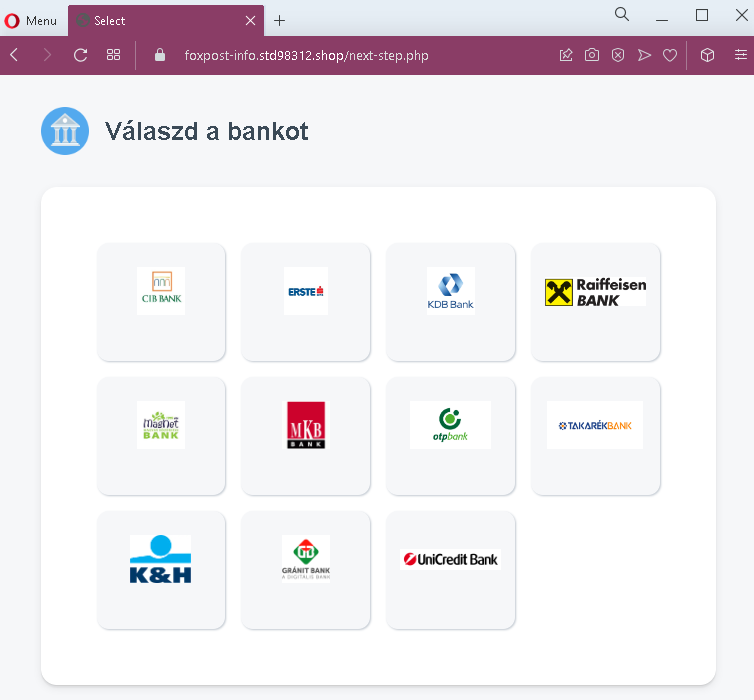
Step 2 – Bank Selection Page (Second Screenshot)
After clicking, the victim is taken to a page asking them to select their bank from a list of major Hungarian banks:

CIB BANK

K&H Bank (misspelled as “BESTEÉ” in the screenshot, likely an error or placeholder)

Raiffeisen BANK

Takarékbank (misspelled as “TAKABÉKBANK”)

Gránit Bank (misspelled as “GJÁNIT BANK”)

UniCredit Bank

Step 3 – Fake Bank Login Page (Third Screenshot)
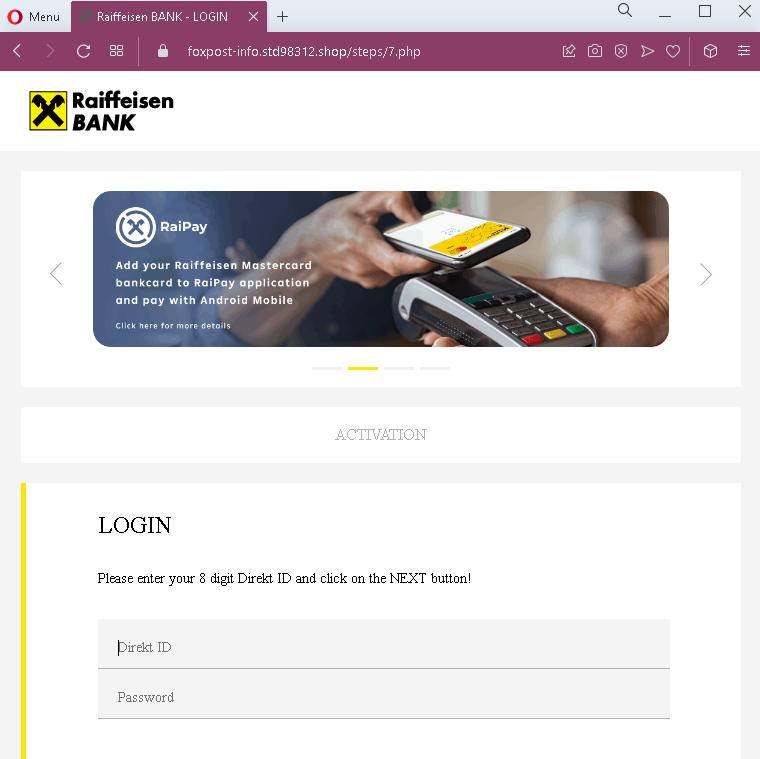
Once a bank is selected (in this case, Raiffeisen), the victim is taken to a fake Raiffeisen login page. This page asks for:

Direkt ID (8-digit online banking identifier)

Password

The page mimics Raiffeisen’s branding and includes references to “RaIPay” (a real Raiffeisen payment service) to appear authentic.

The goal:
The attacker steals the victim’s online banking credentials (Direkt ID and password). With these, they can log in to the victim’s real bank account, transfer funds, or authorize fraudulent payments. There is no actual buyer, no payment of 8000 HUF, and no legitimate escrow service—the entire transaction is fabricated to trick sellers into “claiming” money that doesn’t exist.

Red flags to watch for:

Fake payment intermediary: Legitimate classified ad platforms (like Facebook Marketplace) do not use third-party pages to “hold” payments. Buyers either pay in person or through official platform payment systems.

Grammatical errors and misspellings: The first page contains a misspelled location (“agytéti”), and the second page has multiple bank name misspellings (“BESTEÉ,” “TAKABÉKBANK,” “GJÁNIT BANK”). Official financial pages do not have such errors.

Suspicious URL: All pages are hosted on domains that are not official bank domains nor legitimate classified platform domains.

Request for banking credentials: No legitimate payment process requires a seller to log into their bank account through a link provided by the buyer to receive funds.

Pressure to ship: The first page instructs the seller to ship the item after “receiving” the payment—sellers who fall for this may ship the item before realizing no payment was ever made.

No actual funds transfer: The process involves no real money movement; it’s purely a credential harvesting scheme.

What to do if you encounter this:

Do not click “Megkaptam a fizetést” or any buttons on these pages.

Do not select your bank or enter any login credentials.

If you are selling items online, never click links sent by buyers claiming payment is waiting. Instead, check the official platform (Facebook Marketplace, etc.) for payment confirmation.

If a buyer insists you click a link to “receive payment,” it is a scam. Legitimate buyers pay through official platform mechanisms or in cash upon pickup.

Report the phishing pages to the banks being impersonated and to the classified platform where the scam originated.

Why this scam is effective:
Sellers are eager to complete sales and may not be familiar with how online payment intermediaries work. The promise of already-received funds (8000 HUF) creates a sense of urgency to “claim” the money and ship the item. By using localized Hungarian language and mimicking familiar bank interfaces, the scam successfully lowers suspicion.

Protective measures:

Always complete transactions in person with cash, or use official platform payment systems

Never click links from buyers claiming payment is pending—log in to the platform directly

Never enter bank login credentials on a page you reached via an unsolicited link

Verify the URL carefully: official Hungarian banking domains end in .hu and use proper spelling (e.g., raiffeisen.hu, cib.hu, kh.hu)

Hotmail and Microsoft fake pages detected

Microsoft/Outlook Phishing – Fake Account Verification Scam

This phishing campaign impersonates Microsoft (specifically Hotmail/Outlook) to steal email account credentials. The scam is presented in two steps: a deceptive warning page followed by a fake login form.

How it works:
The victim receives an email, SMS, or social media message—likely in Spanish—claiming their email account requires verification or is at risk of being suspended. The link leads to the first phishing page.

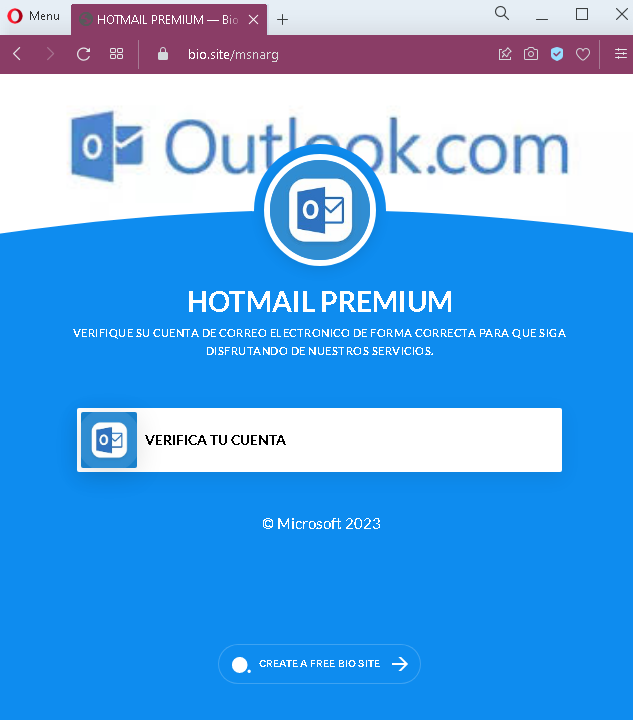
Step 1 – The Fake Verification Warning (First Screenshot)
This page displays:

A heading: “HOTMAIL PREMIUM”

A message in Spanish: “VERIFIQUE SU CUENTA DE CORREO ELECTRÓNICO DE FORMA CORRECTA PARA QUE SIGA DISFRUTANDO DE NUESTROS SERVICIOS”
(Translation: “Verify your email account correctly so that you continue enjoying our services.”)

A button: “VERIFICA TU CUENTA” (Verify your account)

A footer: “© Microsoft 2023”

The page uses urgency and fear—implying that failure to verify will result in loss of service.

Step 2 – Fake Microsoft Login Page (Second Screenshot)
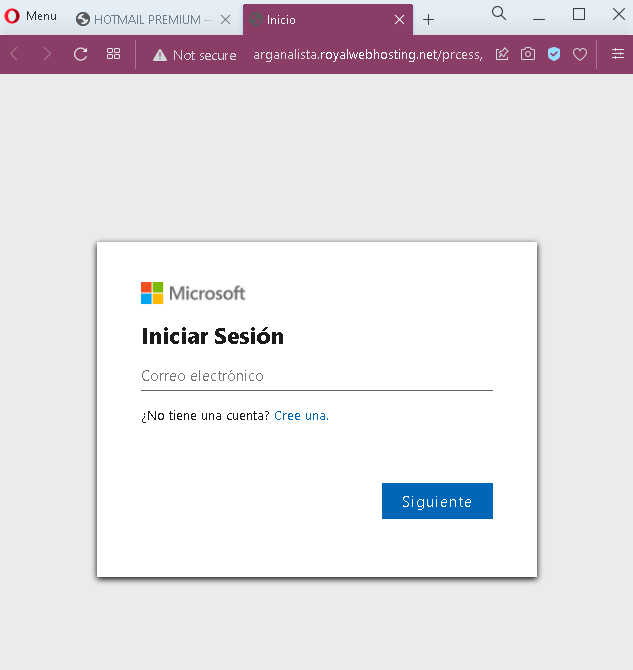
After clicking “VERIFICA TU CUENTA,” the victim is taken to a fake Microsoft login page. This page asks for:

Correo electrónico (Email address)

It mimics Microsoft’s branding with the official Microsoft logo and the “Iniciar Sesión” (Sign in) header.

The goal:
The attacker aims to steal Microsoft/Outlook/Hotmail email credentials. Once they have the email address and password (likely captured on a subsequent page after the email is entered), they can:

Access the victim’s emails (searching for sensitive information or password reset links)

Reset passwords for other accounts linked to that email (banking, social media, etc.)

Use the compromised email to send further phishing messages to the victim’s contacts

Red flags to watch for:

No personalization: Legitimate Microsoft security alerts address you by your name or partial email address. This page uses a generic warning.

Suspicious URL: Both pages are hosted on domains that are not microsoft.com or outlook.com.

Poor Spanish grammar: The phrasing “VERIFIQUE … PARA QUE SIGA DISFRUTANDO” is slightly awkward. Official Microsoft communications are professionally localized.

No two-factor authentication (2FA) mention: Legitimate Microsoft account verification often involves 2FA or confirmation within the authenticator app—not simply clicking a link and entering a password.

Generic footer: The footer only shows “© Microsoft 2023” and a random “CREATE A FREE BIO SITE” link, which is completely unrelated to Microsoft and a clear indicator of a fake page.

Single-field login: The second page asks only for email initially, but a subsequent page would ask for a password. Phishing pages sometimes do this to first validate if the email is active before presenting the password field.

What to do if you encounter this:

Do not click “VERIFICA TU CUENTA” or enter any email or password.

If you are concerned about your Microsoft account, go directly to outlook.com or account.microsoft.com by typing the URL into your browser—never click links in unsolicited messages.

Legitimate Microsoft account verification never requires you to click a link in an email to “verify” your account. Instead, you may receive a code via SMS or email that you enter on the official site if you initiated a change.

Report the phishing page to Microsoft using their reporting tools: forward suspicious emails to [email protected] or use the “Report Message” add-in in Outlook.

Why this scam is effective:
Email accounts are a high-value target because they serve as the “keys to the kingdom” for password resets across other services. Spanish-speaking users may be less frequently targeted with localized phishing, making this campaign particularly dangerous. The use of Microsoft branding and the fear of losing email service prompts users to act quickly without scrutinizing the URL or page details.

Protective measures:

Enable two-factor authentication (2FA) on your Microsoft account to prevent unauthorized access even if your password is stolen

Always check the URL before entering credentials—Microsoft’s login pages always end in microsoft.com or live.com

Be suspicious of any message that creates urgency and asks you to “verify” your account by clicking a link

If in doubt, contact Microsoft support through official channels rather than using links in suspicious messages

Nuevo Banco del Chaco phishing page detected

Nuevo Banco del Chaco Phishing – Fake Platform Update Scam

This phishing campaign impersonates Nuevo Banco del Chaco (NBCH) , a bank serving the Chaco province in Argentina. The scam uses the pretext of a “platform update” or “security verification” to steal online banking credentials.

How it works:
The victim receives a phishing email, SMS, or social media message—likely in Spanish—claiming that the bank has updated its online banking platform (Home Banking) and that the user must verify their account to continue using services. The link leads to the first phishing page.

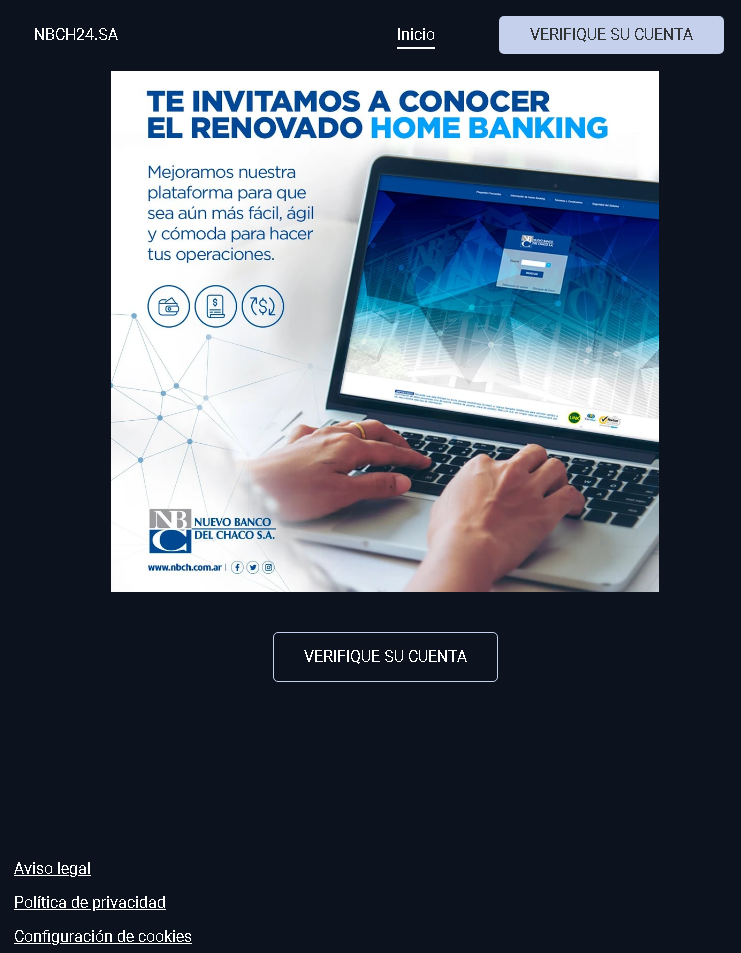
Step 1 – Fake Platform Update Notification (First Screenshot)
This page displays:

“VERIFIQUE SU CUENTA” (Verify your account) as a prominent heading

A message in Spanish: “TE INVITAMOS A CONOCER EL RENOVADO HOME BANKING. Mejoramos nuestra plataforma para que sea aún más fácil, ágil y cómoda para hacer tus operaciones.”
(Translation: “We invite you to get to know the renewed Home Banking. We improved our platform to make your transactions even easier, faster, and more convenient.”)

The bank’s name: “Nuevo Banco del Chaco SA”

A reference to the official website: www.nbch.com.ar

A button: “VERIFIQUE SU CUENTA”

The page mimics NBCH’s branding and uses the bank’s real website URL in the text to appear legitimate.

Step 2 – Fake Security Verification Page (Second Screenshot)
After clicking the verification button, the victim is taken to this page, which displays:

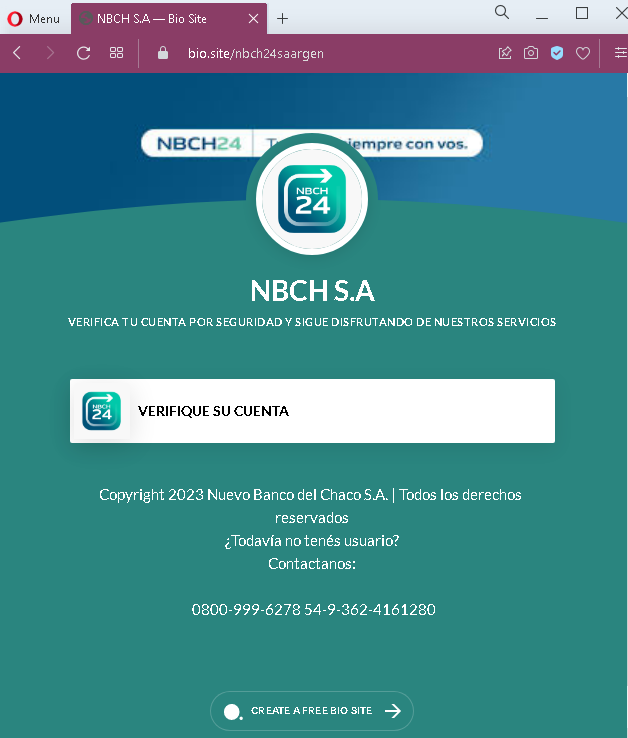
“VERIFICA TU CUENTA POR SEGURIDAD Y SIGUE DISFRUTANDO DE NUESTROS SERVICIOS”
(Translation: “Verify your account for security and continue enjoying our services”)

Another “VERIFIQUE SU CUENTA” button

Footer with a copyright notice and customer service phone numbers (which may be copied from the real bank)

The actual credential harvesting form likely appears after clicking the button on this second page (though not shown in the screenshots, such forms typically request User ID, password, or security details).

The goal:
The attacker aims to steal NBCH online banking credentials. By impersonating a legitimate “platform update” or “security verification,” the scam tricks users into entering their login details on a fake page, giving attackers direct access to their bank accounts.

Red flags to watch for:

Suspicious URL: Both pages are hosted on a domain (antiphishing.biz) that is not nbch.com.ar or any official NBCH domain.

No personalization: The messages address the user generically rather than using their name or account details.

Two-step verification process: Legitimate banks do not require clicking a link in an email to “verify” an account due to a platform update. Such updates are communicated via official app notifications or direct mail, and users are expected to log in normally (not through a provided link).

Unusual footer content: The second page includes “CREATE A FREE BIO SITE” at the bottom—a completely unrelated and suspicious addition that no legitimate bank would include.

Urgency without authentication: The page pressures the user to “verify” without requiring any prior authentication, which is a common phishing tactic.

Copy of official content: While the first page references the real NBCH website (www.nbch.com.ar), the phishing site itself is not on that domain. Attackers often copy legitimate URLs into text to mislead users.

What to do if you encounter this:

Do not click the “VERIFIQUE SU CUENTA” buttons or enter any personal information.

If you are an NBCH customer, always access your online banking by typing www.nbch.com.ar directly into your browser or by using the official NBCH mobile app.

Never log into your bank account through a link sent via email, SMS, or social media.

Report the phishing page to Nuevo Banco del Chaco using their official customer service channels (e.g., the phone numbers listed on their genuine website, not those on the phishing page).

Why this scam is effective:
Regional banks in Argentina, such as NBCH, have a strong local customer base. Phishing campaigns that use the pretext of a “platform update” exploit the fact that users may have heard about digital transformation efforts at their bank. The use of the real bank URL in the text and the familiar branding lowers suspicion. Additionally, the page is fully localized in Argentine Spanish, making it more convincing than generic phishing attempts.

Protective measures:

Always verify the URL in your browser’s address bar before entering any credentials

Bookmark the official bank website and use that bookmark to log in

Enable two-factor authentication (2FA) if offered by the bank

Be suspicious of any unsolicited message that asks you to “verify” or “update” your account

If you receive such a message, contact your bank directly using a phone number or email from your bank statement or official website—never use contact details provided in the suspicious message.

Facebook and Freefire fake pages detected

Free Fire “Skin Generator” Scam – Facebook Credential Harvesting

This phishing campaign targets players of Free Fire, a popular mobile battle royale game developed by Garena. The scam promises free in-game skins and diamonds through a fake “generator” tool. In reality, it is a multi-step scheme designed to steal victims’ Facebook login credentials (the primary method of logging into Free Fire on many devices).

How it works:
The victim encounters a link to this scam via YouTube videos, TikTok, Discord, Instagram, or other social media platforms, often with captions like “Free Fire Free Diamonds Generator 2023” or “Get Free Skins No Human Verification.”

Step 1 – Selection Page (First Screenshot)
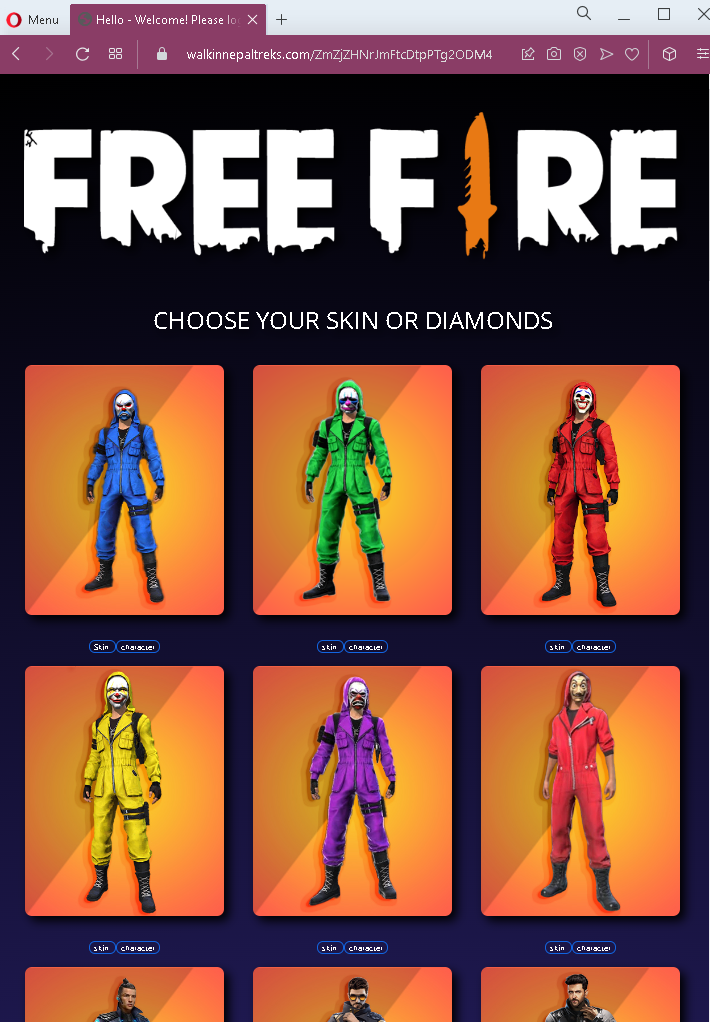
The victim is presented with a page showing various skins (e.g., “Chocolate”) and diamonds. The interface mimics a legitimate selection menu, asking the user to choose what they want to “generate.”

Step 2 – Username & Platform Entry (Second Screenshot)
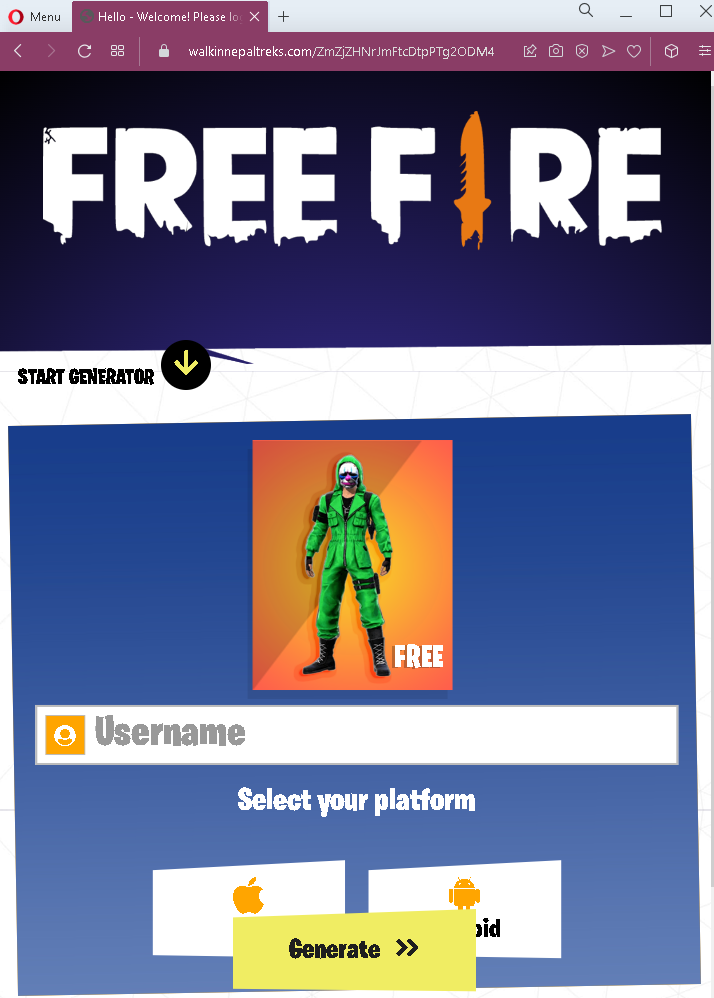
The victim is asked to enter their Free Fire username and select their platform. This is designed to make the scam feel personalized and legitimate.

Step 3 – Fake Progress Indicator (Third Screenshot)
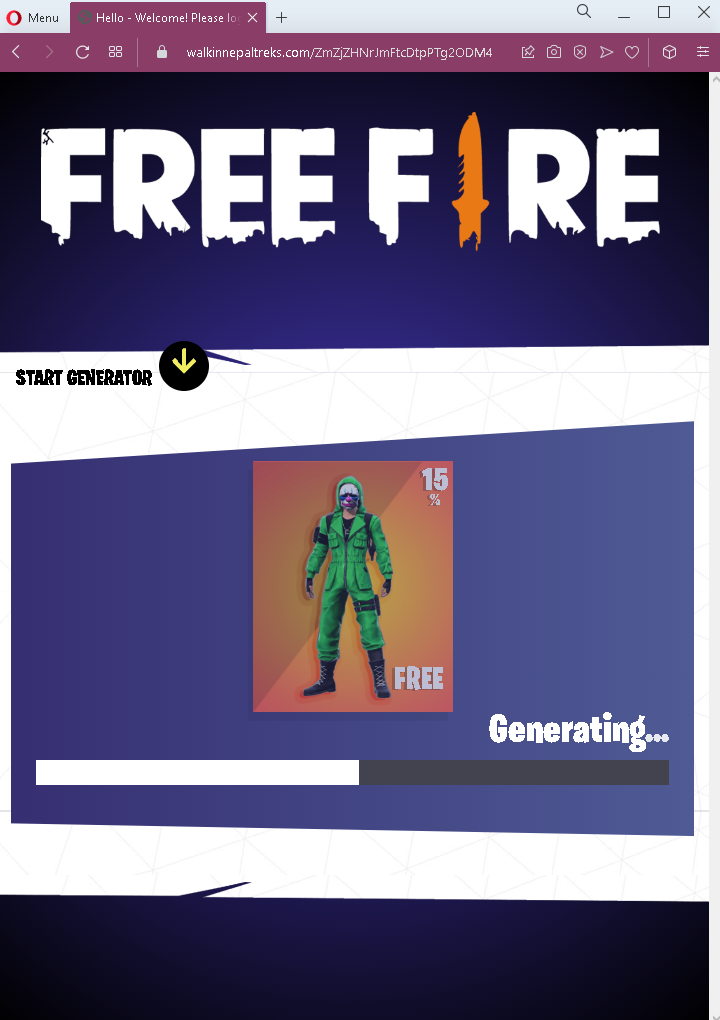
A progress bar appears showing “Generating…” with a percentage (e.g., 15%). This builds anticipation and tricks the victim into believing the generator is working.

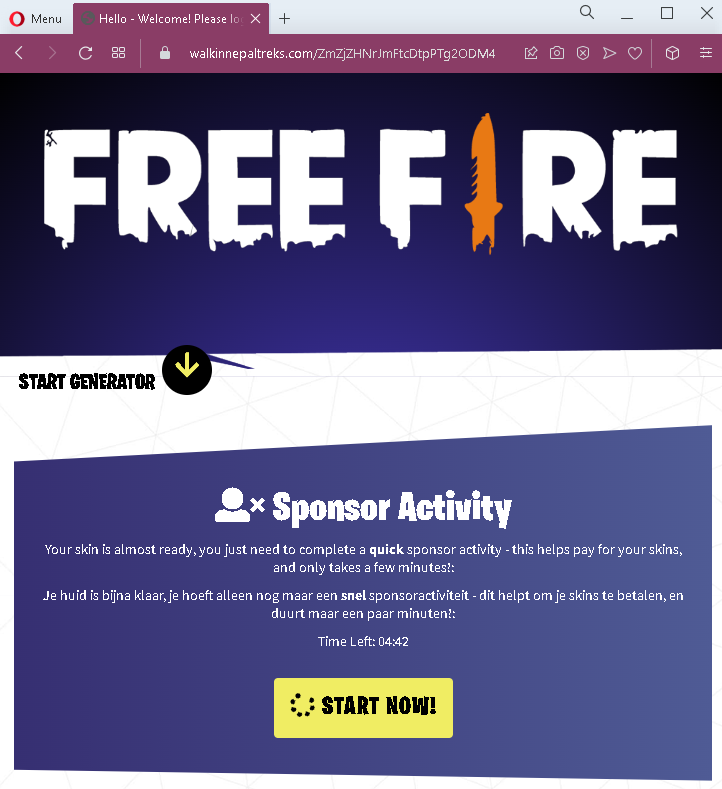
Step 4 – “Sponsor Activity” Requirement (Fourth Screenshot)
After the fake generation, the victim is told that to complete the process, they must complete a “sponsor activity” – typically described as a quick verification step that “helps pay for your skins.” A countdown timer (Time Left: 0442) creates urgency. The text appears in multiple languages (English and Dutch) to target a broader audience.

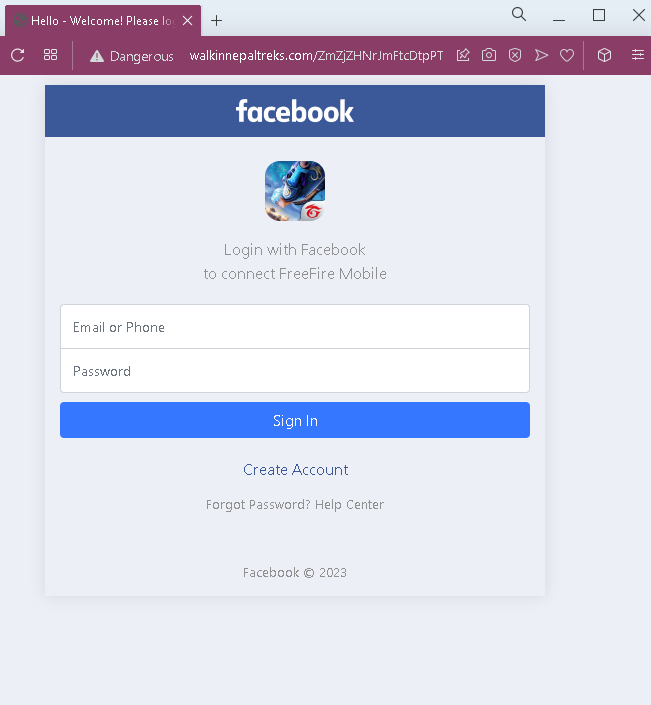
Step 5 – Facebook Login Phishing Page (Fifth Screenshot)
The “sponsor activity” leads to a fake Facebook login page. This page asks for:

Email or Phone

Password

Once the victim enters their Facebook credentials, the information is sent directly to the attacker.

The goal:
The attacker steals the victim’s Facebook login credentials. Since many Free Fire players log into the game using their Facebook account, gaining access to the Facebook account effectively gives the attacker control over the victim’s Free Fire account as well. Attackers can then:

Steal or sell the Free Fire account

Access personal information linked to Facebook

Use the compromised Facebook account to spread the scam further to the victim’s friends

Red flags to watch for:

“Too good to be true” offer: No legitimate service provides free in-game currency or rare skins through an external “generator.” Such items must be purchased or earned through official game events.

No official branding: The pages use generic “FREE FIRE” text but lack official Garena branding, logos, or copyright notices.

Request for credentials: The final step asks for Facebook login details. No legitimate in-game reward system ever requires entering Facebook credentials on a third-party site.

Fake “sponsor activity” concept: The “sponsor activity” is a common phishing tactic to justify why the user must complete an additional step, often involving a credential harvest or survey scam.

Multiple languages: The presence of Dutch text alongside English suggests a broad targeting but also indicates unprofessional localization—official Garena communications are consistently in one language per region.

Countdown timer: The timer creates artificial urgency to pressure the user into completing the “verification” without thinking.

Suspicious URL: All pages are hosted on domains that are not garena.com or facebook.com.

What to do if you encounter this:

Do not enter your Free Fire username, select a platform, or proceed through any steps.

Do not enter your Facebook email/phone and password on the final page.

If you have already entered your Facebook credentials, change your Facebook password immediately, enable two-factor authentication (2FA), and check for any unauthorized activity.

If you use the same password for other accounts, change those passwords as well.

Report the phishing page to Facebook and to Garena (Free Fire’s developer).

Why this scam is effective:
Free Fire is extremely popular, especially among younger audiences who may be eager for free in-game items. The multi-step process with progress bars and “sponsor activity” explanations makes the scam feel elaborate and legitimate. The use of Facebook as the final credential harvest is strategic because many Free Fire players have their game progress tied directly to their Facebook account—losing Facebook access means losing their game progress and purchases.

Protective measures:

Never trust third-party “generators” or “hacks” that promise free in-game currency or items. They are always scams.

Enable two-factor authentication (2FA) on your Facebook account to protect it even if your password is stolen.

Log into Free Fire only through the official app and official Garena methods.

Educate younger gamers about these scams, as they are frequently targeted.