
Security Notice: This scam layout was logged, cross-checked, and neutralized firsthand by the
Antiphishing.bizsecurity team during our daily link moderation procedures. To protect the public, the hostile origin link has been safely deactivated within our infrastructure. We document and analyze these live visual patterns to help security researchers and users spot lookalike phishing methods before financial damage occurs.
Nuevo Banco del Chaco Phishing – Fake Platform Update Scam
This phishing campaign impersonates Nuevo Banco del Chaco (NBCH) , a bank serving the Chaco province in Argentina. The scam uses the pretext of a “platform update” or “security verification” to steal online banking credentials.
How it works:
The victim receives a phishing email, SMS, or social media message—likely in Spanish—claiming that the bank has updated its online banking platform (Home Banking) and that the user must verify their account to continue using services. The link leads to the first phishing page.
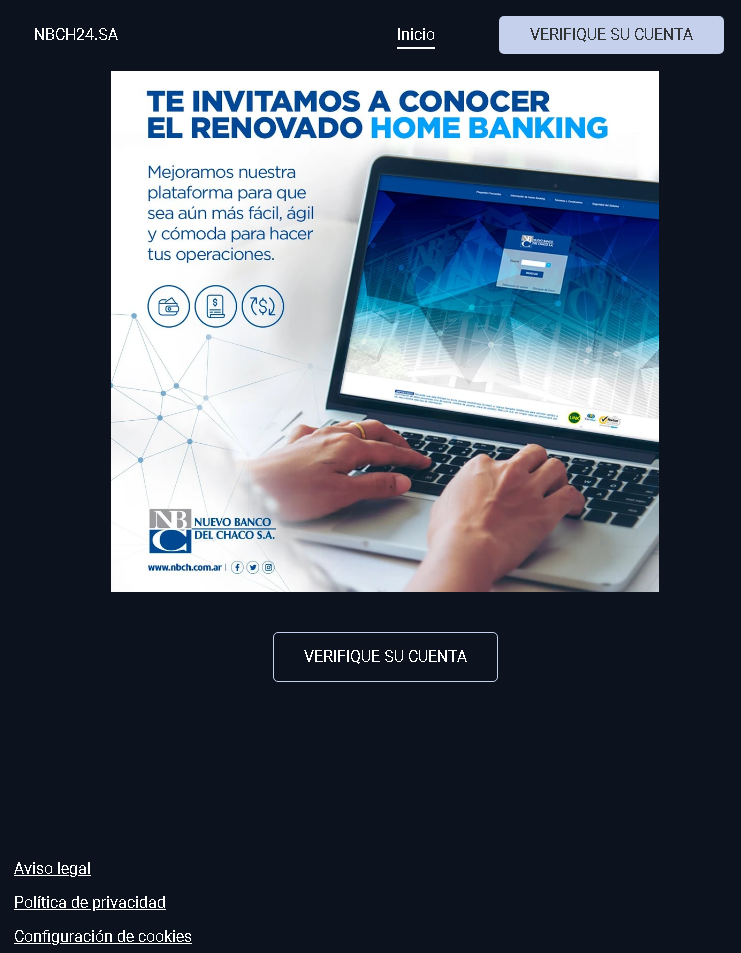
Step 1 – Fake Platform Update Notification (First Screenshot)
This page displays:
“VERIFIQUE SU CUENTA” (Verify your account) as a prominent heading
A message in Spanish: “TE INVITAMOS A CONOCER EL RENOVADO HOME BANKING. Mejoramos nuestra plataforma para que sea aún más fácil, ágil y cómoda para hacer tus operaciones.”
(Translation: “We invite you to get to know the renewed Home Banking. We improved our platform to make your transactions even easier, faster, and more convenient.”)
The bank’s name: “Nuevo Banco del Chaco SA”
A reference to the official website: www.nbch.com.ar
A button: “VERIFIQUE SU CUENTA”
The page mimics NBCH’s branding and uses the bank’s real website URL in the text to appear legitimate.
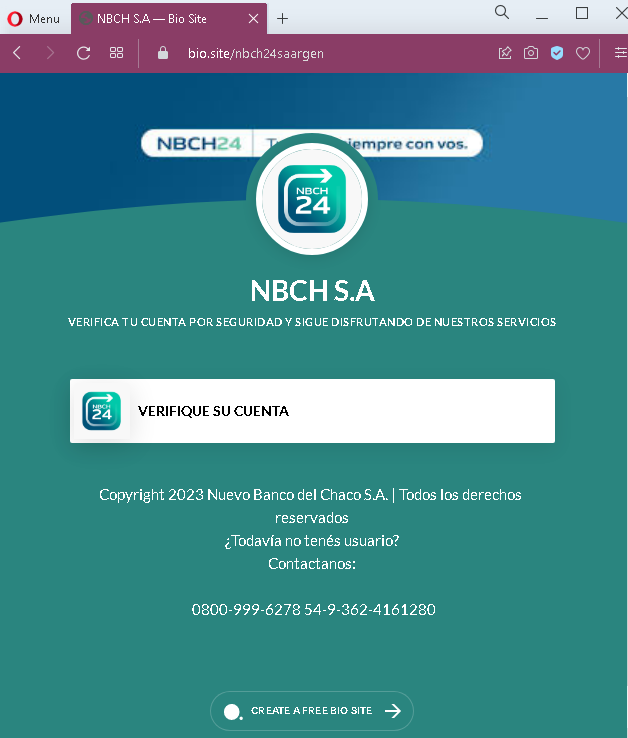
Step 2 – Fake Security Verification Page (Second Screenshot)
After clicking the verification button, the victim is taken to this page, which displays:
“VERIFICA TU CUENTA POR SEGURIDAD Y SIGUE DISFRUTANDO DE NUESTROS SERVICIOS”
(Translation: “Verify your account for security and continue enjoying our services”)
Another “VERIFIQUE SU CUENTA” button
Footer with a copyright notice and customer service phone numbers (which may be copied from the real bank)
The actual credential harvesting form likely appears after clicking the button on this second page (though not shown in the screenshots, such forms typically request User ID, password, or security details).
The goal:
The attacker aims to steal NBCH online banking credentials. By impersonating a legitimate “platform update” or “security verification,” the scam tricks users into entering their login details on a fake page, giving attackers direct access to their bank accounts.
Red flags to watch for:
Suspicious URL: Both pages are hosted on a domain (antiphishing.biz) that is not nbch.com.ar or any official NBCH domain.
No personalization: The messages address the user generically rather than using their name or account details.
Two-step verification process: Legitimate banks do not require clicking a link in an email to “verify” an account due to a platform update. Such updates are communicated via official app notifications or direct mail, and users are expected to log in normally (not through a provided link).
Unusual footer content: The second page includes “CREATE A FREE BIO SITE” at the bottom—a completely unrelated and suspicious addition that no legitimate bank would include.
Urgency without authentication: The page pressures the user to “verify” without requiring any prior authentication, which is a common phishing tactic.
Copy of official content: While the first page references the real NBCH website (www.nbch.com.ar), the phishing site itself is not on that domain. Attackers often copy legitimate URLs into text to mislead users.
What to do if you encounter this:
Do not click the “VERIFIQUE SU CUENTA” buttons or enter any personal information.
If you are an NBCH customer, always access your online banking by typing www.nbch.com.ar directly into your browser or by using the official NBCH mobile app.
Never log into your bank account through a link sent via email, SMS, or social media.
Report the phishing page to Nuevo Banco del Chaco using their official customer service channels (e.g., the phone numbers listed on their genuine website, not those on the phishing page).
Why this scam is effective:
Regional banks in Argentina, such as NBCH, have a strong local customer base. Phishing campaigns that use the pretext of a “platform update” deceptive tactic the fact that users may have heard about digital transformation efforts at their bank. The use of the real bank URL in the text and the familiar branding lowers suspicion. Additionally, the page is fully localized in Argentine Spanish, making it more convincing than generic phishing attempts.
Protective measures:
Always verify the URL in your browser’s address bar before entering any credentials
Bookmark the official bank website and use that bookmark to log in
Enable two-factor authentication (2FA) if offered by the bank
Be suspicious of any unsolicited message that asks you to “verify” or “update” your account
If you receive such a message, contact your bank directly using a phone number or email from your bank statement or official website—never use contact details provided in the suspicious message.