
Microsoft/Outlook Phishing – Fake Account Verification Scam
This phishing campaign impersonates Microsoft (specifically Hotmail/Outlook) to steal email account credentials. The scam is presented in two steps: a deceptive warning page followed by a fake login form.
How it works:
The victim receives an email, SMS, or social media message—likely in Spanish—claiming their email account requires verification or is at risk of being suspended. The link leads to the first phishing page.
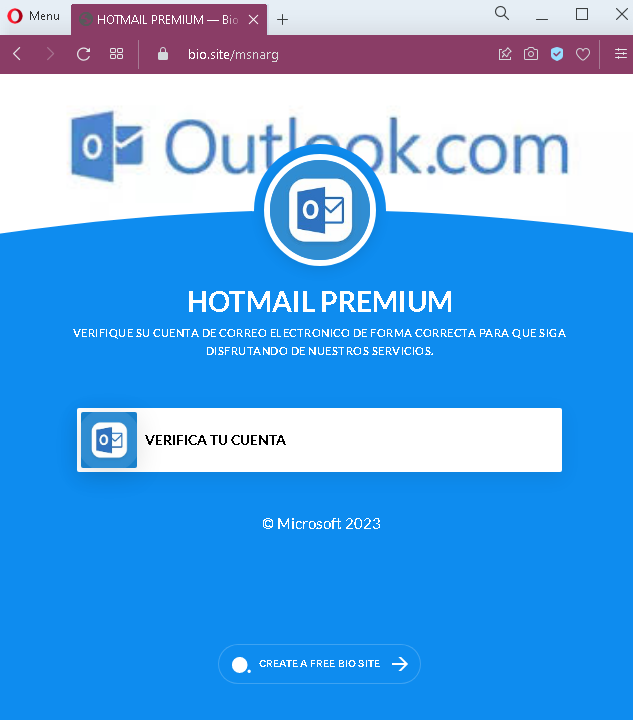
Step 1 – The Fake Verification Warning (First Screenshot)
This page displays:
A heading: “HOTMAIL PREMIUM”
A message in Spanish: “VERIFIQUE SU CUENTA DE CORREO ELECTRÓNICO DE FORMA CORRECTA PARA QUE SIGA DISFRUTANDO DE NUESTROS SERVICIOS”
(Translation: “Verify your email account correctly so that you continue enjoying our services.”)
A button: “VERIFICA TU CUENTA” (Verify your account)
A footer: “© Microsoft 2023”
The page uses urgency and fear—implying that failure to verify will result in loss of service.
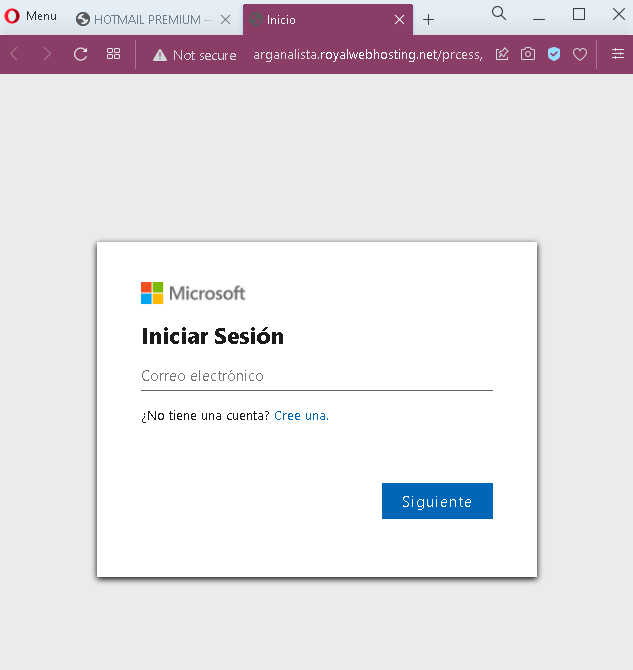
Step 2 – Fake Microsoft Login Page (Second Screenshot)
After clicking “VERIFICA TU CUENTA,” the victim is taken to a fake Microsoft login page. This page asks for:
Correo electrónico (Email address)
It mimics Microsoft’s branding with the official Microsoft logo and the “Iniciar Sesión” (Sign in) header.
The goal:
The attacker aims to steal Microsoft/Outlook/Hotmail email credentials. Once they have the email address and password (likely captured on a subsequent page after the email is entered), they can:
Access the victim’s emails (searching for sensitive information or password reset links)
Reset passwords for other accounts linked to that email (banking, social media, etc.)
Use the compromised email to send further phishing messages to the victim’s contacts
Red flags to watch for:
No personalization: Legitimate Microsoft security alerts address you by your name or partial email address. This page uses a generic warning.
Suspicious URL: Both pages are hosted on domains that are not microsoft.com or outlook.com.
Poor Spanish grammar: The phrasing “VERIFIQUE … PARA QUE SIGA DISFRUTANDO” is slightly awkward. Official Microsoft communications are professionally localized.
No two-factor authentication (2FA) mention: Legitimate Microsoft account verification often involves 2FA or confirmation within the authenticator app—not simply clicking a link and entering a password.
Generic footer: The footer only shows “© Microsoft 2023” and a random “CREATE A FREE BIO SITE” link, which is completely unrelated to Microsoft and a clear indicator of a fake page.
Single-field login: The second page asks only for email initially, but a subsequent page would ask for a password. Phishing pages sometimes do this to first validate if the email is active before presenting the password field.
What to do if you encounter this:
Do not click “VERIFICA TU CUENTA” or enter any email or password.
If you are concerned about your Microsoft account, go directly to outlook.com or account.microsoft.com by typing the URL into your browser—never click links in unsolicited messages.
Legitimate Microsoft account verification never requires you to click a link in an email to “verify” your account. Instead, you may receive a code via SMS or email that you enter on the official site if you initiated a change.
Report the phishing page to Microsoft using their reporting tools: forward suspicious emails to [email protected] or use the “Report Message” add-in in Outlook.
Why this scam is effective:
Email accounts are a high-value target because they serve as the “keys to the kingdom” for password resets across other services. Spanish-speaking users may be less frequently targeted with localized phishing, making this campaign particularly dangerous. The use of Microsoft branding and the fear of losing email service prompts users to act quickly without scrutinizing the URL or page details.
Protective measures:
Enable two-factor authentication (2FA) on your Microsoft account to prevent unauthorized access even if your password is stolen
Always check the URL before entering credentials—Microsoft’s login pages always end in microsoft.com or live.com
Be suspicious of any message that creates urgency and asks you to “verify” your account by clicking a link
If in doubt, contact Microsoft support through official channels rather than using links in suspicious messages