
Incident Report: This scam layout was logged, cross-checked, and neutralized firsthand by the Antiphishing.biz security team during our automated link scanning workflows. To protect the public, the dangerous destination URL has been fully defanged within our infrastructure. We document and analyze these live visual patterns to help security researchers and users detect replica fraud techniques before financial damage occurs.
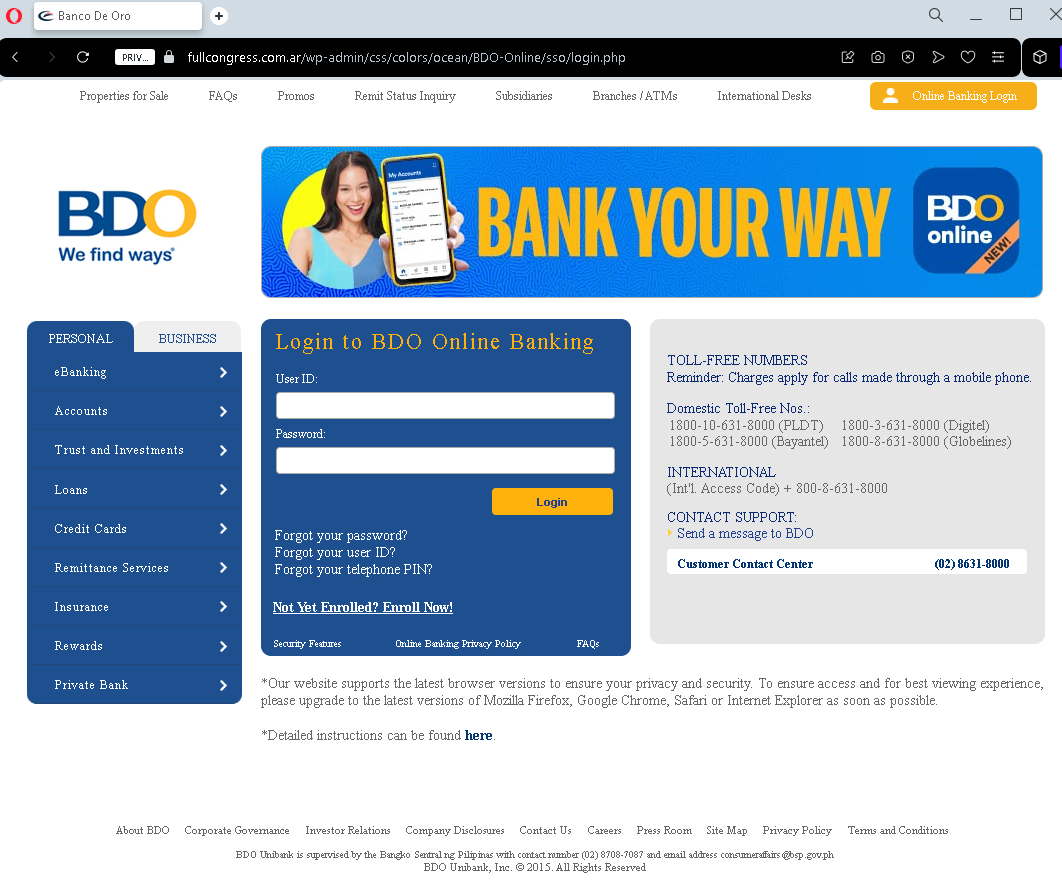
BDO Online Banking Phishing – Credential Harvesting
This phishing page impersonates the login portal of BDO (Banco de Oro Unibank) , one of the largest banks in the Philippines. The page is designed to steal customers’ User ID and Password, giving attackers direct access to their bank accounts.
How it works:
The victim receives a phishing email, SMS, or social media message claiming a security alert, account suspension, or a “problem with your account.” The link leads to this fake BDO login page. The page closely mimics the real BDO Online Banking interface, including legitimate-looking footer links (Privacy Policy, Terms and Conditions, Toll-Free numbers) to appear authentic. When the victim enters their User ID and Password and clicks “Login,” the credentials are captured and sent to the attacker.
The goal:
With stolen User ID and Password, the attacker can log in to the victim’s real BDO account, transfer funds, pay bills, or even enroll in additional services to further compromise the account. Because BDO uses two-factor authentication (2FA) for some transactions, the attacker may attempt to use the credentials immediately or combine them with social engineering to obtain the 2FA code.
Red flags to watch for:
Suspicious URL: The page is hosted on a domain that is not bdo.com.ph. Attackers often use domains that look similar but contain misspellings, extra words, or unrelated extensions.
“Legin” typo: The page header says “Legin to BDO Online Banking” instead of “Log in to BDO Online Banking.” This typo is a clear indicator of a fake page.
Generic login form: Legitimate BDO Online Banking often displays a security image or personalized greeting after entering the User ID—this page does not.
Fake footer: While the footer contains real BDO information (toll-free numbers, etc.), phishing pages copy this text to appear credible. Always check the URL first, not the content.
What to do if you encounter this:
Do not enter your User ID, Password, or any other personal information.
Do not click any links on the page, including the “Forgot your password?” links—they may lead to additional phishing pages.
If you are a BDO customer, always type www.bdo.com.ph directly into your browser or use the official BDO mobile app to access your account.
Report the phishing page to BDO’s fraud department at [email protected] or through their official customer service hotline.
Why this scam is effective:
BDO has millions of online banking users in the Philippines, and phishing pages like this are often distributed via SMS (“smishing”) claiming “Your BDO account has been temporarily locked.” Because the page includes authentic-looking footer content (toll-free numbers, privacy policy links), many users mistakenly trust it. The typo “Legin” is one of the few visual red flags—underscoring how carefully users must scrutinize every detail.