Bancolombia phishing page detected


Threat Analysis: Bancolombia Phishing – Fake “Sucursal Virtual Personas” Login Page

This phishing campaign impersonates Bancolombia, a major Colombian bank with millions of customers. The page mimics the bank’s online banking portal (Sucursal Virtual Personas) to steal customers’ Usuario (username) and Clave (password) .

How it works:
The victim receives a phishing email, SMS, or other message claiming a security alert, account issue, or the need to verify their information. The message includes a link to this fake Bancolombia login page. When the victim enters their Usuario and Clave and clicks “Continuar” (Continue), the credentials are captured and sent to the attacker.

The goal:
The attacker aims to steal the victim’s Bancolombia online banking credentials. With these, they can log into the victim’s real bank account, view balances, transfer funds, and commit fraud.

Red flags to watch for:

  • Suspicious URL: The page is hosted on a domain that is not bancolombia.com or any official Bancolombia domain. Legitimate Bancolombia online banking is accessed through the bank’s official website. Always check the address bar.
  • Unsolicited login request: Bancolombia does not send emails or messages with links requiring customers to log in to resolve account issues. Customers should always access online banking by typing the URL directly or using the official Bancolombia app.
  • Minimal design: While the page includes the Bancolombia logo and some text, it lacks the full navigation, security notices, and personalized elements present on the legitimate login page.
  • Static date and time: The page displays a static date and time (Martes 17 de Enero del 2023 07:52:53 PM) that does not update. A legitimate bank portal would show the current date and time dynamically.
  • No security image or personalization: Legitimate Bancolombia login pages often display a security image or phrase. This page lacks such features.
  • Generic footer: The footer includes links (“Conoce sobre Sucursal Virtual Personas,” etc.), but these are copied from the real site and do not guarantee legitimacy.

What to do if you encounter this:

  • Do not enter your Usuario, Clave, or any other personal information on this page.
  • If you are a Bancolombia customer, always access online banking by typing bancolombia.com directly into your browser or by using the official Bancolombia app (such as “Bancolombia Personas”).
  • If you have already entered your credentials, contact Bancolombia immediately through their official customer service hotline to secure your account and change your password.
  • Report the phishing page to Bancolombia’s fraud department.

Why this scam is effective:
Bancolombia has a massive customer base in Colombia, and “Sucursal Virtual Personas” is its standard online banking portal. The page uses the bank’s logo and familiar layout. The inclusion of a static date and time is an attempt to mimic the real site, but the fact that it does not update (or is hardcoded) is a subtle red flag that careful users might notice.

Protective measures:

  • Bookmark the official Bancolombia login page and use that bookmark to access online banking—never click links in emails or messages.
  • Use a password manager: It will autofill only on legitimate bancolombia.com domains, not on phishing sites.
  • Enable two-factor authentication (2FA) on your Bancolombia account if available, to add an extra layer of protection.
  • Be suspicious of any unsolicited message that creates urgency and asks you to log in to your bank account.
  • Check the URL carefully: Legitimate Bancolombia domains end with bancolombia.com. Look for misspellings, extra words, or unusual top-level domains.
  • If in doubt, contact Bancolombia directly using a phone number from your bank statement or the official website—never use contact information provided in a suspicious message.

BANTRAB bank phishing page revealed


Threat Analysis: Bantrab Phishing – Fake Login Page Stealing Client Credentials

This phishing campaign impersonates Bantrab (Banco de los Trabajadores) , a prominent bank in Guatemala. The page mimics the bank’s login interface to steal customers’ Cliente (client ID) and Usuario (username) . This information is typically used as the first step in accessing online banking, after which the victim would be asked for a password on a subsequent page (likely part of a multi-step phishing flow).

How it works:
The victim receives a phishing email, SMS, or other message claiming a security alert, account issue, or the need to verify their information. The message includes a link to this fake Bantrab login page. When the victim enters their Cliente and Usuario and clicks “Ingresar” (Login), the credentials are captured and sent to the attacker.

The goal:
The attacker aims to steal the victim’s Bantrab online banking credentials. With these (and likely a password captured on a follow-up page), they can log into the victim’s real bank account, view balances, transfer funds, and commit fraud.

Red flags to watch for:

  • Suspicious URL: The page is hosted on a domain that is not bantrab.com.gt or any official Bantrab domain. Legitimate Bantrab online banking is accessed through the bank’s official website. Always check the address bar.
  • Unsolicited login request: Bantrab does not send emails or messages with links requiring customers to log in to resolve account issues. Customers should always access online banking by typing the URL directly or using the official app.
  • Minimal design: The page uses the Bantrab logo and a simple form, but lacks the full navigation, security notices, and personalized elements present on the legitimate login page.
  • Missing security elements: Legitimate Bantrab login pages may display security tips, a virtual keyboard, or other features. This page has only a basic form.
  • Typographical note: The page heading says “BENVENIDO” instead of “BIENVENIDO” (the correct Spanish spelling for “welcome”). While minor, such typos can appear in phishing pages and are not typical of official bank communications.
  • Ironically, the security tip itself: The page includes a warning that “BANTRAB NUNCA TE PEDIRÁ INFORMACIÓN CONFIDENCIAL…” (Bantrab will never ask for confidential information). Yet the page itself is asking for confidential information—a contradiction that users should notice.

What to do if you encounter this:

  • Do not enter your Cliente, Usuario, or any other personal information on this page.
  • If you are a Bantrab customer, always access online banking by typing bantrab.com.gt directly into your browser or by using the official Bantrab mobile app.
  • If you have already entered your credentials, contact Bantrab immediately through their official customer service hotline to secure your account and change your password.
  • Report the phishing page to Bantrab’s fraud department.

Why this scam is effective:
Bantrab is a well-known bank in Guatemala, and its online banking portal is familiar to many customers. The page uses the bank’s logo and a simple, clean design that resembles the real login screen. The inclusion of a security warning (even though it’s ironically being violated) can actually reassure some users who see it and think, “This must be legitimate because they’re warning me about security.” The typo “BENVENIDO” is a subtle red flag that careful users might notice.

Protective measures:

  • Bookmark the official Bantrab login page and use that bookmark to access online banking—never click links in emails or messages.
  • Use a password manager: It will autofill only on legitimate bantrab.com.gt domains, not on phishing sites.
  • Enable two-factor authentication (2FA) on your Bantrab account if available, to add an extra layer of protection.
  • Be suspicious of any unsolicited message that creates urgency and asks you to log in to your bank account.
  • Check the URL carefully: Legitimate Bantrab domains end with bantrab.com.gt. Look for misspellings, extra words, or unusual top-level domains.
  • If in doubt, contact Bantrab directly using a phone number from your bank statement or the official website—never use contact information provided in a suspicious message.

AV Villas digital phishing page detected


Threat Analysis: Av Villas Phishing – Fake “Banca Virtual” Login Page

This phishing campaign impersonates Av Villas (Avvillas) , a prominent Colombian bank. The page mimics the bank’s “Banca Virtual” (Virtual Banking) login interface to steal customers’ document number (typically “Cédula de Ciudadanía” – national ID) and password.

How it works:
The victim receives a phishing email, SMS, or other message claiming a security alert, account issue, or the need to verify their information. The message includes a link to this fake Av Villas login page. When the victim selects their document type (pre-selected as “Cédula de Ciudadanía”), enters their document number and password, and clicks “INGRESAR” (Login), the credentials are captured and sent to the attacker.

The goal:
The attacker aims to steal the victim’s Av Villas online banking credentials. With these, they can log into the victim’s real bank account, view balances, transfer funds, and commit fraud.

Red flags to watch for:

  • Suspicious URL: The page is hosted on a domain that is not avvillas.com.co or any official Av Villas domain. Legitimate Av Villas online banking is accessed through the bank’s official website. Always check the address bar.
  • Unsolicited login request: Av Villas does not send emails or messages with links requiring customers to log in to resolve account issues. Customers should always access online banking by typing the URL directly or using the official app.
  • Minimal design: While the page includes the Av Villas logo, it lacks the full navigation, security notices, and personalized elements present on the legitimate login page.
  • Missing security features: Legitimate Av Villas login pages typically include additional security elements such as a virtual keyboard, security image, or multi-step authentication. This page has only a basic form.
  • Emoji in the interface: The page includes a 😊 emoji next to the “Olvidé mi contraseña” (Forgot my password) link. While not impossible on a legitimate site, such informal elements are more common in phishing pages than in professional banking interfaces.
  • Generic form: The page asks only for document number and password without any account-specific personalization.

What to do if you encounter this:

  • Do not enter your document number, password, or any other personal information on this page.
  • If you are an Av Villas customer, always access online banking by typing avvillas.com.co directly into your browser or by using the official Av Villas mobile app.
  • If you have already entered your credentials, contact Av Villas immediately through their official customer service hotline to secure your account and change your password.
  • Report the phishing page to Av Villas’s fraud department.

Why this scam is effective:
Av Villas is a well-established bank in Colombia, and “Banca Virtual” is its standard online banking portal. The page uses the bank’s logo and a clean, simple design that resembles the real login screen. The use of “Cédula de Ciudadanía” (the common national ID in Colombia) as the document type is accurate and familiar to local users. The emoji, while a slight red flag, may not be noticed by victims who are focused on entering their credentials.

Protective measures:

  • Bookmark the official Av Villas login page and use that bookmark to access online banking—never click links in emails or messages.
  • Use a password manager: It will autofill only on legitimate avvillas.com.co domains, not on phishing sites.
  • Enable two-factor authentication (2FA) on your Av Villas account if available, to add an extra layer of protection.
  • Be suspicious of any unsolicited message that creates urgency and asks you to log in to your bank account.
  • Check the URL carefully: Legitimate Av Villas domains end with avvillas.com.co. Look for misspellings, extra words, or unusual top-level domains.
  • If in doubt, contact Av Villas directly using a phone number from your bank statement or the official website—never use contact information provided in a suspicious message.

Scotiabank phishing page detected

Then user will be redirected to the truth Scotiabank’s Website:


Threat Analysis: Scotiabank Phishing – Multi-Step Credential & Email Harvesting with Real Bank Redirection

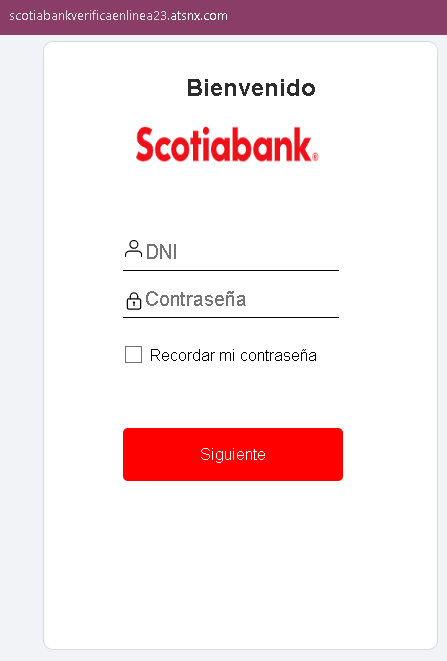
This sophisticated phishing campaign impersonates Scotiabank, targeting Spanish-speaking customers (likely in Latin America). The attack uses a multi-page flow to capture the victim’s bank login credentials (document number and password) and email account credentials. After capturing this information, the victim is redirected to the real Scotiabank website, making the attack harder to detect.

How it works:
The victim receives a phishing email, SMS, or other message claiming a security alert, account issue, or the need to verify their information. The message includes a link to the first phishing page.

Step 1 – Fake Bank Login Page (First Screenshot)
The first page asks for:

  • Document type (pre-selected as DNI – national ID)
  • Document number
  • Password

This page captures the victim’s primary banking credentials.

Step 2 – Fake Email Credentials Page (Second Screenshot)
The second page asks for:

  • Email address
  • Email password

This step captures the victim’s email account credentials, which can be used to intercept bank communications, reset passwords, and maintain persistent access.

Step 3 – Redirect to Genuine Scotiabank Dashboard (Third Screenshot)
After the victim submits their email credentials, they are redirected to the real Scotiabank online banking dashboard. The victim sees their actual accounts and balances, believing their login was successful and that nothing suspicious occurred. In reality, the attacker has already captured the credentials on the preceding fake pages.

The goal:
The attacker aims to:

  • Steal the victim’s Scotiabank online banking credentials
  • Capture the victim’s email address and password
  • Gain full access to both the bank account and email account

With email access, the attacker can intercept password reset emails, delete fraud alerts, and maintain long-term access. The redirection to the real bank site reduces the likelihood that the victim will immediately realize they have been scammed, giving the attacker more time to exploit the stolen credentials.

Red flags to watch for:

  • Suspicious URL: The first two pages are hosted on domains that are not official Scotiabank domains. Victims should carefully check the address bar before entering any credentials. The redirection to the real site happens after the credentials are stolen.
  • Request for email password: No legitimate bank asks for your email account password. This is a clear indicator of a phishing attack designed to take over your email as well.
  • Multi-step flow with unrelated requests: Banking login and email credentials are never requested together in a legitimate banking session.
  • Unsolicited login request: Scotiabank does not send emails or messages with links requiring customers to log in to resolve account issues.
  • Typographical error: The first page contains a minor typo (“Ingresa tu número de docur” instead of “documento”), which is uncommon in official bank communications.

What to do if you encounter this:

  • Do not enter your document number, bank password, email address, or email password on pages reached via unsolicited links—even if you are later redirected to what looks like the real bank site.
  • If you are a Scotiabank customer, always access online banking by typing the official Scotiabank URL for your country directly into your browser or by using the official mobile app.
  • If you have already entered your email credentials, change your email password immediately, enable two-factor authentication on your email account, and check for any unauthorized forwarding rules or account changes.
  • If you have entered your banking credentials, contact Scotiabank immediately through their official customer service hotline to secure your account and change your password.
  • Report the phishing pages to Scotiabank’s fraud department.

Why this scam is particularly dangerous:
This is a sophisticated phishing technique that combines credential theft with a redirection to the legitimate site. Victims often assume that because they ended up on the real bank website after logging in, the first pages must have been legitimate. The email credential harvesting gives attackers persistent access to the victim’s communications, enabling them to intercept fraud alerts and maintain control even if the victim later changes their bank password.

Protective measures:

  • Always initiate banking sessions by typing the official URL directly—never click links in emails or messages.
  • Use a password manager: It will autofill only on legitimate Scotiabank domains, not on phishing sites.
  • Never enter your email password on any page that claims to be your bank. Legitimate banks never ask for this.
  • Enable two-factor authentication (2FA) on both your bank account and email account, using an authenticator app rather than SMS where possible.
  • Be suspicious of any unsolicited message that creates urgency and asks you to log in to your bank account.
  • Check the URL carefully before entering credentials: Legitimate Scotiabank domains vary by country (e.g., scotiabank.com.mx for Mexico, scotiabank.com.pe for Peru, scotiabank.cl for Chile). Look for misspellings, extra words, or unusual top-level domains.
  • If in doubt, contact Scotiabank directly using a phone number from your bank statement or the official website—never use contact information provided in a suspicious message.

Global Bank (Panama) phishing page detected


Threat Analysis: Global Bank Phishing – Fake “Token” Verification & 2FA Code Harvesting

This phishing campaign impersonates Global Bank, a financial institution operating in Panama and other Central American countries. The scam is designed to capture the victim’s dynamic password (token) —the one-time two-factor authentication (2FA) code used to authorize transactions and logins. This code is the final layer of security; by stealing it, attackers can bypass the bank’s primary defenses.

How it works:
The victim receives a phishing email, SMS, or other message claiming a security alert, account issue, or the need to verify their information. The message includes a link to the first phishing page. The attack likely occurs after the victim has already entered their primary credentials (username and password) on a previous phishing page (not shown in these screenshots).

Step 1 – Fake Global Bank Landing/Information Page
The first and second screenshots show pages with Global Bank branding, navigation menus, and footer content copied from the legitimate bank website. These pages serve as a “lobby” or informational area, likely intended to make the phishing site appear legitimate before the victim proceeds to the token entry page.

Step 2 – Fake Loading Page
The third screenshot shows a fake loading page with a countdown timer (“0:27”). This page is designed to create a sense of legitimate processing while the attacker prepares to capture the token code.

Step 3 – Fake Token Validation Page
The fourth screenshot shows a page asking for the victim’s dynamic password (token) —the one-time 2FA code. This is the critical security code used to authorize access or transactions.

Step 4 – Fake Error Page (Token Invalido)
The fifth screenshot shows a fake error page stating that the token entered was invalid. This page is designed to trick the victim into entering the token again, either because they made a typo or because the attacker needs more time to use the first code. The error message creates urgency and encourages the victim to re-enter the code.

The goal:
The attacker aims to:

  • Capture the victim’s dynamic token (2FA code) in real time
  • Use this code to log into the victim’s real bank account or authorize fraudulent transactions
  • The fake error page serves to obtain a second token if the first one expires or if the attacker needs additional codes

With the primary credentials (captured on an earlier page) and the token, the attacker can gain full access to the victim’s bank account.

Red flags to watch for:

  • Suspicious URL: The pages are hosted on domains that are not the official Global Bank domain. Legitimate Global Bank online banking is accessed through the bank’s official website. Always check the address bar.
  • Unsolicited login request: Global Bank does not send emails or messages with links requiring customers to log in and enter token codes to resolve account issues.
  • Fake loading page: Legitimate banking sites do not display artificial loading countdown timers before asking for a token. This is a tactic to create anticipation and make the phishing site feel “technical.”
  • Fake error page: The error page claiming “Token Invalido” is a classic phishing technique to get victims to enter the code again. In reality, the first code may have already been used by the attacker.
  • Outdated copyright: The footer shows “© 2014 Global Bank,” which is outdated (the screenshots are from 2023). Legitimate bank websites typically display the current year.
  • Minimal design on token pages: The token validation pages lack the full navigation, account-specific information, and personalization that would appear on a legitimate logged-in session.

What to do if you encounter this:

  • Do not enter your dynamic password (token) or any other codes on these pages.
  • If you are a Global Bank customer, always access online banking by typing the official Global Bank URL directly into your browser or by using the official mobile app.
  • If you have already entered your token code, contact Global Bank immediately through their official customer service hotline to secure your account. The attacker may have already used the code to log in.
  • Report the phishing pages to Global Bank’s fraud department.

Why this scam is particularly dangerous:
This attack targets the two-factor authentication (2FA) code—often the last line of defense for online banking accounts. By capturing both the primary credentials (on earlier pages) and the token (on these pages), the attacker can bypass security measures and gain full account access. The fake error page is a sophisticated touch: if the first token expires or is used by the attacker, the victim may enter a second one, giving the attacker even more access.

Protective measures:

  • Bookmark the official Global Bank login page and use that bookmark to access online banking—never click links in emails or messages.
  • Use a password manager: It will autofill only on legitimate bank domains, not on phishing sites.
  • Never enter your token or 2FA code on a page you reached via a link. Legitimate banks only ask for these codes after you have initiated a login or transaction on their official site.
  • Be suspicious of any unsolicited message that creates urgency and asks you to log in to your bank account.
  • Check the URL carefully: Legitimate Global Bank domains are associated with the bank’s official website. Look for misspellings, extra words, or unusual top-level domains.
  • If you see a fake error page after entering a token, assume your credentials are compromised. Contact your bank immediately.
  • If in doubt, contact Global Bank directly using a phone number from your bank statement or the official website—never use contact information provided in a suspicious message.

Crédit Agricole Banque & Assurances phishing page detected


Threat Analysis: Crédit Agricole Phishing – Fake “SecuriPass” Security Update Scam

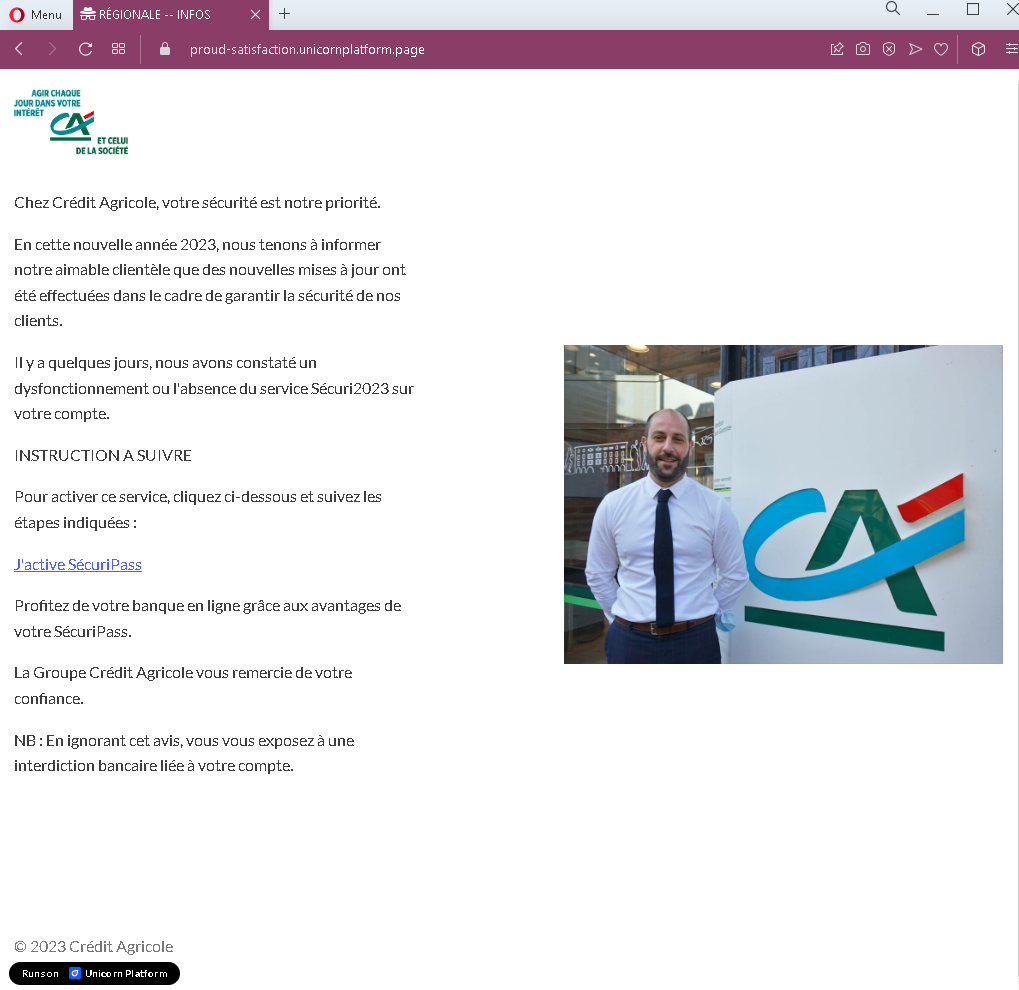
This phishing campaign impersonates Crédit Agricole, one of the largest banking groups in France. The page claims that security updates have been made and urges the victim to click a link to “reinforce” their SecuriPass (the bank’s real security feature). The page outlines a multi-step process involving SMS and email codes, followed by card reactivation—all designed to lead the victim through a series of phishing pages that capture sensitive information.

How it works:
The victim receives a phishing email (or lands on this page via a link in a message) claiming to be from Crédit Agricole. The page:

  • States that new security updates have been implemented
  • Claims the victim must access their client space via a provided link to reinforce SecuriPass
  • Outlines three steps: entering a 6-digit SMS code, waiting for a 6-digit email code, and reactivating their bank card
  • Warns that ignoring the activation will result in a banking restriction

When the victim clicks the link (likely embedded in the text), they are taken to a fake Crédit Agricole login page or a series of pages designed to capture their credentials, SMS codes, email codes, and card details.

The goal:
The attacker aims to:

  • Steal the victim’s Crédit Agricole online banking credentials
  • Capture SMS-based two-factor authentication (2FA) codes
  • Capture email-based verification codes
  • Obtain bank card details (through the fake “reactivation” step)

With this combination of information, the attacker can gain full access to the victim’s bank account, authorize transactions, and potentially compromise the victim’s email account as well.

Red flags to watch for:

  • Suspicious URL: The page is hosted on a domain that is not credit-agricole.fr or any official Crédit Agricole domain. Legitimate bank communications are hosted on official domains. Always check the address bar.
  • Unsolicited security request: Crédit Agricole does not send emails or messages with links requiring customers to click to “reinforce” security features. Legitimate security updates are communicated through official app notifications or secure messages within the online banking portal.
  • Multi-step code requests: The page mentions receiving two separate codes (SMS and email) and then reactivating a card. This is highly unusual for a legitimate security update and indicates a phishing kit designed to harvest multiple layers of authentication.
  • Threat of consequences: The warning that ignoring the activation will result in a “banking restriction” is a classic fear-based tactic to pressure victims into acting without thinking.
  • Generic greeting: The page does not address the victim by name or reference a specific account number—common in phishing messages.
  • Poor formatting: While the design mimics Crédit Agricole’s branding, the overall layout and language contain stylistic inconsistencies compared to official communications.

What to do if you encounter this:

  • Do not click any link in the message or on this page.
  • Do not enter any personal information, credentials, SMS codes, or card details on any pages reached via this link.
  • If you are a Crédit Agricole customer, always access online banking by typing credit-agricole.fr directly into your browser or by using the official Crédit Agricole mobile app.
  • If you have already clicked the link and entered any information, contact Crédit Agricole immediately through their official customer service hotline to secure your account.
  • Report the phishing page to Crédit Agricole’s fraud department (e.g., by forwarding the original message to [email protected] or using their official reporting channel).

Why this scam is effective:
Crédit Agricole has millions of online banking customers in France. The mention of SecuriPass—a real security feature—makes the page seem credible. The multi-step instructions (SMS code, email code, card reactivation) make the process appear thorough and “official.” The threat of a banking restriction creates urgency, encouraging victims to act quickly without scrutinizing the URL or the legitimacy of the message.

Protective measures:

  • Never click links in unsolicited emails or messages claiming to be from your bank. Instead, type the official bank URL directly into your browser.
  • Be suspicious of any message that creates urgency, threatens consequences, and asks you to click a link to “activate,” “reinforce,” or “verify” something.
  • Check the sender’s email address carefully. Legitimate Crédit Agricole emails come from @credit-agricole.fr or specific subdomains—not from generic or misspelled addresses.
  • Enable two-factor authentication (SecuriPass) through the official app, and remember that legitimate activation processes happen within the app or after logging into the official website—not via a link in an email.
  • If you receive a request to enter codes from both SMS and email, be extremely suspicious. Legitimate banks do not use multi-step code harvesting in this manner.
  • If in doubt, contact your bank directly using a phone number from your bank statement or the official website—never use contact information provided in the suspicious message.

Banco BPM (Italy) phishing page detected


Threat Analysis: Banco BPM Phishing – Multi-Step Credential, Phone Number & OTP Harvesting

This phishing campaign impersonates Banco BPM, one of Italy’s largest banking groups. The scam uses a multi-page flow to capture the victim’s online banking credentials, phone number, and OTP (one-time password) —the two-factor authentication code. By harvesting all three, attackers can bypass security measures and gain full access to the victim’s account.

How it works:
The victim receives a phishing email, SMS, or other message claiming a security alert, account issue, or the need to verify their information. The message includes a link to the first phishing page.

Step 1 – Fake Credentials Page (First Screenshot)
The first page asks for:

  • Codice postazione (Station code) / Identificativo utente (User ID)
  • Password

This page captures the victim’s primary online banking credentials.

Step 2 – Fake Phone Number Page (Second Screenshot)
The second page asks for:

  • Numero di telefono (Phone number)

This step is designed to capture the victim’s phone number, which is likely used to send the OTP (two-factor authentication code) via SMS. By providing the phone number, the victim enables the attacker to later request and intercept the OTP.

Step 3 – Fake OTP Page (Third Screenshot)
The third page asks for:

  • OTP (One-time password)

This is the two-factor authentication code sent to the victim’s phone. When the victim enters this code, the attacker captures it and uses it to complete the login on the real Banco BPM site.

The goal:
The attacker aims to:

  • Steal the victim’s Banco BPM online banking credentials (user ID and password)
  • Obtain the victim’s phone number (for SIM swapping or to trigger OTP messages)
  • Capture the OTP (2FA code) in real time

With all three pieces of information, the attacker can log into the victim’s real bank account and authorize fraudulent transactions.

Red flags to watch for:

  • Suspicious URL: The pages are hosted on domains that are not bancobpm.it or any official Banco BPM domain. Legitimate Banco BPM online banking is accessed through the bank’s official website. Always check the address bar.
  • Unsolicited login request: Banco BPM does not send emails or messages with links requiring customers to log in and provide this level of information to resolve account issues.
  • Multi-step flow with phone number request: Legitimate banking logins do not ask for your phone number on a separate page during the login process. The bank already has your phone number on file.
  • Outdated copyright: The footer shows “© 2000-2019,” which is outdated (the screenshots are from 2023). Legitimate bank websites typically display the current year.
  • Copied content: The pages include legitimate-looking information about COVID-19 initiatives and YouBusiness Web features, copied from the real Banco BPM website. Attackers use such content to make the pages appear authentic, but its presence does not guarantee legitimacy.
  • No personalization: The pages do not address the victim by name or display any account-specific information.

What to do if you encounter this:

  • Do not enter your user ID, password, phone number, or OTP on these pages.
  • If you are a Banco BPM customer, always access online banking by typing bancobpm.it directly into your browser or by using the official Banco BPM mobile app.
  • If you have already entered your credentials and phone number but not the OTP, contact Banco BPM immediately to change your password and secure your account.
  • If you have entered the OTP as well, the attacker may have already accessed your account. Contact Banco BPM’s fraud department immediately.
  • Report the phishing pages to Banco BPM’s fraud team.

Why this scam is effective:
Banco BPM has millions of customers in Italy. The multi-step flow closely mimics legitimate banking processes where users are sometimes asked for a user ID, password, and then an OTP. The inclusion of real bank content (COVID-19 information, YouBusiness Web features) adds to the illusion of legitimacy. The separate phone number page is a clever tactic: it allows the attacker to collect the victim’s number, which can be used to trigger the real OTP from the bank while the victim waits on the fake page.

Protective measures:

  • Bookmark the official Banco BPM login page and use that bookmark to access online banking—never click links in emails or messages.
  • Use a password manager: It will autofill only on legitimate bancobpm.it domains, not on phishing sites.
  • Never enter your OTP on a page you reached via a link. Legitimate banks only ask for OTP codes after you have initiated a login on their official site.
  • Be suspicious of any unsolicited message that creates urgency and asks you to log in to your bank account.
  • Check the URL carefully: Legitimate Banco BPM domains end with bancobpm.it. Look for misspellings, extra words, or unusual top-level domains.
  • If in doubt, contact Banco BPM directly using a phone number from your bank statement or the official website—never use contact information provided in a suspicious message.

HDFC Bank phishing page detected


Threat Analysis: HDFC Bank Phishing – Fake NetBanking Login Page

This phishing campaign impersonates HDFC Bank, a major Indian financial institution. The page mimics the bank’s NetBanking login interface to steal customers’ Customer ID/User ID and Password/IPIN (Internet Personal Identification Number).

How it works:
The victim receives a phishing email, SMS, or other message claiming a security alert, account issue, or the need to verify their information. The message includes a link to this fake HDFC Bank login page. When the victim enters their Customer ID/User ID and Password/IPIN and clicks “LOGIN,” the credentials are captured and sent to the attacker.

The goal:
The attacker aims to steal the victim’s HDFC Bank online banking credentials. With these, they can log into the victim’s real bank account, view balances, transfer funds, and commit fraud.

Red flags to watch for:

  • Suspicious URL: The page is hosted on a domain that is not hdfcbank.com or any official HDFC Bank domain. Legitimate HDFC NetBanking is accessed through the bank’s official website. Always check the address bar.
  • Unsolicited login request: HDFC Bank does not send emails or messages with links requiring customers to log in to resolve account issues. Customers should always access NetBanking by typing the official URL directly or using the official mobile app.
  • Minimal design: While the page includes the HDFC Bank logo and a simple form, it lacks the full navigation, security notices, and personalized elements present on the legitimate NetBanking portal.
  • Missing security features: Legitimate HDFC NetBanking pages typically include additional security elements such as a virtual keyboard, security image, or multi-factor authentication steps. This page has only a basic form.
  • Generic welcome message: The page includes a generic “Dear Customer” greeting, which is common in phishing pages. Legitimate HDFC NetBanking pages often display a personalized welcome message or security phrase after initial identification.
  • No account recovery options: The page lacks links for forgotten Customer ID or Password that would be present on the real login page.

What to do if you encounter this:

  • Do not enter your Customer ID, Password/IPIN, or any other personal information on this page.
  • If you are an HDFC Bank customer, always access NetBanking by typing hdfcbank.com directly into your browser or by using the official HDFC Bank mobile app.
  • If you have already entered your credentials, contact HDFC Bank immediately through their official customer service hotline to secure your account and change your password.
  • Report the phishing page to HDFC Bank’s fraud department (e.g., by forwarding the original message to [email protected] or using their official reporting channels).

Why this scam is effective:
HDFC Bank has tens of millions of NetBanking users in India. The page uses the bank’s logo and a clean, simple design that resembles the real login screen. The request for “Customer ID/User ID” and “Password/IPIN” matches the terminology used by the bank. Many customers are accustomed to logging in through various portals and may not immediately notice that the URL is incorrect.

Protective measures:

  • Bookmark the official HDFC NetBanking login page and use that bookmark to access online banking—never click links in emails or messages.
  • Use a password manager: It will autofill only on legitimate hdfcbank.com domains, not on phishing sites.
  • Enable two-factor authentication (2FA) on your HDFC Bank account if available, to add an extra layer of protection.
  • Be suspicious of any unsolicited message that creates urgency and asks you to log in to your bank account.
  • Check the URL carefully: Legitimate HDFC Bank domains end with hdfcbank.com. Look for misspellings, extra words, or unusual top-level domains.
  • If in doubt, contact HDFC Bank directly using a phone number from your bank statement or the official website—never use contact information provided in a suspicious message.

La Banque Postale phishing page revealed


Threat Analysis: La Banque Postale Phishing – Fake “Certicode Plus” Security Update Scam

This phishing campaign impersonates La Banque Postale, a major French bank. The message claims that regulatory changes require the victim to accept new conditions and “activate” their Certicode Plus—a legitimate security feature used by the bank for transaction verification. The threat of card suspension is used to pressure the victim into clicking a malicious link.

How it works:
The victim receives this message (likely by email) claiming to be from La Banque Postale. The message:

  • States that regulatory changes require the victim to accept new conditions for online card purchases
  • Prompts the victim to click a link to “activate” Certicode Plus
  • Warns that failure to confirm will result in the suspension of online card purchases and blocking of the card

When the victim clicks the link, they are taken to a phishing page designed to capture their banking credentials, personal information, or Certicode Plus verification codes.

The goal:
The attacker aims to:

  • Steal the victim’s La Banque Postale online banking credentials
  • Capture Certicode Plus verification codes (two-factor authentication)
  • Obtain card details or other personal information

With this information, the attacker can access the victim’s bank account, make unauthorized purchases, and commit fraud.

Red flags to watch for:

  • Suspicious link: The message contains a link (disguised as “Active+Votre-Mobile”) that leads to a phishing site. Legitimate La Banque Postale communications do not require customers to click links to activate security features.
  • Threat of suspension: The warning that the card will be blocked if no action is taken is a classic fear-based tactic to pressure victims into acting without thinking.
  • Unsolicited request: La Banque Postale does not send emails with links requiring customers to “accept new regulations” or “activate” Certicode Plus via external links. Legitimate security features are activated within the app or after logging into the official website.
  • Generic greeting: The message does not address the victim by name or reference a specific account number—common in phishing emails.
  • Vague regulatory reference: The message refers vaguely to “regulatory changes” without specifics, a common phishing tactic.
  • Poor formatting: While the design mimics La Banque Postale’s branding, the layout and language contain stylistic inconsistencies compared to official communications.

What to do if you encounter this:

  • Do not click any link in the message.
  • Do not enter any personal information, banking credentials, or Certicode Plus codes on any page reached via this link.
  • If you are a La Banque Postale customer, always access online banking by typing labanquepostale.fr directly into your browser or by using the official mobile app.
  • If you have already clicked the link and entered any information, contact La Banque Postale immediately through their official customer service hotline to secure your account.
  • Report the phishing email to La Banque Postale’s fraud department (e.g., by forwarding it to [email protected] or using their official reporting channel).

Why this scam is effective:
La Banque Postale has millions of customers in France. Certicode Plus is a real security feature used by the bank for transaction verification, so references to it are familiar and appear legitimate. The threat of card suspension creates urgency, prompting victims to click the link without carefully checking its destination. The message’s design and language closely mimic official bank communications.

Protective measures:

  • Never click links in unsolicited emails or messages claiming to be from your bank. Instead, type the official bank URL directly into your browser.
  • Be suspicious of any message that creates urgency, threatens consequences (such as card suspension), and asks you to click a link to “activate” or “verify” something.
  • Check the sender’s email address carefully. Legitimate La Banque Postale emails come from @labanquepostale.fr or specific subdomains—not from generic or misspelled addresses.
  • Enable Certicode Plus through the official app if you haven’t already, and remember that legitimate activation processes happen within the app or after logging into the official website—not via a link in an email.
  • If in doubt, contact La Banque Postale directly using a phone number from your bank statement or the official website—never use contact information provided in the suspicious message.