
Analysis Memo: This malicious interface was logged, cross-checked, and neutralized firsthand by the
Antiphishing.bizsecurity team during our daily link moderation procedures. To protect the public, the hostile origin link has been fully defanged within our infrastructure. We document and analyze these live visual patterns to help security researchers and users detect replica fraud techniques before financial damage occurs.
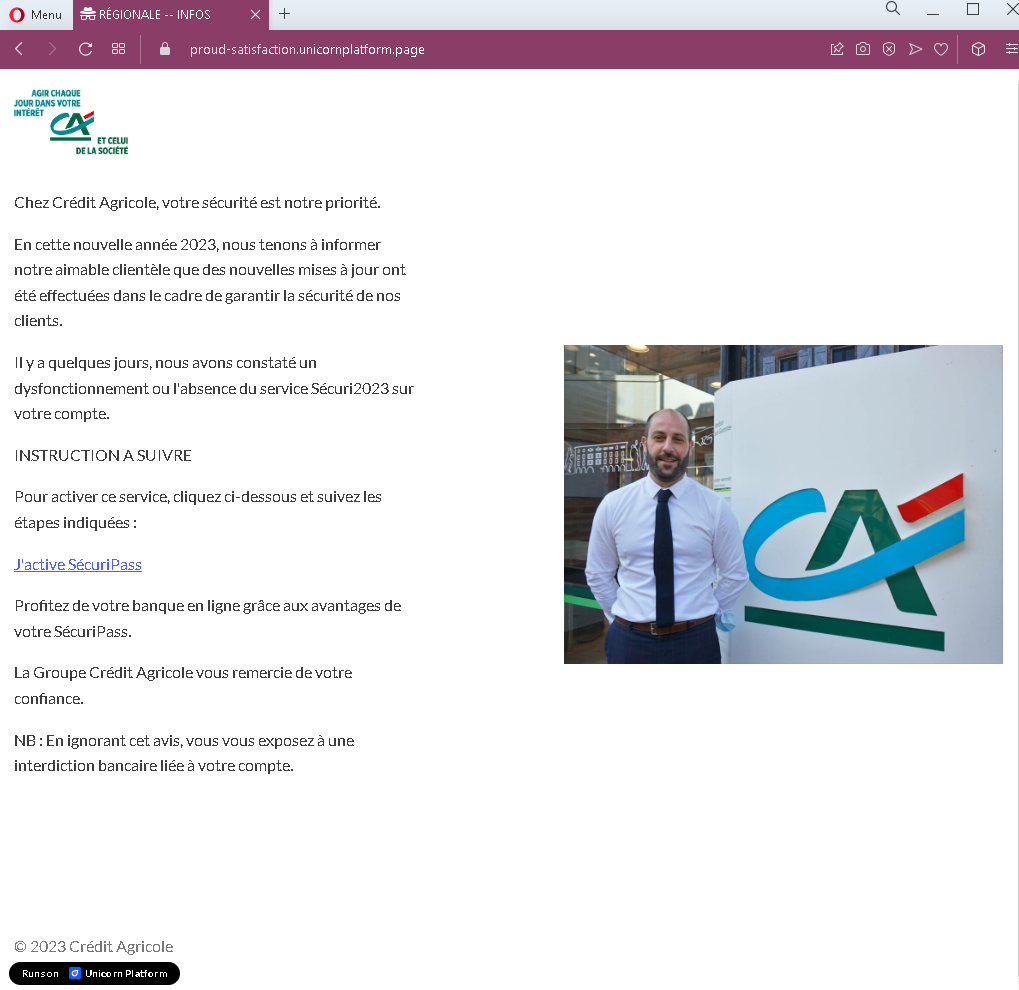
Threat Analysis: Crédit Agricole Phishing – Fake “SécuriPass” Security Update Scam
This phishing campaign impersonates Crédit Agricole, a major French banking group. The page (which could be an email or a landing page) claims that the bank has detected a malfunction or absence of the SécuriPass security service on the customer’s account. It pressures the victim to click a button to “activate” the service, which leads to a fake login page designed to steal banking credentials.
How it works:
The victim receives this message (likely by email) claiming to be from Crédit Agricole. The message:
- States that security updates have been made
- Claims a problem with the SécuriPass security service on the account
- Instructs the victim to click a button to activate SécuriPass
- Warns that ignoring the message could result in a banking restriction
When the victim clicks the “J’active SécuriPass” (I activate SécuriPass) button, they are taken to a fake Crédit Agricole login page (not shown in this screenshot) where they are asked to enter their online banking credentials.
The goal:
The attacker aims to steal the victim’s Crédit Agricole online banking credentials (typically a client ID and password, and possibly SécuriPass codes). With these, they can log into the victim’s real bank account, view balances, transfer funds, and commit fraud.
Red flags to watch for:
- Suspicious URL: The page is hosted on a domain that is not
credit-agricole.fr - Unsolicited security alert: Crédit Agricole does not send emails with links requiring customers to click to “activate” security services. Legitimate security updates are communicated through official app notifications, secure messages within the online banking portal, or postal mail—not via email links.
- Threat of consequences: The message warns that ignoring it could lead to a “banking restriction.” This is a classic fear-based tactic to pressure victims into acting without thinking.
- Vague language: The message refers to “un dysfonctionnement ou l’absence du service Sécuri2023” (a malfunction or absence of the Sécuri2023 service). SécuriPass is the real security feature; the variation “Sécuri2023” is unusual and suggests the attacker modified the name to appear current.
- Generic greeting: The message does not address the victim by name or reference a specific account number—common in phishing emails.
- Poor formatting: While the design mimics Crédit Agricole’s branding, subtle formatting inconsistencies may be present compared to official communications.
What to do if you encounter this:
- Do not click the button to “activate” SécuriPass or any other links in the message.
- Do not enter any banking credentials on any page reached via this link.
- If you are a Crédit Agricole customer, always access online banking by typing
credit-agricole.fr - If you have already clicked the link and entered your credentials, contact Crédit Agricole immediately through their official customer service hotline to secure your account and change your password.
- Report the phishing email to Crédit Agricole’s fraud department (e.g., by forwarding it to
[email protected]or using their official reporting channel).
Why this scam is effective:
Crédit Agricole has millions of online banking customers in France. SécuriPass is a real security feature used by the bank for transaction confirmation, so references to it are familiar to customers. The fear of losing access to banking services (“interdiction bancaire”) creates urgency. The message’s design and language closely mimic official bank communications, making it difficult for an untrained eye to distinguish from a legitimate notice.
Protective measures:
- Never click links in unsolicited emails claiming to be from your bank. Instead, type the official bank URL directly into your browser.
- Be suspicious of any message that creates urgency, threatens consequences, and asks you to click a link to “activate” or “verify” something.
- Check the sender’s email address carefully. Legitimate Crédit Agricole emails come from
@credit-agricole.fror specific subdomains—not from generic or misspelled addresses. - Enable two-factor authentication (SécuriPass) through the official app, and remember that legitimate activation processes happen within the app or after logging into the official website—not via a link in an email.
- If in doubt, contact your bank directly using a phone number from your bank statement or the official website—never use contact information provided in the suspicious message.