
Threat Intel: This spoofed page was detected, analyzed, and contained firsthand by the
Antiphishing.bizsecurity team during our daily link moderation procedures. To protect the public, the phishing source domain has been safely deactivated within our infrastructure. We document and analyze these live visual patterns to help security researchers and users spot lookalike phishing methods before financial damage occurs.
Threat Analysis: Banco Regional Phishing – Multi-Step Credential & 2FA Code Harvesting
This phishing campaign impersonates Banco Regional, a financial institution operating in Paraguay and other South American countries. The scam uses a multi-page flow to capture the victim’s document number, access password, email credentials, and the transactional PIN (two-factor authentication code) sent via SMS or email.
How it works:
The victim receives a phishing email, SMS, or other message claiming a security alert, account issue, or the need to verify their information. The message includes a link to the first phishing page. The scam unfolds in three steps:
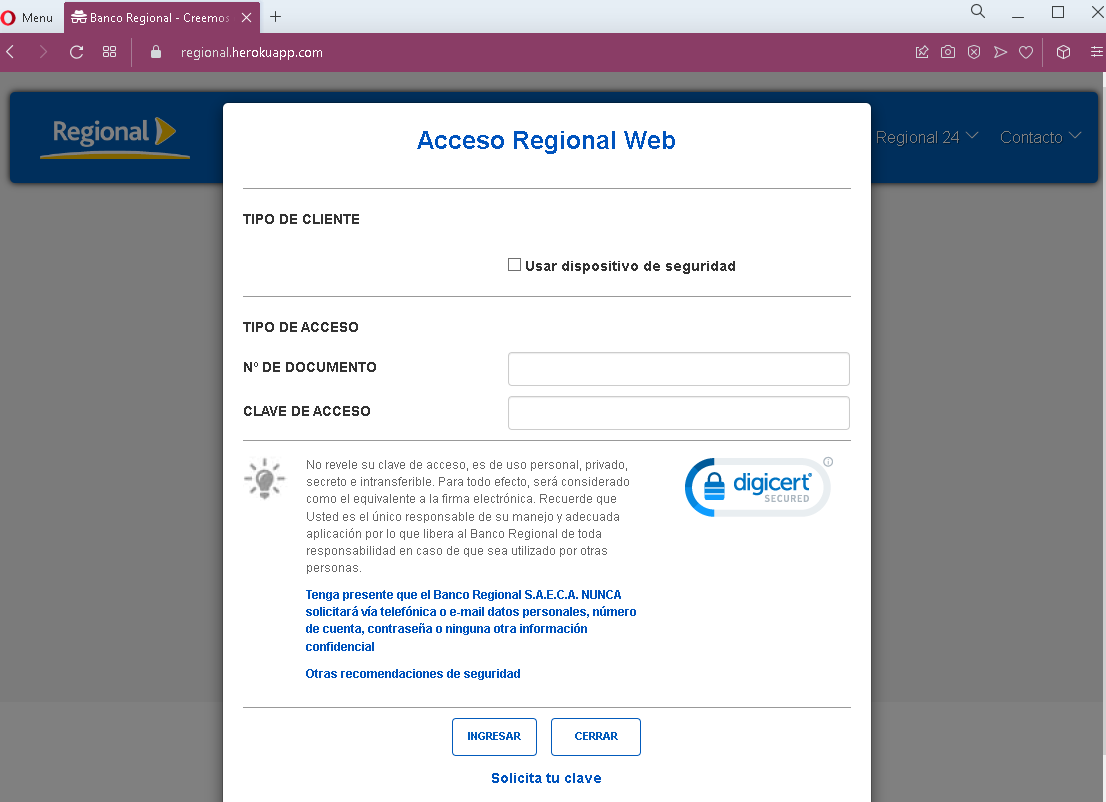
Step 1 – Fake Document Number & Password Page
The first page asks for the victim’s document number (likely national ID) and access password. The page includes security warnings copied from the legitimate bank to appear authentic.
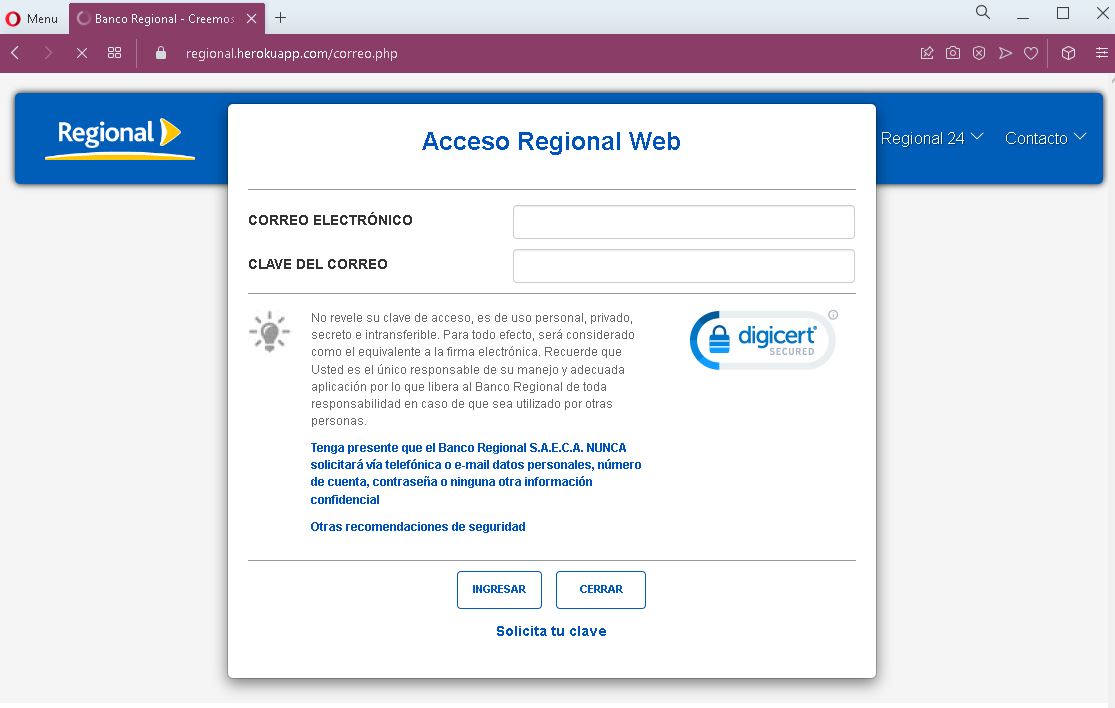
Step 2 – Fake Email & Email Password Page
The second page asks for the victim’s email address and email password. This step is designed to capture credentials for the victim’s personal email account, which can then be used to intercept further communications or reset passwords for other services.
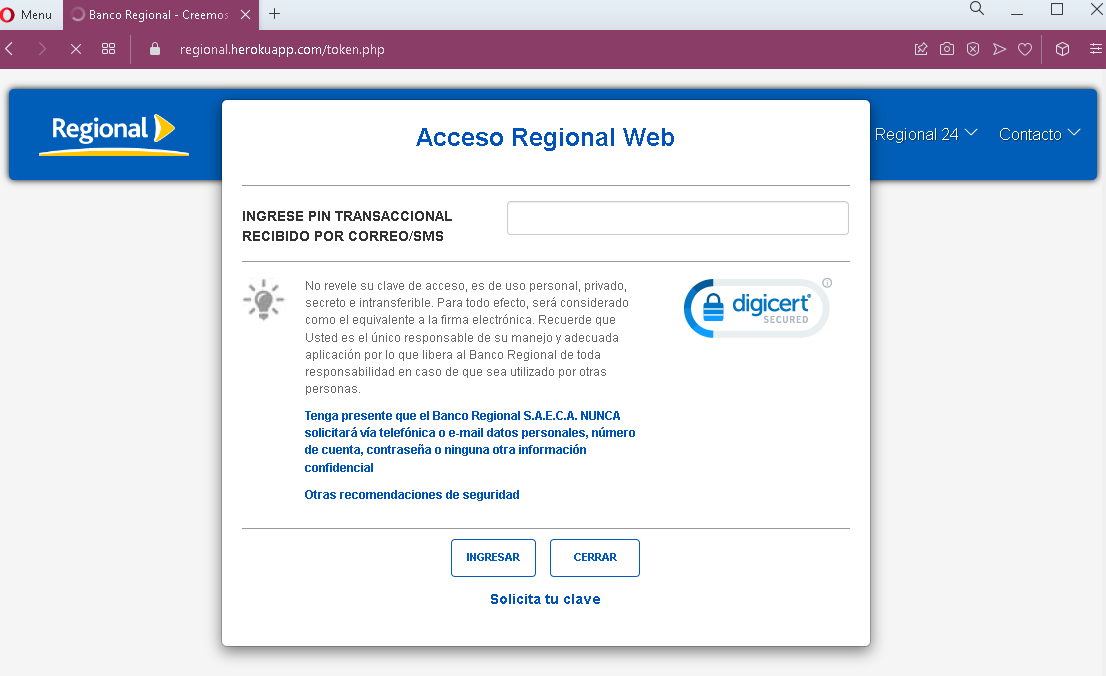
Step 3 – Fake Transactional PIN Page
The third page asks for the transactional PIN—a one-time code sent via SMS or email, typically used to authorize transactions. This is the two-factor authentication (2FA) step. By capturing this code, the attacker can bypass security measures and complete fraudulent transactions in real time.
The goal:
The attacker aims to:
- Steal the victim’s Banco Regional online banking credentials (document number and password)
- Capture the victim’s email account credentials (to access password resets and intercept communications)
- Obtain the transactional PIN (2FA code) to authorize unauthorized transfers or payments
With all three pieces of information, the attacker can log into the victim’s bank account and complete fraudulent transactions, often within minutes.
Red flags to watch for:
- Suspicious URL: The pages are hosted on domains that are not the official Banco Regional domain. Legitimate Banco Regional online banking is accessed through the bank’s official website—never through links in unsolicited messages.
- Request for email credentials: Legitimate banking login processes never ask for your email account password. This is a clear indicator of a phishing attack designed to take over your email as well.
- Multi-step design: The flow asks for credentials in stages, which is common in sophisticated phishing kits. Each step builds legitimacy while capturing different pieces of information.
- Ironically, the security warning itself: The page contains a warning that the bank never requests personal information via email or phone—yet the page itself is doing exactly that. This is a contradiction that users should notice.
- Unsolicited login request: Banco Regional does not send emails or messages with links requiring customers to log in to resolve account issues.
- Generic design: While the pages mimic the bank’s branding, they lack the full navigation, account-specific information, and personalization that would appear on a legitimate logged-in session.
What to do if you encounter this:
- Do not enter any document numbers, passwords, email credentials, or transactional PINs on these pages.
- If you are a Banco Regional customer, always access online banking by typing the official bank URL directly into your browser or by using the official mobile app.
- If you have already entered your banking credentials, contact Banco Regional immediately through their official customer service hotline to block your account and change your password.
- If you entered your email credentials, change your email password immediately and check for any unauthorized forwarding rules or account changes.
- Report the phishing page to Banco Regional’s fraud department.
Why this scam is particularly dangerous:
This is a full account takeover phishing kit. By capturing the document number, password, and the transactional PIN (2FA), the attacker obtains everything needed to log in and complete transactions. The request for email credentials is an added layer—if the victim’s email is compromised, the attacker can intercept bank communications, delete alerts, and further entrench their access. The multi-step design also makes the scam feel more “official” to victims who are used to multi-page login flows.
Protective measures:
- Bookmark the official Banco Regional login page and use that bookmark to access online banking—never click links in emails or messages.
- Use a password manager: It will autofill only on legitimate bank domains, not on phishing sites.
- Enable two-factor authentication (2FA) on both your bank account and email account, using an authenticator app rather than SMS where possible.
- Never enter your email password on any page that claims to be your bank. Bank login processes do not require this.
- Be suspicious of any unsolicited message that creates urgency and asks you to log in to your bank account.
- Check the URL carefully: Legitimate Banco Regional domains are associated with the official bank website. Look for misspellings, extra words, or unusual top-level domains.
- If in doubt, contact the bank directly using a phone number from your bank statement or the official website—never use contact information provided in a suspicious message.