Freefire fake page ad Facebook phishing revealed

Free Fire “Rewards Generator” Scam – Facebook Credential Harvesting (Variant)

This phishing campaign targets Free Fire players by promising free in-game rewards (skins, diamonds, rare items) through a fake “generator” tool. The scam uses a multi-step process designed to steal victims’ Facebook login credentials, which are commonly used to access Free Fire accounts.

How it works:
The victim encounters a link to this scam via YouTube, TikTok, Discord, Instagram, or other social media platforms with enticing claims of free rewards.

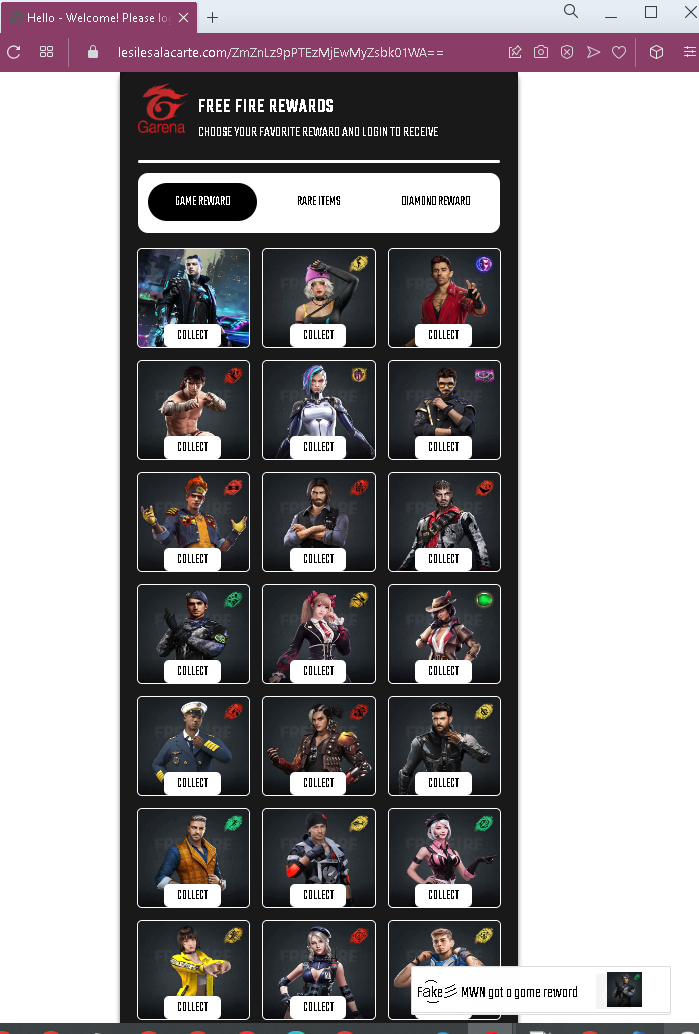
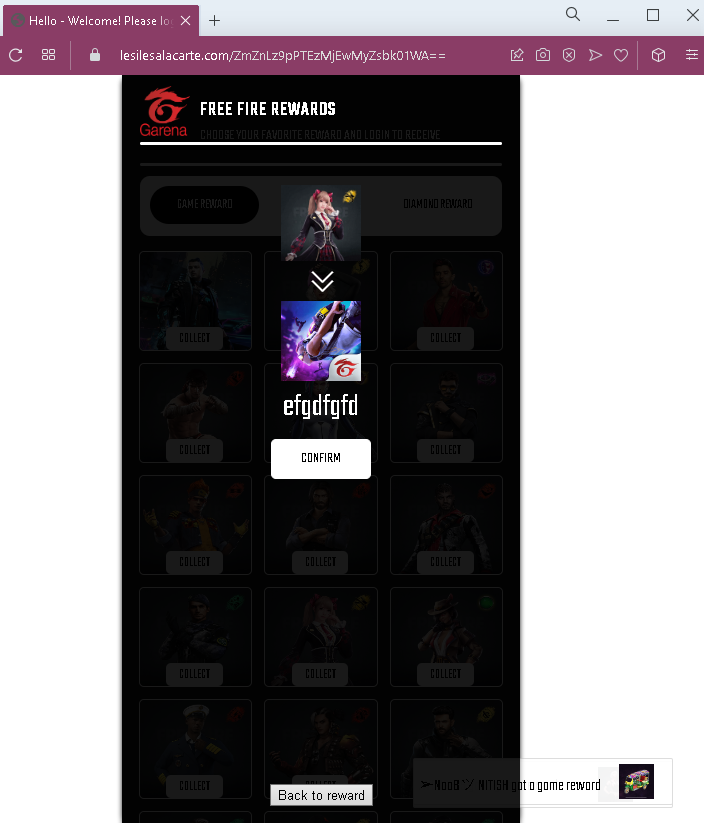
Step 1 – Reward Selection Page (First Screenshot)
The victim lands on a page displaying numerous reward icons (weapons, skins, items) with “COLLECT” buttons. The page includes:

A suspicious URL: lesilesalacarte.com/… (not associated with Garena)

Text indicating “Fake ⬆ MWM got a game reward” (likely a tester’s note)

Garena branding to appear legitimate

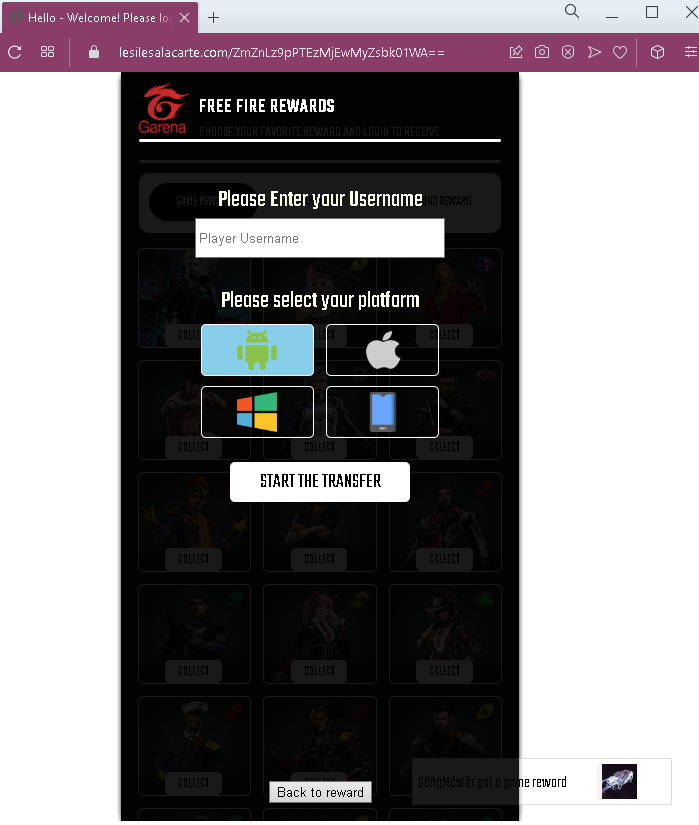
Step 2 – Username & Platform Entry (Second Screenshot)
The victim is asked to:

Enter their Player Username (Free Fire in-game name)

Select their platform

Click “START THE TRANSFER”

This step collects basic information and creates the illusion of a personalized reward delivery.

Step 3 – Reward Confirmation (Third Screenshot)
After entering credentials, the victim sees another page filled with reward icons and “COLLECT” buttons. This reinforces the belief that rewards are ready to be claimed. A “Back to reward” link allows navigation, but all paths lead to the verification trap.

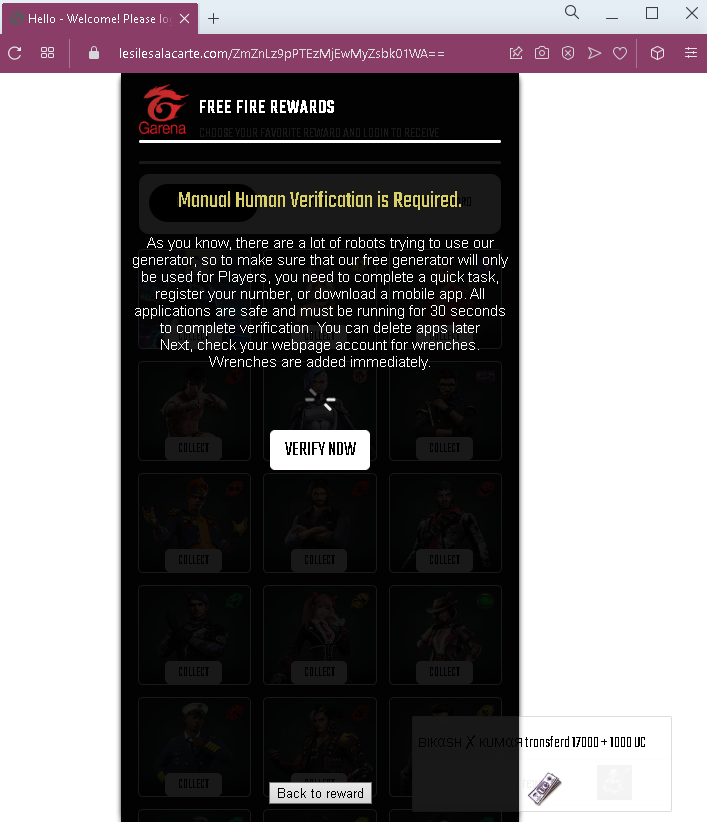
Step 4 – “Manual Human Verification” Requirement (Fourth Screenshot)
This page claims:

“Manual Human Verification is Required.”

Explanation: many robots try to use the generator, so to prove the user is human, they must complete a “quick task” (register a phone number or download a mobile app).

The instructions claim: “All applications are safe and must be running for 30 seconds to complete verification. You can delete apps later.”

This is a classic social engineering tactic to convince victims to complete the next step.

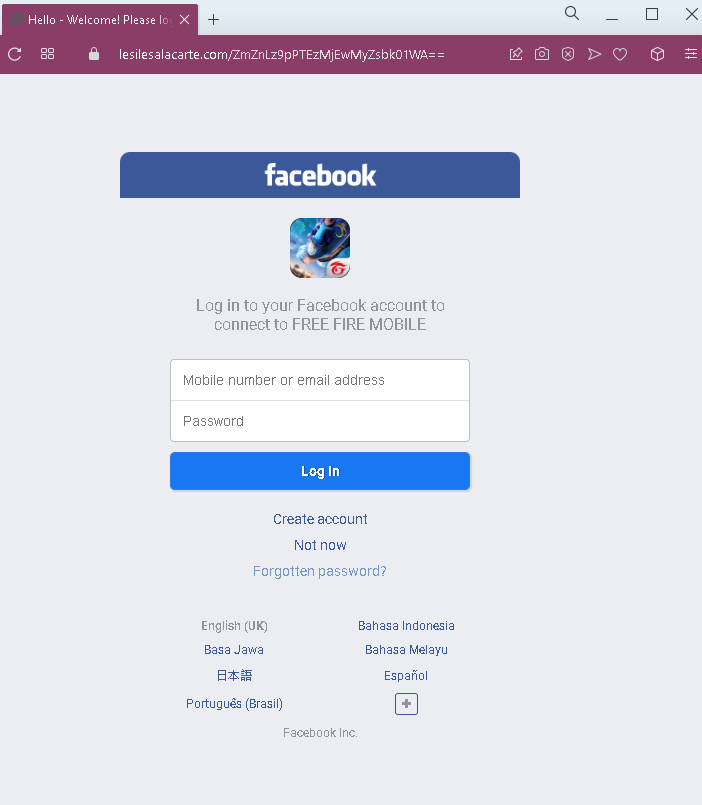
Step 5 – Facebook Login Phishing Page (Fifth Screenshot)
The “VERIFY NOW” button leads to a fake Facebook login page. This page asks for:

Mobile number or email address

Password

The page mimics Facebook’s mobile login interface and includes multiple language options to appear authentic.

The goal:
The attacker steals the victim’s Facebook credentials. Since Free Fire accounts are often linked to Facebook, this grants the attacker access to both the Facebook account and the associated Free Fire game account. Attackers can then:

Steal or sell the Free Fire account (including any purchased items or progress)

Access personal information on Facebook

Use the compromised Facebook account to spread the scam to the victim’s friends

Red flags to watch for:

“Too good to be true” offer: No legitimate service provides free in-game currency or rare items through an external website. Garena sells diamonds and items only through official channels.

Suspicious URL: The initial page is hosted on lesilesalacarte.com, a domain completely unrelated to Garena (garena.com) or Free Fire.

No official branding consistency: While the pages use the Free Fire and Garena names, they lack official logos, copyright notices, and professional design elements.

“Human verification” scam pattern: The requirement to “verify” by completing a task (phone registration, app download) is a classic phishing tactic. No legitimate game reward system uses such methods.

Facebook login request: The final step asks for Facebook credentials. Legitimate in-game rewards never require logging into Facebook through a third-party site.

Multiple “COLLECT” buttons: The repetitive design is meant to overwhelm the user and create a sense of abundance, but it is unprofessional and inconsistent with official Garena interfaces.

“Back to reward” loop: The navigation allows users to go back, but all paths eventually lead to the same phishing request.

What to do if you encounter this:

Do not enter your Free Fire username, select a platform, or click any “COLLECT” or “START THE TRANSFER” buttons.

Do not complete any “human verification” tasks, especially those asking for phone numbers or app downloads.

Do not enter your Facebook email/phone and password on the final page.

If you have already entered your Facebook credentials, change your Facebook password immediately, enable two-factor authentication (2FA), and check for any unauthorized activity.

Report the phishing page to Facebook and to Garena (Free Fire’s developer).

Why this scam is effective:
Free Fire has a massive global player base, especially among younger audiences who may be more susceptible to offers of free premium content. The multi-step process with multiple reward icons and the “human verification” explanation makes the scam appear legitimate and elaborate. The use of Facebook as the final credential harvest is strategic—once attackers have Facebook access, they can compromise the game account and potentially spread the scam further.

Protective measures:

Never trust third-party “generators” or “hacks” that promise free in-game currency or items. They are always scams.

Enable two-factor authentication (2FA) on your Facebook account to prevent unauthorized access even if your password is stolen.

Log into Free Fire only through the official app and official Garena methods.

Educate younger gamers about these scams, as they are frequently targeted through social media platforms.
Facebook phishing page detected

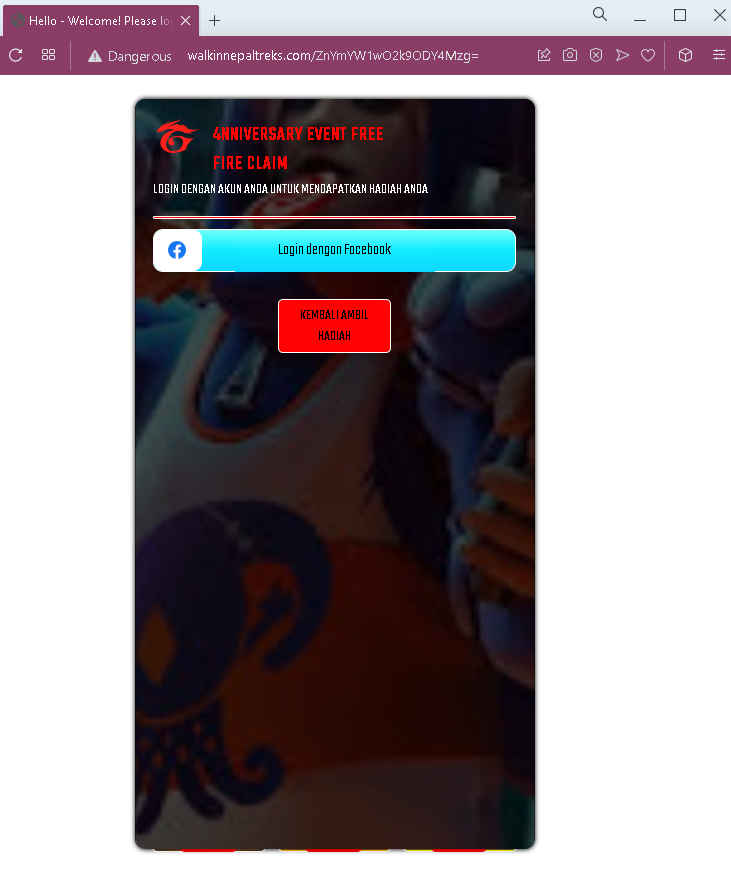
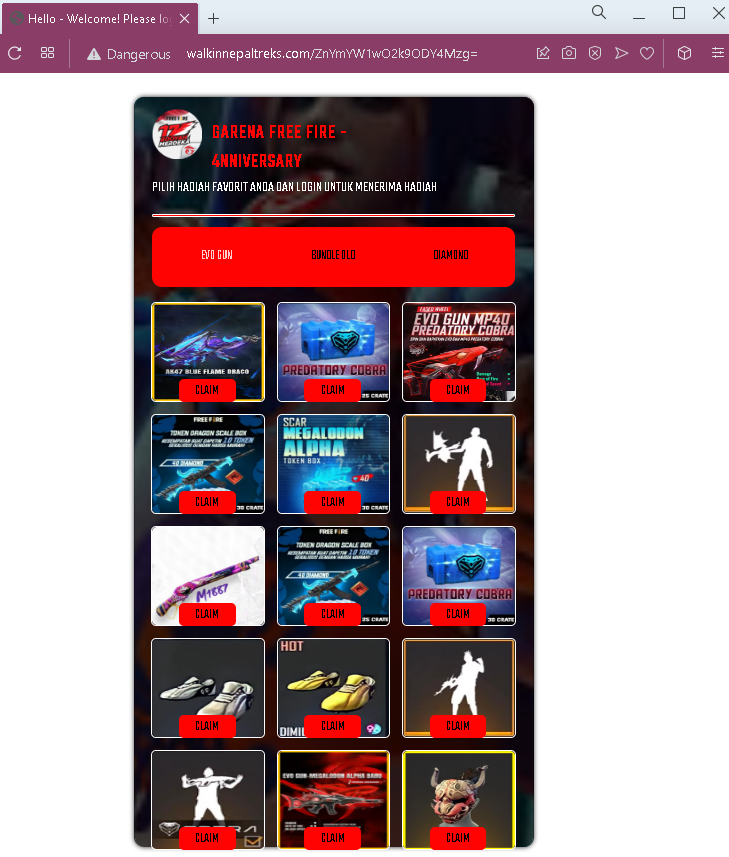
Free Fire “Anniversary Event” Scam – Facebook Credential Harvesting (Indonesian Variant)

This phishing campaign targets Free Fire players in Indonesia and other Indonesian-speaking regions by promoting a fake “anniversary event” offering free rewards. The scam uses localized language and cultural references to appear legitimate.

How it works:
The victim encounters a link to this scam via social media platforms (YouTube, TikTok, Instagram, Facebook) or messaging apps, often with captions promoting a Free Fire anniversary giveaway.

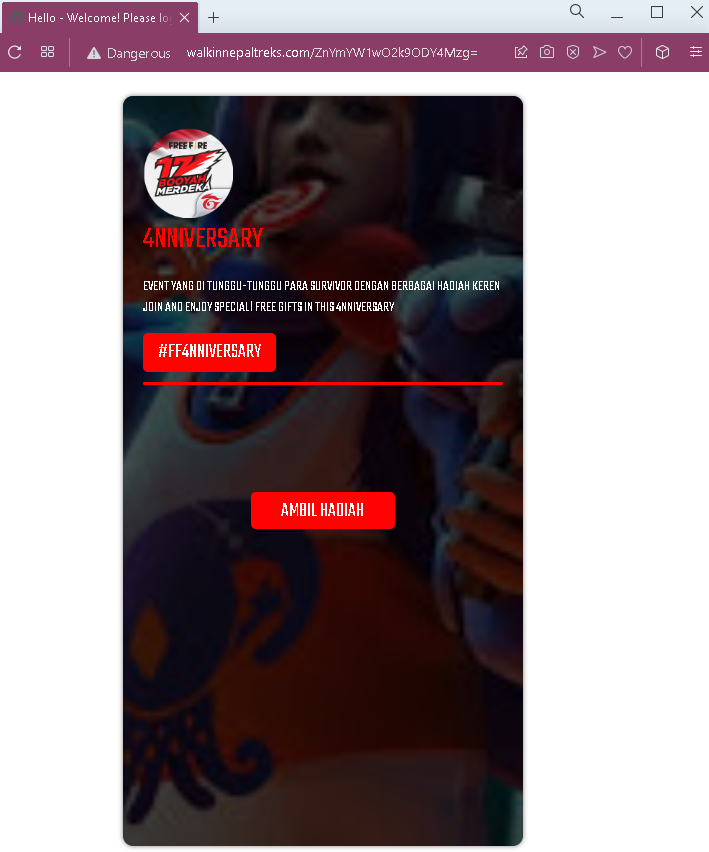
Step 1 – Fake Anniversary Promotion (First Screenshot)
The victim lands on a page with:

A suspicious URL: dangerous walkmiepaltreks.com/… (clearly not an official domain)

Indonesian text: “EXCEPT YANG DI TUNGBU-TUNGBU PARA BURNHOR DENGAN BERBABAN HADIAN KEREN JIJIN AND ELJIYY SPECIALI FREE DIFFS IN THIS ANNIVERSARY”
(Note: The text contains multiple typos and nonsensical phrases, likely machine-translated or poorly written.)

A heading: “4TH ANNIVERSARY”

A button: “AMBIL HADIAH” (Take Prize)

Step 2 – Login Request (Third Screenshot – second image failed to load)
After clicking “AMBIL HADIAH,” the victim is taken to a page that instructs:

Indonesian: “LIGHT DENGAN AKUR ANDA UNTUK MEDIAPATKAN HADIAN ANDA”
(Rough translation: “Login with your account to get your prize”)

A button: “Login dengan Facebook” (Login with Facebook)

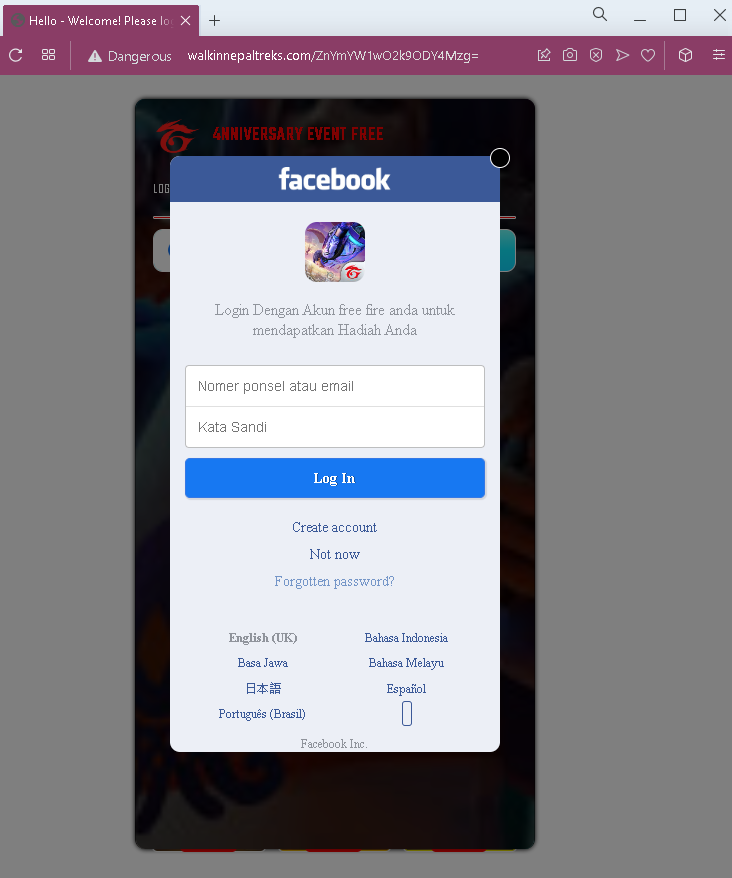
Step 3 – Fake Facebook Login Page (Fourth Screenshot)
Clicking the login button leads to a fake Facebook login page. This page:

Asks for Nomer ponsel atau email (Mobile number or email) and Kata Sandi (Password)

Includes Facebook branding and language options (Bahasa Indonesia, English, etc.)

Is designed to steal the victim’s Facebook credentials

The goal:
The attacker steals the victim’s Facebook login credentials. Since many Free Fire players in Indonesia use Facebook to log into the game, gaining access to the Facebook account gives attackers control over the associated Free Fire account as well.

Red flags to watch for:

Suspicious URL: The initial page is hosted on a domain unrelated to Garena or Free Fire (dangerous walkmiepaltreks.com with obvious typos).

Poor Indonesian grammar: The text contains multiple misspellings and awkward phrasing (e.g., “EXCEPT YANG DI TUNGBU-TUNGBU,” “BERBABAN HADIAN,” “JIJIN AND ELJIYY”). Official Garena announcements use correct, professional Indonesian.

No official branding: The pages lack official Garena or Free Fire logos and copyright notices.

Anniversary timing: While Free Fire does have anniversary events, they are always announced and hosted on official channels (ff.garena.com), never through third-party domains.

Facebook login requirement: No legitimate Free Fire event requires logging into Facebook through a third-party link. Official events are accessed within the game app or on official Garena websites.

Multiple typos: The heading “4MWERSARY” instead of “4TH ANNIVERSARY” is a clear typo that indicates a fake page.

What to do if you encounter this:

Do not click “AMBIL HADIAH” or “Login dengan Facebook.”

Do not enter your Facebook email/phone and password on the fake login page.

If you are a Free Fire player, always check official Free Fire social media accounts and the official website (ff.garena.com) for legitimate event information.

If you have already entered your Facebook credentials, change your Facebook password immediately, enable two-factor authentication (2FA), and check for any unauthorized activity.

Report the phishing page to Facebook and to Garena.

Why this scam is effective:
Indonesia has a massive Free Fire player base, and anniversary events are highly anticipated. Scammers exploit this by creating fake “anniversary giveaway” pages that mimic the excitement of official events. The use of the Indonesian language (even with errors) makes the scam more convincing to local users than generic English phishing pages.

Protective measures:

Never click links claiming to offer free Free Fire rewards from unofficial sources.

Always access Free Fire events through the official game app or official Garena websites.

Enable two-factor authentication (2FA) on your Facebook account.

Be suspicious of any page that asks for your Facebook login credentials outside of facebook.com.

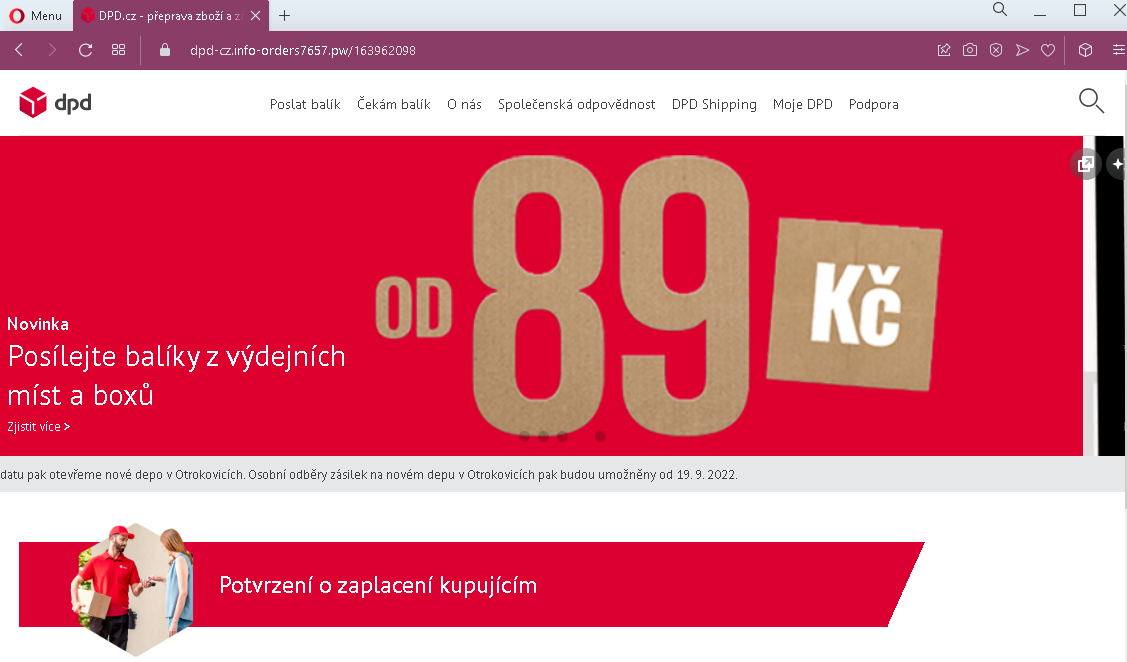
DPD phishing page in Czech detected

DPD Czech Phishing – Fake “Buyer Payment Confirmation” & Card Harvesting

This phishing campaign impersonates DPD, a legitimate international parcel delivery service, specifically targeting customers in the Czech Republic. The scam uses the pretext of a “buyer payment confirmation” to trick victims into entering credit card details on a fake payment page.

How it works:
The victim receives a phishing email or SMS claiming that a buyer has paid for a shipment or that a package requires payment confirmation. The link leads to a series of fake DPD-branded pages.

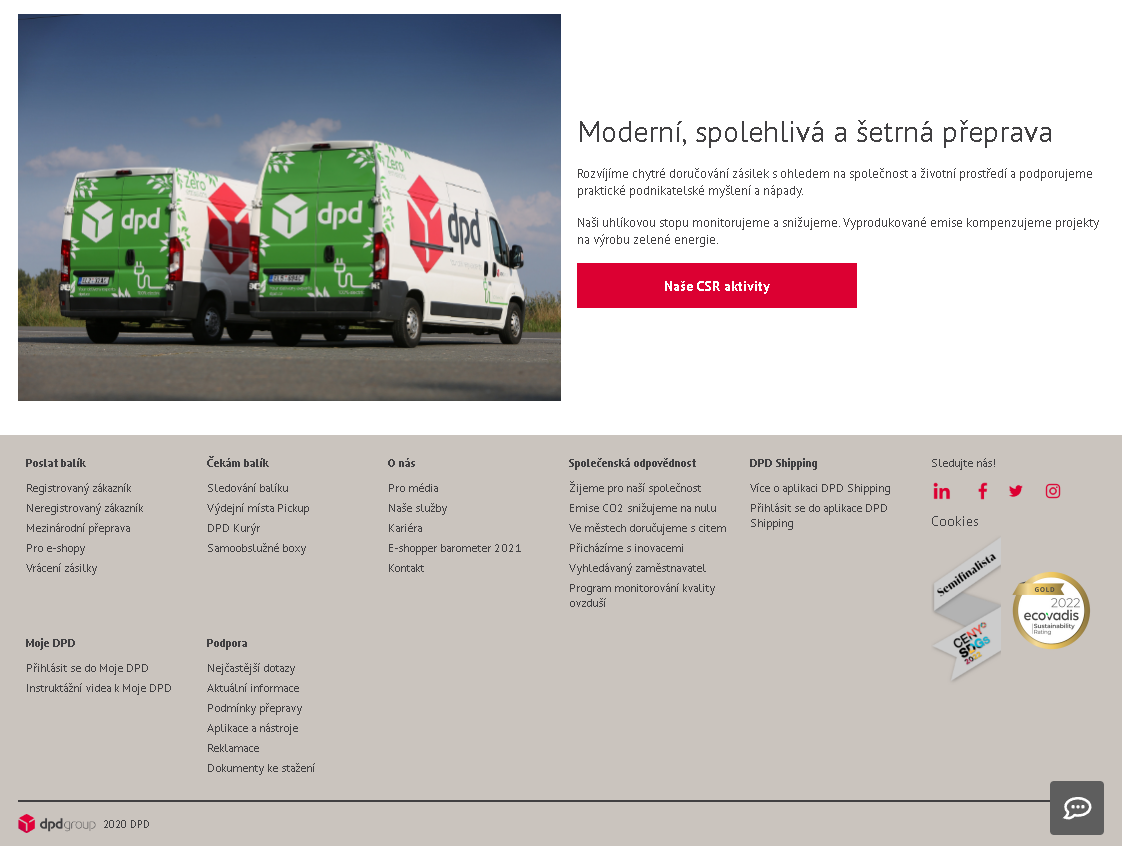
Step 1 – Fake DPD Landing Page (First Screenshot)
The page displays:

A suspicious URL: dpd cz.info orders7657 pw/… (not the official DPD domain)

DPD branding and navigation links (copied from the real DPD website)

A heading: “Potvrzení o zaplacení kupujícím” (Buyer payment confirmation)

A button or link likely leading to the next step (not fully visible in this screenshot)

The page mimics DPD’s legitimate Czech website layout to appear authentic.

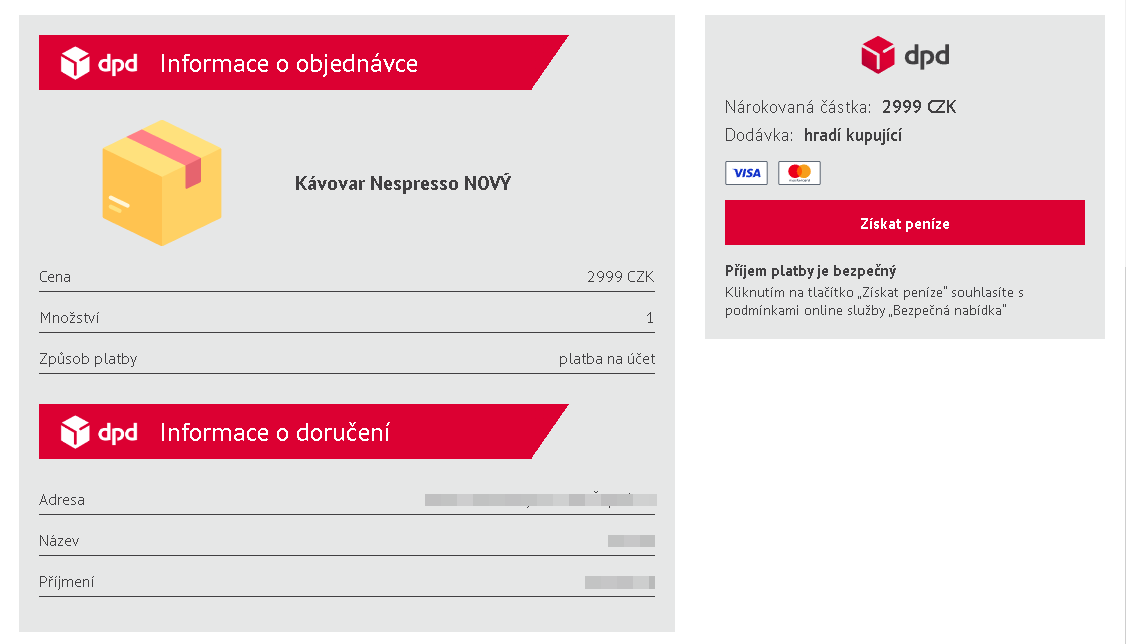
Step 2 – Fake DPD Information Page (Second Screenshot)
This page displays legitimate-looking DPD content about the company’s services, corporate social responsibility, and support. Attackers often copy entire sections from real websites to make the phishing page appear credible. The page includes:

DPD’s real branding, mission statements, and navigation menus

Social media links and cookie policy information (copied from the official site)

However, the page is hosted on the fraudulent domain, not dpd.cz.

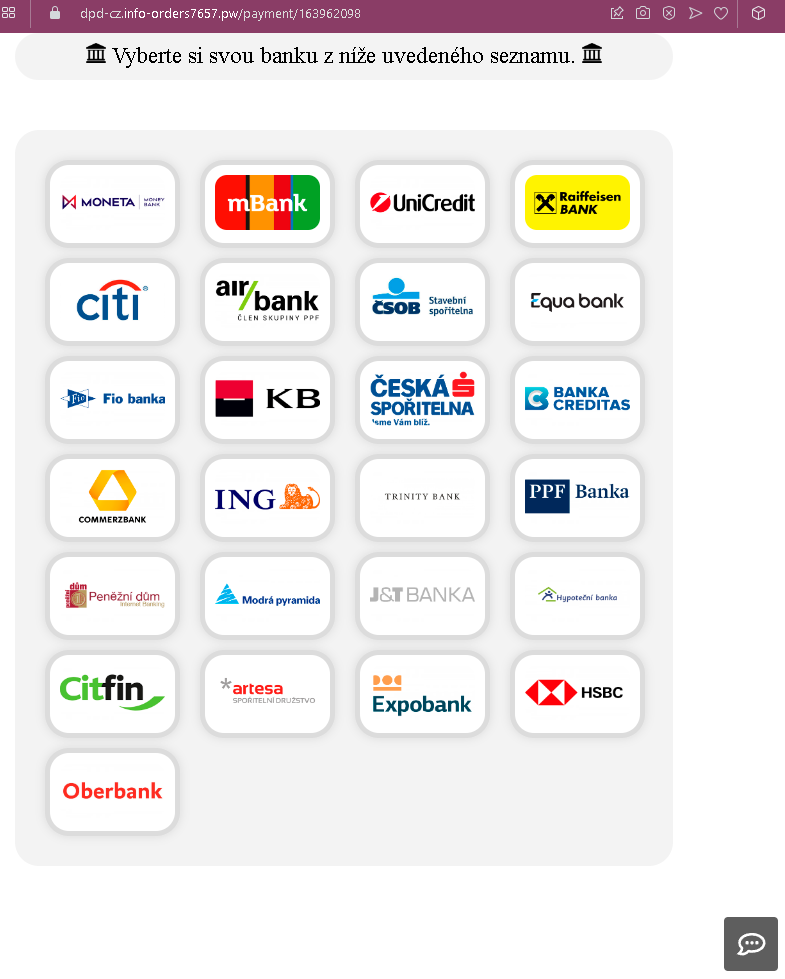
Step 3 – Bank Selection Page (Third Screenshot)
The victim is directed to a page asking them to select their bank from a list of major Czech and international banks, including:

MONETA

mBank

UniCredit

Raiffeisen BANK

Česká spořitelna

KB (Komerční banka)

Fio banka

and many others

This page is designed to make the victim believe they are about to complete a legitimate payment through their own bank’s secure portal.

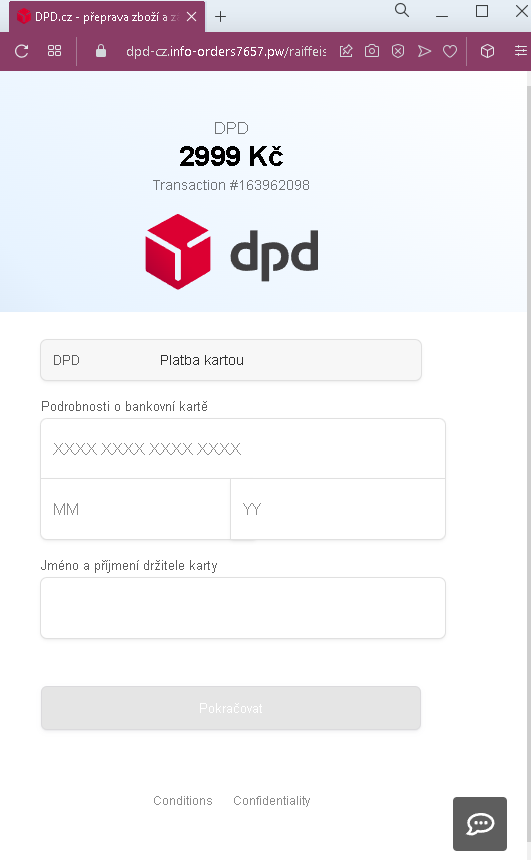
Step 4 – Credit Card Harvesting Page (Fourth Screenshot)
After selecting a bank, the victim is taken to a page that requests:

Full credit card number (placeholder: XXXX XXXXX XXXXX XXXXX)

Expiry date (MM/YY)

Cardholder name and surname

The page displays a DPD logo and an amount: 2999 Kč (Czech koruna), along with a transaction number (#163962098).

The goal:
The attacker steals the victim’s credit card details (card number, expiry date, and cardholder name). With this information, they can make fraudulent online purchases, create cloned cards, or sell the data. There is no legitimate payment—the entire “buyer confirmation” and delivery context is fabricated.

Red flags to watch for:

Suspicious URL: The initial page is hosted on dpd cz.info orders7657 pw/…. The official DPD Czech domain is dpd.cz. Any deviation (extra words, misspellings, or different TLDs like .info) is a red flag.

Unusual request for card details: DPD does not process payments through a “bank selection” page that asks for full credit card details on a third-party site. Legitimate DPD payments are handled through integrated payment gateways (e.g., ComGate, GoPay) on the official website.

Context mismatch: The scam combines a “buyer payment confirmation” (suggesting the victim is receiving money) with a request for the victim’s own credit card details. This is illogical—receiving money does not require entering your card information.

Copied content: The second page contains legitimate DPD text, but it is hosted on a fake domain. Attackers often copy entire sections of real websites to make their pages look authentic.

Generic transaction details: The transaction number (#163962098) and amount (2999 Kč) are fabricated and not tied to any real shipment.

No login or tracking number: A legitimate DPD payment confirmation would require a tracking number or reference to a specific shipment. This page lacks any such identifier.

What to do if you encounter this:

Do not select your bank or enter any credit card details.

Do not enter any personal information on these pages.

If you are expecting a package from DPD, go directly to dpd.cz and enter your tracking number to check its status.

If you have already entered your credit card details, contact your bank immediately to block the card and dispute any unauthorized charges.

Report the phishing page to DPD Czech and to the relevant anti-phishing authorities.

Why this scam is effective:
DPD is a widely used delivery service in the Czech Republic. The scam exploits the common scenario of e-commerce transactions where buyers pay for shipments. The copied legitimate content from DPD’s real website makes the fake pages visually convincing. The bank selection list with well-known Czech banks adds to the illusion of authenticity, making victims believe they are being redirected to a secure banking portal.

Protective measures:

Always type the official URL (dpd.cz) directly into your browser to track shipments or make payments.

Never click links in unsolicited emails or SMS messages claiming delivery issues or payment confirmations.

Be suspicious of any page that asks for your credit card details outside of a well-known, secure payment gateway (e.g., ComGate, GoPay) on the official merchant site.

Check the URL carefully—phishing domains often contain the brand name but add extra words, use different TLDs (.info, .site, .xyz), or have slight misspellings.

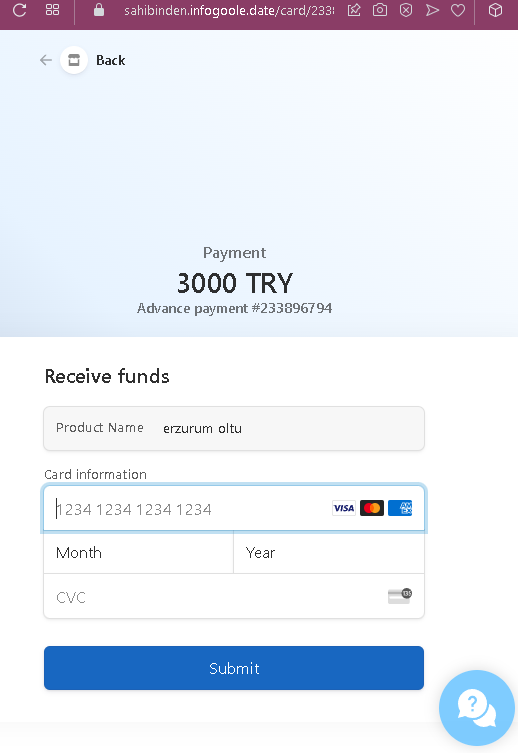
Sahibinden phishing page detected


Fake Shipment Tracking Scam – “Receive Funds” Card Harvesting

This phishing campaign is designed to steal credit card details from users selling items online (likely on classified ad platforms such as Sahibinden, Letgo, or Facebook Marketplace). The scam creates a fake shipment tracking interface and pressures the seller to “receive funds” by entering their card information.

How it works:
The victim (a seller) receives a message from a potential buyer claiming they have paid for the item and that the payment is being held by a shipping or escrow service. The buyer sends a link to this fake tracking page.

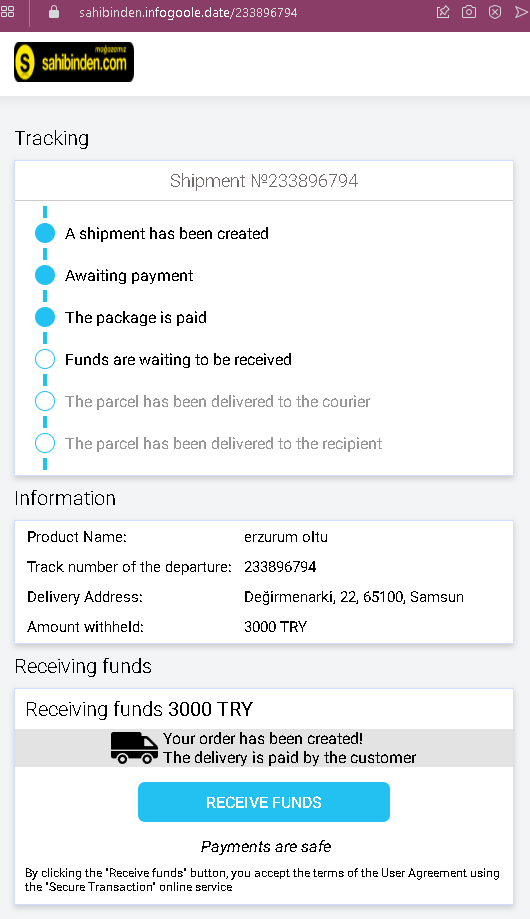
Step 1 – Fake Shipment Tracking Page (First Screenshot)
The page uses Turkish lira and location details to appear legitimate.

Step 2 – Credit Card Harvesting Page (Second Screenshot)

The goal:
The attacker aims to steal the victim’s credit card details. There is no actual payment of 3000 TRY waiting to be received—the entire transaction is fabricated. If the victim enters their card details, the attacker can make unauthorized purchases or sell the information.

Red flags to watch for:

  • Illogical request for card details: To receive money (funds), you never need to enter your credit card details. Receiving funds typically requires providing a bank account number or using a payment service (e.g., PayPal, IBAN), not a credit card number, expiry date, and CVC.
  • Fake tracking status: The status timeline claims “the package is paid” and “funds are waiting to be received,” but the seller is being asked to pay—this is contradictory.
  • Suspicious URL: Both pages are hosted on domains that are not legitimate shipping or payment services. The URLs visible in the first screenshot (dpd cz.info orders... from previous examples) indicate a pattern of phishing domains.
  • Generic payment page: The second page lacks any recognizable payment processor branding (e.g., Stripe, Iyzico, PayPal) and does not use a secure payment gateway.
  • No actual buyer or order context: The seller has no way to verify the shipment or the buyer’s identity through legitimate channels.
  • Poor design consistency: The first page mixes shipment tracking elements with a “receive funds” button, which is not how legitimate shipping or payment services operate.

What to do if you encounter this:

  • Do not click “RECEIVE FUNDS” or enter any credit card details.
  • Do not enter your card number, expiry date, or CVC on this page.
  • If you are selling items online, never click links sent by buyers claiming payment is waiting. Legitimate buyers pay through official platform mechanisms or in cash upon pickup.
  • If you have already entered your credit card details, contact your bank immediately to block the card and dispute any unauthorized charges.
  • Report the phishing page to the classified platform where the scam originated.

Why this scam is effective:
In Turkey, classified ad platforms are widely used, and sellers often ship items after receiving payment. This scam exploits the seller’s expectation of a legitimate transaction by providing a fake tracking number and shipment status. The “funds are waiting to be received” message creates excitement and urgency, overriding the suspicion that receiving money should never require entering credit card details.

Protective measures:

  • Always complete transactions through the official payment system of the platform you are using (e.g., Sahibinden’s “Güvenli Ödeme” system).
  • Never accept payment through links sent by buyers—insist on in-person cash or official platform transactions.
  • Remember: receiving money never requires your credit card information.
  • If a buyer claims they have paid through a shipping company or escrow service, verify directly with the official website of that service using a URL you type yourself—never click links in messages.

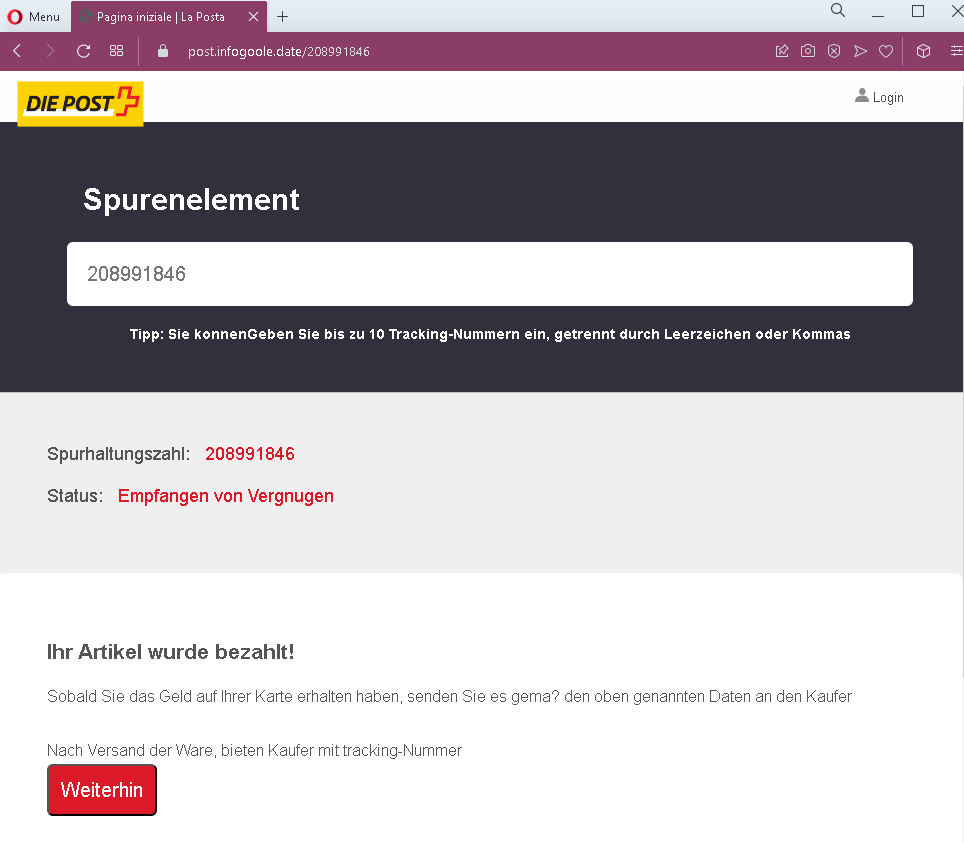
DIE Post (Swiss Post) phishing page detected


Fake Package Tracking Scam – “Receive Funds” Card Harvesting (Swiss/German Variant)

This phishing campaign is designed to steal credit card details from users selling items online (likely on classified ad platforms such as Ricardo, Tutti, or Facebook Marketplace) in Switzerland and German-speaking Europe. The scam creates a fake shipment tracking interface and pressures the seller to “receive funds” by entering their card information.

How it works:
The victim (a seller) receives a message from a potential buyer claiming they have paid for the item and that the payment is being held by a shipping or escrow service. The buyer sends a link to this fake tracking page.

Step 1 – Fake Tracking Status Page (First Screenshot)
The page instructs the seller to ship the item after “receiving” funds.

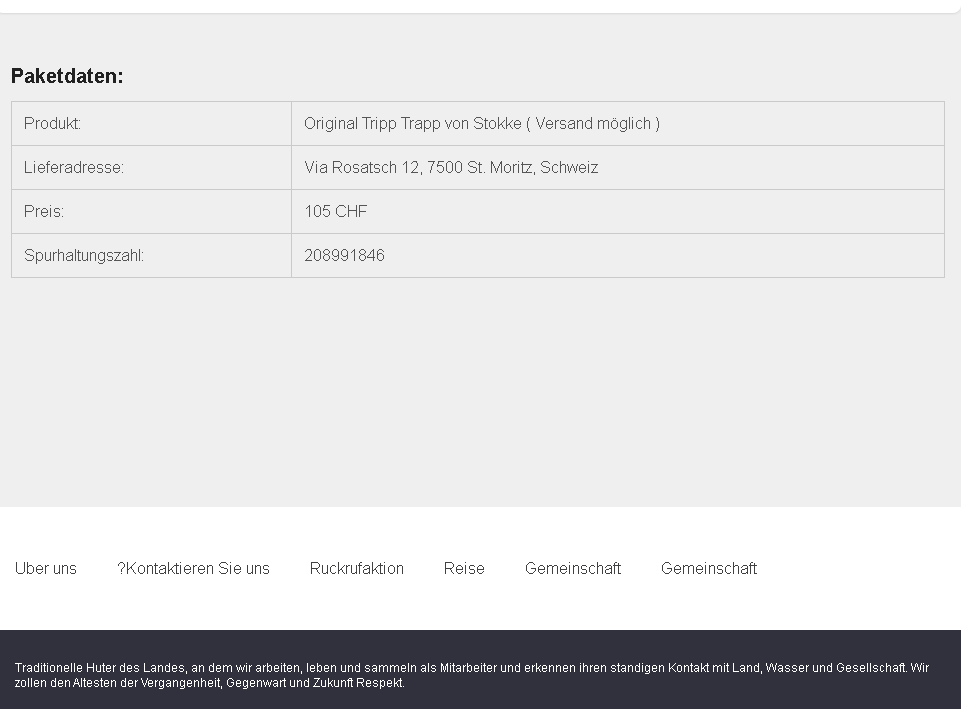
Step 2 – Fake Package Details Page (Second Screenshot)
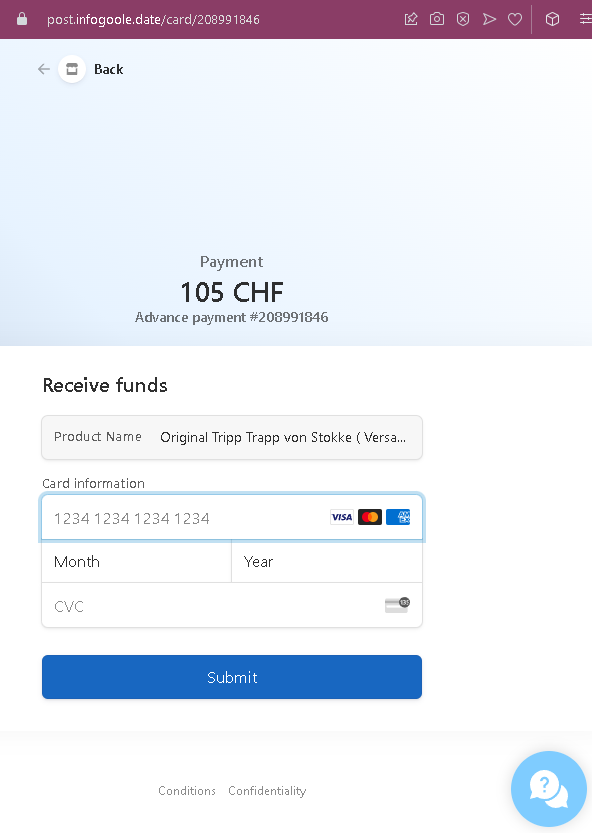
Step 3 – Credit Card Harvesting Page (Third Screenshot)
The goal:
The attacker steals the victim’s credit card details. There is no actual payment of 105 CHF waiting to be received—the entire transaction is fabricated. If the victim enters their card details, the attacker can make unauthorized purchases or sell the information.

Red flags to watch for:

  • Illogical request for card details: To receive money, you never need to enter your credit card details. Receiving funds typically requires providing a bank account number (IBAN) or using a payment service (e.g., Twint, PayPal)—not a credit card number, expiry date, and CVC.
  • Suspicious URL: The pages are hosted on domains that are not legitimate shipping or payment services. (From the visible URL bar in the first screenshot, the domain appears unrelated to any known Swiss shipping company.)
  • Fake tracking status: The status text is poorly written (“Empfangen von Vergnugen” is not a standard DHL, Swiss Post, or other carrier status message).
  • Copied footer content: The second page contains a footer about “traditional hutters of the land” (likely copied from an unrelated website), which has nothing to do with package delivery.
  • No login or verification: Legitimate payment processes do not ask for full credit card details on a page reached via an unsolicited link.
  • Price in CHF, but tracking in German: While Swiss shipping uses German, the overall design and errors suggest the page was not created by a professional Swiss company.
  • Generic card form: The payment page lacks any recognizable payment processor branding (e.g., Stripe, Datatrans, PayPal) and does not use a secure payment gateway.

What to do if you encounter this:

  • Do not enter any credit card details, expiry date, or CVC.
  • Do not click “Submit” or any buttons on these pages.
  • If you are selling items online, never click links sent by buyers claiming payment is waiting. Legitimate buyers pay through official platform mechanisms (e.g., Ricardo’s payment system, Twint, or cash on pickup).
  • If you have already entered your credit card details, contact your bank immediately to block the card and dispute any unauthorized charges.
  • Report the phishing page to the classified platform where the scam originated.

Why this scam is effective:
High-value items like the “Tripp Trapp” child’s chair are frequently sold on second-hand platforms in Switzerland and Germany. Sellers are eager to complete the sale and may not question a buyer who claims to have paid via an escrow or shipping service. The use of Swiss francs (CHF) and a real address in St. Moritz makes the scam appear locally relevant. The multi-step process with a tracking number and package details gives the illusion of a legitimate transaction.

Protective measures:

  • Always complete transactions through the official payment system of the platform you are using.
  • Never accept payment through links sent by buyers—insist on in-person cash, Twint, or platform-integrated payments.
  • Remember: receiving money never requires your credit card information.
  • If a buyer claims they have paid through a shipping company or escrow service, verify directly with the official website of that service using a URL you type yourself—never click links in messages.
  • Be suspicious of any page that asks for your full credit card details outside of a well-known, trusted payment provider.

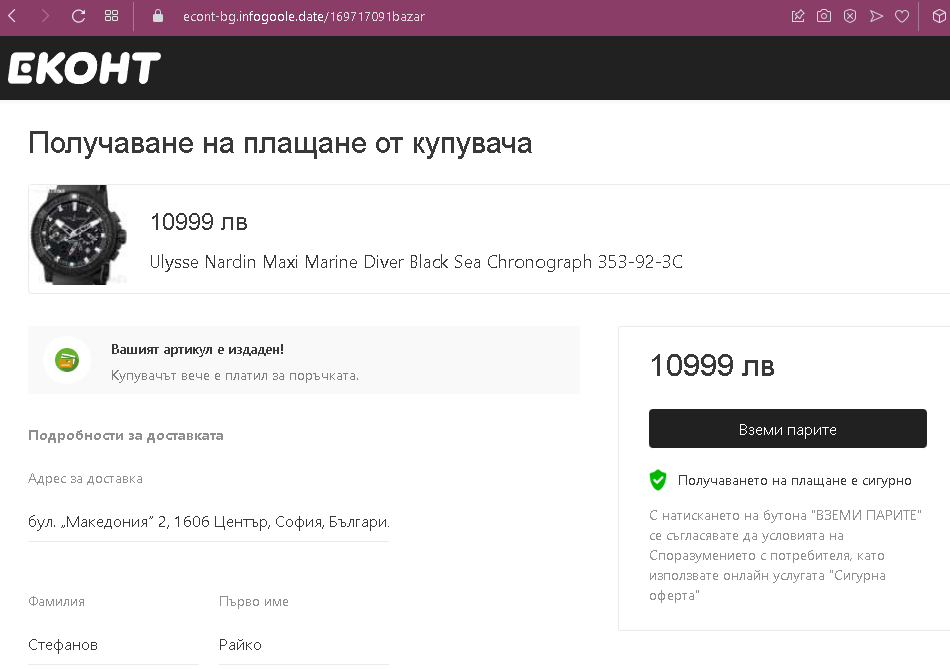
Econt phishing page in Bulgarian revealed


Fake Payment Receipt Scam – “Receive Funds” Card Harvesting (Bulgarian Variant)

This phishing campaign is designed to steal credit card details from users selling items online (likely on classified ad platforms such as OLX.bg, Bazar.bg, or Facebook Marketplace) in Bulgaria. The scam creates a fake payment confirmation interface and pressures the seller to “receive funds” by entering their card information.

How it works:
The victim (a seller) receives a message from a potential buyer claiming they have paid for the item and that the payment is being held by a shipping or escrow service. The buyer sends a link to this fake payment page.

Step 1 – Fake Payment Confirmation Page (First Screenshot)
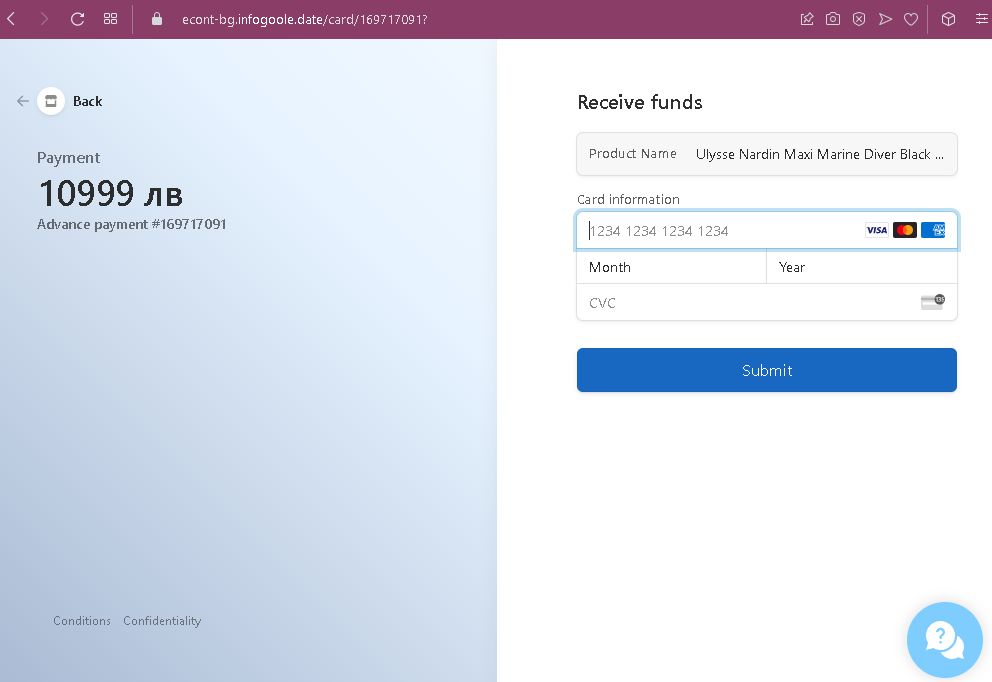
Step 2 – Credit Card Harvesting Page (Second Screenshot)
The goal:
The attacker steals the victim’s credit card details. There is no actual payment of 10,999 leva waiting to be received—the entire transaction is fabricated. If the victim enters their card details, the attacker can make unauthorized purchases or sell the information.

Red flags to watch for:

  • Illogical request for card details: To receive money, you never need to enter your credit card details. Receiving funds typically requires providing a bank account number (IBAN) or using a payment service (e.g., PayPal, ePay)—not a credit card number, expiry date, and CVC.
  • Suspicious URL: The pages are hosted on domains that are not legitimate shipping, escrow, or payment services. Always check the address bar.
  • High-value item: Luxury watches like Ulysse Nardin are commonly used in scams because they command high prices, making the “payment” amount large enough to excite the seller.
  • Fake buyer information: The name “…” and the Sofia address may be real or plausible, but they are not verifiable through the platform.
  • Currency typo: The second page shows “10999 JB” instead of “10999 лв,” indicating the page was poorly translated or copied.
  • No platform integration: Legitimate classified platforms in Bulgaria (OLX, Bazar) do not use external “Secure Offer” pages for payments. Buyers and sellers typically arrange payment directly or through platform-integrated options.
  • Generic card form: The payment page lacks any recognizable Bulgarian payment processor branding (e.g., ePay, Borica) and does not use a secure, trusted payment gateway.

What to do if you encounter this:

  • Do not click “ВЗЕМИ ПАРИТЕ” or enter any credit card details.
  • Do not enter your card number, expiry date, or CVC on this page.
  • If you are selling items online, never click links sent by buyers claiming payment is waiting. Legitimate buyers pay through official platform mechanisms, bank transfer, or cash on pickup.
  • If you have already entered your credit card details, contact your bank immediately to block the card and dispute any unauthorized charges.
  • Report the phishing page to the classified platform where the scam originated.

Why this scam is effective:
Bulgaria has a thriving second-hand market for luxury watches and other high-value items. Sellers are often eager to close a sale and may not question a buyer who claims to have paid through a “secure” escrow service. The use of Bulgarian language, a real Sofia address, and a plausible buyer name makes the scam locally convincing. The large amount (10,999 leva) creates excitement and urgency, overriding suspicion.

Protective measures:

  • Always complete transactions through the official payment system of the platform you are using, or use cash on pickup.
  • Never accept payment through links sent by buyers—insist on bank transfer to your IBAN, or use trusted services like ePay or PayPal directly (by logging into your account, not through a link).
  • Remember: receiving money never requires your credit card information.
  • If a buyer claims they have paid through an escrow or shipping service, verify directly with the official website of that service using a URL you type yourself—never click links in messages.
  • Be suspicious of any page that asks for your full credit card details outside of a well-known, trusted payment provider.

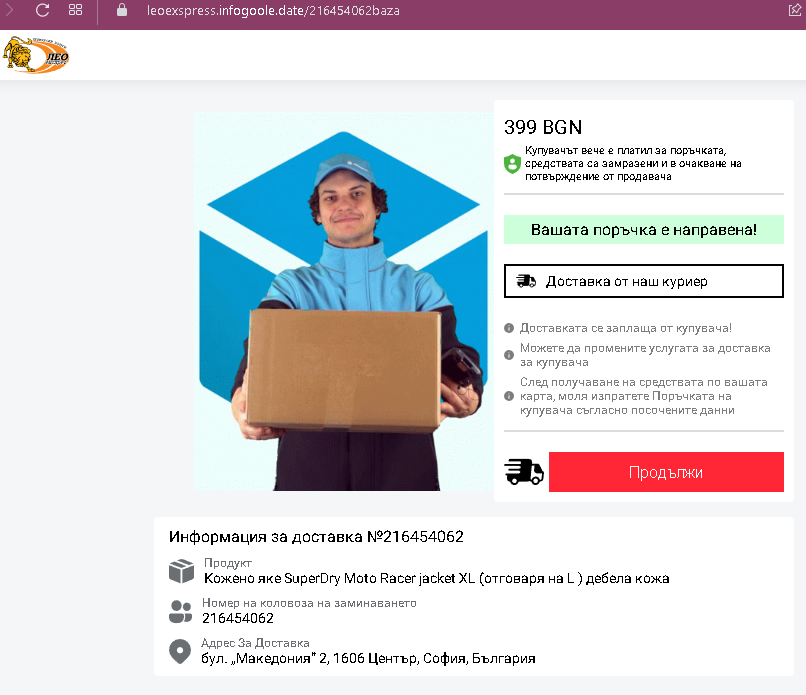
Leo Express phishing page in Bulgarian detected


Fake Order Confirmation Scam – “Receive Funds” Card Harvesting (Bulgarian Variant – Lower Value Item)

This phishing campaign is designed to steal credit card details from users selling items online (likely on classified ad platforms such as OLX.bg, Bazar.bg, or Facebook Marketplace) in Bulgaria. The scam creates a fake “order confirmation” page and pressures the seller to “receive funds” by entering their card information.

How it works:
The victim (a seller) receives a message from a potential buyer claiming they have paid for the item. The buyer sends a link to this fake order confirmation page.

Step 1 – Fake Order Confirmation Page (First Screenshot)
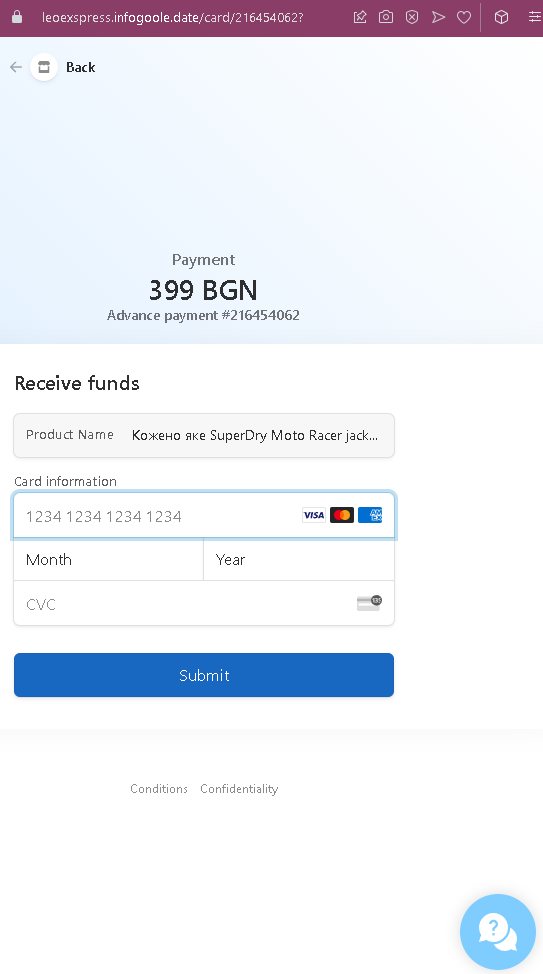
Step 2 – Credit Card Harvesting Page (Second Screenshot)
After clicking “Продължи,” the victim is taken to this page.

The goal:
The attacker steals the victim’s credit card details. There is no actual payment of 399 BGN waiting to be received—the entire transaction is fabricated. If the victim enters their card details, the attacker can make unauthorized purchases or sell the information.

Red flags to watch for:

  • Illogical request for card details: To receive money, you never need to enter your credit card details. Receiving funds typically requires providing a bank account number (IBAN) or using a payment service (e.g., PayPal, ePay)—not a credit card number, expiry date, and CVC.
  • Suspicious URL: The pages are hosted on domains that are not legitimate classified or payment platforms. Always check the address bar.
  • “Frozen funds” pretext: The phrase “средствата са замразени” (funds are frozen) is a common phishing tactic to create urgency and legitimacy, but no real platform freezes funds waiting for card details.
  • Fake delivery options: The page claims “Доставка от наш куриер” (Delivery by our courier) and “Доставката се заплаща от купувача” (Delivery is paid by the buyer), but these are just text elements—not interactive or verifiable services.
  • Product description inconsistencies: The second page has a typo (“Koxxeno axe” instead of “Кожено яке”), indicating poor translation or copying.
  • Same address as previous scam: The delivery address (бул. „Македония“ 2, Sofia) appears in multiple Bulgarian phishing campaigns, suggesting a template being reused by attackers.
  • Generic card form: The payment page lacks any recognizable Bulgarian payment processor branding (e.g., ePay, Borica) and does not use a secure, trusted payment gateway.

What to do if you encounter this:

  • Do not click “Продължи” or enter any credit card details.
  • Do not enter your card number, expiry date, or CVC on this page.
  • If you are selling items online, never click links sent by buyers claiming payment is waiting. Legitimate buyers pay through official platform mechanisms, bank transfer, or cash on pickup.
  • If you have already entered your credit card details, contact your bank immediately to block the card and dispute any unauthorized charges.
  • Report the phishing page to the classified platform where the scam originated.

Why this scam is effective:
This scam uses a moderately priced item (399 BGN) rather than an expensive luxury watch, making it more relatable to average sellers. The “frozen funds” language creates a sense of urgency and false legitimacy. The use of a real Sofia address, Bulgarian language, and detailed product description (SuperDry jacket with size details) makes the transaction appear genuine. Sellers who are eager to complete the sale may overlook the critical red flag: entering credit card details to receive money.

Protective measures:

  • Always complete transactions through the official payment system of the platform you are using, or use cash on pickup.
  • Never accept payment through links sent by buyers—insist on bank transfer to your IBAN, or use trusted services like ePay or PayPal directly (by logging into your account, not through a link).
  • Remember: receiving money never requires your credit card information.
  • If a buyer claims they have paid through an escrow or shipping service, verify directly with the official website of that service using a URL you type yourself—never click links in messages.
  • Be suspicious of any page that asks for your full credit card details outside of a well-known, trusted payment provider.

Grailed fake page detected


Grailed Marketplace Phishing – Fake “Item Sold” & Card Harvesting

This phishing campaign impersonates Grailed, a popular peer-to-peer marketplace for men’s clothing and vintage items. The scam targets sellers by creating a fake “item sold” confirmation page and then requesting credit card details under the guise of “receiving funds.”

How it works:
The victim (a seller) receives a message—likely through Grailed’s messaging system, email, or social media—claiming that their item has been purchased. The message includes a link to this fake Grailed-branded payment page.

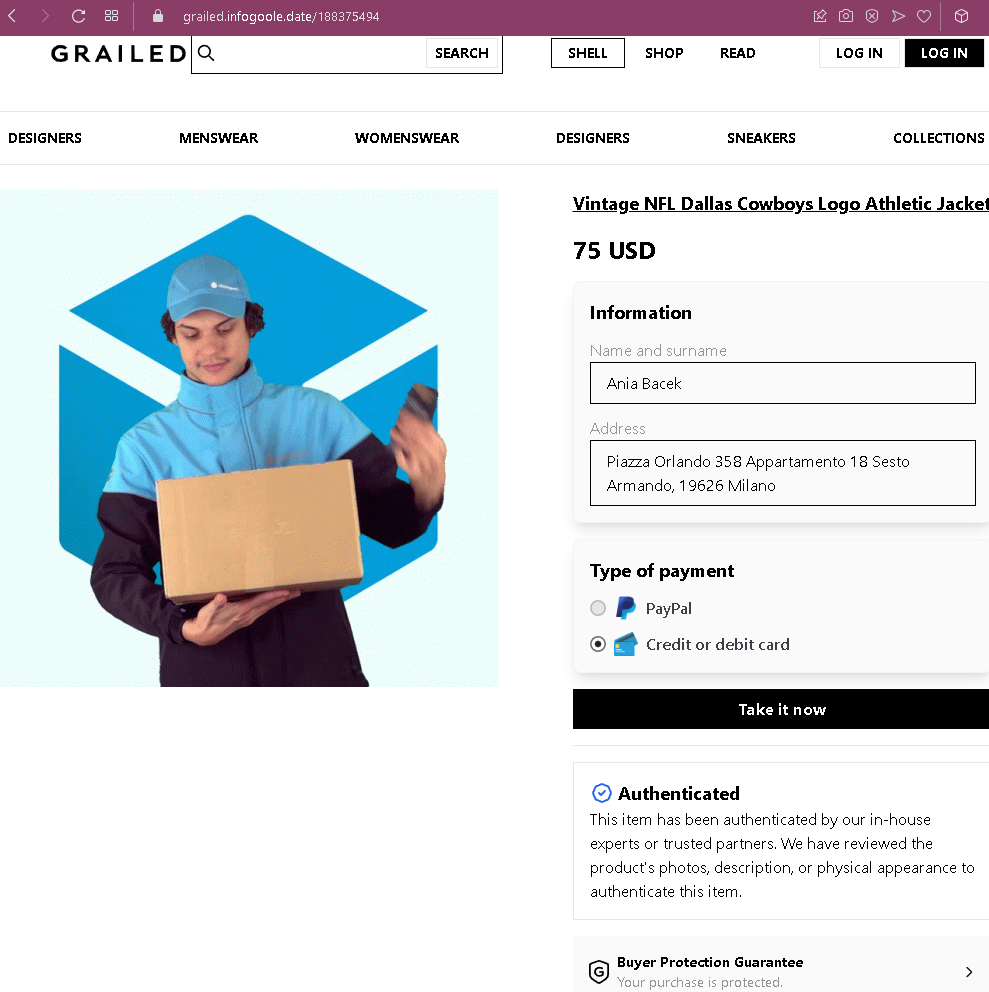
Step 1 – Fake Grailed Item Sold Page (First Screenshot)
The page is designed to look like Grailed’s official checkout or payment confirmation interface.

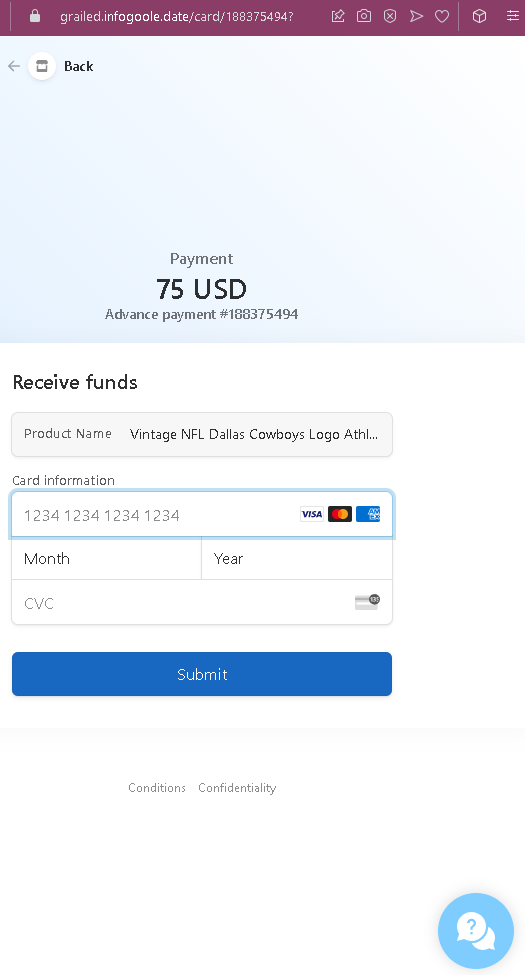
Step 2 – Credit Card Harvesting Page (Second Screenshot)
After clicking “Take it now,” the victim is taken to this page.

The goal:
The attacker steals the victim’s credit card details. There is no actual sale of the jacket—the entire transaction is fabricated. If the victim enters their card details, the attacker can make unauthorized purchases or sell the information.

Red flags to watch for:

  • Illogical request for card details: On a legitimate marketplace like Grailed, sellers do not enter credit card details to receive payment. Sellers provide payout information (bank account or PayPal) once, during account setup. Payments are automatically processed.
  • Suspicious URL: The pages are hosted on domains that are not grailed.com. Always check the address bar before entering any information.
  • Mismatched payment method: The first page offers PayPal or card, but the second page only asks for card details—even if the seller selected PayPal, the scam would still present the card form.
  • Fake buyer address: The address in Milan may be real, but Grailed does not display the buyer’s full address to the seller before payment is completed. Sellers only receive shipping addresses after a legitimate sale is confirmed through the platform.
  • “Take it now” button: Grailed’s legitimate interface uses “Buy Now” or “Make an Offer,” not “Take it now.”
  • Fake authentication badges: While Grailed does offer authentication for certain items, the badges on this page are copied and used out of context to build false trust.
  • No login required: Legitimate Grailed sales require the seller to be logged into their account. This page does not ask for Grailed credentials—it jumps straight to payment details, which is not how the platform works.
  • Generic card form: The payment page lacks Grailed’s actual payment processor branding (Grailed uses PayPal and Stripe) and does not have the expected secure checkout interface.

What to do if you encounter this:

  • Do not click “Take it now” or enter any credit card details.
  • Do not enter your card number, expiry date, or CVC on this page.
  • If you are a Grailed seller, always log into your Grailed account directly (type grailed.com into your browser) to check for real sales. Legitimate sales will appear in your “Sales” dashboard.
  • Never click links in messages claiming someone has purchased your item—always verify through the official platform.
  • If you have already entered your credit card details, contact your bank immediately to block the card and dispute any unauthorized charges.
  • Report the phishing page to Grailed’s support team ([email protected]) so they can take action.

Why this scam is effective:
Grailed has a dedicated community of sellers who frequently list high-value streetwear and vintage items. Sellers are eager to make a sale and may click a link in a message without thinking. The page closely mimics Grailed’s design, uses correct terminology (“Authenticated,” “Buyer Protection”), and includes realistic-looking buyer details. The $75 price point is modest enough to be believable but high enough to motivate the seller to act quickly.

Protective measures:

  • Always log into the platform (Grailed, eBay, etc.) directly to confirm sales—never rely on links in messages.
  • Never enter credit card details to receive payment. Receiving money requires your payout information (bank account or PayPal), which is set once in account settings, not entered per transaction.
  • Enable two-factor authentication (2FA) on your Grailed account and associated email.
  • Be suspicious of any message that directs you to an external page to “complete” a transaction.
  • If a buyer claims they have purchased your item but you don’t see it in your official account dashboard, it is a scam.

FedEx phishing page in Slovak revealed

A two-step classified ads/phishing scam targeting users in Slovakia. The scam combines fake branding from FedEx and Slovenská pošta (Posta.sk) with a fake payment confirmation page to steal credit card details.


FedEx & Posta.sk Phishing Scam – Fake “Funds Received” & Card Harvesting (Slovak Variant)

This phishing campaign targets sellers on Slovak classified platforms (such as Bazar.sk) by impersonating both FedEx and Slovenská pošta (Posta.sk) . The scam creates a fake “funds received” page and then pressures the seller to “link a card” to receive payment.

How it works:
The victim (a seller) receives a message from a potential buyer claiming they have paid for the item and that the payment is being held by a shipping service. The buyer sends a link to this fake FedEx/Posta.sk payment page. The scam also includes a fake chat support window to add credibility.

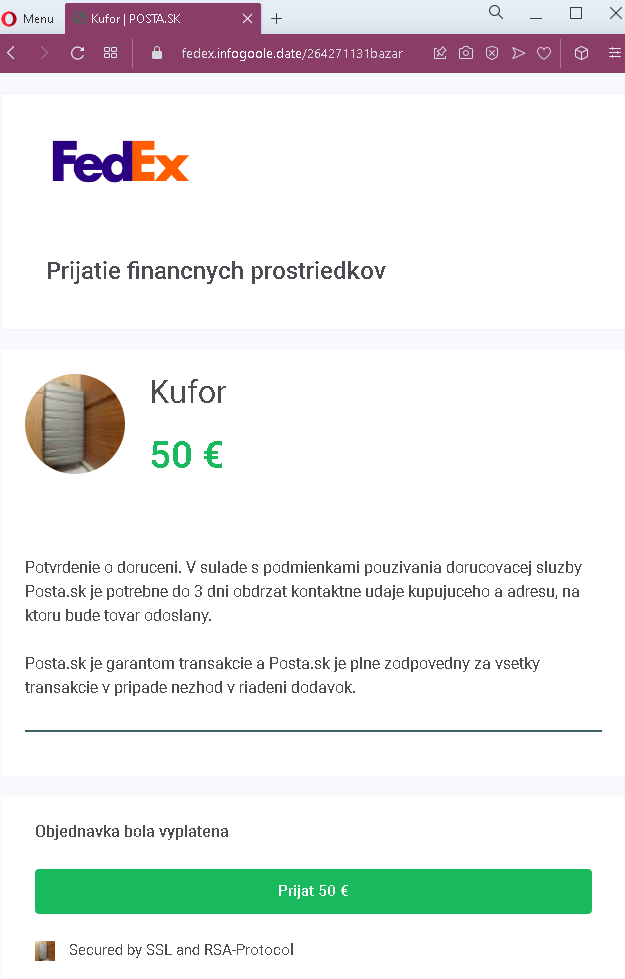
Step 1 – Fake FedEx & Posta.sk “Funds Received” Page (First Screenshot)
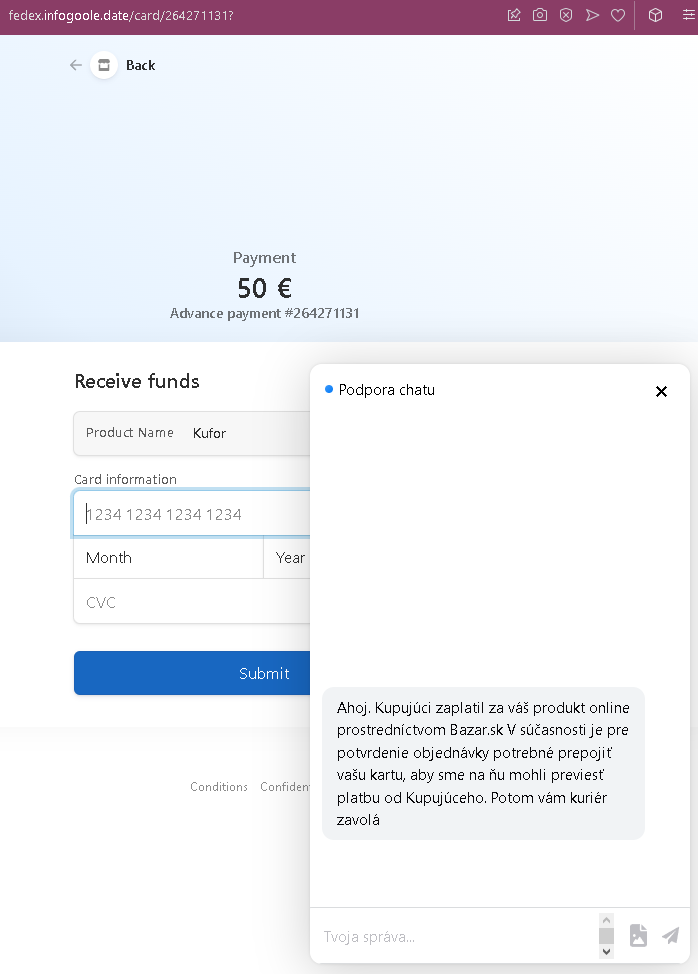
Step 2 – Credit Card Harvesting Page & Fake Chat Support (Second Screenshot)
After clicking the “Received” button, the victim is taken to this page.

The goal:
The attacker steals the victim’s credit card details. There is no actual payment of 50 €—the entire transaction is fabricated. The fake chat support window is designed to add legitimacy and answer any questions the victim might have, guiding them to complete the card form.

Red flags to watch for:

  • Illogical request for card details: To receive money (prijať platbu), you never need to enter your credit card details. Receiving funds typically requires providing a bank account number (IBAN) or using a payment service—not a credit card number, expiry date, and CVC.
  • Mixed branding: The page uses both FedEx and Posta.sk logos, which is unusual—these are separate companies. A legitimate transaction would not involve both.
  • Fake chat support: The chat window is not a live support feature but a scripted message designed to reassure victims. Legitimate shipping companies do not use embedded chat windows to walk users through payment receipt.
  • Suspicious URL: The pages are hosted on domains that are not fedex.com, posta.sk, or bazar.sk. Always check the address bar.
  • Reference to Bazar.sk: The chat message mentions Bazar.sk (a Slovak classified site), but the payment page is not on the Bazar.sk domain.
  • Poor grammar and formatting: The Slovak text contains some stylistic inconsistencies, and the “Secured by SSL and RSA-Protocol” badge is generic and not linked to a real security certificate.
  • No login required: Legitimate sales on Bazar.sk or payments via shipping companies do not require entering credit card details on a third-party page.

What to do if you encounter this:

  • Do not click “Prijal 50 €” or enter any credit card details.
  • Do not interact with the fake chat support or follow its instructions.
  • If you are selling items on Bazar.sk or similar platforms, always verify any sale by logging into your account directly—never click links sent by buyers.
  • If you have already entered your credit card details, contact your bank immediately to block the card and dispute any unauthorized charges.
  • Report the phishing page to Bazar.sk, FedEx, and Slovenská pošta.

Why this scam is effective:
This scam cleverly combines multiple trusted brands (FedEx, Posta.sk, Bazar.sk) to create a false sense of legitimacy. The fake chat support window is a particularly sophisticated touch—it mimics the “live chat” features common on e-commerce sites and provides a seemingly helpful explanation for why the card details are needed. The relatively low amount (50 €) makes the transaction feel plausible, and the 3-day deadline creates urgency.

Protective measures:

  • Always log into the platform (Bazar.sk, etc.) directly to check for sales—never rely on links in messages.
  • Never enter credit card details to receive payment. Receiving money requires your bank account or PayPal details, which are set once in your account settings, not entered per transaction.
  • Be suspicious of any page that asks for your full credit card details outside of a well-known, trusted payment provider.
  • If a buyer claims they have paid through a shipping company or escrow service, verify directly with the official website of that service using a URL you type yourself—never click links in messages.
  • Legitimate chat support will not ask you to enter card details in a separate form; they will guide you to the official website’s secure payment section.

Yad2 phishing page in Hebrew detected

This is a two-step classified ads/phishing scam targeting users in Israel, impersonating the popular Israeli classified platform Yad2. The scam is designed to steal credit card details from sellers by creating a fake “payment received” notification.


Yad2 Classifieds Phishing – Fake “Payment Received” & Card Harvesting (Israeli Variant)

This phishing campaign impersonates Yad2, a leading classified advertisements platform in Israel. The scam targets sellers by creating a fake transaction confirmation page and then requesting credit card details under the guise of “receiving funds” for a sold item.

How it works:
A seller receives a message—likely via the Yad2 messaging system, SMS, or other chat app—from a potential buyer claiming to have paid for the item. The message includes a link to a phishing page that mimics Yad2’s payment interface.

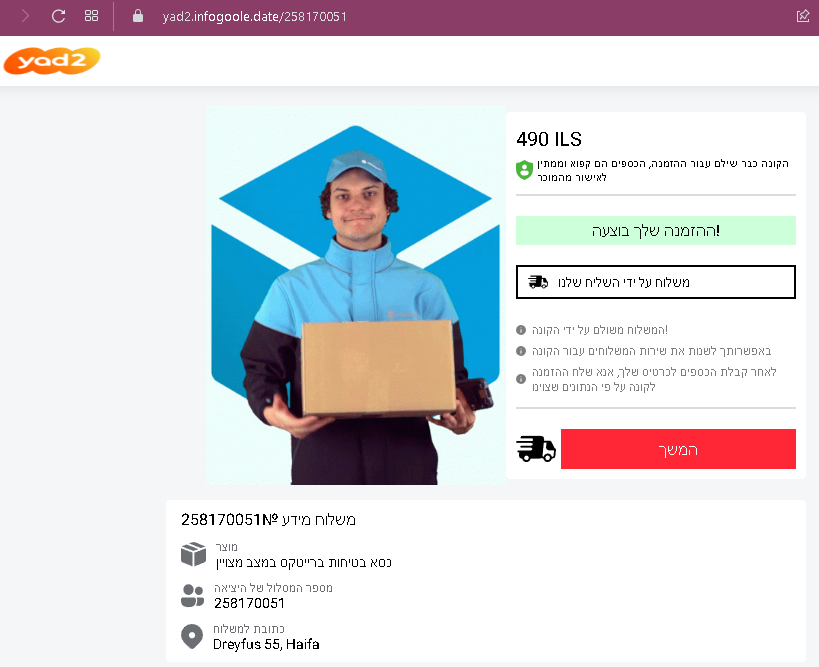
Step 1 – Fake Payment Confirmation Page
The first page displays:

  • The Yad2 logo and branding
  • A specific item (in this case, a product listed at 490 ILS, Israeli shekels)
  • Fabricated buyer details, including a name and an address in Haifa
  • A fake reference or tracking number
  • A button designed to make the seller believe they can “receive” or “claim” the payment

The page is designed to look like an official Yad2 payment confirmation, creating the impression that the buyer has already paid and the funds are waiting.

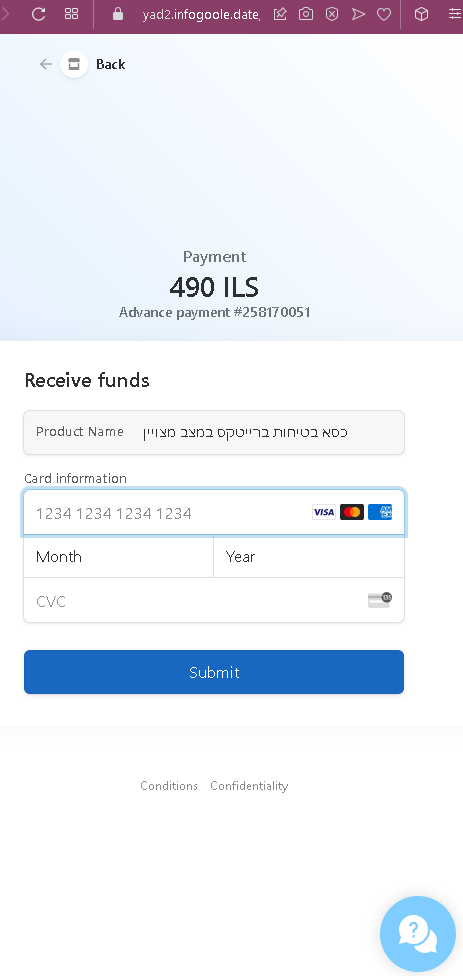
Step 2 – Credit Card Harvesting Page
After clicking the button, the seller is taken to a second page that requests:

  • Full credit card number
  • Expiration date (month and year)
  • CVC security code

This page also displays the transaction amount (490 ILS) and a reference number to maintain the illusion of a legitimate payment process.

The goal:
The attacker steals the seller’s credit card details. There is no actual buyer or payment—the entire transaction is fabricated. Once the seller submits their card information, the attacker can make unauthorized purchases or sell the data.

Red flags to watch for (without quoting specific text):

  • Illogical request for card details: A seller receiving money should never be asked to enter their credit card information. Receiving funds requires providing bank account details (such as IBAN) or linking a payout method like PayPal—not entering a full card number, expiry date, and CVC.
  • Suspicious URL: The pages are hosted on a domain that is not yad2.co.il. Always check the address bar before entering any information.
  • Fake buyer details: The scam includes plausible but unverifiable buyer information (name, address) to make the transaction seem real. On legitimate Yad2 transactions, payment details and buyer information are handled through the platform’s official system, not displayed on a third-party page.
  • No login required: A legitimate sale on Yad2 would appear in the seller’s account dashboard after logging in. This scam bypasses that entirely, asking for card details without any account authentication.
  • Generic payment form: The second page lacks integration with Yad2’s actual payment providers (such as credit card gateways or PayPal) and does not display the security indicators expected from a legitimate checkout page.

What to do if you encounter this:

  • Do not click any buttons claiming payment is ready.
  • Do not enter your credit card number, expiry date, or CVC on such pages.
  • If you are selling on Yad2, always log into your account directly (by typing yad2.co.il into your browser) to check for real sales and payment status.
  • Never trust links sent by buyers claiming they have paid—legitimate buyers use the platform’s official payment or communication channels.
  • If you have already entered your credit card details, contact your bank immediately to block the card and dispute any unauthorized charges.
  • Report the phishing page to Yad2’s support team so they can take action to protect other users.

Why this scam is effective:
Yad2 is one of Israel’s most widely used platforms for buying and selling second-hand goods. Sellers are accustomed to receiving messages from buyers and may not suspect a link that appears to show a legitimate-looking payment confirmation. The use of Hebrew text, local addresses, and shekel amounts makes the scam culturally and contextually convincing. The relatively modest amount (490 ILS) is realistic for a typical second-hand item, reducing suspicion.

Protective measures:

  • Always verify any sale by logging directly into your Yad2 account—never through a link sent in a message.
  • Never enter credit card details to receive payment. Payment to sellers is typically handled through bank transfer, cash on pickup, or platform-integrated payment methods that do not require re-entering card details for each transaction.
  • Be suspicious of any message that creates urgency or claims payment is already “waiting” but requires you to click an external link.
  • Enable two-factor authentication (2FA) on your email and any linked payment accounts.
  • If a buyer sends you a link to “claim” payment, treat it as a red flag and verify directly through the platform’s official app or website.