
Threat Intel: This malicious interface was detected, analyzed, and contained firsthand by the
Antiphishing.bizsecurity team during our standard URL vetting operations. To protect the public, the phishing source domain has been safely deactivated within our infrastructure. We document and analyze these live visual patterns to help security researchers and users recognize deceptive clone designs before financial damage occurs.
Grailed Marketplace Phishing – Fake “Item Sold” & Card Harvesting
This phishing campaign impersonates Grailed, a popular peer-to-peer marketplace for men’s clothing and vintage items. The scam targets sellers by creating a fake “item sold” confirmation page and then requesting credit card details under the guise of “receiving funds.”
How it works:
The victim (a seller) receives a message—likely through Grailed’s messaging system, email, or social media—claiming that their item has been purchased. The message includes a link to this fake Grailed-branded payment page.
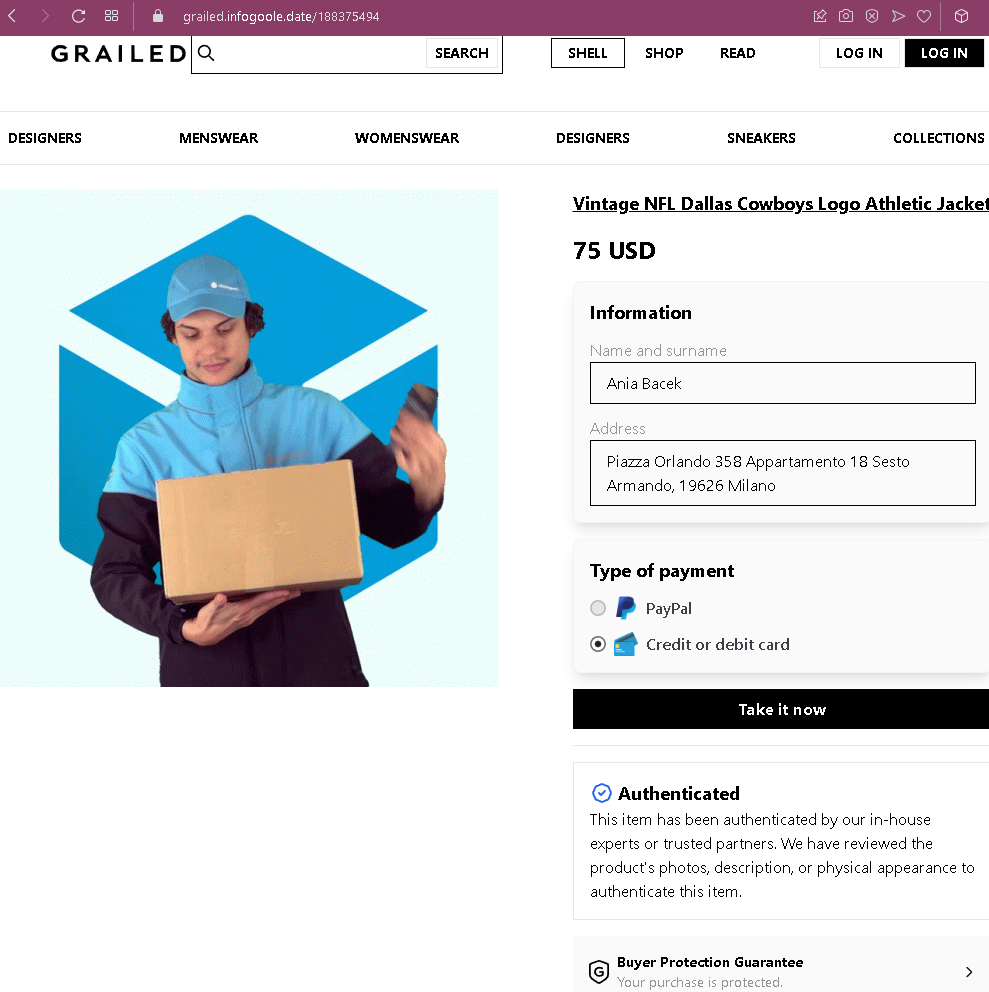
Step 1 – Fake Grailed Item Sold Page (First Screenshot)
The page is designed to look like Grailed’s official checkout or payment confirmation interface.
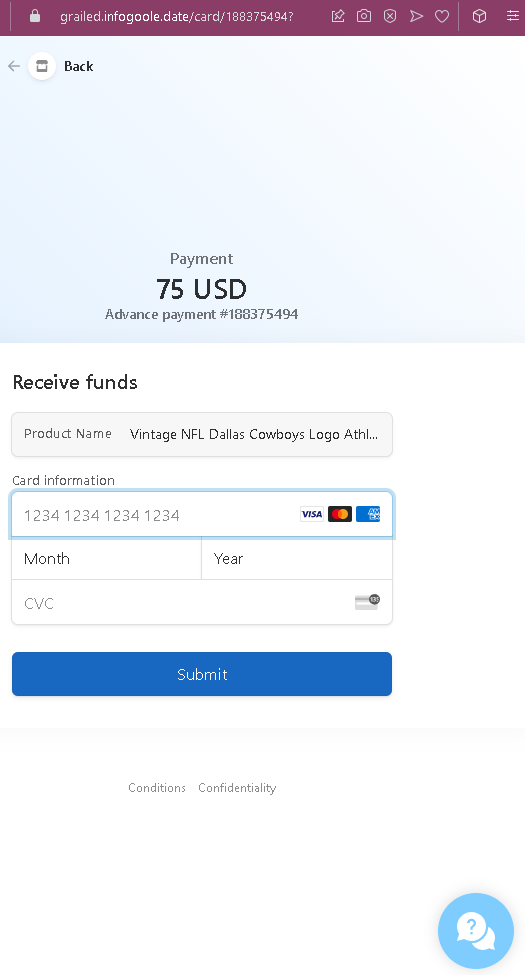
Step 2 – Credit Card Harvesting Page (Second Screenshot)
After clicking “Take it now,” the victim is taken to this page.
The goal:
The attacker steals the victim’s credit card details. There is no actual sale of the jacket—the entire transaction is fabricated. If the victim enters their card details, the attacker can make unauthorized purchases or sell the information.
Red flags to watch for:
- Illogical request for card details: On a legitimate marketplace like Grailed, sellers do not enter credit card details to receive payment. Sellers provide payout information (bank account or PayPal) once, during account setup. Payments are automatically processed.
- Suspicious URL: The pages are hosted on domains that are not
grailed.com - Mismatched payment method: The first page offers PayPal or card, but the second page only asks for card details—even if the seller selected PayPal, the scam would still present the card form.
- Fake buyer address: The address in Milan may be real, but Grailed does not display the buyer’s full address to the seller before payment is completed. Sellers only receive shipping addresses after a legitimate sale is confirmed through the platform.
- “Take it now” button: Grailed’s legitimate interface uses “Buy Now” or “Make an Offer,” not “Take it now.”
- Fake authentication badges: While Grailed does offer authentication for certain items, the badges on this page are copied and used out of context to build false trust.
- No login required: Legitimate Grailed sales require the seller to be logged into their account. This page does not ask for Grailed credentials—it jumps straight to payment details, which is not how the platform works.
- Generic card form: The payment page lacks Grailed’s actual payment processor branding (Grailed uses PayPal and Stripe) and does not have the expected secure checkout interface.
What to do if you encounter this:
- Do not click “Take it now” or enter any credit card details.
- Do not enter your card number, expiry date, or CVC on this page.
- If you are a Grailed seller, always log into your Grailed account directly (type
grailed.com - Never click links in messages claiming someone has purchased your item—always verify through the official platform.
- If you have already entered your credit card details, contact your bank immediately to block the card and dispute any unauthorized charges.
- Report the phishing page to Grailed’s support team (
[email protected]) so they can take action.
Why this scam is effective:
Grailed has a dedicated community of sellers who frequently list high-value streetwear and vintage items. Sellers are eager to make a sale and may click a link in a message without thinking. The page closely mimics Grailed’s design, uses correct terminology (“Authenticated,” “Buyer Protection”), and includes realistic-looking buyer details. The $75 price point is modest enough to be believable but high enough to motivate the seller to act quickly.
Protective measures:
- Always log into the platform (Grailed, eBay, etc.) directly to confirm sales—never rely on links in messages.
- Never enter credit card details to receive payment. Receiving money requires your payout information (bank account or PayPal), which is set once in account settings, not entered per transaction.
- Enable two-factor authentication (2FA) on your Grailed account and associated email.
- Be suspicious of any message that directs you to an external page to “complete” a transaction.
- If a buyer claims they have purchased your item but you don’t see it in your official account dashboard, it is a scam.