Incident Report: This spoofed page was detected, analyzed, and contained firsthand by the Antiphishing.biz security team during our standard URL vetting operations. To protect the public, the dangerous destination URL has been safely deactivated within our infrastructure. We document and analyze these live visual patterns to help security researchers and users recognize deceptive clone designs before financial damage occurs.
Figure 1: Visual proof of the active phishing operation intercepted by our security systems.Figure 2: Visual proof of the active phishing operation intercepted by our security systems.
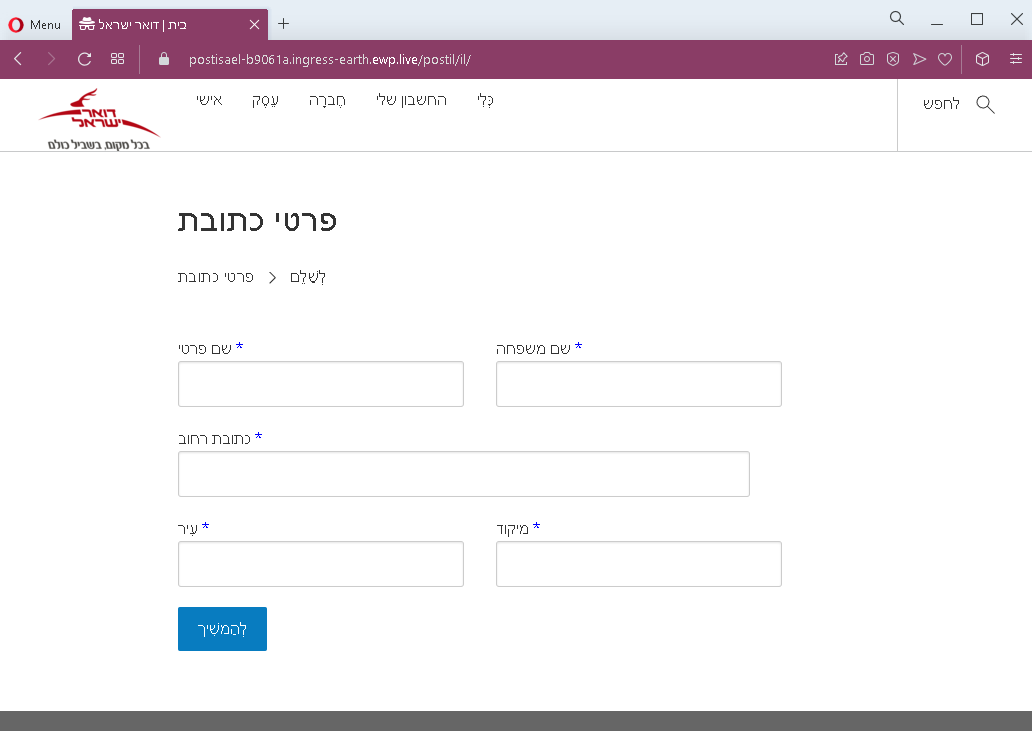
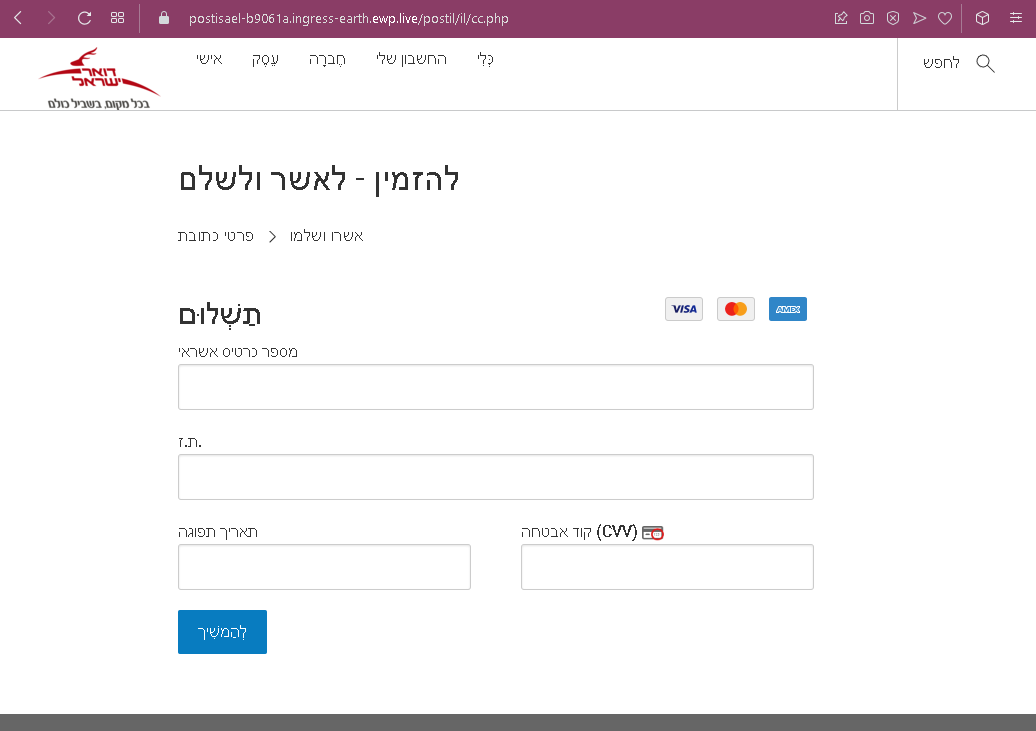
Thank you for the clarification. The two screenshots are indeed Hebrew‑language phishing pages impersonating a local courier or postal service (likely Israel Post or a similar carrier). The text appeared garbled in the automatic fetch, but the layout matches the classic two‑step delivery scam.
Threat Analysis: Hebrew Delivery Phishing – Personal Info & Card Harvesting
Step 1 – Personal Information Page The victim is asked to provide:
Full name
Address, city, postal code
Phone number
Step 2 – Card Details Page The second page requests:
Cardholder name
Full card number
Expiration date (MM/YY)
CVV security code
A small delivery fee is displayed (typically a few shekels) to make the payment seem trivial and urgent.
The goal: The attacker collects:
Personal identity details for future fraud or identity theft
Full credit/debit card information to make unauthorized purchases or sell the data
Red flags:
Suspicious URL: The page is hosted on a domain that is not the official postal service website.
Request for CVV: A legitimate courier never asks for your card security code to collect a delivery fee.
Small fee trick: A negligible amount is used to lower suspicion.
No trackable package reference: The victim cannot verify the supposed shipment.
What to do:
Do not enter any personal or card information.
If you are expecting a delivery, track it directly by typing the official courier URL into your browser.
If you have already entered card details, contact your bank immediately to block the card.
Protective measures:
Never click links in unsolicited delivery messages.
Always go directly to the official courier website.
Threat Intel: This scam layout was detected, analyzed, and contained firsthand by the Antiphishing.biz security team during our standard URL vetting operations. To protect the public, the hostile origin link has been fully defanged within our infrastructure. We document and analyze these live visual patterns to help security researchers and users spot lookalike phishing methods before financial damage occurs.
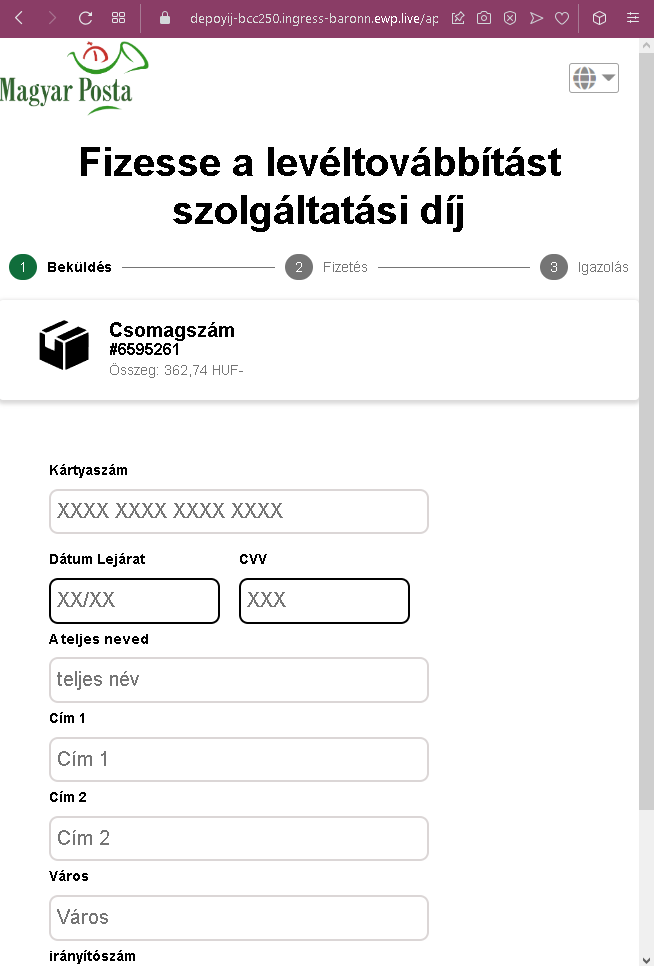
Figure 1: Actual screenshot of the ongoing fraudulent campaign intercepted by our security systems.
This screenshot shows a Hungarian‑language phishing page impersonating a courier service (likely Magyar Posta or a similar carrier). The scam uses a small delivery fee (362.74 HUF) as a pretext to collect full credit card details and personal address information.
Threat Analysis: Hungarian Delivery Phishing – Card & Personal Data Harvesting
How it works: The victim receives an SMS or email claiming a package requires a forwarding or service fee. The link leads to this page, which asks for:
Full card number, expiration date, CVV
Full name
Street address, city, postal code
A fake tracking number and a small amount (362.74 HUF) are displayed to make the request appear legitimate.
The goal: The attacker captures:
Full credit/debit card details for fraudulent transactions
Personal identity information (name, address) for identity theft
Red flags:
Suspicious URL: The page is not on the official courier’s domain.
Request for CVV: Legitimate postal services never ask for your card security code for a delivery fee.
Small fee trick: A trivial amount lowers suspicion.
No trackable package reference: The victim cannot verify the supposed shipment.
What to do:
Do not enter any personal or card information.
Track packages directly by typing the official courier’s URL into your browser.
If you have already entered card details, contact your bank immediately.
Protective measures:
Never click links in unsolicited delivery messages.
Always go directly to the official courier website.
Analysis Memo: This scam layout was intercepted, verified, and locked down firsthand by the Antiphishing.biz security team during our standard URL vetting operations. To protect the public, the phishing source domain has been safely deactivated within our infrastructure. We document and analyze these live visual patterns to help security researchers and users detect replica fraud techniques before financial damage occurs.
Figure 1: Verified screenshot of the live scam infrastructure isolated on our infrastructure.Figure 2: Verified screenshot of the live scam infrastructure isolated on our infrastructure.
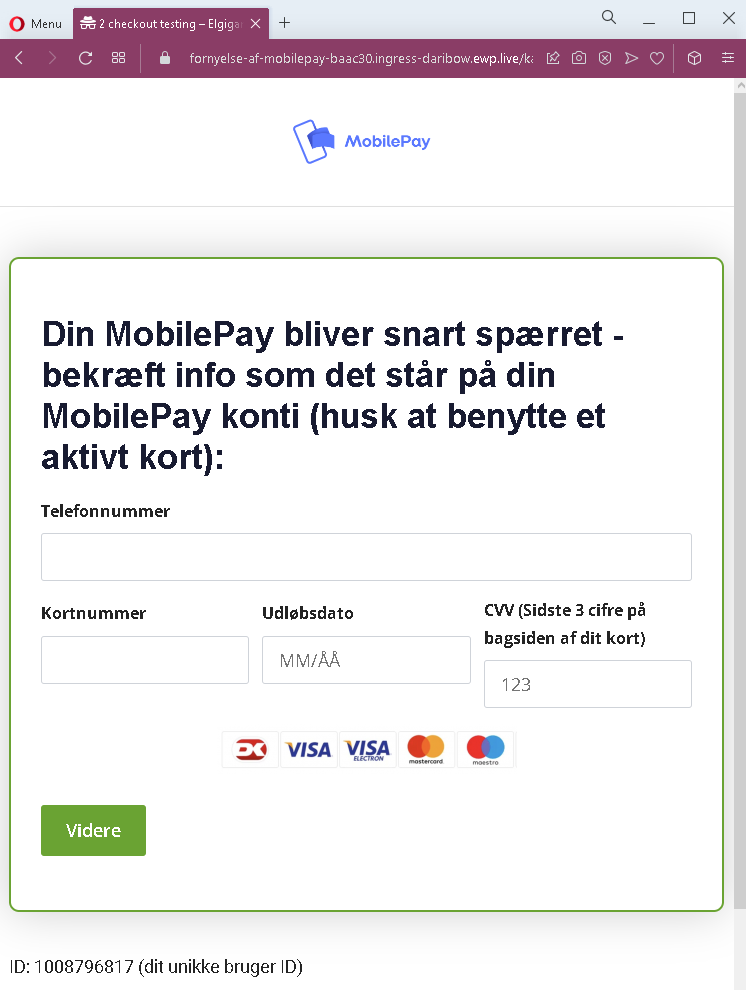
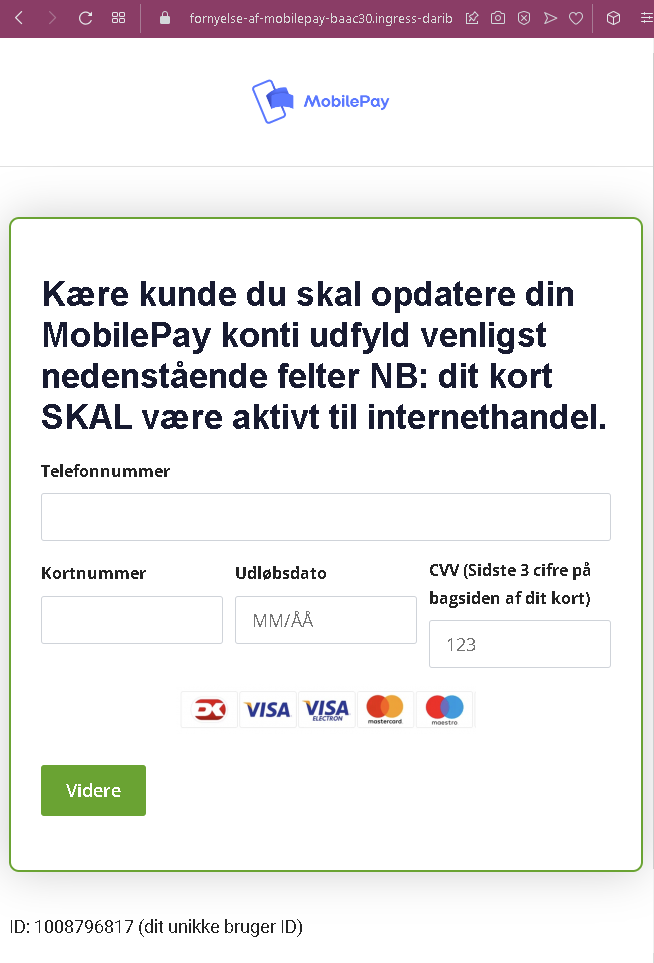
These two screenshots show a Danish‑language phishing campaign impersonating MobilePay, a popular mobile payment service in Denmark. The scam threatens account suspension and demands that the victim provide their phone number, full card details, and CVV under the pretext of “updating” the account.
How it works: The victim receives an SMS, email, or message claiming that their MobilePay account will soon be blocked. To prevent this, they must “confirm” their information by clicking a link that leads to one of these pages.
The pages ask for:
Phone number (linked to the MobilePay account)
Card number
Expiration date (MM/ÅÅ)
CVV (the three‑digit security code on the back of the card)
A “unique user ID” is displayed to make the page appear personalized, but it is the same static number on all pages.
The goal: The attacker collects:
The victim’s phone number (used for SIM‑swapping or further fraud)
Full credit/debit card details (number, expiry, CVV) to make unauthorized purchases or clone the card
Red flags to watch for:
Suspicious URL: The page is hosted on a domain that is not mobilepay.dk. Legitimate MobilePay services are accessed through the official app or website.
Threat of account closure: MobilePay does not send unsolicited links threatening to block accounts.
Request for CVV: MobilePay never asks for your card security code to “update” or “verify” your account.
Static “unique” ID: The displayed ID (1008796817) is identical on both pages – a clear sign of a phishing template.
Poor Danish phrasing: The text contains minor grammatical inconsistencies that would not appear in official communications.
Unsolicited action required: Any legitimate request to update payment information would happen within the app or after logging in, not via a link.
What to do if you encounter this:
Do not enter your phone number, card details, or CVV.
If you are a MobilePay user, always open the official app to check for any notifications or account issues.
If you have already entered card details, contact your bank immediately to block the card.
Report the phishing page to MobilePay’s fraud team.
Protective measures:
Never click links in unsolicited messages threatening account closure.
Always use the official MobilePay app to manage your account.
Never provide your card’s CVV outside of a trusted, direct purchase environment.
Enable two‑factor authentication on your bank and email accounts.
Incident Report: This scam layout was logged, cross-checked, and neutralized firsthand by the Antiphishing.biz security team during our daily link moderation procedures. To protect the public, the hostile origin link has been safely deactivated within our infrastructure. We document and analyze these live visual patterns to help security researchers and users detect replica fraud techniques before financial damage occurs.
Figure 1: Visual proof of the active phishing operation captured during routine moderation.
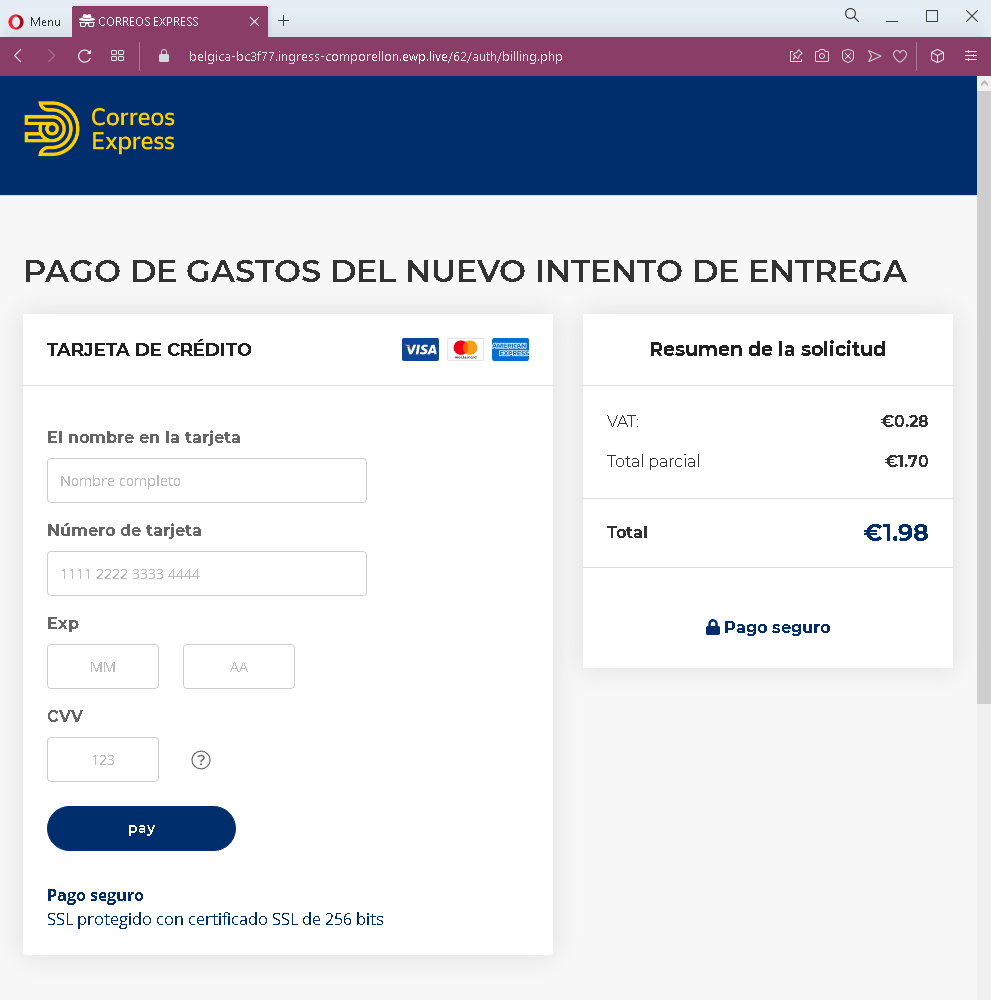
This screenshot shows a Spanish‑language phishing page impersonating a delivery service (such as Correos or another courier). The scam asks the victim to pay a small fee (€1.98) for a “new delivery attempt” and in the process harvests full credit card details.
Threat Analysis: Delivery Phishing – Small Fee & Card Harvesting
How it works: The victim receives an SMS, email, or messaging app alert claiming a package could not be delivered and that a small fee is required to schedule a new delivery attempt. The link leads to this page, which mimics a courier’s payment interface. The victim is asked to provide:
Cardholder name
Full card number
Expiration date (MM/AA)
CVV security code
A total of €1.98 is displayed, with a fake breakdown (VAT, partial total) to appear legitimate. A “secure payment” badge and SSL claim are added to create a false sense of security.
The goal: The attacker captures complete credit/debit card information to make fraudulent purchases, clone the card, or sell the data.
Red flags to watch for:
Suspicious URL: The page is hosted on a domain that is not the official courier’s website.
Request for CVV: A legitimate delivery service never asks for your card security code to collect a redelivery fee.
Small fee trick: €1.98 is a trivial amount intended to lower suspicion.
No tracking or package reference: The page lacks a verifiable tracking number or any personalization linking it to an actual shipment.
Fake security badges: The “SSL protegido” and padlock icons are copied from legitimate sites but do not guarantee authenticity.
What to do if you encounter this:
Do not enter any card or personal information.
If you are expecting a delivery, track it directly by typing the official courier’s URL into your browser.
If you have already entered card details, contact your bank immediately to block the card and dispute any unauthorized charges.
Report the phishing page to the legitimate courier service and to the relevant authorities.
Protective measures:
Never click links in unsolicited delivery messages. Always go directly to the official courier website.
Never pay a “redelivery fee” via a link. Legitimate fees are handled in person, through the official app, or after logging into your account on the official site.
Check the URL carefully: Look for misspellings, extra words, or unusual top‑level domains.
Enable transaction alerts on your bank account to catch unauthorized charges early.
Incident Report: This scam layout was intercepted, verified, and locked down firsthand by the Antiphishing.biz security team during our automated link scanning workflows. To protect the public, the hostile origin link has been safely deactivated within our infrastructure. We document and analyze these live visual patterns to help security researchers and users detect replica fraud techniques before financial damage occurs.
Figure 1: Visual proof of the active phishing operation isolated on our infrastructure.Figure 2: Visual proof of the active phishing operation isolated on our infrastructure.
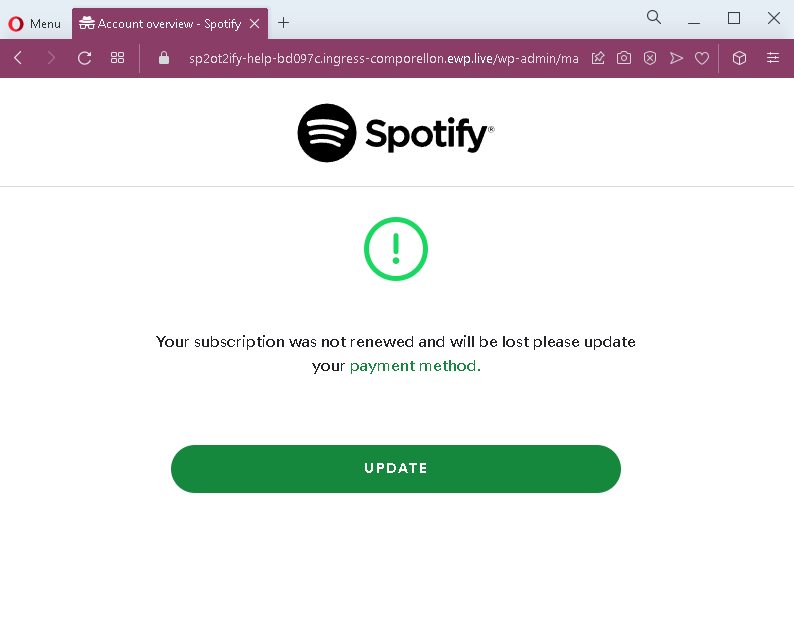
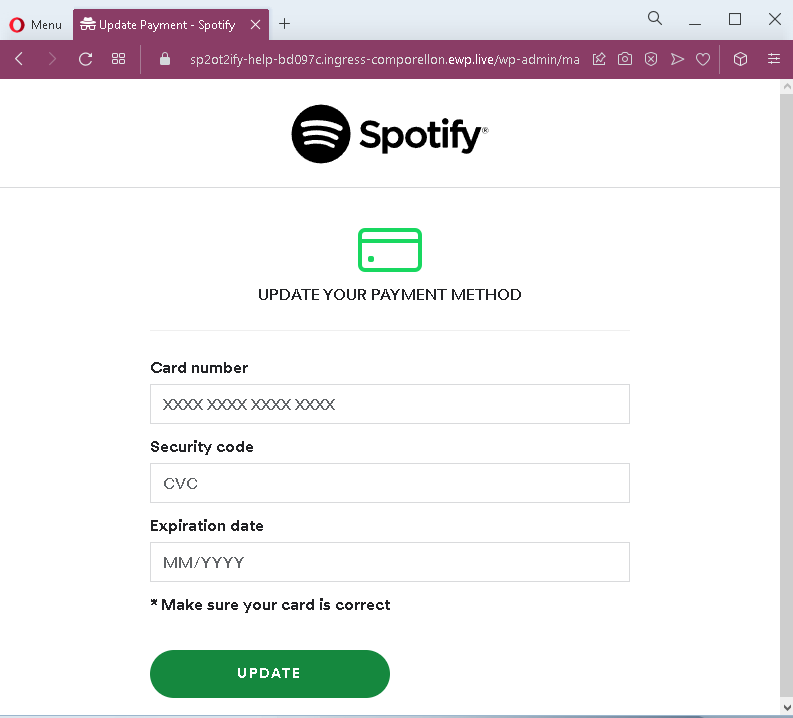
These two screenshots show a phishing campaign impersonating Spotify, targeting users with a fake subscription renewal alert. The scam threatens that the victim’s subscription will be lost unless they update their payment method, then directs them to a page that steals full credit card details.
How it works: The victim receives an email, SMS, or notification claiming their Spotify subscription could not be renewed and will be lost. A link leads to the first page, which repeats the warning and prompts the user to click “UPDATE.” The second page mimics Spotify’s payment interface and asks for:
Card number
Security code (CVV)
Expiration date (MM/YYYY)
The goal: The attacker collects full credit/debit card details to make fraudulent purchases or sell the information.
Red flags:
Suspicious URL: The pages are hosted on a domain that is not spotify.com. Legitimate Spotify payment updates are done within the account settings or official app.
Urgent threat: The message claims the subscription will be lost immediately – a classic fear tactic.
Request for CVV: Spotify never asks for your card security code via an external link.
Generic design: The pages lack personalized account details (e.g., username, plan type, last billing date) that would appear in a genuine notification.
Unsolicited request: Spotify does not send links requiring users to update payment methods through a separate web form.
What to do:
Do not enter any card details.
Open the Spotify app or website directly (type spotify.com) and check your account status under “Subscription.”
If you have already entered card details, contact your bank immediately to block the card.
Protective measures:
Never click links in unsolicited subscription alerts.
Always manage subscriptions through the official app or website.
Enable two‑factor authentication on your email and financial accounts.
Threat Intel: This scam layout was intercepted, verified, and locked down firsthand by the Antiphishing.biz security team during our daily link moderation procedures. To protect the public, the phishing source domain has been fully defanged within our infrastructure. We document and analyze these live visual patterns to help security researchers and users recognize deceptive clone designs before financial damage occurs.
Figure 1: Actual screenshot of the ongoing fraudulent campaign isolated on our infrastructure.Figure 2: Actual screenshot of the ongoing fraudulent campaign isolated on our infrastructure.
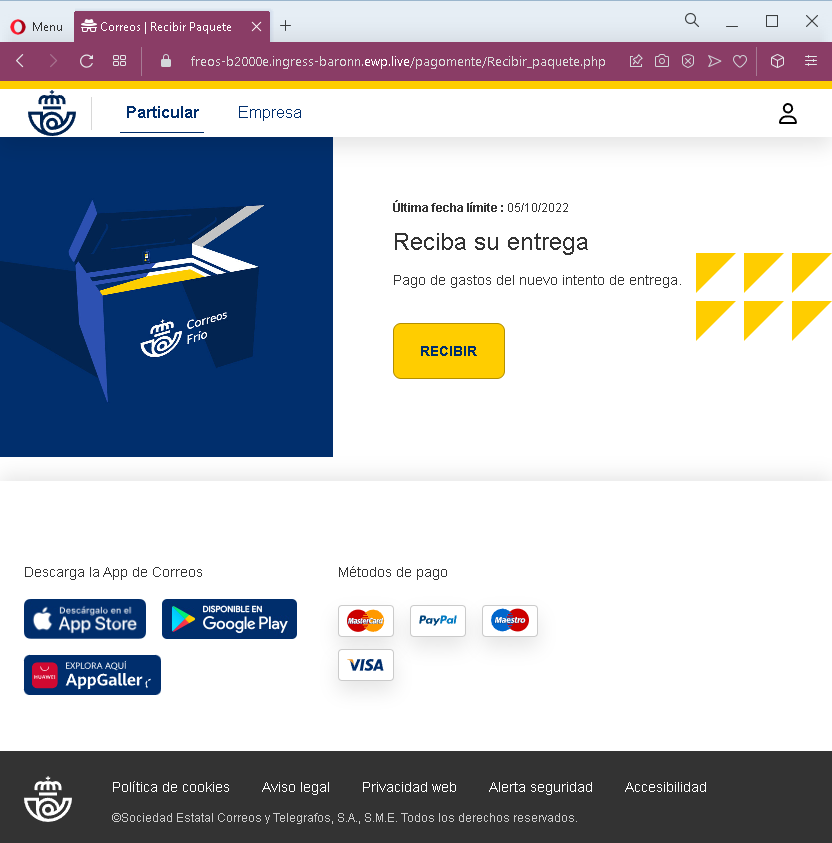
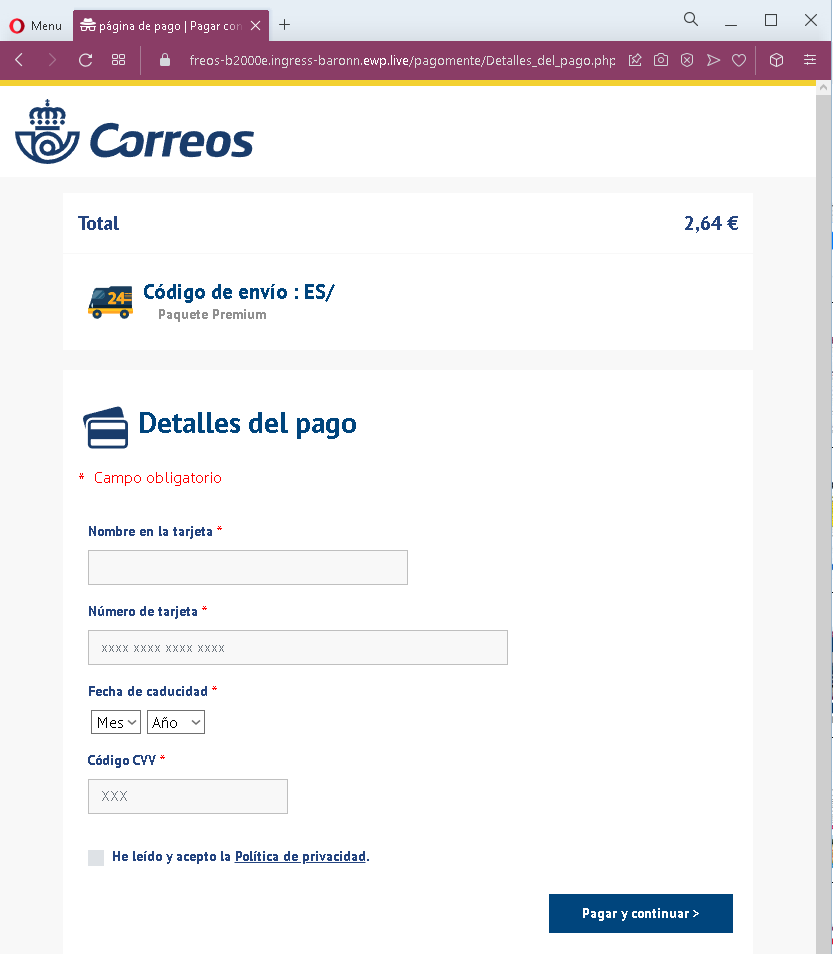
These two screenshots show a Spanish‑language phishing campaign impersonating Correos (the Spanish postal service). The scam uses a fake delivery fee (€2.64) and an urgent deadline to trick victims into providing full credit card details.
How it works: The victim receives an SMS, email, or message claiming that a package is waiting and a fee is required for a new delivery attempt. The first page warns of a “last deadline” and offers a “RECIBIR” (receive) button. Clicking it leads to the second page, which asks for:
Cardholder name
Full card number
Expiration date (month/year)
CVV security code
The page displays a total of €2.64, a fake tracking reference, and a checkbox to accept a privacy policy – all designed to appear legitimate.
The goal: The attacker captures full credit/debit card details to make fraudulent purchases or sell the information.
Red flags to watch for:
Suspicious URL: The pages are hosted on a domain that is not correos.es – the official Correos domain.
Request for CVV: Correos never asks for your card security code to collect a redelivery fee.
Small fee trick: €2.64 is a trivial amount intended to lower suspicion.
Fake tracking reference: The “Código de envío : ES/” is incomplete and cannot be verified on the real Correos site.
Urgent deadline: The mention of a “last deadline” pressures victims to act without thinking.
Copied branding: The pages use the Correos logo, app store badges, and footer links copied from the real website to appear authentic.
What to do if you encounter this:
Do not enter any card or personal information.
If you are expecting a delivery, track it directly by typing correos.es into your browser and using your real tracking number.
If you have already entered card details, contact your bank immediately to block the card.
Report the phishing page to Correos (e.g., via their official fraud reporting page).
Protective measures:
Never click links in unsolicited delivery messages. Always go directly to the official courier website.
Never pay a “redelivery fee” via a link. Legitimate fees are handled in person, through the official app, or after logging into your account.
Check the URL carefully: Official Correos domains end with correos.es. Look for misspellings, extra words, or unusual top‑level domains.
Threat Intel: This malicious interface was detected, analyzed, and contained firsthand by the Antiphishing.biz security team during our daily link moderation procedures. To protect the public, the phishing source domain has been completely disabled within our infrastructure. We document and analyze these live visual patterns to help security researchers and users recognize deceptive clone designs before financial damage occurs.
Figure 1: Actual screenshot of the live scam infrastructure intercepted by our security systems.Figure 2: Actual screenshot of the live scam infrastructure intercepted by our security systems.Figure 3: Actual screenshot of the live scam infrastructure intercepted by our security systems.
Yet one example:
Figure 4: Actual screenshot of the live scam infrastructure intercepted by our security systems.Figure 5: Actual screenshot of the live scam infrastructure intercepted by our security systems.Figure 6: Actual screenshot of the live scam infrastructure intercepted by our security systems.
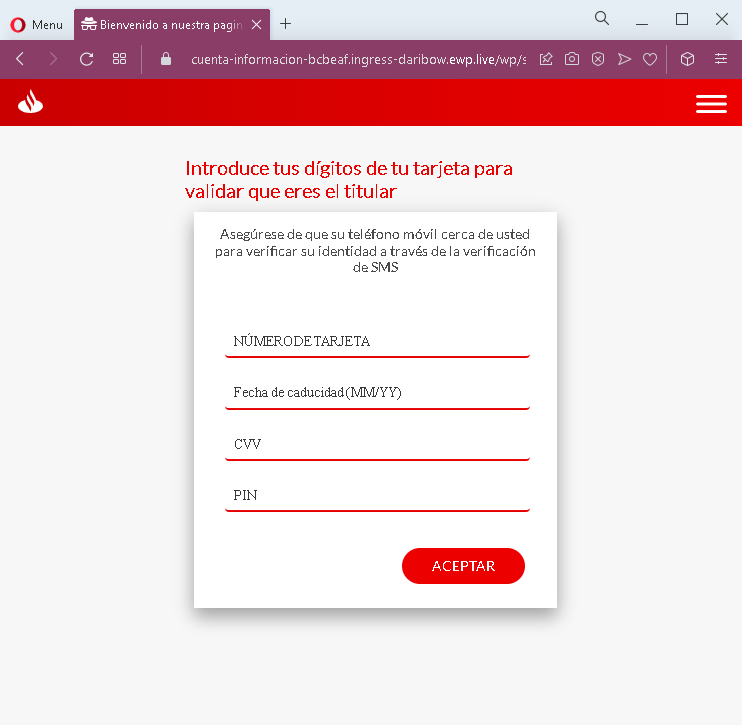
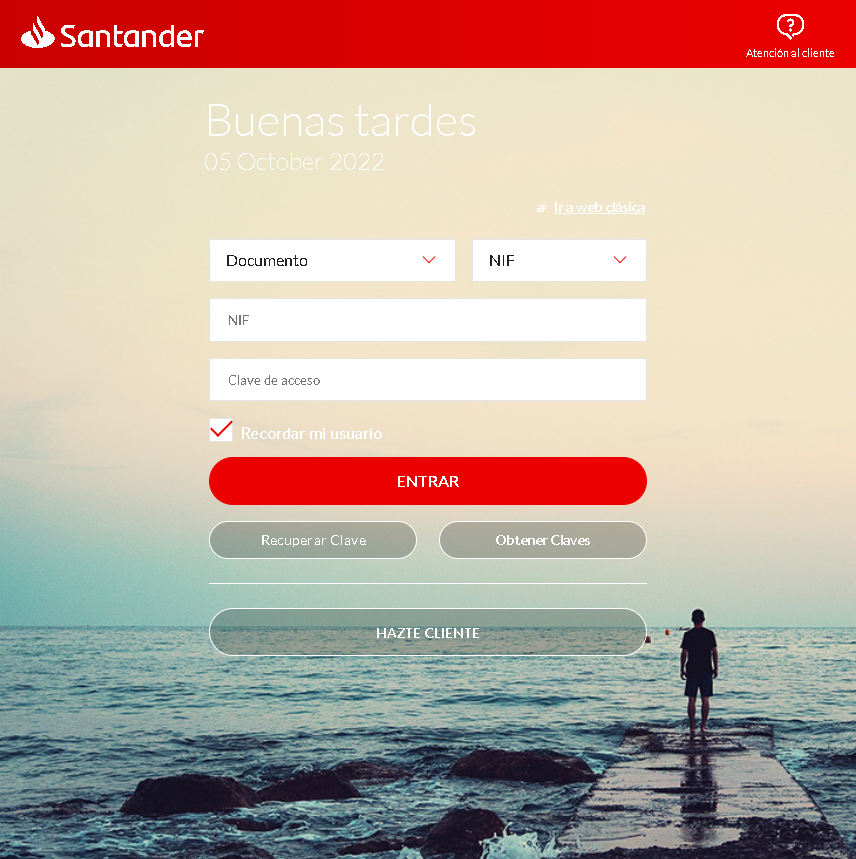
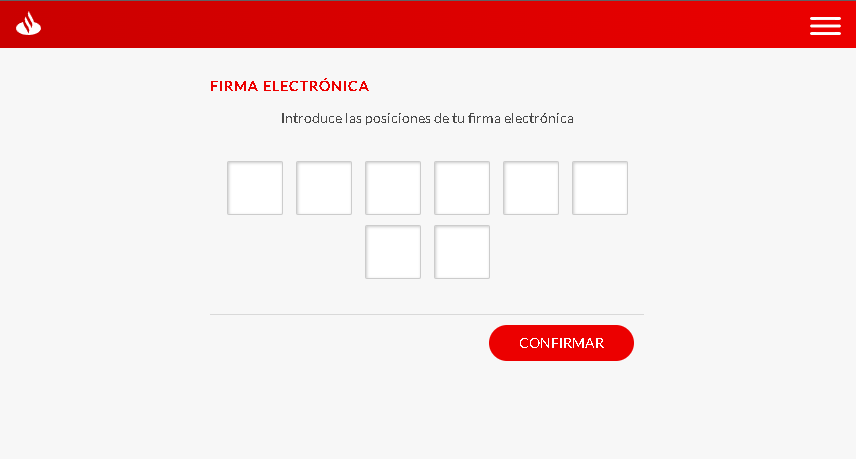
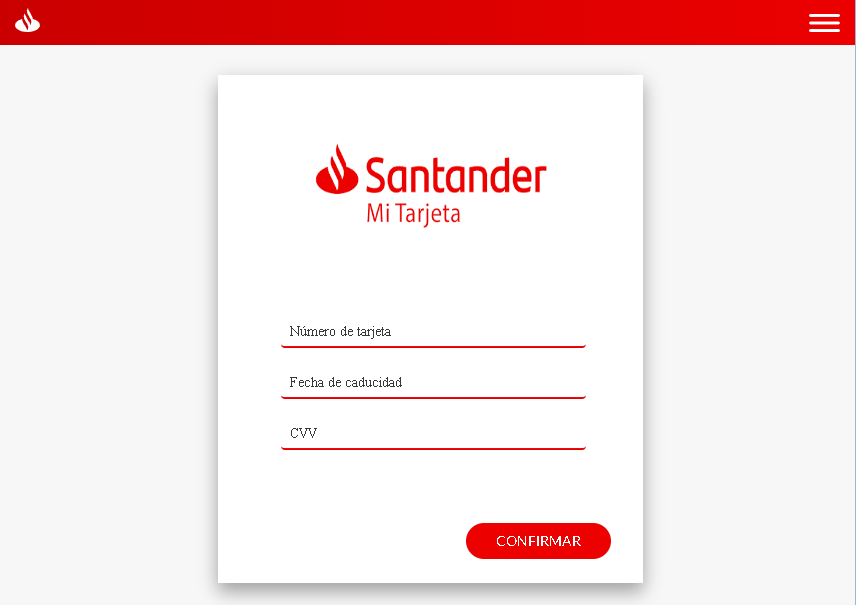
These six screenshots show a multi‑step phishing campaign impersonating Santander Bank, targeting Spanish‑speaking customers. The attack is designed to harvest:
Online banking credentials (documento and clave)
Electronic signature coordinates (a second factor used in Spanish banking)
Full card details (number, expiration, CVV)
PIN (likely the card’s ATM PIN)
The flow mimics real Santander security steps, making it particularly convincing.
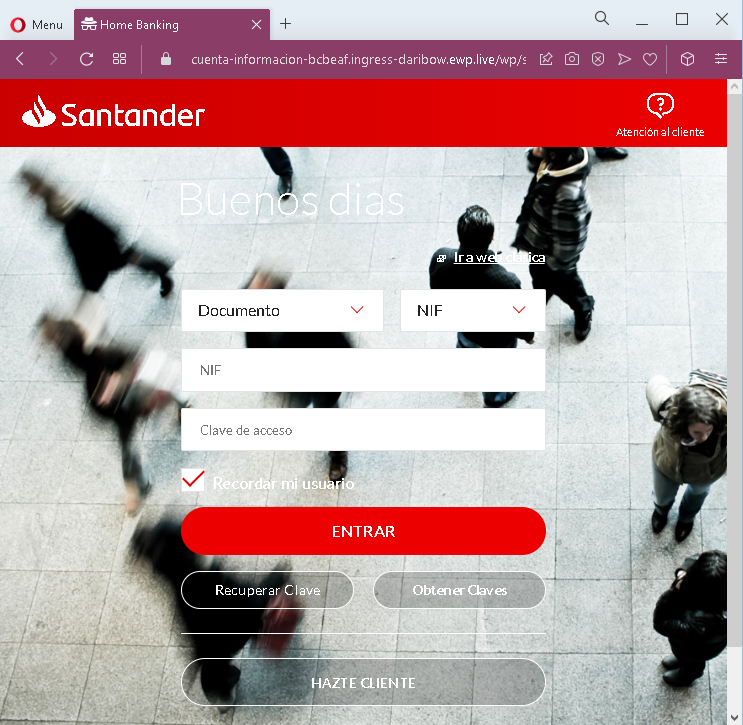
Step 1 – Fake Login Page (Screenshots 1 & 4) The victim lands on a page that looks like Santander’s online banking login. It asks for:
Documento (NIF – national ID)
Clave de acceso (password)
“Recordar usuario” and links to recover credentials are included to appear legitimate.
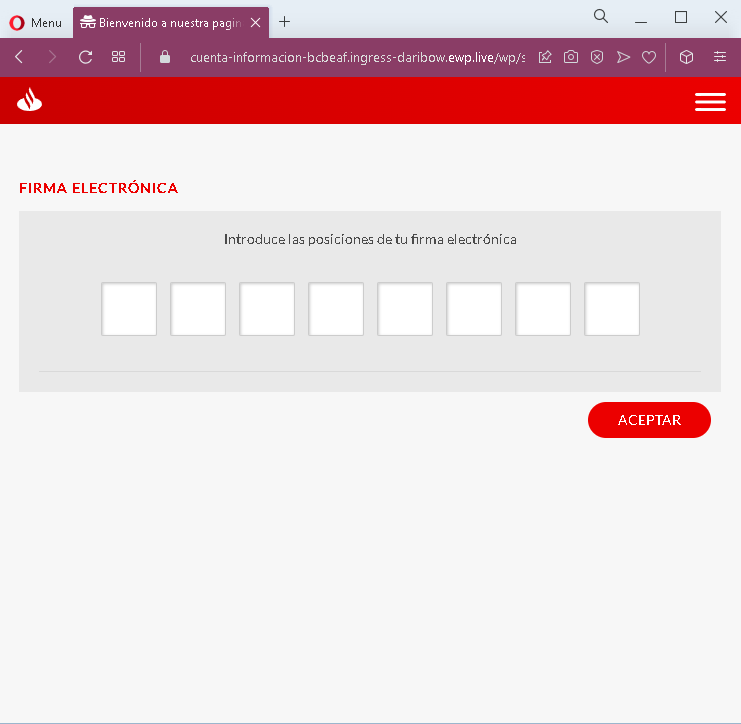
Step 2 – Fake Electronic Signature Page (Screenshots 2 & 5) After submitting credentials, the victim is asked to enter the positions of their “electronic signature” – a real second‑factor authentication method used by Spanish banks. The page typically asks for specific digits from a pre‑established grid. This step captures the second factor needed to authorize transactions.
Step 3 – Fake Card & PIN Verification Page (Screenshots 3 & 6) The final step asks for:
Card number
Expiration date (MM/YY)
CVV
PIN (the card’s ATM or security PIN)
A message claims this is to “verify the cardholder” and that an SMS will be sent – a common tactic to make the victim believe this is a normal security check.
The goal: The attacker captures:
Online banking credentials (documento + password)
Electronic signature coordinates (second factor)
Full card details (number, expiry, CVV)
ATM or card PIN
With this combination, the attacker can log into the victim’s bank account, authorize transactions, and use the card for ATM withdrawals or online purchases.
Red flags to watch for:
Suspicious URL: All pages are hosted on a domain that is not santander.es or the official Santander domain.
Multi‑step flow with excessive requests: A legitimate bank login does not require entering electronic signature positions and full card details + PIN in a single session.
PIN request on a web page: Banks never ask for your ATM PIN on a website.
Unsolicited login request: Santander does not send links requiring customers to log in and complete multiple verification steps.
Copied branding: The pages use Santander’s logo, color scheme, and terminology, but the design has inconsistencies compared to the real site.
What to do if you encounter this:
Do not enter any information on these pages.
If you are a Santander customer, always access online banking by typing the official URL directly (e.g., santander.es).
If you have already entered your credentials, electronic signature positions, or card details, contact Santander immediately to block your account, card, and change all credentials.
Report the phishing pages to Santander’s fraud team.
Protective measures:
Never click links in unsolicited messages claiming bank issues.
Use a password manager – it will not autofill on fake domains.
Never provide your card PIN or CVV on a page reached via a link.
Enable two‑factor authentication through the bank’s official app, not via web links.
Check the URL carefully: Legitimate Santander domains end with santander.es (or .com for other countries). Look for misspellings, extra words, or unusual top‑level domains.
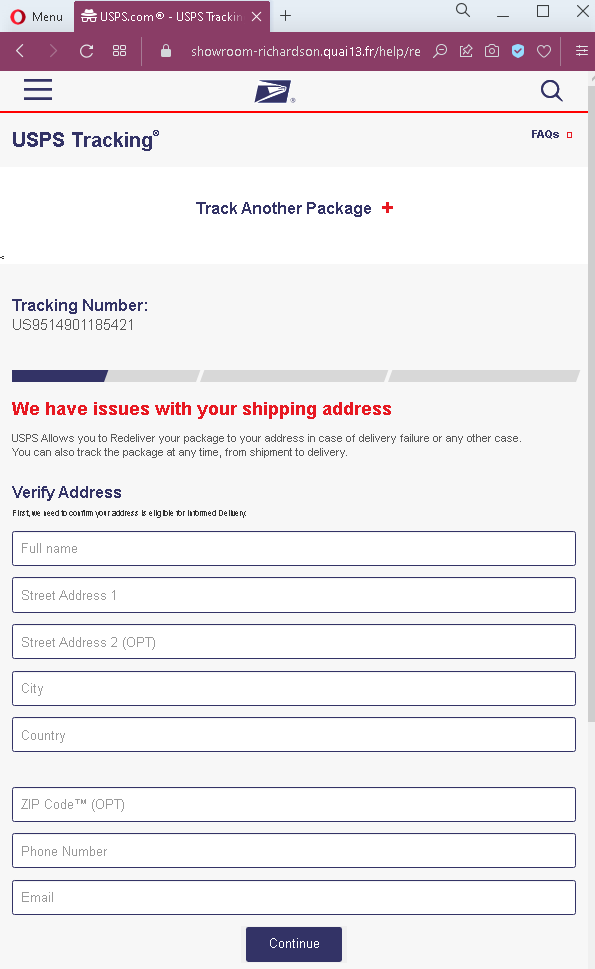
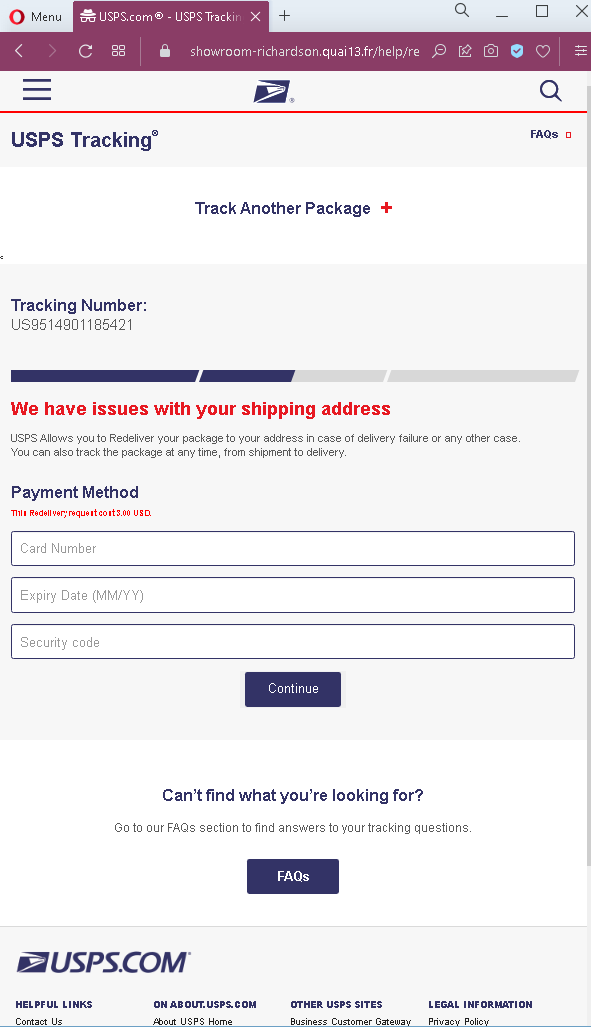
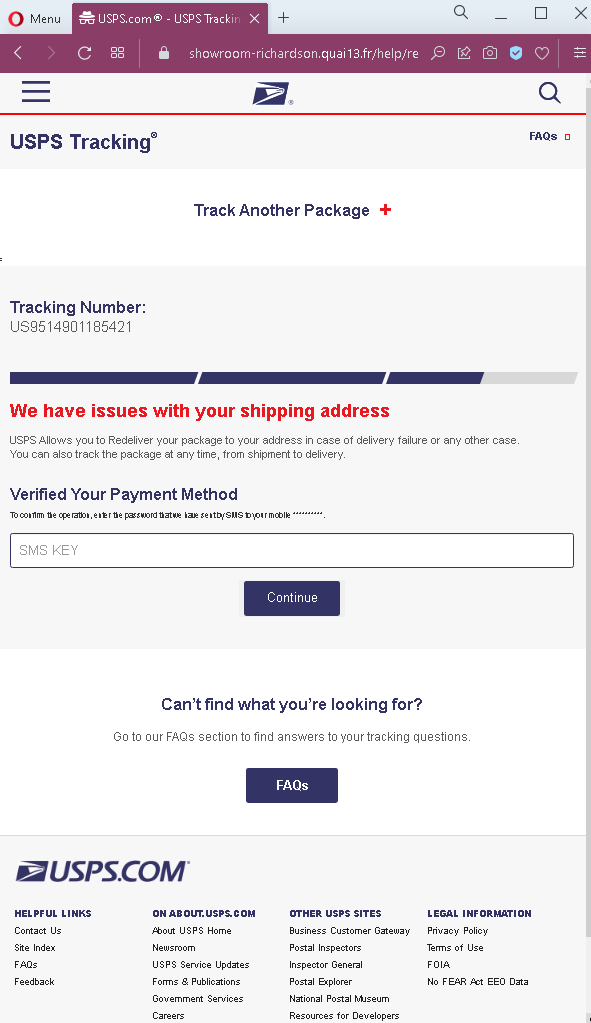
A sophisticated phishing campaign impersonating the United States Postal Service (USPS) is targeting residents with fraudulent SMS and emails claiming an “incomplete address” for package delivery. Victims are directed to a cloned website that steals personal information and credit card details, including CVV and 3D-Secure codes, by prompting for a small re-delivery fee.
Threat Intel: This spoofed page was intercepted, verified, and locked down firsthand by the Antiphishing.biz security team during our automated link scanning workflows. To protect the public, the dangerous destination URL has been fully defanged within our infrastructure. We document and analyze these live visual patterns to help security researchers and users recognize deceptive clone designs before financial damage occurs.
Figure 1: Actual screenshot of the active phishing operation isolated on our infrastructure.
This phishing scam uses SMS or email impersonating DHL or USPS to lure victims with fake “delivery issues” or “small fees” into entering personal data, credit card details, and 3D-secure codes. The attackers create high-fidelity clones of tracking pages to steal financial credentials and use stolen SMS codes for fraudulent purchases. To stay safe, ignore links in messages, use official company apps for tracking, and never provide a CVV code for shipping address verification.
Figure 2: Actual screenshot of the active phishing operation isolated on our infrastructure.
This logistics phishing case, targeting both DHL and USPS, uses “micro-payment” baiting, where attackers request a small fee to trick victims into providing full credit card details and 3D-Secure codes. The attack deceptive tactics high shipping volumes by sending SMS messages for fake “address errors” and collecting personal data on fraudulent sites designed to steal financial credentials.
Figure 3: Actual screenshot of the active phishing operation isolated on our infrastructure.
Expert Security Tip: To avoid this threat, never click links in delivery text messages, but manually enter tracking numbers on official websites and carefully read bank SMS alerts for discrepancies in transaction amounts.
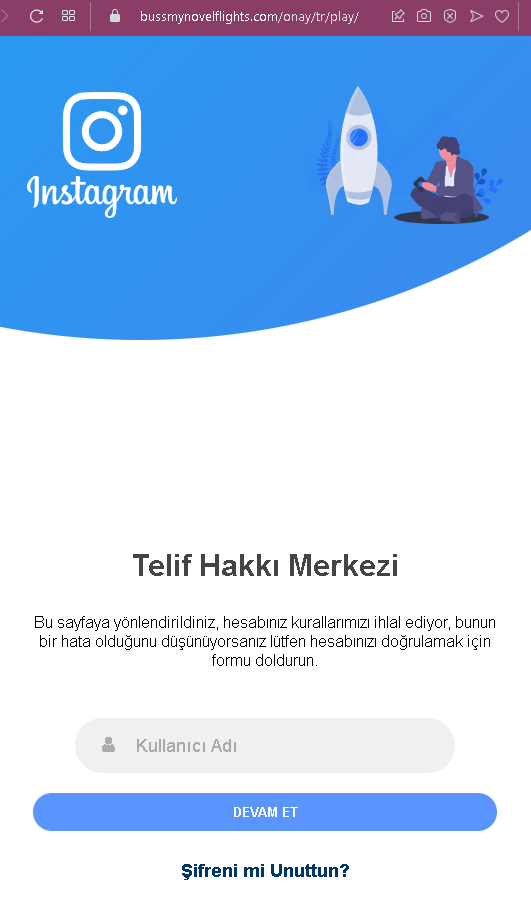
A Turkish-language phishing campaign targeting Instagram creators uses fake “Copyright Infringement” notifications to steal account credentials and bypass two-factor authentication. Victims are coerced through “legal scaring” tactics to enter credentials on a fake site that immediately harvests usernames, passwords, and 2FA codes.
Analysis Memo: This malicious interface was intercepted, verified, and locked down firsthand by the Antiphishing.biz security team during our standard URL vetting operations. To protect the public, the phishing source domain has been completely disabled within our infrastructure. We document and analyze these live visual patterns to help security researchers and users spot lookalike phishing methods before financial damage occurs.
Figure 1: Verified screenshot of the live scam infrastructure isolated on our infrastructure.
This Turkish-language Instagram phishing attack uses a “Copyright Infringement” threat via DMs to deceive users into providing their account credentials, email passwords, and 2FA codes. The attack relies on urgent, fraudulent “appeal forms” that mimic official Meta branding to steal login information, and it is a high-risk scam targeting content creators. To protect yourself, always verify the URL, utilize the “Emails from Instagram” tool in the app, and never provide email credentials or login details in response to a DM.
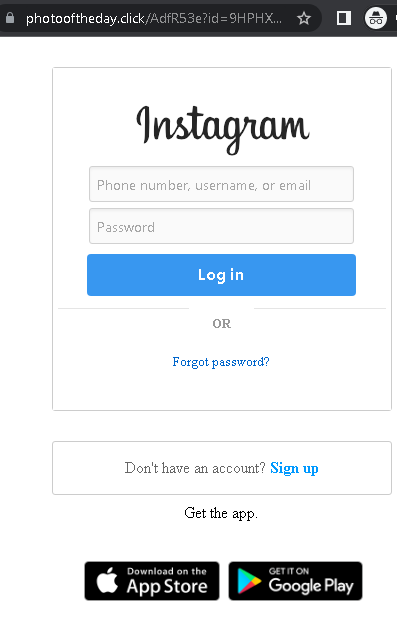
An Instagram phishing campaign uses “Photo of the Day” contests as a social engineering lure to steal user credentials and bypass two-factor authentication (2FA). Attackers use deceptive URLs to direct victims to fake login pages designed to harvest usernames, passwords, and 2FA codes, often capitalizing on the victim’s desire for social validation.
Security Notice: This spoofed page was intercepted, verified, and locked down firsthand by the Antiphishing.biz security team during our automated link scanning workflows. To protect the public, the phishing source domain has been fully defanged within our infrastructure. We document and analyze these live visual patterns to help security researchers and users spot lookalike phishing methods before financial damage occurs.
Figure 1: Live screenshot of the live scam infrastructure isolated on our infrastructure.
Instagram users are being targeted by phishing campaigns, including Turkish-language copyright violations and English-language “Photo of the Day” scams, designed to steal credentials and bypass 2FA. These phishing sites mimic the official Instagram login page to harvest usernames, passwords, and real-time security codes, enabling attackers to take over accounts and change recovery methods. To avoid these scams, users should never log in via external links, check the “Emails from Instagram” section in the app, and use authenticator apps for 2FA.
These attacks use Social Engineering to create panic or excitement:
The Copyright Trap (Turkish Case): Users receive a DM or email claiming their account will be deleted in 24-48 hours due to a “Copyright Infringement.” They are told to click a link to “Appeal” or “Object” to the complaint.
The Reward Trap (Photo Contest): Users are told they have been nominated for “Photo of the Day” or a contest. They are urged to click a link to “Vote” or “Claim a badge.”
Both links lead to a fake Instagram login page. The phishing kit is designed to harvest:
Username and Password.
Linked Email and Password (to prevent the user from recovering their account).
Two-Factor Authentication (2FA) Codes: The fake site intercepts the 6-digit code in real-time, allowing the attacker to log in and immediately change the account’s associated email and phone number.
Red Flags to Watch For
Deceptive URLs: Instagram only uses instagram.com or facebook.com for official notices. Phishing sites use copyright-instagram-help.com, photooftheday-click.net, or free subdomains like instagram-support.web.app.
Communications via DM: Instagram never sends Direct Messages (DMs) about copyright or security. Official notices appear in Settings > Security > Emails from Instagram.
Grammar & Urgency: Phishing messages often contain subtle spelling errors and use aggressive countdown timers to force an impulsive login.
Expert Security Tip: The “App-Based 2FA” Shield
The Method: These cases highlight a Credential & Session Hijacking attack. Scammers are not just after your password; they are waiting to intercept your 2FA code to lock you out of your account permanently. The Trap: When you enter your 2FA code on a phishing site, the attacker uses it on the real Instagram app to log you out of all devices and change your recovery email. In many cases, they then use your account to spread the scam to your followers or demand a ransom. How to Protect Yourself:
Use Authentication Apps: Switch from SMS-based 2FA to an app like Google Authenticator or Duo. SMS codes are easier to intercept via phishing or SIM swapping.
The “In-App Only” Rule: If you receive a security or copyright alert, do not click the link. Open your Instagram app, go to Settings > Security > Emails from Instagram. If the email isn’t listed there, it is 100% a scam.
Zero Trust for DMs: Treat every DM from an unknown account (even with a “verified” badge, as these can be stolen accounts) as a potential threat.
Check the URL on the 2FA Screen: If you are prompted for a 2FA code, double-check the browser’s address bar. If it doesn’t say instagram.com, do not enter the code.