
An Instagram phishing campaign uses “Photo of the Day” contests as a social engineering lure to steal user credentials and bypass two-factor authentication (2FA). Attackers use deceptive URLs to direct victims to fake login pages designed to harvest usernames, passwords, and 2FA codes, often capitalizing on the victim’s desire for social validation.
Security Notice: This spoofed page was intercepted, verified, and locked down firsthand by the
Antiphishing.bizsecurity team during our automated link scanning workflows. To protect the public, the phishing source domain has been fully defanged within our infrastructure. We document and analyze these live visual patterns to help security researchers and users spot lookalike phishing methods before financial damage occurs.
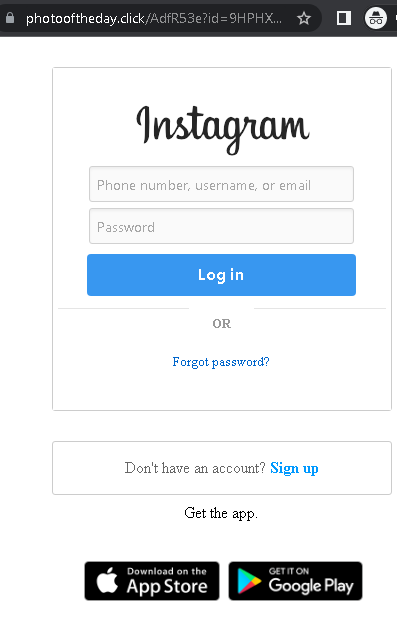
Instagram users are being targeted by phishing campaigns, including Turkish-language copyright violations and English-language “Photo of the Day” scams, designed to steal credentials and bypass 2FA. These phishing sites mimic the official Instagram login page to harvest usernames, passwords, and real-time security codes, enabling attackers to take over accounts and change recovery methods. To avoid these scams, users should never log in via external links, check the “Emails from Instagram” section in the app, and use authenticator apps for 2FA.
📸 Instagram “Copyright Infringement” & “Photo Contest” Phishing
Target: Instagram Users and Influencers Worldwide
Threat Level: Critical (Account Takeover & Identity Theft)
Phishing Method Description
These attacks use Social Engineering to create panic or excitement:
- The Copyright Trap (Turkish Case): Users receive a DM or email claiming their account will be deleted in 24-48 hours due to a “Copyright Infringement.” They are told to click a link to “Appeal” or “Object” to the complaint.
- The Reward Trap (Photo Contest): Users are told they have been nominated for “Photo of the Day” or a contest. They are urged to click a link to “Vote” or “Claim a badge.”
Both links lead to a fake Instagram login page. The phishing kit is designed to harvest:
- Username and Password.
- Linked Email and Password (to prevent the user from recovering their account).
- Two-Factor Authentication (2FA) Codes: The fake site intercepts the 6-digit code in real-time, allowing the attacker to log in and immediately change the account’s associated email and phone number.
Red Flags to Watch For
- Deceptive URLs: Instagram only uses
instagram.comorfacebook.comfor official notices. Phishing sites usecopyright-instagram-help.com,photooftheday-click.net, or free subdomains likeinstagram-support.web.app. - Communications via DM: Instagram never sends Direct Messages (DMs) about copyright or security. Official notices appear in Settings > Security > Emails from Instagram.
- Grammar & Urgency: Phishing messages often contain subtle spelling errors and use aggressive countdown timers to force an impulsive login.
Expert Security Tip: The “App-Based 2FA” Shield
The Method:
These cases highlight a Credential & Session Hijacking attack. Scammers are not just after your password; they are waiting to intercept your 2FA code to lock you out of your account permanently.
The Trap:
When you enter your 2FA code on a phishing site, the attacker uses it on the real Instagram app to log you out of all devices and change your recovery email. In many cases, they then use your account to spread the scam to your followers or demand a ransom.
How to Protect Yourself:
- Use Authentication Apps: Switch from SMS-based 2FA to an app like Google Authenticator or Duo. SMS codes are easier to intercept via phishing or SIM swapping.
- The “In-App Only” Rule: If you receive a security or copyright alert, do not click the link. Open your Instagram app, go to Settings > Security > Emails from Instagram. If the email isn’t listed there, it is 100% a scam.
- Zero Trust for DMs: Treat every DM from an unknown account (even with a “verified” badge, as these can be stolen accounts) as a potential threat.
- Check the URL on the 2FA Screen: If you are prompted for a 2FA code, double-check the browser’s address bar. If it doesn’t say
instagram.com, do not enter the code.