
A phishing campaign targeting Snapchat users employs fake “account locked” alerts to steal login credentials and bypass two-factor authentication. The attack, often utilizing deceptive domains like unlock-snapchat.com, drives users to a cloned site designed to harvest usernames, passwords, and 2FA codes, allowing attackers to seize control of personal accounts.
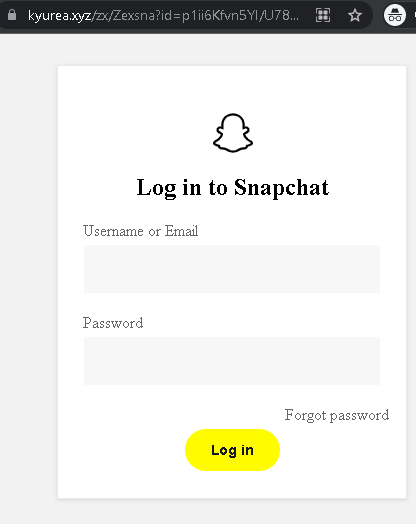
🛡️ Snapchat “Account Security/Unlock” Phishing
Target: Snapchat Users Worldwide
Threat Level: Critical (Complete Account & Privacy Takeover)
Security Measures to Stay Safe:
- 1. Snapchat Never Sends DMs about Security:
Official Snapchat support will never send you a Direct Message (DM) with a link to “verify” or “unlock” your account. Real security alerts are sent via email from @snapchat.com or appear as in-app system notifications. - 2. Verify the URL (The “.com” Rule):
The only official web portal for managing your account is ://snapchat.com. Look out for fake domains like snapchat-unlock.net, verify-snap-account.com, or snap-support.xyz. - 3. Use App-Based 2FA:
Enable Two-Factor Authentication (2FA) in Snapchat settings (Settings > Two-Factor Authentication). Use an Authentication App (like Google Authenticator) rather than SMS, as it is much harder for phishers to intercept. - 4. Beware of “Phished Friends”:
If a friend sends you a strange link in a Snap or Chat (e.g., “Check out this video of you!”), do not click it. Their account has likely been hacked. Contact them through another platform to warn them.