
An Orange-themed phishing attack targeting French customers uses fake refund or unpaid bill notifications to harvest credentials and credit card details. The fraudulent site, often utilizing deceptive domains, captures 3D-Secure codes in real-time to facilitate immediate fraudulent transactions.
Incident Report: This scam layout was logged, cross-checked, and neutralized firsthand by the Antiphishing.biz security team during our daily link moderation procedures. To protect the public, the phishing source domain has been fully defanged within our infrastructure. We document and analyze these live visual patterns to help security researchers and users recognize deceptive clone designs before financial damage occurs.
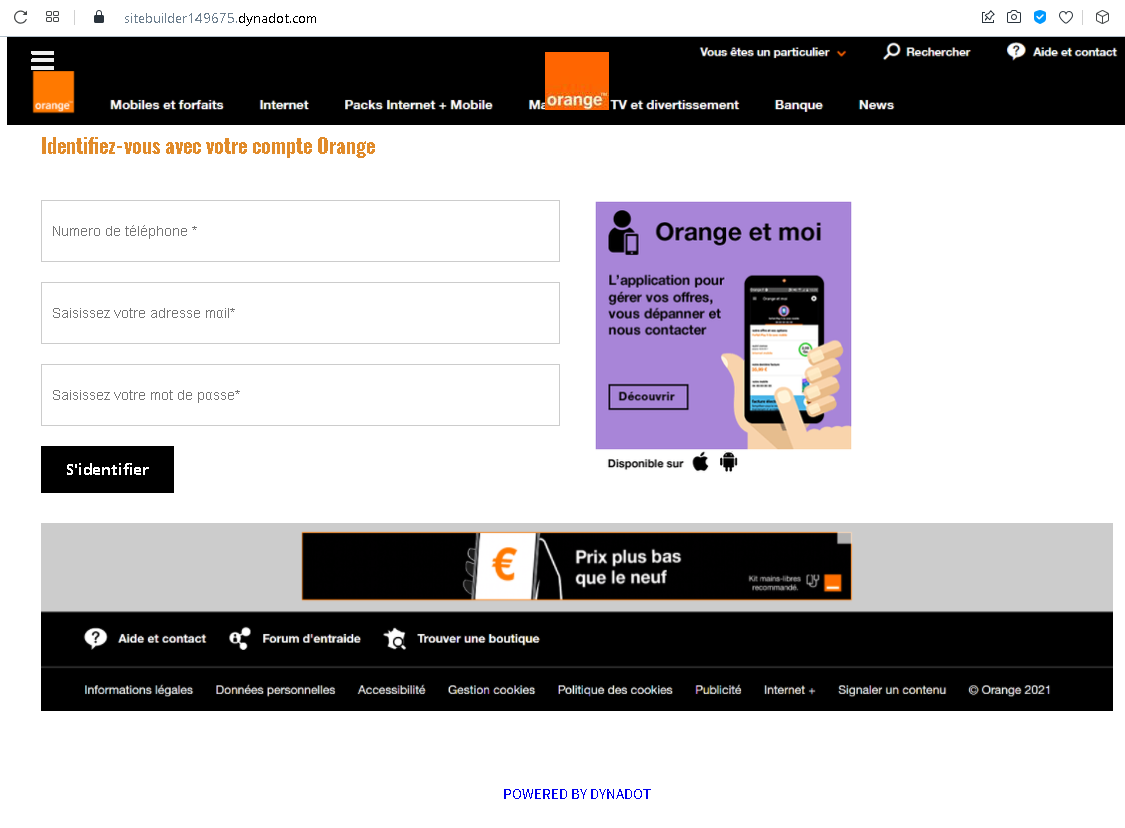
This screenshot shows a phishing page impersonating Orange, a major French telecommunications provider. The page mimics the Orange login portal to steal phone number, email address, and password.
Threat Analysis: Orange Phishing – Fake “Identifiez-vous” Login Page
How it works:
The victim receives a phishing email, SMS, or message claiming a security alert, account issue, or the need to verify their information. The link leads to this page, which looks like the Orange login interface. The victim is asked to enter their:
- Phone number
- Email address
- Password
After clicking “S’identifier” (Sign in), all three pieces of information are captured and sent to the attacker.
The goal:
The attacker steals Orange account credentials to:
- Access the victim’s personal information, billing details, and phone services
- Perform SIM swapping (porting the victim’s phone number) to bypass SMS‑based two‑factor authentication for banking or other accounts
- Use the email and password combination to attempt credential stuffing on other platforms
Red flags to watch for:
- Suspicious URL: The page is hosted on a domain that is not
orange.fror any official Orange domain. Legitimate Orange login pages are only on official domains. - Unusual combination of fields: A real Orange login typically asks for either a phone number or an email address, not both at the same time. Asking for both is a sign of a phishing page trying to collect as much data as possible.
- Unsolicited login request: Orange does not send links requiring customers to log in to resolve account issues.
- Outdated copyright: The footer shows “© Orange 2021” – while plausible, combined with other red flags it adds to suspicion. The real site would have the current year.
- No personalization or security image: Legitimate Orange login pages often display a security phrase or personalized greeting after identifier entry. This page lacks that.
What to do if you encounter this:
- Do not enter your phone number, email, or password.
- If you are an Orange customer, always access your account by typing
orange.frdirectly into your browser or using the official Orange app. - If you have already entered your credentials, change your Orange password immediately and contact Orange customer service to secure your account and watch for SIM swapping attempts.
- Report the phishing page to Orange’s fraud team (e.g., via
spam.orange.fr).
Protective measures:
- Bookmark the official Orange login page and use that bookmark.
- Use a password manager – it will autofill only on legitimate
orange.frdomains. - Enable two‑factor authentication on your Orange account if available.
- Be suspicious of any unsolicited message that asks you to log in via a link.