
This case study details a Twitter (X) phishing attack using fake copyright violations or verification requests to steal credentials and 2FA codes, allowing attackers to seize account control. The fraudulent sites mimic official login pages, often featuring urgent, threatening language designed to induce panic in users.
Security Notice: This spoofed page was detected, analyzed, and contained firsthand by the
Antiphishing.bizsecurity team during our automated link scanning workflows. To protect the public, the dangerous destination URL has been safely deactivated within our infrastructure. We document and analyze these live visual patterns to help security researchers and users detect replica fraud techniques before financial damage occurs.
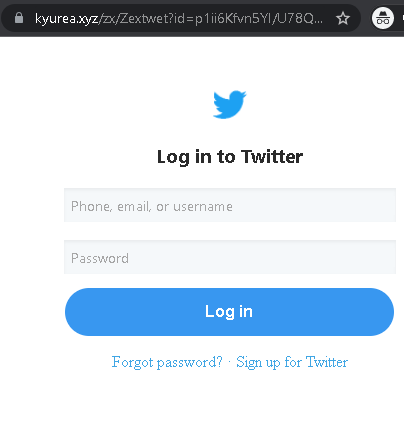
Cybersecurity Measures: How to Avoid Twitter (X) Account Phishing
To protect your Twitter/X profile and prevent threat actors from hijacking your identity to spread spam or scams, follow these essential safety rules:
1. Verify the Domain (The URL Rule)
Phishing sites often use deceptive lookalike domains (e.g., twitter-help-center.net, x-verify-account.com, twitter-support-portal.org).
- Action: The only official web address for Twitter/X is
twitter.comorx.com. Before entering your username or password, check the address bar manually. If you reached the page via a DM or email link, it is likely a scam.
2. Twitter Never DMs About “Copyright” or “Verification”
A common tactic is sending a Direct Message (DM) claiming you have a “Copyright Infringement” or that you need to “Re-verify your badge” to avoid suspension.
- Action: Official Twitter/X support will never send you a DM with a clickable link to resolve a security or legal issue. Genuine notices are sent via email from @
twitter.comor @x.comand appear in your official account notifications.
3. Mandatory Two-Factor Authentication (2FA)
Password theft is the primary goal of this phishing page. 2FA is your most powerful defense.
- Action: Enable Two-Factor Authentication in your settings (Settings > Security and account access > Security > Two-factor authentication). Use an Authentication App (like Google Authenticator) or a Security Key (like YubiKey) instead of SMS for maximum protection.
4. Beware of “Phished Friends” and Viral Links
If a trusted contact sends you a strange link (e.g., “Is this you in this video?” or “Help me win this contest!”), their account may have been compromised.
- Action: Do not click the link. Contact your friend through another platform (WhatsApp, call) to ask if they actually sent it. Usually, they are unaware their account is spreading malware.
5. Check “Connected Apps” Regularly
Some phishing sites don’t just steal passwords; they trick you into authorizing a “Malicious App” to access your account.
- Action: Periodically review your Connected Apps in settings. Revoke access for any application you don’t recognize or no longer use.
6. Use a Password Manager
Tools like Bitwarden, 1Password, or iCloud Keychain identify sites by their exact URL.
- Action: If you are on a fake Twitter/X site, your password manager will not offer to auto-fill your credentials. This is a definitive technical warning that the site is a fraud.