Orange phishing

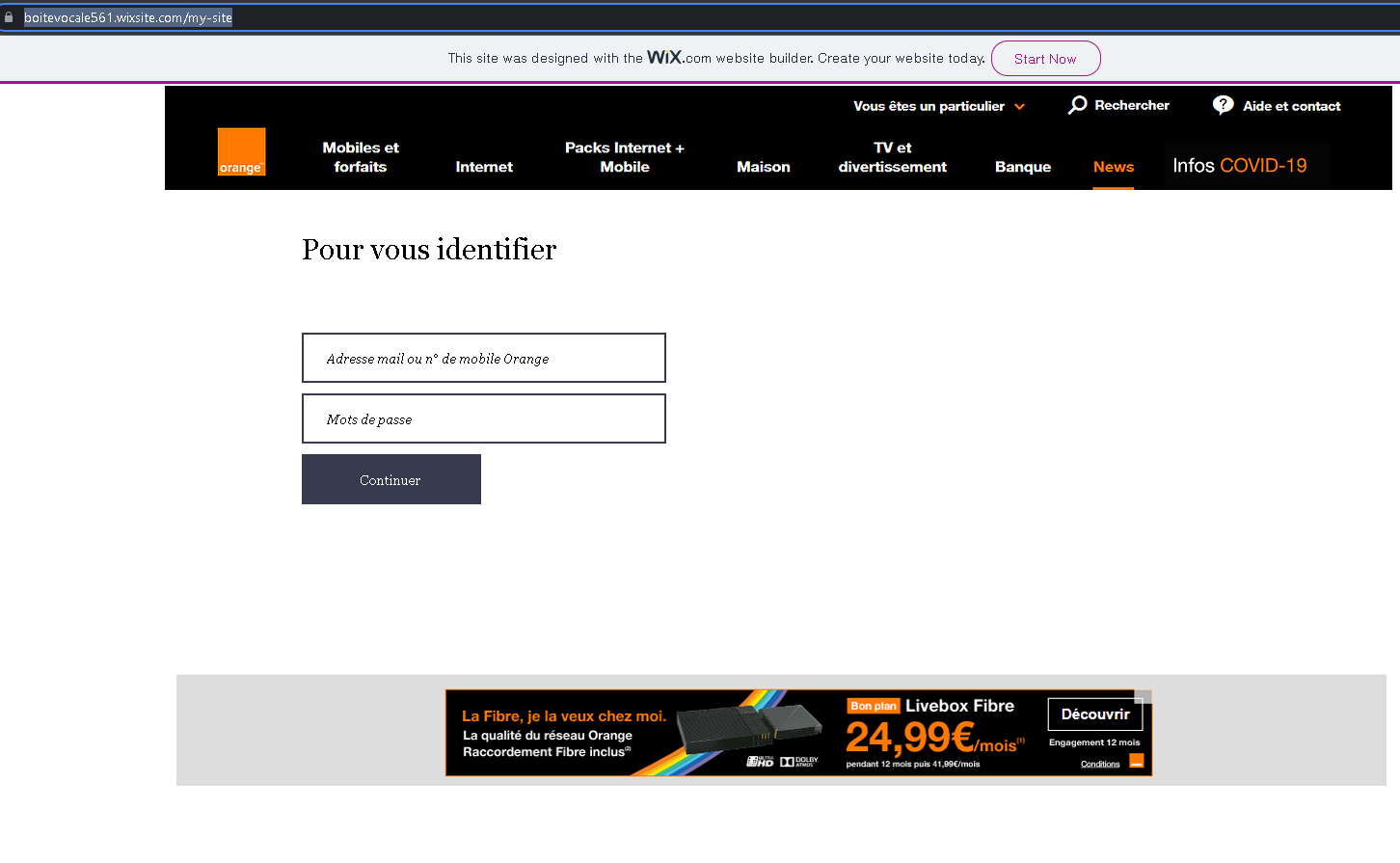
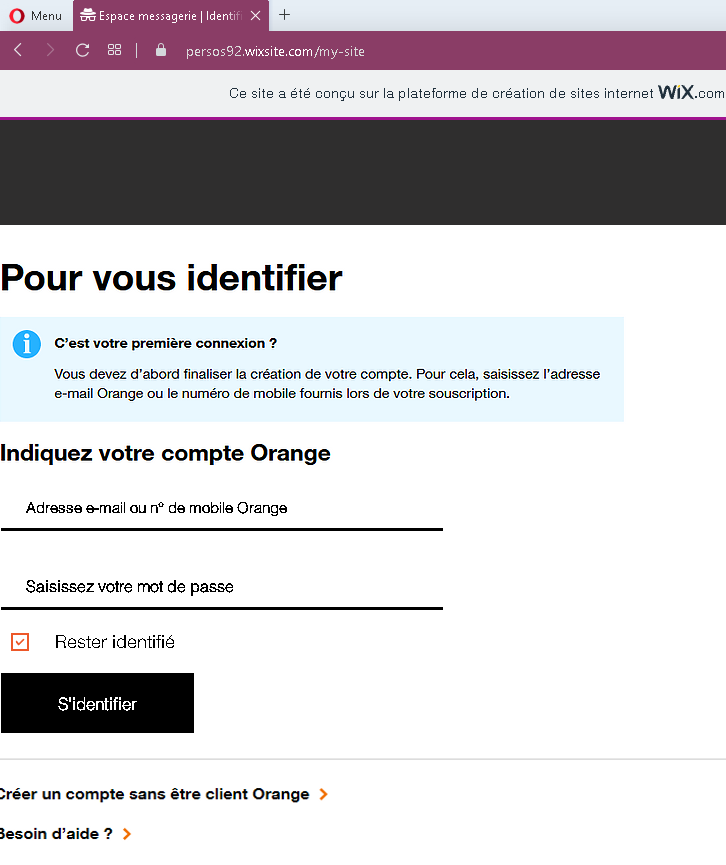
These screenshots show multiple phishing pages impersonating Orange, a major French telecommunications provider. The pages are designed to steal customers’ login credentials (email/mobile number and password). Several of them are hosted on free website builders (Wix), which is a clear red flag.

Incident Report: This malicious interface was detected, analyzed, and contained firsthand by the Antiphishing.biz security team during our daily link moderation procedures. To protect the public, the dangerous destination URL has been fully defanged within our infrastructure. We document and analyze these live visual patterns to help security researchers and users detect replica fraud techniques before financial damage occurs.
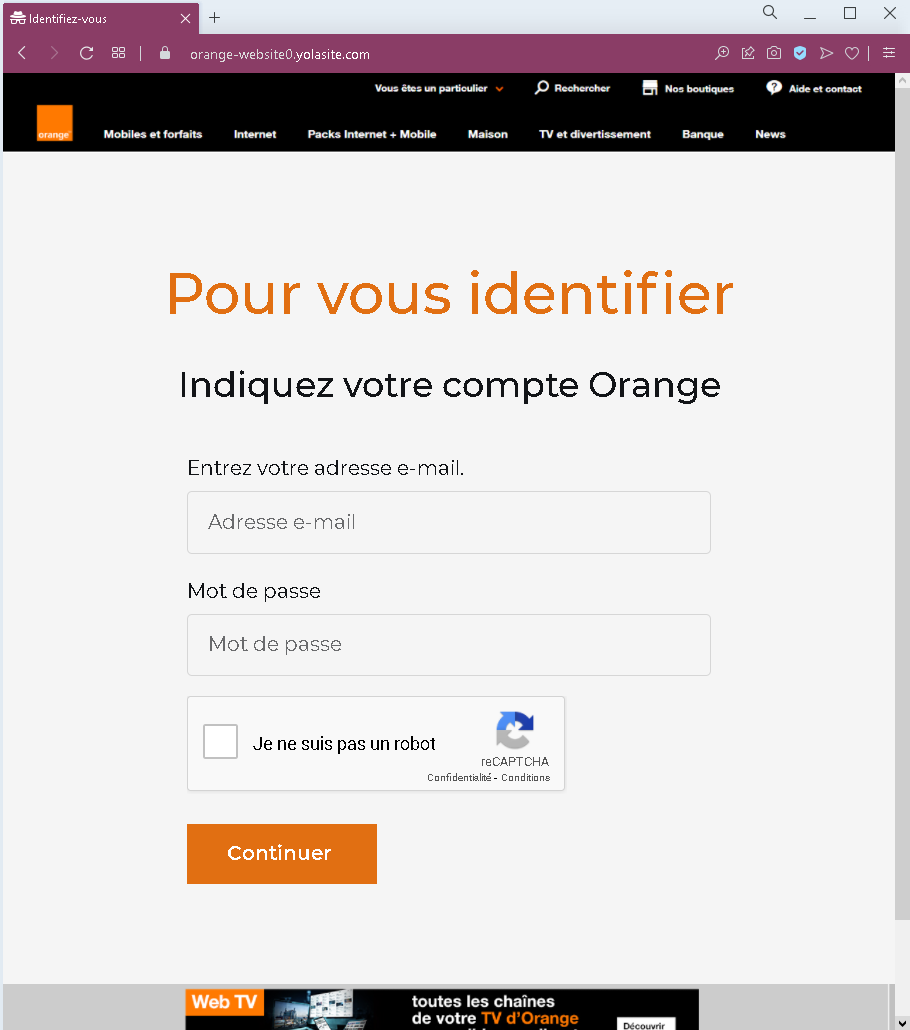
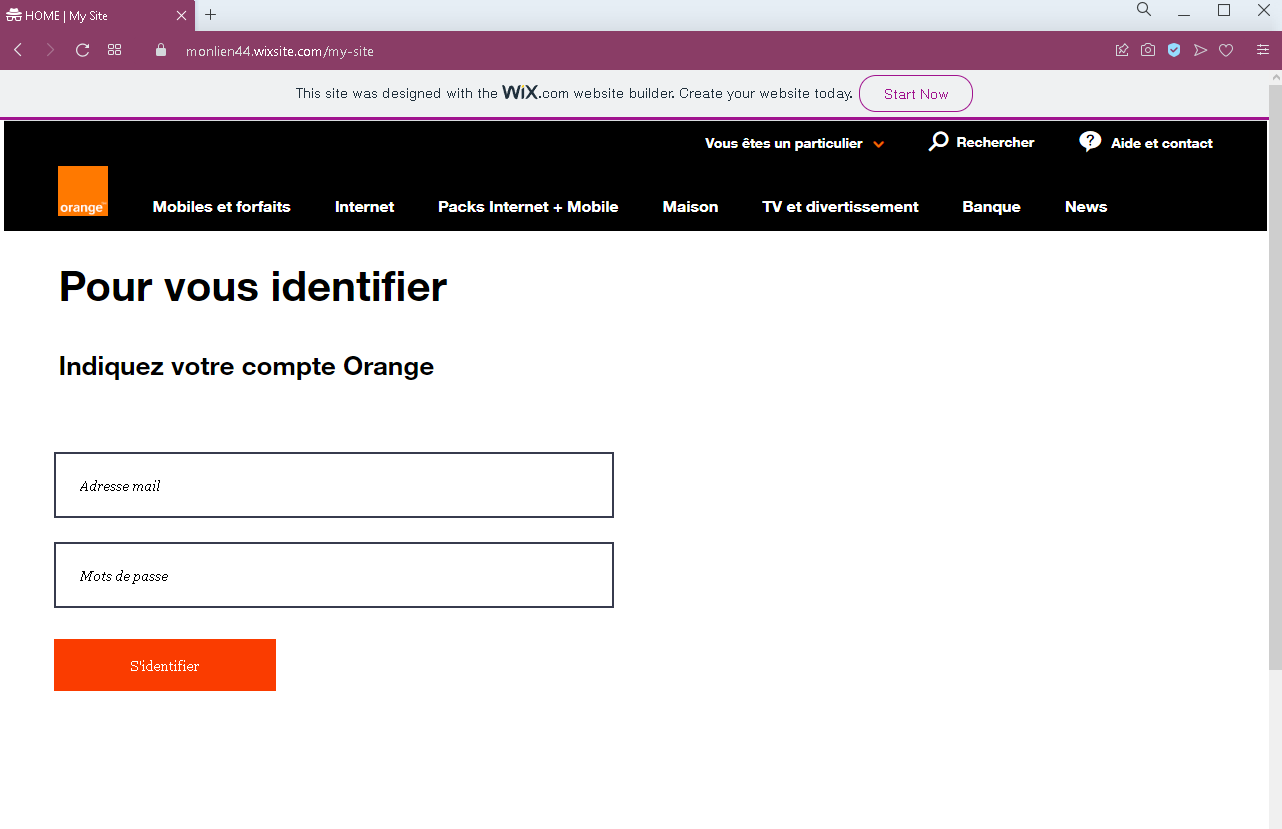
Actual screenshot of "Orange phishing" phishing interface captured during link moderation on our platform.
Figure 1: Visual proof of the active phishing operation intercepted by our security systems.

Actual screenshot 2 of "Orange phishing" phishing interface captured during link moderation on our platform.
Figure 2: Visual proof of the active phishing operation intercepted by our security systems.

Actual screenshot 3 of "Orange phishing" phishing interface captured during link moderation on our platform.
Figure 3: Visual proof of the active phishing operation intercepted by our security systems.

Actual screenshot 4 of "Orange phishing" phishing interface captured during link moderation on our platform.
Figure 4: Visual proof of the active phishing operation intercepted by our security systems.

Threat Analysis: Orange Phishing – Fake Login Pages (French Telecom Scam)

This phishing campaign targets Orange customers in France. The scam uses various fake login pages that mimic the official Orange authentication portal. The goal is to trick victims into entering their Orange account identifier (email address or mobile number) and password.

How it works:
The victim receives a phishing email, SMS, or other message claiming a security alert, account issue, unpaid bill, or the need to verify their information. The message includes a link to a fraudulent login page. The page looks similar to the real Orange login interface, often including copied branding, menu items, and even fake CAPTCHA or “reCAPTCHA” badges to appear legitimate. Once the victim enters their credentials and clicks a button (e.g., “Continuer” or “S’identifier”), the information is sent to the attacker.

The goal:
The attacker steals Orange account credentials to:

  • Access the victim’s personal information, billing details, and mobile/internet services
  • Perform SIM swapping (porting the victim’s phone number) to bypass SMS‑based two‑factor authentication for banking or other accounts
  • Use the compromised account to send further phishing messages to contacts
  • Sell the credentials on criminal markets

Red flags to watch for (across all variants):

  • Suspicious URL: The pages are hosted on domains that are not orange.fr. Some are on free website builders like wixsite.com. Legitimate Orange login pages are only on official Orange domains.
  • Visible “Wix.com” or other free‑hosting banners: These banners appear on several screenshots (“This site was designed with the WIX.com website builder”) – a clear sign of a fake page.
  • Unsolicited login request: Orange does not send links requiring customers to log in to resolve account issues. Always type orange.fr directly.
  • Generic or missing security features: Real Orange login pages may display a security phrase or personalized greeting. These fake pages lack such personalization.
  • Fake reCAPTCHA / CAPTCHA badges: Some pages include a “I am not a robot” checkbox or reCAPTCHA label to appear more trustworthy, but this does not guarantee legitimacy.

What to do if you encounter this:

  • Do not enter your Orange identifier or password.
  • If you are an Orange customer, always access your account by typing orange.fr directly into your browser or using the official Orange app.
  • If you have already entered your credentials, change your Orange password immediately and contact Orange customer service to watch for SIM swapping attempts.
  • Report the phishing page to Orange’s fraud team (e.g., via [email protected] or their official reporting form).

Protective measures:

  • Bookmark the official Orange login page and use that bookmark exclusively.
  • Use a password manager – it will only autofill on legitimate orange.fr domains.
  • Enable two‑factor authentication on your Orange account if available.
  • Never log in via a link in an unsolicited message – always type the address manually.
  • Avoid entering credentials on pages hosted on free platforms (Wix, Weebly, Strikingly, etc.) – legitimate telecom providers do not use these for login portals.

Facebook phishing with PUBG Mobile spoofing page

A phishing campaign targeting PUBG Mobile players uses fake “Lucky Spin” pages to steal Facebook credentials by promising free, exclusive in-game rewards. These deceptive websites mimic official branding and capture user data via fraudulent login forms, leading to account theft and potential sale on the dark web. To protect your account, only trust promotions from official PUBG Mobile channels and enable two-factor authentication.

Analysis Memo: This spoofed page was intercepted, verified, and locked down firsthand by the Antiphishing.biz security team during our standard URL vetting operations. To protect the public, the phishing source domain has been fully defanged within our infrastructure. We document and analyze these live visual patterns to help security researchers and users spot lookalike phishing methods before financial damage occurs.

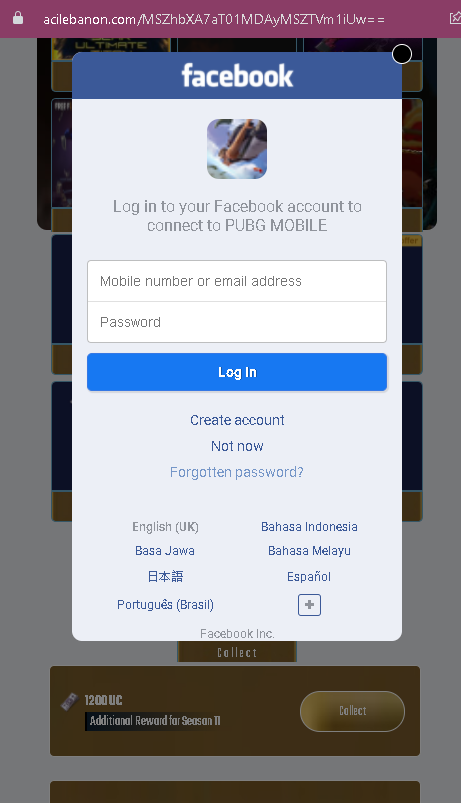
Actual screenshot of "Facebook phishing with PUBG Mobile spoofing page" phishing interface captured during link moderation on our platform.
Figure 1: Verified screenshot of the ongoing fraudulent campaign isolated on our infrastructure.

This screenshot shows a phishing page impersonating Facebook, luring victims with a promise of an “Additional Reward for Season II” for PUBG MOBILE. The page asks for the victim’s mobile number or email address and password to “connect” the game account.


Threat Analysis: Facebook / PUBG Mobile Phishing – Credential Harvesting

How it works:
The victim receives a link via social media, SMS, or messaging app promising a free reward (e.g., in‑game currency, skins, or other bonuses) for PUBG Mobile. The link leads to this page, which mimics the Facebook login interface. The victim is told they must log in with Facebook to claim the reward. When they enter their phone number/email and password and click “Log In,” the credentials are captured and sent to the attacker.

The goal:
The attacker steals Facebook credentials to:

  • Take over the victim’s Facebook account
  • Access the linked PUBG Mobile account (and any other connected games or services)
  • Post spam or malicious links from a trusted account
  • Use the same email/password combination to compromise other accounts (credential stuffing)
  • Sell the account or its data on criminal markets

Red flags to watch for:

  • Suspicious URL: The page is hosted on a domain that is not facebook.com. Legitimate Facebook login pages are only on official Facebook domains.
  • Reward lure: Facebook does not offer “season rewards” for PUBG Mobile via a login page. This is a common gaming scam tactic.
  • No personalization or security indicators: The page lacks the security badges, privacy shortcuts, and personalized elements (e.g., profile picture, saved account) that appear on a real Facebook login page.
  • Unsolicited reward offer: Any unsolicited message promising free in‑game currency or rewards in exchange for logging in via a link is almost certainly a scam.

What to do if you encounter this:

  • Do not enter your Facebook email/phone or password.
  • If you have already entered your credentials, change your Facebook password immediately and enable two‑factor authentication (2FA). Also check for any unauthorized activity or connected apps.
  • Always access Facebook by typing facebook.com directly into your browser.
  • Claim in‑game rewards only through the official game app or store – never through external links.

Protective measures:

  • Bookmark the official Facebook login page and use that bookmark.
  • Use a password manager – it will not autofill on fake domains.
  • Enable two‑factor authentication on your Facebook account.
  • Be suspicious of any unsolicited message that asks you to log in to claim a reward.
  • Never log in to Facebook via a link sent in a message or posted on social media.

Instagram phishing page revealed

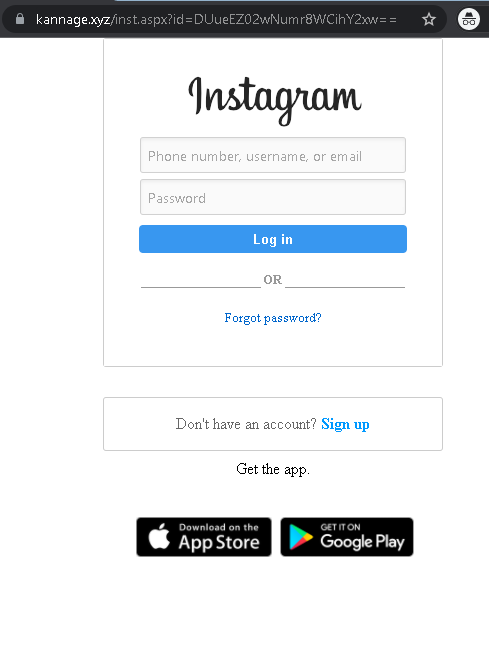
This screenshot shows a phishing page impersonating Instagram, designed to steal login credentials (phone number, username, email, and password). The page is hosted on a suspicious domain unrelated to Instagram.

Security Notice: This spoofed page was detected, analyzed, and contained firsthand by the Antiphishing.biz security team during our daily link moderation procedures. To protect the public, the dangerous destination URL has been completely disabled within our infrastructure. We document and analyze these live visual patterns to help security researchers and users detect replica fraud techniques before financial damage occurs.
Actual screenshot of "Instagram phishing page revealed" phishing interface captured during link moderation on our platform.
Figure 1: Live screenshot of the live scam infrastructure intercepted by our security systems.

Threat Analysis: Instagram Phishing – Credential Harvesting

How it works:
The victim receives a phishing email, SMS, or social media message claiming a security alert, account issue, or the need to verify their information. The link leads to this page, which mimics the Instagram login interface. The victim is asked to enter their phone number, username, or email and password, then click “Log in.” The credentials are captured and sent to the attacker.

The goal:
The attacker steals Instagram account credentials to:

  • Access private messages and personal information
  • Post spam, scams, or malicious links from a trusted account
  • Use the account to send further phishing messages to the victim’s followers
  • Attempt credential reuse on other platforms (email, banking, etc.)

Red flags to watch for:

  • Suspicious URL: The page is hosted on kannage.xyz, not instagram.com. Legitimate Instagram login pages are only on official Instagram / Meta domains.
  • Generic design: While the page copies Instagram’s layout, the domain and lack of security indicators (e.g., valid SSL certificate matching Instagram) reveal its fraudulent nature.
  • Unsolicited login request: Instagram does not send links requiring users to log in to resolve account issues or claim rewards.
  • No personalization or two‑factor prompt: A real Instagram login may show a profile photo or ask for a verification code – this page does not.

What to do if you encounter this:

  • Do not enter your username, phone number, email, or password.
  • If you have already entered your credentials, change your Instagram password immediately and enable two‑factor authentication (2FA). Also check for any unauthorized activity or connected apps.
  • Always access Instagram by typing instagram.com directly into your browser or using the official app.

Protective measures:

  • Bookmark the official Instagram login page and use that bookmark.
  • Use a password manager – it will autofill only on legitimate instagram.com domains.
  • Enable two‑factor authentication on your Instagram account.
  • Be suspicious of any unsolicited message that asks you to log in via a link.

Snapchat phishing page detected

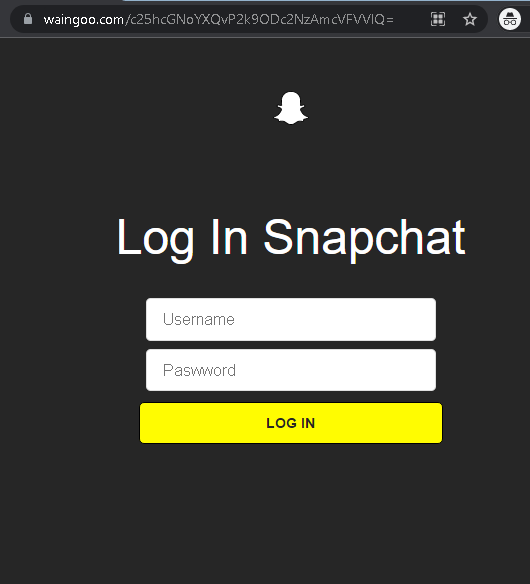
This screenshot shows a phishing page impersonating Snapchat, designed to steal login credentials (username and password). The page is hosted on a suspicious domain unrelated to Snapchat.

Security Notice: This spoofed page was logged, cross-checked, and neutralized firsthand by the Antiphishing.biz security team during our automated link scanning workflows. To protect the public, the hostile origin link has been safely deactivated within our infrastructure. We document and analyze these live visual patterns to help security researchers and users detect replica fraud techniques before financial damage occurs.
Actual screenshot of "Snapchat phishing page detected" phishing interface captured during link moderation on our platform.
Figure 1: Live screenshot of the ongoing fraudulent campaign captured during routine moderation.

Threat Analysis: Snapchat Phishing – Credential Harvesting

How it works:
The victim receives a phishing email, SMS, or social media message claiming a security alert, account issue, or the need to verify their information. The link leads to this page, which mimics the Snapchat login interface. The victim is asked to enter their username and password, then click “LOG IN.” The credentials are captured and sent to the attacker.

The goal:
The attacker steals Snapchat account credentials to:

  • Access private messages, photos, and personal information
  • Post spam or malicious links from a trusted account
  • Use the account to send further phishing messages to the victim’s friends
  • Attempt credential reuse on other platforms (email, banking, etc.)

Red flags to watch for:

  • Suspicious URL: The page is hosted on waingoo.com, not snapchat.com. Legitimate Snapchat login pages are only on official Snapchat domains.
  • Minimal design: The page lacks Snapchat’s full branding, security notices, and two‑factor authentication options.
  • Unsolicited login request: Snapchat does not send links requiring users to log in to resolve account issues.
  • No personalization or “Forgot password?” link: A real login page would include a password recovery option – this simple form may be incomplete.

What to do if you encounter this:

  • Do not enter your username or password.
  • If you have already entered your credentials, change your Snapchat password immediately and enable two‑factor authentication (2FA). Also check for any unauthorized activity.
  • Always access Snapchat by typing snapchat.com directly into your browser or using the official app.

Protective measures:

  • Bookmark the official Snapchat login page and use that bookmark.
  • Use a password manager – it will autofill only on legitimate snapchat.com domains.
  • Enable two‑factor authentication on your Snapchat account.
  • Be suspicious of any unsolicited message that asks you to log in via a link.

Preparation to carding with phishing page of income tax credits refund in France detected

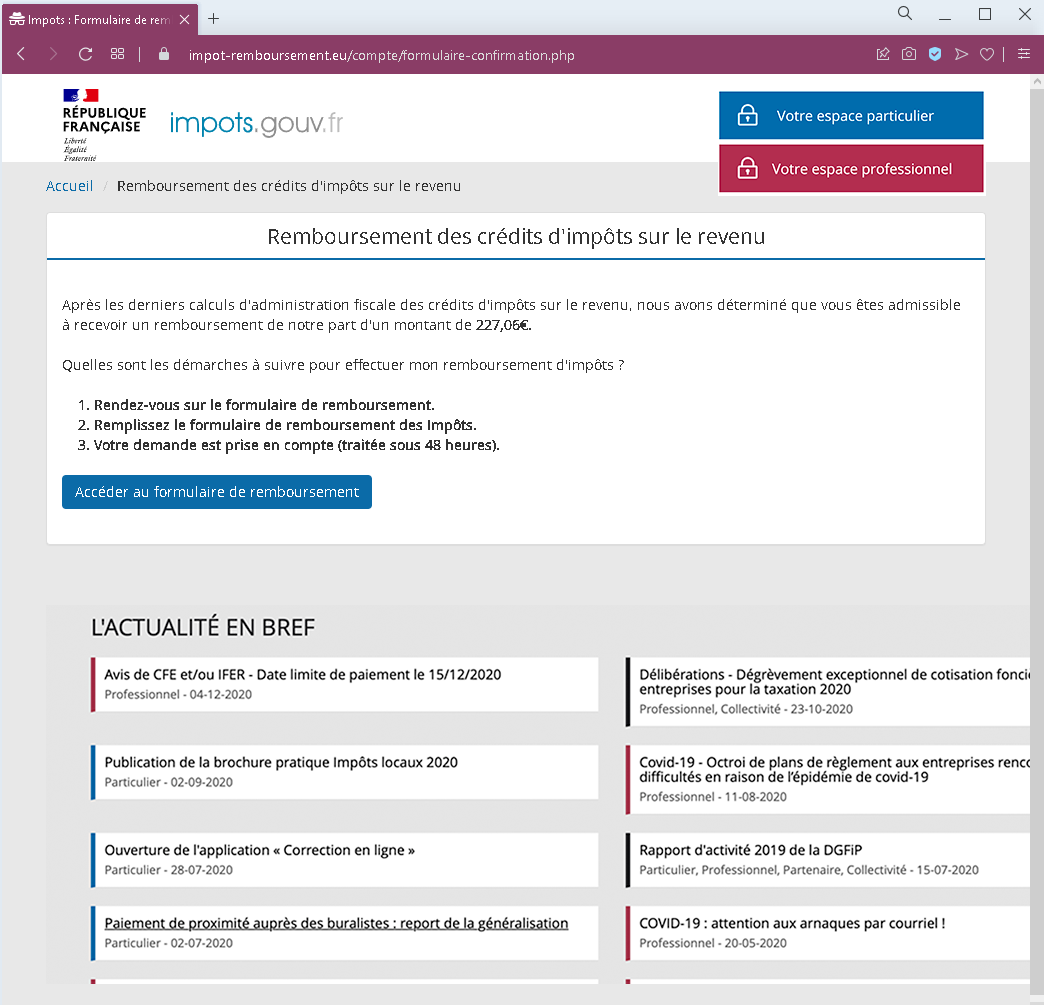
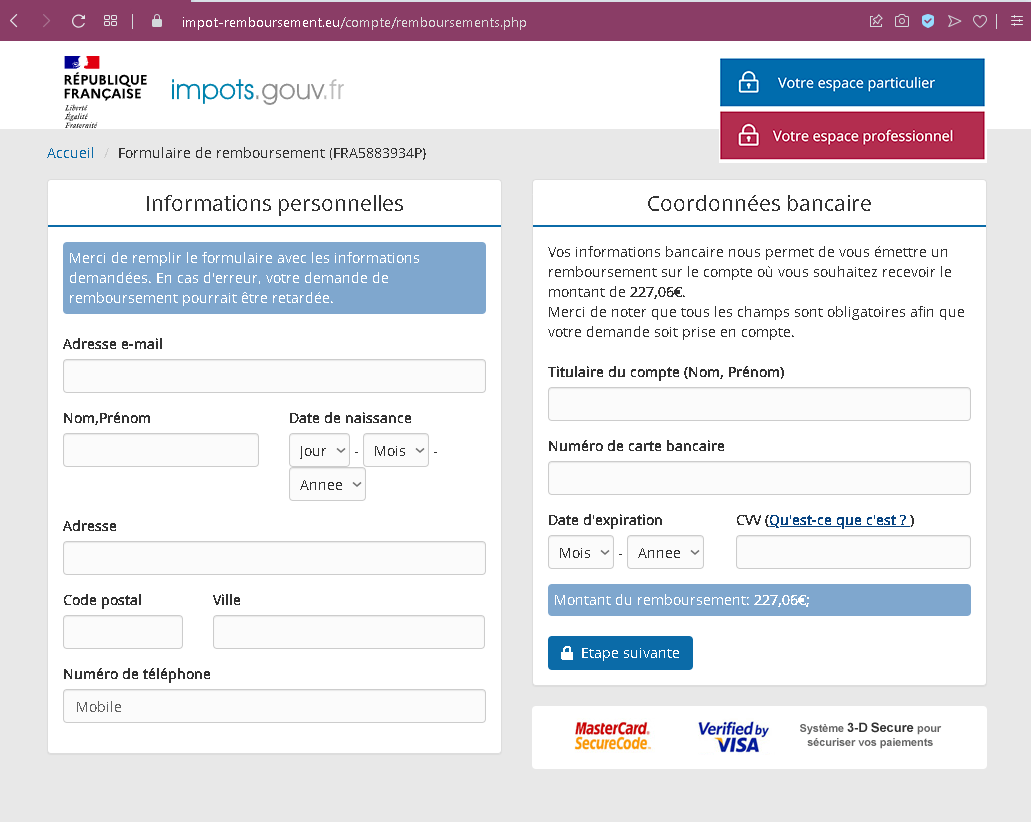
These two screenshots show a phishing campaign impersonating the French tax authorities (impôts), offering a fake tax refund (€227.06) to trick victims into providing personal information and full credit card details.

Security Notice: This deceptive layout was logged, cross-checked, and neutralized firsthand by the Antiphishing.biz security team during our standard URL vetting operations. To protect the public, the phishing source domain has been safely deactivated within our infrastructure. We document and analyze these live visual patterns to help security researchers and users spot lookalike phishing methods before financial damage occurs.

Actual screenshot of "Preparation to carding with phishing page of income tax credits refund in France detected" phishing interface captured during link moderation on our platform.

Actual screenshot 2 of "Preparation to carding with phishing page of income tax credits refund in France detected" phishing interface captured during link moderation on our platform.


Threat Analysis: French Tax Refund Phishing – Personal & Card Data Harvesting

How the scam works:

Step 1 – Fake Refund Notification (First Screenshot)
The victim receives an email or lands on a page claiming that after the latest tax credit calculations, they are eligible for a refund of €227.06. The page includes steps to follow (click the refund form link) and shows fake news items (e.g., “Avis de CFE”, “Covid-19 – attention aux arnaques par courriel”) copied from the real French tax website to appear legitimate.

Step 2 – Personal Information & Card Details Page (Second Screenshot)
The victim is taken to a page that asks for:

  • Email address
  • Full name
  • Date of birth
  • Postal code and city
  • Phone number (mobile)
  • Bank card details: cardholder name, card number, expiration date, CVV

A message claims this information is needed to issue the refund to the victim’s bank account. Fake security logos (MasterCard SecureCode, Verified by Visa) are added to appear trustworthy.

The goal:
The attacker collects:

  • Personal identity information (name, DOB, address, email, phone) for identity theft
  • Full credit/debit card details (number, expiry, CVV) to make fraudulent purchases or clone the card

No refund is ever issued – the entire offer is fabricated.

Red flags to watch for:

  • Suspicious URL: The pages are hosted on a domain that is not impots.gouv.fr (the official French tax website).
  • Request for card details for a refund: Legitimate tax refunds are deposited directly to the bank account the tax authorities already have on file – they never ask for your card number, expiration date, or CVV.
  • Fake news section: The “L’ACTUALITÉ EN BREF” section contains old news (dates from 2020) and includes a warning about email scams – ironically placed on a scam page itself.
  • Poor design / inconsistencies: The layout and language have minor inconsistencies compared to the real French tax portal.
  • Unsolicited refund offer: The French tax authorities (DGFiP) do not send unsolicited emails with links to claim refunds. Any such message is a scam.

What to do if you encounter this:

  • Do not enter any personal or card information.
  • If you are a French taxpayer, always access your tax account by typing impots.gouv.fr directly into your browser.
  • If you have already entered card details, contact your bank immediately to block the card and dispute any unauthorized charges.
  • Report the phishing page to the French tax authorities (via their official reporting form) and to the platform hosting the page.

Protective measures:

  • Never click links in unsolicited messages claiming a tax refund.
  • Always type the official government URL directly into your browser.
  • Never provide your card CVV or expiration date to “receive” a refund – refunds do not require this information.
  • Enable two‑factor authentication on your bank account and email.
  • Be suspicious of any message that creates urgency (“claim your refund now”) and asks for sensitive information.

Facebook phishing with fake Apple offer in Arabic

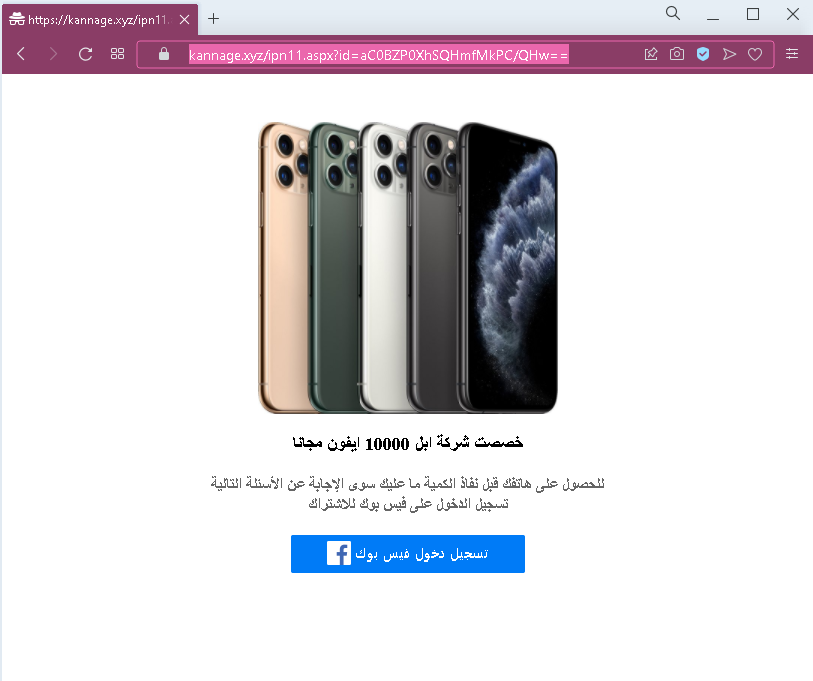
This screenshot shows an Arabic‑language phishing page that promises 10,000 free iPhones to lure victims into logging in with Facebook. The goal is to steal Facebook credentials.

Security Notice: This scam layout was detected, analyzed, and contained firsthand by the Antiphishing.biz security team during our standard URL vetting operations. To protect the public, the hostile origin link has been safely deactivated within our infrastructure. We document and analyze these live visual patterns to help security researchers and users recognize deceptive clone designs before financial damage occurs.

Actual screenshot of "Facebook phishing with fake Apple offer in Arabic" phishing interface captured during link moderation on our platform.
Figure 1: Live screenshot of the ongoing fraudulent campaign intercepted by our security systems.

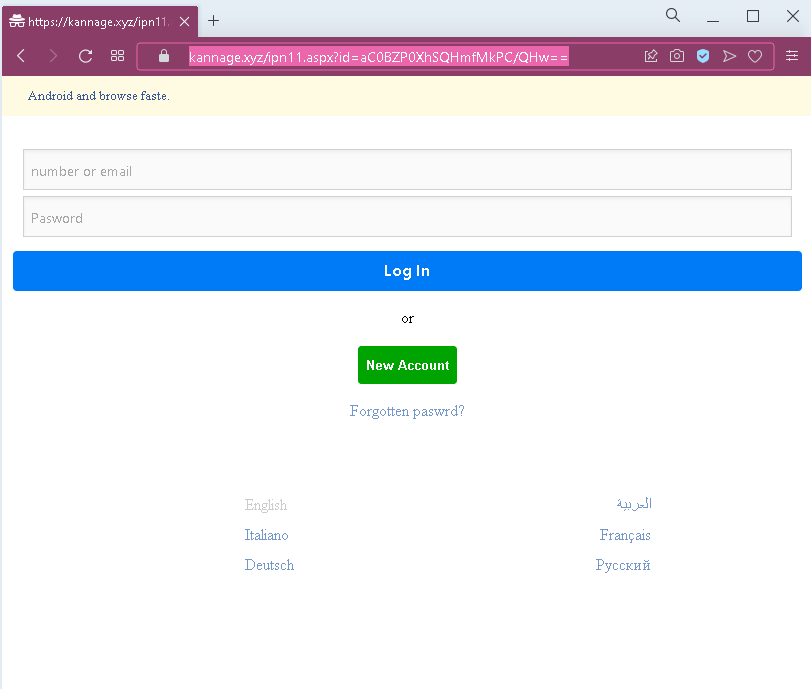
Actual screenshot 2 of "Facebook phishing with fake Apple offer in Arabic" phishing interface captured during link moderation on our platform.
Figure 2: Live screenshot of the ongoing fraudulent campaign intercepted by our security systems.

Threat Analysis: Fake Apple Giveaway Phishing – Facebook Credential Harvesting

How it works:
The victim sees an ad or link promising a chance to receive a free iPhone (or multiple iPhones). The page claims the offer is limited and urges the victim to log in with Facebook to participate. When the victim enters their Facebook login credentials (email/phone and password) and clicks the login button, the information is captured and sent to the attacker.

The goal:
The attacker steals Facebook account credentials to:

  • Take over the victim’s Facebook account
  • Access personal messages and information
  • Post spam, scams, or malicious links from a trusted account
  • Use the account to spread the same phishing scam to the victim’s friends
  • Attempt credential reuse on other platforms

Red flags to watch for:

  • Too‑good‑to‑be‑true offer: Apple does not give away 10,000 iPhones through random Facebook login pages.
  • Login via Facebook for a giveaway: A legitimate giveaway does not require your Facebook password to claim a prize.
  • Suspicious URL: The page is hosted on a domain that is not facebook.com or apple.com. Legitimate Facebook login pages are only on official Facebook domains.
  • Urgency and limited quantity: Phrases like “before they run out” are classic pressure tactics.
  • Poor design / generic Arabic phrasing: The page lacks official Apple or Facebook branding and contains awkward wording.

What to do if you encounter this:

  • Do not enter your Facebook email/phone or password.
  • If you have already entered your credentials, change your Facebook password immediately and enable two‑factor authentication (2FA).
  • Always log in to Facebook by typing facebook.com directly into your browser.
  • Report the phishing page to Facebook (via their official reporting tools).

Protective measures:

  • Remember: if it sounds too good to be true, it is a scam.
  • Never log in to Facebook via a third‑party page – always use the official website or app.
  • Use a password manager – it will not autofill on fake domains.
  • Enable two‑factor authentication on your Facebook account.

Credit Mutuel Bretagne phishing preparation detected in Abidjan (Cote d’Ivoire)

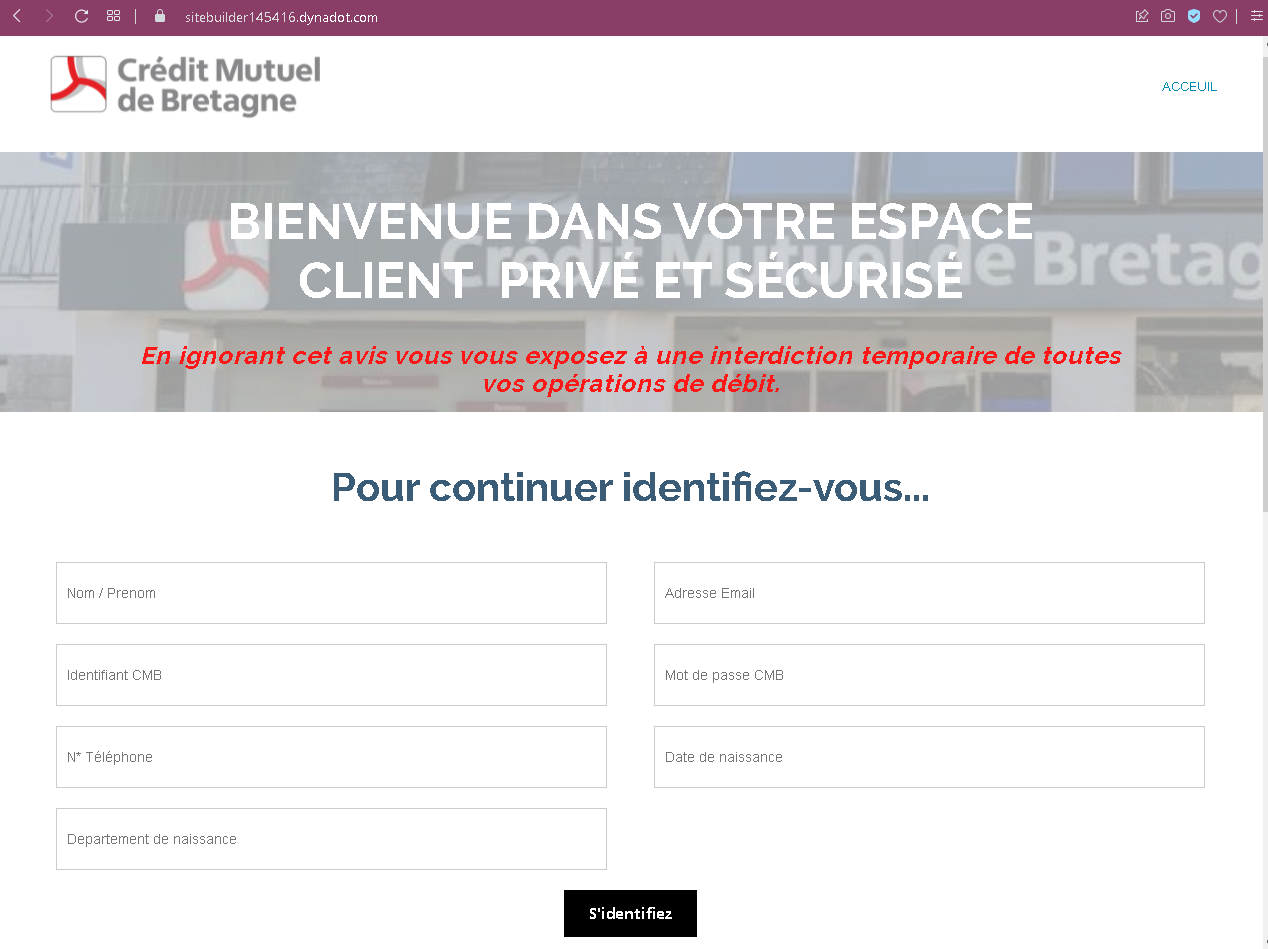
This screenshot shows a phishing page impersonating Crédit Mutuel de Bretagne, a French bank. The page threatens a “temporary ban on all debit operations” to pressure victims into providing sensitive personal and banking information.

Analysis Memo: This deceptive layout was detected, analyzed, and contained firsthand by the Antiphishing.biz security team during our daily link moderation procedures. To protect the public, the dangerous destination URL has been safely deactivated within our infrastructure. We document and analyze these live visual patterns to help security researchers and users spot lookalike phishing methods before financial damage occurs.

Actual screenshot of "Credit Mutuel Bretagne phishing preparation detected in Abidjan (Cote d’Ivoire)" phishing interface captured during link moderation on our platform.
Figure 1: Verified screenshot of the active phishing operation intercepted by our security systems.

Threat Analysis: Crédit Mutuel de Bretagne Phishing – Full Identity & Banking Credential Harvesting

How it works:
The victim receives a phishing email, SMS, or other message claiming a security alert or account restriction. The link leads to this page, which mimics the bank’s client space. The victim is asked to provide:

  • First and last name
  • Email address
  • Identifiant CMB (online banking username)
  • Mot de passe CMB (password)
  • Phone number
  • Date of birth
  • Department of birth

A threat is displayed: ignoring the notice will result in a temporary ban on all debit operations – a classic fear tactic.

The goal:
The attacker collects:

  • Online banking credentials (identifier and password)
  • Full personal identity information (name, DOB, birth department, phone, email)
  • Enough data to potentially answer security questions or commit identity theft

With this information, the attacker can:

  • Log into the victim’s Crédit Mutuel online banking account
  • Authorize fraudulent transfers or payments
  • Use personal details for identity fraud or to impersonate the victim

Red flags to watch for:

  • Suspicious URL: The page is hosted on a subdomain of dynadot.com (a domain registrar), not on creditmutuel.fr or an official Crédit Mutuel domain.
  • Threat of immediate consequences: The warning of a “temporary ban on all debit operations” is a fear tactic to pressure victims into acting without thinking.
  • Excessive data requests: A legitimate bank login does not ask for full name, email, phone, date of birth, and department of birth all on the same page. This is a clear sign of a phishing kit designed to harvest as much personal data as possible.
  • Unsolicited login request: Crédit Mutuel does not send links requiring customers to log in to avoid account restrictions.
  • Poor design / generic layout: The page lacks the full branding, security notices, and two‑factor authentication features of the real Crédit Mutuel portal.

What to do if you encounter this:

  • Do not enter any personal or banking information.
  • If you are a Crédit Mutuel customer, always access your account by typing the official website URL directly (e.g., creditmutuel.fr or your regional branch’s domain).
  • If you have already entered your credentials, contact Crédit Mutuel immediately to change your password and secure your account.
  • Report the phishing page to Crédit Mutuel’s fraud team.

Protective measures:

  • Bookmark the official Crédit Mutuel login page and use that bookmark.
  • Use a password manager – it will autofill only on legitimate domains.
  • Enable two‑factor authentication on your bank account if available.
  • Never provide your date of birth, phone number, and banking credentials in response to a threat‑based message.
  • Be suspicious of any unsolicited message that threatens account restrictions and asks you to log in via a link.

Yahoo mail phishing page detected

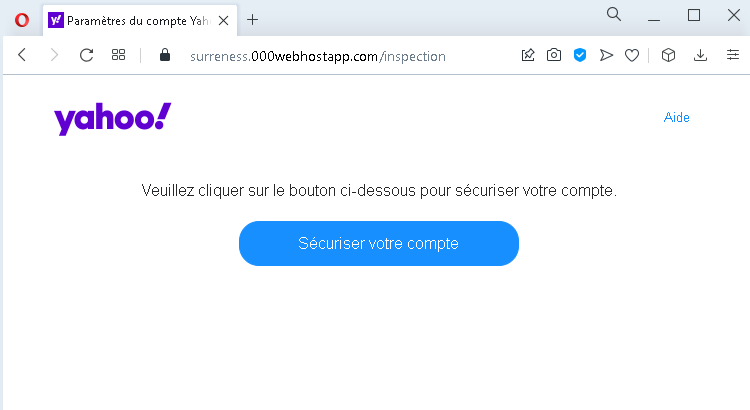
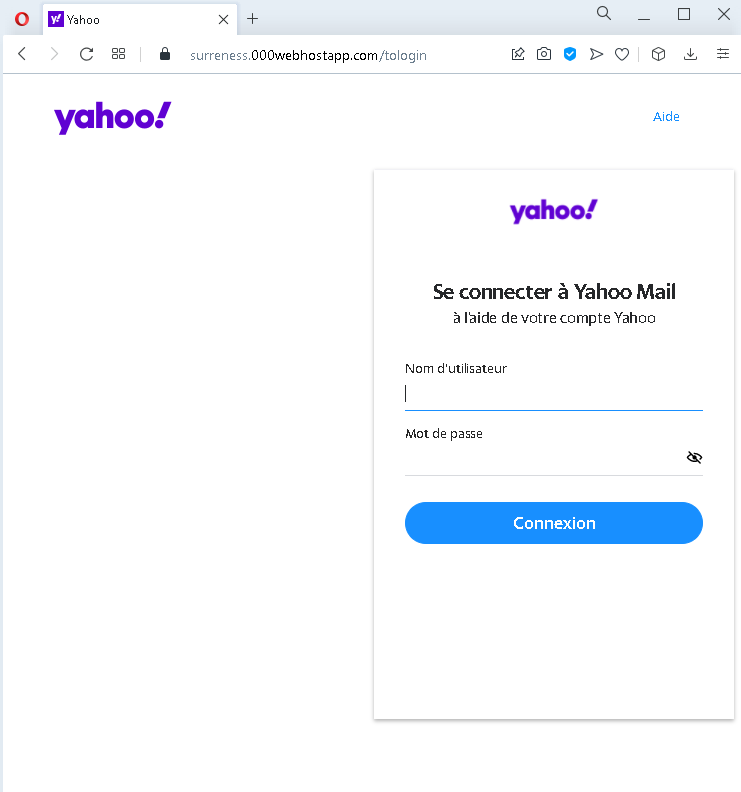
These two screenshots show a phishing campaign impersonating Yahoo, targeting French-speaking users. The scam uses a fake security alert to trick victims into clicking a button that leads to a fraudulent login page, where their Yahoo username and password are stolen.

Threat Intel: This deceptive layout was detected, analyzed, and contained firsthand by the Antiphishing.biz security team during our daily link moderation procedures. To protect the public, the phishing source domain has been safely deactivated within our infrastructure. We document and analyze these live visual patterns to help security researchers and users recognize deceptive clone designs before financial damage occurs.

Actual screenshot of "Yahoo mail phishing page detected" phishing interface captured during link moderation on our platform.
Figure 1: Actual screenshot of the live scam infrastructure intercepted by our security systems.

Actual screenshot 2 of "Yahoo mail phishing page detected" phishing interface captured during link moderation on our platform.
Figure 2: Actual screenshot of the live scam infrastructure intercepted by our security systems.

Threat Analysis: Yahoo Phishing – Fake “Secure Your Account” Scam

How it works:

Step 1 – Fake Security Alert (First Screenshot)
The victim receives a phishing email or lands on a page claiming that they need to “secure” their Yahoo account. A button labelled “Sécuriser votre compte” (Secure your account) is prominently displayed. Clicking the button leads to the next page.

Step 2 – Fake Yahoo Login Page (Second Screenshot)
The victim is taken to a page that mimics the Yahoo Mail login interface. It asks for:

  • Nom d’utilisateur (username)
  • Mot de passe (password)

After the victim enters their credentials and clicks “Connexion” (Sign in), the information is captured and sent to the attacker.

The goal:
The attacker steals Yahoo account credentials to:

  • Access the victim’s Yahoo Mail (searching for sensitive information, password reset links)
  • Compromise other services linked to the Yahoo account
  • Send further phishing messages to the victim’s contacts
  • Attempt credential reuse on other platforms

Red flags to watch for:

  • Suspicious URL: The pages are hosted on domains that are not yahoo.com or yahoo.fr. Legitimate Yahoo login pages are only on official Yahoo domains.
  • Unsolicited security alert: Yahoo does not send emails or messages with links requiring users to click a button to “secure” their account.
  • Generic design / missing security features: The fake login page lacks the full Yahoo branding, security notices, and two‑factor authentication options present on the real site.
  • No personalization: A legitimate Yahoo login may display a profile image or account selection – this page does not.

What to do if you encounter this:

  • Do not click the button or enter your username and password.
  • If you are a Yahoo user, always access your mailbox by typing yahoo.com directly into your browser.
  • If you have already entered your credentials, change your Yahoo password immediately and enable two‑factor authentication (2FA).
  • Report the phishing page to Yahoo’s security team.

Protective measures:

  • Bookmark the official Yahoo login page and use that bookmark.
  • Use a password manager – it will autofill only on legitimate yahoo.com domains.
  • Enable two‑factor authentication on your Yahoo account.
  • Be suspicious of any unsolicited message that asks you to click a button to “secure” your account.

Fake Amazon gift card

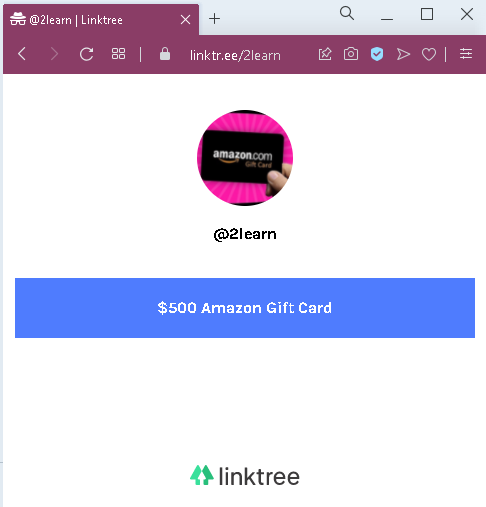
This screenshot shows a fake Amazon gift card giveaway hosted on a Linktree page (a popular link‑in‑bio service). The page claims a “$500 Amazon Gift Card” is available, but this is a common lure used to direct victims to phishing sites, survey scams, or affiliate fraud pages.

Incident Report: This malicious interface was logged, cross-checked, and neutralized firsthand by the Antiphishing.biz security team during our daily link moderation procedures. To protect the public, the phishing source domain has been fully defanged within our infrastructure. We document and analyze these live visual patterns to help security researchers and users recognize deceptive clone designs before financial damage occurs.

Actual screenshot of "Fake Amazon gift card" phishing interface captured during link moderation on our platform.
Figure 1: Visual proof of the live scam infrastructure captured during routine moderation.

Threat Analysis: Amazon Gift Card Scam – Survey / Phishing Lure on Linktree

How it works:
The victim sees a post or message (often on social media like Instagram, TikTok, or Twitter) with a link to a Linktree profile. The Linktree page displays an image or text promising a high‑value Amazon gift card (e.g., $500). When the victim clicks the link, they are redirected to a fraudulent website that may:

  • Ask for personal information (name, address, email) to “claim” the prize
  • Require completion of paid surveys, app downloads, or subscription offers (affiliate fraud)
  • Lead to a phishing page that steals Amazon or other account credentials
  • Request a small “shipping” or “processing” fee (advance fee fraud)

The goal:
The attacker earns money through:

  • Affiliate commissions – each time a victim signs up for a paid offer or service
  • Lead generation – collecting personal data to sell to marketers
  • Phishing – stealing login credentials if the victim is directed to a fake Amazon login page
  • Advance fees – tricking victims into paying a small fee for a gift card that never arrives

Red flags to watch for:

  • Too‑good‑to‑be‑true offer: Amazon does not give away $500 gift cards through random Linktree pages.
  • No official Amazon branding or verification: The Linktree page is generic and not associated with Amazon.
  • Redirects to unknown websites: The actual gift card claim link does not lead to amazon.com.
  • Unsolicited offer: Receiving a link to a gift card giveaway without entering a legitimate contest is almost always a scam.

What to do if you encounter this:

  • Do not click any links on the Linktree page.
  • Do not provide any personal or payment information.
  • If you have already clicked through and entered sensitive data, contact your bank immediately and change any compromised passwords.
  • Report the Linktree page to Linktree (via their abuse reporting system) and to the social media platform where you saw the post.

Protective measures:

  • Remember: legitimate gift card giveaways do not require you to click through random link‑in‑bio pages.
  • Always check the URL – only trust gift cards from amazon.com or official Amazon communications.
  • Never complete surveys or pay fees to claim a prize.
  • Use an ad blocker and be cautious of “too good to be true” offers on social media.

Arabic Facebook phishing detected

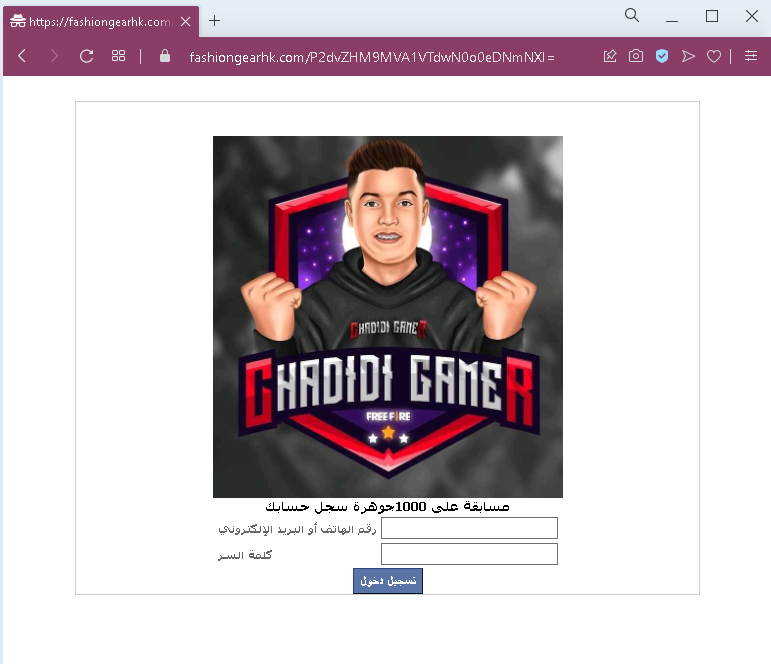
This screenshot shows a phishing page impersonating Facebook, targeting Arabic‑speaking users. The page lures victims with a promise of a Free Fire game reward and asks for their Facebook login credentials (phone number/email and password).

Incident Report: This malicious interface was intercepted, verified, and locked down firsthand by the Antiphishing.biz security team during our automated link scanning workflows. To protect the public, the phishing source domain has been completely disabled within our infrastructure. We document and analyze these live visual patterns to help security researchers and users spot lookalike phishing methods before financial damage occurs.

Actual screenshot of "Arabic Facebook phishing detected" phishing interface captured during link moderation on our platform.
Figure 1: Visual proof of the active phishing operation isolated on our infrastructure.

Threat Analysis: Facebook / Free Fire Phishing – Credential Harvesting (Arabic Variant)

How it works:
The victim receives a link via social media, SMS, or messaging app promising a free reward or bonus for the game Free Fire (e.g., diamonds, skins, or in‑game currency). The link leads to this page, which mimics the Facebook login interface. The Arabic text instructs the victim to log in with their Facebook account to claim the reward. When the victim enters their phone number or email and password and clicks “تسجيل دخول” (Login), the credentials are captured and sent to the attacker.

The goal:
The attacker steals Facebook credentials to:

  • Take over the victim’s Facebook account
  • Access the linked Free Fire (Garena) account
  • Post spam or malicious links from a trusted account
  • Use the same email/password combination to compromise other accounts (credential stuffing)
  • Sell the account or its data on criminal markets

Red flags to watch for:

  • Suspicious URL: The page is hosted on fashiongarkh.com, not facebook.com. Legitimate Facebook login pages are only on official Facebook domains.
  • Free Fire reward lure: Facebook does not offer Free Fire rewards through third‑party login pages. This is a common gaming scam tactic.
  • Poor Arabic phrasing / typo: The text contains a possible typo (“حضارة” instead of “حسابك” or similar), which would not appear on an official Facebook page.
  • Unsolicited login request: Facebook never asks you to log in via an external site to claim game rewards.
  • No personalization or security indicators: The page lacks Facebook’s full branding, language selection, and two‑factor authentication prompts.

What to do if you encounter this:

  • Do not enter your Facebook email/phone or password.
  • If you have already entered your credentials, change your Facebook password immediately and enable two‑factor authentication (2FA). Also check for any unauthorized activity or connected apps.
  • Always access Facebook by typing facebook.com directly into your browser.
  • Claim Free Fire rewards only through the official Garena app or website – never through external links.

Protective measures:

  • Bookmark the official Facebook login page and use that bookmark.
  • Use a password manager – it will not autofill on fake domains.
  • Enable two‑factor authentication on your Facebook account.
  • Be suspicious of any unsolicited message that asks you to log in to claim a game reward.
  • Never log in to Facebook via a link sent in a message or posted on social media.