
Analysis Memo: This spoofed page was intercepted, verified, and locked down firsthand by the
Antiphishing.bizsecurity team during our daily link moderation procedures. To protect the public, the hostile origin link has been safely deactivated within our infrastructure. We document and analyze these live visual patterns to help security researchers and users spot lookalike phishing methods before financial damage occurs.
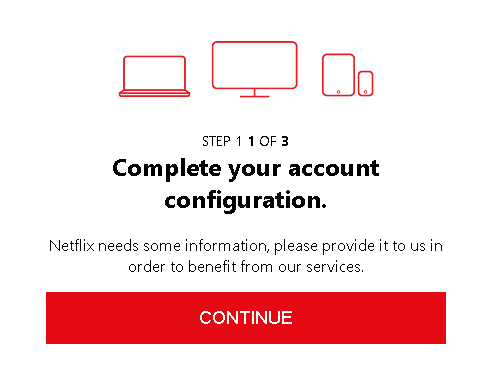
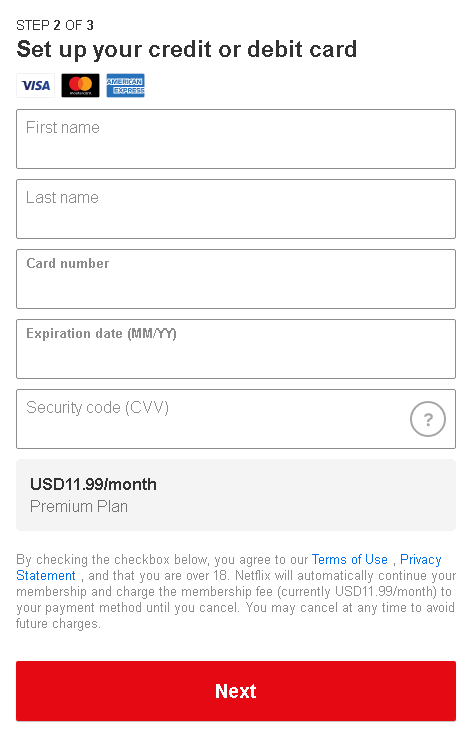
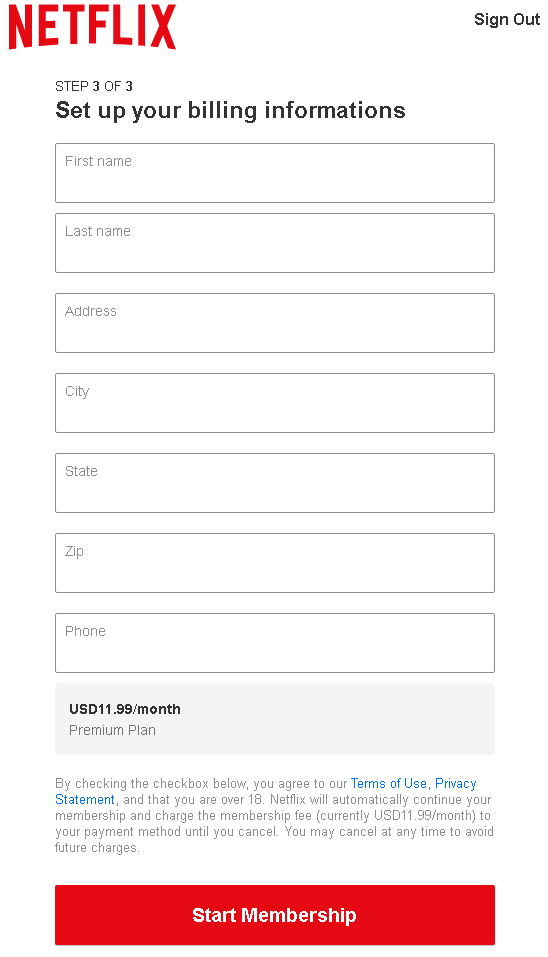
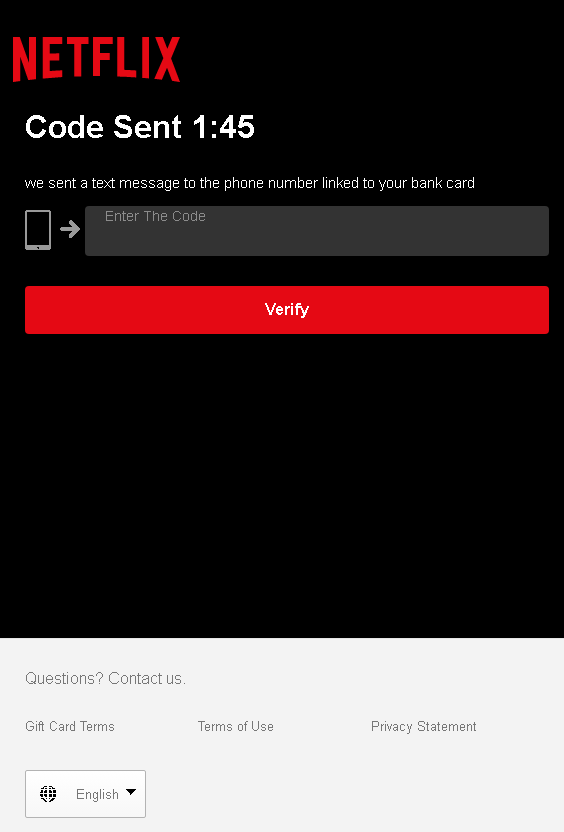
These four screenshots show a multi‑step Netflix phishing campaign designed to harvest full payment card details, personal information, and the SMS verification code (two‑factor authentication) needed to authorize fraudulent charges or take over an account.
Threat Analysis: Netflix Phishing – Complete Card & 2FA Code Harvesting
This phishing campaign impersonates Netflix’s subscription sign‑up process. The victim is led to believe they need to “complete account configuration” to start a premium subscription. The scam uses a multi‑page flow to collect:
- Full card details (number, expiration date, CVV)
- Personal information (name, address, city, state, zip, phone number)
- SMS verification code (a 2FA code sent to the victim’s phone, presumably by the real bank or card issuer)
How it works:
The victim receives a phishing email, SMS, or social media message claiming their Netflix account needs updating, or they are eligible for a free trial. The link leads to a fake Netflix page.
Step 1 – Introductory Page (First Screenshot)
A simple page claims the victim needs to “complete account configuration” to continue. It provides no details but directs the victim to proceed.
Step 2 – Card Details Page (Second Screenshot)
The victim is asked to enter:
- First and last name
- Full card number
- Expiration date (MM/YY)
- Security code (CVV)
A monthly fee (USD11.99) is displayed to make the page look like a legitimate subscription checkout.
Step 3 – Billing Address & Phone Page (Third Screenshot)
The third page requests:
- First and last name (again)
- Address, city, state, zip code
- Phone number
This completes the personal and contact information needed for identity theft.
Step 4 – SMS Code Page (Fourth Screenshot)
The final page claims a code has been sent “to the phone number linked to your bank card.” The victim is asked to enter that code to “verify” the payment method. This is a classic 2FA code capture step. The attacker, having the card details, has likely already initiated a real transaction or attempted to add the card to a digital wallet, triggering the SMS code from the actual bank or card provider. When the victim enters the code, the attacker uses it to authorize the fraudulent transaction.
The goal:
The attacker aims to:
- Steal full credit/debit card details (number, expiry, CVV)
- Obtain the victim’s full identity (name, address, phone)
- Capture the SMS two‑factor authentication code to complete an unauthorized transaction or add the card to a payment service
With this data, the attacker can make online purchases, create cloned cards, or use the card for fraud.
Red flags to watch for:
- Suspicious URL: The pages are hosted on a domain that is not
netflix.com - Unusual setup flow: Netflix does not ask new subscribers for card details, billing address, and SMS codes in a four‑step manual process. Account creation is done in one or two simple screens.
- SMS code request: A legitimate Netflix subscription does not require entering a code sent by your bank. This is a clear sign of a phishing kit attempting to intercept 2FA.
- Inconsistent branding: While the pages use the Netflix logo and red theme, the layout and phrasing differ from the official Netflix interface.
- Excessive data collection: Asking for both card details and a separate billing address, plus phone, is redundant for a real subscription.
- Unsolicited offer: Netflix does not send emails or messages with links to “complete configuration” or “update payment” without prior notification through the official account dashboard.
What to do if you encounter this:
- Do not enter any card details, personal information, or SMS codes on these pages.
- If you have already entered your card details, contact your bank immediately to block the card and dispute any unauthorized charges.
- If you have entered an SMS code, the attacker may have already used it. Contact your bank’s fraud department immediately.
- Always access Netflix by typing
netflix.com - Report the phishing pages to Netflix’s security team (e.g., by forwarding the original message to
[email protected]).
Why this scam is particularly dangerous:
This is a full payment card and 2FA harvesting kit. The multi‑step flow mimics a real subscription process, making it convincing. The final SMS code page is especially dangerous because it allows the attacker to bypass two‑factor authentication on the victim’s card or bank account. Victims often assume the code is a normal part of signing up for Netflix and enter it without suspicion.
Protective measures:
- Bookmark the official Netflix login page and never click links in emails or messages claiming account issues.
- Use a password manager: It will not autofill on fake domains.
- Never enter your card’s CVV or an SMS verification code on a page you reached via a link.
- Enable two‑factor authentication on your Netflix account (available in some regions) and on your email account.
- Check the URL carefully: Legitimate Netflix domains end with
netflix.com - If in doubt, contact Netflix support directly via the official website—never use contact information from a suspicious message.