
Who This Guide Is For
This guide is written for you – someone who uses cloud storage every day. You have photos on iCloud. Documents on Google Drive. Work files on OneDrive. Backups on Dropbox. You may have a free account that fills up quickly, or a paid subscription that renews automatically. You are not a cybersecurity professional. When an alert pops up saying your storage is almost full and your files will be deleted unless you upgrade immediately, your natural instinct is to act fast.
That instinct is exactly what the criminals behind the new wave of fake storage alerts are counting on.
The scam documented on the next page is not a crude email from a Nigerian prince. It is a highly professional, multi‑stage criminal operation that has already tricked millions of users worldwide. The attackers use real cloud infrastructure – including Google Cloud Storage – to host their phishing pages, so the links in their emails look legitimate even to sophisticated email filters. They include your real name and sometimes even your actual photo count in the message to make it feel personal. And they create an artificial emergency with a ticking clock, usually 24 to 48 hours, to bypass your critical thinking.
This threat is growing at an alarming rate. Trend Micro researchers observed a 531% month‑over‑month spike in fake “cloud storage full” phishing campaigns – a massive surge showing how aggressively scammers are now targeting consumers. According to the FBI, business email compromise (BEC) scams alone cost victims over $2.9 billion in 2023, and fake storage alerts are now a major component of these attacks.
This guide will walk you through exactly how the scam works, share true stories of real people who lost tens of thousands of dollars – and those who narrowly escaped – and give you the expert‑backed habits that will keep your money and your files safe.
The Anatomy of the Attack: How a Fake “Storage Full” Alert Drains Your Accounts
The security team at Antiphishing.biz recently intercepted and neutralized a live phishing page that perfectly illustrates the mechanics of this scam. Here is exactly how the trap is set.
Step One: The Message That Triggers Panic
It starts with an email or SMS that appears to come from your cloud provider – Apple, Google, Microsoft, Dropbox, or a generic “Cloud Services” sender. The message claims that your storage is critically low or that your payment method has failed. It uses urgent, fear‑inducing language: “URGENT REMINDER”, “Action required”, “Failure to act may result in backup suspension”. It warns that new files and emails will be blocked, backups will fail silently, and important data may be lost permanently – all classic fear tactics designed to bypass critical thinking.
To increase credibility, the attackers often include your real name and email address in the subject line. They may even mention how many photos you have stored. The deadline is never far away – usually just 24 to 48 hours. No scammer ever wants you to think things through before you act, so there is always intense time pressure.
Step Two: The Legitimate‑Looking Link That Leads to a Trap
The message contains a prominent button labelled “UPGRADE NOW”, “Update Payment Details”, or “Manage Storage”. Clicking that button leads to a fraudulent website that mimics the real cloud provider’s login or payment portal. To make the link appear trustworthy, the attackers often host their initial redirect page on legitimate Google Cloud Storage (GCS). A link beginning with storage.cloud.google.comstorage.googleapis.com
Incident Report: This spoofed page was detected, analyzed, and contained firsthand by the
Antiphishing.bizsecurity team during our daily link moderation procedures. To protect the public, the phishing source domain has been fully defanged within our infrastructure. We document and analyze these live visual patterns to help security researchers and users detect replica fraud techniques before financial damage occurs.
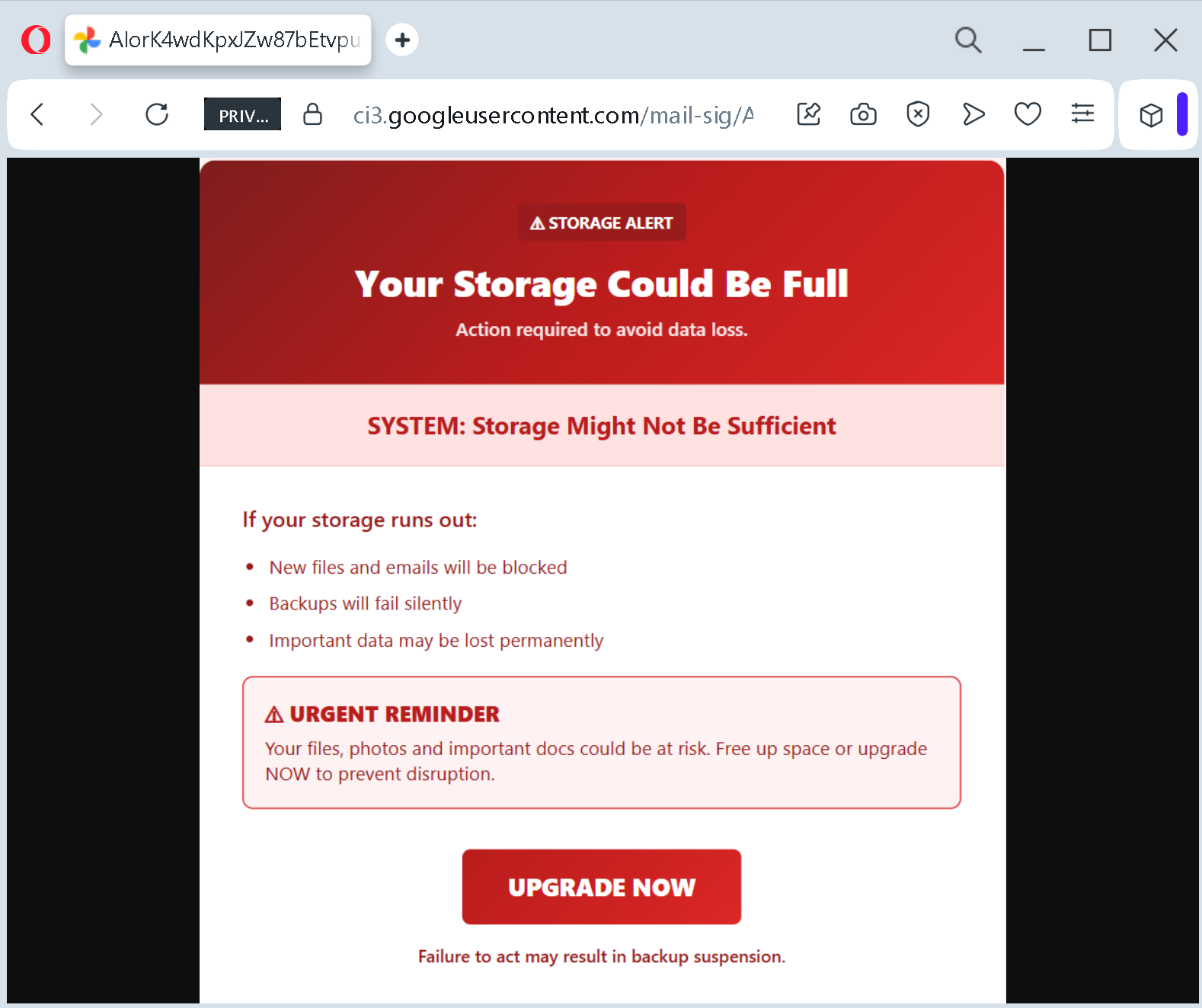
The attackers have become exceptionally sophisticated at abusing trusted cloud infrastructure. A new wave of cloud‑based phishing campaigns exploits Google Cloud Storage to host fraudulent redirectors and phishing sites. These attacks combine social engineering with the misuse of legitimate cloud infrastructure, exploiting the inherent trust users place in Google domains to execute financially motivated scams. Instead of hosting malicious content on suspicious domains, threat actors exploit Google’s trusted infrastructure to bypass scrutiny, making these scams harder to detect and more effective at scale.
Step Three: The Fake Page That Harvests Everything
Once you click through, the fraudulent website does one or more of the following:
- Asks for your cloud account login credentials (email and password). The attackers now have access to your entire cloud account – photos, documents, emails, and contacts.
- Requests your credit card information to “upgrade” your storage. The amount is deliberately small – often $0.99, €0.99, or £0.99. A trivial amount does not trigger suspicion. You think, “It is only a dollar. If it is a scam, I have not lost much. If it is real, I need my storage.” That is exactly the trap.
- Installs malware disguised as a “cleanup tool” or “upgrade utility”. The malware can steal additional data, lock your files for ransom, or give the attacker remote access to your device.
- Redirects you through a fake CAPTCHA page to evade automated scanners, then sends you to affiliate marketing sites where the attackers earn commissions for every sign‑up or purchase.
In many cases, the attackers do all of the above. They steal your login credentials, capture your payment details, and monetize your visit through multiple channels – all within seconds.
Five Heartbreaking Stories of Real People Who Lost Everything
These are not warnings from a security textbook. These are actual human beings who saw a “storage full” or “payment failed” message and lost money they had spent years saving.
A California Executive with 25 Years in Cybersecurity Lost $400,000
Rana Robillard, a 55‑year‑old Silicon Valley executive who had worked at tech companies – including the cybersecurity firm HackerOne – for 25 years, was elated to finally buy a home in Orinda, California. She had beaten three other bidders. The closing was approaching. She received an email that appeared to come from her mortgage broker with directions to wire a $398,359.58 down payment to a JPMorgan Chase account.
She wasted no time sending the money.
The email was a forgery. The criminals had penetrated the email system of her mortgage broker and were waiting for the perfect moment to strike. The wire instructions were fake. Instead of sending a down payment for her future home, Robillard had sent her life savings to a criminal.
“That’s when I went into a full panic,” she told. The next six months were a nightmare. By the time the fraud was discovered, the money was gone. According to FBI data, scams involving fake emails in real estate deals have exploded from less than $9 million in losses in 2015 to $446.1 million by 2022.
A Chicago First‑Time Homebuyer Wired $60,000 to Criminals
Three days before closing on his Chicago‑area condo – the culmination of his dream of first‑time homeownership – Cullen Brown received an email with wiring directions from what appeared to be the title company working with the seller. The email looked legitimate. It included his name, his address, and the exact amount he owed for his down payment. “It all made sense in the moment,” Brown later said.
The email was not from the title company. It was from criminals who had hacked into the title company’s email system. Brown wired nearly $60,000 – almost his entire savings – to the wrong place. His attorney called about an hour later to let him know the money had not been received. “That’s when it all started to unravel,” Brown said. “I realized it was my mistake not verifying this information beforehand.”
A Nashville Buyer Had “No Idea Something Like This Could Happen”
Ritu Tirthani, 37, had worked two jobs to afford a home in Nashville. She received what appeared to be legitimate wiring instructions for her down payment. She sent tens of thousands of dollars to the provided account. She did not learn about the fraud for an entire day.
“The day after I wired the money, I got a call from the banker saying they hadn’t received the wire yet,” Tirthani said. “I remember my brain just froze.” According to a survey of 650 homebuyers and sellers, more than half of respondents said they were only “somewhat” or “not aware” of fraud risks. Tirthani was one of them – until it was too late.
A Bengaluru House‑Hunter Lost Rs 10,000 Before Realizing It Was a Scam
In India, a woman looking for a 2BHK flat in Koramangala came across a dream deal on 99acres: a fully furnished apartment in Prestige Pinewood for Rs 35,000 per month – far below the market rate of about Rs 1 lakh. The “owner,” Abhishek Khanna, spoke fluent English, sounded professional, and claimed he was out of town but could show the flat when he returned.
To make it more convincing, he mentioned another couple from Mumbai who were eager to rent the same flat and had already offered a Rs 5,000 token amount. Afraid she would lose the apartment, the woman offered to pay Rs 10,000 upfront. Khanna agreed and sent her a UPI number belonging to his “CA.”
When she tried paying through Google Pay, the UPI network actually stopped the transaction to protect her money – a clear warning. But instead of walking away, she told the “owner,” who quickly shared another UPI QR code. This time the payment went through. When nothing arrived, another excuse followed: a “stamp paper” for the agreement required a minimum payment of Rs 20,000. That is when she finally paused.
A friend reverse‑image searched the property photos. The same pictures appeared on Facebook and OLX with older timestamps and different contact names. The “owner,” the “CA,” the “assistant,” the “notary” – all part of an elaborate scam.
A Young Man’s iCloud “Storage Full” Message Cost Him His Entire Photography Portfolio
A freelance photographer received an email warning that his iCloud storage was full and that his photos would be deleted within 48 hours unless he upgraded. The email looked official. It used Apple’s branding and included his real name. Panicked about losing years of client work, he clicked the link, entered his Apple ID password, and provided his credit card details for the “upgrade.”
The criminals used his Apple ID to lock him out of his account, changed the password, and deleted his backups. He lost his entire photography portfolio – thousands of client images – permanently. The $0.99 payment he thought he was making cost him his business.
The Five People Who Saved Themselves (And How You Can Too)
Not every story ends in tragedy. Some people recognized the trap before it snapped shut.
The California Couple Who Recovered 90% of Their Money by Acting Fast
Lynette and Scott, a Southern California couple, were about to submit a down payment on a home when they received what looked like a message from their mortgage broker. The email was an exact duplicate of previous correspondence – except for one keystroke. Instead of “escrow.com,” the sender address was “escrovv.com” – two V’s in place of a W.
They did not notice the typo. They sent the money. But then they did something critical: they immediately followed up with their broker, who told them they had not received anything. “We literally stopped and prayed, and then we called the police,” Scott said.
Orange County has one of Southern California’s only cyber crimes investigative units. The sheriff told them speed is essential in cyber fraud cases: “The quicker you recognize it and then take immediate action is key. The likelihood of recovering that money is almost zero after about 72 hours.”
Because they acted immediately, investigators traced where the money went. After several months, the couple ultimately recovered about 90% of their funds. The remaining 10% had been converted into Bitcoin – and that was gone forever. But 90% was far more than most victims ever see.
The Mount Royal University Payroll Team That Sent a Second Email
A payroll department at Mount Royal University was repeatedly hit with requests to change bank account information. The requests looked legitimate. They came from employees, and the email addresses displayed were correct. The sender names were people they knew. The requests seemed routine.
But the payroll team had been trained. Instead of acting on the original emails, they created new, separate emails. They attached screenshots of the suspicious requests and sent them directly to the employees who supposedly made them. They asked a simple question: “Did you actually send this?”
The answer was always no.
The payroll team did not use advanced technology. They did not have special training. They simply refused to trust the original message and verified through a separate channel. That habit saved their organization from financial disaster.
The Surgeon Who Caught the Typo Before Sending $1.2 Million
A well‑known New York surgeon was in the final stages of purchasing a $3.5 million apartment. He received an email from his attorney’s office with instructions to wire $1.2 million to what appeared to be a legitimate escrow account. The email looked identical to previous correspondence. But the surgeon noticed something: the email address had a single extra letter. Instead of the attorney’s usual domain, it was off by one character.
He did not click reply. He did not call the number in the email. Instead, he picked up the phone and called his attorney’s office using the number saved in his contacts from years of working together. The attorney had no idea what he was talking about. The email was a forgery.
The surgeon’s eye for detail – noticing one extra letter in a sea of text – saved him $1.2 million.
The Six Red Flags That Give Away the Fake Storage Alert – Every Time
You do not need to be a cybersecurity expert to spot these attacks. You just need to know what to look for.
Red Flag One: The Sender Address Is Not the Official Domain
Legitimate storage alerts come from [email protected], [email protected], or similar official domains. Fake messages come from random, nonsensical domains – nothing like the real provider. In documented campaigns, attackers have used addresses that look close but are off by a letter or two.
Red Flag Two: The Message Threatens Immediate Deletion
Real services do not say things like “Your photos will be deleted TODAY” or “Your backup will be blocked in 24 hours.” Major cloud providers do not instantly delete user data when payment issues occur. Instead, they typically impose limited restrictions and provide long grace periods, sometimes lasting months or even years (for example, Google may retain data for up to two years, while OneDrive allows up to six months).
If the message says your data will be deleted in 24 to 48 hours, you are looking at a scam.
Red Flag Three: The Message Contains a Link Urging You to “Upgrade Now”
Legitimate storage alerts do not force you to take action through emailed links. Real alerts appear within your device settings or as official system notifications – not through unsolicited text messages or emails with external links. If you need to check your storage, go directly to your device settings or the official website. Do not click the link.
Red Flag Four: The URL Looks Official but Contains Subtle Errors
Examples like icloud-storage.comgoogle-drive-alert.neticloud.comgoogle.commicrosoft.comdropbox.com
Red Flag Five: The Message Arrives Even If You Do Not Use That Provider
If you receive an “iCloud storage full” alert but you do not use iCloud – or you receive a “Google Drive” alert but only use Dropbox – that is an instant giveaway. Scammers blast these messages to millions of addresses, hoping that a fraction of recipients actually use the service being impersonated.
Red Flag Six: The Message Uses a Fake CAPTCHA or Redirect Chain
In advanced versions of the scam, clicking the link sends you through a multi‑stage redirection chain. You may see a legitimate‑looking CAPTCHA page that asks you to “verify you are human” before proceeding. This is not a security measure; it is a trick to evade automated scanners. Real cloud providers do not use CAPTCHA redirects for storage alerts.
Expert Advice: How to Keep Your Files and Money Safe Starting Today
The following rules come from cybersecurity professionals, law enforcement agencies, and the official security teams at major cloud providers. Following them will protect you from the fake storage alert scam and every future variation.
Rule One: Never, Ever Click Links in Unsolicited Storage Alerts
This is the single most important rule in this guide. If you receive an email or SMS claiming your storage is full, your payment method has expired, or your files will be deleted – do not click any links. Do not call any phone numbers in the message. Do not reply.
Instead, open a new browser tab or go directly to your device settings. For iCloud, go to Settings on your iPhone or iPad → Your Name → iCloud. For Google Drive, open drive.google.com manually. For OneDrive, open onedrive.com manually. If your storage is truly full or your payment method has expired, you will see the warning there – inside the official app or website. If you see nothing, the message was a scam. Delete it and move on.
That one habit – typing the official address yourself instead of clicking a link – would have prevented every victim story in this article.
Rule Two: Understand What Real Cloud Providers Will Never Do
Legitimate cloud providers will never:
- Send you an unsolicited email with a link to “upgrade now” to avoid immediate data loss.
- Ask you to enter your payment details through a link in an email.
- Threaten to delete your files within 24 to 48 hours.
- Use a fake CAPTCHA or redirect chain to “verify” you before showing your storage status.
Apple, Google, Microsoft, and Dropbox all display storage alerts within their official apps and system settings. They do not use panic‑inducing emails with clickable upgrade buttons.
Rule Three: Be Suspicious of Any Message That Creates Urgency
Scammers manufacture pressure because it works. “Your account will be locked.” “Your files will be deleted.” “Immediate action required.” These phrases are designed to make you panic. When you panic, you do not check the web address. You do not question the request for your password or payment details.
Train yourself to treat urgency as a red flag. When a message tries to rush you, pause. Take a breath. Then follow Rule One: check your storage directly through official settings.
Rule Four: Enable Two‑Factor Authentication on All Cloud Accounts
Two‑factor authentication (2FA) is your digital seatbelt. Even if a scammer steals your password through a fake login page, they cannot access your account without the one‑time code sent to your phone or authenticator app.
Apple, Google, Microsoft, and Dropbox all offer 2FA. Enable it now. Use an authenticator app rather than SMS where possible, because SMS codes can be intercepted through SIM swapping attacks. This one step could save your entire digital life.
Rule Five: Use a Password Manager
Password managers are small applications that store all your login credentials securely and automatically fill them into websites. They have a hidden superpower: they only autofill on the correct domain.
If you click a link to a fake cloud login page, your password manager will recognize that the domain is not the official one – for example, icloud-storage.comicloud.com
Rule Six: If You Are Expecting a Bill, Log In Manually
If you have a paid cloud subscription, you know roughly when your renewal is due. If you receive an email about a payment failure around that time, do not click the link. Open a new tab, go to the official website, and check your billing status there. That extra minute of caution will protect your payment information.
Rule Seven: Report Suspicious Messages Immediately
If you receive a fake storage alert, do not just delete it. Report it. Forward the email to the Anti‑Phishing Working Group at [email protected]. Forward suspicious texts to 7726 (SPAM). Report the scam to the Federal Trade Commission at reportfraud.ftc.gov
Your report could help protect other users from falling into the same trap.
What to Do If You Have Already Fallen for This Scam
If you realize that you have clicked a link, entered your cloud credentials, or provided payment information on a suspicious website, do not panic. But do not wait, either. Time is the enemy. Act immediately using this step‑by‑step checklist.
First, change your cloud account password immediately. If you can still log in, do so and change your password to a strong, unique one. If you cannot log in because the criminals have already locked you out, go through the provider’s account recovery process immediately. For Apple, go to iforgot.apple.com. For Google, go to accounts.google.com/signin/recovery.
Second, revoke all active sessions. Most cloud providers have a “sign out everywhere” feature. Use it. This will kick any criminal out of your account if they are currently logged in.
Third, if you provided credit card details, contact your bank immediately using the phone number on the back of your physical card. Tell them your card may have been compromised in a phishing attack. Ask them to block the card and issue a new one. If any fraudulent charges have already appeared, report them immediately and request a chargeback.
Fourth, review your recent account activity. Most cloud providers offer a sign‑in log that shows the locations and devices used to access your account. Look for any sign‑ins that you do not recognize – especially those from unusual geographic locations or at odd hours.
Fifth, check for hidden forwarding rules. If your email account was compromised, criminals may have set up rules to forward or delete incoming security alerts. Review your email settings and remove any rules you did not create.
Sixth, file a police report. Many victims delay reporting because they feel embarrassed or ashamed. Do not let that stop you. These criminal networks defraud thousands of people every year. There is nothing shameful about being targeted by a sophisticated attack. The shame belongs to the criminals.
The Bottom Line
The fake cloud storage alert scam is a masterpiece of psychological manipulation, not technical hacking. It uses your fear of losing precious photos and important files to override your better judgment. It uses a legitimate‑looking link hosted on real cloud infrastructure to bypass your security filters. It uses a small, seemingly trivial payment to make you lower your guard. And it relies entirely on you clicking before you think.
But the scam has a fatal weakness. It falls apart the moment you pause, take a breath, and ask one simple question: “Did I ask for this message?”
If the answer is no – and it almost always is – do not click. Do not type. Do not call the number in the message. Open your device settings or type the official website address manually. Check your storage directly. That extra minute of caution will protect your photos, your documents, your passwords, and your bank account.
The criminals are counting on your speed, your fear, and your momentary distraction. Do not give them any of those things. Stay slow. Stay skeptical. And always, always check your storage through the official app – not through an email link.
This attack was detected, analyzed, and contained firsthand by the Antiphishing.biz security team during their automated link scanning workflows. The phishing source domain has been fully defanged within their infrastructure to protect the public. If you found this guide helpful, share it with every cloud user you know. The more people understand this scam, the harder it becomes for criminals to profit.