
Who This Guide Is For
This article is written for you – someone who shops online and waits for packages to arrive.
You order from Takealot, Amazon, Shein, or a small boutique store. You track your parcels the way your parents tracked letters – with anticipation and trust. You are not a cybersecurity expert. You probably do not spend your days analysing every SMS that lands on your phone. And that is exactly what the criminals behind this scam are counting on.
The attack described in this guide was intercepted, verified, and locked down firsthand by the Antiphishing.biz security team during their automated link scanning workflows. The phishing source domain has been fully defanged within their infrastructure to protect the public. But new domains appear every day, using the same fake logos, the same urgent language, and the same ridiculously small fee that makes you think it cannot possibly be a scam.
South Africa is being hit harder than almost anywhere else. According to the South African Express Parcel Association, delivery scams have evolved from mass SMS campaigns to targeted “spear phishing” attacks that use real information about actual orders you have placed. Garry Marshall, CEO of the Association, has warned that this indicates internal data leaks within the delivery supply chain. “There seems to be a growing trend towards a link to actual orders that have taken place. That would then imply some form of internal leakage towards syndicates and individuals that are hellbent on taking your money from you.”
Even scarier? The scammers are now using advanced phishing‑as‑a‑service platforms like “Darcula” to launch thousands of fake domains simultaneously. These platforms offer real‑time keylogging and sender ID spoofing, meaning the scam messages can appear inside legitimate SMS threads from trusted delivery providers. The Middle East and Africa region saw a spike in activity between December 2025 and February 2026, with South Africa among the most affected markets.
Between ten and twenty South Africans fall victim to this scheme every single day.
This guide will show you exactly how the scam works, walk you through the real stories of people who have lost everything, and give you the expert‑backed habits that will protect your bank account forever.
The Anatomy of the Attack: How R15.99 Becomes R40,000
Based on the real phishing page intercepted by Antiphishing.biz, here is exactly how the trap is set and sprung.
Step One: The Hook That Feels Harmless
It starts with an unsolicited text message or email. The sender appears to be The Courier Guy, a well‑known South African courier service. The message claims that a parcel addressed to you has an outstanding balance and cannot be delivered until that fee is paid.
The amount is deliberately small – just R15.99. The criminals know that a trivial fee does not trigger suspicion. You think, “It is only sixteen rand. If it is a scam, I have not lost much. If it is real, I need my package.” That is exactly the trap.
The message might include a fake tracking number, such as “CG15403239”, to make it look authentic. The tracking number cannot be verified on The Courier Guy’s official website, but most people do not check. They just see the number and assume it matches something they ordered.
The message almost always creates urgency. “Your parcel cannot be delivered.” “Immediate payment required.” “Your package will be returned to sender in 24 hours.” This manufactured panic is the criminals’ most powerful weapon. When you are afraid of losing a package you have been waiting for, you stop thinking clearly. You stop looking at the web address. You just want to solve the problem as quickly as possible.
Step Two: The Website That Looks Exactly Like The Real One
If you click the link, you are taken to a webpage that has been carefully designed to mirror the official The Courier Guy website. The same colours. The same logos. The same layout. The criminals have copied everything that makes the real site feel familiar and trustworthy.
Security Notice: This spoofed page was intercepted, verified, and locked down firsthand by the
Antiphishing.bizsecurity team during our automated link scanning workflows. To protect the public, the phishing source domain has been fully defanged within our infrastructure. We document and analyze these live visual patterns to help security researchers and users spot lookalike phishing methods before financial damage occurs.
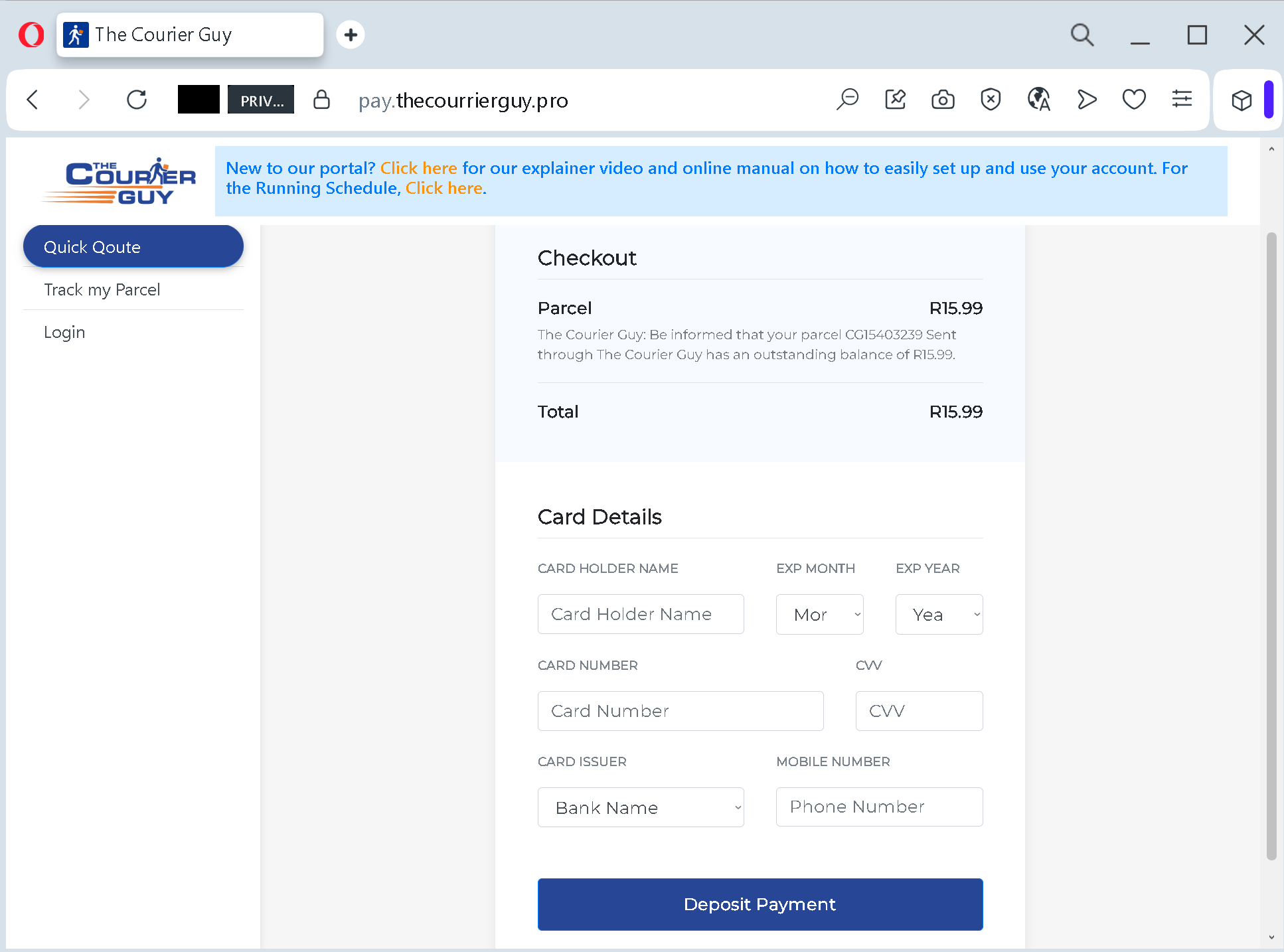
The page includes a payment form that looks legitimate. It asks for your cardholder name, card number, expiry date, CVV security code, your mobile phone number, and even the name of your card issuer (the bank that issued your card).
But look closely at the address bar of your browser. The official The Courier Guy website uses domain thecourierguy.co.za.pro.top.xyz.cu.cc
“This link,” explains one cybersecurity professional, “goes to a legit‑looking site with a fake URL. Be aware of these scams, bad actors use them to harvest credit card details.”
The criminals know that most people glance at the first part of the address (“thecourierguy”) and assume the rest is fine. It is not fine.
Step Three: The Silent Theft That Happens In Minutes
Here is where the trap snaps shut. When you enter your card details and click that “Deposit Payment” button, you are not paying R15.99. You are handing over every piece of information the criminal needs to drain your account.
With your card number, expiry date, and CVV code, the attacker can make fraudulent online purchases anywhere in the world. With your phone number, they can attempt to intercept SMS‑based two‑factor authentication codes – a technique called SIM swapping. And with your card issuer information, they have a complete financial profile they can sell on underground markets to other criminals.
The whole process takes less than a minute. In that minute, you go from feeling slightly annoyed about a small fee to having your entire financial life in the hands of criminals.
Real Stories That Will Break Your Heart
These are not cautionary tales from a cybersecurity textbook. These are actual human beings who lost money they worked their entire lives to earn.
Software Developer Herman S. Lost His Entire Month’s Salary
Herman, a software developer, knew better than most people how phishing attacks work. He was tech‑savvy. He understood security. And he still fell for it.
Herman received an SMS stating that he needed to pay R30 for customs clearance within 24 hours or his parcel would be returned to the sender. The message included a link and a webpage that looked exactly like something he might receive from the South African Post Office. He was expecting a parcel. The timing was perfect. “Although he acknowledged he should’ve known better, Hermansaid he was expecting a parcel, and the link and webpage it pointed to looked exactly like one you might receive from the Post Office.”
Herman entered his payment details. A cybercriminal then used one of his FNB Virtual Cards to make several R4,998 purchases. He lost his entire month’s salary. His bank told him the money was gone through his own fault and that it would not be paying him back.
But here is the part that should terrify every South African. Herman decided to figure out how the criminals had done it. He recreated the attack in an effort to understand how the criminals were able to use his Virtual Card without him receiving transaction notifications or requiring multi‑factor authentication. To his horror, he discovered that building a phishing attack that lets you empty someone’s bank account or max out their credit card is extremely simple. The rotating CVV of FNB’s Virtual Card provided no protection. The bank not sending notifications of the transactions meant he did not realise the fraud was happening until it was too late.
The only reason he discovered the scam at all? He saw the transactions on his statement days later.
The LinkedIn Post That Outed The Scam In Real Time
In March 2025, a LinkedIn user shared their experience with the exact scam described in this article. “THE COURIER GUY, has an unpaid fee of R15.99. Kindly click to finalise payment,” the message read. The link went to a page that at first glance looked fine. Something just seemed off.
The user, a cybersecurity professional, did not click. But their post sparked a thread of comments from other South Africans who had received the same message. One user reported receiving messages from The Courier Guy, RAM, and other couriers about outstanding fees, even though they had not ordered anything. The link, they said, took them to a legit‑looking site with a fake URL.
Another commenter described receiving messages from different cellphone numbers claiming they must pay an outstanding amount to ensure delivery of a package they had already received and paid for. “It is a scam no doubt,” they wrote, “but what worries me is the clear indication that it must be a scam being run from inside The Courier Guy. Be careful ladies and gents, these lowlifes are everywhere.”
A Forum User Watched His Friend Get Charged R11.80 For A Package That Never Existed
On the Gunsite South Africa forum, a user shared a second‑hand story that illustrates how convincing these scams can be. A friend had received an SMS about an outstanding payment for a package. “He paid R11.80, which he paid, to release the parcel.” But when the friend checked the tracking function on The Courier Guy’s official website, there was no mention of any issues. The tracking number showed the parcel had already been delivered.
The small fee was paid. The card details were harvested. And the friend had no idea that his financial information was now in the hands of criminals who could strike days or weeks later.
The Delivery Scam That Cost An Unsuspecting Shopper More Than R40,000
According to industry research, some victims have lost far more. In a case cited by cybersecurity experts, a South African shopper received what appeared to be a routine delivery notification from a courier company they used regularly. The fee was R19.99 – barely enough to buy a sandwich. The victim clicked, entered their card details, and went about their day.
Three days later, they noticed a series of charges on their bank statement: five separate transactions totalling over R40,000, all made to online retailers in countries where the victim had never shopped. The bank initially refused to reverse the charges, claiming the transactions had been authorised using the one‑time SMS codes the victim had provided when they clicked “verify” on the fake website.
The South African Banking Risk Information Centre has warned that these scams are becoming increasingly sophisticated. “If you see a padlock on the URL of the website, that is a sign that you are transacting on a secure site. If there is no padlock, rather stay away,” says Ntshiki Maluleka, digital banking crime manager at SABRIC.
But even a padlock is no guarantee. Criminals can get SSL certificates for their fake websites just as easily as legitimate businesses can. The only reliable defence is to never click the link in the first place.
The Six Red Flags That Give Away The Fake Message – Every Single Time
You do not need to be a cybersecurity expert to spot these scams. You just need to know what to look for.
Red Flag One: The Message Creates Panic With A Deadline
“Your parcel cannot be delivered.” “Immediate payment required.” “Your package will be returned in 24 hours.”
These phrases are the scammers’ most powerful weapon. They are designed to make you panic. When you panic, you do not check the web address. You do not question the request for your CVV. You just want to fix the problem as fast as possible.
Real courier notifications are informative. They tell you when your package will arrive. They do not threaten you with deadlines or demand immediate payment. If a message tries to rush you, that is your signal to stop entirely.
Red Flag Two: The Web Address Is Not Exactly The Official Domain
The official The Courier Guy website is thecourierguy.co.za
Before you type any personal information into a website, look at the browser’s address bar. Does the domain end with exactly thecourierguy.co.za.pro.top.xyz.info.cu.cc
South African cybersecurity researchers have spotted fake domains using the .cu.cchttps://thecourierguy.cu.cc/lk
Red Flag Three: The Page Asks For Your CVV
This is the most important red flag in this article. No legitimate courier company will ever ask you for your CVV security code to collect a delivery fee. Such fees would be paid through a secure payment gateway without exposing the CVV.
Your CVV code is the key to your bank account. It exists to prove that you are the legitimate cardholder during a purchase. If a website asks for your CVV for a simple delivery fee, you are looking at a scam. Period.
Red Flag Four: The Message Comes From A Random Mobile Number
Legitimate courier companies send notifications from official short codes or business numbers, not from random cellphone numbers. In the real attack, the criminals sent messages from different cellphone numbers, each with a link to click.
If the SMS comes from a standard mobile number, especially one you do not recognise, treat it with extreme suspicion.
Red Flag Five: The Fee Is Absurdly Small
R15.99. R11.80. R19.99. R30.00. The criminals choose these tiny amounts because they know a small payment does not feel like a threat. You are not worried about losing fifteen rand. But the fee is not the goal. The fee is the bait. Once you are on the hook, they take everything.
Real courier fees are not collected through random text message links. If a delivery fee is due, it would be collected at the time of booking, through the official app after logging into your account, or in person upon delivery. No legitimate courier service asks you to pay a fee by clicking a link in an unsolicited text message.
Red Flag Six: The Message Asks For Excessive Personal Information
A legitimate payment gateway asks for your card number, expiry date, and maybe your name. It does not ask for your CVV, your phone number, your card issuer, and your billing address all on the same page. The fake page documented by Antiphishing.biz asked for all of these things. That is not how secure payments work. That is data harvesting.
What The Authorities Are Saying
You are not alone in fighting this threat. Multiple official organisations have issued urgent warnings and created tools to help you stay safe.
The South African Express Parcel Association has warned that these scams are evolving to target specific individuals. Spear phishing attacks now use real information about actual orders you have placed, indicating potential data leaks within the delivery supply chain. Marshall recommends that you never act on any messages received regarding an order, as this may take you to a false address. Instead, always go directly to the shipper or originator and track the order from there.
Group‑IB, a global cybersecurity company, has warned of a sharp rise in fake shipment tracking scams across the Middle East and Africa. Their research shows these scams have accelerated through 2025 and early 2026, driven by increasingly sophisticated phishing‑as‑a‑service platforms. Attackers are using advanced techniques such as real‑time keylogging to capture banking details and one‑time passwords as they are entered. In some cases, sender ID spoofing allows fraudulent messages to appear within legitimate SMS threads from trusted delivery providers.
The South African Banking Risk Information Centre advises consumers to look before they click. If you see a padlock on the URL of a website, that is a sign that you are transacting on a secure site. If there is no padlock, stay away. But remember – a padlock is not a guarantee of legitimacy. Only the domain name matters.
Wesbank has issued a specific alert about The Courier Guy scams. Their “Spot The Scam” campaign warns customers that legitimate courier notifications do not demand payments through unsolicited links.
Capitec Bank has echoed this warning, urging customers to never click on links in messages asking for personal or banking information, never send money or transfer money to a “safe account”, and never approve transactions to prevent fraud or reverse unauthorised debit orders.
Expert Advice: How To Keep Your Bank Account Safe Starting Today
The advice below comes from cybersecurity professionals, law enforcement agencies, and the official security teams at major banks. Following these simple rules will protect you from this scam and every future variation of it.
Rule One: Never, Ever Click Links In Unsolicited Delivery Messages
This is the single most important rule in this guide. If you receive a text message or email about a package delivery – especially one that asks for a payment – do not click any links in that message. Do not call any phone numbers in the message. Do not reply.
Instead, open a new browser tab. Type the official website of the courier company manually. For The Courier Guy, that is thecourierguy.co.za
That one habit – typing the official address yourself instead of clicking a link – would have prevented every single victim story in this article.
Rule Two: Understand That Couriers Do Not Collect Fees Via Link
Here is a fact you should memorise: Legitimate delivery fees are handled in person, through the official app, or after logging into your account. No legitimate courier service asks you to pay a fee by clicking a link in an unsolicited text message.
If a message claims you owe money for a delivery, close it. If you are genuinely unsure, contact the courier company directly using a phone number from their official website – never from the suspicious message.
Rule Three: Check The Domain Before You Do Anything Else
Before you type any personal information into a website, look at the address bar of your browser. Does the domain end with exactly thecourierguy.co.za.pro.top.xyz.cu.cc
One cybersecurity professional shared a simple test: “When I saw the link, something just seemed off. Trust that feeling.”
Rule Four: Never Share Your CVV Or SMS Verification Code
This rule is absolute. No legitimate courier company will ever ask you for your CVV code to collect a delivery fee. And no one will ever ask you to provide the one‑time SMS verification code that your bank sends to your phone. That code is for you and you alone.
If a page asks for either of these things, you are looking at a scam. Close the tab immediately.
Rule Five: Enable Transaction Alerts On Your Bank Accounts
Most banking apps allow you to set up push notifications or SMS alerts for every transaction above a certain threshold – often as low as R1. Enable this feature right now. That way, if a criminal does manage to get your card details, you will know about the first fraudulent charge within seconds, not days, and you can block your card immediately.
Herman lost his entire month’s salary because his bank did not send him transaction notifications. Do not make the same mistake. Check your bank’s settings and turn on alerts for every transaction.
Rule Six: Use A Credit Card Instead Of A Debit Card For Online Purchases
Credit cards offer significantly better fraud protection than debit cards. If a fraudulent charge appears on your credit card, you can dispute it, and the card issuer will typically remove the charge while they investigate. With a debit card, the money leaves your bank account immediately, and recovering it can be a much longer, more difficult process.
For any transaction that might be risky – including “delivery fees” – a credit card is safer.
Rule Seven: If You Are Expecting A Delivery, Use The Official Tracking Number
When you make an online purchase, the seller provides a tracking number. Use that number to check your delivery status on the official website of the courier company. Do not rely on text messages that arrive out of nowhere. The tracking number is your proof. If a message about your package does not include that specific tracking number, it is not about your package.
In the intercepted attack, the fake tracking number “CG15403239” was used. This number cannot be verified on The Courier Guy’s official website. If the person receiving the message had checked, they would have seen that no such package existed.
Rule Eight: Report The Scam When You See It
If you receive a suspicious delivery message, do not just delete it. Forward the fake SMS to your bank’s fraud reporting number. Report it to the South African Fraud Prevention Service. Post a warning on social media. The more people share these warnings, the harder it becomes for criminals to profit.
Rule Nine: Share This Information With Family And Friends
The most vulnerable targets of this scam are often the people who are least comfortable with technology – older parents, grandparents, and anyone who does not check their bank statements regularly. Take five minutes to explain the golden rule to the people you love: No legitimate courier will ever ask you to pay a delivery fee by clicking a link in a text message.
That conversation could save their savings.
What To Do If You Have Already Fallen For This Scam
If you realise that you have clicked a link, entered your card details, or provided your CVV or SMS verification code on a suspicious website, do not panic. But do not wait, either. Time is the enemy. Act immediately using this step‑by‑step checklist.
First, contact your bank or credit card issuer immediately using the phone number on the back of your physical card. Do not use any phone number from the suspicious message. Tell them that your card details may have been compromised in a phishing attack. Ask them to block the card and issue a new one. If any fraudulent charges have already appeared, report them immediately and request a chargeback. The faster you act, the more likely you are to get your money back.
Second, review your recent transactions carefully. Look for small test charges – often R0.00 or R1.00 – as well as larger amounts you do not recognise. Criminals sometimes test a stolen card with a tiny transaction before making a big purchase. If you see anything suspicious, report it to your bank. Keep a record of the transaction dates, amounts, and merchant names.
Third, change your passwords on other websites. If you use the same email address and password combination on any other websites – your email provider, your social media accounts, your online shopping accounts – change those passwords immediately. Scammers will try the stolen credentials on other popular services to see where else they work. Use strong, unique passwords for each service.
Fourth, save all evidence. Take screenshots of the SMS you received. Capture the URL of the fake website if you still have it. Save any error messages or confirmation pages you saw. These will be useful when filing reports with the authorities and your bank.
Fifth, report the phishing attempt. File a report with the South African Fraud Prevention Service at safps.org.za
Sixth, consider filing a police report. Many victims delay reporting because they feel embarrassed or ashamed. Do not let that stop you. These criminal networks defraud thousands of people every day, including professionals with advanced training. There is nothing shameful about being targeted by a sophisticated scam. The shame belongs to the criminals.
The Bigger Picture: Why The Scammers Keep Coming Back
The fake courier delivery scam is not going away. Every major shopping season – Black Friday, Christmas, back‑to‑school – the messages return. The criminals know that when people are buying more, they are also expecting more packages, and they are more likely to click without thinking.
Between December 2025 and February 2026, the Middle East and Africa region saw a massive spike in fake shipment tracking scams, with South Africa among the most affected markets. Nearly two‑thirds of South Africans surveyed have been affected by scams, with 46% being affected specifically by courier and delivery fraud.
The criminals are able to keep operating because their campaigns are cheap to run and hugely profitable. A single successful victim can net them thousands of rands. Even if only a small fraction of the people who receive the message fall for it, the criminals still make a profit.
The South African Express Parcel Association has warned that these scams often indicate internal data leaks within the delivery supply chain. Many people are involved in the delivery process, including the sender, airlines, customs clearance brokers, and delivery agents – all points where leakages could occur.
The criminals have also upgraded their tools. They now use phishing‑as‑a‑service platforms like “Darcula”, which offer thousands of fake domains and templates, along with real‑time keylogging and sender ID spoofing. These platforms have made it trivially easy for anyone – even people with no technical skills – to launch a professional phishing campaign.
A Final Word
The fake courier delivery scam is a masterpiece of psychological manipulation, not technical sophistication. It uses a ridiculously small fee to make you lower your guard. It uses the natural anxiety of waiting for a package to override your better judgment. It uses a fake but convincing webpage to trick you into handing over the keys to your bank account.
But the scam has a fatal weakness. It falls apart the moment you pause, take a breath, and ask one simple question: “Did I get this message out of nowhere, and is it asking me for money?”
If the answer is yes, you are looking at a scam. Close the message. Open your browser. Type thecourierguy.co.za
The scammers are counting on your speed, your trust, and your hope that your package is on its way. Do not give them any of those things. Stay slow. Stay skeptical. And always, always type the address yourself.
This attack was detected, analysed, and contained firsthand by the Antiphishing.biz security team during their automated link scanning workflows. The phishing source domain has been completely disabled within their infrastructure to protect the public. If you found this guide helpful, share it with every South African who has ever ordered a package online. The more people understand this scam, the harder it becomes for criminals to profit.