
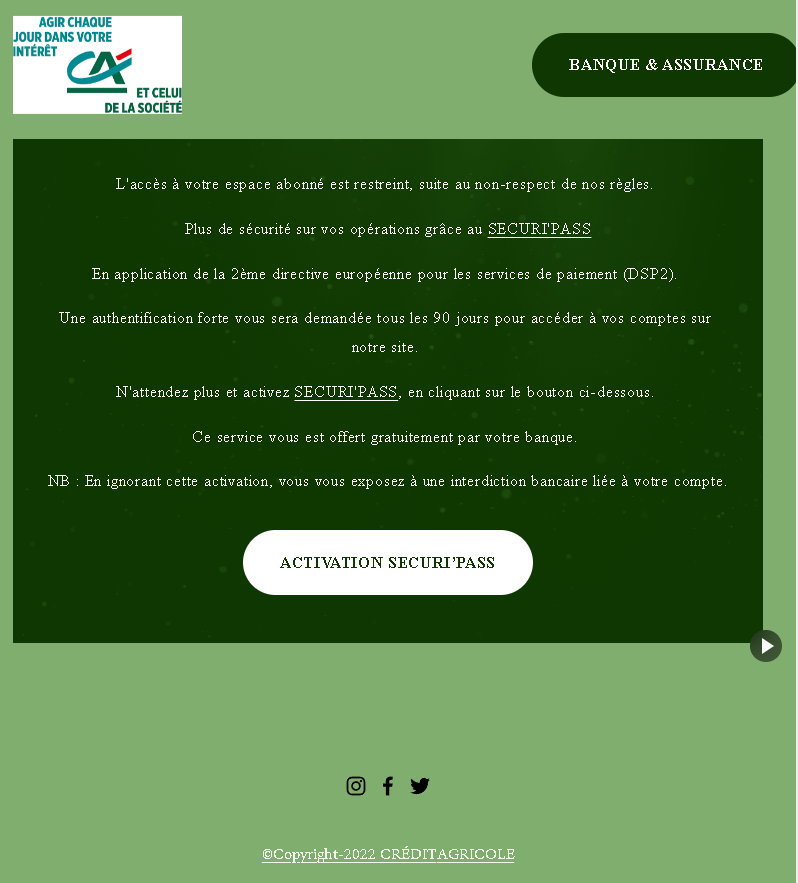
This screenshot shows a phishing landing page impersonating a French bank (likely Crédit Agricole or another institution using the “SécuriPass” security feature). The scam uses a fake security update pretext based on the EU’s PSD2 (second payment services directive) to pressure victims into clicking a malicious link.
Threat Analysis: French Bank Phishing – Fake “SécuriPass” Activation Scam
This phishing message claims that access to the victim’s online account is restricted due to non‑compliance with security rules. It references the EU’s PSD2 directive, stating that strong authentication is required every 90 days. The victim is told to click a button to activate “SECURTPASS” (a misspelling of the legitimate SécuriPass) or face a banking ban.
How it works:
The victim receives this message (likely by email) and is directed to click the activation button. The link leads to a fake bank login page designed to steal the victim’s online banking credentials and possibly two‑factor authentication codes (SMS or SécuriPass codes).
The goal:
The attacker aims to steal online banking credentials to take over the victim’s account, transfer funds, and commit fraud.
Red flags to watch for:
- Suspicious URL: The link leads to a domain that is not the official bank domain. Legitimate banks do not send activation links in emails.
- Misspelling: “SECURTPASS” instead of the correct “SécuriPass” (or similar) is a clear sign of a phishing attempt.
- Threat of banking ban: The warning that ignoring the message will result in a “banking ban” is a classic fear tactic to pressure victims into acting without thinking.
- Unsolicited activation request: Banks do not require customers to click links in emails to activate security features. Legitimate security updates are handled within the online banking portal or mobile app after the customer logs in normally.
- Generic greeting: The message does not address the victim by name or reference any specific account details.
What to do if you encounter this:
- Do not click the activation button or any links in the message.
- If you are a customer of the bank being impersonated, access your account by typing the official bank URL directly into your browser.
- If you have already clicked the link and entered any credentials, contact your bank immediately to secure your account.
- Report the phishing message to the bank’s fraud department.
Protective measures:
- Never click links in unsolicited emails claiming you need to activate a security feature.
- Always type your bank’s official website address directly into your browser.
- Enable two‑factor authentication through your bank’s official app, not via email links.
- Be suspicious of any message that creates urgency, threatens negative consequences, and asks you to click a link.