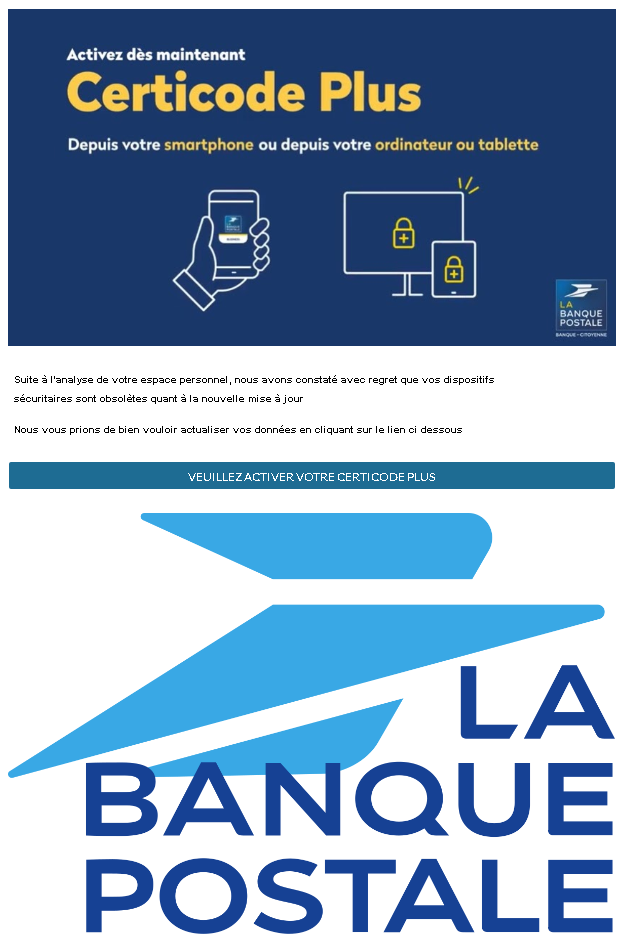
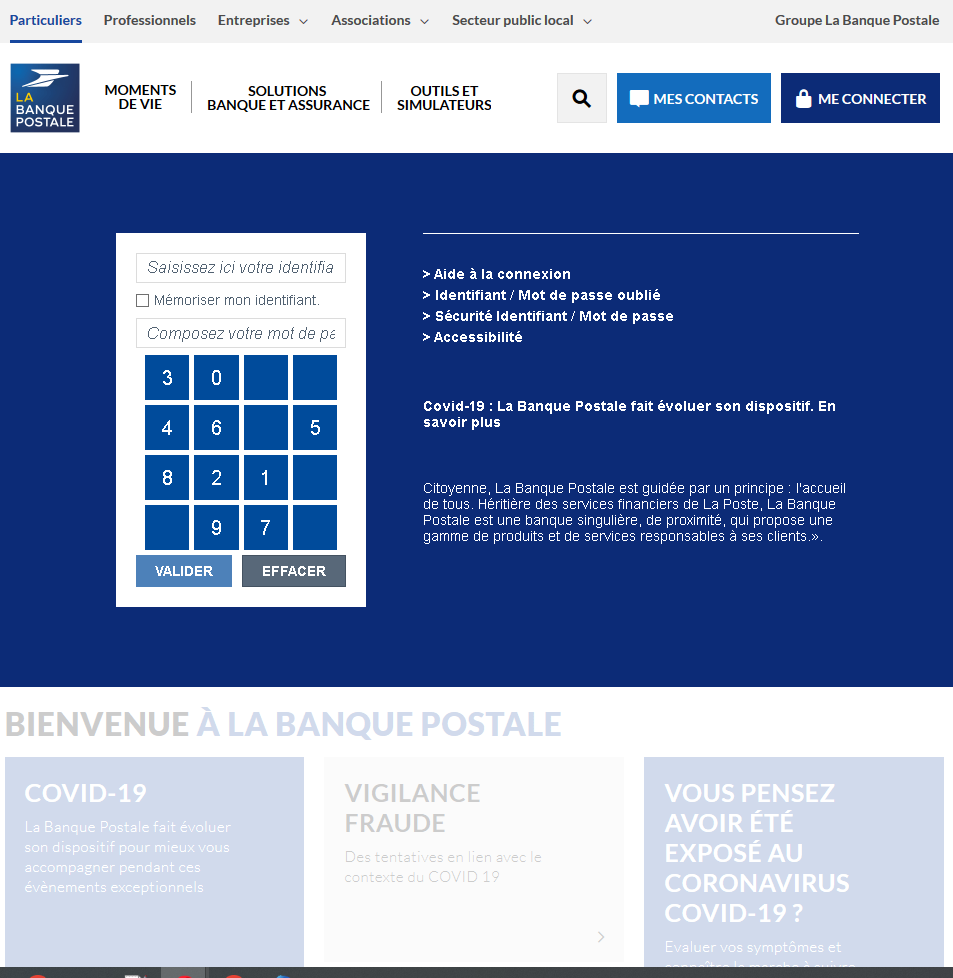
These two screenshots show a phishing campaign impersonating La Banque Postale, a major French bank. The scam uses a fake “Certicode Plus” activation pretext to trick victims into clicking a link that leads to a fraudulent login page designed to steal their online banking credentials (identifiant and mot de passe).
Threat Analysis: La Banque Postale Phishing – Fake “Certicode Plus” Activation
This campaign targets La Banque Postale customers by claiming that their security devices are obsolete and that they must activate Certicode Plus (a legitimate security feature) to continue using online services.
How it works:
- Fake Alert Page (First Screenshot)
The victim receives an email or lands on a page stating that security devices are outdated due to a new update. The page urges the victim to click a button to activate Certicode Plus. The link leads to the next phishing page. - Fake Login Page (Second Screenshot)
This page mimics the official La Banque Postale online banking portal. It includes:
- Fields for identifiant (identifier) and mot de passe (password)
- A virtual keyboard (a real security feature used by the bank)
- Legitimate-looking menus, COVID-19 notices, and fraud warnings copied from the genuine site
When the victim enters their credentials and clicks “VALIDER,” the information is sent to the attacker.
The goal:
The attacker aims to steal La Banque Postale online banking credentials. With these, they can log into the victim’s account, view balances, transfer funds, and commit fraud.
Red flags to watch for:
- Suspicious URL: The pages are hosted on a domain that is not
labanquepostale.fr - Unsolicited activation request: La Banque Postale does not send emails or messages with links requiring customers to “activate” Certicode Plus. Legitimate activation happens within the app or after logging in.
- Virtual keyboard out of context: While the real bank uses a virtual keyboard, its presence on a fake page does not make the page legitimate.
- Copied content: The second page contains real La Banque Postale branding, menus, and security notices. Attackers copy these to appear authentic.
- No personalization: The page does not display a security image, account name, or any personalized element that would appear on a legitimate login after initial identification.
What to do if you encounter this:
- Do not click the activation link or enter any credentials.
- If you are a La Banque Postale customer, always access online banking by typing
labanquepostale.fr - If you have already entered your credentials, contact La Banque Postale immediately to change your password and secure your account.
- Report the phishing pages to La Banque Postale (e.g.,
[email protected]).
Why this scam is effective:
Certicode Plus is a well-known security feature, so a request to activate it can seem plausible. The fake login page is highly convincing because it copies the bank’s layout, including the virtual keyboard and official-looking fraud warnings. The urgency of “obsolete security devices” pressures victims to act without verifying the URL.
Protective measures:
- Bookmark the official La Banque Postale login page and use that bookmark to access your account.
- Use a password manager – it will autofill only on the legitimate domain.
- Never activate security features via a link in an email. Always go directly to the official site or app.
- Enable two‑factor authentication (Certicode Plus) through the official app, not through a web link.
- Check the URL carefully: Legitimate La Banque Postale domains end with
labanquepostale.fr
Incident Report: This scam layout was intercepted, verified, and locked down firsthand by the
Antiphishing.bizsecurity team during our standard URL vetting operations. To protect the public, the phishing source domain has been completely disabled within our infrastructure. We document and analyze these live visual patterns to help security researchers and users detect replica fraud techniques before financial damage occurs.