
Incident Report: This malicious interface was logged, cross-checked, and neutralized firsthand by the
Antiphishing.bizsecurity team during our daily link moderation procedures. To protect the public, the dangerous destination URL has been fully defanged within our infrastructure. We document and analyze these live visual patterns to help security researchers and users recognize deceptive clone designs before financial damage occurs.
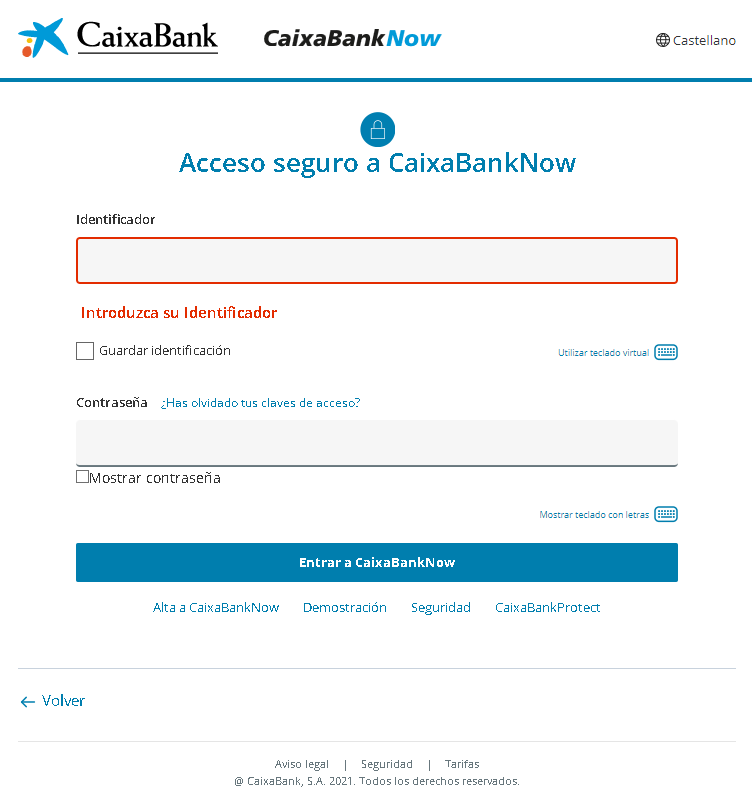
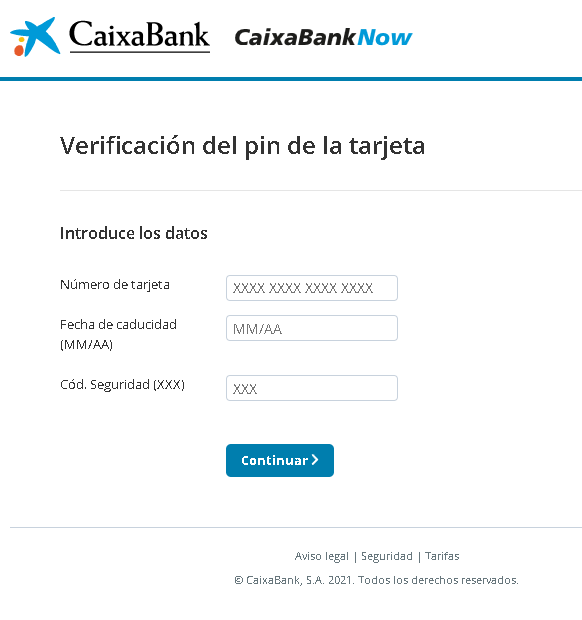
These two screenshots show a two‑step phishing campaign impersonating CaixaBank, a major Spanish bank. The scam is designed to first steal the victim’s online banking credentials (Identificador and Contraseña) and then their full card details (card number, expiration date, CVV) under the guise of “card PIN verification.”
Threat Analysis: CaixaBank Phishing – Credential & Card Data Harvesting
This campaign uses a multi‑page flow to collect everything needed to take over a bank account and use the associated payment card.
How it works:
Step 1 – Fake CaixaBankNow Login Page (First Screenshot)
The victim lands on a page that mimics the CaixaBankNow online banking login. It asks for:
- Identificador (user ID)
- Contraseña (password)
The page includes options like “virtual keyboard” and “remember my ID” to appear legitimate. When submitted, these credentials are captured.
Step 2 – Fake “Card PIN Verification” Page (Second Screenshot)
After the login credentials are stolen, the victim is taken to a second page that claims to verify the card PIN. It asks for:
- Card number
- Expiration date (MM/AA)
- Security code (CVV)
This is a classic card harvesting page. The attacker now has the full card details needed for online purchases, cloning, or adding to a digital wallet.
The goal:
- Steal online banking credentials to access the account
- Capture full card details (number, expiry, CVV) for fraud
- Use both to drain accounts, make unauthorized payments, or commit identity theft
Red flags to watch for:
- Suspicious URL: The pages are hosted on a domain that is not
caixabank.comcaixabank.es - Illogical flow: After logging in, a legitimate bank would never ask for the card number, expiry, and CVV on a separate page. This is a clear phishing pattern.
- Outdated copyright: The footer shows “© 2021,” which is outdated for a 2022 campaign.
- No personalization: Real CaixaBankNow displays a security image or personal greeting after ID entry. This page lacks that.
- Unsolicited login request: CaixaBank does not send links requiring customers to log in and then “verify” their card.
What to do if you encounter this:
- Do not enter any credentials or card details on these pages.
- If you have already entered your login details, contact CaixaBank immediately to change your password.
- If you entered card details, block your card immediately and dispute any unauthorized charges.
- Always access CaixaBank by typing
caixabank.es
Protective measures:
- Bookmark the official CaixaBank login page and use that bookmark.
- Use a password manager – it will not autofill on fake domains.
- Never enter your card’s CVV on a page you reached via a link. Legitimate banks do not request this outside a secure, logged‑in session.
- Enable two‑factor authentication (CaixaBankProtect) through the official app.