
Analysis Memo: This spoofed page was logged, cross-checked, and neutralized firsthand by the
Antiphishing.bizsecurity team during our daily link moderation procedures. To protect the public, the phishing source domain has been fully defanged within our infrastructure. We document and analyze these live visual patterns to help security researchers and users recognize deceptive clone designs before financial damage occurs.

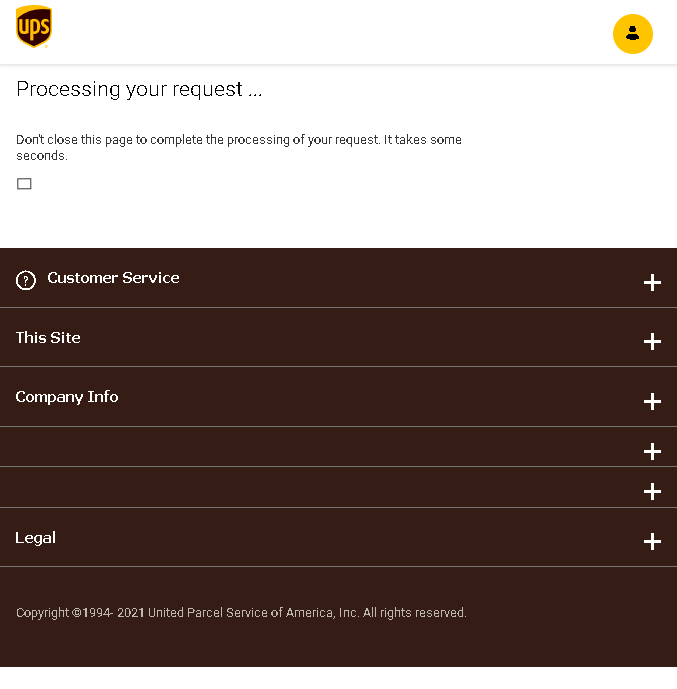
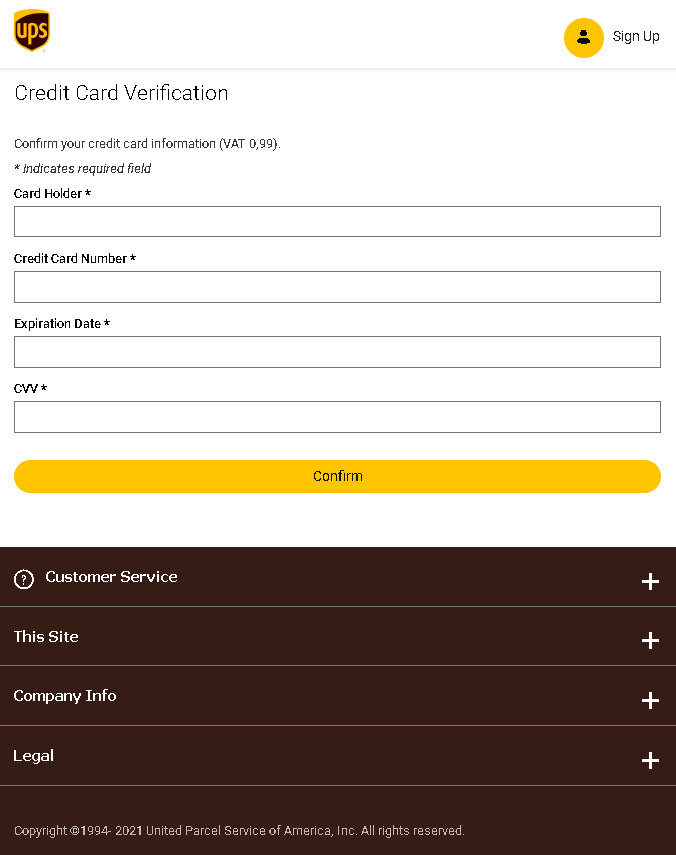
These three screenshots show a three‑step UPS phishing campaign designed to harvest personal information, create a new account credential, and steal full credit card details under the guise of a small “verification” fee.
Threat Analysis: UPS Phishing – Personal Info, Account Creation & Card Harvesting
This scam impersonates UPS (United Parcel Service) . The victim is told that a package is waiting and they must update their shipping information to receive it. The campaign is structured in three steps:
Step 1 – Personal & Password Page (First Screenshot)
The victim is asked to provide:
- Full name, address, city, ZIP code
- Phone number, email address
- A new password (and confirmation)
This page captures personal identity information and creates a new credential that the attacker can use later.
Step 2 – Fake Processing Page (Second Screenshot)
A waiting screen claims the request is being processed. This creates a sense of legitimacy and buys time while the attacker prepares the next step.
Step 3 – Card Verification Page (Third Screenshot)
The victim is told to “verify” their credit card with a small fee (VAT 0.99) to complete the delivery. The page asks for:
- Cardholder name
- Full card number
- Expiration date
- CVV
The goal:
The attacker collects:
- Personal information (name, address, phone, email)
- A new password (likely for a fake account they create)
- Complete card details (number, expiry, CVV) for fraud
With this data, they can make unauthorized purchases, clone the card, or sell the information.
Red flags to watch for:
- Suspicious URL: The pages are hosted on a domain that is not
ups.com - Request for a password: UPS does not require you to create a new password just to update shipping information.
- Request for card details to “verify” a package: A legitimate courier never asks for your credit card CVV to release a package.
- Fake processing page: Real shipping updates do not include artificial loading screens.
- Outdated copyright (1994‑2021): The footer date is inconsistent with a 2022 campaign.
What to do if you encounter this:
- Do not enter any personal information, passwords, or card details.
- If you are expecting a UPS delivery, track it directly by typing
ups.com - If you have already entered card details, contact your bank immediately to block the card.
Protective measures:
- Never click links in unsolicited delivery messages. Always go directly to the official courier website.
- Never pay a “small fee” via a link to receive a package. Legitimate couriers handle fees through their official site or upon delivery.
- Use a password manager – it will not autofill on fake domains.