
This screenshot shows a phishing page impersonating Google / Gmail, targeting users who read Arabic and French (likely in North Africa or the Middle East). The page asks for email/phone and password to steal login credentials.
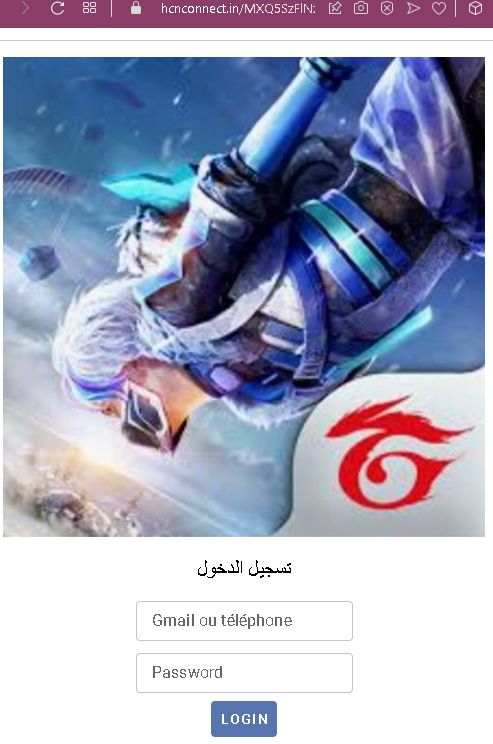
Threat Analysis: Google/Gmail Phishing – Credential Harvesting
How it works:
The victim receives a phishing email, SMS, or message claiming a security alert, account issue, or the need to verify their information. The link leads to this page, which mimics the Gmail login interface. The victim enters their email/phone and password, then clicks “LOGIN.” The credentials are captured and sent to the attacker.
The goal:
The attacker steals Google account credentials to:
- Access Gmail (searching for sensitive information, password reset links)
- Compromise other Google services (Drive, Photos, etc.)
- Use the account to send further phishing messages to the victim’s contacts
- Attempt credential reuse on other platforms
Red flags to watch for:
- Suspicious URL: The page is hosted on a domain that is not
google.comoraccounts.google.com. - Mixed languages: The page uses Arabic for the title (“تسجيل الدخول” – login) but French for the field labels (“Gmail ou téléphone”). Official Google login pages are consistently localized in one language.
- Minimal design: The page lacks Google’s full branding, security notices, and two‑factor authentication options.
- No personalization: Legitimate Google login pages often show a security image or account selection after entering an email.
- Unsolicited login request: Google does not send links requiring users to log in to resolve account issues.
What to do if you encounter this:
- Do not enter your email/phone or password.
- If you have already entered your credentials, change your Google password immediately and enable two‑factor authentication (2FA).
- Always access Gmail by typing
gmail.comdirectly into your browser.
Protective measures:
- Bookmark the official Google login page and use that bookmark.
- Use a password manager – it will autofill only on legitimate
google.comdomains. - Enable two‑factor authentication on your Google account (using an authenticator app or security key).
- Be suspicious of any unsolicited message that asks you to log in.