
This screenshot shows a phishing page impersonating Google / Gmail, targeting users who read Arabic and French (likely in North Africa or the Middle East). The page asks for email/phone and password to steal login credentials.
Analysis Memo: This scam layout was intercepted, verified, and locked down firsthand by the Antiphishing.biz security team during our standard URL vetting operations. To protect the public, the phishing source domain has been completely disabled within our infrastructure. We document and analyze these live visual patterns to help security researchers and users detect replica fraud techniques before financial damage occurs.
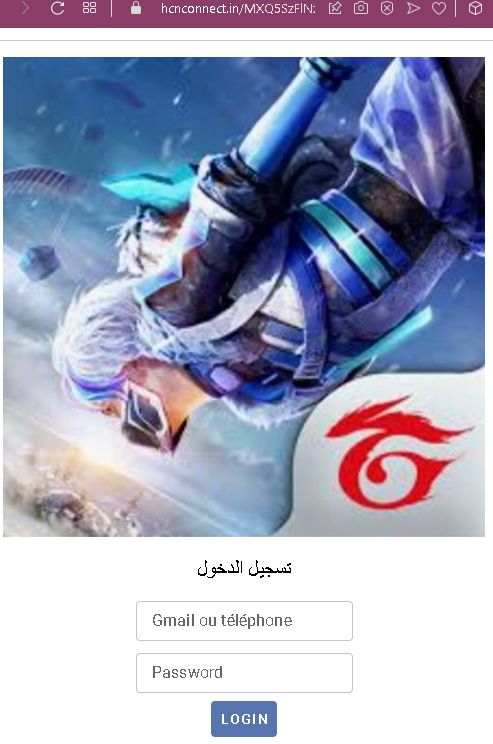
Threat Analysis: Google/Gmail Phishing – Credential Harvesting
How it works:
The victim receives a phishing email, SMS, or message claiming a security alert, account issue, or the need to verify their information. The link leads to this page, which mimics the Gmail login interface. The victim enters their email/phone and password, then clicks “LOGIN.” The credentials are captured and sent to the attacker.
The goal:
The attacker steals Google account credentials to:
- Access Gmail (searching for sensitive information, password reset links)
- Compromise other Google services (Drive, Photos, etc.)
- Use the account to send further phishing messages to the victim’s contacts
- Attempt credential reuse on other platforms
Red flags to watch for:
- Suspicious URL: The page is hosted on a domain that is not
google.comoraccounts.google.com. - Mixed languages: The page uses Arabic for the title (“تسجيل الدخول” – login) but French for the field labels (“Gmail ou téléphone”). Official Google login pages are consistently localized in one language.
- Minimal design: The page lacks Google’s full branding, security notices, and two‑factor authentication options.
- No personalization: Legitimate Google login pages often show a security image or account selection after entering an email.
- Unsolicited login request: Google does not send links requiring users to log in to resolve account issues.
What to do if you encounter this:
- Do not enter your email/phone or password.
- If you have already entered your credentials, change your Google password immediately and enable two‑factor authentication (2FA).
- Always access Gmail by typing
gmail.comdirectly into your browser.
Protective measures:
- Bookmark the official Google login page and use that bookmark.
- Use a password manager – it will autofill only on legitimate
google.comdomains. - Enable two‑factor authentication on your Google account (using an authenticator app or security key).
- Be suspicious of any unsolicited message that asks you to log in.