
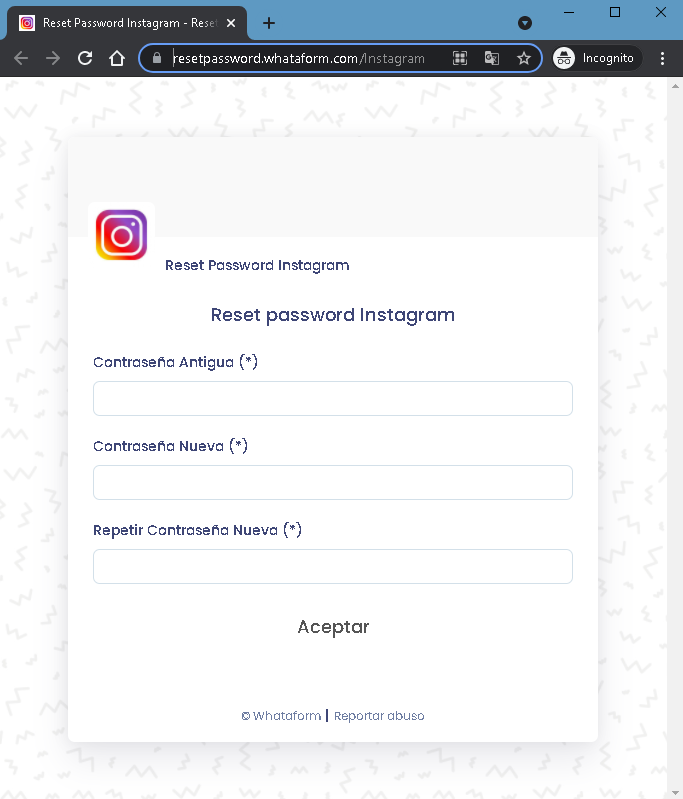
This screenshot shows a phishing page impersonating Instagram’s password reset process. The page asks for the victim’s old password and a new password (twice), tricking the victim into revealing their current login credentials while believing they are updating their account security.
Threat Analysis: Instagram Password Reset Phishing – Credential Harvesting
How it works:
The victim receives a phishing email, SMS, or message claiming a security alert or that their Instagram password needs to be updated. The link leads to this page, which mimics Instagram’s password reset interface. The victim is asked to enter:
- Old password (current password)
- New password (entered twice)
When the victim clicks “Aceptar” (Accept), the information is sent to the attacker. The attacker now has the victim’s current Instagram password and may also attempt to use it to log in immediately. The victim may then be redirected to the real Instagram login page, believing the password change was successful, when in fact no change occurred.
The goal:
The attacker steals Instagram account credentials to:
- Take over the victim’s Instagram account
- Access private messages, photos, and personal information
- Post spam or malicious links from a trusted account
- Use the account to spread further phishing messages to followers
- Attempt credential reuse on other platforms
Red flags to watch for:
- Suspicious URL: The page is hosted on a domain that is not
instagram.com. Legitimate Instagram password reset pages are only on official Instagram domains. - Unsolicited password reset request: Instagram does not send links requiring users to change their password via external pages.
- Poor design / generic footer: The footer reads “© whataform | Reportar abuso” – this is not Instagram’s copyright. Official Instagram pages have proper legal notices.
- No Instagram branding / missing security features: The page lacks Instagram’s logo, security icons, and two‑factor authentication prompts.
- Request for old password on a reset page: A legitimate password reset typically asks for a new password after verifying identity via email or SMS – it does not ask for your current password in plain text.
What to do if you encounter this:
- Do not enter your old password, new password, or any other information.
- If you have already entered your credentials, change your Instagram password immediately on the real Instagram website or app (type
instagram.comdirectly). Enable two‑factor authentication (2FA). - Always access Instagram password reset by going directly to
instagram.comand using the official “Forgot password” link. - Report the phishing page to Instagram.
Protective measures:
- Bookmark the official Instagram login page and use that bookmark.
- Use a password manager – it will not autofill on fake domains.
- Enable two‑factor authentication on your Instagram account.
- Never click links in unsolicited messages claiming you need to reset your password.