
This screenshot shows a phishing page impersonating Orange Mail (Orange.fr), a major French telecommunications provider. The page asks for the victim’s email address and password, claiming they must log in to access their mailbox or client space.
Analysis Memo: This scam layout was detected, analyzed, and contained firsthand by the Antiphishing.biz security team during our automated link scanning workflows. To protect the public, the dangerous destination URL has been fully defanged within our infrastructure. We document and analyze these live visual patterns to help security researchers and users detect replica fraud techniques before financial damage occurs.
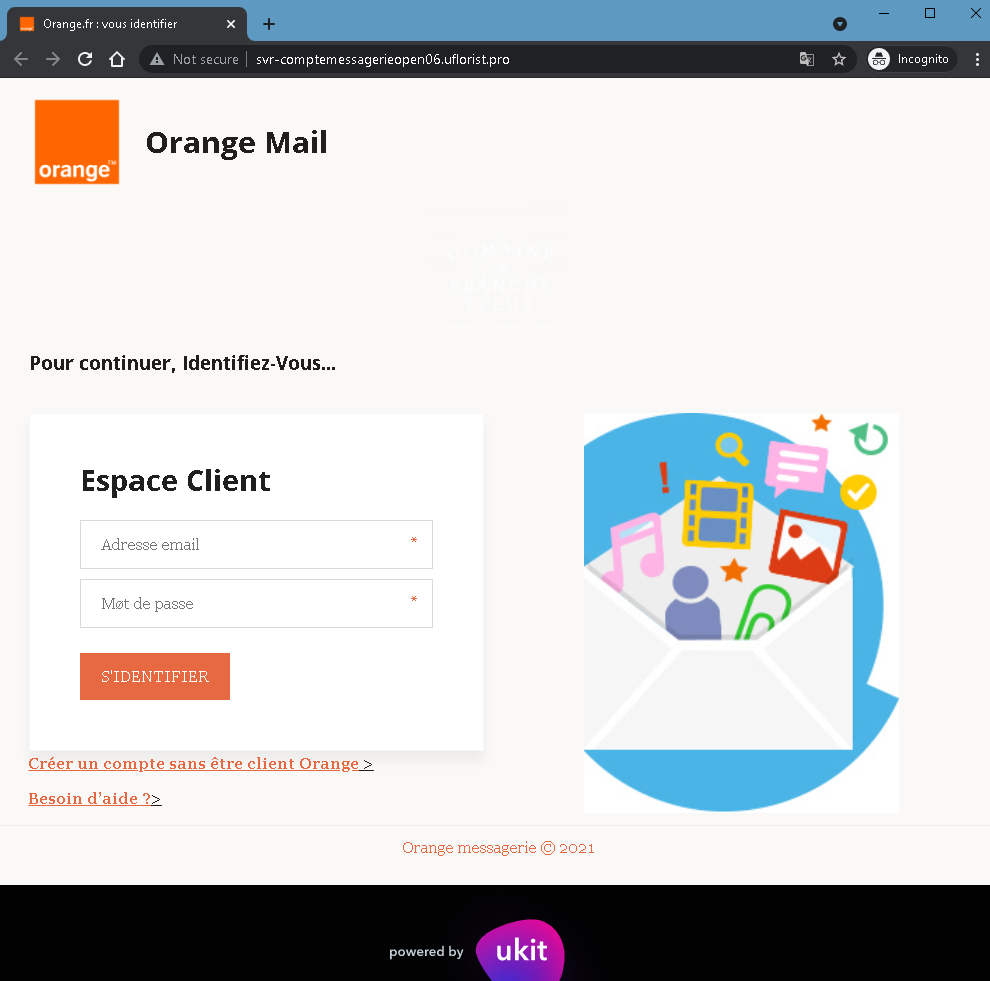
Threat Analysis: Orange Phishing – Fake “Espace Client” Login Page
How it works:
The victim receives a phishing email, SMS, or other message claiming a security alert, account issue, or the need to verify their mailbox. The link leads to this page, which mimics the Orange Mail login interface. The page asks for:
- Email address (Adresse email)
- Password (Mot de passe)
The victim is then prompted to click “S’IDENTIFIER” (Sign in). The credentials are captured and sent to the attacker. A note about creating an account without being an Orange customer and a help link are added to appear legitimate.
The goal:
The attacker steals Orange account credentials to:
- Access the victim’s email and personal information
- Reset passwords for other online accounts linked to that email
- Perform SIM swapping (porting the victim’s phone number) to bypass SMS‑based two‑factor authentication for banking or other services
- Use the account to send further phishing messages
Red flags to watch for:
- Suspicious URL: The page is hosted on a subdomain of
uflorist.pro, notorange.fr. Legitimate Orange login pages are only on official Orange domains. - “Not secure” browser warning: The URL bar shows “Not secure” – a clear indicator that the page lacks a valid SSL certificate for Orange’s official site.
- “powered by ukit” footer: Official Orange pages do not include “powered by ukit” – this indicates the page was built on a free website builder (Ukit), which is not used by legitimate telecom providers for login portals.
- Unsolicited login request: Orange does not send links requiring customers to log in to resolve account issues.
- Minimal design / missing security features: The page lacks the full branding, security notices, and two‑factor authentication options present on the real Orange login page.
What to do if you encounter this:
- Do not enter your email address or password.
- If you are an Orange customer, always access your mailbox by typing
orange.frdirectly into your browser or using the official Orange app. - If you have already entered your credentials, change your Orange password immediately and contact Orange customer service to watch for SIM swapping attempts.
- Report the phishing page to Orange’s fraud team (e.g., via
[email protected]).
Protective measures:
- Bookmark the official Orange login page and use that bookmark.
- Use a password manager – it will not autofill on fake domains.
- Enable two‑factor authentication on your Orange account if available.
- Never log in via a link in an unsolicited message – always type the URL manually.
- Avoid entering credentials on pages built with free website builders (Ukit, Wix, Weebly, etc.) – legitimate providers do not use these for secure login portals.