
Security Notice: This scam layout was intercepted, verified, and locked down firsthand by the
Antiphishing.bizsecurity team during our standard URL vetting operations. To protect the public, the hostile origin link has been safely deactivated within our infrastructure. We document and analyze these live visual patterns to help security researchers and users recognize deceptive clone designs before financial damage occurs.
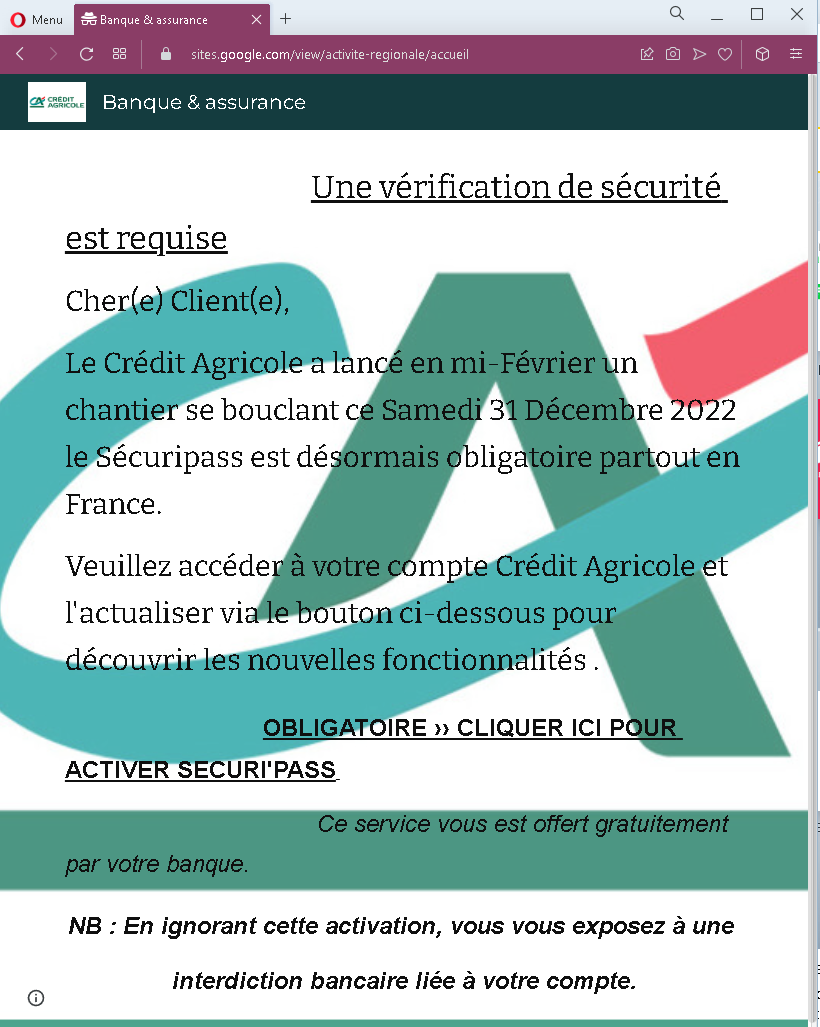
This screenshot shows a phishing page impersonating Crédit Agricole, a major French bank. The page uses the pretext of mandatory SécuriPass activation (a legitimate security feature) to pressure victims into clicking a malicious link that leads to a fake login page.
Threat Analysis: Crédit Agricole Phishing – Fake SécuriPass Activation Deadline
The page claims that SécuriPass will become mandatory by a specific date (December 31, 2022) and urges the victim to click a button to “activate” it. A threat of a “banking ban” is added to create urgency.
How it works:
The victim receives an email or message containing a link to this page. Clicking the activation button leads to a fraudulent Crédit Agricole login page designed to steal online banking credentials and possibly two‑factor authentication codes.
The goal:
The attacker aims to capture the victim’s Crédit Agricole login credentials to access the account, transfer funds, and commit fraud.
Red flags to watch for:
- Suspicious URL: The page is hosted on a domain that is not
credit-agricole.fr - Unsolicited activation request: Crédit Agricole does not send links requiring customers to “activate” SécuriPass via external pages.
- Threat of immediate consequences: The warning of a “banking ban” is a classic fear tactic.
- No personalization: The message does not address the victim by name or reference a specific account.
- Vague deadline: The mention of a specific date (31 December 2022) is used to create a false sense of urgency, but legitimate security updates are communicated through official channels, not unsolicited emails.
What to do if you encounter this:
- Do not click the activation button or any links.
- Access your Crédit Agricole account by typing
credit-agricole.fr - If you have already clicked and entered credentials, contact Crédit Agricole immediately to secure your account.
- Report the phishing page to Crédit Agricole’s fraud team (
[email protected]).
Protective measures:
- Always type your bank’s website address manually. Never click links in unsolicited emails or messages.
- Enable SécuriPass through the official app – legitimate activation happens within the app or after logging in, not via email links.
- Be suspicious of any message that creates urgency, threatens negative consequences, and asks you to click a link.