
Phishing Alert: The “eWallet Hijack” Scam
This screenshot shows a sophisticated phishing page that impersonates the Touch ‘n Go eWallet login interface. While the URL suggests a gaming theme (sangepoints), the actual goal is to drain your digital wallet.
Security Notice: This malicious interface was logged, cross-checked, and neutralized firsthand by the
Antiphishing.bizsecurity team during our standard URL vetting operations. To protect the public, the dangerous destination URL has been fully defanged within our infrastructure. We document and analyze these live visual patterns to help security researchers and users recognize deceptive clone designs before financial damage occurs.
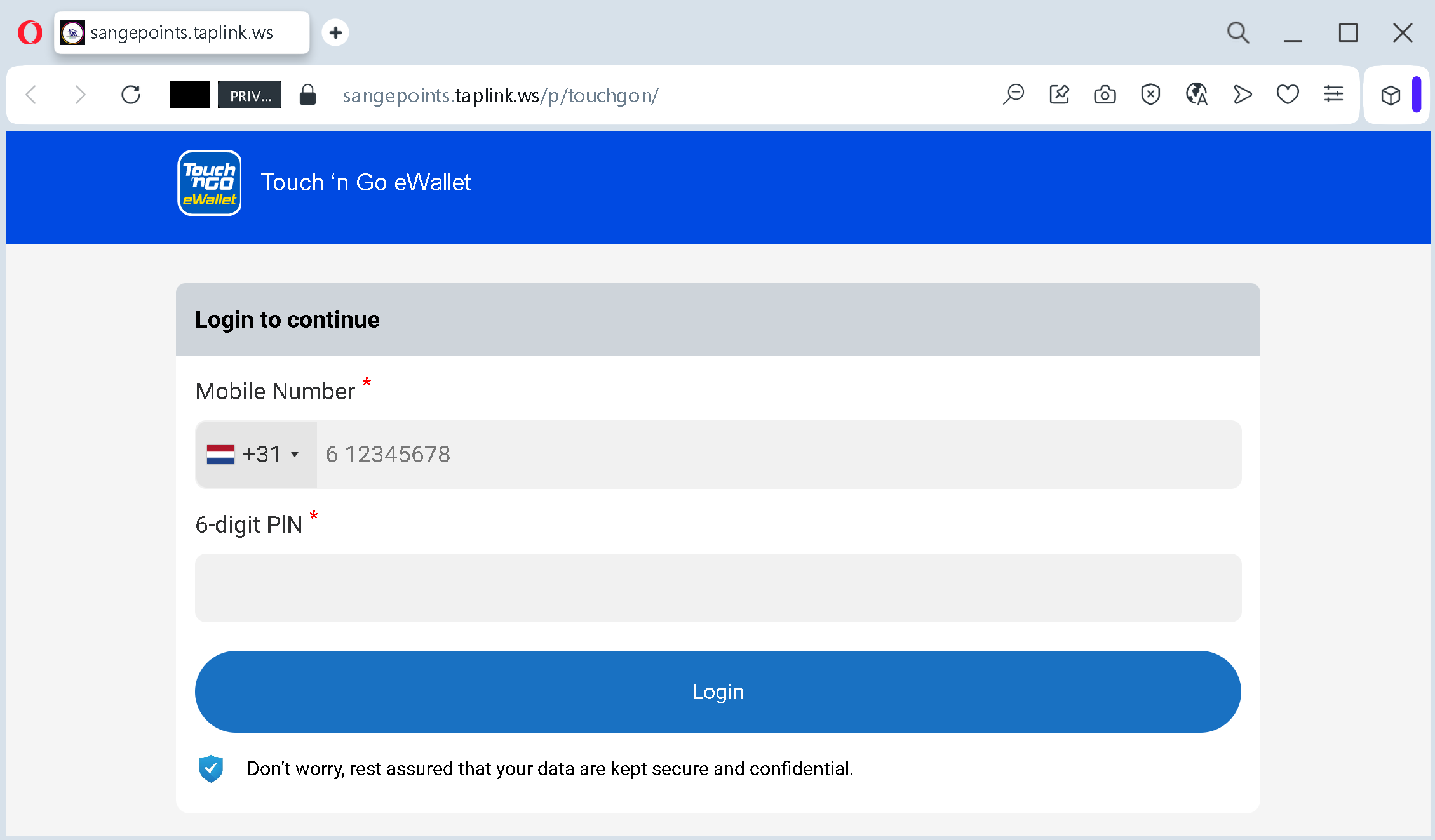
1. Brand Impersonation (Spoofing)
The attackers use the official colors, fonts, and the Touch ‘n Go eWallet logo at the top of the page.
- The Tactic: This is a “Double Trap.” The user might come for gaming points but is told they need to log in with their wallet to “pay a small fee” or “verify their identity” to receive the reward.
- The Reality: Any legitimate login for Touch ‘n Go would occur on their official domain (
touchngo.com.my) or within the app, never on a Taplink page.
2. High-Value Data Theft: Mobile Number & PIN
The form asks for two critical pieces of information:
- Mobile Number: Used as the account ID for most eWallets.
- 6-digit PIN: This is the master key to your funds.
- The Theft: Once a victim enters these details, the scammer can instantly log into the real app, change the password, and transfer all the money to another account.
3. False Sense of Security
At the bottom, there is a reassuring message: “Don’t worry, rest assured that your data are kept secure and confidential.”
- Social Engineering: This is a psychological trick designed to lower the victim’s guard at the most critical moment. Scammers often use professional-sounding legal or security disclaimers to appear legitimate.
How to Stay Safe:
- Check the URL twice: If you see a banking or eWallet login form on a domain like
taplink.ws, it is 100% a scam. - Never enter your PIN on a website: Payment apps are designed to be used inside the app. Your eWallet will never ask for your PIN via a browser link sent by a stranger.
- Enable Biometrics: Using FaceID or Fingerprint for your wallet makes it much harder for scammers to use a stolen PIN.
Phishing Alert: The “Push Notification” Hijack
This screenshot captures the final step of an account takeover. After stealing your credentials, the scammer is now tricking you into authorizing their fraudulent login.
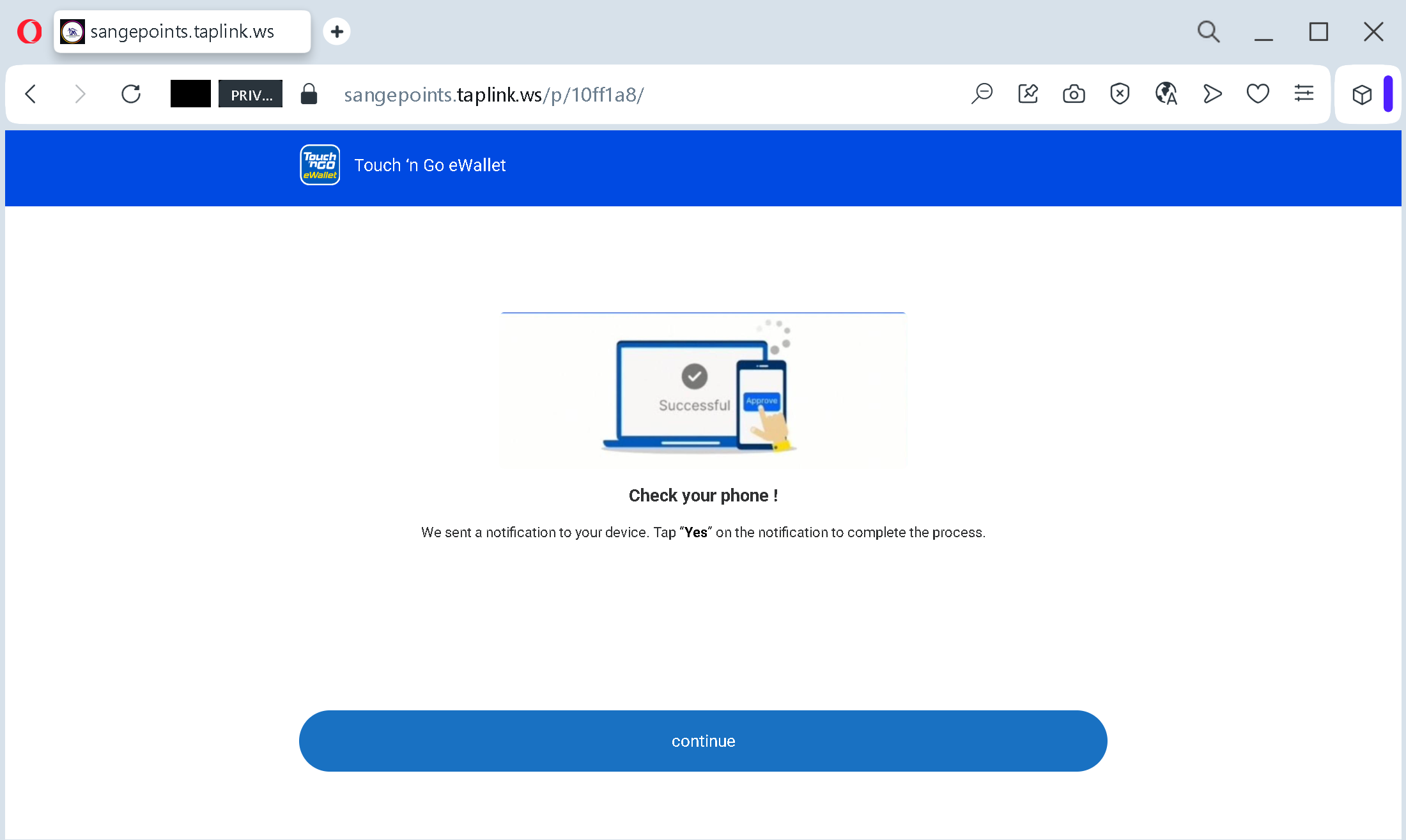
1. The “Check Your Phone” Trap
The page displays a convincing message: “We sent a notification to your device. Tap ‘Yes’ to complete the process.”
- The Tactic: This is timed perfectly. While you are looking at this fake page, a real notification from the actual Touch ‘n Go eWallet app pops up on your phone.
- The Reality: The notification you see on your phone is not to “receive points” or “verify a reward.” It is a request to authorize a new device (the scammer’s phone) to access your wallet.
2. Social Engineering: The “Continue” Button
The large “Continue” button at the bottom does nothing technical—it is purely psychological.
- The Goal: It keeps the victim engaged and waiting on the site while the scammer waits for the victim to tap “Yes” on their mobile device.
- The Deception: By creating a professional-looking “Processing” screen, the scammer makes the illegal login attempt feel like a legitimate part of the “Get Money” or “Get Points” flow.
3. Exploiting 2FA (Two-Factor Authentication)
- The Breach: Scammers know that most people trust their app’s notifications. They rely on the victim’s confusion: the victim thinks they are confirming a “Safe Receipt of Funds,” but they are actually handing over the keys to their account.
- The Result: If you tap “Yes” or enter an OTP code on this site, the scammer gains full control of your eWallet. They can immediately drain your balance and any linked bank accounts or credit cards.
How to Stay Safe:
- Never “Authorize” via a Link: If you receive a push notification to log in while you are on a third-party website (like Taplink), always tap “No” or “Reject”.
- Read the Notification Carefully: Real security alerts will say “Are you trying to log in from a new device?” or “Authorize this transaction?”. If you didn’t initiate it yourself inside the official app, it’s a scam.
- Close the Browser: If a site asks you to “wait for a notification” to receive a prize, it is 100% a scam. Official rewards never require 2FA authorization.
Phishing Alert: The “Google Login” Account Takeover
This screenshot reveals a fake Google login page hosted on Taplink. Scammers use the familiarity of Google to gain full access to your emails, photos, cloud storage, and saved passwords.
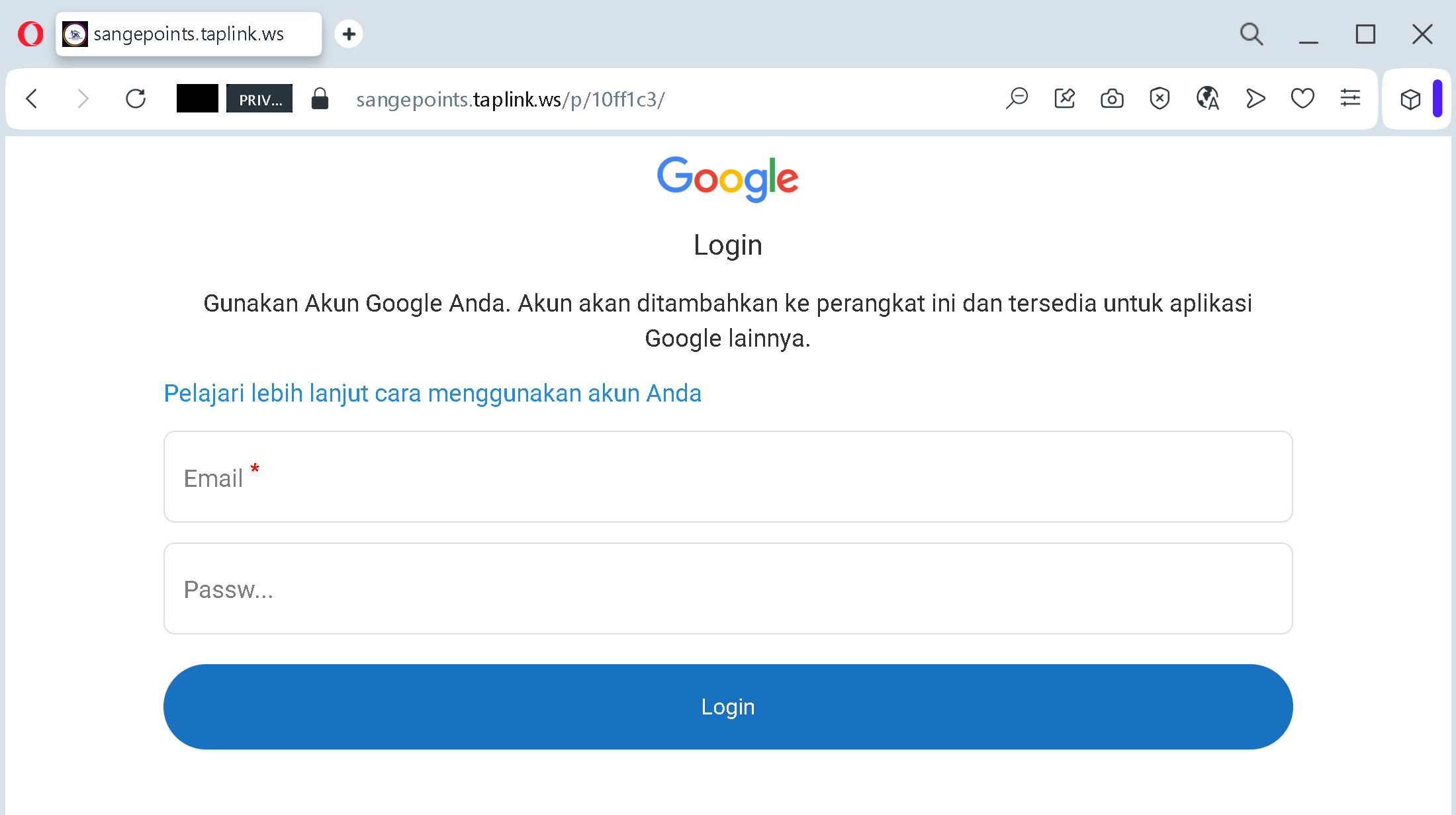
1. The Visual Deception (Impersonation)
The page uses the official Google logo and mimics the layout of a real login screen.
- The Tactic: The text is in Indonesian (“Gunakan Akun Google Anda…”), which suggests this specific campaign is targeting users in Southeast Asia.
- The Red Flag: A real Google login will always be hosted on ://
google.com. If you see a Google login form ontaplink.wsor any other domain, it is 100% a fake.
2. High-Stake Theft: Email and Password
The form asks for your Email and Password.
- The Goal: Once the victim enters these, the scammer gains access to the victim’s primary email. From there, they can reset passwords for other services (banking, social media, crypto exchanges) and steal sensitive personal data from Google Drive and Photos.
3. Exploiting “Safe” Domains
By using sangepoints.taplink.ws, the attackers hope that the “safe” reputation of Taplink will prevent the browser from showing a “Dangerous Site” warning. They often lure victims to this page by promising “Premium Game Features” or “Early Access” that supposedly requires a Google login to “sync progress.”
How to Stay Safe:
- Check the URL Bar: This is the most important rule. If the URL doesn’t end in
google.com, do not type anything. - Use a Password Manager: Professional password managers (like 1Password or Bitwarden) will refuse to autofill your password on a phishing site because they recognize the domain is wrong.
- Enable 2-Step Verification (2FA): Always use a physical security key (like YubiKey) or an Authenticator App. Never trust a login request that pops up while you are on a suspicious website.
Phishing Alert: The “Success” Deception
This screenshot captures the moment after a victim has already submitted their Google credentials. It is a critical psychological tactic used to buy time for the attacker.
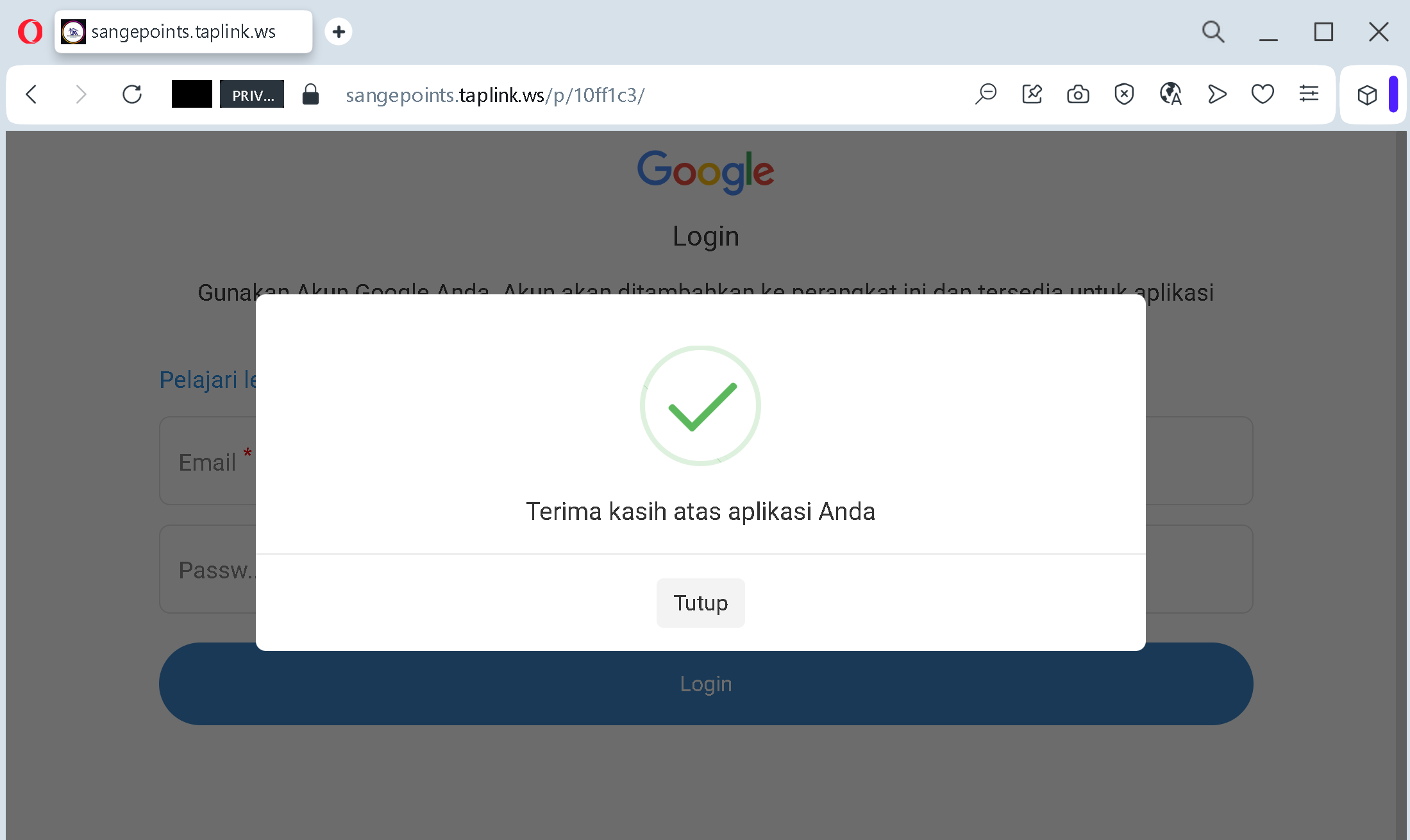
1. The Fake Success Message
The popup says: “Terima kasih atas aplikasi Anda” (“Thank you for your application”) with a green checkmark.
- The Tactic: By showing a “Success” screen, the scammer makes the victim feel that the process is over and everything is fine.
- The Reality: At this very second, the victim’s email and password have already been sent to the scammer’s server.
2. Psychological “Cooling Off”
- Why it works: If the page just crashed or showed an error, the victim might realize they were scammed and immediately try to change their password or enable 2FA.
- The Goal: The “Tutup” (“Close”) button encourages the user to simply close the tab and move on, giving the scammer minutes or hours of uninterrupted access to the stolen account.
3. Language Targeting
The Indonesian text confirms that this specific campaign (sangepoints.taplink.ws) is a localized attack. Scammers often use the victim’s native language to increase the conversion rate and build trust.
How to Stay Safe:
- Check your Activity: If you ever realize you’ve entered data into a suspicious site, go to
google.comimmediately. - Sign out of all devices: Use the “Sign out of all sessions” feature to kick any intruders out of your account.
- Change your password instantly: Every second counts before the scammer sets up their own recovery info.