
A June 2025 phishing campaign targeting Bank of America users employs a “Compliance & Maintenance” pretext, claiming an “incomplete profile update” to steal credentials and bypass two-factor authentication [1]. The fraudulent site, often hosted on deceptive domains, attempts to capture online banking IDs, passcodes, email credentials, and real-time one-time passcodes (OTP). Users should be wary of urgent, high-fidelity clones and are advised to verify accounts only through the official banking app or by directly typing the URL.
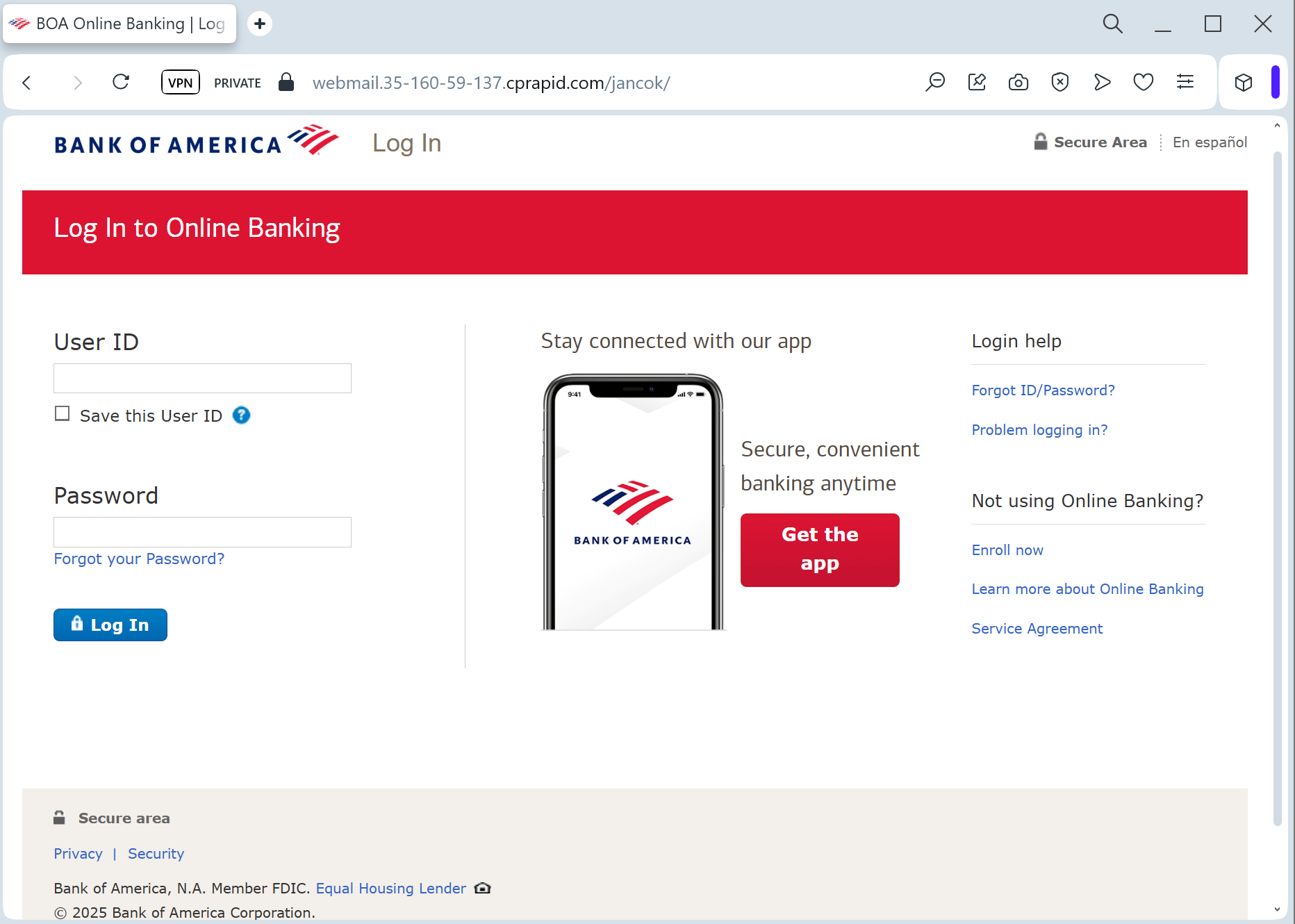
Target: Bank of America Customers (USA)
Threat Level: Critical (Identity Theft & Full Account Hijacking)
Phishing Method Description
This attack uses an Account Verification pretext. Victims receive an urgent email or SMS stating that their “Security Profile” is outdated or that “New Security Measures” must be accepted to maintain online access.
The link leads to a multi-step phishing portal that mimics the official Bank of America login flow. Unlike simpler scams, this one is designed to harvest:
Online ID and Passcode
Social Security Number (SSN) (Full or last 4 digits)
Security Challenge Questions & Answers (Mother’s maiden name, childhood pet, etc.)
Email Account Credentials (Scammers often ask for your email password under the guise of “Synchronizing your alerts”)
⚠️ Red Flags to Watch For
Deceptive Domain Name: The official domain is strictly bankofamerica.com. Phishing sites often use variations like bofa-online-verify.com, bankofamerica-support.net, or free hosting subdomains like bofa-security.web.app.
Requests for Sensitive Personal Data: A legitimate bank will rarely ask you to provide your full SSN and answers to all your security questions on a single page, especially after clicking a link.
Aggressive Urgency: Messages claiming “Immediate action required” or “Failure to comply will result in permanent account closure” are classic social engineering tactics.
🛡️ How to Protect Yourself
The “Manual Entry” Rule: Always access Bank of America by typing the URL manually into your browser. Never use links from emails or text messages.
Use the Mobile App: Official alerts will appear within the secure Bank of America Mobile Banking app. If the app doesn’t show a notification, the email is a scam.
Never Share Security Answers: Your security questions are a secondary password. Banks will never ask for them in a bulk “update” form.
Enable Advanced 2FA: Use a hardware security key or an authenticator app if supported. If you receive an unexpected 2FA code via SMS, do not enter it on any website.
💡 Expert Security Tip:
This is an Identity Harvesting Kit. Scammers are not just trying to log in once; they are gathering enough data to bypass your security questions and reset your password at any time. Never provide the answers to your challenge questions on a page you reached via a link.