
Shpock Classifieds Phishing – Fake “Product Already Paid For” Scam (UK Variant)
This phishing campaign impersonates Shpock, a widely used classified marketplace app and website in the UK and other European countries. The scam targets sellers by creating a fake order page that claims a buyer has already paid for an item, then directs the seller to a card harvesting page.
How it works:
A seller receives a message—likely via Shpock’s messaging system, SMS, or other chat app—from a supposed buyer claiming to have paid for the item. The message includes a link to the first phishing page.
Step 1 – Fake Order Confirmation Page
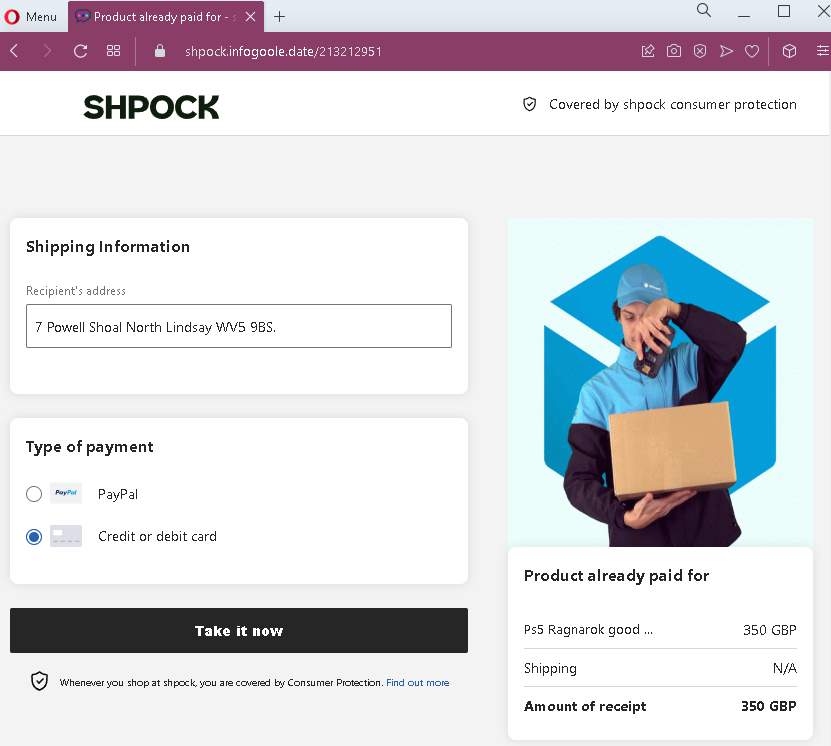
The first page displays:
- Shpock branding
- A shipping address (fabricated)
- Payment method options (PayPal and credit/debit card), with one pre-selected
- A prominent button implying the seller can “take” or claim the payment
- A false statement that the product has already been paid for
- A high-value item: PlayStation 5 Ragnarok bundle, priced at £350 GBP
Step 2 – Credit Card Harvesting Page
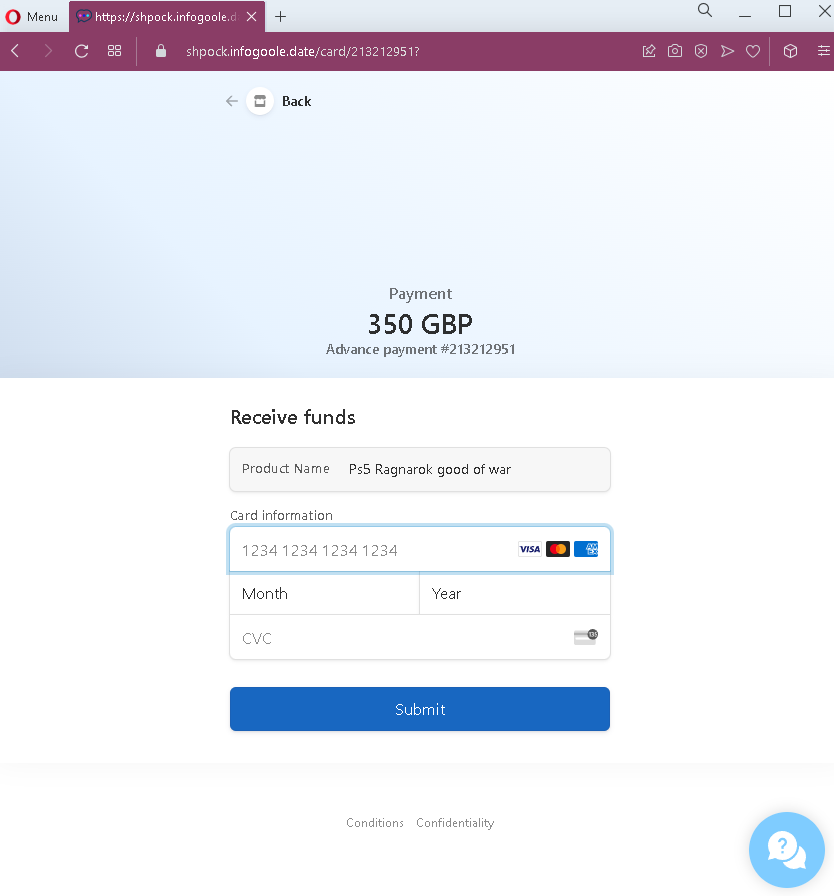
After clicking the button, the seller is taken to a second page that:
- Requests full credit card number, expiration date, and CVC
- Displays the same transaction amount (£350) and a reference number
- Includes a “Submit” button
The goal:
The attacker steals the seller’s credit card details. There is no actual buyer or payment—the entire transaction is fabricated. The reference to “Advance payment” and the fake transaction number are designed to make the card entry seem like a necessary step to complete the legitimate sale.
Red flags to watch for:
- Illogical request for card details: A seller receiving money should never be asked to enter their credit card number, expiry date, and CVC. Receiving funds requires bank account details or a linked payout method (such as PayPal, which is set up once in account settings)—not re-entering card credentials per transaction.
- Mismatched payment flow: The first page offers both PayPal and card options, but the second page only presents a card form—even if the seller expected to use PayPal.
- Suspicious URL: The pages are hosted on a domain that is not
shpock.com. Always check the address bar before entering any information. - No account login required: A legitimate sale on Shpock would appear in the seller’s account dashboard after logging into the app or website. This scam bypasses account authentication entirely.
- Fake buyer address: The shipping address appears nonsensical (“7 Powell Shoal North Lindsay WVS 9BS”), a common tactic to make the listing seem specific without using real identifiable information.
- High-value lure: The PS5 Ragnarok bundle is a highly desirable, often expensive item. Scammers use such products to attract sellers and create urgency.
What to do if you encounter this:
- Do not click the button to “take” or claim payment.
- Do not enter your credit card details, expiry date, or CVC on such pages.
- If you are selling on Shpock, always open the official Shpock app or type
shpock.comdirectly into your browser to check for real sales and messages. - Never trust links sent by buyers claiming they have paid—especially those directing you to external pages.
- If you have already entered your credit card details, contact your bank immediately to block the card and dispute any unauthorized charges.
- Report the phishing page to Shpock’s support team.
Why this scam is effective:
Shpock is popular for selling second-hand electronics, and the PS5 is one of the most sought-after items. Sellers are often eager to close a sale quickly. The page mimics Shpock’s simple, mobile-friendly design, and the fake “Consumer Protection” mention adds a false sense of security. The £350 price is realistic for a used PS5 bundle, making the transaction believable.
Protective measures:
- Always verify any sale by logging directly into your Shpock account (via the app or official website)—never through a link sent in a message.
- Never enter credit card details to receive payment. Sellers provide payout details (bank account or PayPal) during account setup; payments are processed automatically.
- Be suspicious of any message that creates urgency or claims payment is already “waiting” but requires you to click an external link.
- If a buyer sends you a link to “claim” payment, treat it as a red flag and verify directly through the platform’s official app or website.
- Enable two-factor authentication (2FA) on your email and any linked payment accounts.